Data breaches are a growing concern for businesses across all industries, and accounting is no exception.
According to the Identity Theft Resource Center’s 2025 Annual Data Breach Report, financial services was the most breached industry in the U.S. for the second year running, with 739 data compromises, while total U.S. compromises hit a record 3,322. Professional services, which includes accounting firms, had 478 compromises and the fastest growth of any sector.
IBM’s Cost of a Data Breach Report 2025 puts the average cost of a breach in the financial industry at $5.56 million, the second-highest of any industry, and the average U.S. breach at a record $10.22 million.
If you believe you’ve never had a data breach because a hacker hasn’t directly infiltrated your system, you may be overlooking other kinds. Data breaches aren’t limited to hacking; they also happen through physical theft, accidental exposure, or misdelivery of sensitive information.
Given these risks, you must be security-conscious when sharing files internally and with clients. You need to keep the environment safe and protect clients’ data so it doesn’t fall into the wrong hands.
This guide covers the most common security risks in file sharing and how you can mitigate them.
TL;DR
- The biggest file-sharing security risks for accountants are phishing and social engineering, clients who ignore security, manual processes that cause errors like misdelivery, insecure methods like email attachments and free tools, weak passwords, unauthorized access, and malware or ransomware.
- Why it matters: financial services was the most breached U.S. industry in 2025 (739 compromises, per ITRC), professional services firms like accountants saw the fastest growth, and a financial-industry breach costs $5.56 million on average (IBM).
- Your obligations: the FTC Safeguards Rule requires a written information security plan (WISP), a qualified person running your security program, and regular risk assessments. GDPR and the AICPA Code of Professional Conduct add confidentiality duties.
- How to reduce risk: follow the CIA triad (Compliance, Implementation, Audit), use a secure file-sharing platform, train your team and clients, automate document requests, enforce long unique passwords with MFA, monitor access, avoid public Wi-Fi, and keep software updated.
Why Does File-Sharing Security Matter for Accountants?
File-sharing security matters because accounting firms hold the data criminals want most (tax returns, Social Security numbers, bank details, and payroll records), and a single breach can bring client losses, regulatory penalties, and lasting reputational damage.
Accounting and bookkeeping firms handle some of the most sensitive client information there is, including tax returns, financial statements, and payroll data. That makes them prime targets for cybercriminals.
A single breach can expose this information to unauthorized parties, leading to identity theft, fraud, or even financial ruin for your clients. It can also cause reputational damage and increased scrutiny of your firm.
Case in point: in July 2023, the public accounting firm Wright, Moore, DeHart, Dupuis & Hutchinson (WMDDH) experienced a data breach affecting over 127,000 individuals. The compromised data included names, Social Security numbers, financial account details, and medical information.
The firm identified the breach after detecting unusual network activity, but it took nearly a year to fully assess the impact and notify affected individuals. Afterward, the law firm Federman & Sherwood opened an investigation into WMDDH and how it handled the breach.
Incidents like this bring scrutiny from regulators and damage clients’ trust in a firm’s ability to protect their information. That’s why you must secure your files properly to prevent breaches.
Beyond the risks, accountants have legal and ethical obligations to protect client information. Regulations like the General Data Protection Regulation (GDPR) set stringent standards for handling personal data, such as collecting data only for a specific purpose, collecting the minimum necessary, not storing it longer than necessary, and implementing security measures to protect it.
There’s also the FTC Safeguards Rule, which requires accountants to appoint a qualified individual to run their security program, conduct risk assessments, and implement safeguards, among other requirements.
Professional standards like the AICPA Code of Professional Conduct also emphasize confidentiality. You’re obligated to keep client information confidential unless disclosure is authorized or legally required.
You must be familiar with these regulations, because ignorance of the law is not an excuse.
The consequences of a security breach can be severe. They include:
Loss of client trust
Trust is the foundation of any accountant-client relationship. Clients expect you to handle their financial and personal data carefully, and a security breach exposes that data and signals a failure to meet that expectation.
Clients may feel betrayed and take their business elsewhere. Rebuilding that trust can be nearly impossible, especially in a competitive market where trust and reputation drive client acquisition and retention.
Legal penalties and fines
Governments and regulators impose heavy penalties on businesses that fail to protect personal and financial data.
For example, non-compliance with the GDPR can result in fines of up to €20 million or 4% of a business’s global annual turnover, whichever is higher. Lesser violations can bring fines of up to €10 million or 2% of global turnover.
Damage to your firm’s reputation
In an industry where reputation is critical, news of a data breach spreads quickly and can permanently damage your firm’s standing. Clients are less likely to recommend a firm with a history of security lapses, and prospects may avoid you altogether.
Repairing reputational damage through public relations, enhanced security measures, or client outreach can also be expensive and time-consuming, pulling resources away from your core operations.
What Are the Most Common Security Risks in File Sharing?
You can’t avoid exchanging files with clients. They send you documents, and you send them completed work or files to review, such as financial statements, tax returns, or business reports. File sharing is a routine part of your workflow, but it carries significant security risks if it isn’t done properly. These risks include:
Phishing and social engineering attacks
Cybercriminals often impersonate trusted entities, such as clients or software vendors, to trick accountants into revealing credentials or granting access to file systems. These attacks can lead to unauthorized data access or malware infections.
For example, an attacker might pose as a client or software provider and request login credentials or access to shared files. Once they have client data, they can steal financial information or disrupt your operations through extortion.
Clients who don’t prioritize security
“I think we all get that our clients are our biggest challenge when it comes to security,” Brad says. “For starters, they typically don’t understand technology, especially security.”
Many clients are unaware of the implications of their actions, and others are indifferent to file-sharing best practices.
They may resist using secure platforms, rely on outdated methods like email attachments, or ignore password policies.
These behaviors can expose sensitive data to unauthorized access and increase your firm’s liability. Something as simple as emailing an unencrypted financial statement can invite attackers to intercept the data.
Manual processes that lead to errors
Manual file-sharing workflows, such as downloading, renaming, and emailing documents, are prone to human error. One study found that 84% of organizations have experienced a security incident caused by human error, and that it’s the leading cause of serious insider data breaches.
Manual processes can lead you to send files to the wrong recipient or keep outdated versions in insecure locations. Verizon’s 2025 Data Breach Investigations Report (DBIR) found the human element, including errors like misdelivery, involved in about 60% of breaches. These mistakes, while unintentional, can result in confidentiality breaches or compliance violations.
Insecure file-sharing methods
Some firms use email attachments or free file-sharing platforms (here’s how client portals compare with email). That’s risky: email remains a primary route for phishing and malware, and free platforms often lack the encryption, access controls, and audit trails that client financial data needs.
When you share sensitive financial documents through these channels, unauthorized parties or hackers can intercept and access them.
Weak passwords or credentials
Number one on the list of the world’s most common passwords is “123456.” Over three million people use it, and it takes less than a second to crack. The next four (123456789, 12345678, password, and qwerty123) can also be cracked in under a second.
If you use passwords like these, or reuse passwords across accounts, cybercriminals can easily guess them and access client data.
Unauthorized access
Unauthorized access happens when you don’t implement proper access controls. If you share files without role-based permissions or account restrictions, people who shouldn’t have access can view and download them.
Internally, this might mean employees accessing files outside their roles; externally, it could mean hackers exploiting weak security. For instance, an improperly secured client portal could let anyone with a basic URL download confidential files.
Malware and ransomware
Malicious files disguised as legitimate documents can spread malware or ransomware. It’s a very common attack: Verizon’s 2025 DBIR found ransomware in 44% of all breaches, up from 32% the year before, and in 88% of breaches at small and mid-sized businesses.
When accountants unknowingly download or share these files, they risk infecting their systems and compromising client data. A shared file from an unverified source could unleash ransomware that encrypts all your client records or locks your systems until you pay.
How Can Accountants Avoid Security Risks in File Sharing?
Accountants can avoid most file-sharing risks by meeting their compliance requirements, using a secure file-sharing platform instead of email, training staff and clients, automating document requests, enforcing strong password and access policies, and keeping systems updated. Here’s how to put each into practice.
Start with the CIA: the accounting cybersecurity triad
You can reduce file-sharing risk by focusing on the cybersecurity triad for accounting: Compliance, Implementation, and Audits (CIA). These three components, discussed by Brad, form a practical framework for data security in accounting and financial services.

Compliance
Compliance means meeting the baseline legal and regulatory requirements for cybersecurity. “These are items that we are required to have or do,” he says.
Key compliance measures include:
- A written information security plan (WISP), which is required for anyone in financial services. It outlines your policies and procedures for protecting sensitive data.
- A cyber breach insurance plan, which protects you against the financial and operational fallout of a data breach.
- A base-level understanding of cybersecurity and the FTC Safeguards Rule. As Brad notes, accountants can no longer claim ignorance about cybersecurity.
Implementation
Being compliant without taking action is meaningless. “It’s not just about having the compliance; we have to truly implement this,” Brad says. That’s the second pillar: implementation.
Key implementation actions include:
- Staff and self-training on accounting cybersecurity practices, including recognizing phishing attempts and handling sensitive files securely.
- Client management and education, so clients use more secure ways to send files.
- A breach management policy that details what to do if a breach occurs, including communication plans and containment strategies.
Audit
The final pillar is audit. “An audit doesn’t refer to a financial audit. It means we must regularly review our policies, ensure updates are applied, and verify that we’re maintaining our systems properly,” Brad explains.
Key audit practices include:
- Regularly reviewing information security policies to keep them current with threats and regulatory changes.
- Updating and maintaining systems like firewalls and antivirus software so they stay effective.
- Reviewing logs to track system activity and verify compliance.
Use secure file-sharing platforms
Vet your vendors, too. Verizon’s 2025 DBIR found third-party involvement in 30% of breaches, double the year before, so the security of the tools you share files through matters as much as your own practices. Use secure file-sharing tools designed for financial services. These tools provide encryption, role-based access controls, and other essential security features that protect sensitive data in storage and in transit.
One such tool is the Financial Cents practice management solution, which has secure file sharing built in.
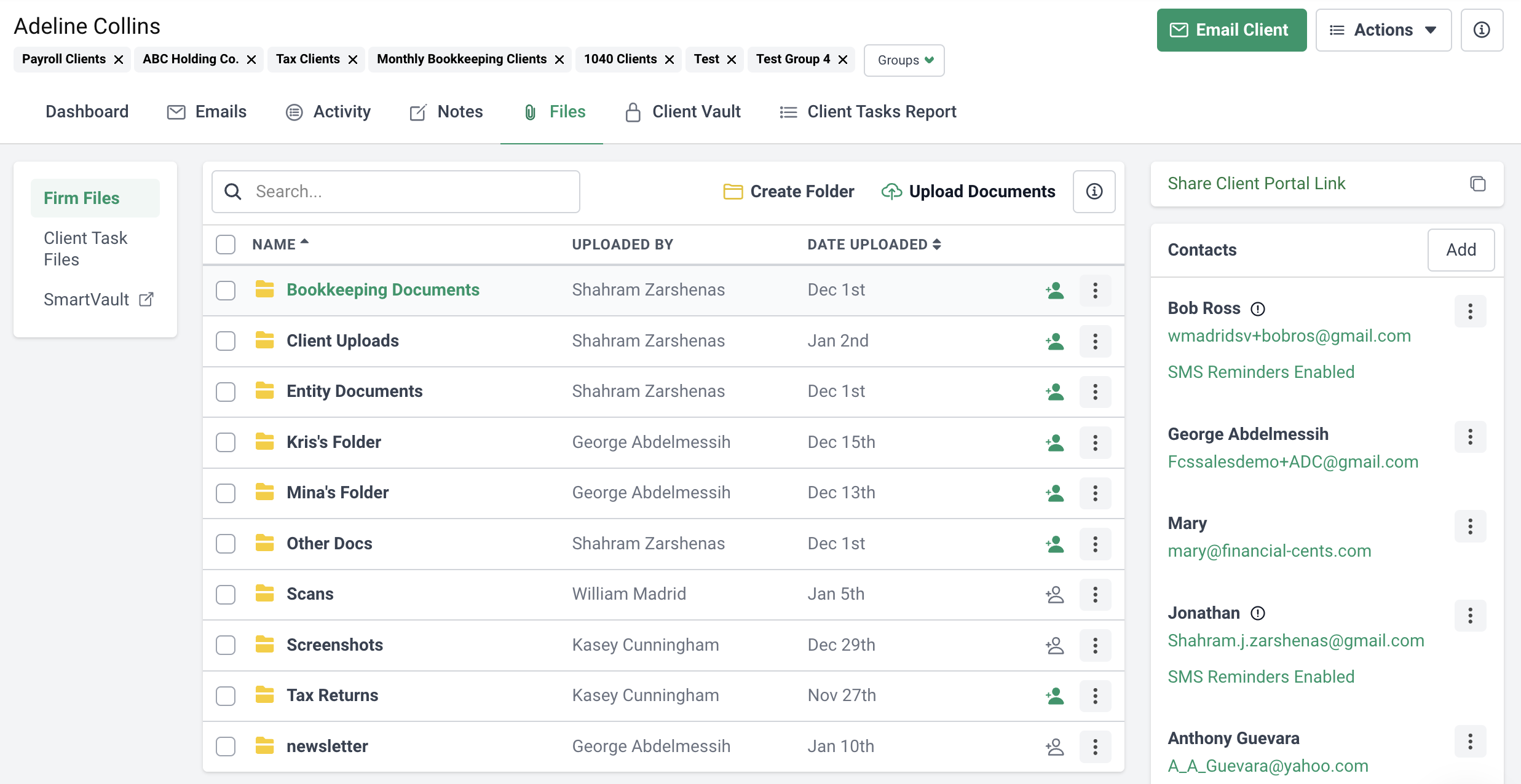
It lets you request, store, and retrieve client files in the same software, so you don’t have to juggle multiple tools.
Financial Cents supports your FTC Safeguards Rule compliance with data encryption at rest and in transit (TLS), two-factor authentication, access controls and user permissions, and a choice of document storage regions (the U.S., Canada, the U.K., or Australia) for data residency. It’s also SOC 2 Type I certified. Learn more about Financial Cents’ security.
These protections run in the background, so your team doesn’t have to take extra steps. Brad puts it this way:
Educate your team
A well-informed team is one of the strongest defenses against file-sharing risks. As Brad says, “We have to be training our staff.”
Train your employees regularly on cybersecurity best practices so they understand the latest threats and know how to prevent them.
Start by teaching them to recognize phishing emails, avoid suspicious links, and use secure file-sharing platforms correctly. Many breaches happen because of human error, so clear guidelines for handling sensitive data significantly reduce risk.
Include sessions on password management, secure file sharing, and incident response, and update your training as regulations and threats change.
A trained team protects your firm from breaches and reassures clients that their sensitive information is in safe hands.
Educate your clients
Clients play a key role in file-sharing security, so educating them on best practices is essential.
Brad recommends making security a regular part of your client communications.
You can also send quarterly updates, as Brad’s firm does, with brief summaries of recent threats, tips for spotting phishing attempts, and practical advice for protecting their data. For instance, explain how to spot suspicious emails or what to do if they suspect their information has been compromised.
Beyond general education, encourage clients to use multi-factor authentication (MFA). MFA adds a layer of security by requiring users to verify their identity in more than one way, such as a password plus a one-time code sent to their phone, which reduces the risk of unauthorized access to shared files.
Automate to reduce errors
Automating tasks reduces the human errors that compromise security. “Automate as much as you can. Every time we add automation, we reduce manual tasks. If I don’t have to type something or go to a client for approval, I save time and effort,” Brad says.
He shares an example from his firm: they automated their extension process and filed 412 extensions (including communicating with clients, getting permission to file, and calculating each extension) completely through automation. The results?
Automating file sharing produces similar benefits. Platforms like Financial Cents automate document requests, reminders, and notifications, which eliminates manual follow-ups, reduces miscommunication, and ensures documents are shared securely and on time.
Automation also strengthens compliance by standardizing encryption, access control, and audit logging. These run in the background with little to no manual effort, which reduces errors and keeps data protected.
Have strong password policies
Weak passwords remain one of the easiest ways for attackers to get into sensitive systems and files. That’s why you need strict password guidelines across your firm.
For example, require long passwords or passphrases (at least 15 characters), never reused across accounts, and turn on multi-factor authentication wherever it’s available. Current NIST guidance favors length over forced complexity and recommends changing passwords when there’s evidence of compromise rather than on a fixed 60- or 90-day schedule, since forced rotation tends to produce weaker, predictable passwords. A password manager makes long, unique passwords practical for your team.
Use Financial Cents’ Client Vault to securely store and share client passwords, security questions, and other sensitive information with your team. Custom encrypted fields hold extra details like security questions, so your staff can access what they need without compromising security.
Client Vault data is encrypted with AES-256 and AES-128 via OpenSSL, and every encrypted value is signed with a message authentication code (MAC), so no one can modify it once it’s encrypted.
Monitor and audit access
Regular monitoring and auditing ensure only authorized people can access sensitive information and let you address anomalies immediately.
Use role-based access control (RBAC) to limit file access based on job responsibilities. Most accounting document management software supports this out of the box. Consider setting alerts for specific activity, such as access to highly sensitive files or logins from unusual locations.
Review access logs regularly to spot unusual activity or unauthorized attempts. Audits can reveal patterns, such as repeated failed logins, that may signal a brute-force attack.
Avoid public Wi-Fi
Public Wi-Fi networks in coffee shops, airports, and hotels are inherently insecure. They’re often unencrypted, which makes it easy for hackers to intercept data sent over the connection. Sharing files or accessing client information on public Wi-Fi can expose confidential data to cybercriminals.
Turn off automatic Wi-Fi connections and avoid accessing or sharing sensitive files on public networks. If you can’t avoid it, use your smartphone’s hotspot or a virtual private network (VPN) to encrypt your connection.
Regularly update software
Keeping your software up to date protects your firm against security risks. Updates often include patches for vulnerabilities in earlier versions, helping defend against malware, ransomware, and other threats.
They also improve performance, usability, and compatibility, so your tools stay effective.
Enable automatic updates, set a regular update schedule, or periodically review your firm’s tools to make sure they’re running the latest versions.
Use Financial Cents to Share Files Securely and Manage Your Clients
Protecting client data while running your firm efficiently doesn’t have to be complicated. Financial Cents combines security, productivity, and ease of use, so you can focus on delivering exceptional service.
Its features include:
- Secure file sharing with built-in encryption: All file exchanges are encrypted and protected, and document management for accountants keeps every client file organized in one secure place.
- Client management: “One of the biggest challenges for accounting firms as they grow is organization. This is because all their client information gets stored in so many random places, making it impossible to find,” says Shahram Zarshenas, CEO of Financial Cents. Its accounting CRM centralizes client data, communication, and tasks in one organized platform.
- Secure client portal: Collaborate with clients through a secure client portal with client chat, encrypted file requests, and passwordless magic-link login.
- Workflow management and automation: Track client work and automate repetitive tasks to reduce errors, improve efficiency, and meet deadlines.
- Data residency: Choose where your clients’ documents are stored (the U.S., Canada, the U.K., or Australia) to meet data residency requirements.
Share files securely with your clients and team, and manage your firm with Financial Cents. Start a 14-day free trial or book a free demo.
Frequently Asked Questions (FAQs)

Abdullah Almsaeed is the co-founder and CTO of Financial Cents. With more than 18 years in software development, he leads the team building Financial Cents' workflow, automation, and AI features for accounting and bookkeeping firms.
Share this article