
AI for Accounting Firms
AI Built for How Accounting Firms Actually Work
Financial Cents makes AI effortless with the leading practice management platform for small and growing firms. From automatically renaming client files to drafting client emails and building workflows, AI is woven into the tools you already use to run your firm. No prompts to master, no separate tools to wire up.
Proudly built for small firms — and designed to grow with you.
We’ll set up a personalized walkthrough — no spam, no sales pressure.

Financial Cents brings AI directly into accounting practice management. Instead of asking your team to learn a separate AI tool, Financial Cents embeds AI where the work already happens: it automatically renames the documents your clients upload, drafts professional client emails in seconds, and generates complete workflow checklist templates from a single prompt. It’s practical, firm-specific AI built for accountants, bookkeepers, and tax professionals—not a generic chatbot bolted onto the side.
One system for the work, the team, and the client
Get value from AI instantly with our suite of effortless tools. Pick a tab to see what changes on day one.
Work Management
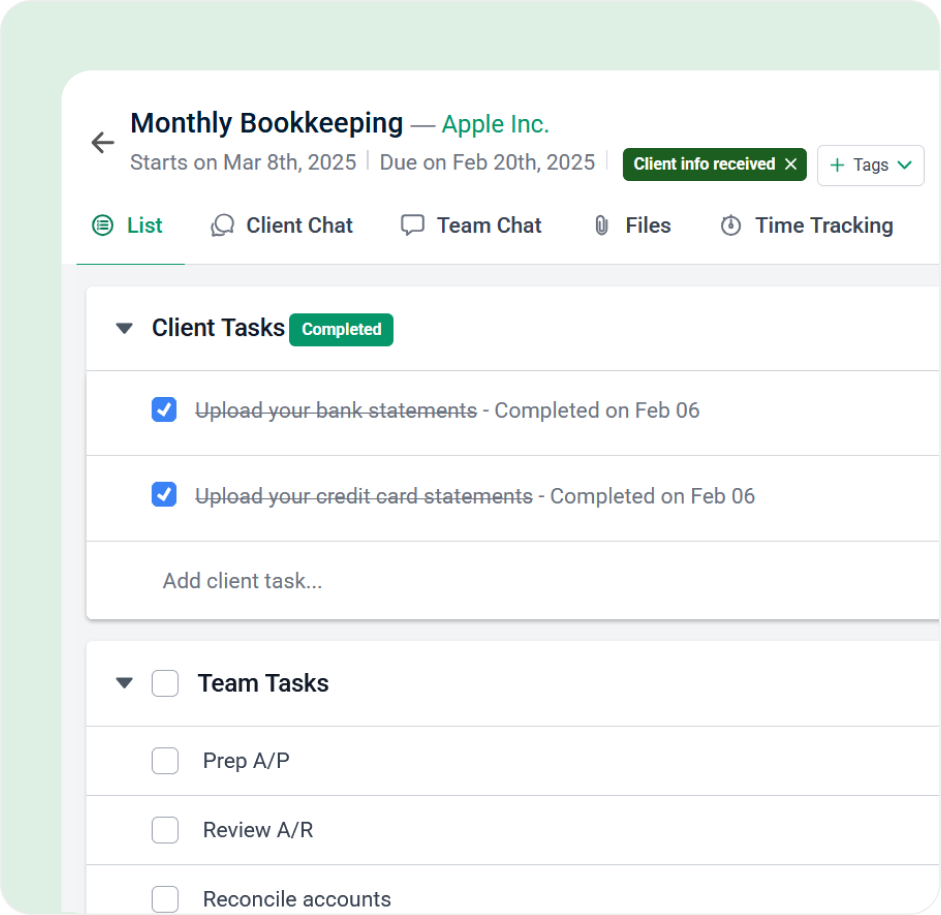
Your team always knows what’s nextMost small firms don’t have an SOP library or a project manager. Build a workflow template once and it runs forever: recurring engagements rebuild automatically, tasks assign themselves, due dates roll forward.
“Financial Cents enabled us to see the status of tasks and track deadlines at a glance…we needed to stay on top of things; get reminders, and look at the calendar to see what’s due this week, next week, this month.”
Sarabjeet Ghai, CPA, CGA, Managing Director
Client CRM
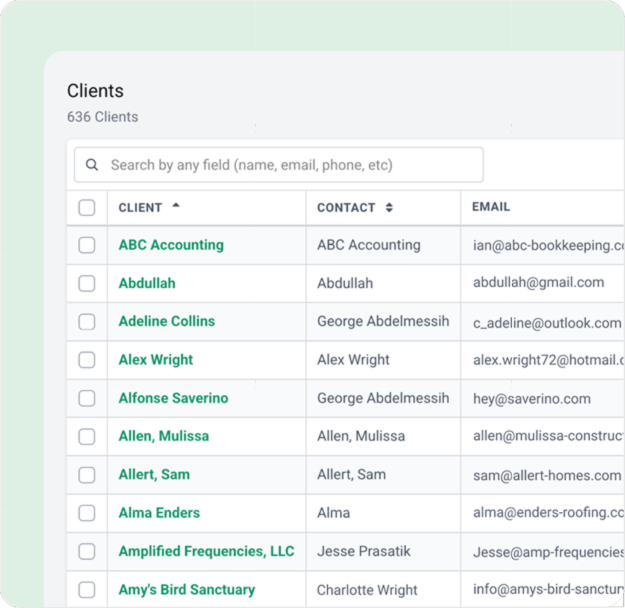
Every client detail in one recordServices, contacts, notes, files, history, and billing all hang off the same client record — and off the work your team is actually doing. Native QuickBooks Online sync keeps it current without anyone maintaining it.
“We had 10, 15 task lists in Outlook. We just wanted one software to bring it all together.
Tim Manery, owner, 5-person firm
Client Portal
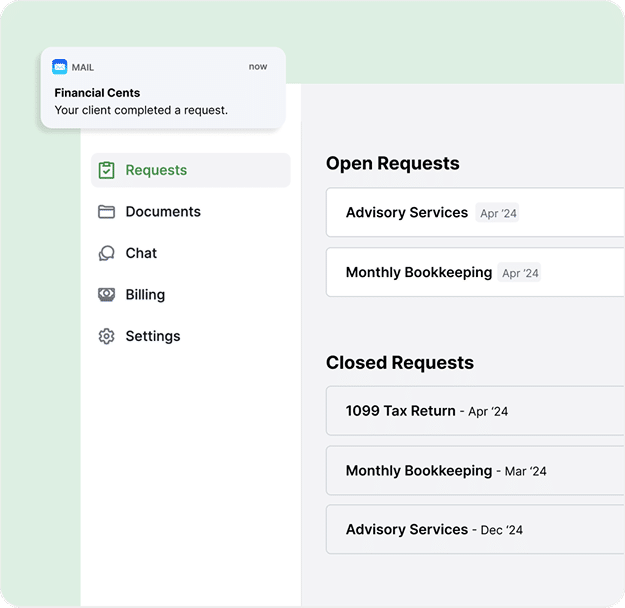
Stop chasing clients before the deadline crushClients upload documents, e-sign, and see exactly what you still need — no logins, no third follow-up email.
“Thanks to the passwordless client portal and auto-reminders, our clients respond much faster and everything gets done on time.”
Stelle Anderson, Owner of Infinite Accounting Solutions
Time & Billing
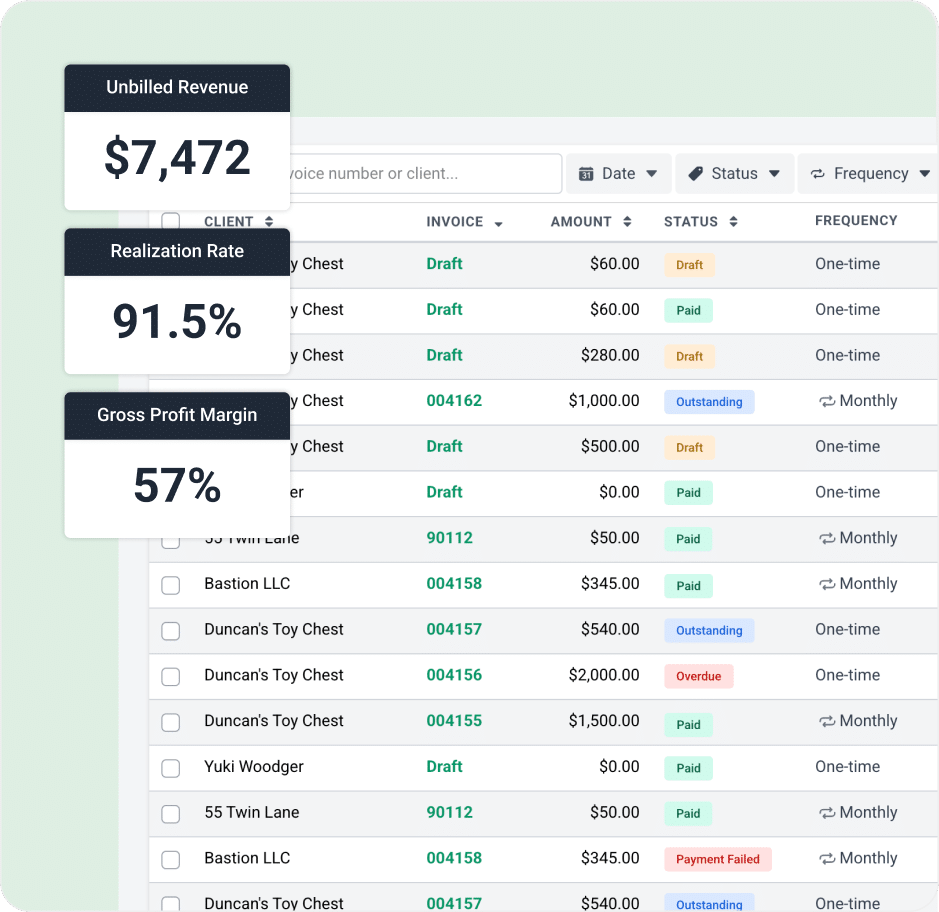
Capture every billable minutes you’re losing nowTime tracking is tied to the work, so what you bill matches what happened. Invoice in seconds, take payment online, and stop reconciling hours across three apps at month end.
- One-click timer linked to the task you’re working on
- Ability to bill by the hour, the engagement, or fixed fee
- Online payments via ACH and credit card
- Real-time view of unbilled time, AR, and revenue per client
Proposals
Close the fall work in days, not weeksBuild a branded proposal from a template and send it for signature. The moment a client signs, the workflow, client record, and recurring invoice create themselves — sales and delivery finally connected.

Reporting & Capacity
See the load before the busy season, not during itEvery project’s status, every team member’s load, and every upcoming deadline in one view. Plan capacity weeks out and catch the engagement that’s slipping before the client calls you about it.
“Somebody putting their tasks on their Outlook calendar is not outwardly helpful. If they’re out sick, I can’t see what’s missing. With Financial Cents, I can get in there and see exactly what’s going on.”
Theresa Pedrotty, Director of Client Services
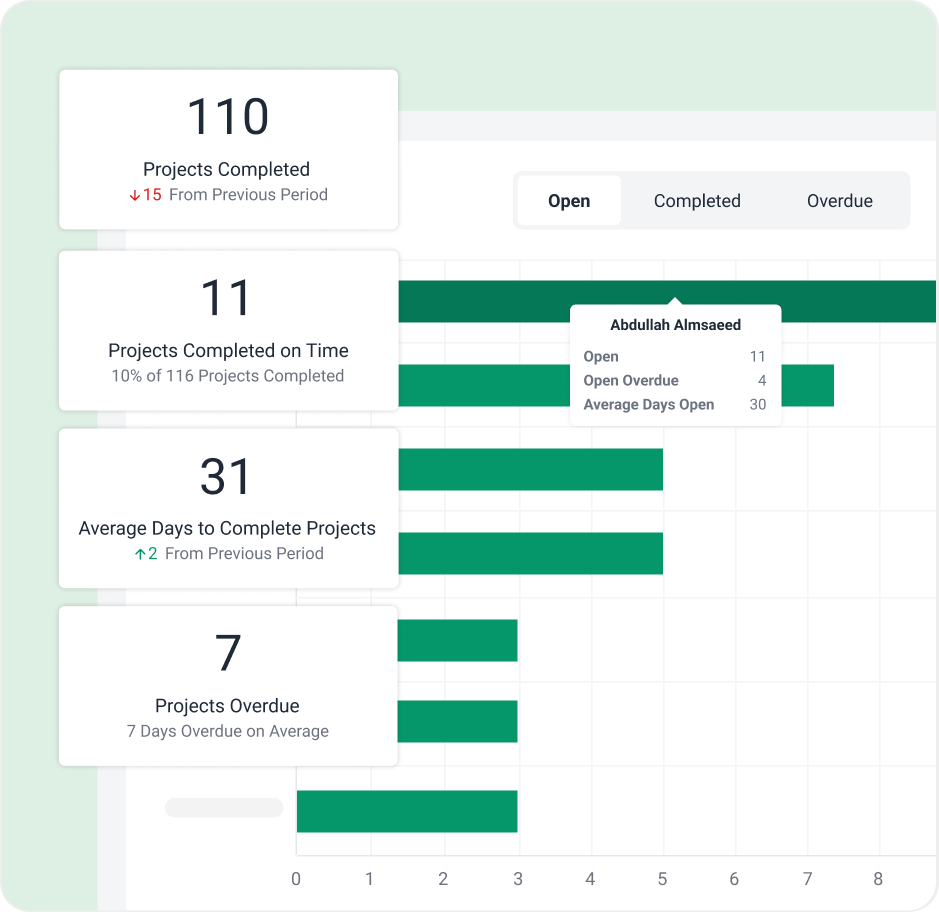
What AI can do in Financial Cents
Automatically rename client files
to your firm’s exact naming convention the moment they’re uploaded, with the new AI File Renaming Agent.
File client uploads into the right folder automatically
The AI File Routing agent reads each file a client uploads and files a copy in the correct client folder, so uploads stop piling up unfiled.
Build workflow checklist templates
from a single prompt, ready to customize.
More AI capabilities on the way
Financial Cents is continually adding AI where it saves firms the most time.
More AI capabilities on the way
Financial Cents is continually adding AI where it saves firms the most time.
AI File Renaming Agent
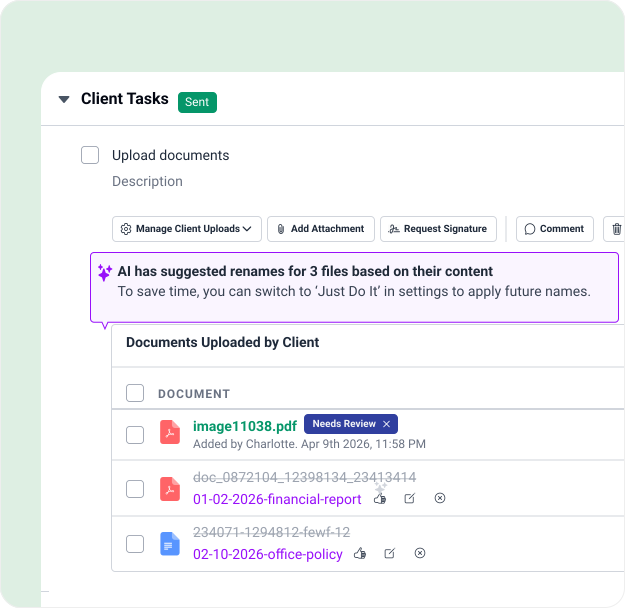
Your clients upload files named IMG_4471.pdf and scan(2).pdf, and someone on your team has to open each one and rename it by hand. Not anymore.
The AI File Renaming Agent reads every file a client uploads; detects what it actually is; analyzes the document date, type, account, and client; and renames it based on your firm’s standardized convention automatically. Choose “Just Do It” for fully hands-free renaming, or “Always Ask” to approve, edit, or reject each suggested name (in bulk if you like). When the agent isn’t confident about a file, it flags it and asks you to confirm, so you’re always in control of the documents that matter. Every renamed file keeps its original name on record and carries a sparkle icon so your team can see what the AI has touched.
AI File Validator Agent
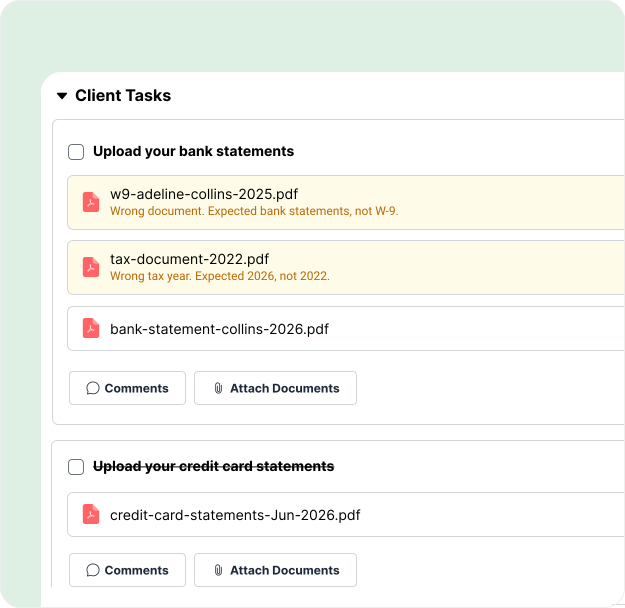
Requesting documents is easy. Getting the right documents is the hard part. Clients upload last year’s W-2 instead of this year’s, a statement from the wrong bank, or the wrong file entirely, and your team doesn’t catch it until the work is already underway.
The AI File Validator fixes that problem at the source. The moment a client uploads a file to a client task, it reads the document and compares it against the request, the project’s accounting period, and client details. If something’s off (wrong year, wrong bank, wrong document), the client sees clear feedback right in the portal and can replace the upload on the spot. It only flags files when it’s highly confident, so clients are never second-guessed by mistake. And when a client keeps a flagged file anyway, your team gets an alert so you’re always in the loop. Best of all, there’s nothing to set up; just toggle it on.
The AI File Routing Agent
Files clients upload to a task don’t file themselves, someone still has to open each one, work out what it is, and drag it into the right client folder. The AI File Routing agent does that for you.
When a client uploads a file to a Client Task, it reads the file, looks at how that client’s folders are already organized, and files a copy in the best-fit folder, using project context to land the right year or period folder, like the correct tax-year folder for a 1040. It starts in Always Ask (accept, change, or reject each suggested folder) and can switch to Just Do It to file automatically when it’s confident. It only ever files within that same client’s existing folders, never creates new ones, and always files a copy so the original stays on the task. Every routed file shows “Copied to [folder]” with a click-through, so you always see where it went.

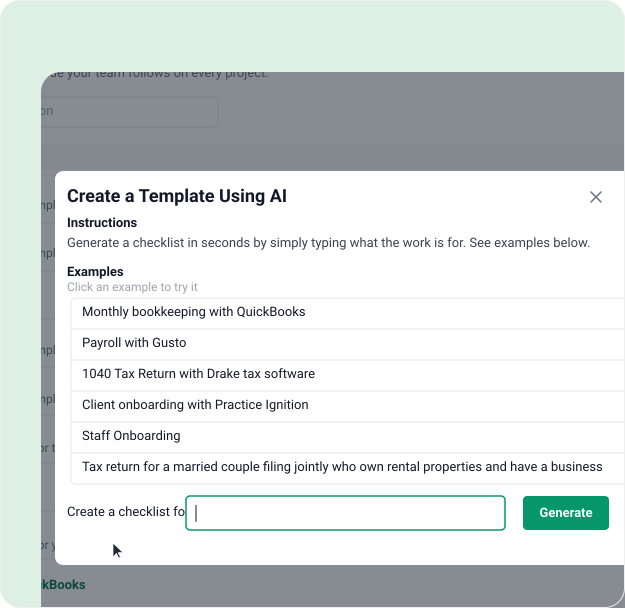
Create checklist templates in seconds
Documenting your processes with workflow checklist templates just got simpler. Type in your prompt and get a complete workflow checklist template in seconds, then customize it to match your firm’s exact process.
“I love how easy the setup was! You can literally be set up in just a few hours. I also loved the tags and the simplicity of setting up automations to change tags as things are checked off. The progress bar IS SO COOL. Something I think is wonderful is the ability to send requests through Financial Cents and keep all client communication and document collection in one place.”
Crystal M., Bookkeeper

Generate email templates & responses for clients
Streamline client communication and save time by drafting emails in seconds with AI in Financial Cents. Save your best emails as templates for future use.
“The AI emails is extremely helpful, along with auto email sending once a task is completed. Automation is key.”
Jessica F., Accounting Firm Office Manager
Loved by over 10,000 accountants, bookkeepers and CPAs
On average, firms save 56 hours month & 19,200 every year with Financial Cents
The only app you need to run your solo firm at one affordable price.
Get started for freeIncludes
- Workflow and to-do lists
- Workflow automations
- Client tasks & requests
- Client portal
- Secure file sharing
- Document management
- Client CRM & database
- Time tracking
- Invoicing & billing
- Proposals & engagement letters
- QuickBooks Online Integration
- Budgeting & reporting
- E-signatures
- AI Features
- Lock files behind an invoice
- Project based billing
- Retainers

Hit deadlines with more visibility, collaboration, and organization.
Get started for freeIncludes
- Workflow and to-do lists
- Workflow automations
- Client tasks & requests
- Client portal
- Secure file sharing
- Document management
- Client CRM & database
- Time tracking
- Invoicing & billing
- Proposals & engagement letters
- QuickBooks Online Integration
- Budgeting & reporting
- E-signatures
- AI Features
- Lock files behind an invoice
- Project based billing
- Retainers
- Integrated email
- Unlimited tags, client groups, and custom fields
Increase firm productivity with more automations & integrations.
Get started for freeEverything in Team Plan, plus
- Auto-follow ups for client tasks
- Customize client task emails
- Task dependencies
- Auto-send email updates
- Auto-create work
- Optional upsell services in proposals
- SmartVault Integration
- Zapier (5,000+ Integrations)
- Open API
- Branded client portal
- Shared email Inbox
- Multiple email integrations per user
- Profitability reports
- OneDrive & Google Drive two-way sync
- Tax Integrations: Drake, UltraTax, ProConnect, ProSeries, CCH Axcess
- Proposal packages
Advance support, security & customization for large accounting firms.
Contact salesEverything in Scale Plan, plus
- IP Fencing/IP Whitelisting
- Mandatory 2FA Option
- Custom user permissions
- Webhooks
- Priority support
- Premium training & onboarding
- Dedicated customer success manager
Hit deadlines with more visibility, collaboration, and organization.
Get started for freeIncludes
Minimum 5 users required for monthly billing.
Increase firm productivity with more automations & integrations.
Get started for freeEverything in Team Plan, plus
Minimum 5 users required for monthly billing.
Advance support, security & customization for large accounting firms.
Contact salesEverything in Scale Plan, plus
FAQs about AI in Financial Cents
Financial Cents has several AI features built directly into the platform: an AI File Renaming Agent that automatically renames client-uploaded files to your firm’s naming convention, an AI File Validator that checks each client upload against the request and flags the wrong file before it reaches your team, AI email drafting that writes and saves client emails, and AI workflow template generation that builds checklist templates from a single prompt. New AI capabilities are added regularly.
Financial Cents AI is a set of AI features built directly into Financial Cents’ practice management platform for accounting, bookkeeping, and tax firms. Instead of a separate chatbot or tool to learn, it works where you already manage your firm, renaming and validating client-uploaded documents, drafting client emails, and generating workflow checklist templates. By automating repetitive tasks like these, Financial Cents AI frees up hours every week so your team can focus on higher-value client work.
Yes! Simply type a prompt, and Financial Cents AI will generate a detailed workflow checklist in seconds. You can then customize it to match your firm’s exact processes.
AI helps you write polished, professional emails in seconds, whether you’re sending reminders, updates, or requests. You can save your AI-generated emails as templates for future use, and even automate sending when tasks are completed.
Here’s how Financial Cents ensures the security of its integration with AI tools like ChatGPT:
- Financial Cents shares the same cybersecurity firm with Google and Intuit.
- Financial Cents doesn’t store your prompts.
- Data transfer between Financial Cents and OpenAI is secured by TLS 1.3, which ensures secure communication between two applications.
- Financial Cents’ communication with OpenAI’s API is SOC II compliant. SOC II is an AICPA security framework for storing and processing customer data.
When a client uploads a file, the agent reads the document, detects details like the date, document type, and account, and renames the file to your firm’s chosen convention—either automatically or after your approval.
The AI File Validator automatically checks the documents clients upload to client tasks. It compares each file against the request, the project’s accounting period, and client details, and gives the client feedback in the portal if the file looks wrong, so mistakes get caught at upload instead of days later.
They solve two different problems. The AI File Renaming Agent renames uploaded files to your firm’s naming convention so everything stays organized and consistent. The AI File Validator checks whether the uploaded file is the correct one and flags it to the client if it isn’t. Many firms use both, the validator makes sure the right document comes in, and the renamer files it consistently.
Absolutely. Just type in what you need, and the AI generates suggestions instantly. There’s no steep learning curve, it works seamlessly alongside the features you’re already using.
No. Financial Cents AI isn’t here to replace accountants; it’s designed to assist. It eliminates repetitive, manual tasks so your team can focus on client service and strategic work.
Unlike standalone AI tools, Financial Cents AI is embedded directly into your accounting practice management software. That means you can generate workflows, emails, and insights right where you manage your work, no switching platforms or copying content around.
We have great resources that breaks down how AI works in accounting. Check it out – AI in Accounting Guide and the How Accountants and Bookkeepers Can Use ChatGPT
Run your firm without becoming an AI expert.
Many of the other tools are poor at managing updates and bugs. Some use subcontracted developers, providing real client data samples. Others have suffered breaches without proper notifications.
Of the pre-built systems out there, I do think Financial Cents has a solid offering.
One of my top goals is to make the process easier for clients. Glad I made the switch!
Many of the other tools are poor at managing updates and bugs. Some use subcontracted developers, providing real client data samples. Others have suffered breaches without proper notifications.
Of the pre-built systems out there, I do think Financial Cents has a solid offering.
One of my top goals is to make the process easier for clients. Glad I made the switch!
If you’re not using this feature, I highly recommend it! Remembering to follow up with clients can be a serious bottleneck and I love how this solved that problem!
If you’re not using this feature, I highly recommend it! Remembering to follow up with clients can be a serious bottleneck and I love how this solved that problem!