AI in Accounting EP 4: 2026 So Far, and What Your Firm Should Actually Do About It
2026 was supposed to be the turning point for AI in accounting. We’re past the halfway mark now, so let’s look at what’s actually happened — a shortcut for building SOPs, real data on how small firms are using AI, a costly Starbucks AI failure, and the token math every firm needs to understand before their next bill shows up.
Build an SOP in 30 Minutes Instead of 3 Hours
If you run a firm, you’ve got a list of processes that live entirely in your head — onboarding, month-end close, deadline crunch procedures. You know exactly how it’s done. If you’re not around, it either doesn’t get done or gets done wrong.
Every firm owner knows they need SOPs. Almost none of them write them, because staring at a blank document is tedious. AI fixes the “starting from nothing” problem.
Step 1: Record a Loom video. Open the free screen recorder, hit record, and narrate the process like you’re training a new hire sitting next to you. Don’t script it, don’t polish it. Loom auto-generates a transcript when you’re done.
Step 2: Paste the transcript into AI. Use a prompt like: “Based on this transcript, write a standard operating procedure for our accounting firm. Format it with a clear objective, a numbered step-by-step process, and notes about exceptions or common mistakes.” You’ll get a clean, structured SOP out of raw narration.
The whole thing takes 20-30 minutes. Writing the same SOP from scratch takes two to three hours, minimum.
Three upgrades: link the Loom video inside the SOP so confused team members can watch the step. Feed the AI an existing SOP you like as a format example, so your whole library stays consistent. And delegate it — record the video yourself, then hand the transcript to an ops person to manage the prompt and cleanup.
Pick the one process you get asked about most. Record it. Paste the transcript into Claude or ChatGPT. You’ll have a working SOP in under 30 minutes.
How Small Firms Are Actually Using AI Right Now
The Journal of Accountancy, working with CPA.com data, profiled four firms under 10 employees using AI in practical, low-cost ways. Here’s what stood out.
One Stop CPA (4 people, Fort Lauderdale) fed a complex merger-and-relocation tax scenario into BlueJ, a cited tax-research AI tool, then used ChatGPT to turn the findings into client-facing slides and summaries. A question that would’ve taken days was resolved in two hours. Founder Brian Davis’s take: “AI is a starting point, not the final answer. This works because it combines AI speed with CPA judgment.” The firm also built a library of reusable prompts, so every customized output becomes a faster template next time.
Agate CPA (6 people) had a weak prospect intake form killing their conversion rate. Co-founder Sarah Harris used Lovable and Claude to build and embed a better one that screens for company size, revenue, and fit — feeding results straight into their practice management system. Conversion rate went up 25%. Her advice: pick one recurring pain point and just start.
Cheryl Hannafin, a solo practitioner in St. Petersburg, uses AI to build the plumbing, not touch client data. Her nonprofit clients needed invoice approval without new logins or passwords. Using Microsoft Power Automate (already included in her Microsoft 365 subscription) plus advice from Copilot and ChatGPT, she built a workflow where an invoice email triggers approval through Adobe Sign, then auto-creates the bill in QuickBooks with a signed audit trail. Cost: zero dollars.
High Rock Accounting (8 people, Scottsdale) wasn’t happy with their expensive client satisfaction tools. COO Ashley Rhoden used Claude and Claude Code to build a custom app in 4-5 hours that integrates with Karbon, auto-surveys clients after projects, and flags relationships needing attention. No coding background required — their head of tax, also non-technical, separately built a client onboarding prototype using Claude in a few hours.
None of these firms have big budgets or tech teams. What they have is a specific problem and the willingness to try one thing.
When AI Doesn’t Work: Starbucks’ Bean-Counting Problem
As reported by Going Concern, Starbucks deployed an AI app called Automated Counting to North American stores in September 2025. Point a tablet’s camera and LIDAR sensor at a shelf, and it was supposed to detect stock levels of milk, syrup, and coffee beans, then automatically flag low inventory for restocking.
It never worked reliably. Employees across stores reported it recognizing some products but not others, miscounting inventory, and triggering wrong restock orders — making the process slower than just doing a manual count. The intent was to save employees time. The result was more time and more headaches.
The lesson: AI that works in a controlled test doesn’t automatically survive the mess of real-world conditions. A syrup bottle sitting slightly out of place can break an expensive corporate app. Some use cases just aren’t ready yet.
Understand Tokenomics Before Your AI Bill Surprises You
A token is a chunk of text, not a word — “reconciliation” might be two or three tokens. Every prompt in and response out costs tokens, and output tokens usually cost more than input. A tool that reads a long document and gives a short answer is cheap. A tool that writes a five-page memo from a short question is expensive.
This only matters if your firm uses API-based or agentic tools where cost scales with usage — not flat-fee subscriptions. Three ways token cost sneaks up on firms: uploading a full general ledger every time instead of once, agentic tools making several hidden model calls behind one visible “click,” and nobody in the firm actually owning AI spend tracking.
Three fixes: treat token spend like a billable expense category someone reviews monthly. Match the tool to the task — use a lightweight model for simple stuff, save the expensive one for complex reasoning. And if you’re evaluating an agentic tool, ask the vendor directly how many model calls one task triggers. If they can’t answer in one sentence, that’s a red flag.
Tokens are the new billable unit for AI-driven work. You don’t need to be an engineer — you just need someone treating it like a cost center worth watching.
What’s New at Financial Cents
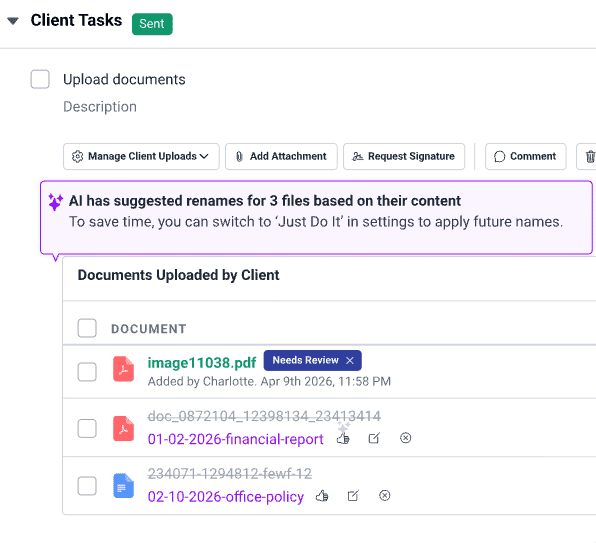
Financial Cents just launched AI File Validator. It checks the accounting period, project name, and client details against an uploaded file to catch mismatches — if a client uploads the wrong document, the portal flags it and prompts them to fix it themselves. If they leave it as-is, your firm gets alerted too, so nothing slips through during a busy week.
It’s one more reason 10,000+ accountants, bookkeepers, and CPAs run their firms on Financial Cents.

Tools, templates, and stories built for small and growing firms.