


Month-End Close Software, done inside your workflow
Financial Cents Month-End Close is month-end close software for accounting and bookkeeping firms. It connects to each client’s QuickBooks Online (QBO) file and pulls their bookkeeping into one place, so transaction review, cleanup, client questions, account reconciliation and 1099 prep all happen where the rest of your work already lives. No spreadsheet exports, back-and-forth emails, or re-entering client answers by hand.
Book a Month-End Close demoTry it free: 1 client, no time limit. Every eligible Financial Cents firm gets one Month-End Close client free, with no expiry date. Add more clients for $5 per client, per month when you’re ready to scale.*
*Free client not available for firms on the legacy ReCats add-on.
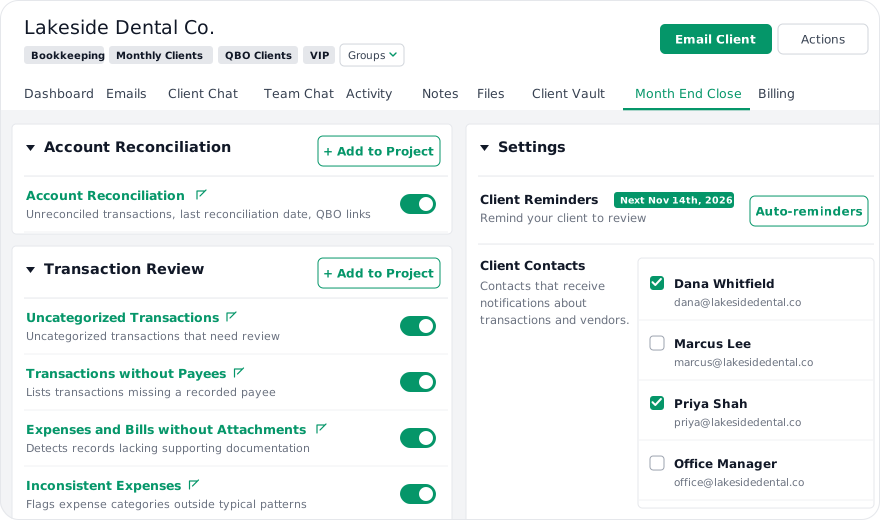
Month-end close software helps accounting and bookkeeping firms complete each client’s monthly books review faster and more consistently. It centralizes transaction review, error detection, client communication, reconciliations and corrections in one workflow, instead of spreadsheets and email. Financial Cents Month-End Close does this for clients on QuickBooks Online and syncs approved changes back to QBO.
Take Month-End Close for a free test drive with one client
Every Financial Cents firm can connect one client to Month-End Close at no cost, with no time limit. Test the full workflow, including Transaction Review, Account Reconciliation, and 1099/W-9 prep, on a real client before you purchase additional licenses.
- Get 1 free client on Month-End Close, indefinitely
- Enjoy full Month-End Close functionality with your free client (no feature restrictions vs. paid licenses)
- Add more clients anytime for $5 per client, per month
Start your free trial from the Month-End Close tab on any existing client in Financial Cents.
Start a free trial

Transaction Review
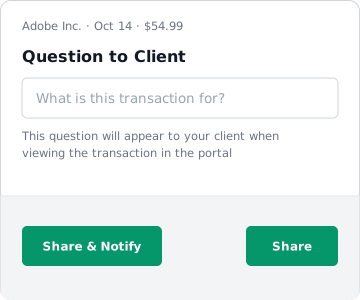
Automate transaction cleanup with a direct sync to the client’s QuickBooks Online file. Transaction Review flags common bookkeeping issues, lets you share specific transactions with the client for their input, and pushes categorization changes back to QuickBooks Online once approved.
Reports included
Uncategorized Transactions
Transactions in QBO that haven’t been assigned a category.
Expenses Without Attachments
Expense transactions missing receipts or supporting documents.
Inconsistent Expenses
Expense patterns that deviate from historical norms.
Large Transactions
Transactions above (or below) a set threshold.
Missing Payees / Class / Location
Data-hygiene reports for firms tracking these fields.
Shared Transactions
Every transaction you’ve shared with the client for their input, in one place, with “Needs Review” and “Approved” tabs.
How Shared Transactions worksAdditional features
Add Filter Settings (Include or Exclude)
On each report, choose whether the Vendor, Transaction Type, and Account lists include or exclude the values you pick. Set up exactly what you want to see (or hide) for each report.
Reload Data
Client just posted something in QBO? Hit the refresh icon in the report header to re-query without a full page reload.
Create Vendors and Customers in Financial Cents
Add a new vendor or customer directly from any Transaction Review report, and Financial Cents creates it in QBO automatically. No tab-switching.
Bulk Hide + Hide Older Than
Clean up review lists fast. Select rows to bulk-hide (this removes them from all reports and the Client Portal without touching QBO), or set a cutoff date to hide older transactions. Every action is auto-saved and reversible.
Account Reconciliation
Track month-end account reconciliations for every client in one report. Get a consolidated view of every account that needs to be reconciled for a client, with an internal record of who did what, and when.
- Search by account name; manage which accounts and account types are included.
- Track Reconciled By and Reconciled Date per account.
- Use the Last Reconciled Txn Date column to see the date of the most recently reconciled transaction in QBO, enabling you to spot accounts that haven’t moved in a while.
- Open any account directly in QuickBooks Online from the report.

1099 & W-9 Preparation
Identify vendors who may need a 1099, request and collect W-9s directly through the Client Portal, review and edit vendor details, and push everything back to QuickBooks Online to generate 1099s.
- Identify vendors that may need 1099s.
- Send W-9 requests directly to those vendors (they can respond via a portal-style form).
- Review submitted W-9 PDFs and edit all vendor fields inline.
- Approve vendors with or without a W-9 on file.
- Push everything to QBO with one click: vendor updates land in the client’s file, ready for 1099 generation.

Newly Added Vendors & Newly Added Accounts
Catch new vendors and accounts as they’re added, so missing information doesn’t become a bigger problem down the line.
Newly Added Vendors
Every recently created vendor is flagged for review before it becomes a mess in the books.
Vendors are organized across three tabs: In Progress, Approved, and Excluded.

Newly Added Accounts
Every newly added account is displayed with transaction counts. Sort by date added, parent account, type, and detail type.
Accounts are organized across three tabs: In Progress, Approved, and Hidden. Approved accounts show who approved them and when they synced to QBO.

Shared Transactions
Review every transaction you’ve shared with a client, all in one report. See what you’ve asked and what they’ve answered, and approve their responses without digging back through individual reports.
- Needs Review tab: Items awaiting your action on the client’s response.
- Approved tab: Items you’ve closed out.

Firms closing faster with Month-End Close
“Financial Cents never ceases to impress me! Their continued commitment to helping firms with their workflows shows by creating a month-end close process. The month-end close process is extremely easy to use and creates a smooth close by enhancing my client communications regarding questions on transactions. Plus the integration into our workflows templates created even more efficiencies for a quicker accurate month-end close. Excited to see the continue enhancements as Financial Cents stays committed to their customer’s firms workflow success.”

Greg Scholten
On Track Accounting Solutions
“We were considering Keeper, but this removed the need for another tool.
We had been thinking about using Keeper (now Double), but it meant another login and another system for our team to learn.
Now that we can do our bookkeeping review directly inside Financial Cents, we don’t need a separate platform anymore. It’s easier to switch between clients than in QuickBooks, and our review process lives right inside our bookkeeping projects.
The integration is smooth, the workflow works, and I was able to complete the entire month-end review from start to finish inside Financial Cents.”

Seth Norris
Norris CPA Firm
Standardize Your Month-End Close Checklist with Project Templates
Month-End Close reports easily plug into your existing workflow. Simply add Month-End Close report sections to any project template so your month-end process is standardized firm-wide. When you use a template to create a project for a client, the Month-End Close reports link to it automatically.

Coming soon: Quality Control reports
Three Quality Control reports are in development:
Statement of Cash Flows
Shows how cash moves through operating, investing, and financing activities.
A/P Aging Report
Tracks unpaid vendor bills by due date.
A/R Aging Report
Shows outstanding customer invoices by age.
Month-End Close pricing
Month-End Close is a premium add-on priced at $5 per client, per month, available on any Financial Cents plan. Eligible firms can try it free with one client, with no time limit.
Additional licenses are purchased from Settings > Membership > Month-End Close.
$5
per client, per month. Available on any Financial Cents plan.
- 1 free client, no time limit for firms not on the legacy ReCats subscription.
- Automated client email reminders included for shared transactions and W-9 requests.
- Each Month-End Close client must have their QBO file connected to Financial Cents. Most firms already have QuickBooks Online Accountant access, so no separate client login is needed.
Loved by over 10,000 accountants, bookkeepers and CPAs
Get Started Today
Frequently asked questions
Month-end close software helps accounting and bookkeeping firms complete each client’s monthly books review faster and more consistently. It centralizes transaction review, error detection, client communication, reconciliations and corrections in one workflow, instead of spreadsheets and email. Financial Cents Month-End Close does this for clients on QuickBooks Online and syncs approved changes back to QBO. (Also called financial close or accounting close software.)
Financial Cents Month-End Close syncs with each client’s QuickBooks Online file and automatically flags transactions that need attention, such as uncategorized transactions, expenses without attachments, inconsistent expenses, large transactions, and missing payees, classes or locations. It sends automated email reminders to clients for shared transactions and W-9 requests, and pushes approved categorization and vendor changes back to QBO, so there’s no manual re-entry.
It’s built for accounting and bookkeeping firms that handle recurring monthly bookkeeping for clients on QuickBooks Online. It suits firms that want a structured, repeatable month-end workflow without switching between tools or chasing clients for answers.
Financial Cents connects directly to QuickBooks Online (QBO). Once a client’s file is connected, your team can review transactions, edit categories, add attachments, fix inconsistencies, create vendors and customers, and batch-update data. Approved changes sync back into QBO automatically. Most firms already have QuickBooks Online Accountant access, so no separate client login is needed.
Financial Cents Month-End Close includes four report categories:
- Transaction Review: Uncategorized Transactions, Expenses Without Attachments, Inconsistent Expenses, Large Transactions, Shared Transactions, and Missing Payee, Class or Location reports.
- Account Reconciliation: Reconciliation status per account, who reconciled it and when, and the last reconciled transaction date.
- Vendor & Account Review: 1099/W-9 Preparation, Newly Added Vendors and Newly Added Accounts.
- Quality Control (coming soon): Statement of Cash Flows, A/P Aging and A/R Aging.
Yes. You can send clients questions about specific transactions from the review screen. Clients answer through the Financial Cents Client Portal via a secure magic link, with no password required. Responses sync back into the Shared Transactions report for you to approve.
Yes. It identifies vendors that may need a 1099, sends W-9 requests to them through a portal-style form, lets you review submitted W-9s and edit vendor details inline, and pushes vendor updates to QuickBooks Online ready for 1099 generation.
Month-End Close is a premium add-on priced at $5 per client, per month, available on any Financial Cents plan. Eligible firms can try it free with one client, with no time limit. Additional licenses are purchased from Settings > Membership > Month-End Close.
Yes. Every firm not on the legacy ReCats add-on can connect one client to Month-End Close free, with no expiration. Start it from any client’s Month-End Close tab.
Yes. Month-End Close report sections can be added to any project template, so every recurring monthly project includes them automatically. If the template is applied to a client without Month-End Close turned on, the section appears grayed out.
ReCats has been rolled into Month-End Close. Existing ReCats firms keep their $4 per client, per month pricing and the original Transactions UI. Switching to Month-End Close is account-wide (all clients move together) and is done by contacting support. A firm can be on only one of the two add-ons at a time.
Many of the other tools are poor at managing updates and bugs. Some use subcontracted developers, providing real client data samples. Others have suffered breaches without proper notifications.
Of the pre-built systems out there, I do think Financial Cents has a solid offering.
One of my top goals is to make the process easier for clients. Glad I made the switch!
Many of the other tools are poor at managing updates and bugs. Some use subcontracted developers, providing real client data samples. Others have suffered breaches without proper notifications.
Of the pre-built systems out there, I do think Financial Cents has a solid offering.
One of my top goals is to make the process easier for clients. Glad I made the switch!
If you’re not using this feature, I highly recommend it! Remembering to follow up with clients can be a serious bottleneck and I love how this solved that problem!
If you’re not using this feature, I highly recommend it! Remembering to follow up with clients can be a serious bottleneck and I love how this solved that problem!