


The AI File Validator Agent for accounting firms
Your client uploads last year’s W-2, a statement from the wrong bank, or the wrong document entirely, and you don’t find out until you’re deep in the work. The AI File Validator checks every file the moment a client uploads it, tells the client if something’s off, and gives them a chance to fix it before it ever reaches you.
Proudly built for small firms — and designed to grow with you.
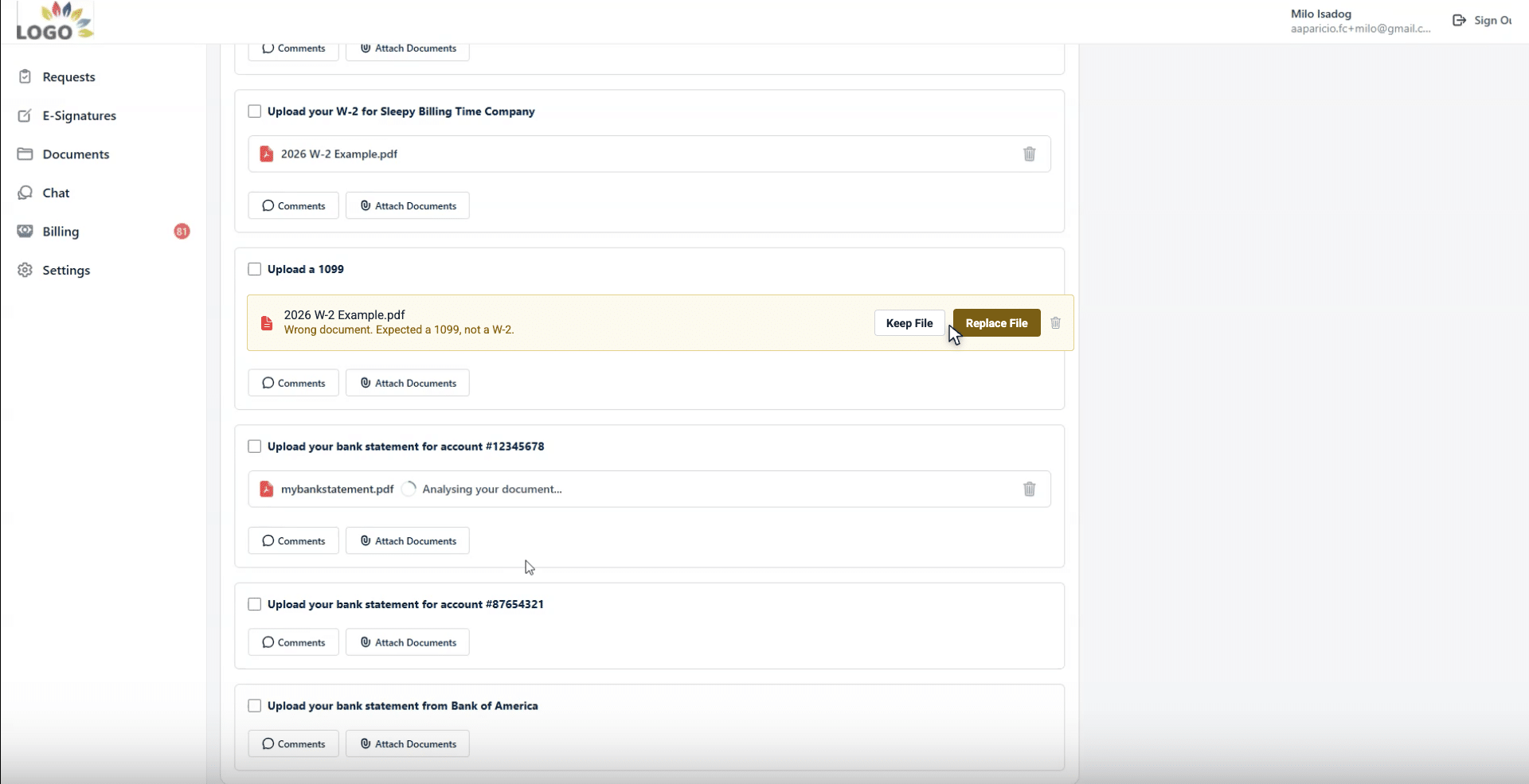
The AI File Validator in Financial Cents is a built-in AI feature that automatically checks the documents your clients upload to make sure they’re the right ones. When a client uploads a file to a client task, the validator reads it and compares it against the request name, the project’s accounting period, the project name, and client details. If the file looks wrong — the wrong tax year, the wrong bank, or the wrong document type — the client sees clear feedback right in the portal and can replace it on the spot. It’s part of Financial Cents’ practice management platform for accounting, bookkeeping, and tax firms.
Why wrong documents cost your firm so much time
Every firm knows the cycle: you request documents, the client uploads something, and you don’t discover it’s the wrong W-2 or last year’s bank statement until you sit down to do the work. Now you have to stop, email the client, explain what’s wrong, and wait, sometimes days, for the right file. Multiply that across every client at month-end close or tax time, and it’s one of the biggest hidden drags on a firm’s turnaround.
The AI File Validator moves that check to the front of the process. Instead of your team catching the mistake later, the client catches it immediately, while they’re still in the portal (and it’s super easy for them to fix on the spot).

How the AI File Validator works
The validator runs automatically whenever a client uploads a file to a client task.
Reads the uploaded file
The AI analyzes the document’s contents, not just the file name.
Compares it against the request
Request name, accounting period, project name and client details.
Decides whether it’s the right file
Does the tax year match the period? Is the statement from the expected bank?
Gives the client feedback in the portal
A clear message explaining what’s wrong and why.
The client can then replace the file with the correct one, or keep the file if they believe it’s right. Either way, the check happens at upload, not weeks later at your desk.
What the validator checks for
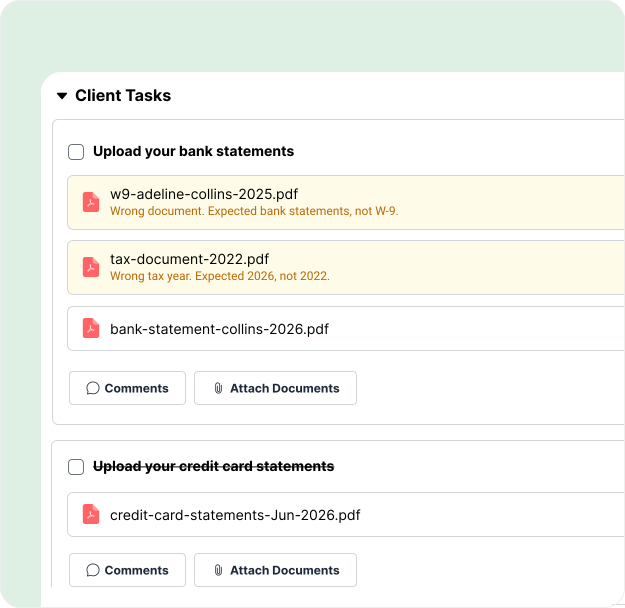
- Wrong tax year / accounting period: e.g., a 2025 W-2 uploaded for a 2026 engagement.
- Wrong document type: e.g., a W-2 uploaded where a 1099 was requested.
- Wrong account: e.g., a bank statement for a different account than expected.
- Wrong institution: e.g., a statement from the wrong bank altogether.
Built to be careful. No false alarms.
The AI File Validator is deliberately conservative. It only flags a file when it’s highly confident something is wrong. If it can’t determine with confidence that a document is incorrect (for example, if it can’t clearly read the issuer), then it stays quiet rather than second-guessing your client with a potentially false warning. That means clients aren’t nagged by mistake, and the flags they do see are worth acting on.
You stay in the loop when a client overrides a flag
Zero setup. Just turn it on.
There’s nothing to configure. Toggle the AI File Validator on under Settings → AI Agents, and it works immediately across your client tasks. No naming rules, no field mapping, no training. It’s one of a growing set of AI agents built directly into Financial Cents, including the AI File Renaming Agent and AI-generated workflows and client emails.


A better experience for your clients, too
Nobody likes being told they did something wrong, least of all after they thought a task was done. The AI File Validator turns that awkward back-and-forth into a smooth, self-serve moment: the client gets immediate, specific guidance while they’re still in the client portal, fixes it themselves, and moves on. Your firm looks organized and modern, and the client feels supported instead of chased.
Secure by design
Financial Cents is SOC 2 certified, uses TLS 1.3 encryption in transit and encryption at rest, and processes documents inside the same secure platform trusted by over 10,000 accountants, bookkeepers, and CPAs. Your clients’ documents never leave your firm’s control.
Read more on our security page
Frequently asked questions
It’s a built-in AI feature that automatically checks the documents clients upload to client tasks. It compares each file against the request, the project’s accounting period, the project name, and client details, and tells the client in the portal if the file looks wrong so they can replace it.
It reads the contents of the uploaded document and compares them to what was requested, checking things like whether the tax year matches the accounting period, whether the document type matches the request, and whether a bank statement is from the expected account and institution.
Common ones include the wrong tax year or accounting period, the wrong document type (like a W-2 instead of a 1099), the wrong bank account, and statements from the wrong financial institution.
It’s designed to be conservative. The validator only flags a file when it’s highly confident something is wrong. If it can’t determine with confidence that a document is incorrect, it won’t warn the client — so clients aren’t second-guessed by mistake.
Yes. The client can choose to replace the file or keep it. If they keep a flagged file, your team sees an advisory on the firm side letting you know the validator flagged it and the client kept it anyway.
No. There’s nothing to configure. Turn it on under Settings → AI Agents and it works immediately across your client tasks.
In the client portal, at the moment of upload. The client gets immediate feedback while they’re still completing the task, so corrections happen upfront instead of later over email.
Accounting, bookkeeping, and tax firms that collect documents from clients and want to cut down on wrong files, rework, and follow-up emails.
Catch wrong documents before they reach your desk.
Let your clients fix mistakes at upload — not days later over email.