

E-Signatures
E-Signatures for Accountants and Accounting Firms
Send any document for signature right inside a client task, no separate e-signature tool to buy or learn. Standard signature requests are free and unlimited on every Financial Cents plan, and your client signs in the portal they already use.
Free and unlimited on every plan. Free trials include up to 5 signature requests. Optional ID verification (KBA) add-on for US-based contacts.

Get a signature without buying a separate signing tool
An e-signature (electronic signature), lets accounting, tax, and bookkeeping firms get documents signed online, without printing, scanning, or mailing. Financial Cents gives firms built-in e-signatures for accountants: send authorizations, agreements, onboarding forms, engagement letters, and standalone IRS forms for signature right inside a client task. Most firms only need a signature now and then, so getting one document signed shouldn’t mean paying for and learning a separate electronic signature tool, or sending clients a pile of extra emails from different systems.
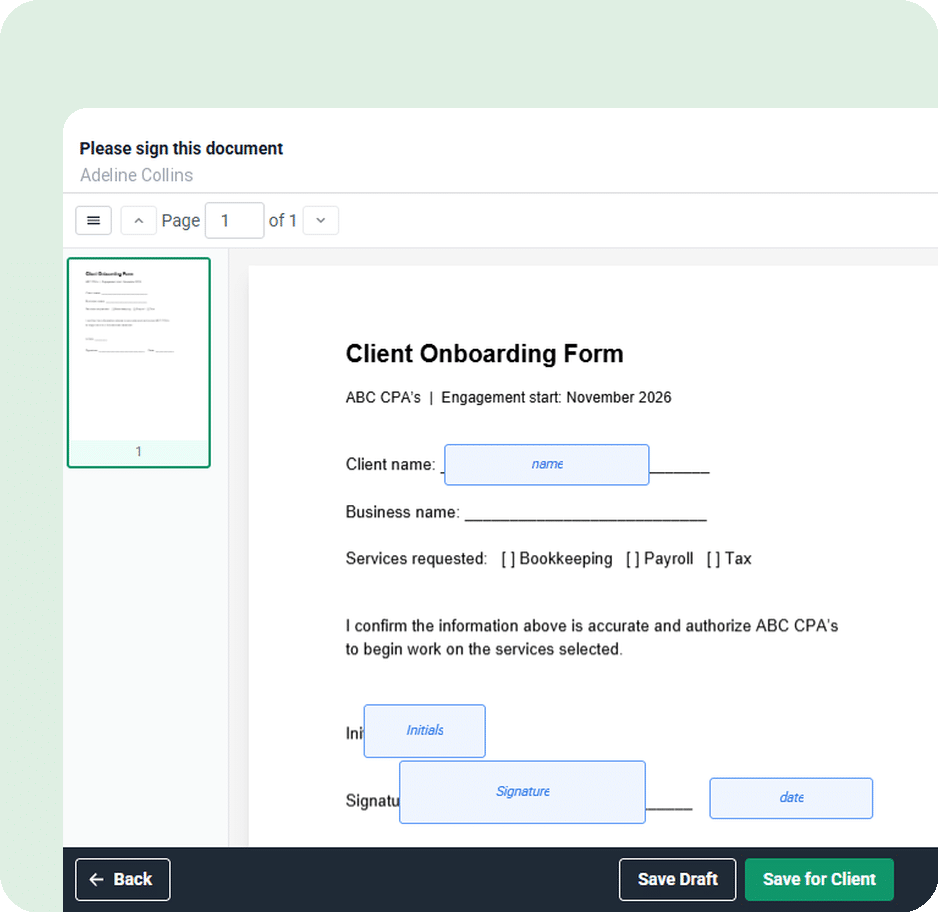
Financial Cents puts e-signatures right in your client tasks. Add a signature request to a task, place the fields on your PDF, and send it with the rest of the client’s to-dos. Your client signs in the same portal they already use, the signed copy files itself on the project, and the task closes itself once everyone has signed. Standard signature requests are free and unlimited on every plan.
A seamless client experience
Your client signs in the same client portal they already use, no new login, no password, no separate signing app. They open the signature task from their task list, click each highlighted field, and sign by typing, drawing, or uploading their signature from any device. Add up to 10 client contacts as signatories, each with their own fields, and let other contacts on the task follow along and download the signed copy without signing. The task completes itself once everyone has signed.

Never chase clients for signatures
The signature request goes out with the rest of the client’s task list, one email, not a separate signing email from another system. Send a reminder anytime from the signature card, and let the client task’s Auto Reminders follow up automatically (available on the Scale plan). You always see exactly where a request stands: not sent, awaiting signature, partially signed, completed, declined, or voided, and you can void any request that will never be signed.
Signed documents that file themselves
When everyone signs, the completed PDF saves straight into the client’s Files on the project, part of Financial Cents’ accounting document management, no downloading from one tool and re-uploading into another. Your client can also download their signed copy from the portal. Keep an optional Certificate of Completion and a full activity history with every request, so your records stay audit-ready.


Add identity verification with KBA
Some documents call for more than a signature. Turn on knowledge-based authentication (KBA) per signer so your client confirms their identity before they sign. KBA is an optional paid add-on for US-based contacts, sold in annual credit bundles, each verification uses one credit, and you switch it on only for the signers who need it. Standard signatures without KBA stay free and unlimited.
E-signature features for accounting, tax, and bookkeeping
Free, unlimited signatures
Send as many standard signature requests as you need, free on every plan.
Signing inside client tasks
Collect signatures in the portal clients already use, no separate tool, no new login.
Multiple signatories
Add up to 10 client contacts to a single request, each with their own fields.
The fields you need
E-signature, name, date, initials, text, and checkbox, mark any field required.
Automatic reminders
Signature reminders ride the client task’s Auto Reminders, plus a one-click manual nudge.
Certificate of completion & audit trail
Attach a completion certificate and keep a full activity history for every request.
KBA identity verification
Add identity verification per signer for higher-stakes documents (US contacts; optional paid add-on).
Centralized, auto-filed storage
Signed PDFs save themselves into the client’s Files on the project.
Secure, and legally binding
Financial Cents is SOC 2 certified, with encryption in transit and at rest. Every request keeps a full activity history, and you can include a Certificate of Completion that records each signer’s name, email, and IP address, the signing time in UTC, and a document ID and hash, so signed documents are legally binding and audit-ready. For higher-stakes documents, optional KBA adds identity verification before signing.
Read more on our security page
Accounting Firm E-signatures FAQs
An e-signature (electronic signature) lets a client sign a document, an engagement letter, authorization, onboarding form, or IRS form like the 2848, online instead of printing, signing, and scanning. For accounting and tax firms, it speeds up document turnaround and keeps a legally binding record of who signed and when.
Yes. Accountants can send tax-related PDFs, engagement letters and standalone IRS forms like the 2848 or 8821, for e-signature in Financial Cents. For a signer whose identity needs to be verified first, turn on KBA (knowledge-based authentication) for that signer.
KBA signature software adds knowledge-based authentication to an electronic signature: the signer confirms personal details and answers identity questions before signing, which verifies they are who they claim to be. In Financial Cents, KBA is an optional paid add-on you switch on per signer for higher-stakes documents (US-based contacts). Firms running their tax workflow in Financial Cents can collect these signatures alongside the rest of their tax practice management software.
Firms running their tax workflow in Financial Cents can collect these signatures alongside the rest of their tax practice management software.
No. Financial Cents has built-in e-signatures, so you don’t need a separate e-signature subscription to get a document signed.
Yes. Firms already using the Adobe Sign integration keep using it, a firm uses one e-signature provider at a time.
Any PDF, authorizations, agreements, onboarding forms, engagement letters, and standalone IRS forms like the 2848 or 8821. Each request takes one PDF.
Use a proposal software when you want the signed engagement letter to set up billing and invoicing automatically, proposals have their own signature step. Use an e-signature when you just need a signature on a PDF.
Yes. Add up to 10 client contacts as signatories, each with their own fields. Other contacts on the task can follow along and download the signed copy without signing. (Firm team members can’t sign through this feature.)
Yes. Financial Cents is SOC 2 certified and encrypts documents in transit and at rest. The optional Certificate of Completion records each signer’s name, email, and IP address, the signing time in UTC, plus a document ID and hash, the audit trail that makes a signed document legally binding and audit-ready.
Yes. Every request shows its status (not sent, awaiting signature, partially signed, completed, declined, or voided), and you can void a request at any time. A sent request can’t be edited, to change it, void it and send a new one.
Loved by over 10,000 accountants, bookkeepers and CPAs
Get your next document signed inside the work you already send.
Add a signature request to a client task and send it with the rest of the list, free on every plan.
Many of the other tools are poor at managing updates and bugs. Some use subcontracted developers, providing real client data samples. Others have suffered breaches without proper notifications.
Of the pre-built systems out there, I do think Financial Cents has a solid offering.
One of my top goals is to make the process easier for clients. Glad I made the switch!
Many of the other tools are poor at managing updates and bugs. Some use subcontracted developers, providing real client data samples. Others have suffered breaches without proper notifications.
Of the pre-built systems out there, I do think Financial Cents has a solid offering.
One of my top goals is to make the process easier for clients. Glad I made the switch!
If you’re not using this feature, I highly recommend it! Remembering to follow up with clients can be a serious bottleneck and I love how this solved that problem!
If you’re not using this feature, I highly recommend it! Remembering to follow up with clients can be a serious bottleneck and I love how this solved that problem!