Month-End Close Doesn’t Have to Be Dreaded. Here’s How to Fix It.
Month-end close. Just saying it out loud is enough to make a bookkeeper’s stomach drop. Capture every transaction, reconcile accounts, make adjustments, prepare statements, close the period — and then multiply that across dozens or hundreds of clients. That’s why close is stressful even for firms who’ve been doing it for years.
Financial Cents’ Month-End Close feature is built to take that dread away with support, insight, and automation that saves your firm hundreds of hours. Here’s what it actually does.
Fixing Uncategorized Transactions Without Leaving Financial Cents
The Month-End Close tab integrates directly with QuickBooks Online, pulling in every client’s uncategorized transactions, vendors, accounts, and reports.
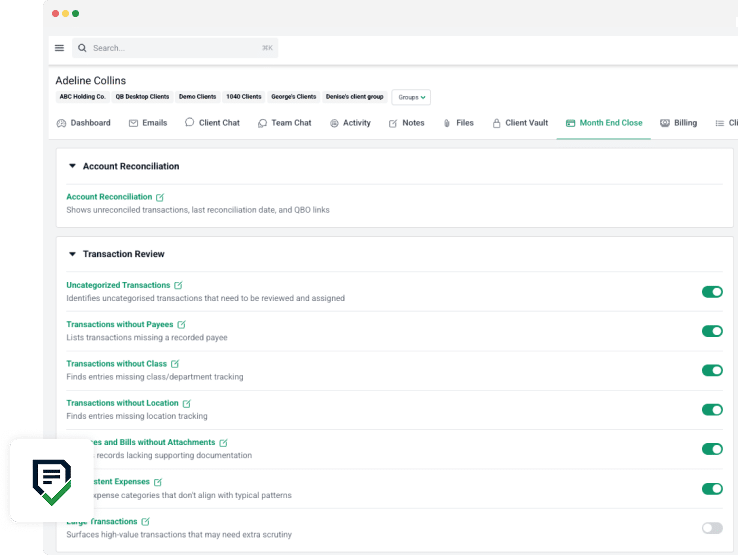
Uncategorized transactions are always the biggest time-and-money sink in close. The Uncategorized Transactions report lets you use Manage Categories to pick exactly which accounts and categories need review — those populate straight into your Month-End Close reports with no trip back into QBO required.
You can customize which fields show up and reorder them however you want. Filter Settings let you include or exclude data at a granular level — specific vendors, transaction types, categories, whatever you need.
Once you’ve filtered down to what actually needs client input, bulk-select everything and share it through the Client Portal. No exporting to Excel, no copying it back into your files later, no playing email tag. Clients review and update directly inside Financial Cents.
And when clients don’t respond right away — which, let’s be honest, is most of the time — Month-End Close has automated reminders you can set client by client. Every day, every 10 days, once a month, whatever fits how many transactions need attention and how responsive that particular client tends to be.
From the client’s side, the notification doesn’t expose any document details for security. Once they click into the portal, they land in the Transactions category, where they can update memos, attach missing receipts, add comments, and chat with you and your team — all without a single email leaving the system.
Back on the firm side, you’ll see transactions move from Waiting on Client to Ready to Review the moment clients update them. Once things look good, approve individually or in bulk, and everything — including new attachments — syncs straight back to QBO.
The Reports That Actually Catch Problems Before They Become Delays
Awareness is what prevents month-end close from spiraling. That’s the whole point of the report library sitting in the Month-End Close tab: Transactions Without Payees, Transactions Without Class, Transactions Without Location, Expenses and Bills Without Attachments, Inconsistent Expenses, Large Transactions, and Shared Transactions.
Each one is built to flag the specific issue that’s standing between you and a closed month.
Inconsistent Expenses pulls historically categorized transactions over a timeframe you define, and highlights in red anything that doesn’t match past categorization patterns for that account. If a transaction looks off compared to how similar ones were coded before, you’ll see it immediately instead of finding it during a client’s tax prep six months later.
Large Transactions lets you set a “greater than” dollar threshold, so any expense above that number gets automatically surfaced for review — no manually scanning every line for the big one.
Shared Transactions shows you exactly what’s currently visible to a client in their portal, without digging through the full transaction list. It’s a fast way to check what a client can see and adjust anything before they do.
W-9 Collection Without the Annual Scramble
Further down the Month-End Close tab are the Vendor and Account Review Reports. Financial Cents pulls in vendors from QuickBooks Online that meet two conditions: they cross a year-to-date spend threshold you set yourself, and they match the transaction types you’ve defined for review. That combination tells you exactly which vendors need a 1099 from you and which ones need to send you a W-9 — before it’s a year-end fire drill.
You’ll also find reports for Newly Added Vendors (making sure new vendors are set up correctly in both QBO and Financial Cents), Newly Added Accounts (confirming proper documentation exists), and Duplicate Vendors and Customers, alongside dedicated 1099 and W-9 preparation support.
Need a W-9? Request it from either the client or the vendor directly inside Financial Cents — toggle between the two options right in the tool. This saves real time not just at month-end, but at quarter-end and year-end too. Same as uncategorized transactions, you can turn on reminder emails at whatever cadence keeps documents coming in.
On the receiving end, the request takes them straight into the client portal’s W-9 request tab, and it stays visible under Open Requests until it’s done. Once uploaded, status flips from Waiting on Client or Vendor to Ready for Review. From there, you can see what already exists in QuickBooks, make any adjustments, and approve — which automatically updates the W-9 in QBO.
Building It Into Your Actual Workflow
None of this has to live separately from how your team already works. Every Month-End Close feature can be added directly into your Financial Cents workflows.
Use Add to Project to pull specific active reports into an open project, or spin up a brand-new project tied to a defined accounting period and add the Month-End Close section under Team Tasks.
From that point forward, uncategorized transactions, every report you’ve configured, and anything else in Month-End Close becomes part of the actual workflow your team follows — not a side tool they have to remember to check.
Pair this with an Account Reconciliation Report, and you get both a high-level checklist of which client accounts still need review and reconciliation, and one central place to manage the granular tasks that make close actually happen. No more juggling five tabs and a mental checklist to figure out what’s left.
The Bottom Line
Month-end close will never be nobody’s least favorite week. But it doesn’t have to mean chasing clients through email, digging through QuickBooks by hand, or discovering a miscategorized transaction three months too late. Financial Cents’ Month-End Close feature turns that entire process — categorization, client follow-up, vendor documentation, and reporting — into one connected workflow.




Tools, templates, and stories built for small and growing firms.