


Client Organizers
Tax Organizer Software That Collects Every Answer and Document in One Place
Build tax organizers clients actually finish, only the questions that apply to them, and no login or password to get in the way. Send from any project, let automatic reminders chase for you, and review answers and documents in your client portal, right next to the work.

Stop chasing tax info across PDFs, emails, and spreadsheets
A tax organizer is a questionnaire that collects the answers and documents a preparer needs to start a client’s return. Financial Cents’ tax organizer software, called Client Organizers, moves that whole step online and into the client’s project.
Every tax season starts the same way: you send a long PDF organizer full of questions that don’t apply, clients skip half of it, and the documents trickle in by email for weeks, with the answers in one tool and the files in another. Client Organizers replaces that. You build the questionnaire once, attach it to the client’s project, and the client fills it out in your client portal, no login, no password. Answers and uploads land on the same project, reminders go out on their own, and your team knows the moment it’s ready to review.
Why firms are retiring the PDF organizer and using digital tax organizers
Same questions, far less chasing.
Everything you need to run organizers inside your workflow
Build it once, reuse it every season, and keep every answer tied to the client’s project.
Reusable organizer templates
Build a tax organizer once and reuse it for every client and every season. Set a tax type, write a welcome message, and group questions into sections and pages so clients never face one endless form.
Conditional logic
Ask “Did you sell any stock this year?” and only show the follow-ups to clients who say yes. Apply rules to a question, a page, or a whole section, and combine them with All or Any.
Ready-made templates
Start from client tax organizer templates built by the Financial Cents team, already in your account. Duplicate one and tweak it, or build your own from scratch.
The question types tax work needs
Names, dates, addresses, Yes/No, dropdowns, multiple choice, checkboxes, and file uploads. Mark any question as required.
Document requests in the same form
Ask for W-2s, 1099s, and receipts right next to the questions they relate to. Review every upload in one place on the organizer.
Automatic reminders
Pick a reminder schedule when you send. Reminders stop on their own once the client submits or the project closes.
Completion tracking
See at a glance who’s submitted, who’s partway through, and what’s still outstanding across every client, so you know exactly where the document collection stands.
From template to verified organizer in four steps
Build your template
Go to Settings > Organizer Templates. Start from a Financial Cents template or a blank one, add sections, pages, questions, and document requests, then set your conditional rules. Use Preview Form to walk through it as your client would.
Add it to a client’s project
Open the project, click Client Request, and choose the Client organizer section. Pick your template.
Send it now or schedule it
Choose the tax year, the client contacts, and when it goes out. Set auto reminders and who on your team gets notified.
Review and verify
Answers and uploads fill in as the client works. Once they submit, check everything in one view and click Mark as Verified to hand it to the next person.
What it looks like

The builder
Build sections and pages, and decide exactly when each one shows up.

The client view
Clients see one page at a time, only the questions that apply to them, and upload documents in the same place.

The review
See every answer and file together, then mark it verified.
Not a separate tool. Part of the tax job.
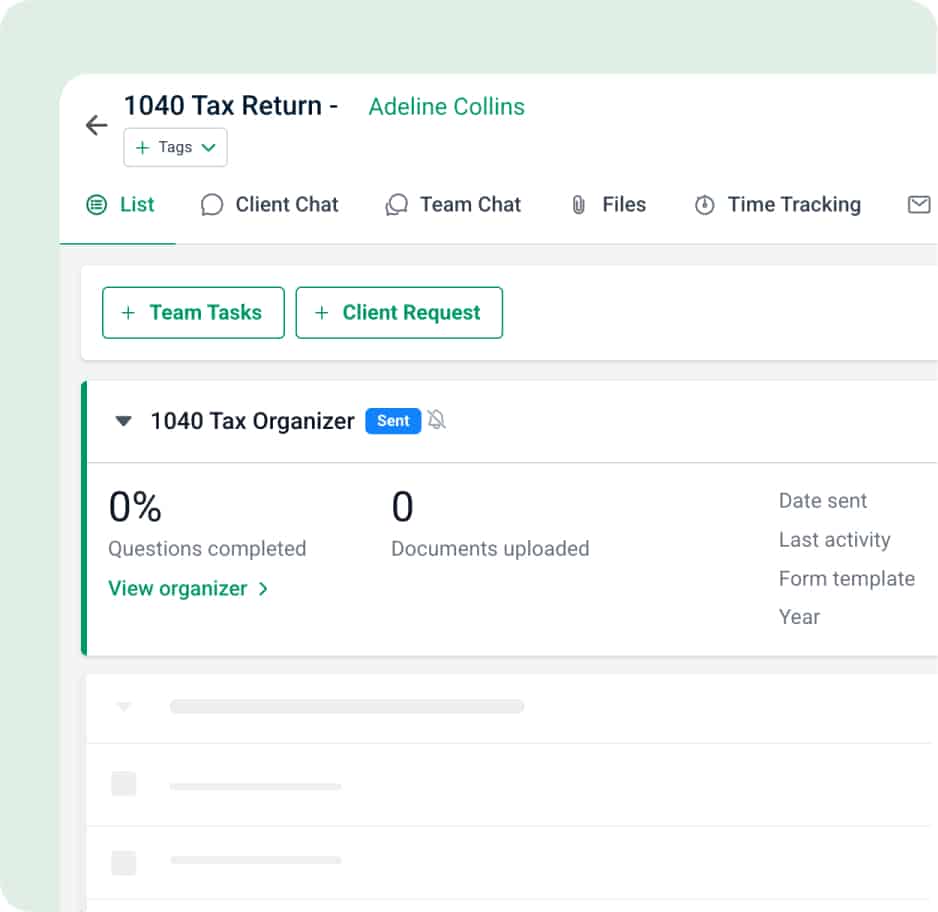
Most tax organizer tools live on their own, so the answers end up in one place and the work in another. In Financial Cents, the organizer sits on the client’s project, next to the tasks, documents, and deadlines for that return.
On the project
Answers and uploads stay with the job they belong to, so whoever prepares the return has everything in one place.
Inside your practice management software
Because the tax organizer lives inside your tax practice management software, answers and documents stay on the return, not in a separate organizer tool.
In the portal clients already use
No new login. Clients open the organizer in your client portal, alongside their other requests, on desktop or phone.
Documents land in document management
Uploads flow into document management on the project, so nothing lives in a separate inbox.
Same reminders your clients already get
Organizer reminders run on the same automatic reminder system as the rest of your client requests.
Built into your project templates
Add an organizer to a project template so it’s ready on every new tax project.
Hands off cleanly
Marking an organizer verified notifies the next person, so prep starts without anyone having to ask.
Get every client’s tax info in before the rush starts.
Send your first organizer this week and let reminders handle the follow-up.
Frequently asked questions
A tax organizer is a questionnaire a tax preparer sends clients to collect the answers and documents needed to start a return, income, deductions, life changes, and supporting files like W-2s and 1099s. Traditionally it’s a printed or PDF booklet; Financial Cents turns it into an online form clients complete in a secure client portal.
A digital (or electronic) tax organizer replaces the printed or PDF booklet with an online form. Clients answer in a browser or on their phone, upload documents in the same place, and their responses return to the firm automatically instead of by email or paper.
Tax organizer software is a tool that lets accounting and tax firms build tax organizers, send them to clients, and collect the answers and documents back digitally. Financial Cents’ tax organizer software, called Client Organizers, builds the questionnaire, adds conditional (adaptive) questions, and collects everything on the client’s project inside the firm’s practice management workflow.
Yes, clients complete the tax organizer online in the Financial Cents client portal, on desktop or mobile, with no PDF, no printing, and no separate login. They see one page at a time and only the questions their earlier answers make relevant, and they upload documents in the same place.
Financial Cents’ tax organizer is built into its practice management software rather than bolted on, so it doesn’t need a separate integration. The organizer sits on the client’s project next to the tasks, documents, and deadlines for that return, which keeps answers and the work in one place, unlike standalone organizer tools that store responses separately from the job.
Yes, Financial Cents tax organizers work for individual (1040) returns and for small-business and business clients. Firms choose the question types and document requests each return needs and reuse the template every season.
Every Financial Cents firm. Client Organizers are included on every plan at the moment, so any firm can build and send tax organizers.
No, Financial Cents accounts include tax organizer templates built by the Financial Cents team. Firms duplicate a template and edit it, or build their own from sections, pages, questions, and document requests.
Conditional logic shows a follow-up question only when an earlier answer makes it relevant, for example, showing stock-sale questions only to clients who answer yes to selling stock. In Financial Cents, Yes/No, dropdown, multiple-choice, and checkbox questions can trigger rules applied to a question, a page, or a whole section, combined with All or Any.
No, clients open the tax organizer from a secure link and complete it in the Financial Cents client portal, with no account to create and no password to remember. Removing the login removes the most common reason clients stall, and the organizer works on desktop or mobile.
Firms pick a reminder schedule when they send the organizer, and reminders go out automatically until the client submits. Reminders stop on their own once the client submits or the project closes, so there’s no manual chasing.
Yes. Financial Cents shows which clients have submitted, who’s partway through, and what’s still outstanding, so the firm can see where document collection stands across every client. The team is notified when a client submits, and marks the organizer verified once it’s reviewed.
Yes. Tax organizers in Financial Cents are reusable templates, so firms build one once and reuse it every season instead of rebuilding or re-sending a static PDF. Duplicate a template, adjust it for the new year, and send it in a few clicks.
Yes, clients can edit and resubmit until the firm marks the organizer verified. After it’s verified, the organizer becomes view-only for the client.
Go to Settings > Organizer Templates, pick a template, and add it to a client’s project. The Financial Cents help article walks through building, sending, and verifying an organizer step by step.