Bookkeeping Firm Tech Stack Report
261 bookkeeping firms gave us an inside look at their current software setup—and the data shows an undeniable gap between what they use and what they want.
Introduction
Tools are supposed to solve problems. But for too many small bookkeeping firms, the tools have become the problem.
For some, tool creep happens slowly. You purchase one software to help with proposals, another to keep you on track with tasks and to-dos, and one more to collect and manage client documents. Before you know it, you’re spending most of your time toggling between systems—copying and pasting information, struggling to keep everything updated, and losing your everloving mind.
You’re not alone. Many bookkeeping firm leaders have fallen into the patchwork trap. (And plenty have found their way out! 😅)
To get a better understanding of the tool sprawl problem, we surveyed 261 bookkeeping and accounting firm professionals about:
- How they’re managing their tech stack,
- Where things break down, and
- What they actually wish they had instead.
What follows is an unfiltered look at the state of software in small bookkeeping firms—and what it’s costing the people who run them.
Survey methodology
Respondents:
261 bookkeeping and accounting firm professionals across the U.S. and Canada
Firm Size:
Primarily firms with 1–20 employees
Roles:
Primarily firm owners/founders in the bookkeeping space
Data Collection:
Conducted by Financial Cents via online survey open for 3 weeks in February 2026
Who Responded: A Quick Look at the Firms Behind the Data
Before we go full-on nerd mode with all the juicy findings, let’s paint a picture of the people behind the numbers. (Spoiler: We’re betting they look a lot like you. 😉)
Is bookkeeping the main service your firm provides?
What’s your role at the firm?
How many people work at your firm?
💡 Insight for Firm Owners When you’re both the main buyer of your firm’s software and a daily user, tool overload becomes more than a company-level operations problem. It’s also dragging down your own impact on the business (not to mention your personal wellbeing). Every hour spent switching between screens, re-entering data, or hunting down client files is an hour you’re not spending on the work that actually grows and improves your firm.
The Current Landscape of Bookkeeping Firm Software
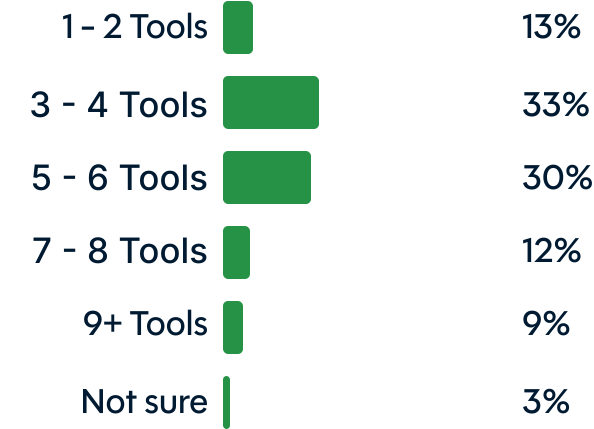
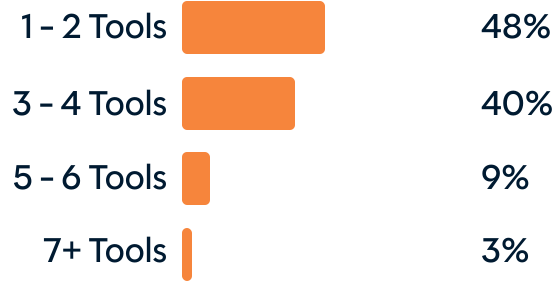
Okay, let’s get down to brass tacks: How many tools are bookkeeping firms actually using—and how does that compare to what they wish they were using? The gap is pretty striking.
Which types of software does your firm currently use?
💡 Insight for Firm Owners ANd Ops Leaders The fact that spreadsheets rank second—ahead of dedicated practice management, client portal, and project management tools—tells us a lot about the “glue” holding disjointed processes together. The prevalence of spreadsheets suggests that many firms are patching gaps manually. And when spreadsheets are doing the work that purpose-built software should be doing, it costs firms in ways they may not even realize.
The Hidden Toll of Too Many Tools
The side effects of tool sprawl run far and wide, showing up everywhere from your calendar and your inbox to your team’s morale—and eventually, your client relationships. Here’s what the data revealed about the symptoms of software overload.
How often does someone have to manually move or re-enter information between tools?
39%
A few times per
week
20%
Multiple times
per day
19%
Once a week or
less
8%
Once a day
14%
Rarely or never
What’s the biggest operational challenge created by your current tool setup?
How is your firm’s tech stack holding you back?
Get clarity with our free 1-minute assessment.
You’ll find out which of the 7 most common “Patchwork Personas” best describes your small bookkeeping firm—and get an instant breakdown of personalized strategies for overcoming your biggest tech challenges.
Straight from the Source: Real Stories of Software Overwhelm
Survey-takers’ dish on the real-life impact of tool sprawl on firm operations.
I don’t have time to fully utilize and integrate each tool for optimum efficiency.”
Scattered communication can be a big problem. Things are missed or forgotten about from time to time.”
We have to manually enter all the data because the tools are not syncing.”
It’s tough to keep track of all the tasks associated with each client. There have been a few slips, and it’s always stressful.”
We rely on the experience of the manager to ‘catch’ these things or pick up the pieces later. It eventually gets caught but slows them down.”
Due dates are not always easy to see and we have to watch closely so things don’t get missed.”
Our communications are scattered across email, text, my list, their list. It’s frustrating and unprofessional.”
When you have to keep a manual list and desktop calendar because the tracking tools are just too varied and all over the map…it costs money to track your operations.”
Onboarding often takes days longer than it should because agreements fall through the cracks.”
Generally, it results in a poor customer onboarding experience, where clients are asked the same questions, multiple times, by different people.”
On several occasions we have underbilled clients because we weren’t able to actively track the number of hours worked per client, and were committing more hours of work than the contracted amount.”
Sometimes if a client has a large number of entities and accounts, I will miss an account.”
It is a nightmare.”
Too many tasks, no clear priority.”
If I’m working on a different machine and my documents are saved locally somewhere else, that’s a problem.”
I follow up on source documents constantly.”
Solution Spotlight: Simplifying Your Stack
Once upon a time, Lori and her team struggled to keep the firm running across a tangle of disconnected tools—workflows in one place, client emails buried in Outlook folders, outstanding questions tracked manually. After consolidating onto Financial Cents, everything landed in one hub: tasks, client communications, documents, and more.
“Tracking work requests and storing client information was very cumbersome,” Lori said of the old setup. Now? “Everything is in one hub, and that is wonderful.” L&L has since grown so much that they have a waitlist—and their streamlined workflow helps ensure every new client gets the quality service they deserve.
Read Lori’s full story →
Lori Hawkins, CEO, L&L Bookkeeping — Grand Rapids, Michigan
The Call for Centralized Visibility
Getting work done is one thing. Knowing that it’s getting done—especially if you’re managing a team—is a whole other can of worms. Can you look at your firm right now and honestly say, with certainty, that nothing is falling through the cracks? Let’s take a look-see at what our survey respondents had to say on the matter.
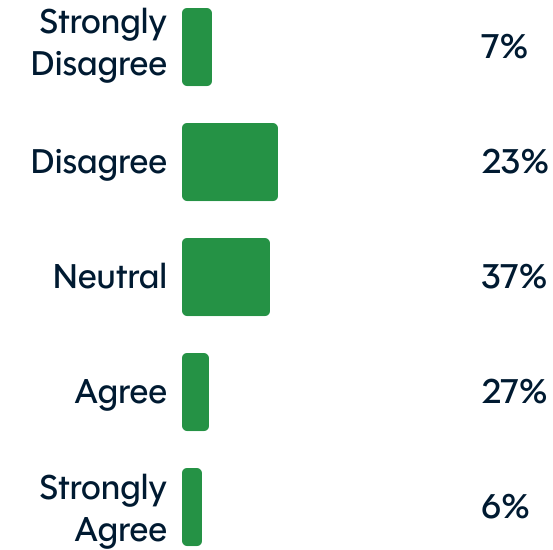
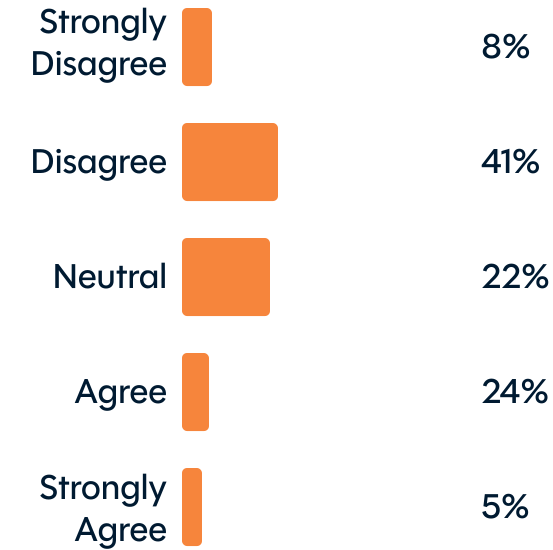
Only 1 in 3 have a clear, unified view of all client work.
This is a major operational problem, sure. But underneath the surface of inefficiency, frustration, and re-work, there lurks a darker threat: the risk of dropping an important ball. Because when you can’t see everything, it’s only a matter of time before you miss a crucial to-do.
Straight from the Source: Real Stories of Work That Slipped Through the Cracks
Surveytakers share personal accounts of dropped balls and the consequences that followed.
We reported dividends in our financial statement preparation; however, we missed setting up the T5 job in our PM system. Therefore, we missed filing the T5 slip for the client.”
During onboarding, a client did not get added to sales tax properly and returns were late.”
Lost a big client, got a bad review, and the client owed for being late.”
The client was late in filing with significant interest and penalties that we had to pay, and the client went elsewhere and took a few clients with them.”
A physical file was discovered years after cleaning out a former staff member’s office. We had to paper-file the return.”
Never received payment for services because I forgot to initiate billing.”
I was waiting on a client to upload information to Google Drive, which doesn’t notify me. I followed up with the client not realizing the work had been uploaded the week prior.”
Multiple orders from the same client were not all recognized/parsed correctly, so inventory was not reserved for the timeframes requested.”
I missed several clients’ tax returns that didn’t get processed by the tax deadline.”
I was using a paper checklist for year-end payroll and just forgot to file all the W-3s by the deadline.”
I missed filing a payroll report and I ended up covering the client’s penalty costs. I worked for free for them that month.”
The software for billing had an error and we didn’t realize it. It was many months before we billed the client, resulting in a large bill to them and frustration. It made us look bad.”
We lost a client of 8 years that provided our firm with $11,200 of annual recurring revenue.”
I forgot we had onboarded a new client and never completed the bookkeeping for 3 months.”
We missed a tax filing deadline for a client, so we had to cover the late fee and associated interest.”
Once we missed an important document, because we didn’t remind the client more than once to look for it. As a result, we filed a sales tax return late and had to pay a penalty.”
A file was saved locally versus cloud-based on Docusign and the employee went on vacation, so we had to reach out to the client and embarrassingly ask for access to their bank account again.”
The firm owner signed on a new client and thought she delegated the work to a bookkeeper, who never actually received the notice or work. After 12 months, I realized there was a client that no one was tending to. It was a rush job to get caught up before year-end.”
Solution Spotlight: Centralizing Your View Across the Firm
Denise May was running a growing, multi-industry bookkeeping firm—and her spreadsheets and outdated systems just couldn’t keep up. Excel showed her a client was “40% complete,” but it couldn’t tell her which tasks were done, what was left, or who was falling behind. Reminders lived in Outlook. Client details lived in her head.
Now that her firm runs on Financial Cents, every project contains its own tasks, due dates, and client details—and the whole team can see exactly where things stand. No more missed deadlines. No more mental load.
Read Denise’s full story →

Denise May, Founder, BookPro Inc. — Longwood, Florida
The Manual Mess of Month-End Close
Month-end close is one of the highest-stakes recurring workflows in any bookkeeping firm. It happens every month, involves multiple steps and team members, and has real consequences for clients when it goes wrong. So, how are firms managing it?
How does your firm currently manage month-end close workflows?
33%
Embedded in practice management software
28%
Spreadsheets we maintain manually
20%
Checklist in a document or notes app
7%
Other
6%
Separate month-end close tool
💡 Insight for Firm Owners Even among the 33% of firms who say month-end close is embedded in their practice management software, the broader data on tool fragmentation suggests many of these solutions are just lightweight checklists rather than automated, trackable, team-assigned workflows. There’s a big difference between having a passive checklist that sits in your system and having a system that actively enforces and tracks the checklist across team members.
💡 Insight for Controllers and Accounting Managers: Month-end close is where fragmented systems create the most downstream risk. When steps live in a spreadsheet, ownership is unclear. And without an audit trail, you can’t prove what was reviewed or when. If a step gets missed—a reconciliation, a report delivery, a client notification—the consequences fall directly on your team’s credibility.
What Firms Actually Want: Less Friction, More Focus
We asked firms: If you could wave a magic wand and fix one thing about how your tools work together, what would it be? And TBH, we weren’t all that surprised by their answers. 🪄
one place”
The TL;DR
Out of 261 bookkeeping firms surveyed:
- 9 in 10 want to run their firm on 4 tools or fewer—but less than half actually do.
- Half are not confident that nothing is falling through the cracks with their current systems.
- Only 1 in 3 have a clear, unified view of all client work.
- 70% manually re-enter data between tools at least a few times per week.
- Over half manage month-end close via spreadsheets, document checklists, or email threads.
The common thread running through the data is that small bookkeeping firms are capable of delivering excellent work, but they’re currently doing it despite their tools, not because of them.
The firms that will thrive and grow sustainably are the ones that stop stacking tools on top of broken workflows—and start consolidating around a single platform designed for what they do.
Most firms fall into 1 of 7 software “patchwork” patterns
We call them Patchwork Personas.
Complete our quick 1-minute assessment to find out which one might be holding back your firm—and how to fix it.







Ready to Simplify Your Stack?
Financial Cents is a practice management software built specifically for accounting and bookkeeping firms, offering a workflow-first approach to client management, task tracking, reporting, billing, proposals, month-end close, and more—all in one place. No magic wand necessary.
Kellie Parks, CPB, FCPB
Owner, Calmwaters Cloud Accounting
On average, firms save 56 hours per month & $19,200 every year with Financial Cents
Book your free demo today. Book a demo