Preparing accurate individual tax returns starts with collecting complete and well-organized information from your clients. The individual client tax organizer template is designed to help accounting and tax professionals streamline client intake by gathering everything needed, from personal details to income, deductions, credits, and payments, in one structured document.
Organized into four comprehensive sections, Personal & Dependents, Income, Deductions & Credits, and Payments & Refund, this template ensures no critical information is overlooked. It provides a clear structure to help you collect taxpayer and spouse details, filing status, dependent eligibility, multiple income sources, deductible expenses, tax credits, and payment history.
Whether you’re onboarding new clients or updating returning ones, this template standardizes your intake process and significantly reduces back-and-forth communication. Clients know exactly what information is required, and your team can confidently move forward with complete documentation.
Built in an easy-to-use excel and google sheet format, the template can be customized with your firm’s branding and shared digitally for secure completion or printed for in-person meetings. It’s a practical, professional tool designed to help your firm operate more efficiently throughout tax season and beyond.
If you are interested in the business tax organizer template, you can grab it here:
Free Business Tax Organizer Template (Excel & Google sheets)
Benefits of Using This Tax Organizer
a. Standardizes Client Intake
Create a consistent process for collecting tax information across all individual clients.
b. Reduces Errors & Missing Information
Structured fields help ensure you capture Social Security numbers, birth dates, filing status, dependent eligibility details, and more.
c. Saves Time During Tax Season
Minimize follow-up emails and phone calls by gathering complete information upfront.
d. Improves Client Experience
Clients appreciate a clear, organized document that tells them exactly what information is required.
e. Enhances Compliance & Documentation
Maintain proper documentation for dependents, disability status, and filing elections.
What’s Included in the Individual Tax Organizer Template
This Individual Client Tax Organizer Template is divided into four comprehensive sections to ensure you collect all information necessary to prepare an accurate and complete individual tax return.
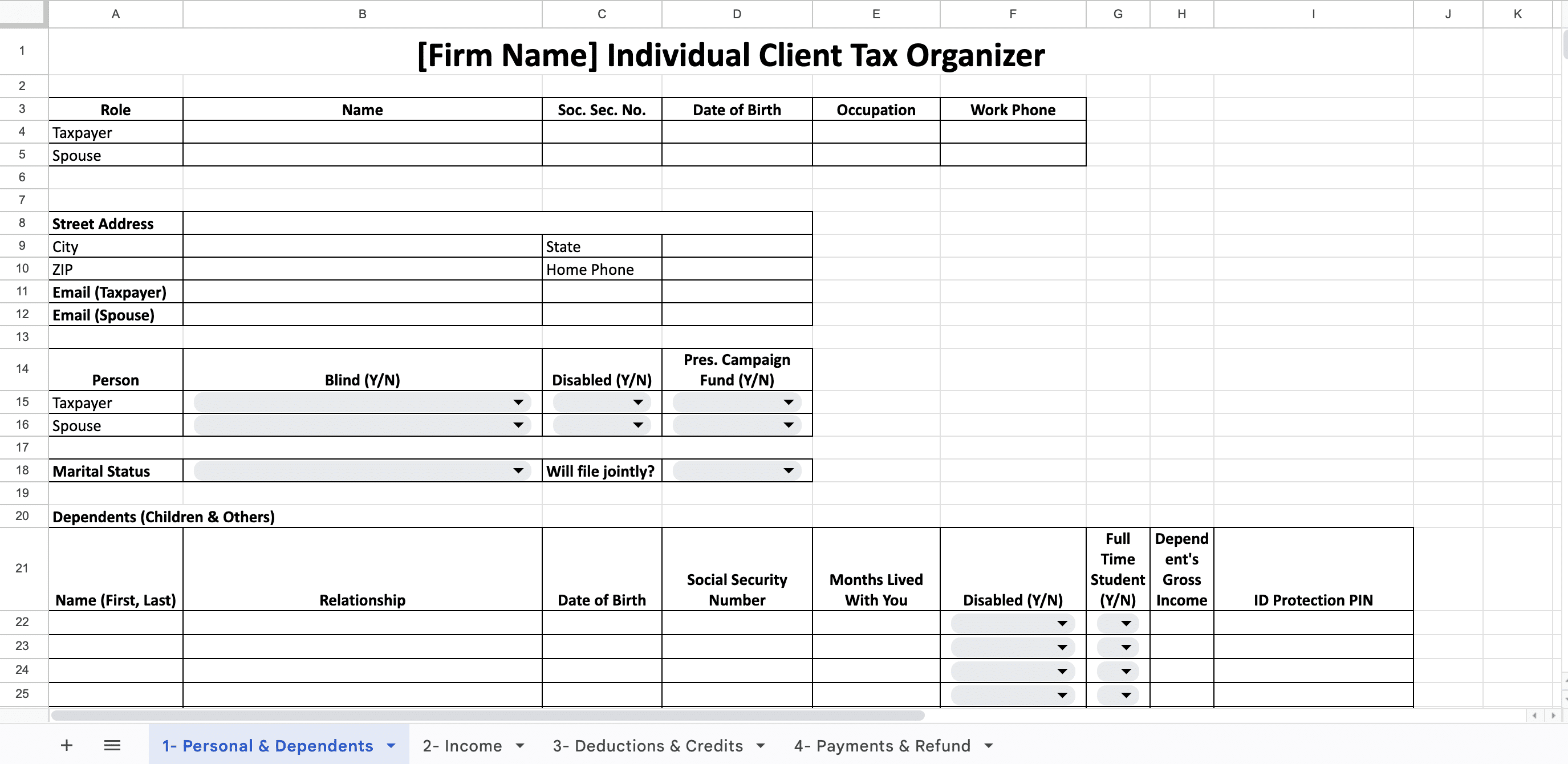
1. Personal & Dependents
This section helps you to capture the basic client information required to determine filing status and eligibility for credits and deductions.
- Taxpayer & Spouse Details
- Address Information
- Filing & Personal Status
- Dependents Information
This layout ensures you collect all critical details needed to determine filing status, credits, exemptions, and eligibility for tax benefits.
2. Income
With this section you can collect all potential sources of taxable and non-taxable income. It includes fields for your clients to report:
-
W-2 wages
-
1099 income (NEC, MISC, K, etc.)
-
Business or self-employment income
-
Rental income
-
Interest and dividend income
-
Retirement distributions (1099-R)
-
Social Security benefits
-
Capital gains and investment income
-
Other miscellaneous income
3. Deductions & Credits
This section gathers information necessary to maximize allowable deductions and tax credits, including:
- Medical & Dental Expenses
- Taxes Paid
- Interest Expense
- Casualty / Theft Loss (Federally declared disasters)
- Charitable Contributions
- Child & Other Dependent Care Expenses
- Moving, Employment, Business Mileage & Travel, Investment Expenses
- Other Deductions
- Education Expenses
- As a well a Questions, Comments & Other Information
4. Payments & Refund
This section collects information related to tax payments and refund preferences.
These four sections help you create a complete, structured tax intake system that helps your firm reduce back-and-forth communication, minimize errors, and improve efficiency during tax season.
How to Use The Template
Step 1: Add Your Firm Name & Branding
Customize the header with your firm’s name and logo.
Step 2: Send to Clients Before Tax Preparation Begins
You can share through your email or create a copy of the Google sheets and share with clients to help them fill it online and complete in advance.
Step 3: Review for Completeness
Verify required fields are filled before starting the return.
Step 4: Store Securely
Save the completed organizers in your document management or practice management system, like Financial Cents, for compliance and future reference.
Step 5: Update Annually
Use it each year to confirm any changes in marital status, dependents, or contact information.