

Many accounting firms struggle because their workflows aren’t consistent or efficient. For instance, someone enters the same data twice because the process is manual. Another team member uses the wrong figures because the firm didn’t collect the right documents during onboarding. Then you redo work that should have been right the first time. That wastes time and cuts into your margins.
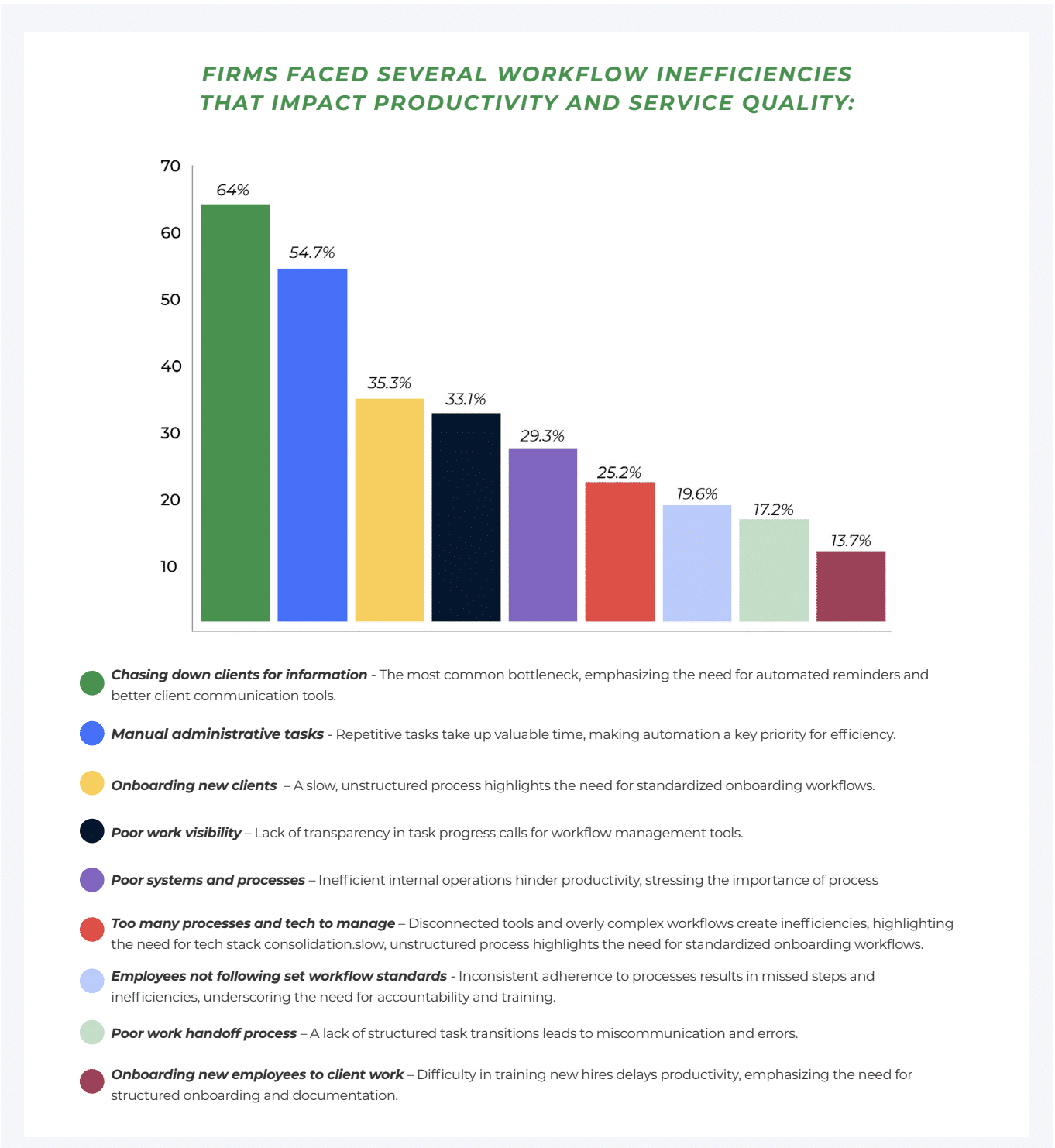
The 2025 State of Accounting Workflow & Automation report confirms this. Workflow inefficiencies rank as the leading challenge firms face. The top three bottlenecks are chasing clients for information (64%), manual administrative tasks (54.7%), and onboarding new clients (35.3%).
These issues slow you down, affect profitability, team morale, and client experience. If you want to grow and scale your firm, you need processes that run consistently and efficiently.
In this guide, we’ll break down accounting process improvement into simple, practical steps. You’ll see what to fix, how to fix it, and which tools can help you build workflows that support firm growth.
What Is Accounting Process Improvement?
Accounting process improvement means reviewing how your firm delivers services and then adjusting the steps so work moves faster, stays consistent, and produces fewer errors. You look at your current workflow, identify what slows it down or causes rework, and then fix those gaps to get better results.
It’s not about asking your team to work longer hours. And it’s not about hiring more staff to handle inefficiency. If the process is weak, adding more effort or more people won’t solve the root problem.
Instead, accounting process improvement focuses on removing unnecessary steps, reducing manual work, and building repeatable accounting workflows your team can follow every time. The goal is to create processes that are consistent, efficient, and able to scale as your firm grows.
Why Process Improvement Matters for Accounting Firms
When your processes are clear and consistent, performance improves across the board. Here’s what that looks like in practice.
Reduces Errors and Rework
When your team follows the same documented steps every time, fewer things slip through. You collect the right documents upfront, use the right source data, and run the same checks before you finalize work. That reduces avoidable mistakes and the time you spend fixing them, which means higher margins for your business.
Improves Turnaround Time and Deadline Compliance
Firms often miss deadlines because work stalls in the middle when they’re waiting on documents, or there’s no clear handoff process.
Strong processes allow you to get documents on time and know when deadlines are close, so you always hit client deadlines more consistently.
Increases Team Accountability and Morale
When ownership is unclear, tasks get delayed because people assume someone else is handling it.
Process improvement makes responsibilities clear, sets expectations, and reduces constant interruptions, which increases work productivity.
Enhances Client Experience
A consistent workflow, such as bookkeeping workflow, creates a consistent client experience. Clients can upload documents easily, receive updates on time, and know the progress of their project. This increases satisfaction and improves retention.
Creates Capacity for Growth Without Adding Headcount
When you remove bottlenecks and reduce manual admin work, you free up real time. That gives you room to take on more clients or do higher-value tasks.
And when you do hire, documented workflows help new team members get up to speed faster.
Common Signs Your Processes Need Improvement
It’s usually obvious that your processes need work. Here are some of the signs:
Work Tracked in Spreadsheets or Email
Emails and spreadsheets are not reliable systems for managing client work. Important details get buried in long email threads, and spreadsheets increase the risk of entering the wrong information or working from outdated data.
This setup leads to errors, missed tasks, and security risks. If you still manage work this way, it’s time to move to a centralized accounting workflow system that lets you organize information and manage tasks in one place.
Constant Follow-Ups With Clients
It’s inevitable that you’ll have to follow up with clients, but if you spend a large chunk of the week chasing documents, access, approvals, and answers, your process needs work. Frequent follow-ups usually mean you don’t have a structured document request list or didn’t inform clients of what you need on time.
Inconsistent Service Delivery
If the same service looks different depending on who handles it, you likely don’t have a standardized workflow.
That inconsistency affects quality, review time, and client experience. A repeatable workflow removes guesswork and sets a clear standard for every engagement.
Tasks Falling Through the Cracks
Missed steps and missed deadlines often point to weak workflow design. If you don’t use checklists, clear task ownership, and defined handoffs, tasks depend on someone remembering what to do next. A good process makes it clear what needs to be done, who owns it, and when it’s due.
No Visibility Into Workload or Bottlenecks
If you can’t quickly see what’s due per week in your firm, who’s overloaded, or the stage of each project, you’re operating without visibility. That makes it hard to plan capacity, set realistic deadlines, or fix bottlenecks. Process improvement starts with making work visible.
Busy Seasons Feel Chaotic Every Year
Busy season will always be busy. But if it feels unpredictable every time, you’re dealing with process issues. Good processes make the busy season more manageable because you’ve automated certain menial tasks and have repeatable workflows that save time.
You may be interested in:
Key Steps to Improving Accounting Processes (Step-by-Step)
Step 1: Identify High-Impact Processes
Start with the workflows that cause the most friction or consume the most time. You’ll see faster results when you improve processes that run frequently or affect many clients.
Prioritize processes that are repeated weekly or monthly, tied to filings or closes, high risk, and have a lot of friction.
Step 2: Document the Current Process
Before you fix anything, write down your current process. This includes how the workflow starts, each step, who does each step, and in what order, and the tools you use.
Step 3: Identify Bottlenecks and Waste
Now review the documented process and look for slowdowns, duplication, or unnecessary steps.
Based on our workflow and automation report, common bottlenecks include:
- Chasing clients for information
- Manual administrative tasks
- Onboarding new clients
- Poor visibility
- Poor systems and processes
Step 4: Standardize the Process
Standardizing your process means your firm runs the workflow the same way every time, with the same quality baseline, regardless of who does the work.
You can standardize with onboarding templates, month-end close checklists, tax preparation checklists, reconciliation checklists, and recurring task templates.
Step 5: Assign Clear Ownership
Missed deadlines and stalled work usually happen when no one owns the next step. That’s why every process needs clear accountability.
Assign a task owner for each step who is responsible for completing their assigned task, and a workflow owner who manages the process and ensures the team follows the standard workflow.
Step 6: Automate Where Possible
After you standardize, automate repetitive parts of the accounting workflow. This can include following up with clients to send docs, creating recurring tasks, automatically updating status, etc. This saves your team time and increases efficiency.
Step 7: Test, Measure, and Refine
Test the new workflow on a small set of clients or one service line, then adjust based on what you learn.
Track the turnaround time (start to finish), number of follow-ups required, rework rate, on-time completion rate, and team feedback. If the process works, roll it out firm-wide, train everyone on it, and review it regularly so it still works as your firm scales.
Tools That Support Process Improvement for Accounting Work
The right tools make your processes easier to follow and enforce. Below are some of them.
Practice Management Software
Accounting practice management software gives you one place to run and manage your firm. You can build repeatable workflows, automate manual tasks, assign tasks, track progress across every client, and keep everyone accountable.
Examples of the best accounting practice management software include Financial Cents, Karbon, and Canopy.
Workflow Automation Tools
Accounting workflow automation tools help you reduce repetitive admin work by triggering actions automatically based on rules. You can automate follow-ups, reminders, task creation, status changes, and simple handoffs so work keeps moving without someone manually handling it.
Financial Cents has built-in automation features that let you automate tasks like recurring workflows for services delivered on a schedule, task dependencies, client follow-ups, and due date reminders for projects and tasks etc.
Client Portals and Communication Tools
Accounting client portals give clients a secure and structured way to upload documents, respond to requests, and communicate with your team. This reduces back-and-forth emails and makes document collection easier.
Financial Cents’ client portal allows clients to:
- Upload and access documents securely in one place.
- View and complete client task/request lists
- Communicate with your team inside the portal, so messages stay tied to the engagement instead of getting lost in email.
Financial Cents also uses a passwordless login. Clients don’t need to create a username or remember a password. They enter their email address, receive a secure magic link email, and click the “Access Your Secure Portal” button to sign in.
Collaboration Tools
Accounting team collaboration tools help your internal team communicate and coordinate work without losing context in email threads. With software like Financial Cents, you can centralize updates, manage handoffs, and keep quick questions tied to ongoing work so projects don’t stall.
Reporting and Dashboard Tools
Reporting and dashboard tools help you track workflow performance and spot bottlenecks early. You can monitor due dates, turnaround time, overdue tasks, team workload, and recurring problem areas so you know what to fix and where to allocate resources.
Financial Cents provides a dashboard that shows what’s happening across your firm at a glance. It also offers reports such as time tracking, effective hourly rate, capacity management, client tasks, utilization report, etc.
Document Management Systems
Accounting document management systems help you store and organize client files consistently. They reduce time spent searching for documents and lower the risk of working from the wrong version.
Financial Cents has made it easy to keep your documents organized and accessible through two distinct types of file folders: Client Files and Project Files.
Client files are created by you or your team members, and its structure can be customized according to your firm’s preference needs.
Project files are automatically generated based on files uploaded to specific projects or client tasks. They are organized by project name and accounting period, which keeps storage consistent across engagements.
Time Tracking and Invoicing Systems
Time tracking and invoicing tools for accounting help you understand where your team spends time and how that time translates into revenue. You can track billable vs non-billable work, identify clients or services that cause overages, reduce write-offs, and invoice faster.
Financial Cents has built-in accounting time tracking inside the workflow tool, so your team logs time where the work happens. It also has billing and invoicing tool that let you invoice clients for billable time without exporting time entries into a separate system.
Examples of Accounting Process Improvement in Action
Below are four common workflows where small process changes create measurable improvements. For each one, we’ll look at what usually breaks and how to fix it.
Example 1: Client Onboarding
Some of the common mistakes accounting firms make during client onboarding are relying on email to collect documents, not having internal checklists, skipping opening balance review, and failing to assign clear ownership.
To fix this,
- Create a standardized onboarding checklist that covers access setup, required documents, scope confirmation, and a mandatory opening balance review.
- Collect documents through a secure client portal instead of email.
- Assign one onboarding owner to oversee the entire process and assign clear task owners for each step.
Example 2: Month-End Close
Month-end close usually breaks when firms manage it through spreadsheets, scattered communication, and inconsistent processes across team members.
You can improve this by:
- Using a practice management system to manage your firm and communication with departments.
- Building a standardized accounting close checklist template to maintain consistency and ensure you collect all the required information.
Example 3: Tax Preparation Workflow
Tax prep often slows down because document collection is disorganized and varies by staff member, and handoffs between prep and review are unclear.
To improve the process:
- Create a standard tax document request checklist for each type of return.
- Define clear stages such as intake, preparation, review, client approval, and filing
- Assign owners per stage and use a tool that shows the current status of every return so the team always knows what is in progress and what is blocked.
Example 4: Reconciliations
Reconciliation issues often happen when firms don’t reconcile accounts regularly, don’t have meticulous records, and don’t organize digital records. Over time, this creates inaccurate financial statements and delays reconciliations.
Resolve the issues in this process by:
- Setting a consistent reconciliation cadence and sticking to it.
- Keeping all records needed.
- Creating a standardized file structure for each client.
Best Practices for Sustaining Process Improvements
Improving a workflow once is not enough. If you want your processes to stay effective, you need to maintain them intentionally. These practices help you keep improving as your firm grows.
Schedule Regular Workflow Reviews
Review your workflows regularly, like monthly or quarterly, not until it begins to develop issues. During each review, look at where work stalled, which steps your team skipped or modified, which clients caused repeat follow-ups, etc. Then use what you find to adjust the workflow. Small, regular improvements prevent larger issues later.
Gather Feedback From Staff
Your team knows where processes break because they deal with the friction every day. If you want process improvements to stick, get input from the people doing the work. You can send an anonymous form to make it easy for them to share feedback.
Avoid Over-Customization
Standardize your workflows, but keep them simple. If you create too many variations, the process becomes difficult to maintain.
Build one core workflow that works for most clients, then add limited, controlled variations only when necessary. This keeps your processes consistent while still allowing flexibility
Document Processes Clearly
Your processes should not live in someone’s memory. Document them so everyone can access and follow them. This reduces training time, improves consistency, prevents missed steps, and makes onboarding new staff easier.
Update Workflows as Firm Grows
Your workflows must reflect how your firm operates today. As you add staff, services, and more complex clients, revisit your processes and update your workflows to reflect that reality.
Building Better Accounting Processes That Scale with Financial Cents
Improving your firm’s processes is not a one-time project. Your firm will continue to change. You’ll add new clients, new services, and new team members, and your workflows need to evolve with those changes.
An accounting practice management software like Financial Cents helps you improve and maintain your processes over time. Instead of managing work across multiple disconnected tools, you can run your workflows, client communication, automation, time tracking, billing, and reporting in one place.
Here’s how Financial Cents supports process improvement:
- Build and reuse standardized workflows: Create templates and recurring projects to save time and ensure our team follows the same structured process every time.
- Improve document collection and client experience: Use a passwordless client portal where clients upload documents, complete request lists, and communicate with your team through secure magic links.
- Track profitability and performance: Use reporting for time tracking, effective hourly rate, capacity management, client tasks, work insights, utilization/realization, revenue insights, AR aging, and more, so you can spot bottlenecks and margin issues early.
- Plan capacity with real visibility: Track workload and availability so you can assign work more evenly and avoid overload during busy seasons.
- Keep time tracking and billing in the same place: Track time inside the workflow tool and invoice based on billable work without exporting data into another system.
If you want to improve processes in your firm and keep those improvements in place, Financial Cents gives you the structure to do it.
Start a free trial today and see how it fits your workflows.
Share this article:



