
The beginning of the year should feel organized and in control, a fresh start with clear priorities and well-defined plans. But for many accounting firms, it does the opposite. Instead of clarity, January exposes the cracks in existing workflows that were easy to ignore during slower months.
Accounting processes that were “good enough” suddenly break under pressure, tasks get duplicated, handoffs are missed, and no one is quite sure who owns what. Instead of starting the year with clarity, teams are left trying to manage the chaos caused by rushed work and broken workflows.
This is often when firm owners and managers notice the same frustrations resurfacing: staff redoing work that should’ve been done once, missing deadlines because responsibilities weren’t clearly defined, and partners stepping in to fix issues that should’ve been caught earlier.
The good news? Broken accounting firm workflows don’t require a full overhaul or months of planning to fix. With the right approach, you can identify what’s broken and make fast, meaningful improvements that immediately reduce chaos, improve accountability, and help your firm start the year strong.
In this guide, we’ll walk through practical, quick-win strategies you can implement right away to fix broken workflows and regain control before busy season ramps up.
Signs Your Accounting Firm’s Workflows Are Broken
Tasks falling through the cracks
Work gets started, momentum fades, and nothing quite lands. When ownership is unclear, or tracking is spread across tools, tasks slip quietly from “in progress” to “forgotten.”
Team members are unsure who owns what
When responsibility is not obvious, work slows down. People hesitate, duplicate effort, or assume someone else has it covered, and progress stalls without anyone noticing right away.
Deadlines are missed or rushed
Deadlines do not usually explode. They creep up. What should be routine turns into a last-minute scramble, increasing stress and lowering the quality of the work delivered.
Repeated follow-ups with clients
The same documents get requested again and again. Not because clients are careless, but because requests are scattered, unclear, or easy to miss. Follow-ups become routine instead of the exception.
Duplicate or inconsistent work
The same task gets done twice, or done differently, depending on who touches it. Without a shared process, quality depends more on the individual than the system.
Too much manual tracking in spreadsheets
Accounting spreadsheets start as a quick fix and quietly become the system. Tracking work this way adds friction, hides context, and breaks the moment something changes.
Constant internal “status check” messages
Slack and email fill up with “Where is this at?” and “Any update?” Instead of moving work forward, your team spends time explaining where things stand.
Managers spending too much time assigning or chasing work
When managers are assigning, reassigning, and checking on tasks all day, there is little room left for planning, improvement, or growth.
Why Accounting Firm Workflows Break in the First Place
Most workflow problems are not caused by one bad decision. They build slowly, usually with good intentions.
Processes grew organically without being documented
What started as a quick workaround quietly became “how we do things.” Over time, those undocumented habits turn into fragile systems no one fully understands.
Reliance on individual memory instead of systems
When processes live in people’s heads instead of systems, everything works until someone is busy, out sick, or leaves. Then cracks appear, fast.
No standardized handoffs between team members
Work gets stuck in the middle when it is unclear when something is ready to move on or who is responsible next.
Dependence on spreadsheets or email
Inbox threads and tracking sheets take on more responsibility than they were ever designed to handle, making visibility and accountability harder.
Over-customization per client
Small customizations pile up until no two engagements look the same. Consistency disappears, and managing work becomes exhausting.
Too many disconnected tools
Information gets spread across systems that do not talk to each other, forcing teams to manually piece together context.
No post-year-end workflow review
Firms roll straight into the next cycle without fixing what clearly did not work, guaranteeing the same problems return.
Recommended:
How to Fix Broken Accounting Firm Workflows Fast (Step-by-Step)
Fixing workflows does not mean tearing everything down and starting over. In fact, the fastest improvements usually come from tightening what already exists, not reinventing it.
Step 1: Audit and identify your most critical broken workflows
Start with reality, not theory. Look at where deadlines are missed, where clients need repeated follow-ups, and where managers spend the most time chasing updates. These are your pressure points. Focus on workflows that affect the most clients or consume the most team hours, not edge cases that rarely occur.
As Nick Boscia, CPA, puts it:
The first thing I had to do was identify where our workflow was breaking down. If you don’t pinpoint the problem, you can’t fix it"
Before workflow tools, templates, or automation, clarity comes first. You cannot improve what you have not clearly identified.
Step 2: Document your workflows, even imperfectly
Do not wait for the “perfect” process. Write down how work actually happens today, including handoffs, tools used, and decision points. Even rough documentation creates shared understanding and exposes gaps. You can refine later, but visibility comes first.
We cover how to document accounting workflows here.
Step 3: Standardize with workflow templates
Once workflows are documented, turn them into templates. Templates reduce variation, set clear expectations, and make repeatable work easier to manage. You can still allow flexibility, but the core steps should look the same every time.
I create templates in spreadsheets and apps like Financial Cents that when you open them up, they’re just ready to go"
Kellie Parks, CPB, FCPBStep 4: Assign clear ownership and deadlines
Every task should have one owner and one due date. This alone removes a surprising amount of friction and prevents work from stalling in limbo.
Step 5: Centralize all work in one system
Scattered tools create blind spots. Centralizing tasks, documents, communication, and deadlines in one place gives your team a shared source of truth and reduces context switching.
Step 6: Eliminate manual tracking and follow-ups
Manual reminders and spreadsheet trackers drain time and introduce errors. Automating task tracking and client follow-ups helps work move forward without constant intervention. But automation works best when it is intentional.
As Heather Satterley, CPA, explains:
When we think about automation, we have to go further and analyze the process itself. The goal is to identify real opportunities to streamline work and automate with a data mindset."
Automation should remove friction, not blindly speed up broken processes. When you automate the right steps, efficiency improves without compromising quality or client experience.
Step 7: Add visibility for managers
Managers should not have to chase updates. Real-time visibility into workload, task status, and upcoming deadlines allows leaders to spot issues early and support the team proactively.
Step 8: Fix client-side bottlenecks
Many workflow delays do not start with your team. They start with clients who are unsure where to upload documents, what is outstanding, or what happens next. Replace scattered email requests with a structured client portal for accounting firms that clearly shows what is needed and when. Set expectations during onboarding about how requests, uploads, and communication will work.
When clients know exactly where to go and what is expected from day one, follow-ups drop, and work moves forward with far less friction.
What Not to Do When Fixing Workflows
Fixing workflows is about removing friction, not creating a new kind of chaos. These are the mistakes that slow teams down and quietly undo good intentions.
Don’t redesign everything mid–busy season
Busy season is for execution, not experimentation. Large workflow changes under pressure usually confuse people and break muscle memory. Stabilize first. Improve when the pace slows.
Avoid over-customizing workflows
Too many exceptions weaken the system. When every client has a slightly different process, nothing scales. For example, if tax work follows one process for sole traders, another for partnerships, and five more variations based on small preferences, tracking quickly becomes chaotic. Standardize the core workflow, then allow limited flexibility where it genuinely adds value.
Don’t ignore team feedback
Your team lives inside the workflow every day. If something is breaking, they already know where. Ignoring their input means you risk fixing symptoms instead of root causes.
Don’t skip documentation
If changes are not written down, they are temporary. Undocumented processes fade quickly, and teams fall back into old habits without realizing it.
Don’t choose tools before fixing processes
Software should support clarity, not replace it. Buying accounting software before defining workflows often locks in bad processes and makes them harder to change later. Automation, in particular, needs restraint.
As Heather Satterley, CPA, puts it: “We don’t automate for the sake of automation. The goal is to increase efficiency without compromising the effectiveness of our processes, the quality of our services, or the relationships we have with clients.” When automation is layered on top of broken workflows, inefficiency just moves faster, and mistakes become harder to unwind.
Don’t treat client delays as “normal”
Late documents and missed responses are usually signs of unclear requests or poor visibility. Accepting them as normal guarantees that the same delays keep happening.
How Workflow Software Helps You Fix Workflows Faster
Once your processes are clear, accounting workflow software helps you put them into motion without adding more manual work.
Here’s what that looks like in practice.
Pre-built workflow templates
Workflow templates give you a reliable starting point for common engagements like tax, bookkeeping, or payroll. For instance, in Financial Cents, you can start with ready-made workflow templates for recurring work like individual tax returns, monthly bookkeeping, or payroll runs. Each template includes the core tasks, deadlines, and handoffs your team needs, so work starts in a familiar structure every time. You can then adjust details for specific clients without rebuilding the entire process.
Instead of rebuilding the same process each time, your team starts with a proven structure that keeps work consistent while still allowing adjustments where needed.
Automated task creation
As work progresses, tasks are created automatically, removing the risk of missed steps. For example, once a client uploads required tax documents to their client portal, the next review or preparation task is created without anyone needing to set it up manually. This workflow automation saves time and keeps projects moving without someone having to remember what comes next.
Client reminders and portals
Automated client reminders and portals replace long email threads with a single, clear place for action. Clients can log in to see exactly which documents are outstanding, what is due next, and where to upload files. If something is missing, polite reminders go out automatically, so work keeps moving without your team repeatedly chasing responses.
Deadline reminders
Automatic deadline tracking keeps work visible and prevents surprises. In Financial Cents, deadlines are tied directly to projects and tasks, so nothing lives in a separate spreadsheet or inbox. As due dates approach, reminders surface the work that needs attention, even when multiple projects are running at once. This makes deadlines harder to miss and far easier to manage without last-minute scrambling.
Team workload visibility
Real-time visibility into who is working on what helps managers balance workloads, spot bottlenecks early, and step in before small issues become bigger problems.
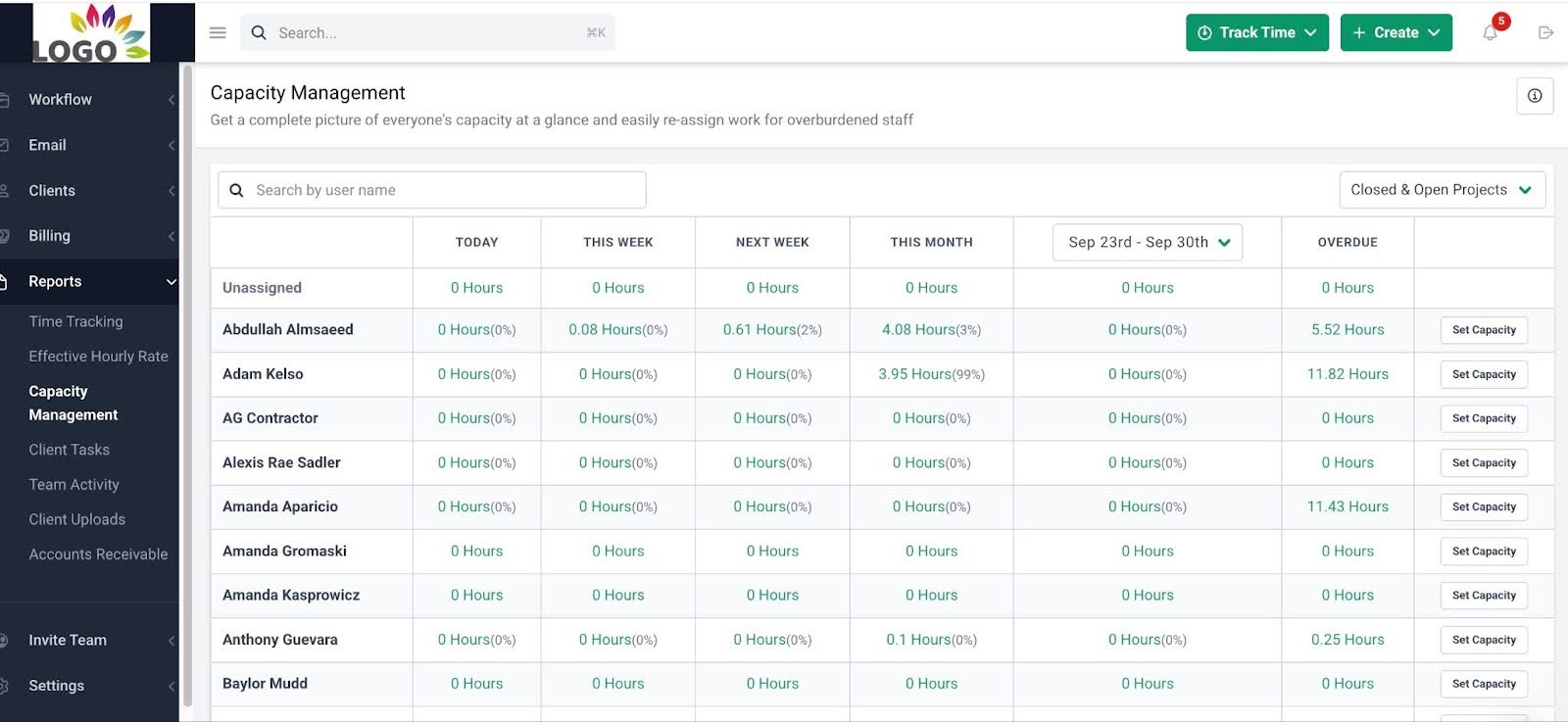
In Financial Cents, managers can see active projects, task ownership, and due dates across the entire team in one view. During the busy season, this becomes especially valuable. Instead of reacting after deadlines slip, you can spot overloaded team members, stalled work, or uneven capacity early and redistribute tasks before pressure builds.
These capabilities of workflow software matter in theory. What makes the difference is how they come together in one system.
How Financial Cents Helps Firms Fix Broken Workflows Quickly
Fixing workflows is faster when the system you use is designed around how accounting work actually happens, not generic project management software.
Ready-made workflows for tax, bookkeeping, payroll, and close
Financial Cents includes proven workflow templates for common accounting services, so you are not starting from a blank slate. In addition to generic templates, you also get access to popular workflows shared by a global community of accountants and CPAs working across different industries. These workflows reflect real engagement structures used in practice and give your team a consistent, reliable starting point every time.
Workflow management built for accounting teams
Tasks, deadlines, and ownership live in one place inside one workflow management system. Everyone knows what they are responsible for, what comes next, and where work stands without constant check-ins.
Recurring task automation
Ongoing work like monthly bookkeeping, payroll runs, or quarterly filings can be automated on a schedule, removing repetitive setup and reducing missed steps. If you are unsure what to automate first, firms like Nayo Carter’s have used Financial Cents to streamline recurring work and free up time by letting routine tasks run automatically.
Centralized client communication
In Financial Cents, all client messages, requests, and updates are tied directly to the work being done. Conversations live alongside tasks and projects, so context is never lost across email threads, inboxes, or disconnected tools.
Automated client requests and reminders
Instead of chasing clients manually, Financial Cents replaces follow-ups with structured client requests and automated reminders. Clients can clearly see what is needed and when, while your team avoids repeated chasing and unnecessary back-and-forth.
Native billing and payments
Billing and payments are built into Financial Cents, allowing firms to invoice and collect payments without switching systems. This reduces administrative friction and helps firms get paid faster with less effort.
Inbuilt month-end close feature
Financial Cents’ month-end close feature organizes recurring close tasks into a clear, repeatable process. Review tasks, transaction checks, and client requests live in one place, making progress easy to track and issues easier to catch before they pile up.
Capacity management and planning
With real-time visibility into workloads, Financial Cents helps firms understand team capacity, rebalance work proactively, and plan ahead. This makes it easier to scale without overloading staff or burning out the team.
Start the Year With Systems That Actually Support Your Team
The start of the year is the best time to reset how work flows through your firm. Pressures are lower, priorities are clearer, and small improvements are easier to implement without disrupting client work. You do not need a full overhaul to see results. Fixing a few broken workflows early can prevent missed deadlines, reduce manual follow-ups, and keep the busy season from turning into controlled chaos.
The firms that stay calm under pressure are rarely working harder. They are working with systems that support their team instead of slowing them down. If you want workflows that are clear, repeatable, and built for how accounting work actually happens, it’s worth seeing Financial Cents in action. You can book a demo or start a free trial and make the choice for your firm before the workload ramps up.