
Many accountants know that email is not secure for file sharing. But some don’t know how easy it is for anyone with basic technical skills and interest to intercept, read, or manipulate email content.
Most email systems are not encrypted end-to-end, and their contents often travel across multiple servers, with each stop increasing your data exposure.
Cybercriminals understand this. That is why they have intensified their efforts to target accounting firms that share sensitive financial information by email. 91% of cyberattacks begin with email, with an average of 3.4 billion phishing emails sent by cybercriminals every single day.
Clients often know this, and they expect their accountants to deploy communication tools that meet the security needs of the accounting industry.
More and more firm owners are becoming aware of the risks of relying on just emails, and they are choosing not to wait for a costly data breach that could cost their clients a fortune and damage their reputation before switching to a client portal with the necessary security infrastructure for accounting data.
In this article, we discuss how client portals provide better security, stronger compliance, and a more streamlined client experience than emails.
Why Is Data Security Crucial for Accounting Firms?
Accounting firms need strong data security systems because they are prime targets for cybercrime, given the sensitive data they handle. The W-2 contains a Social Security number, exposing the possibility of identity theft. A financial statement exposes a company’s strengths and vulnerabilities. Tax return schedules not only paint a clear picture of financial activities, but also contain data that can be used for nefarious activities.
That is why the financial services sector suffers the second-highest losses from cybercrime incidents. Attackers gain access to firms that use email to share sensitive data through tactics like ransomware, credential harvesting, and email-based data theft.
These risks have informed regulators’ decisions to require firms to adopt stricter security practices. For instance:
- SOC 2 requires firms to demonstrate controls around access, integrity, and confidentiality.
- IRS Publication 4557 mandates a written information security guide (WISP), risk assessments, and secure methods for sending and receiving taxpayer data. You can get a free WISP template here.
- GDPR takes it even further. It requires encryption, consent-based data processing, 72-hour breach reporting, and financial penalties for companies.
Outdated communication methods (such as email) undermine the security of your client information and compliance with these standards. Besides the lack of encryption, email lacks built-in access controls and audit trails, denying firms visibility into who viewed a document or when.
The Problem with Email for Client Communication
Between reviewing tax documents one moment, chasing down expense reports the next, and juggling dozens of client conversations, accounting firm owners and managers depend on fast, reliable communication to keep their practices running smoothly.
But when that communication channel is email, everyday actions communication becomes a threat to client data.
Here’s what makes email bad for client communication:
-
Email is vulnerable to phishing and spoofing
Phishing attacks often mimic legitimate emails, such as urgent client requests or official IRS notices, to mislead accountants and clients into clicking malicious links or sharing sensitive credentials.
These messages can be so convincing that even experienced practitioners can fail to detect them.
With spoofing, attackers use email addresses that look similar to impersonate firms or clients, hijack ongoing conversations, and trick staff into sharing personal information or approving fraudulent transactions.
-
Lack of automatic encryption
Most email platforms do not provide end-to-end encryption, which means unauthorized users can access messages as they travel across multiple servers or are stored in a readable and unprotected format.
While some email providers allow manual encryption of email content, it usually requires accountants and clients to manually configure additional tools or settings, which many never do because of the time it takes.
-
Email attachments are stored unsecured on multiple devices
From the sender’s device to the recipient’s device, email servers, and synced devices, email attachments instantly multiply the number of places where sensitive client files are stored.
Each additional location becomes a potential source of security risk. If one device is compromised (lost or infected with malware), attackers can gain access to the attached financial information.
The fact that some firms have Bring-Your-Own-Device (BYOD) policies and clients use personal devices can make things worse. It means that a single file share can eventually expose all other devices to a data breach.
-
Human error (such as sending documents to the wrong recipient)
When accounting firms use it for client collaboration, they are one deceptive attachment away from exposing their clients’ financial records to cyber criminals, often without realizing it.
A data breach doesn't always involve a malicious hacker trying to infiltrate a firm. It can simply be a mistake, like accidentally emailing the wrong document or uploading the wrong file to a client’s folder. It means that information was shared with an individual who was not authorized to see it, and it happens very frequently."
Brad D. Messner, MBA, EAThe stress of busy accounting periods, such as tax season, makes it more likely that your team members will mistype an email address, leading them to send sensitive client information to the wrong person.
Once sent, the exposure can open the firm to potential data breach notifications, compliance issues, and legal consequences.
By contract, any action performed within the client portal is targeted to the related client. There’s no need to type or mistype email addresses.
-
No expiration, access controls, or document recalls
Once you send a document by email, you lose control over it. The file sits in the recipient’s inbox for as long as they choose to keep it, and there is no built-in system to expire access, limit downloads, or remotely delete the file.
This makes it impossible to limit how widely and how long sensitive information is stored, which is a core principle of data security and privacy standards.
-
Poor Audit Trail
Email offers little to no visibility into what happens to a document (who accessed it, when they opened it, whether it was downloaded, forwarded, printed, or shared), once it leaves your outbox.
This lack of traceability becomes a major challenge in the unfortunate event of a data breach. You can’t reliably reconstruct what happened, prove due diligence, or demonstrate internal controls.
-
Regulatory Compliance Challenges
Regulatory frameworks (like SOC 2, IRS Publication 4557, and GDPR) require accounting firms to maintain strong data protection practices that standard email systems do not provide.
To achieve compliance, firms will need to rely on third-party encryption tools, secure file-transfer add-ons, or monitoring solutions. Not many firms can fully implement or maintain this due to the complexity of the setup.
This makes it difficult for firms to manage client data in line with regulatory requirements, which can lead to financial penalties, loss of client trust, and potential issues with cyber-insurance claims.
Security Advantages of Using a Client Portal for Accounting Firms
First, what is an accounting client portal?
An accounting client portal is a cloud-based platform where clients can communicate with accountants, provide information, share documents, sign forms, and track projects.
Instead of relying on email threads, the client portal centralizes all client tasks, document requests, and messages, making it easier and more convenient for clients to collaborate with their accountants.
The security benefits of the accounting client portal software, like Financial Cents, include:
-
Access Control & Authentication
Financial Cents uses secure magic link authentication to simplify client access without compromising security.
This gives your clients a one-time secure link to enter their portal without passwords or account creation.
Financial Cents also uses role-based access control (RBAC) to ensure that only authorized users (whether clients or staff) can view, upload, or download specific documents.
You can set granular permissions on clients, documents, and internal team data, so that each person only sees the information that is relevant to their role or engagement. This reduces unnecessary exposure and supports data-minimization requirements.
-
Centralized Document Management
Financial Cents’ client portal organizes all files in one secure location to eliminate the overwhelm of the email inbox.
Every document a client uploads is automatically stored in the Files section of the client profile, where authorized team members can instantly find what they need.
Clients also get a complete view of all documents your firm shares with them, whether or not they are tied to an active project.
This centralized structure reduces version control issues and accidental exposure.
-
Email Mistakes Prevention
Because clients no longer have to type or remember your firm’s email address, the risk of sending sensitive information to the wrong person is significantly reduced.
Financial Cents allows clients to upload files directly into their secure portal, and your team shares documents from the same controlled environment, which eliminates incorrectly addressed emails, which is one of the most common and costly human errors in accounting communication.
-
End-to-End Encryption
Financial Cents protects client data by using industry-standard Transport Layer Security (TLS) to encrypt data while it moves between your clients and the portal. It also encrypts stored files at rest using AES-256-bit.
This makes Social Security numbers, tax returns, and bank documents unreadable to attackers who manage to intercept network traffic or access storage.
-
Multi-Factor Authentication (MFA)
Financial Cents combines passwordless access with multi-factor authentication to strengthen the security of your client data.
Instead of relying on passwords, which can be stolen and often reused, the portal uses secure magic links that expire every 30 days. When the link expires, the system requires your clients to verify their identity with a six-digit code sent to their email or phone.
This extra layer of authentication ensures that even if a link manages to be compromised, it can’t be used to access the portal.
-
Reduction of Fraud & Impersonation Attempts
Financial Cents reduces your firm’s exposure to data breaches by minimizing your use of email, the most common entry point for business email compromise (BEC), in day-to-day client communication.
It does this by:
- Enabling clients to only access the portal through a secure magic link rather than usernames and passwords, which denies attackers the chance of stealing login credentials.
- Centralizing all communication happens inside the branded portal, which makes spoofed email addresses, fake IRS alerts, and look-alike domains ineffective.
- Triggering verification prompts once it senses any unusual access. Plus, the audit trail feature records every action with timestamps and user IDs.
-
Secure Document Requests & Storage
Financial Cents makes client data collection more secure than email. Instead of attaching sensitive files to inbox threads, accounting firms send branded requests that direct clients to upload documents inside the portal.
These uploaded files are stored in the client profile or related project, depending on their purpose.
All stored files are protected by Financial Cents’ SOC 2 Type I-certified security system, which ensures adequate control of data handling, access, and storage.
-
Secure Communication With Clients
The client portal encrypts all conversations so that tax questions, financial clarifications, and other sensitive messages stay out of email.
Instead of following conversations across inboxes, the Client Chat section in Financial Cents consolidates all communication in a secure location and organizes messages into clear, topic-based threads. This reduces miscommunication and prevents the common email mix-ups that contribute to data leaks.
Financial Cents also gives firm owners and managers granular control over who can view or participate in each client conversation, both on the firm’s team and the client’s team.
Every message is automatically time-stamped and tied to a specific user, creating a reliable audit trail that strengthens accountability and supports compliance requirements.
Beyond Security: The Operational Benefits of Accounting Client Portals
While security is the primary reason firms move away from email, client portals also deliver several other benefits that go beyond compliance and security.
They include:
a. Better team collaboration
Effective accounting team collaboration starts with every team member having access to the same set of information, and a client portal makes this easy.
Tools like Financial Cents ensure everyone works from the same centralized view, so tasks, client files, and project updates are visible to all authorized persons.
Team members can tag colleagues, leave internal notes, or @mention someone directly in a comment to keep questions, clarifications, and feedback organized within the context of the work, reducing miscommunication and ensuring that important details aren’t lost in scattered emails.
-
Centralized hub for documents
The client portal centralizes all client uploads, shared documents, and signed forms in one organized location.
This keeps teams and clients from scattering files across inboxes, personal devices, and third-party apps, saving them time they’d otherwise spend searching for the latest document version.
-
Clear task requests and reminders
Client portals enable firms to send structured document requests and task lists, instead of relying on unclear emails. This tells clients exactly what is needed and when it’s due, reducing confusion and mistakes.
Automated reminders eliminate the need for manual follow-ups, keeping clients on track and encouraging faster responses to ensure deadlines are met consistently.
-
Each client has their own organized workspace
Accounting client portals provide a dedicated workspace for each client, so that collaboration with one client doesn’t overlap with another.
Having individual workspaces also allows firms to manage multiple clients efficiently, as each client’s communications and documents are neatly organized in one place. Teams can quickly access the right files, track outstanding tasks, and maintain a complete record of interactions for each client.
This also gives clients complete visibility into what’s expected, what’s been submitted, and what’s in progress, improving transparency and client experience.
-
Enhanced Client Experience
The top client portals provide a seamless, convenient way for clients to collaborate with your firm without the need to visit your office or wait for your email notifications.
This gives your clients self-service capabilities, such as checking the status of requests or submitting files on their own schedule, empowering them to stay engaged without disrupting their core business operations.
-
Faster client response time
The process of remembering email addresses, drafting messages, and attaching files makes email more stressful for accounting clients (who have their core business operations to attend to).
With a client portal, everything they need is in one place. A single click lets clients view requested documents and upload files directly, eliminating the friction of email.
This encourages clients to respond quickly. For accounting teams, this means faster project completion, smoother workflows, and the ability to take on more work without increasing non-billable time.
Comparing Email vs. Client Portals
| Feature | Client Portal | |
| Encryption | Lacks automatic encryption and is therefore vulnerable to data breaches. | End-to-end encryption protects data in transit and at rest. |
| Access Control | Anyone with access to the inbox can view messages and download attachments. | Granular permissions enable firms to control who can see, upload, or download a document. |
| Audit Trail | No ability to track who read the mail or downloaded files. | Activity logs track every document upload, download, and message. |
| Compliance | Relies on add-ons to meet standards certifications, like IRS Pub. 4557, SOC 2, GDPR). | Designed to meet industry compliance standards with secure storage, controlled access, and breach reporting. |
| User Experience | Risk of lost attachments, long email threads, and confusion over document versions. | Centralized workspace with clear task requests, notifications, and a modern design for clients. |
How to Transition Clients from Email to an Accounting Portal
I. Explain the “why” clearly
Transitioning your clients from email to a client portal solution will change how they work in some ways, so explaining why the switch is necessary can open them to change more quickly.
This is where you show them how moving away from insecure, cluttered email threads to a centralized client portal protects their sensitive financial information, reduces communication delays, and ensures smoother collaboration.
When they see that a portal directly supports their desire for data security, faster responses to questions, and timely and accurate deliverables, they’ll be more willing to make the transition.
Here’s Financial Cent’s email template to help you do this:
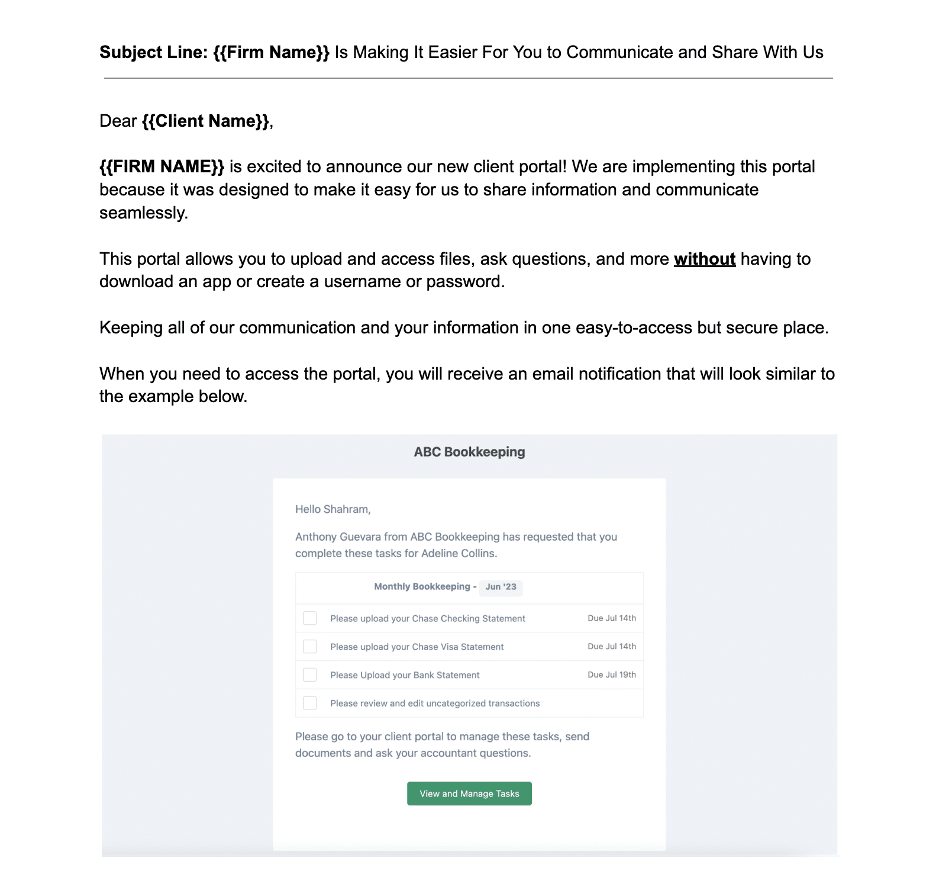
II. Provide step-by-step onboarding instructions
This step allows you to show your clients what they’ll need to do to be ready for collaboration in the new system.
Many traditional client portals require users to create accounts, manage passwords, or set up usernames, which can slow client adoption, but Financial Cents eliminates this friction.
Clients don’t need to create accounts or remember login details. They only have to click a secure magic link sent to their inbox and enter the six-digit code sent to their phone.
This short help article shows exactly what your clients need to do to get on board with client portals like Financial Cents.
III. Demonstrate ease of use
A quick demonstration can remove the fear your clients might have of adding one more tool to their tech stack.
You can do this by recording a short screen-share video to walk them through the key actions they’ll take, such as checking off a client task, responding to a message, or uploading a document.
If you’re using Financial Cents, you don’t have to lift a finger. The platform already includes a short tutorial video showing clients exactly how to access their portal, respond to requests, and upload files.
IV. Address client concerns about logins and passwords
Some clients may hesitate to adopt a new system simply because they assume it’ll come with yet another username and password to create and maintain. This step gives you the chance to address those concerns early.
Common questions and concerns revolve around;
- Belief that portals are complicated to use.
- Fear of losing access if they forget a password.
- Juggling multiple accounts.
Once you understand their specific fears, you can explain how portals like Financial Cents eliminate these pain points with passwordless authentication.
V. Offer support during first submissions
Firms serving clients in particularly low-tech industries or age brackets may need to provide extra guidance when their clients start using the portal.
Encourage your team to be available during a client’s first few uploads or messages in the portal because a simple “I see the document you uploaded, and it looks perfect” can go a long way in reassuring clients that they’re doing it right.
This step will also help your team identify and correct mistakes early, keeping their projects moving forward.
How Financial Cents Client Portal Protects Your Firm
In an industry where a single data slip can cost millions and erode trust overnight, Financial Cents’ client portal provides data security features that not only protect your clients’ information but also improve your team’s efficiency, freeing your staff to focus on delivering quality service.
Its client portal features include:
-
Bank-level secure client portal
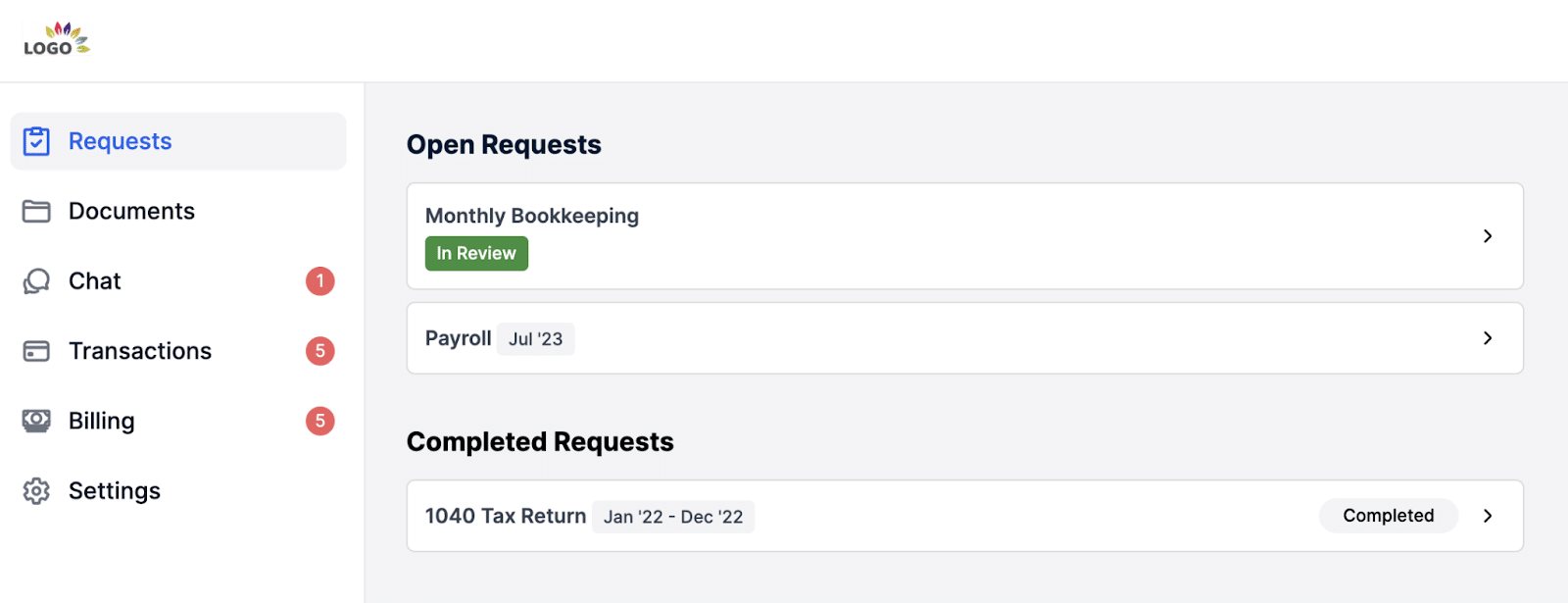
Financial Cents uses secure magic link and multi-factor authentication to protect client data without requiring passwords.
This passwordless design encourages client adoption and keeps messages, sensitive files, and tasks away from insecure email inboxes.
-
Encrypted file sharing
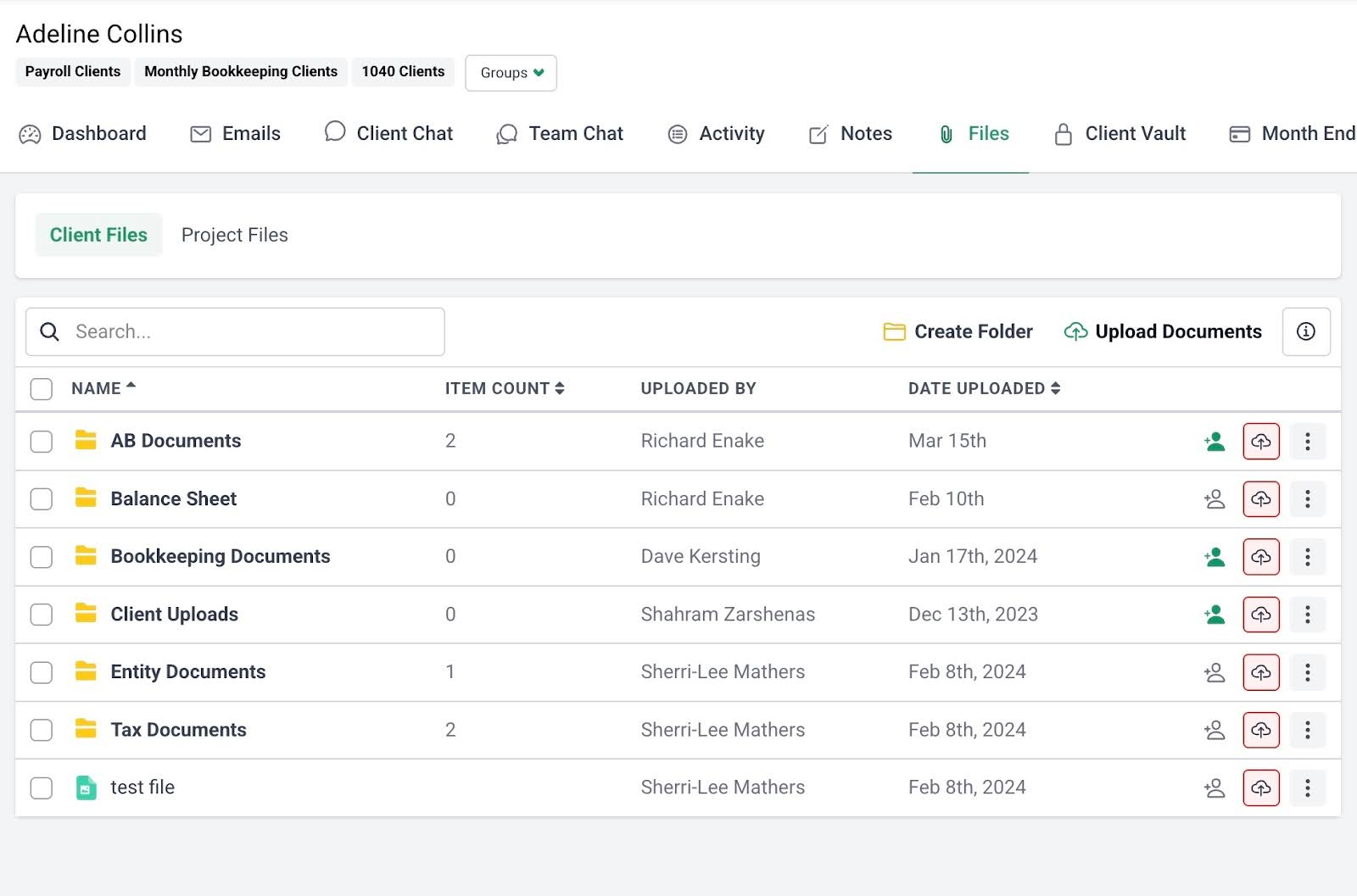
Financial Cents protects every uploaded or shared document with TLS and AES-256 encryption, securing data both in transit and at rest.
This converts financial information into unreadable code to prevent unauthorized access and strengthen compliance with security requirements, like IRS Pub. 4557 and GDPR.
-
Automated client document requests
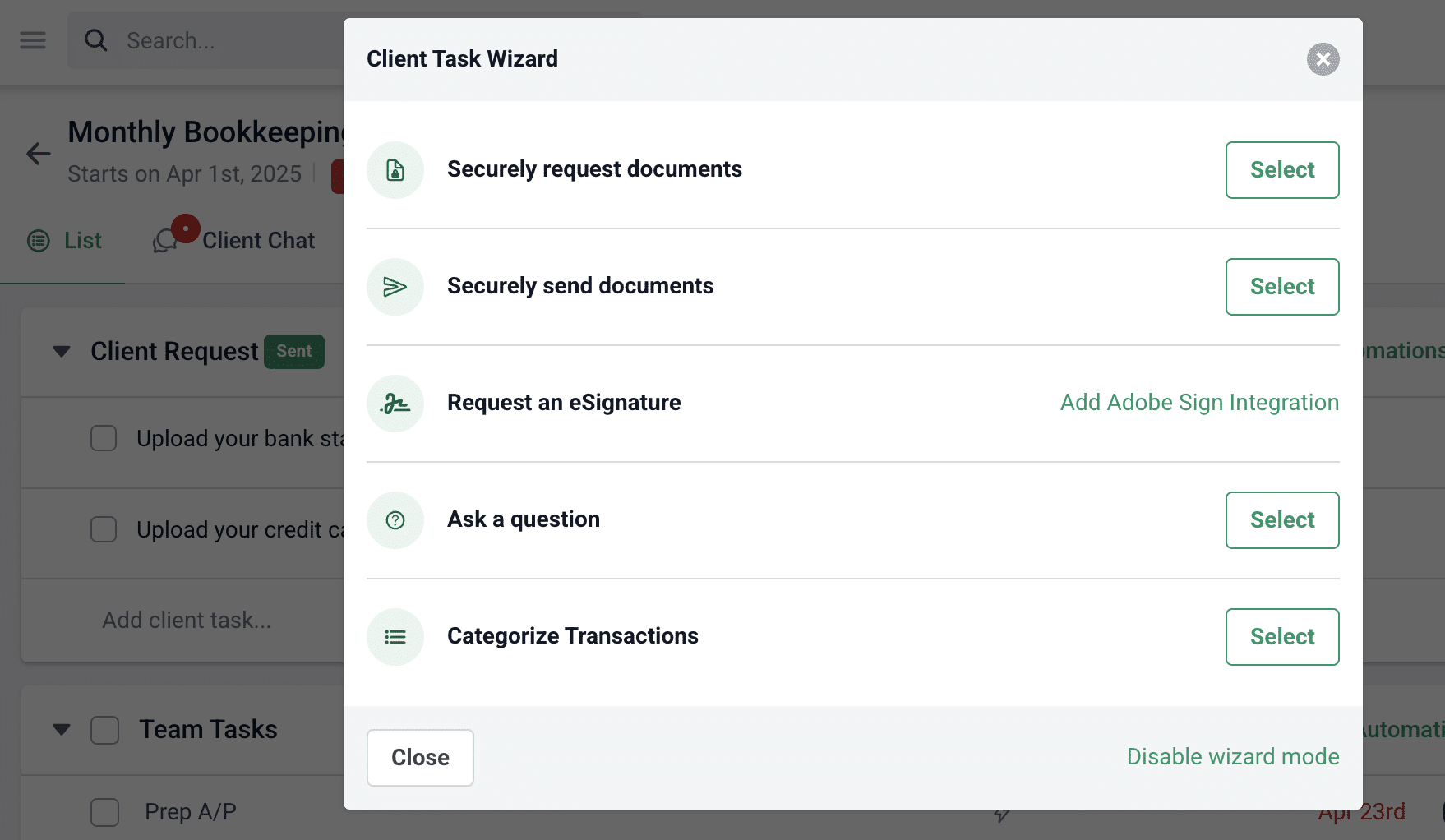
Financial Cents allows firms to automatically request client documents with clear instructions about which documents are needed and when, reducing missed submissions and workflow delays.
Its automated reminders eliminate manual follow-ups while saving staff time and improving team capacity.
-
Centralized client communication
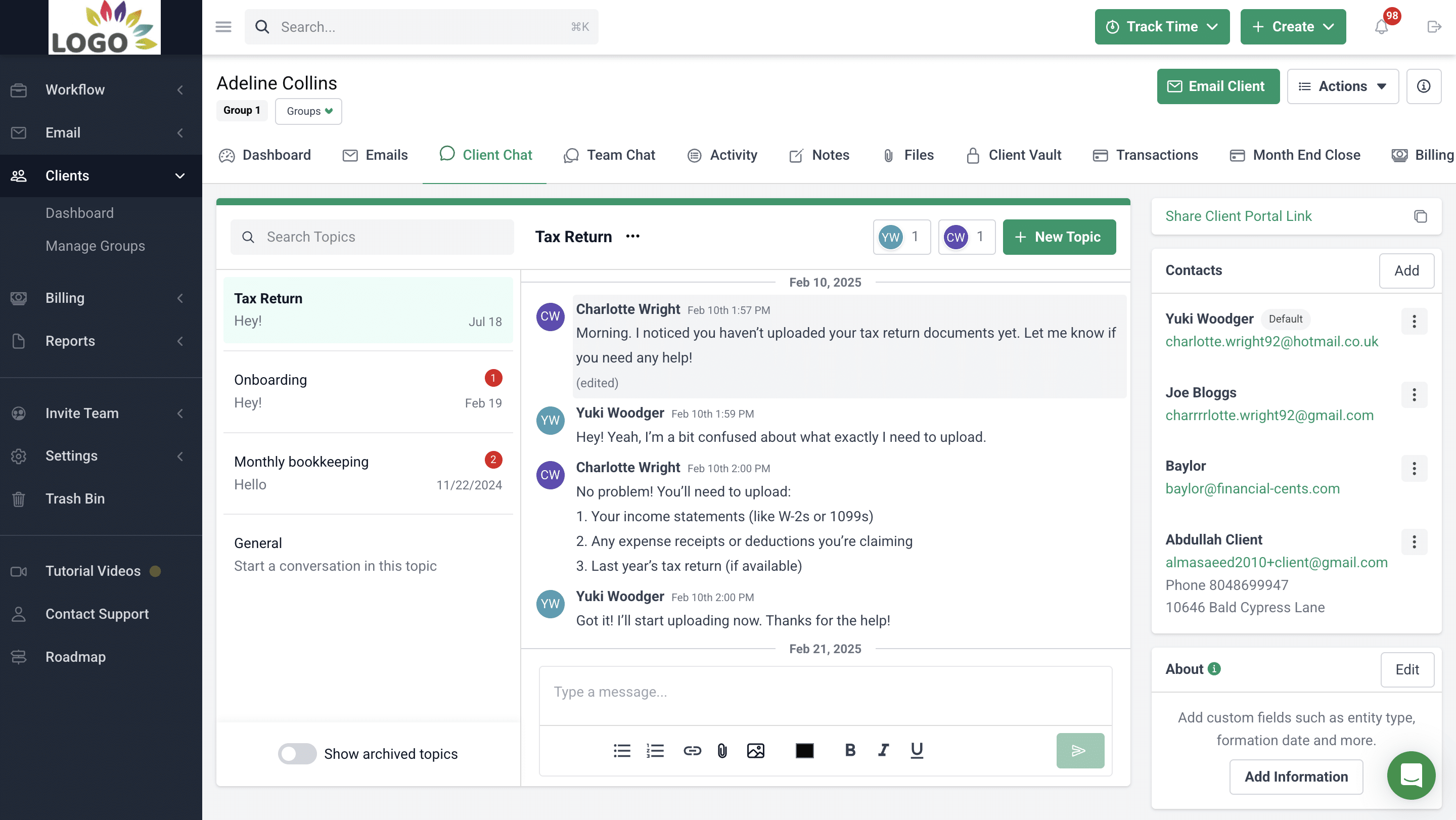
Financial Cents keeps all client messages, file updates, and notes in the Client Chat section of the portal.
Every interaction is time-stamped and auditable to prevent scattered emails and ensure accountability and clarity.
-
Proposals & Engagement Letters
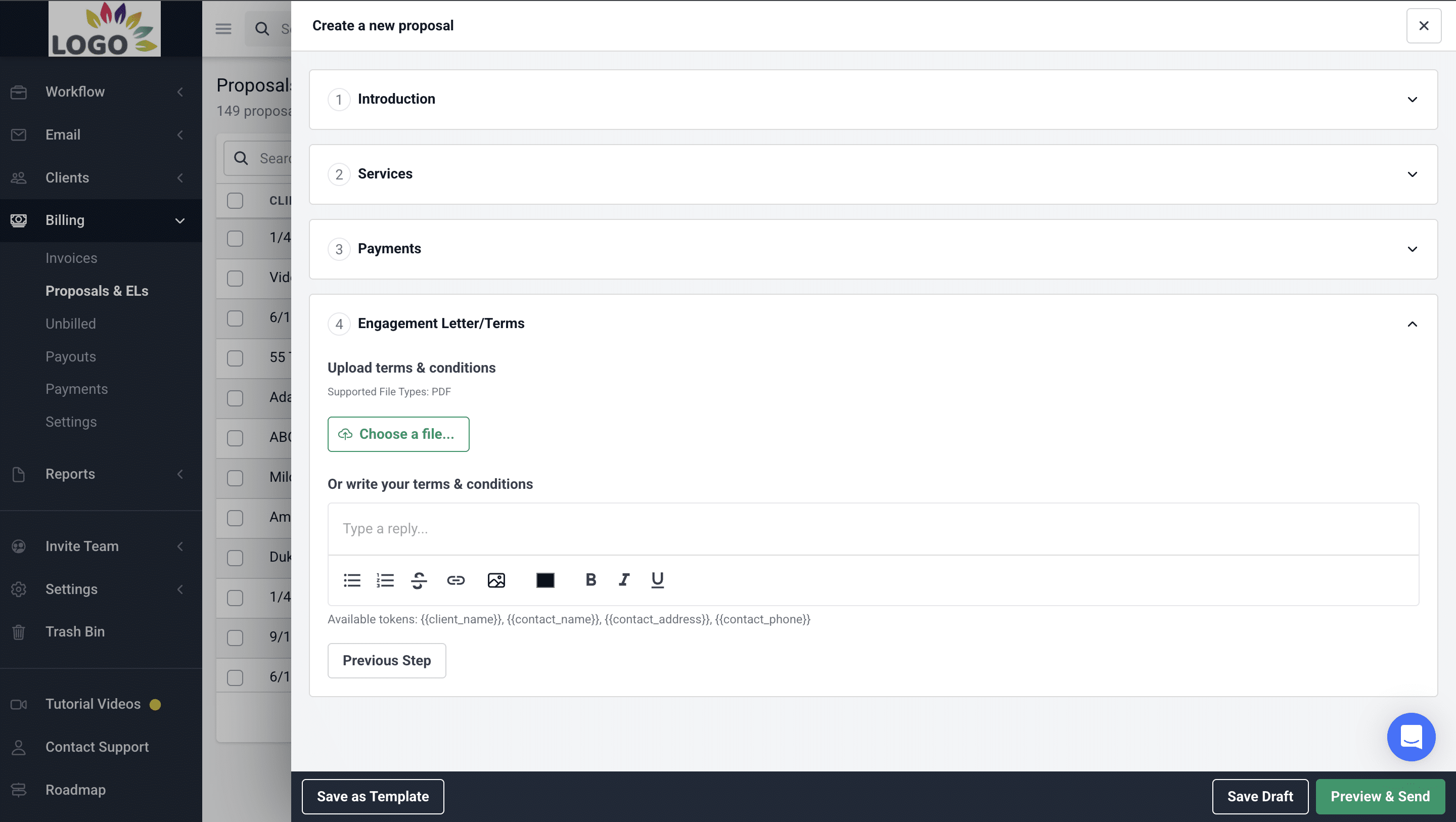
Financial Cents allows accounting teams to create, send, and have clients sign proposals and engagement letters directly in the client portal.
This reduces manual paperwork and streamlines client onboarding.
-
Month-End Close
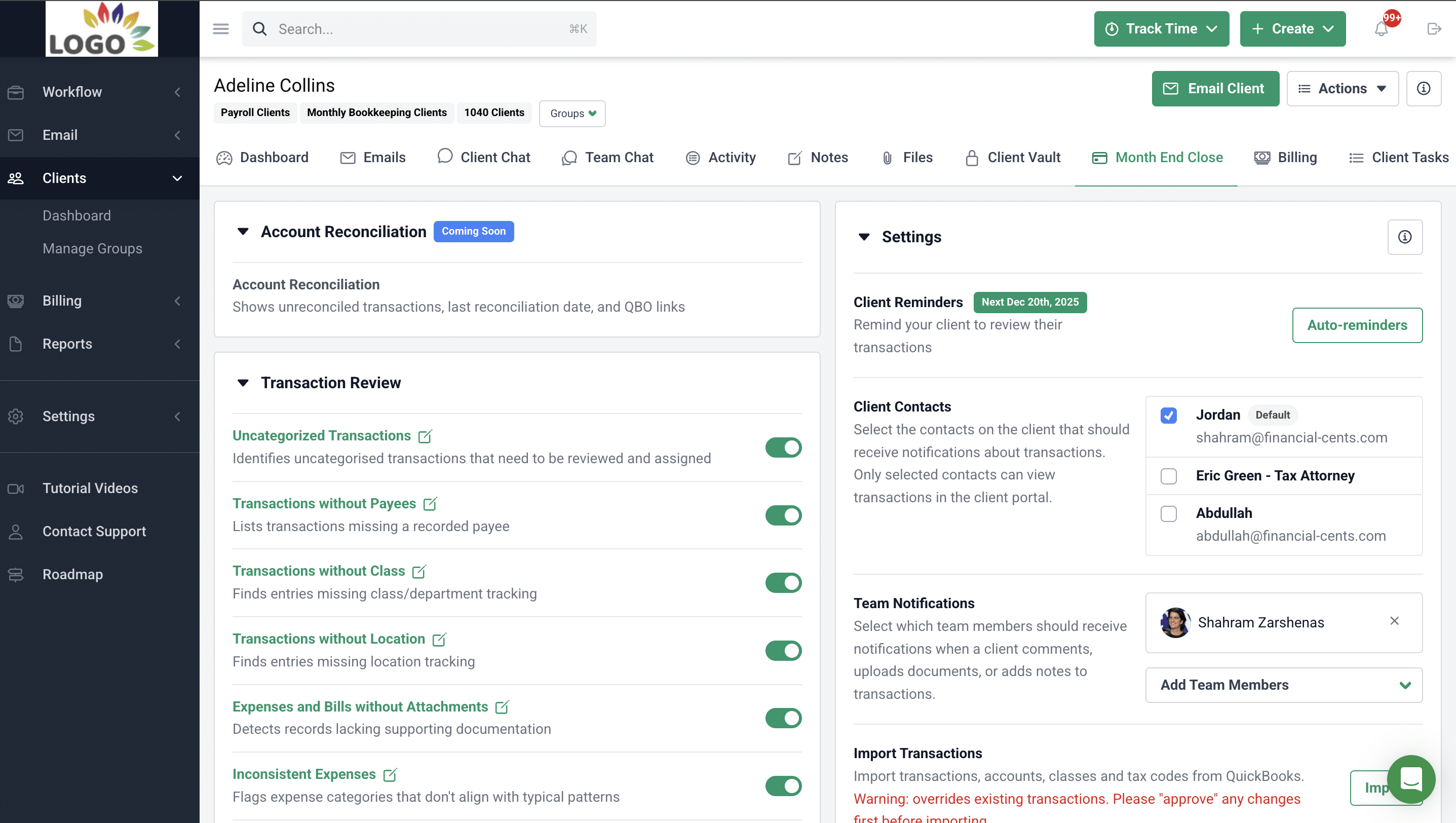
Financial Cents integrates with general ledger software to track client financials, identify discrepancies, and enable collaboration within the client portal.
This minimizes client chase and helps your team to reconcile client accounts faster.
-
E-signatures
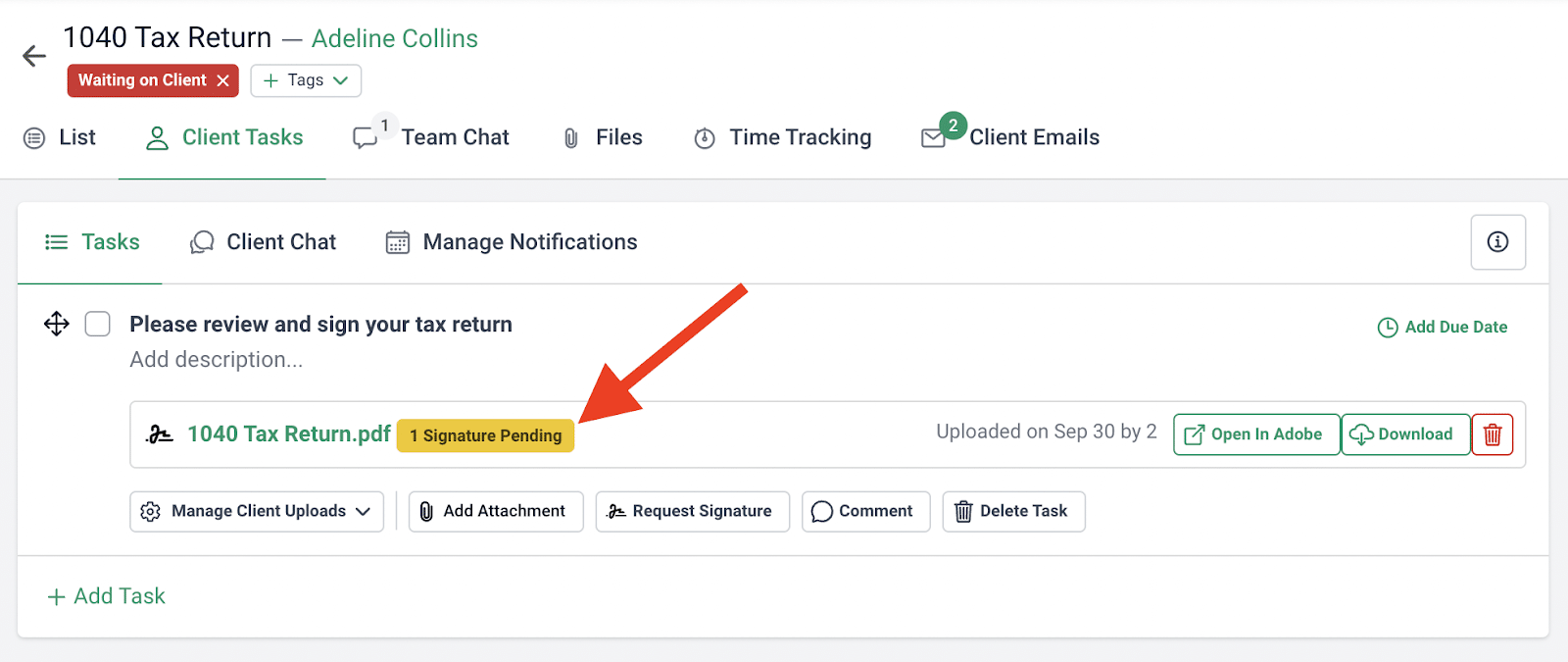
Financial Cents integrates with Adobe Sign to let clients e-sign documents within the portal. Signed documents are organized in the Client Files section of the related project.
Since clients no longer need to print or scan documents, your E-signature collections become more timely and efficient.
Why Your Client Portal Should Be Built Into Your Practice Management System
Managing an accounting firm today shouldn’t be as hard as it is for accounting firm owners, considering the type and number of efficiency tools currently available.
But this availability can be a good or bad thing. With so many apps on the market, each firm is just one tool away from having too many subscriptions to keep, too many passwords to maintain, and too many places to retrieve client information, which increases data exposure and workflow bottlenecks.
This is why Financial Cents accounting practice management software goes beyond offering just a secure client portal to bringing everything you need to manage your practice into one platform, so nothing is disconnected or duplicated.
This helps firms to:
- Centralize team collaboration by allowing teams to comment, share files, and tag each other inside each project, not across emails or chat threads.
- Consistently meet deadlines with due dates, workflow dashboard, and workflow automations that track upcoming deadlines, provide visibility into project status, and eliminate manual tasks to help accounting teams meet deadlines predictably.
- Elevating Client Experience through a passwordless client portal that makes document sharing easy, enables client self-service, and builds brand loyalty.
- Streamline Workflows by centralizing every project resource and client information in the workflow dashboard and providing the workflow templates to standardize processes across the firm to ensure consistency, accuracy, and Efficiency
See how Financial Cents can enhance client security and streamline your workflows today. Book a free demo or start your 14-day Free Trial today.



