

The AI File Renaming Agent for accounting firms
Your clients upload files named IMG_4471.pdf and scan-final-FINAL(2).pdf. Financial Cents’ AI agent reads each document the moment it lands, understands what it actually is, and renames it to your firm’s exact naming convention, automatically.
Proudly built for small firms — and designed to grow with you.

The AI File Renaming Agent in Financial Cents is a built-in AI feature that automatically renames the files your clients upload so every document follows your firm’s standardized naming convention. When a client uploads a bank statement, tax form, or receipt, the agent reads the document; detects the date, document type, account, and client; and applies the exact file-name format your firm chose, with no manual renaming from your team. It’s part of Financial Cents’ practice management platform, built specifically for small and growing accounting, bookkeeping, and tax firms.
Why messy file names eat up your time
Every firm has lived this: a client uploads 12 documents with names like Untitled.pdf, photo.jpg, and document(3).pdf. Someone on your team has to open each one, figure out what it is, and rename it by hand so it’s findable later. Multiply that across every client, every month, and it’s hours of low-value work (plus the errors and the “where’s that statement?” searches when names aren’t consistent).
Standardized file names aren’t a nice-to-have. They’re how a firm stays audit-ready, hands work off cleanly between team members, and finds any document in seconds. The AI File Renaming Agent makes that consistency automatic.
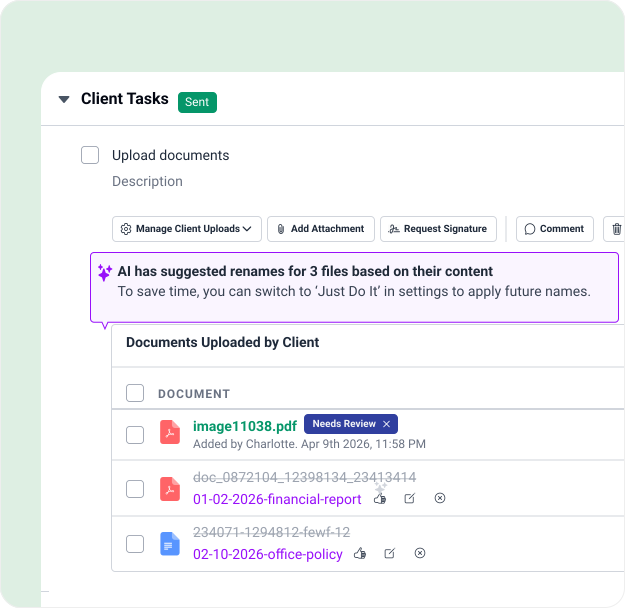
How the AI file renaming agent works
The agent runs the moment a client uploads a file to a client task or into their client folders. Here’s how it works:
1. Reads the document
The agent opens and interprets the file’s contents, not just the file name.
2. Detects the details
The AI determines the document date, document type, account identifier, bank name, and client.
3. Builds the name
The tool assembles those details into the exact naming convention your firm configured.
4. Renames the file
This can either happen automatically or after your quick approval, depending on the mode you choose.
Renamed files are flagged with a small sparkle icon so your team can see at a glance which files the agent changed. Hover over any renamed file to see its original name; the original upload name is always preserved on the document record, so nothing is ever lost.
You decide how much control to keep
Built into the platform you already run your firm on
The AI File Renaming Agent isn’t a bolt-on or a separate tool to learn. It lives inside Financial Cents’ document management and client portal, right next to the client work, tasks, and files your team already manages. There’s nothing to integrate and no new login. Just turn it on in Settings under AI Agents, configure your convention, and watch it work everywhere clients upload documents.
It’s one of a growing set of AI capabilities in Financial Cents, including AI-generated workflow templates and client emails and AI file validation.
A naming convention that fits how your firm actually files
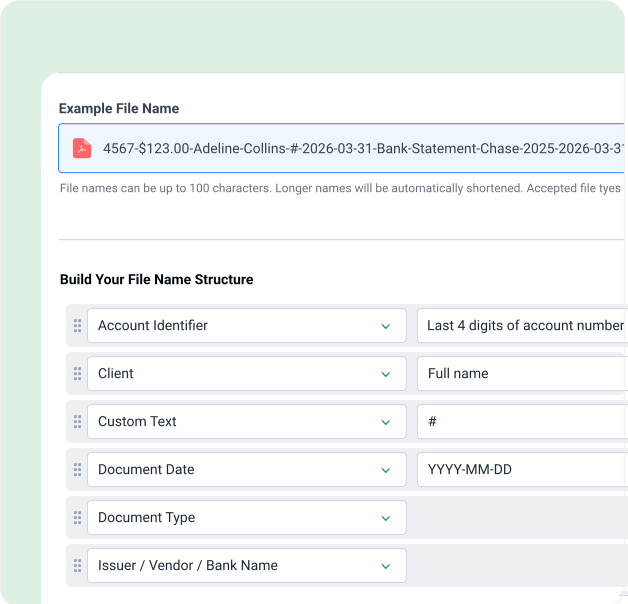
Your firm sets the naming convention once, and the agent follows it on every upload. Set it up in minutes; save time on every upload after.
- Choose the fields that make up each file name: document date, type, account identifier, bank name, client, and more.
- Reorder fields by clicking and dragging them into the sequence you want.
- Change the format of individual fields (for example, how the date is written).
- Handle missing information field by field, skip the field entirely, or drop in a placeholder like “X” so you can spot what’s missing.
- Pick your separator: dash, underscore, period, or space.
Secure by design
Financial Cents is SOC 2 certified, uses TLS 1.3 encryption in transit and encryption at rest, and processes documents inside the same secure platform trusted by over 10,000 accountants, bookkeepers, and CPAs. Your clients’ documents never leave your firm’s control.
Read more on our security page
Frequently asked questions
It’s a built-in AI feature that automatically renames files your clients upload so they match your firm’s naming convention. It reads each document, detects details like the date, document type, and account, and applies your chosen file-name format, with no manual renaming.
The agent reads the contents of each uploaded document, detects the relevant details, and assembles them into the naming convention your firm configured in Settings. You can have it rename files automatically or suggest names for your approval.
Yes. You choose which fields appear in the file name, the order in which they appear, the format of each field, how missing information is handled, and the separator between fields (e.g., dash, underscore, period, or space). A live preview shows the result before you save.
When the agent has low confidence about a document, it flags the file with a low-confidence banner and a confidence score and asks you to confirm the name, even if you’ve set it to rename automatically.
No. The original upload name is preserved on the document record. Renamed files show a sparkle icon, and hovering over the file name reveals what it was originally called.
Your choice. “Just Do It” renames files automatically on upload. “Always Ask” suggests a name and lets you approve, edit, or reject each file, or approve/reject them all in bulk.
The AI File Rename Agent is part of the Financial Cents platform. Start a 14-day free trial to try it, no credit card required.
Small and growing accounting, bookkeeping, and tax firms that want their client documents organized consistently without spending hours renaming files by hand.
Stop renaming files by hand. Let the agent do it.
Turn messy client uploads into clean, consistent, searchable files—automatically.