


AI for Accounting Firms
AI Built for How Accounting Firms Actually Work
Financial Cents is the AI-forward practice management platform for small and growing firms. From automatically renaming client files to drafting client emails and building workflows, AI is woven into the tools you already use to run your firm, no prompts to master, no separate tools to wire up.
Proudly built for small firms — and designed to grow with you.
 4.8 stars




Financial Cents brings AI directly into accounting practice management. Three AI agents handle client documents from the moment they’re uploaded: AI File Validator checks it’s the right file, AI File Renaming names it to your firm’s convention, and AI File Routing files it in the right client folder. Alongside them, AI drafts client emails and generates workflow checklist templates from a single prompt. The agents are available on every Financial Cents plan, and your firm decides whether each one acts automatically or waits for approval. It’s practical, firm-specific AI built for accountants, bookkeepers, and tax professionals, not a generic chatbot bolted onto the side.
What AI can do in Financial Cents
Automatically rename client files
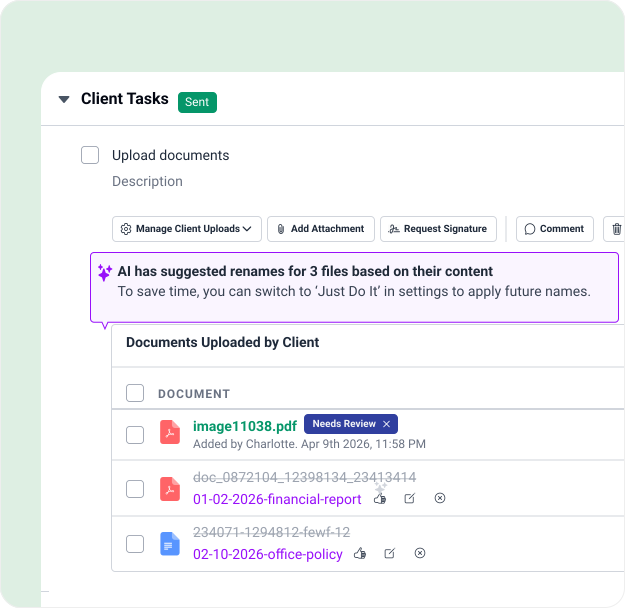
The AI File Renaming Agent reads every file your clients upload and renames it to your firm’s naming convention, so you never have to fix another IMG_4471.pdf by hand.
File client uploads into the right folder automatically
The AI File Routing agent reads each file a client uploads and files a copy in the correct client folder, so uploads stop piling up unfiled.
Draft client emails and responses
Write client emails and replies in seconds, then save your best ones as reusable templates.
Build workflow checklist templates
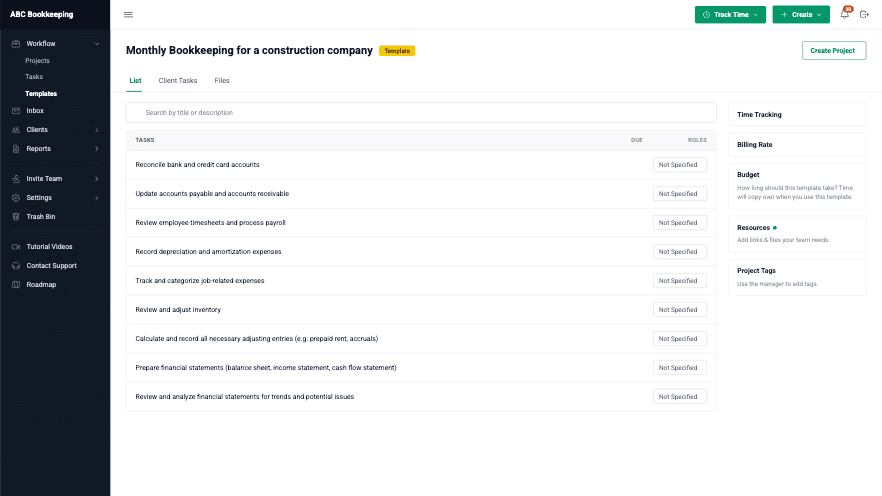
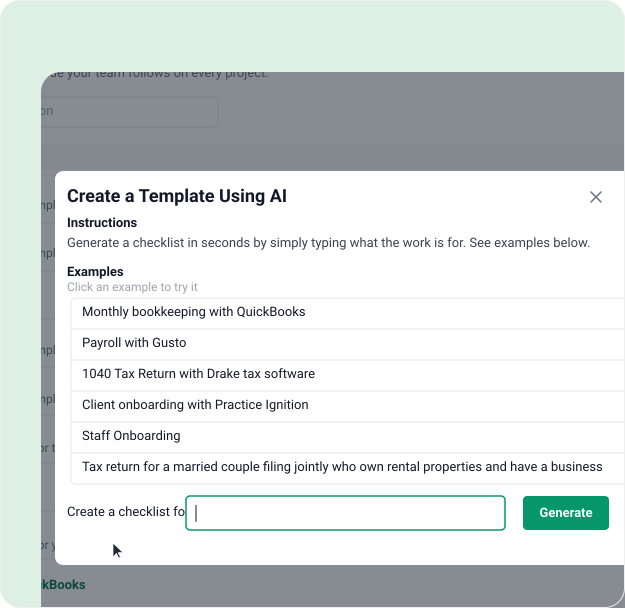
Describe your process in a single prompt and get a complete workflow checklist template, ready for you to customize.
Check that clients upload the right documents
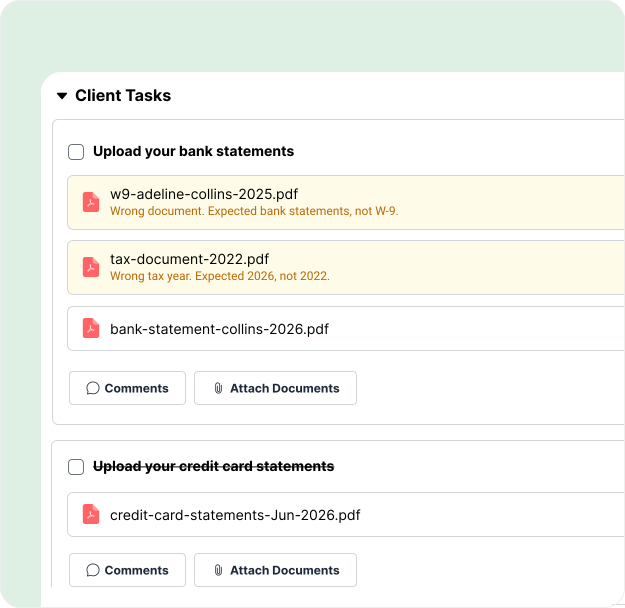
The AI File Validator compares each upload with your request, the accounting period, and the client’s details. It flags the wrong file in the client portal before it ever reaches your team.
Use your firm’s data in Claude, ChatGPT, Gemini, and other AI tools
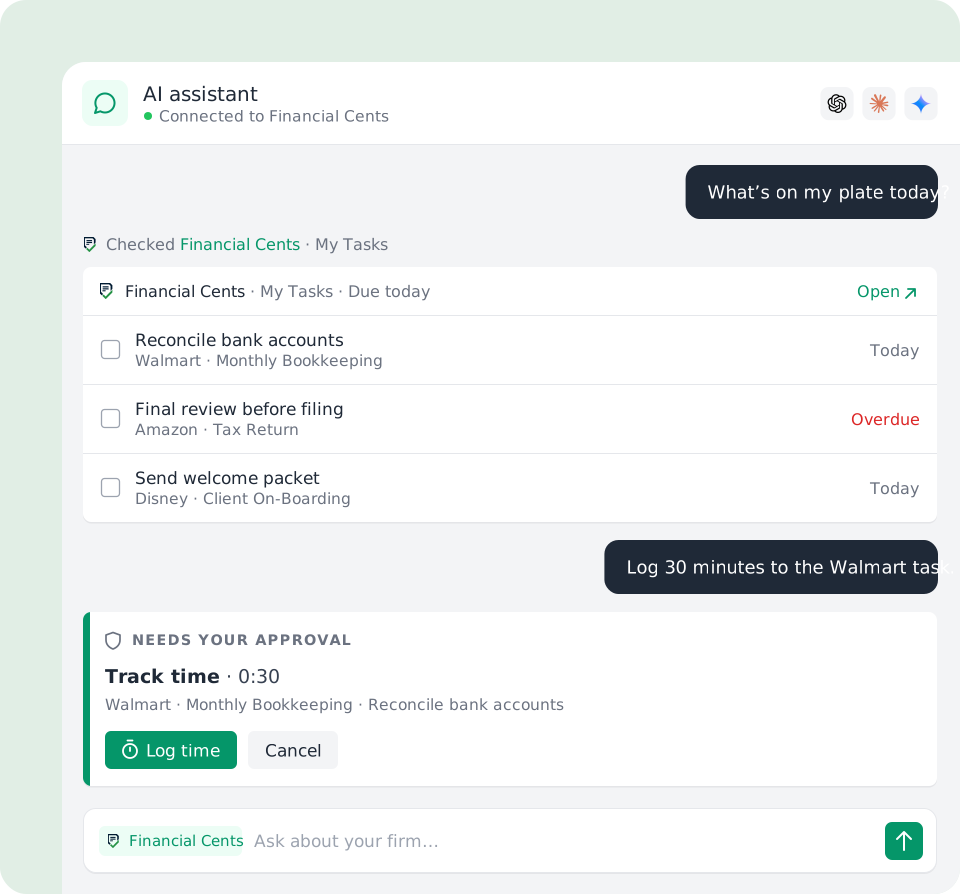
The Financial Cents MCP connects your account to your favorite AI assistant so you can ask about your work and take action, securely.
Three agents, one document workflow
Financial Cents’ AI agents handle the document busywork from the moment a client uploads: the AI File Validator checks it’s the right file, AI File Renaming gives it a name that matches your convention, and the AI File Routing agent files it in the right client folder. Together they turn a messy scan_001.pdf into the right document, named right, filed right, with your team reviewing or automating each step.
The AI File Renaming Agent
NewYour clients upload files named IMG_4471.pdf and scan(2).pdf, and someone on your team has to open each one and rename it by hand. Not anymore.
The AI File Renaming Agent reads every file a client uploads, detects what it actually is , the document date, type, account, and client, and renames it to your firm’s standardized convention automatically. Choose “Just Do It” for fully hands-free renaming, or “Always Ask” to approve, edit, or reject each suggested name (in bulk if you like). When the agent isn’t confident about a file, it flags it and asks you to confirm, so you’re always in control of the documents that matter. Every renamed file keeps its original name on record and carries a sparkle icon so your team can see what the AI handled.
The AI File Validator
NewRequesting documents is easy. Getting the right documents is the hard part. Clients upload last year’s W-2, a statement from the wrong bank, or the wrong file entirely, and your team doesn’t catch it until the work is already underway.
The AI File Validator fixes that at the source. The moment a client uploads a file to a client task, it reads the document and compares it against the request, the project’s accounting period, and client details. If something’s off, wrong year, wrong bank, wrong document, the client sees clear feedback right in the portal and can replace it on the spot. It only flags files when it’s highly confident, so clients are never second-guessed by mistake, and when a client keeps a flagged file anyway, your team gets an advisory so you’re always in the loop. Best of all, there’s nothing to set up, just toggle it on.
The AI File Routing Agent
NewFiles clients upload to a task don’t file themselves, someone still has to open each one, work out what it is, and drag it into the right client folder. The AI File Routing agent does that for you.
When a client uploads a file to a Client Task, it reads the file, looks at how that client’s folders are already organized, and files a copy in the best-fit folder, using project context to land the right year or period folder, like the correct tax-year folder for a 1040. It starts in Always Ask (accept, change, or reject each suggested folder) and can switch to Just Do It to file automatically when it’s confident. It only ever files within that same client’s existing folders, never creates new ones, and always files a copy so the original stays on the task. Every routed file shows “Copied to [folder]” with a click-through, so you always see where it went.

Bring your firm’s data into your AI assistant with MCP
NewThe AI agents work inside Financial Cents. The Financial Cents MCP goes the other way — it brings your firm’s data into the AI tools you already use. Connect Claude, ChatGPT, Gemini, Cursor, or another AI client to your account over the Model Context Protocol, then ask plain-English questions like “What’s overdue this week?” and take action like logging time or creating tasks. Each connection is bound to one firm account, runs through your own permissions, uses OAuth 2.1 (your password is never shared), and can be revoked in one click. Available on the Scale plan.
Learn about the Financial Cents MCPCreate checklist templates in seconds
Documenting your processes with workflow checklist templates just got simpler. Type in your prompt and get a complete workflow checklist template in seconds, then customize it to match your firm’s exact process.
“I love how easy the setup was! You can literally be set up in just a few hours. I also loved the tags and the simplicity of setting up automations to change tags as things are checked off. The progress bar IS SO COOL. Something I think is wonderful is the ability to send requests through Financial Cents and keep all client communication and document collection in one place.”
Crystal M., Bookkeeper
Generate email templates & responses for clients
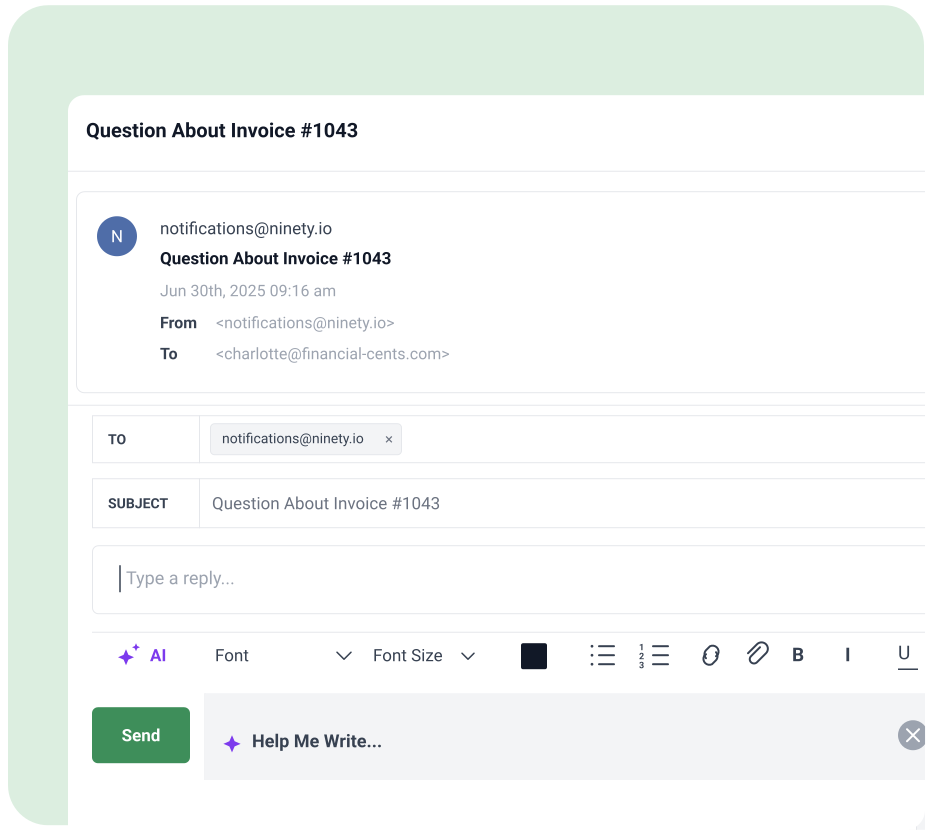
Streamline client communication and save time by drafting emails in seconds with AI in Financial Cents. Save your best emails as templates for future use.
“The AI emails is extremely helpful, along with auto email sending once a task is completed. Automation is key.”
Jessica F., Accounting Firm Office Manager
Loved by over 10,000 accountants, bookkeepers and CPAs
FAQs about AI in Financial Cents
Financial Cents has six AI features: AI File Validator, which checks each client upload is the right file; AI File Renaming, which renames uploads to your naming convention; AI File Routing, which files a copy in the right client folder; AI email drafting; AI workflow template generation; and the Financial Cents MCP, which connects your firm’s data to AI assistants like Claude, ChatGPT, and Gemini.
Financial Cents AI is a set of AI features built into the Financial Cents practice management platform for accounting, bookkeeping, and tax firms. Instead of a separate chatbot you have to learn and feed with data, it works where you already run your firm: checking, renaming, and filing client documents, drafting client emails, and building workflow templates.
The AI File Validator, AI File Renaming, and AI File Routing agents are available on every Financial Cents plan. You can turn them on under Settings > AI Agents, or try them during your 14-day free trial. The Financial Cents MCP is available on the Scale plan.
They handle three steps of the same job. The AI File Validator makes sure the client uploaded the right file, AI File Renaming gives it a name that matches your convention, and AI File Routing files a copy in the right client folder. Many firms run all three together, so a messy scan_001.pdf becomes the right document, named right and filed right.
The AI File Validator checks each document a client uploads to a client task against the request, the project’s accounting period, and the client’s details. If it’s the wrong year, the wrong bank, or the wrong document, the client sees feedback in the portal and can replace it on the spot. It only flags files when it’s highly confident, and there’s nothing to set up beyond turning it on.
When a client uploads a file, the agent reads it, detects details like the document date, type, account, and client, and renames it to your firm’s naming convention. If it isn’t confident, it flags the file for you to confirm. Every renamed file keeps its original name on record.
The AI File Routing agent reads each file a client uploads to a client task, looks at how that client’s folders are already organized, and files a copy in the best-fit folder, such as the right tax-year folder for a 1040. It only files within that client’s existing folders, never creates new ones, and always leaves the original on the task.
Yes. AI File Renaming and AI File Routing each have two modes: Always Ask, where your team approves, edits, or rejects each suggestion, and Just Do It, where the agent acts on its own when it’s confident. AI File Routing starts in Always Ask, so you can review its work before letting it run automatically.
Yes. Type a prompt describing the process, and Financial Cents AI generates a complete workflow checklist template in seconds. You can then customize it to match exactly how your firm does the work.
Yes. You can draft client emails and responses in seconds, whether you’re sending reminders, updates, or requests, and save your best ones as templates to reuse.
Yes. The Financial Cents MCP connects your account to Claude, ChatGPT, Gemini, Cursor, and other AI tools over the Model Context Protocol. You can ask questions like “What’s overdue this week?” and take actions like logging time or creating tasks. Your assistant confirms before making any change, nothing is ever deleted, and each connection runs within your own permissions. It’s available on the Scale plan.
Yes. Financial Cents is SOC 2 compliant, independently audited against the AICPA’s SOC 2 standards, and encrypts data in transit and at rest. Its AI features run inside the platform, and every AI action stays visible to your team: renamed files keep their original name, and routed files show which folder the copy went to. The MCP uses OAuth 2.1, so your password is never shared, and you can revoke a connection in one click.
No. Financial Cents AI takes the repetitive work off your team’s plate, like renaming, checking, and filing documents, so they can spend their time on client service and advisory work.
Read the AI in Accounting Guide for a breakdown of how firms are using AI today, and the ChatGPT for Accounting Firms Guide for practical ways to use AI assistants in your practice.
Run your firm without becoming an AI expert.
Many of the other tools are poor at managing updates and bugs. Some use subcontracted developers, providing real client data samples. Others have suffered breaches without proper notifications.
Of the pre-built systems out there, I do think Financial Cents has a solid offering.
One of my top goals is to make the process easier for clients. Glad I made the switch!
Many of the other tools are poor at managing updates and bugs. Some use subcontracted developers, providing real client data samples. Others have suffered breaches without proper notifications.
Of the pre-built systems out there, I do think Financial Cents has a solid offering.
One of my top goals is to make the process easier for clients. Glad I made the switch!
If you’re not using this feature, I highly recommend it! Remembering to follow up with clients can be a serious bottleneck and I love how this solved that problem!
If you’re not using this feature, I highly recommend it! Remembering to follow up with clients can be a serious bottleneck and I love how this solved that problem!