
If it takes your firm a full week to close clients’ books in 2026, your team is likely still relying on spreadsheets or a bunch of disconnected tools to manage the process.
The most common month-end challenges (missed tasks, last-minute transaction cleanup, unclear responsibilities, etc.) persist when firms try to manage complex bookkeeping workflows with the wrong systems.
A solid month-end close software addresses this by creating a structured workflow for every close cycle. Instead of rebuilding task lists each month, teams work from standardized checklists that track deadlines, dependencies, and recurring tasks across all clients.
The best tools go even further. They enable bookkeeping firms to schedule transaction reviews, reconciliations, and accrual preparation throughout the month. This enables them to complete month-end tasks progressively instead of leaving it all for the close week.
In this guide, we’ll break down the seven best software solutions for month-end close that bookkeeping firms can use in 2026 to close clients’ books faster, improve accuracy, and deliver a smoother experience.
What Is Month-End Close Software?
Month-end close software is a tool that helps bookkeeping and accounting firms organize, track, and complete every task required to finalize a client’s financial records at the end of each month.
Think of it as replacing the chaos of scattered spreadsheets, missed email reminders, and checklists with a program that makes your workflow structured, predictable, and repeatable. It is an essential part of a bookkeeping practice management software.
The month-end or financial close software improves the financial reporting through:
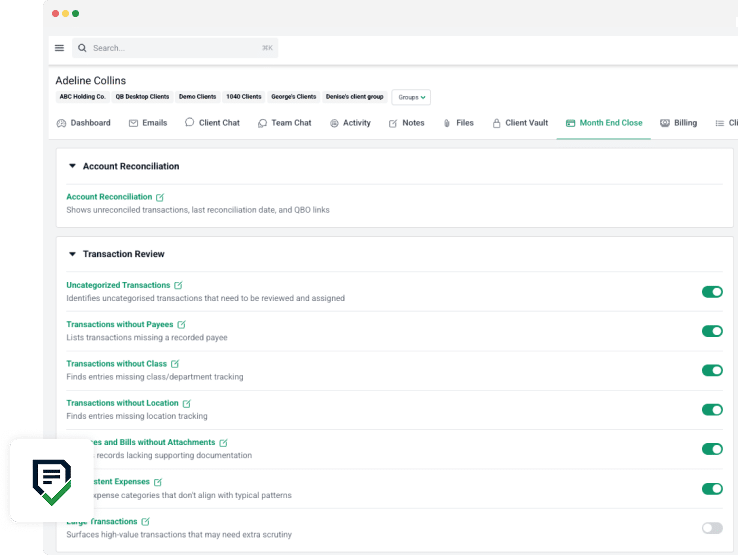
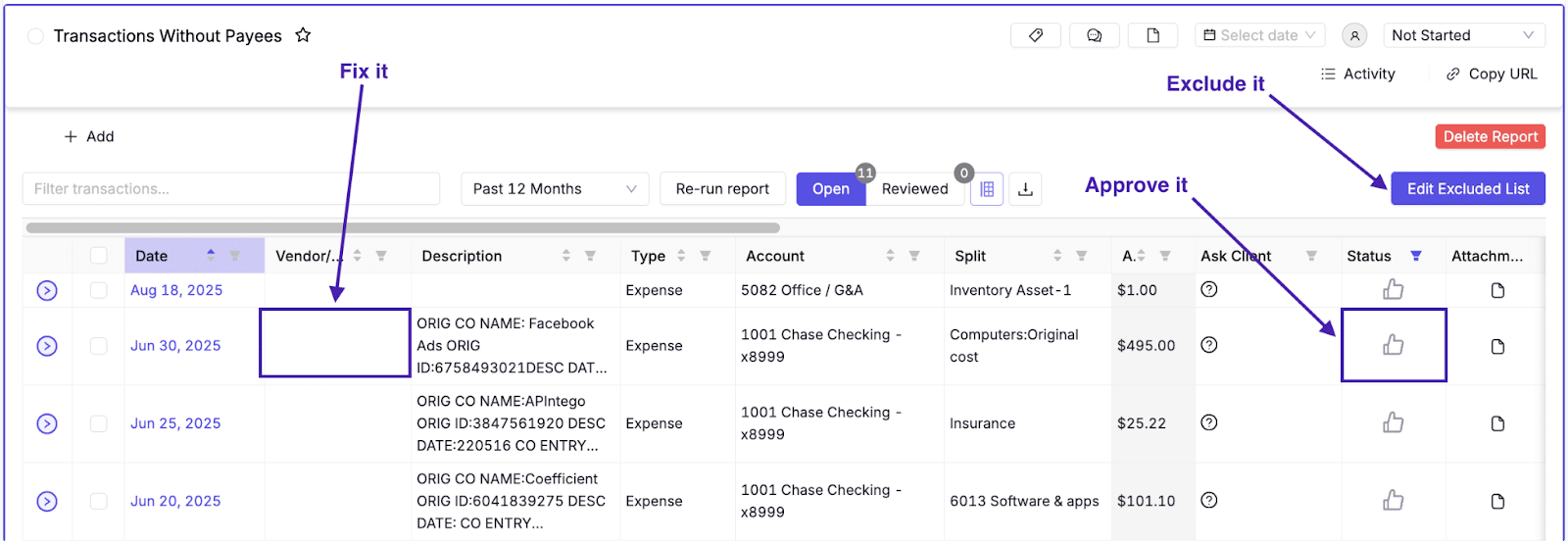
Transaction Review: The software pulls data automatically from connected sources, flags uncategorized or unusual items, and enables reviews and approvals.
Reconciliation: The software matches general ledger balances against bank statements, credit cards, vendor records, and subledgers automatically to display discrepancies and track reconciliation status across every client.
QA and Review: The account close software also runs structured quality checks before financials are delivered to the client.
Reporting: Once the books are clean and verified, the software uses the reconciled data to package the final trial balances, management reports, and client-facing summaries.
What are the key month-end close features to look out for?
The following features are necessary for a financial close software to improve the speed, accuracy, and compliance of your month-end close process.
a. Transaction review dashboards
Without the transaction review feature, uncategorized transactions, unusual entries, and mismatched amounts can sit quietly in your ledger only to show up in the financial statements.
With the transaction review feature, messy data is pulled into a centralized view automatically, instead of your team manually digging through the general ledger or exporting spreadsheets.
It flags and queues up anything that needs a human decision before reconciliation begins.
b. Workflow automation
Workflow automation eliminates the busy bookkeeping work, from rebuilding the close checklists and reassigning tasks to re-entering the same recurring steps for the same clients.
The accounting close software lets you build processes once and run them repeatedly. This includes templates that standardize month-end procedures across every client and automated client data collection that minimizes client delays.
c. Transaction errors detection
One problem with manual error-checking is that by the time you find the mistake, it’s likely already showing up somewhere it shouldn’t be.
Transaction error detection applies rules-based logic and machine learning to scan every transaction as it comes in. It flags duplicate transactions, miscoded entries, and anything that doesn’t fit the expected pattern for the client.
c. Integration with accounting systems
Your month-end close tool is only as good as the data flowing into it. If that data isn’t automatically flowing in from your accounting software, bank feeds, or clients’ connected accounts, then someone on your team is transferring it by hand.
With a two-way QuickBooks integration, you can be sure that data is flowing seamlessly between your general ledger and close software. That means transaction data and bank feeds flow in automatically, so your dashboards are always showing current numbers.
d. Client portal or question tagging within the workflow
The client portal provides bookkeepers with a client-facing workspace to request documents, collect missing information, and track what has been received and what remains outstanding.
Question tagging allows bookkeepers to assign custom tags to tasks, projects, or client requests. These tags help organize, track, and automate follow-ups on information or documents needed from clients.
Together, both features (client portal and question tagging) replace email back-and-forth with a central communication system that is built into the month-end close process.
e. Ease of use & onboarding support
Your software will only address your pain points when it’s easy for your team to implement and use for day-to-day tasks without multiplying non-billable hours.
This is reflected in an intuitive interface, clear workflows, and strong onboarding support, including training sessions, implementation resources, and responsive customer support.
f. Team Collaboration
Since month-end closing involves different staff handling different tasks across multiple clients, they need a structured way to communicate within the work.
Collaboration features built directly into the close workflow keep all communication attached to the task and visible to everyone who needs it.
This ensures that the manager, for example, has everything they need when they sit to perform reconciliation.
g. Deadline Tracking
Deadline tracking ensures month-end close projects do not rely on last-minute efforts.
The best month-end system goes well beyond putting a due date on a task and includes built-in reminders that alert team members when a task is approaching its due date, so nothing falls behind.
The 7 Best Software for Month-End Close
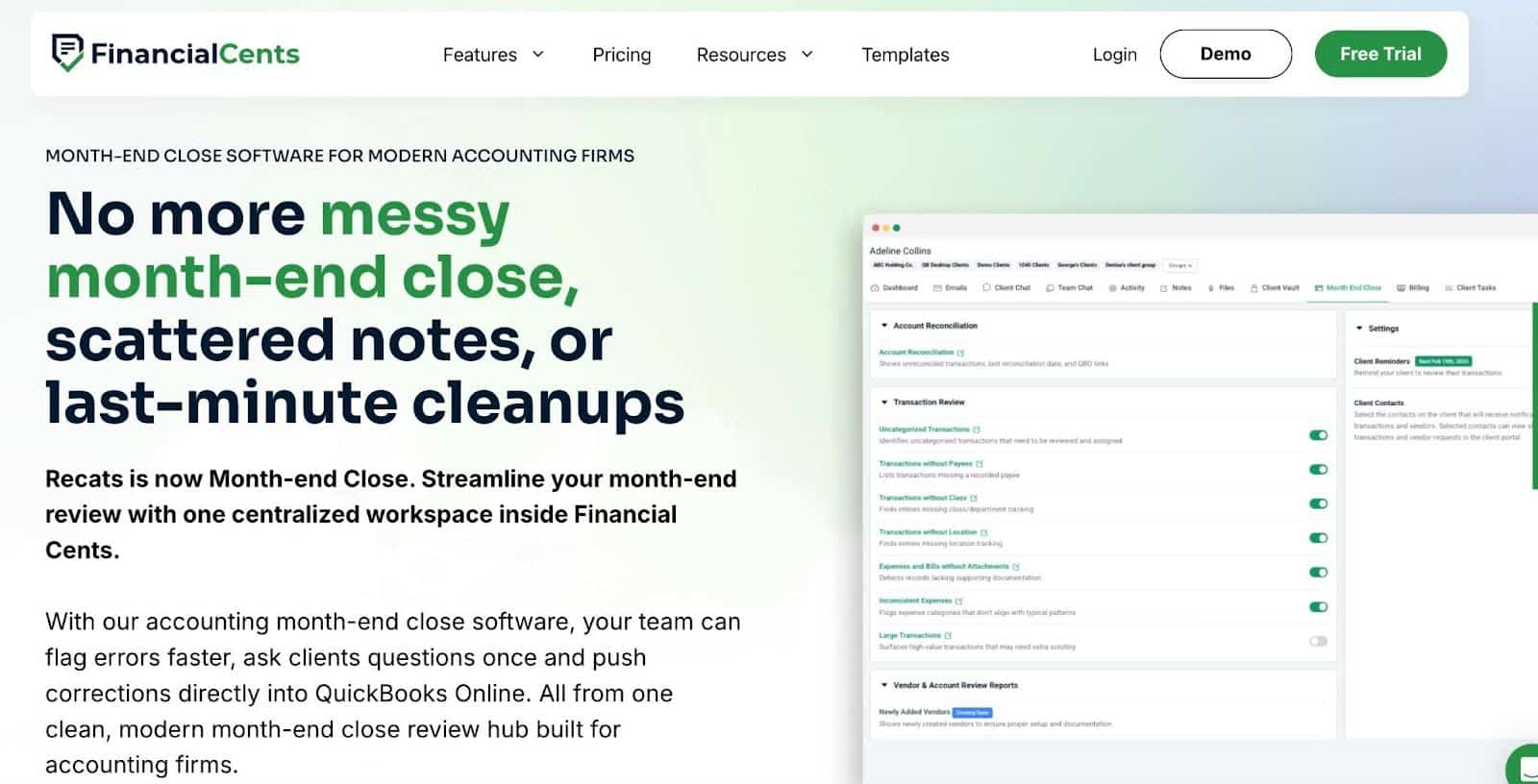
Financial Cents is a practice management software for accounting and bookkeeping firms with a dedicated Month-End Close (MEC) tool that helps you to streamline review, correction, and finalization of client books.
Its workflow management and automation capabilities make it the tool of choice for bookkeeping firms looking to standardize recurring bookkeeping tasks across multiple clients.
As an all-in-one practice management software, Financial Cents’ features extend beyond the month-end close management, as you can see below.
Core Month-End Close Features & workflows
Month-End Close
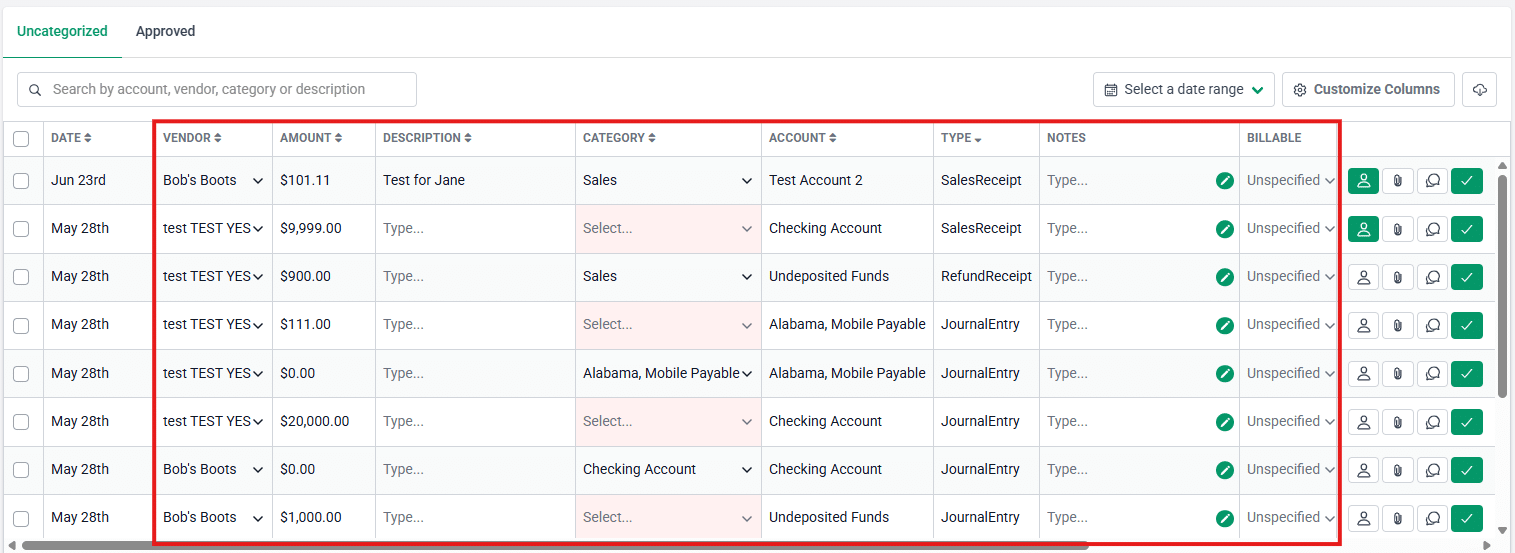
- Transaction Review: Automatically flag errors, ask clients about transactions, edit and categorize entries within Financial Cents, and sync approved updates with QuickBooks Online through two-way integration.
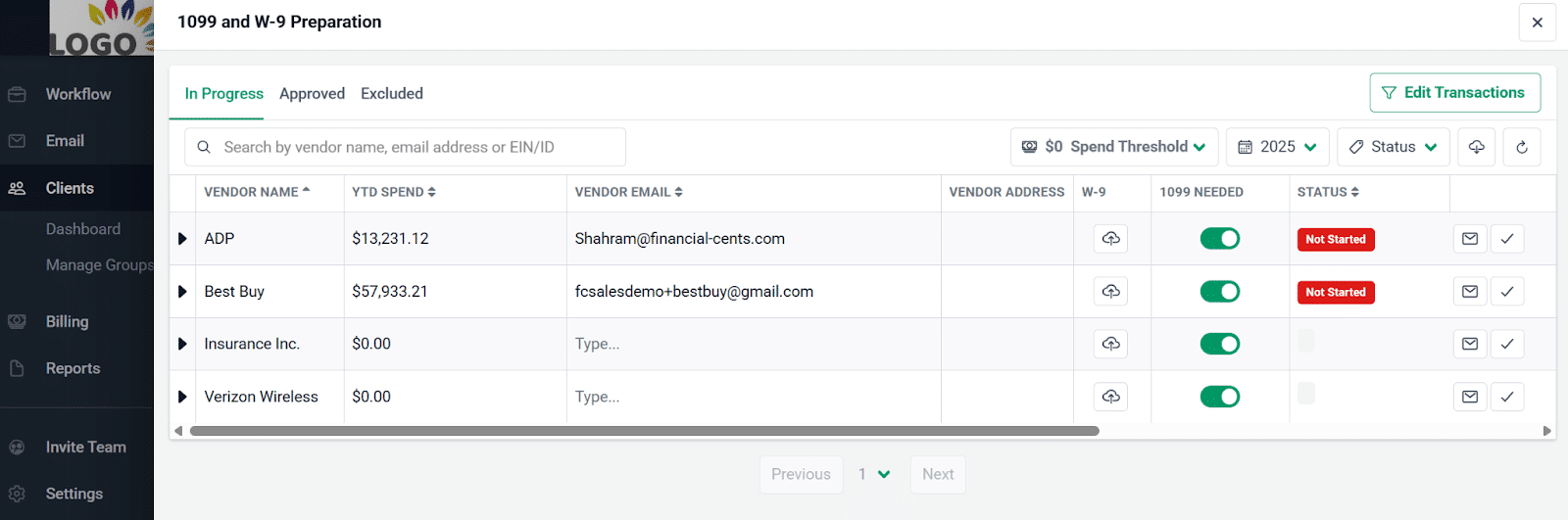
- 1099 & W-9 Preparation: Financial Cents also simplifies vendor compliance tasks during the close process through:
- Vendor Identification: Import vendor lists directly from QuickBooks Online to identify vendors who may require Form 1099.
- Smart Filtering: Refine vendor lists by filtering transactions to determine which vendors qualify for 1099 reporting.
- W-9 Requests: Request W-9 forms directly from vendors or clients within the workflow.
- Vendor Record Updates: Edit vendor details in Financial Cents and push updates back to QuickBooks Online.
Workflow Management and Automation
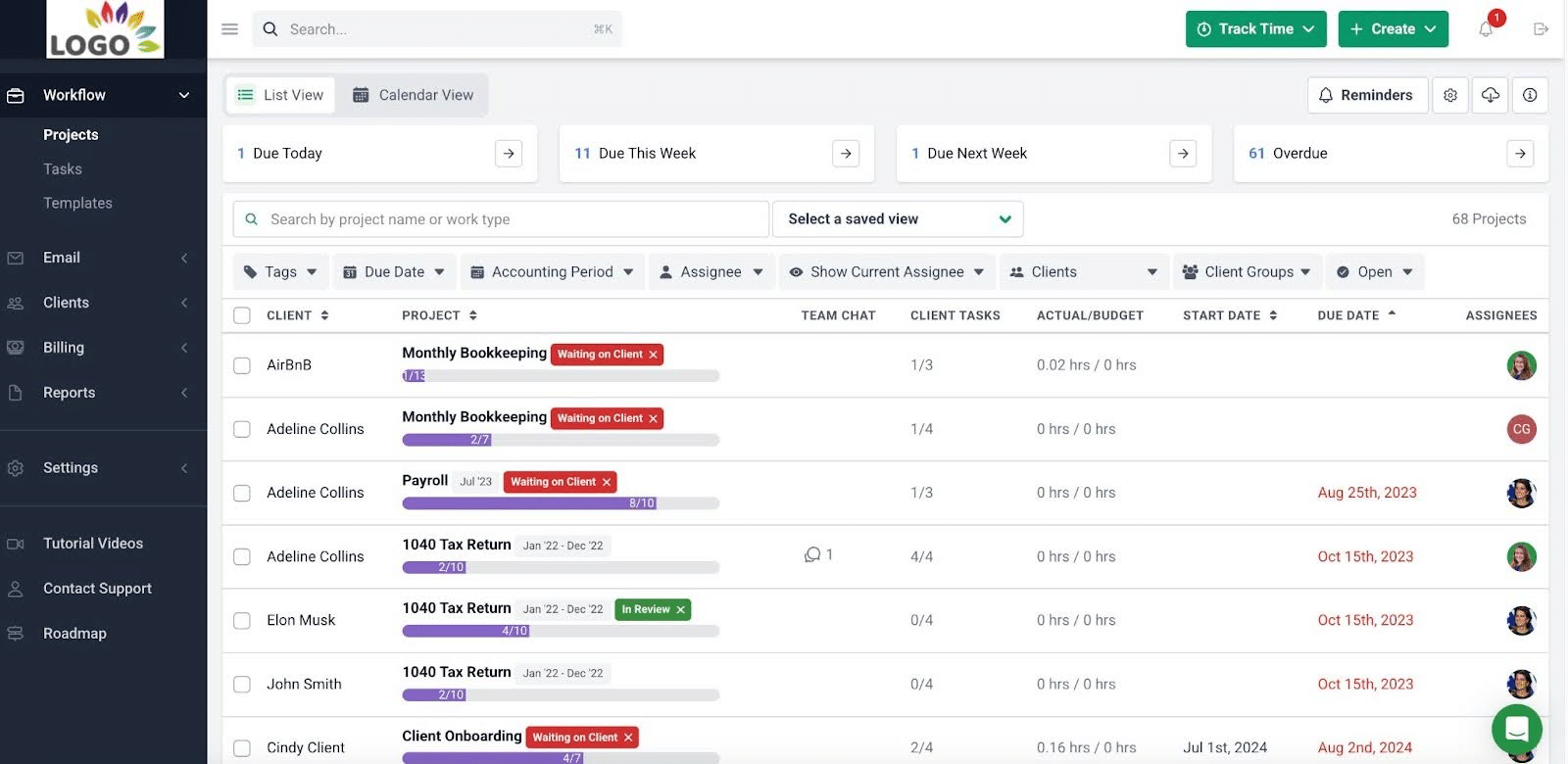
- Workflow Dashboard: Displays the status of every project in the firm, including due date, assignees, and client.
- Workflow Templates: Standardize your processes with best-practice templates or create custom workflows.
- Workflow Filters: Quickly filter work by client, employee, status, or tag for maximum visibility.
- Recurring Work: Automatically recreate recurring workflows for monthly, quarterly, or annual tasks so your team never has to rebuild them manually.
- Task Dependencies: Automatically notify team members when prerequisite tasks are completed, ensuring work begins on time without manual coordination.
Team Collaboration
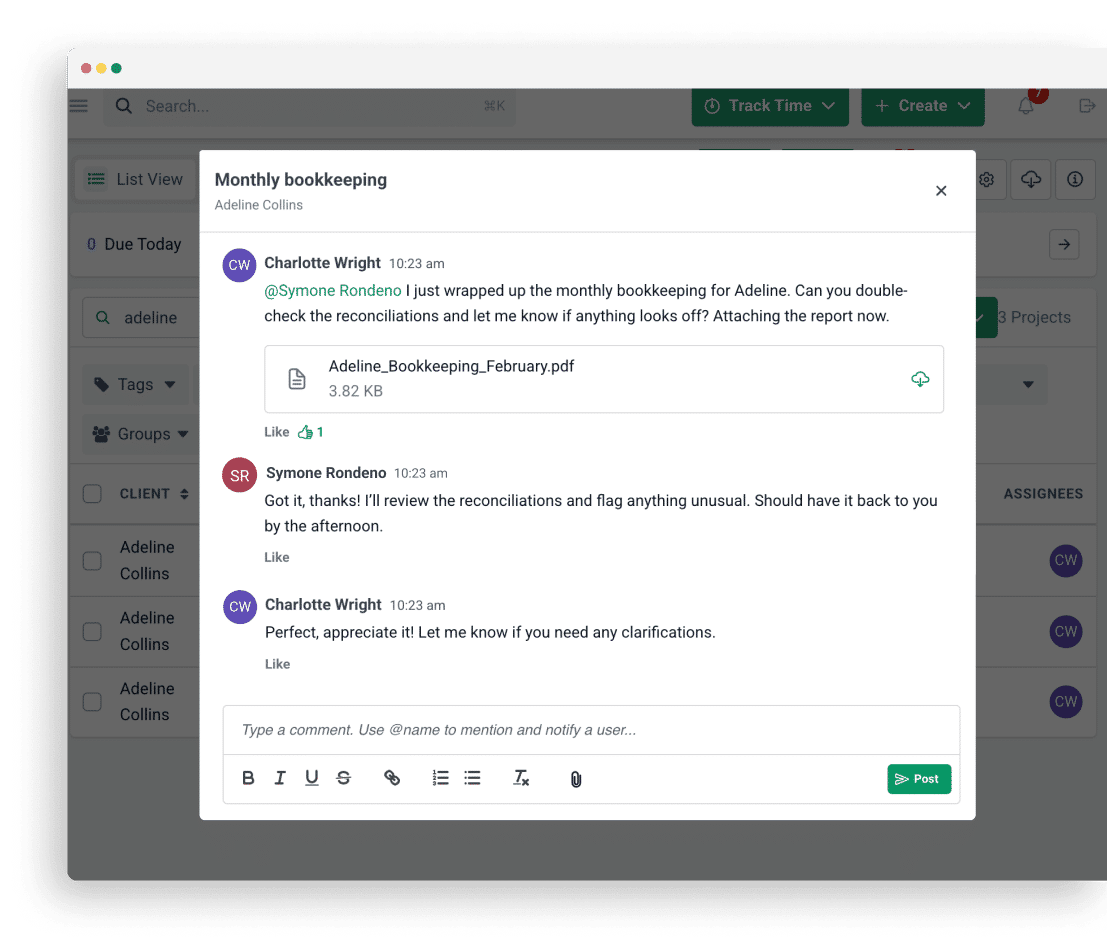
- @Mentions: Tag team members directly in tasks, emails, or client records to keep the right people informed and involved.
- Shared Inbox: Collaborate on client emails in a centralized team inbox so no messages fall through the cracks.
- Real-Time Notifications: Automatically notify team members when tasks are ready to begin or require their attention.
CRM & Client Portal
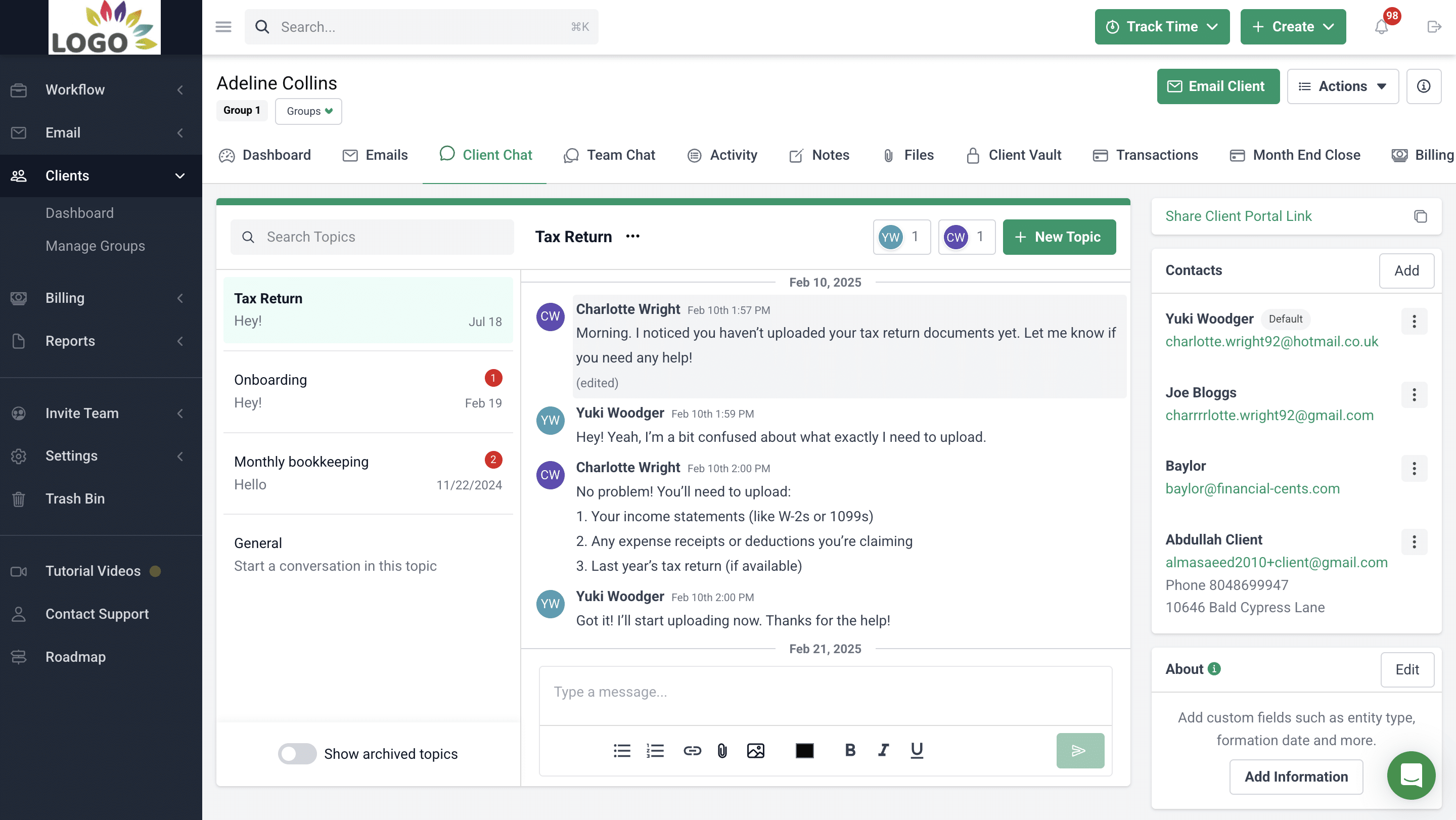
- Passwordless Client Portal: Give clients secure portal access without requiring them to manage passwords.
- Automated Client Reminders: Automatically remind clients about outstanding requests, so your team spends less time chasing information.
- Client Requests: Send structured requests for documents or information and track responses in one place.
- Secure Folder Sharing: Share sensitive documents securely with clients while keeping files organized.
- Client Communication: Communicate with clients inside a secure system rather than relying on scattered email threads.
- Client Audit Trail: Maintain a complete record of client communications and activities to ensure accountability and transparency.
- Secure Password Storage: Store client credentials securely in an encrypted vault accessible to authorized staff.
- Client Profiles: View all important client information, activity history, and documents in one centralized profile.
Capacity Management
- Capacity Dashboard: View your entire team’s workload at a glance to quickly identify who is overloaded and who has availability.
- Workload Forecasting: Analyze historical workload trends to anticipate busy periods and plan hiring or resource allocation.
- Task Reassignment: Easily redistribute tasks when team members are unavailable or over capacity to keep projects on schedule.
- Automated Task Assignments: Automatically assign tasks based on team availability and capacity to balance workloads efficiently.
Document Management
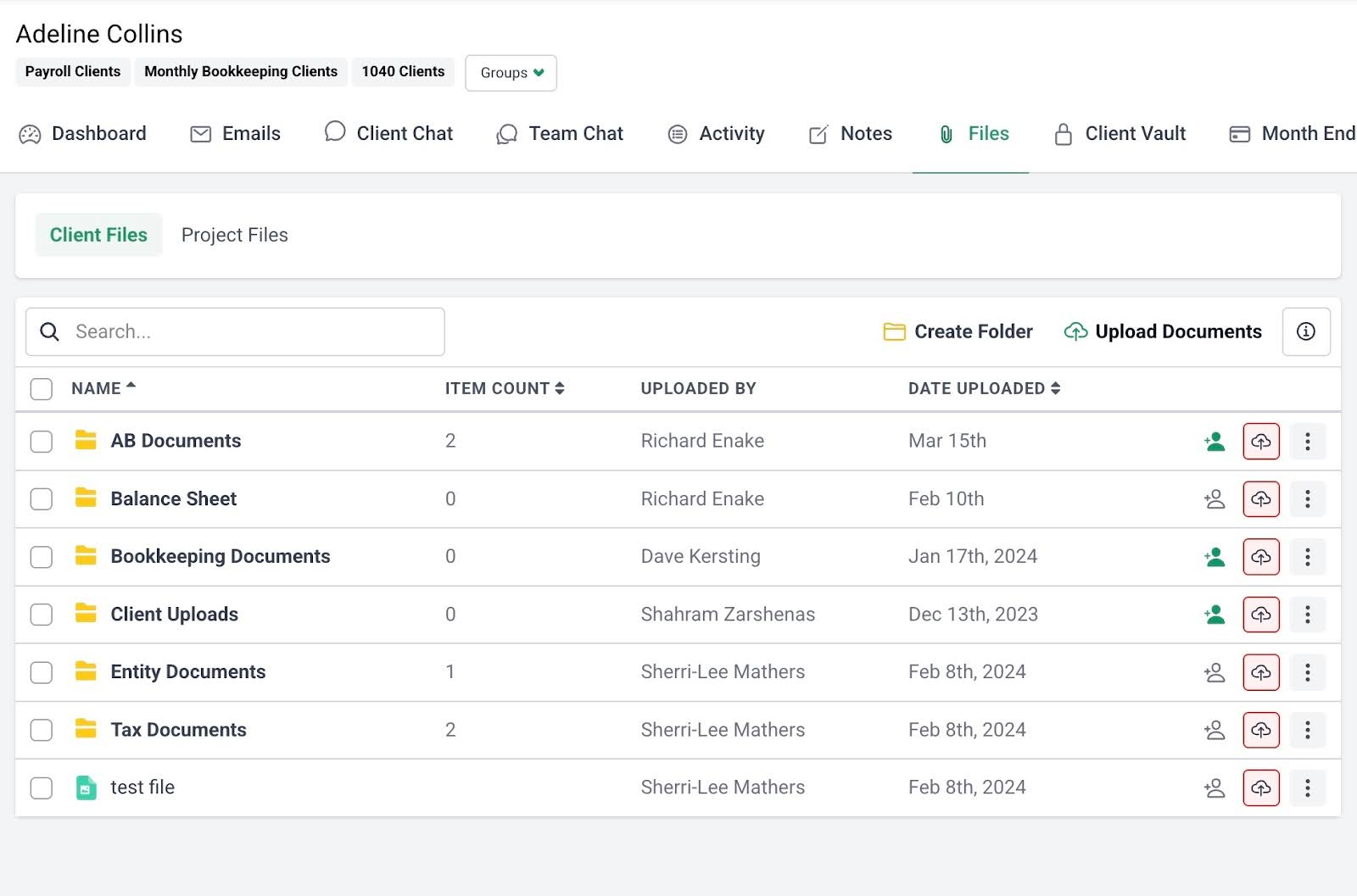
- DMS Integrations: Connect with your existing accounting document management system to automatically back up files and create organized folders.
- Document Organization: Structure files into customizable folders and subfolders for easier management across clients.
- Search Functionality: Quickly locate documents using keyword search instead of manually browsing through folders.
Budget & Reporting
- Time Tracking Reports: Analyze where your team spends time to improve workflow efficiency.
- Client Uploads Report: Track all client document uploads across the firm from a single dashboard.
- Work Insights Report: Identify workflow bottlenecks and process inefficiencies slowing down your team.
- Utilization Reports: Measure team utilization to ensure staff time is allocated efficiently across client work.
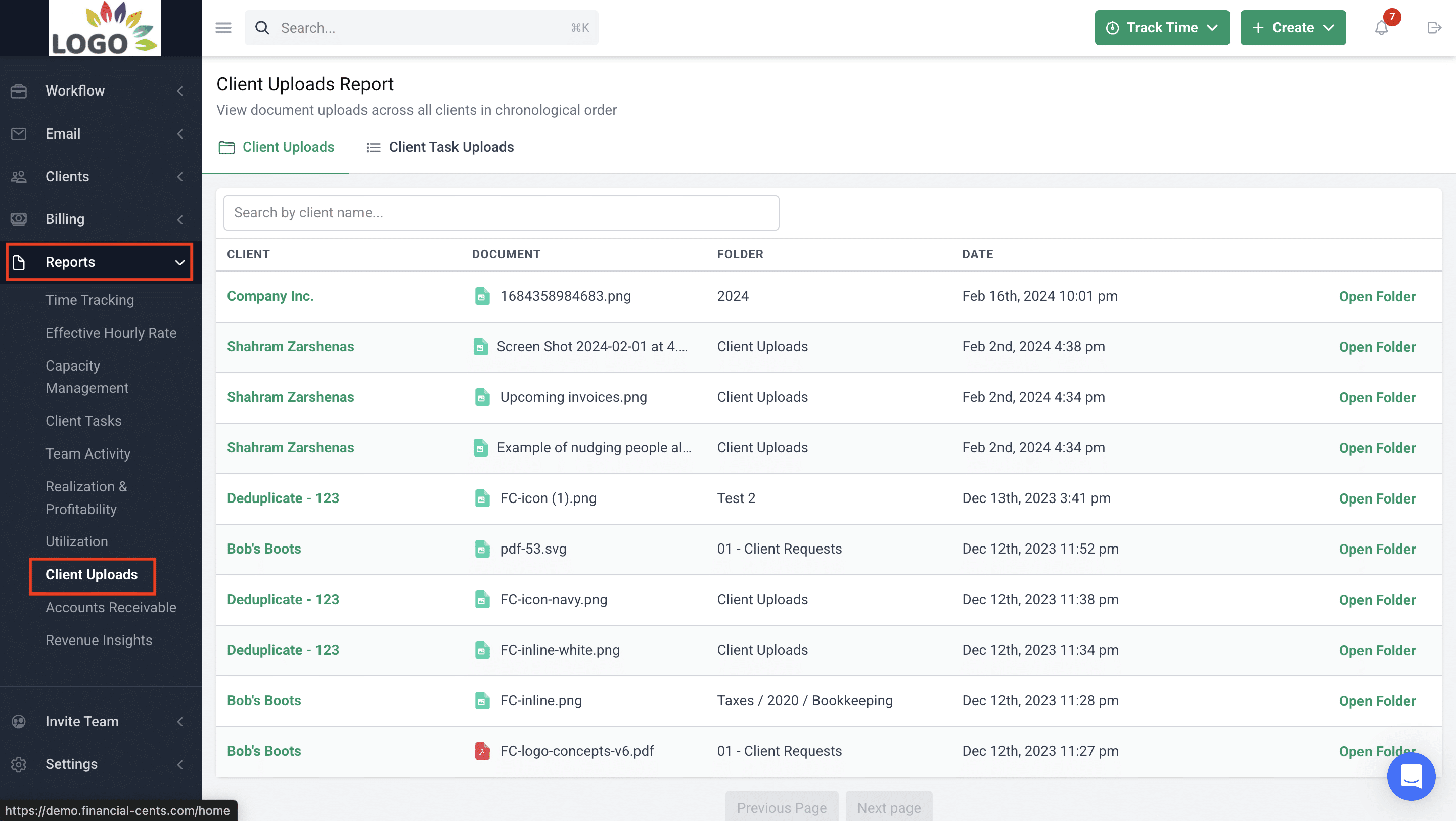
Ideal For:
Financial Cents’ workflow-driven approach to month-end close management makes it well-suited for firms looking to replace spreadsheet-based task tracking with a structured, collaborative, and standardized system.
It is designed for small and mid-sized bookkeeping firms with 1–50 team members. Its intuitive interface enables teams without deep technical expertise to adopt the platform and improve workflow efficiency, deadline management, and client satisfaction.
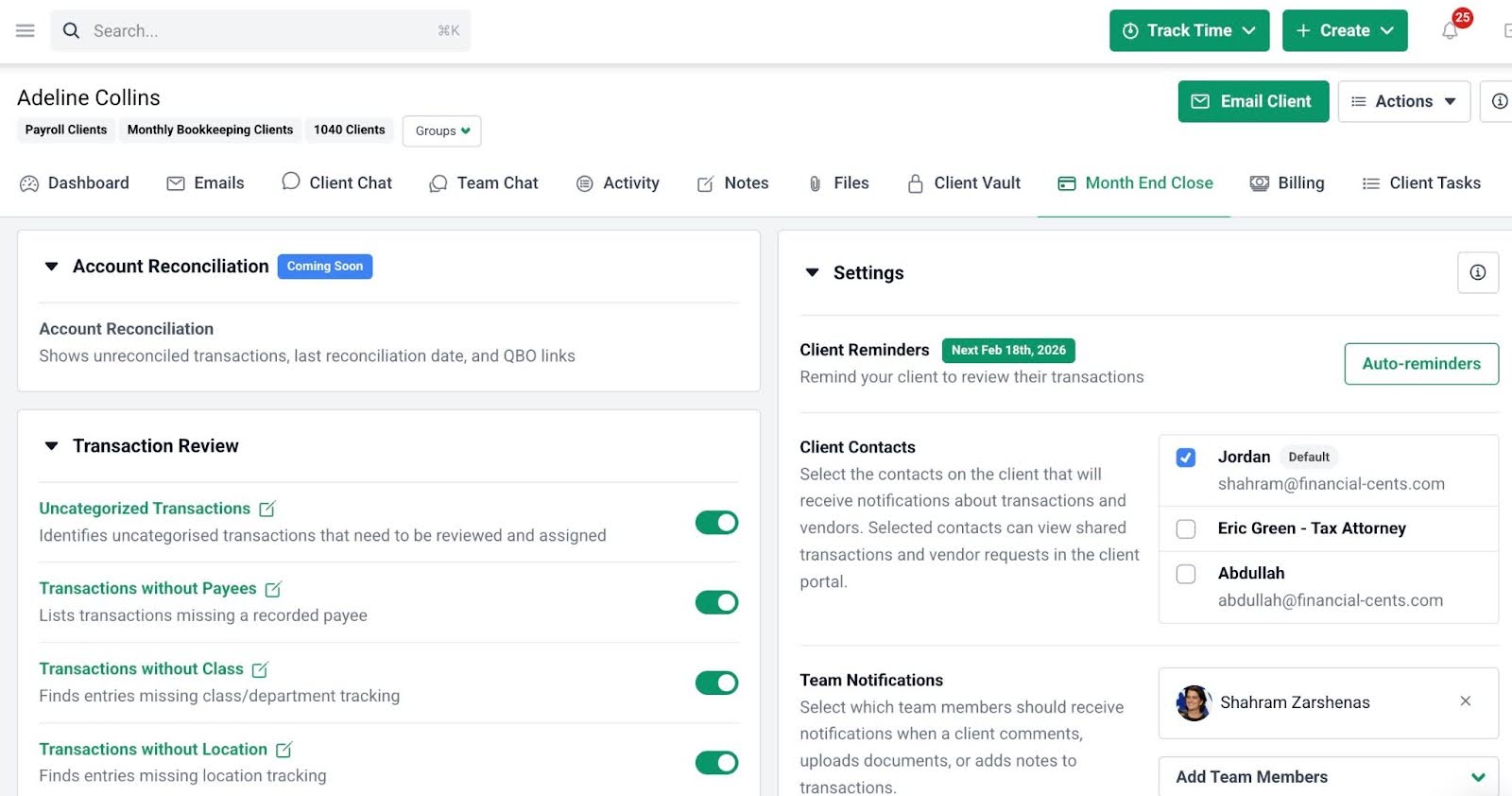
Pricing
The Financial Cents Month-End Close is an add-on feature available at $5/month per client.
The rest of Financial Cents’ features are available on a per-user basis:
- Solo: $19/month per user
- Team: $49/month/ per user
- Scale: $69/month per user
- Enterprise: Custom pricing
Pros
|
Cons
|
Reviews
Financial Cents is rated:
See how Financial Cents can help you bring structure and visibility to your month-end close today. Click here to book a demo.
2. Double
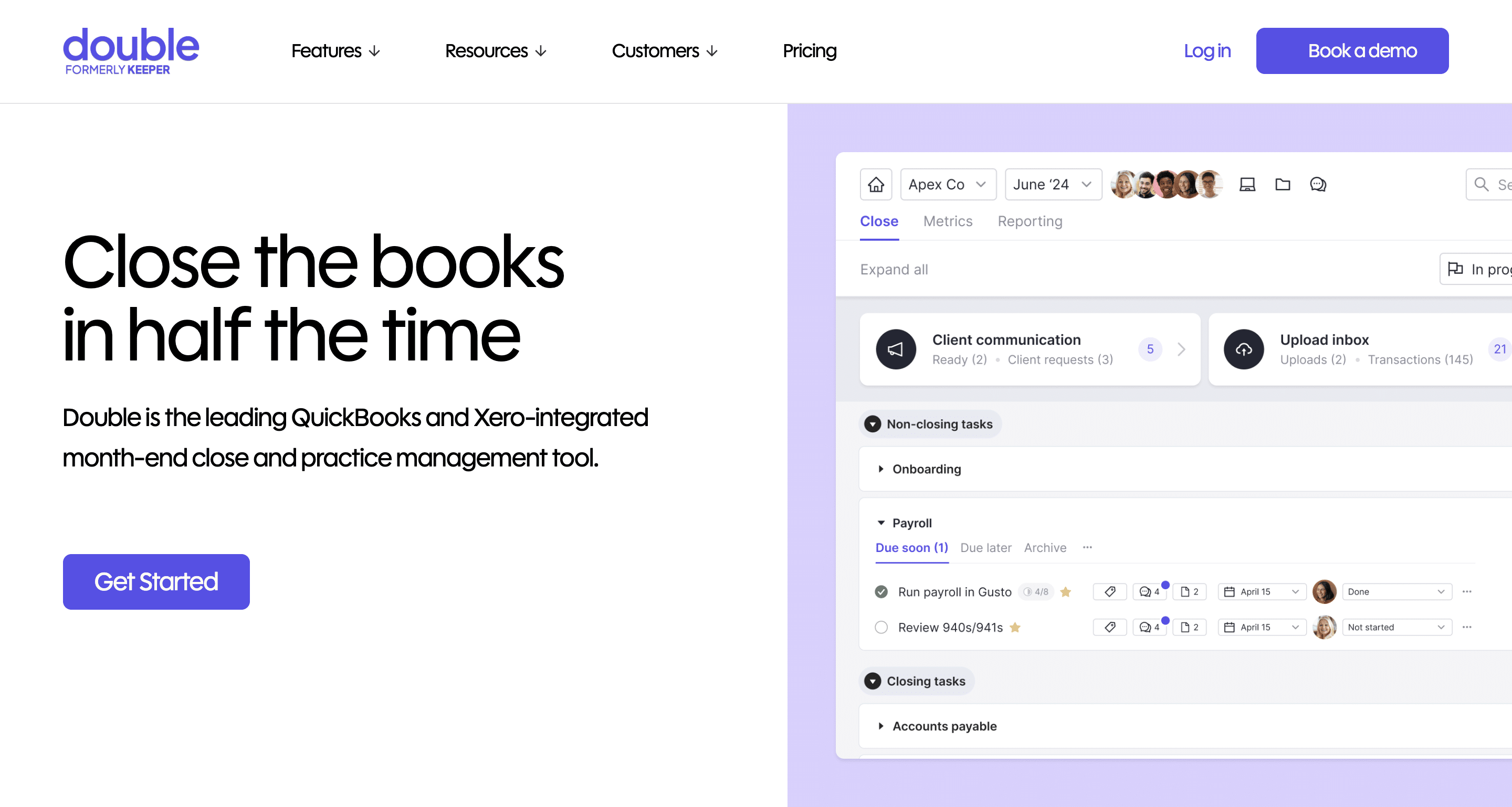
Double combines transaction/file reviews, error detection, client communication, task management, CRM, and reporting into one platform to help firms catch coding errors early, speed up client responses, and reduce overall close time.
It streamlines the month-end close processes through deep, two-way integrations with QuickBooks Online and Xero.
Core Month-End Close Features & workflows
- Client Portal: Securely request information and communicate with clients about specific transactions or bookkeeping tasks.
- CRM: Maintain organized client records and communication history to manage workflows and relationships in one place.
- 1099s: Identify vendors that require 1099 reporting and collect necessary information to simplify year-end compliance.
- Receipts: Collect, store, and attach receipts to transactions to ensure supporting documentation is available during reviews.
- Task Management: Track bookkeeping tasks and assign responsibilities to enable teams to manage recurring work and deadlines efficiently.
- File Reviews: Review financial files and bookkeeping records within a structured workflow to ensure accuracy before closing the books.
- Reports: Generate reports that provide visibility into bookkeeping activity, workflow progress, and operational performance.
- Integrations: Connect with accounting platforms and other tools to streamline data flow and reduce manual data entry.
Ideal For:
Double is a good fit for bookkeeping firms that want to streamline the cleanup and review portion of the month-end close.
Double’s strong transaction review capabilities make it well-suited for firms that have data accuracy and transaction validation as major parts of the close process.
Pricing
Double uses per-connected-client pricing:
- Core: $10/month per client
- Plus: $25/month per client
- Scale: $50/month per client
Pros
|
Cons
|
Reviews
Double is rated:
Related
The 7 Best Double Alternatives.
3. Numeric
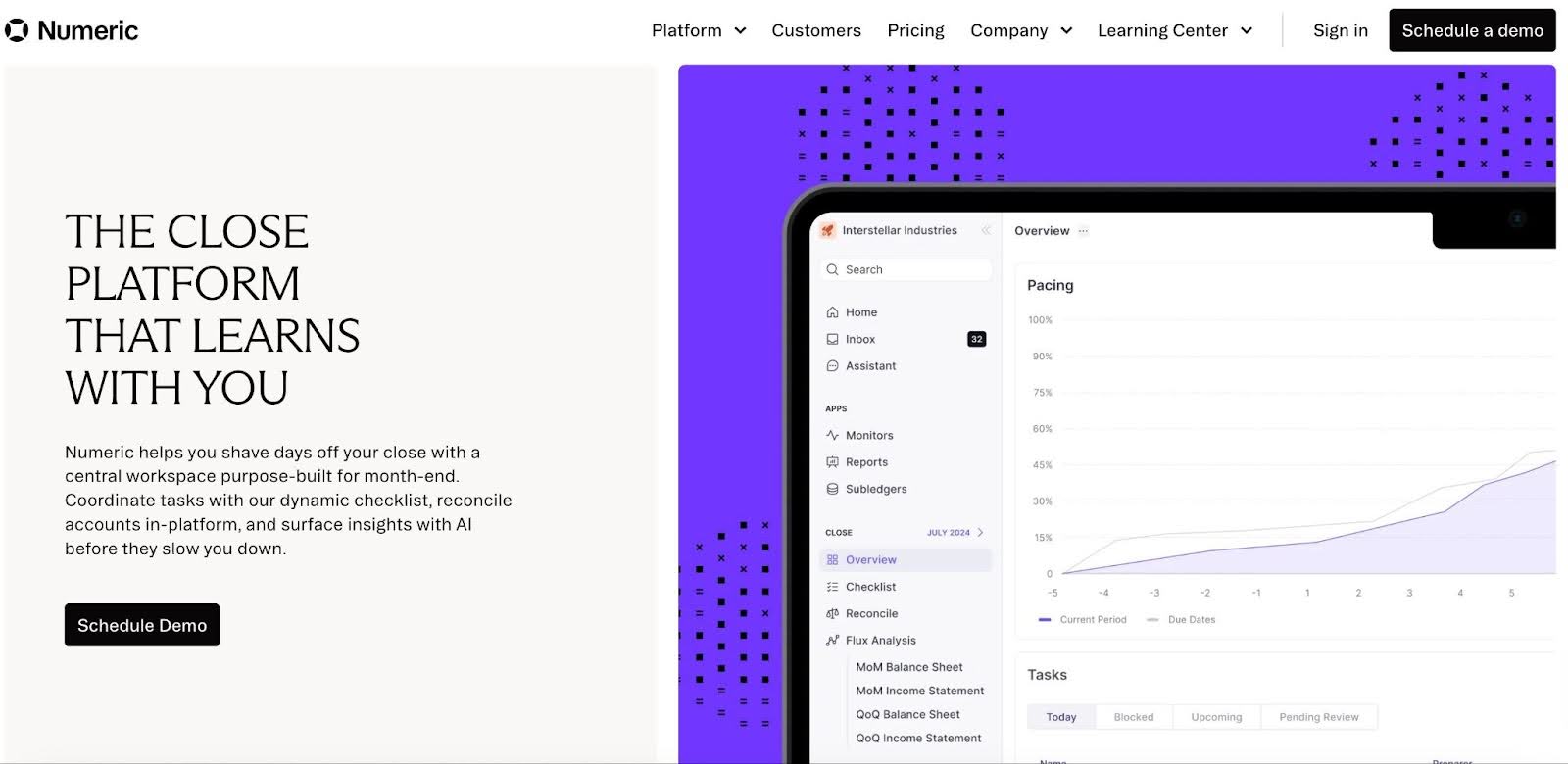
Numeric is a financial close and accounting automation platform that streamlines the month-end close by organizing close activities, monitoring account reconciliations, and identifying anomalies in financial data before reports are finalized.
It is used by both in-house finance teams and multi-client bookkeeping firms, as its structured approach to close management provides stronger visibility and control over financial review processes.
Core Month-End Close Features & workflows
- Close Checklist: Organize and track month-end close tasks with structured checklists.
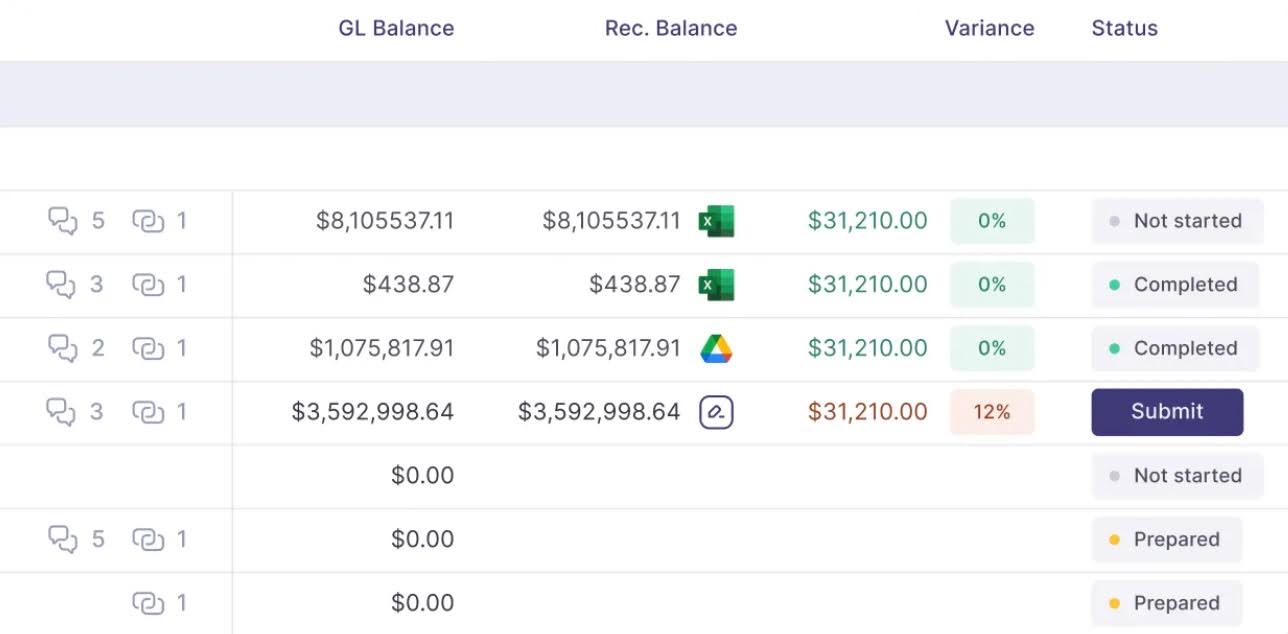
- Reconciliation: Manage and document account reconciliations in a standardized workflow to verify balances.
- Flux Analysis: Automatically analyze balance fluctuations between periods to identify unusual changes or potential financial issues.
- Transaction Monitors: Continuously monitor transactions and account activity to detect anomalies or unexpected entries early.
- Reporting: Generate financial and operational reports that provide visibility into close progress and accounting performance.
- Cash Matching: Automatically match cash transactions to their corresponding records to speed reconciliation and reduce manual review.
- Journal Entry Automation: Automate recurring or rule-based journal entries to reduce manual posting and improve consistency.
- Bank Integrations: Connect directly with banking and accounting systems to import financial data and streamline reconciliation workflows.
Ideal For:
Numeric’s focus on financial close oversight makes it most valuable for teams that need additional control and monitoring during the close process.
It works well for firms scaling beyond manual methods and needs to improve close productivity and headcount control.
Pricing
- Essentials: Starts at $30/month per user
- Growth: Custom pricing
- Enterprise: Custom pricing
Pros
|
Cons
|
Reviews
Numeric is rated 4.8/5 on G2.
3. Xenett
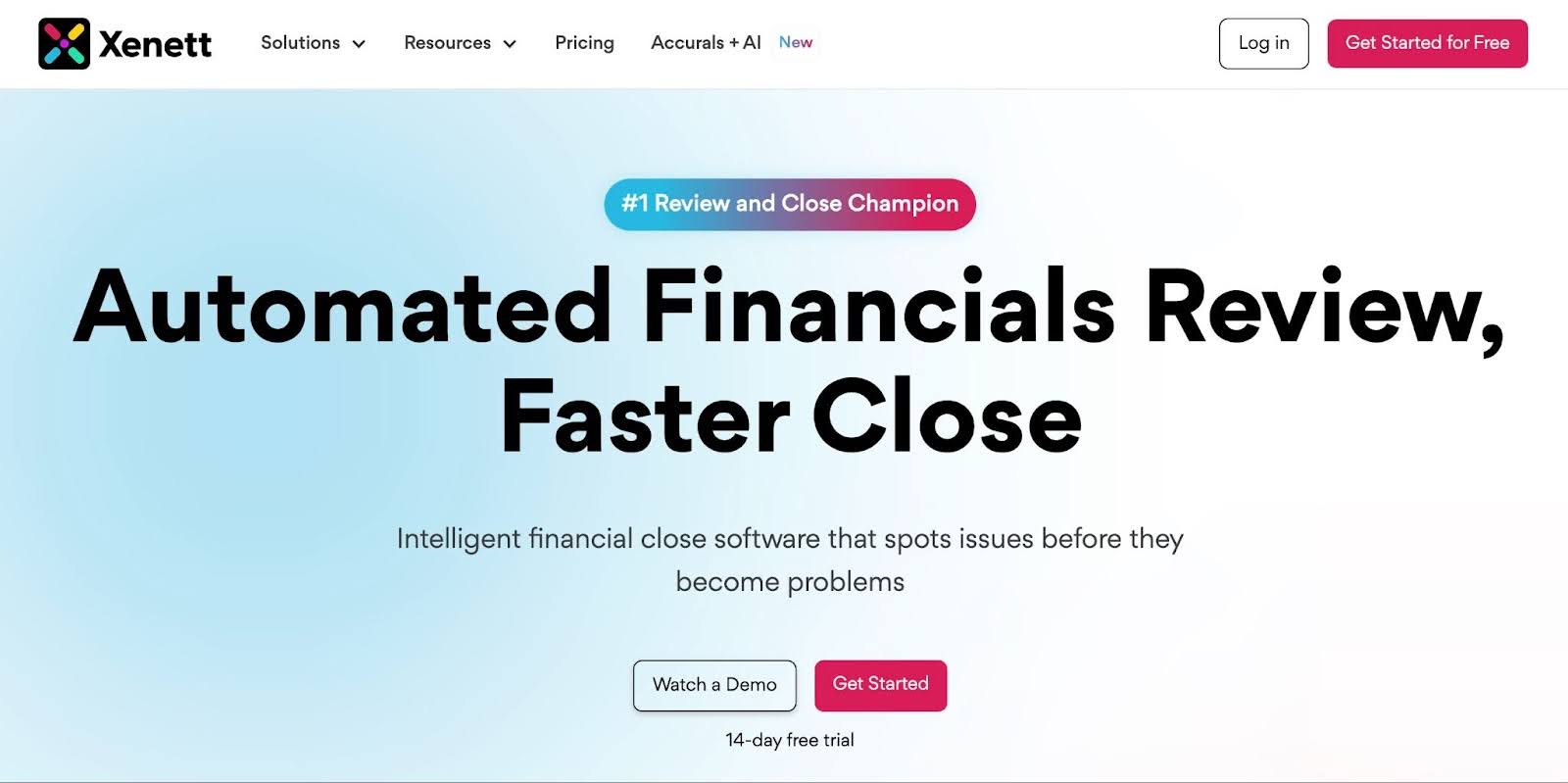
Xenett is a bookkeeping workflow and automation platform that streamlines month-end close processes, transaction reviews, and client communication.
It’s a lightweight, task-oriented solution that emphasizes workflow visibility and process standardization rather than deep financial automation.
Core Month-End Close Features & workflows
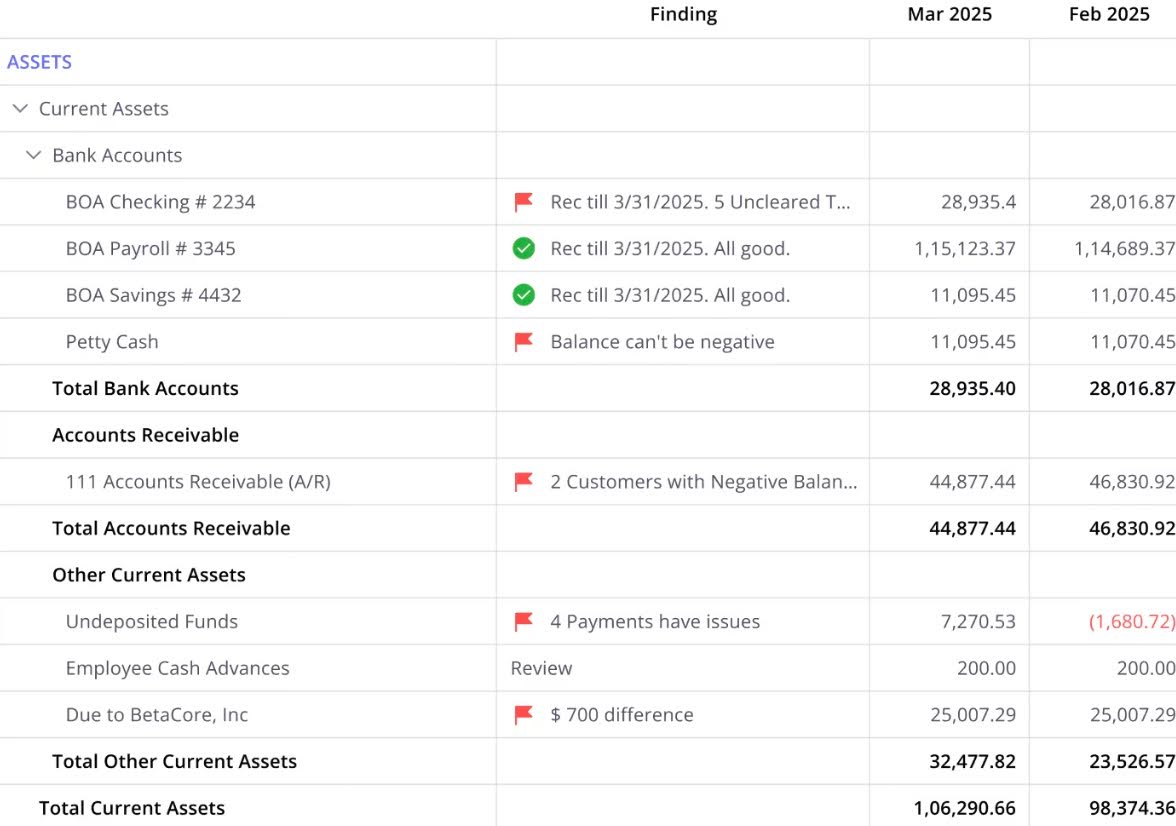
- Close Dashboard: Shows the progress of your month-end close at a glance with a real-time dashboard.
- Link Workpapers: Attach supporting documents and workpapers directly to GL reconciliations.
- Reconciliation Discrepancy Alerts: Receive instant notifications when any changes occur to reconciled or signed-off GL entries.
- Close Checklist: Break tasks into steps to ensure every step of the close is completed accurately.
- Time Tracking: Estimate and monitor the time required to complete tasks to manage workloads efficiently.
- Review Notes: Add contextual notes to explain the status of review points.
- Recurring Projects: Automatically recreate recurring projects on set schedules, reducing manual effort and standardizing workflows.
- Set Auto-Reminders: Automatically send scheduled reminders to clients for outstanding items to reduce follow-ups.
- AP & AR Level Analysis: Track overdue bills, unpaid invoices, and unapplied payments in real time to stay on top of cash flow.
Ideal For:
Xenett is ideal for small to mid-sized bookkeeping firms that want workflow organization without the complexity of large-scale financial automation platforms. It is valuable for firms dealing with cleanup, inconsistency issues, or scaling client volume.
Pricing
Xenett uses a per-client pricing:
- AI Financials Review: $7.5/month per client
- Workflow Plan: $10/month per client
- Enterprise: Custom Pricing
Pros
|
Cons
|
Reviews
Not available
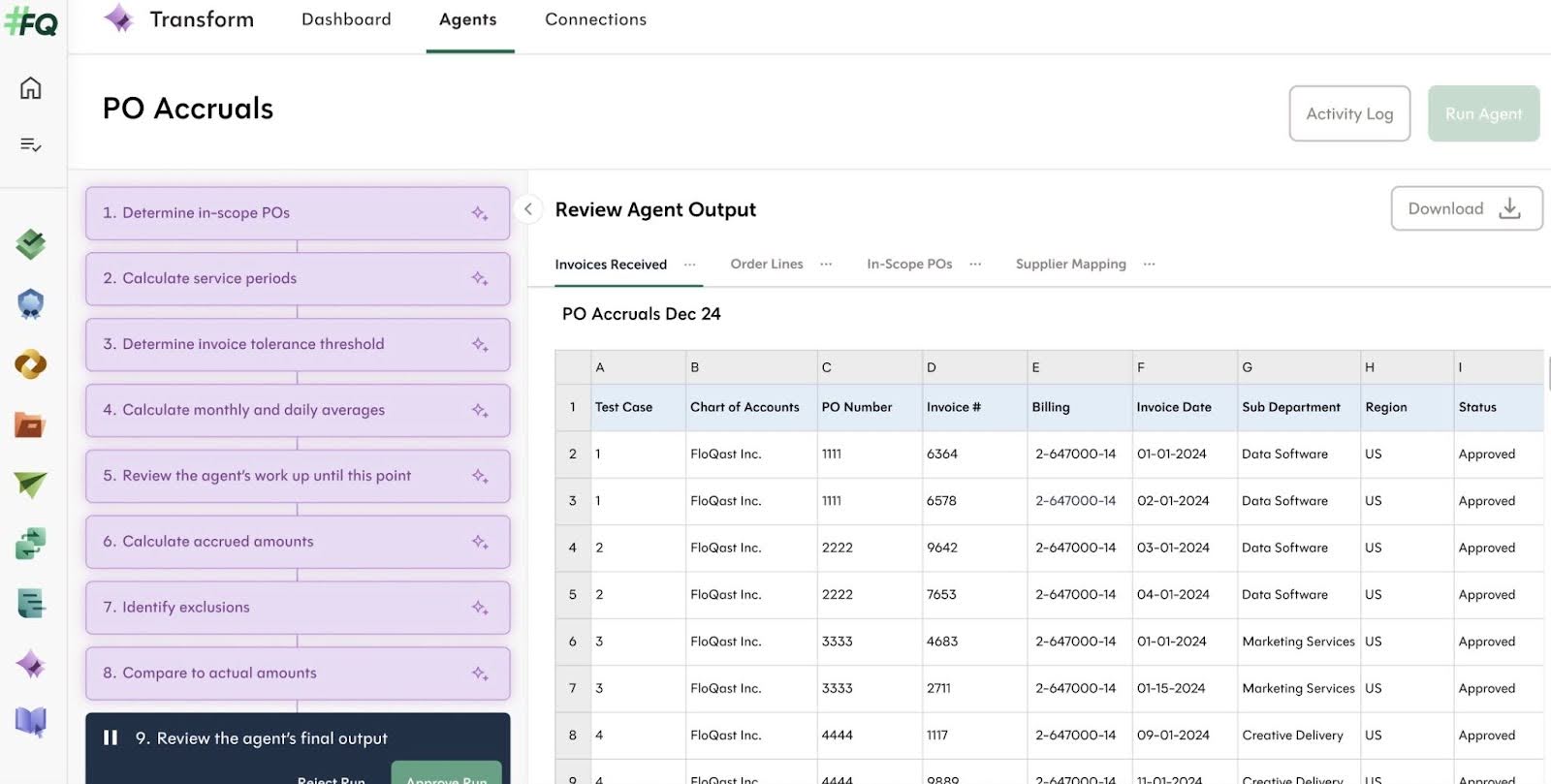
5. FloQast

FloQast is a financial close management platform designed for internal accounting departments, and it also supports bookkeeping firms handling complex client reconciliations or multiple entity closes.
It emphasizes workflow automation, team collaboration, and visibility into task completion to streamline month-end close processes for accounting teams.
Core Month-End Close Features & workflows
- Automated Reconciliations: Automate amortization, depreciation, bank, credit card, intercompany, and subledger reconciliations to save time.
- AI Transaction Matching: Use AI-generated rules to speed high-volume reconciliations while retaining team oversight.
- Journal Entry Automation: Standardize journal entry creation, approvals, and posting with all supporting documentation in one system.
- Close Dashboard: Monitor the status of close tasks and reconciliations across teams and entities to identify roadblocks and ensure deadlines are met.
- FloQast AI: Automate requests for information to reduce back-and-forth communication.
- Financial Statement Risk Management: Manage risks, controls, narratives, and flowcharts in a single interconnected platform.
- Automated Evidence Collection: Capture internal control evidence at the source linked to month-end workflows.
Ideal For:
FloQast is ideal for mid-sized to large bookkeeping, accounting, and finance teams (10–100+ users, often in companies with multi-entity operations) that manage complex or global month-end closes across multiple entities, perform high-volume reconciliations, and seek deep integrations for automation.
Pricing
Pricing is tailored to organization size, scope, and business needs.
Pros
|
Cons
|
Reviews
FloQast is rated:
7. Easy Month End

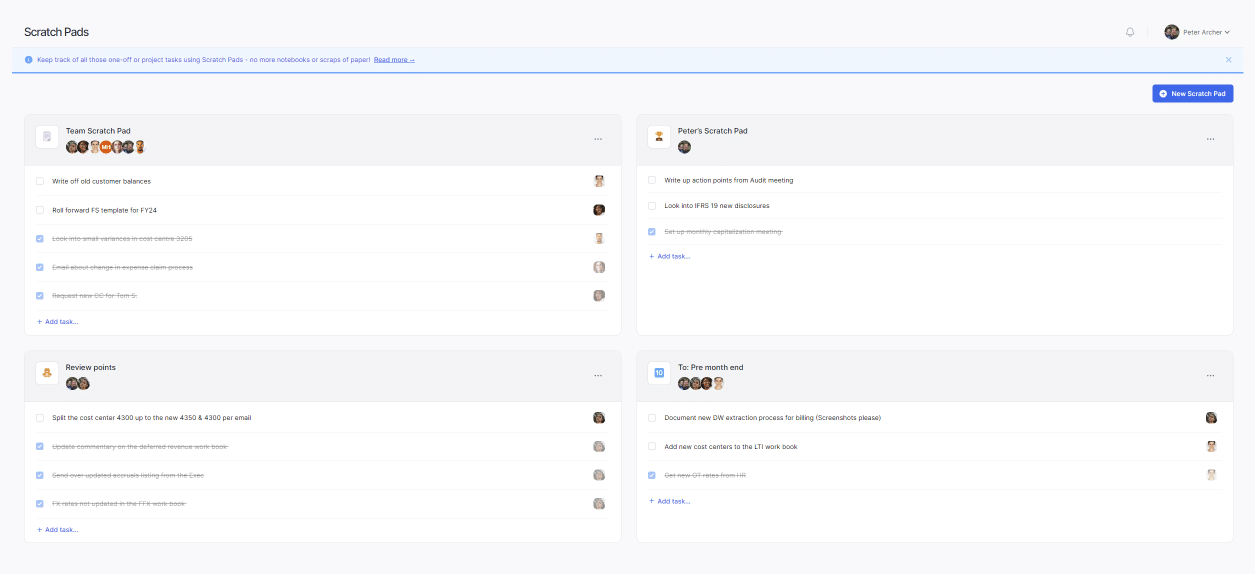
Easy Month End is a bookkeeping-focused month-end close tool designed for firms to manage reconciliations, checklists, and documentation in one place.
With direct integrations to QuickBooks Online and Xero, it automates balance sheet pulls, simplifies reconciliations, replaces manual spreadsheet checklists, reduces chaos in close processes, and supports multi-entity or multi-period workflows.
Core Month-End Close Features & Workflows:
- Task & Checklist Management: Customizable, recurring checklists for month-end, quarter-end, year-end, and ad-hoc finance tasks.
- Balance Sheet Reconciliation: Automatic import of balance sheet data from QuickBooks Online or Xero for easy matching, discrepancy flagging, and reconciliation.
- Team Collaboration & Oversight: Assign tasks to team members, set deadlines, send reminders, and monitor progress in a shared dashboard.
- Audit & Documentation: Collect and store evidence (attachments, notes) for compliance and audits.
- Analytics & Insights: Basic analytics on close performance, bottlenecks, and team efficiency.
Ideal For:
Easy Month End is ideal for small to mid-sized finance teams and bookkeeping firms (typically 1–20 users) that rely on QuickBooks Online or Xero and need simple balance sheet reconciliation connected to their workflows.
Most of these firms are looking to replace spreadsheets with structured workflows and ensure audit-readiness.
Pricing
Easy Month End uses a tiered subscription model
- Small: $45/month
- Company: $89/month
- Enterprise: Custom pricing
Pros:
|
Cons:
|
Reviews:
Easy Month End is rated 5/5 on G2
7. BlackLine

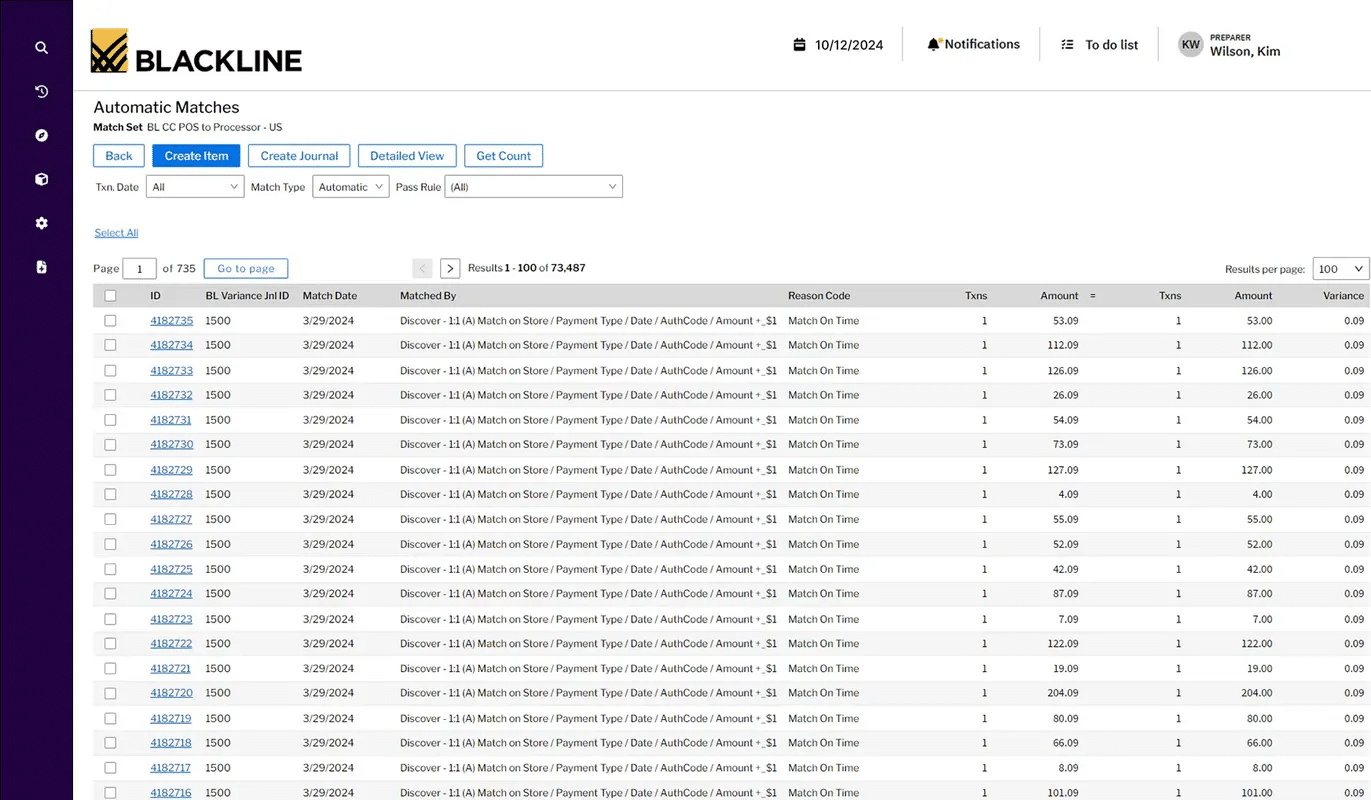
BlackLine’s financial close automation platform makes reconciliations, task management, and audit compliance more manageable for enterprise accounting teams by standardizing close processes with robust governance, real-time visibility, and configurable controls.
Its support for global/multi-entity operations and its integration with major ERPs make it a powerful option for firms that handle high client volumes or complex accounting structures.
Core Month-End Close Features & Workflows:
- Account Reconciliations: Automate and standardize reconciliations, track status and quality in real time, and eliminate version control errors.
- Transaction Matching: Apply rule-based automation to automatically match transactions to reduce errors and free staff for strategic tasks.
- Smart Close for SAP: Coordinate global close processes with exception-based management directly in SAP.
- Consolidation: Automate complex consolidation tasks, including intercompany eliminations and ownership calculations.
- Task Management: Track, assign, and monitor tasks across the close process with configurable dashboards and automated workflows.
- Compliance: Centralize risk and compliance management, control testing, and audit documentation in one platform.
Ideal For:
Large bookkeeping or corporate finance teams managing high-volume reconciliations, complex client structures, or multi-entity reporting.
These organizations require high accuracy, risk mitigation, and audit readiness, and prioritize scalability, controls, and integration over simplicity.
Pricing
BlackLine uses custom, enterprise subscription pricing. You have to request a demo to get your customized quote.
Pros:
|
Cons:
|
Reviews:
BlackLine is rated:
Why Bookkeeping Firms Should Use a Financial Close Software for Month-end
I. Reduced manual cleanup and error risk
When bookkeepers have to manually process hundreds of transactions across dozens of clients with accounting spreadsheets, there’s bound to be errors, especially because spreadsheets were not designed for such a workload.
Financial Close tool eliminates spreadsheet sprawl and the risk of missed corrections by centralizing all tasks, transactions, and corrections in one place.
It also uses automated checks to flag potential issues before they reach reconciliation.
II. Faster close cycles
Month-end closes stretch into weeks when tasks are assigned late because someone had to recreate recurring projects first, team members waste hours hunting for updates, or chasing missing documents, among other reasons.
The close software removes these bottlenecks by automatically generating recurring engagements. It also provides centralized task visibility and tells team members exactly what needs their attention next.
III. Visibility into review status
Month-end close software gives managers a dashboard view of every task across every close project, while team members also see what needs their attention in real time.
This makes bottlenecks that used to remain hidden until the end of the week now visible, with time to fix them.
IV. Standardized workflows and checklists
The workflow templates feature in accounting close system makes it easy to document your firm’s operating procedures.
This ensures the same process, quality, and documentation standards are applied to every client each month, keeping client experiences consistent.
V. Improves team accountability
Every task in a monthly close software has an owner, a due date, and automatic notifications that are sent when work is ready to begin and as deadlines approach.
Similarly, the capacity dashboard shows workload distribution across the entire team. This visibility enables managers to identify overloaded team members and reassign tasks to ensure timely deliverables.
VI. Better audit trails and documentation
That is why month-end close tools attach detailed activity logs, notes, and supporting documentation directly to each task.
Everything is timestamped, organized, and retrievable in seconds to help firm owners defend the work performed, when it was done, and by whom.
How to Choose the Right Accounting Close Software
There are several reasons two bookkeeping and accounting firms may not use the same month-end close tool.
Here’s how to ensure the software you implement lives up to, if not exceeds, your expectations.
-
Evaluate workflow complexity
The right accounting close software should match the complexity of your firm’s workflows.
Before choosing any tool, assess how your close process currently operates: the number of clients you serve, the industries you support, and how many team members are involved in the month-end close.
For example, smaller bookkeeping teams may only require simple task tracking and checklists, while larger firms managing many clients often need multi-step workflows, task dependencies, and structured review processes.
-
Prioritize integration needs
The right integrations sync financial data across platforms to reduce manual data entry and minimize the risk of errors.
Ask the software vendor how well your preferred choice integrates with the systems your team already relies on.
For example, Financial Cents integrates with bookkeeping tools like QuickBooks to help firms deliver month-end services without switching between platforms.
-
Consider team size and skill
The size of your bookkeeping team should influence the type of accounting close software you choose because large firms, for example, need some features to track work and maintain accountability during the month-end close.
At the same time, the software should be intuitive enough for your staff to use for day-to-day tasks without requiring extensive training or complex setup.
-
Assess reporting and visibility needs
Beyond simply showing which month-end tasks are completed or delayed, the top platforms offer reporting tools that help managers evaluate what is working and where improvements are needed across workflows, team performance, and client management.
Reports like client uploads, revenue insights, and work insights help firms identify bottlenecks and adjust processes over time.
-
Budget for cost vs. value
While pricing is an important factor, bookkeeping firms should look beyond the subscription fee to assess how much time, efficiency, and operational clarity the software provides.
The right tool repays its subscription fees through increased productivity and better service delivery.
Why Financial Cents Could Be the Best Month-End Close Software for Your Firm
Every month brings the same cycle: pulling transactions, chasing uncategorized items, reconciling accounts, and finalizing reports across dozens of files, all on a deadline.
When that process runs through spreadsheets and scattered email threads, the result is predictable. Reports will be delayed, quality will be inconsistent, and the team will be too overwhelmed with manual work to deliver higher-value services.
Month-end close software addresses this at the root by standardizing workflows, automating transaction reviews, tracking deadlines, centralizing client communication, and providing real-time visibility across every client engagement.
To choose suitable financial close software, identify bottlenecks in your current close process and shortlist tools that match your firm’s size and workflow complexity.
For many bookkeeping firms, Financial Cents is the most complete option. It combines month-end close management, automated workflows, task tracking, and client communication in a single platform.
Beyond these month-end close-related features, Financial Cents also provides the following features that help bookkeeping firms manage their bookkeeping practice in one place:
If you’re ready to see how these work in your bookkeeping practice, click here to start your 14-day Free Trial.
Frequently Asked Questions (FAQS)
- What does month-end close software do?
Month-end close software helps bookkeeping teams to complete every step of the close process consistently and on time.
- How much does month-end close software cost?
The cost of month-end close software depends on the platform, number of users, and level of functionality.
Starting prices range from $30 to $100 per user per month for small and mid-sized teams.
- Can I use QuickBooks for the month-end close?
QuickBooks was not designed for the month-end workflow. Still, it can support parts of the month-end close process since it contains the underlying financial data needed for reconciliations, journal entries, and reporting.
- Do I need separate software if I already have practice management software?
It depends on your practice management platform’s capabilities.
If your practice management tool is like Financial Cents, which includes a dedicated month-end close, workflow automation, capacity management, and team collaboration features that support the month-end close process, you wouldn’t need to.
- What are the common month-end close challenges for bookkeeping firms?
Bookkeeping firms face several operational challenges during the month-end close process, including:
- Manual workflows.
- Lack of process visibility.
- Transaction cleanup delays.
- Client communication gaps.
- Inconsistent workflows.