Choosing an accounting practice management software can be a herculean task for firm owners. You have dozens of tools to review, each with its own set of features. Some of those features are core to solving your firm’s problems, while others are just nice-to-haves. Telling them apart before you buy is tough, and the cost of making the wrong choice is high.
A tool that doesn’t fit how your team works means time lost to setup, money spent on a subscription you’ll probably end up replacing, and clients who can feel the disorganization (and might leave as a result).
In this article, we break down the practice management features that matter most for accounting firms, so you can select the right one for your specific needs. You’ll know which features are non-negotiable, which you can do without, and what to test during a trial or demo.
TL;DR
- Accounting practice management software addresses challenges such as workflow inefficiencies, scattered client management, and stalled talent onboarding.
- Firms shouldn’t choose software based on the highest number of features. Instead, you should choose a platform that can easily handle your core accounting work and scale with you as you grow.
- Core features to prioritize are workflow and task management, workflow automation, a CRM, a client portal, document management, team collaboration tools, reporting, proposal & engagement letters, and integrations with your existing accounting tools.
- Other features to look for (depending on your firm’s needs) include time tracking for accountants and capacity management.
- You can use a platform’s free trial to test out its ease of use when creating recurring workflows, requesting documents, assigning tasks, finding client documents, and creating invoices.
- Financial Cents brings all the essential core features into one platform built for small and mid-sized accounting and bookkeeping firms, so you don’t have to use multiple tools.
Why Your Accounting Firm Needs Practice Management Software
Today’s firms face a wide variety of challenges, from acquiring and managing clients to managing workflows, hiring talent, and keeping pace with new technology. Out of all these, Financial Cents’ 2025 State of Accounting Workflow and Automation Report found workflow inefficiencies to be the biggest challenge, named by 55.5% of firms surveyed. This inefficiency causes missed deadlines, reduced work quality, friction with clients, lost revenue, and long hours that leave owners little time for anything outside of the firm.
Accounting firm practice management software is built to resolve these challenges. Take a recurring problem like chasing clients for documents. You often have to follow up with them multiple times before you get a response, which wastes a lot of time and can cause project delays. But an accounting management software simplifies the process by automating the follow-ups and making it easier for clients to upload the requested documents. This speeds up the document collection process, taking it from several days to just 1-3 days, according to the previously cited report.
Want to learn more about this type of technology? Here’s the accounting practice management software ultimate guide.
The Practice Management Features Every Accounting Firm Needs
Below are the features to look for when choosing a practice management tool.
Workflow and Task Management
This is one of the most important features a practice management software for accounting firms should have, because it keeps you organized and on schedule during busy seasons. Much of that comes from a centralized dashboard: the most sought-after workflow feature, wanted by 73.9% of firm owners.
A good dashboard gives you visibility into everything happening in your firm. In one view, you should be able to see every client project, its status, its due date, and who it’s assigned to, so you can keep work moving and meet all of your deadlines.
Workflow Automation
Accounting and bookkeeping both involve a lot of tedious, repetitive tasks. Since your firm might run some of the same work every month, quarter, and year for certain clients, good software sets that work on schedule instead of your team rebuilding it each time. It should also handle the routine admin around it, so your team spends its time on client work.
Client Management/CRM
Accounting firms manage a lot of clients, each with their own documents, credentials, and notes. At some point, it becomes difficult to manage all of this information in spreadsheets and emails without missing details. An accounting CRM keeps every client’s full record in one place, so anyone on your team can instantly find the details they need.
Client Portal and Client Requests
The second and third most sought-after accounting software features are client reminders (69.3%) and a client portal (60.6%). And for good reason. Clients often forget to send necessary documents, causing work to stall. A portal gives them one secure place to upload documents, and the software follows up on its own until they send what you asked for.
Document Management
With the sheer number of documents you handle, you need somewhere secure to store and organize them. With document management, every file is organized by client and job, so your team can quickly and easily find the right one.
Team Collaboration
Accounting work involves a lot of collaboration between team members and clients. Your team hands work off to each other, and you ask clients questions so you can do the work accurately. A proper collaboration feature makes this easier. It keeps notes and updates in one place where everyone can find them, and lets you tag and chat with people directly within the project.
Time Tracking & Invoicing
If you bill by the hour, time tracking is necessary to record how long it takes to complete a project. The best platforms also offer an invoicing feature that enables you to turn those hours into invoices and send them directly to clients—all within the same tool.
Proposals & Engagement Letters
Ideally, you send proposals and engagement letters to every new client (and renew them annually for every existing client). Having this feature built into your practice management tool is super convenient. You can create, send, and get signatures on these documents without ever leaving the tool or having to draft them from scratch each time.
Capacity Management
It’s important to know how much work each person on your team is handling, so you can reassign tasks as needed. Tools with capacity management features allow you to see that information instantly. That way, you can shift work off the plates of team members who are overloaded. When work is spread evenly across your team, they are less likely to burn out, even during busy seasons.
9. Reporting and Firm Insights
You need hard data to run your firm well and make informed decisions. This includes data on how your team members spend their time and which clients and services actually make you money. Your accounting practice management software should provide this, since it already has all the necessary historical records.
Integrations with Key Accounting Tools
There are certain third-party tools you’ll likely use alongside your practice management software, like QuickBooks Online or Xero. Integrations connect those tools to your practice management software, so information moves between them without your team entering it twice. This saves time and reduces errors.
Features That Are Nice-to-Have vs. Must-Have
Many tools offer more features than the ones we covered above. Those extras can be useful, but they shouldn’t sway your decision one way or the other. For instance, features like AI, white-labeled client portals, enterprise permissions, and highly customized automations are helpful, but not essential.
On the other hand, core features like workflow and task management, workflow automation, accounting client portals, CRMs, document management, team collaboration tools, reporting, and integrations are ones every accounting firm needs, no matter their size or operational model.
Some features may be considered “core” depending on your specific firm. Capacity management, for example, does little for a solo firm but becomes essential as you scale. Time tracking may not matter if you don’t bill by the hour, though it may become necessary if you add time-based offerings like advisory or consulting services.
Whatever the case, it’s important to know which features are true must-haves for your firm and which are optional nice-to-haves. We’ve laid it all out in the table below.
Practice Management Feature Checklist for Accounting Firms
| Feature | Why it matters | What to look for | Priority level |
|---|---|---|---|
| Workflow and task management | Shows you everything happening in the firm, so you stay on track | A central dashboard with every project, status, due date, and assignee | Must-have |
| Workflow automation | Reduces the time spent on manual and repetitive tasks | Automated reminders and notifications, and ability to create recurring projects | Must-have |
| Client portal | Gives clients one place to upload documents | A simple portal for document uploads and work progress monitoring | Must-have |
| CRM | Manages each client’s full record in one place for easy access | Storage for client documents, passwords, and notes, ideally linked to each project | Must-have |
| Document management | Stores sensitive files securely and keeps them easy to find | Secure storage, per-client and per-project organization, and access permissions | Must-have |
| Team collaboration | Makes team collaboration and communication seamless | In-context notes, tagging, and chat functionality within the project | Must-have |
| Proposals & engagement letters | Makes it easy to create and send client proposals and engagement letters | Built-in proposals & engagement letters, templates, and e-signatures | Must-have |
| Reporting | Shows how your firm is performing so you can make informed decisions | Time tracking, revenue, and profitability reports | Must-have |
| Time tracking & invoicing | Lets you track work hours and invoice clients in one place | Timer tied to tasks, and invoicing that pulls from time logged | Depends on the firm |
| Capacity management | Shows who’s overloaded so you can redistribute work evenly | A view of each person’s workload and capacity | Depends on the firm |
| AI features | Drafts, sorts, and reviews documents for you | Document tagging, email drafting, and file review | Nice-to-have |
| Custom dashboards | Builds advanced reports for deeper insights | Reports you can create and edit yourself | Nice-to-have |
| Enterprise permissions | Controls access in more detail than usual | Custom roles and per-client access rules | Nice-to-have |
| Highly customized automations | Automates work that standard rules can’t handle | Configurable rules and triggers beyond the standard ones | Nice-to-have |
| White-labeled client portal | Puts your firm’s branding on your client portal | Custom logo, domain, and brand colors for your portal | Nice-to-have |
Common Mistakes When Evaluating Practice Management Features for Accounting Firms
Here are the mistakes firms often make when comparing practice management software.
Selecting the Software With the Longest Feature List
It’s easy to compare two tools by counting their features. But the number of features tells you nothing about how useful they are for your firm. The better test is whether you’d use a feature every day or only once in a while, and how well the tool handles the work your team does most.
Choosing a Generic Project Management Tool
There are many project management tools on the market, but they weren’t all built for accounting work. Generic tools can’t easily handle tasks like collecting documents from clients or running recurring monthly and quarterly bookkeeping projects.
As Joseph Councilman, COO of the Minerva Group, explains, “Financial Cents has been a huge shift for our firm. We were previously using a different project management system to help us track things, but it wasn’t specifically tied to an accounting firm or accounting systems. And so once we implemented Financial Cents, it made a huge difference in how we’re able to track and keep ourselves organized.”
Ignoring Client Experience
Your clients’ experience when using the software is important. If they’re confused or find it difficult to navigate, they won’t adopt it, and you’ll be back to sending endless emails and chasing them to collect documents. So make sure you find a tool with a great client UI and UX.
Not Involving Staff Who Will Use the Tool Daily
As an owner, you’re not the only one who will use the tool, so be sure to involve your staff from the start. Because they handle more of the day-to-day work, they might notice things about the tool that you won’t. So let them test it and provide feedback.
Implementing a Tool That Doesn’t Scale With Your Firm
Don’t choose a tool that works for your firm’s current state, but not for the next stage of growth. Switching software later costs you time and money. So think about where your firm will be in two years, and make sure the software can handle the projected increase in clients, staff, and work before you commit. Also, ask how pricing works for a larger team, since some tools get very expensive as you add users.
What to Test When You Start a Trial of Practice Management Software for Accountants
Most tools offer a free trial, which you should take advantage of. During this trial, test how to:
- Create a recurring monthly bookkeeping workflow: This is work your firm does often, so build a monthly bookkeeping workflow, set it to recur, and make sure it replicates at the set interval with the right tasks and settings.
- Assign tasks to team members: See how easy it is to assign tasks and tag other team members. Check whether they get a notification or not.
- Request documents from a client: Set up a real or test client and have them upload the requested documents to the portal. Then schedule reminders to follow up at set intervals.
- Track time: Start a timer, record the time it takes to complete a project, and stop it. Check that it’s accurate.
- Create an invoice: Create and send an invoice to a client, real or test. Bonus points if it pulls from the hours you tracked.
- Monitor workload/capacity: Check whether the dashboard shows each person’s workload so you can distribute tasks evenly.
- Find client documents: Store documents and information in the software, then search for them and see how quickly and easily you can find them.
- Review reports: Once you have enough data, look at the reports and see whether the insights are detailed, accurate, and practical.
- Get new users onboarded: Bring on one or two staff members to try the tool and ask them whether it’s easy to use or if anything is slowing them down.
All the Practice Management Features Your Firm Needs in One Place
Instead of stitching together multiple tools to get all of the core features we highlighted here, the best accounting firms choose a platform that offers all of them in one place. One of such tools is Financial Cents. It’s built for small and mid-sized accounting and bookkeeping firms that want to manage their work, clients, team, deadlines, documents, time tracking, and billing from a single platform.
“We wanted a software solution that could scale with us. I like Financial Cents because it targets the accounting industry. The nuances of recurring work, task dependencies, and client requests made a lot of sense for us,” says Stacey Feldman, CPA, Chief Operating Officer at Full Send Finance.
With Financial Cents, you can:
- Track client work, projects, tasks, and deadlines from a centralized workflow dashboard: Here, you have a real-time view of every project and task in your firm. You can see what’s on schedule, what’s overdue, and what needs attention now, without asking anyone for a status update.
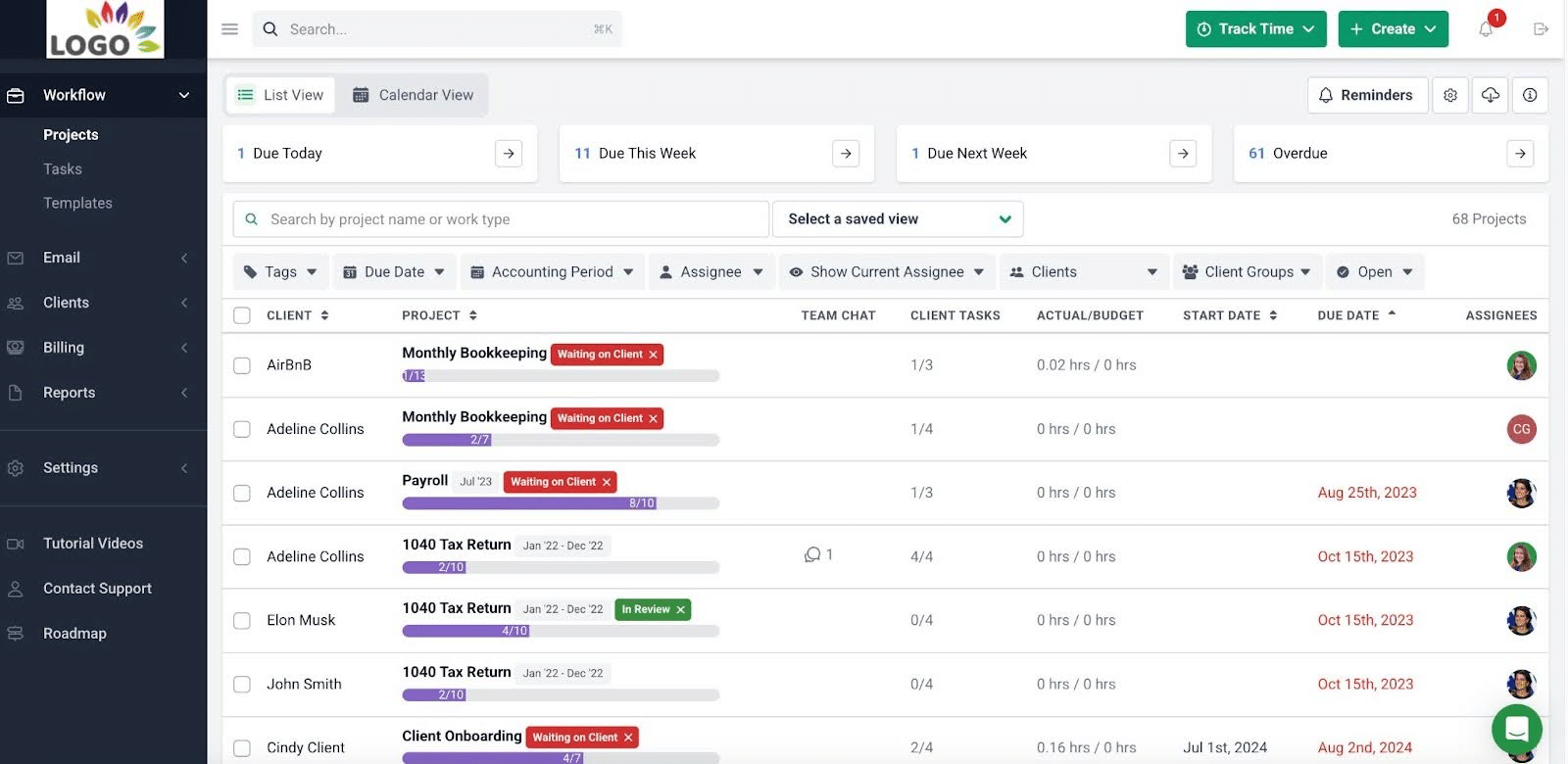
“I like to have a holistic view of all the work we have across the company and their status,” Stacey says. “Financial Cents allows me to identify which project is behind schedule, why it is behind schedule, and which team member needs support. It gives me a big picture of the company’s overall workload and the resources allocated.”
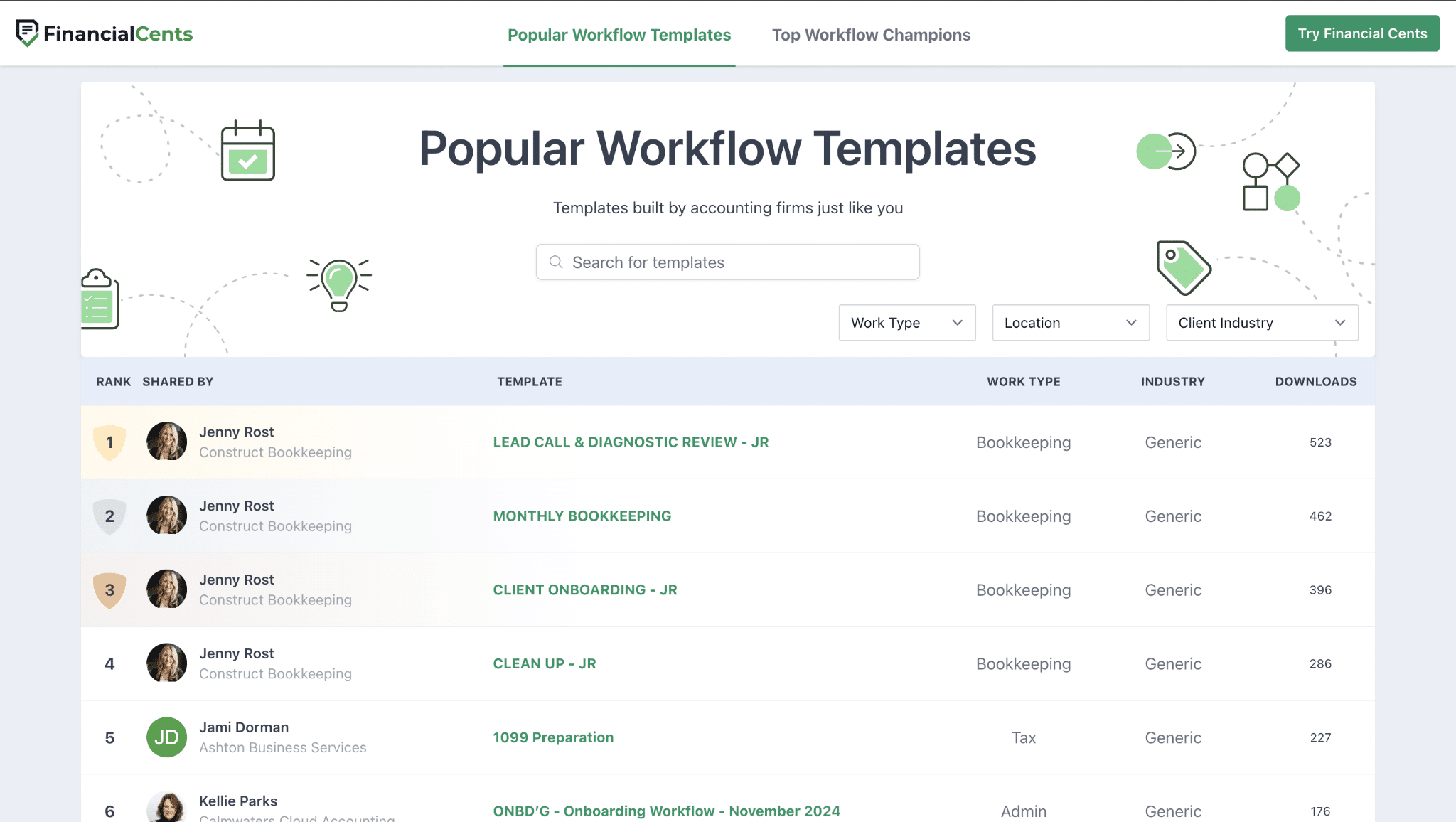
- Standardize recurring work with templates: You can create and store templates for repeatable tasks like month-end close, tax prep, payroll, bookkeeping, client onboarding, and more with Financial Cents. This ensures everyone on your team follows the same steps every time, so the work stays consistent no matter who completes it. You can also leverage any of the 400+ pre-built templates in our template library.
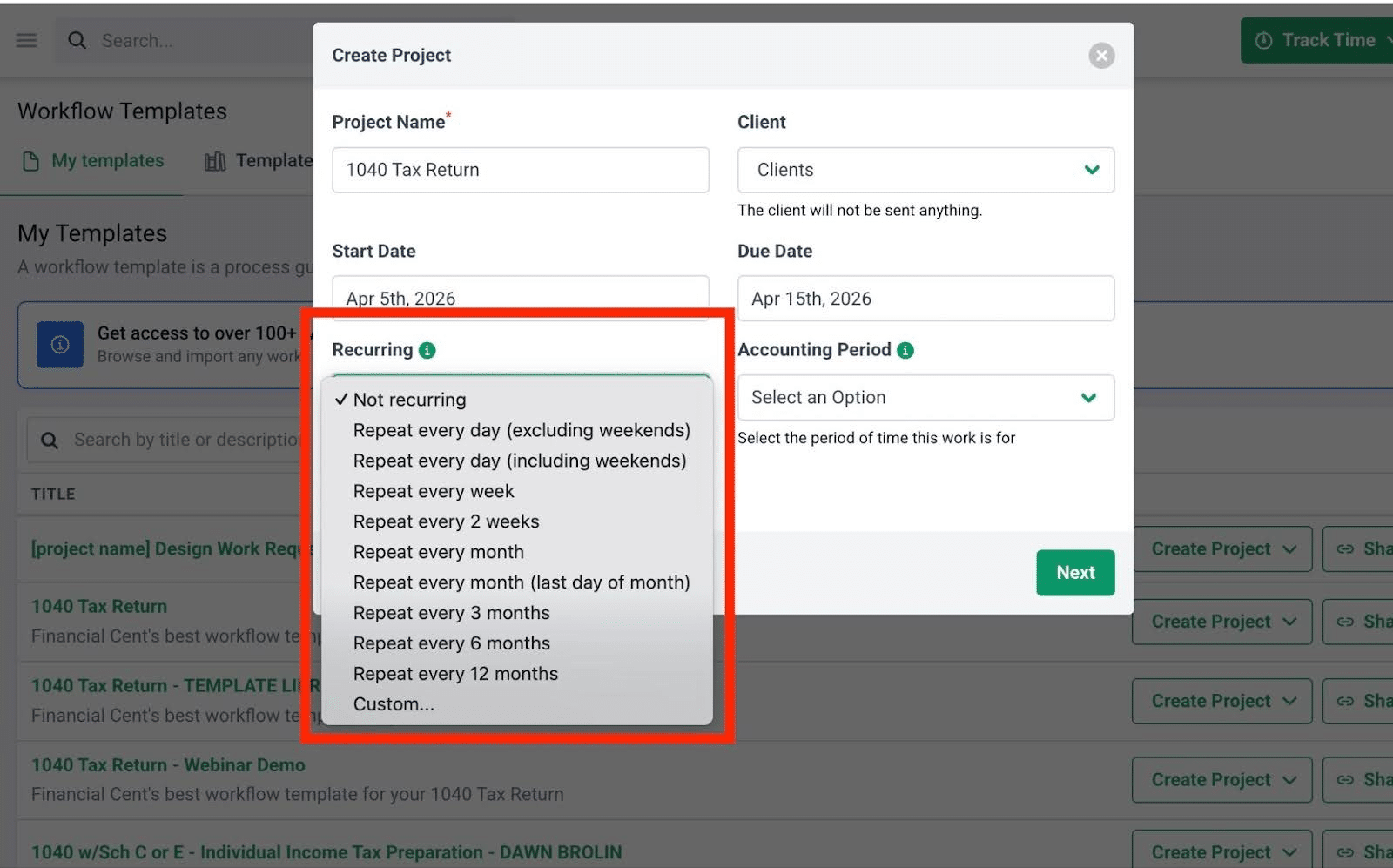
- Automate repetitive and low-admin work: Financial Cents automatically schedules recurring projects and tasks, whether the work runs on a fixed cycle (like monthly bookkeeping and quarterly close) or an irregular one. It also automates routine work like updating a task’s status as it progresses or sending customized emails to a client whenever your team completes a certain task.
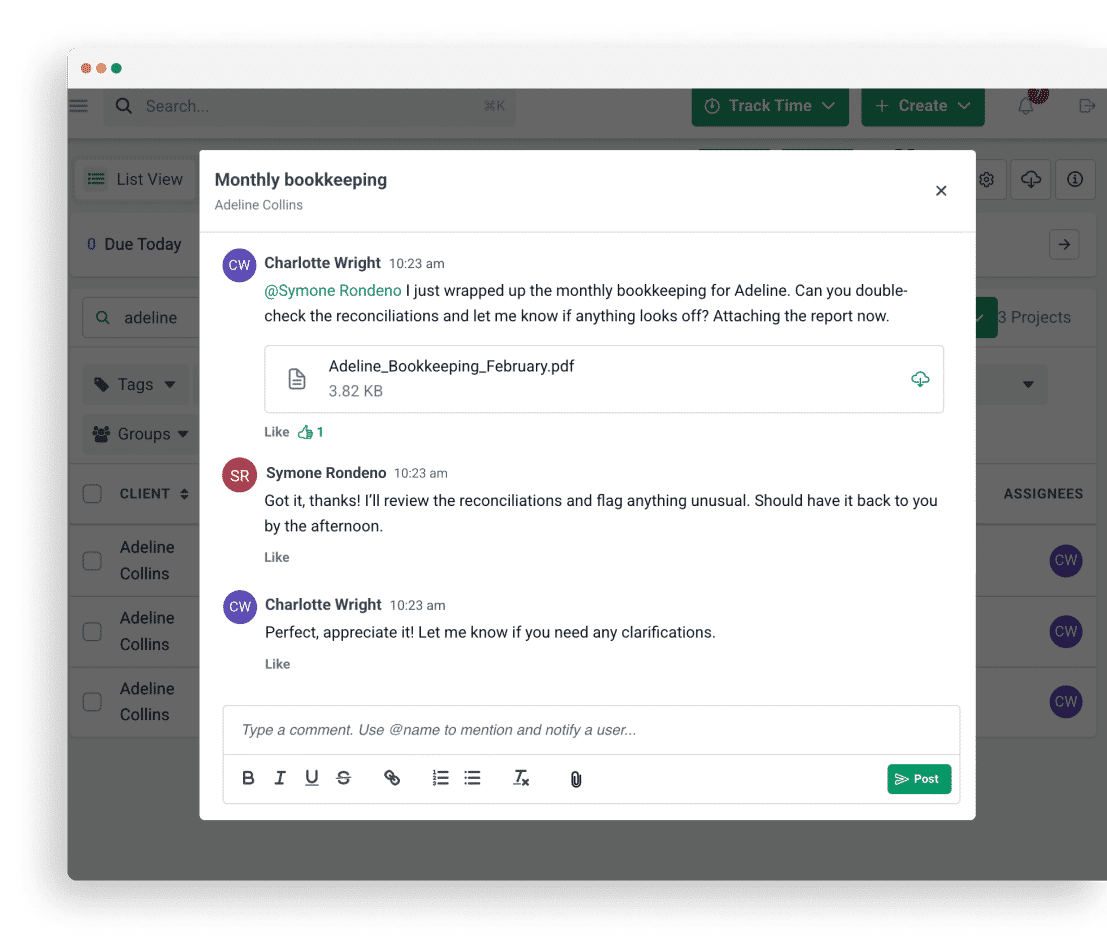
- Assign work and collaborate with your team: Financial Cents improves team collaboration and accountability by allowing you to assign work to team members, comment on tasks, tag each other, and share files, with every update in one timeline.
- Collect documents and manage client requests: Send clients a request list, and Financial Cents will follow up for you with automated email and SMS reminders at set intervals until the client responds.
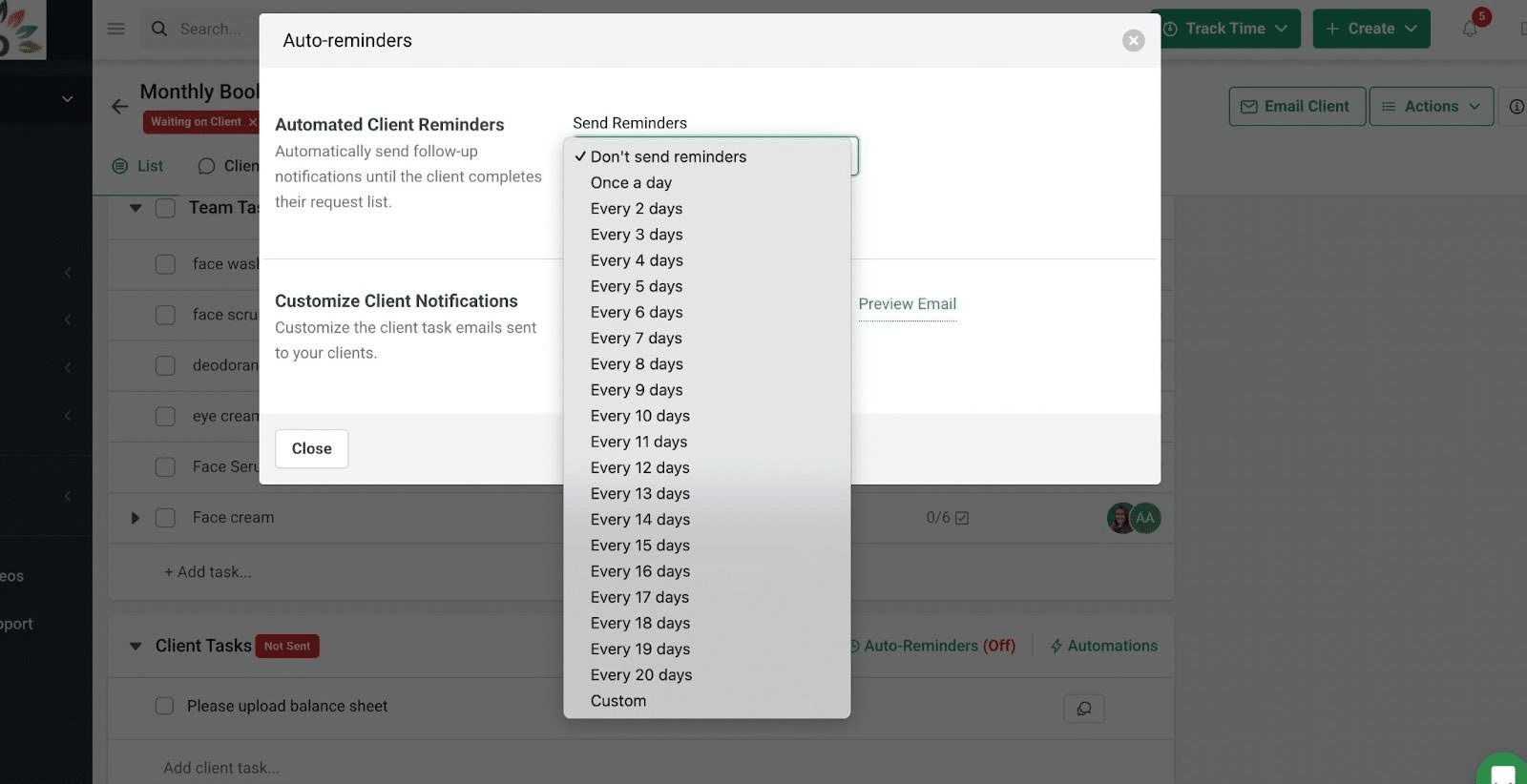
Kim Ritter, who owns Ritter’s Tax & Accounting Services, loves this feature. She says: “Financial Cents’ client tasks allows us to be proactive and follow up with clients to send required documentation. These automated emails prevent us from forgetting about it. And we don’t have to worry about the client forgetting about it too. Automated emails continue to go out to them (at the frequency we set) until they send in the required information.”
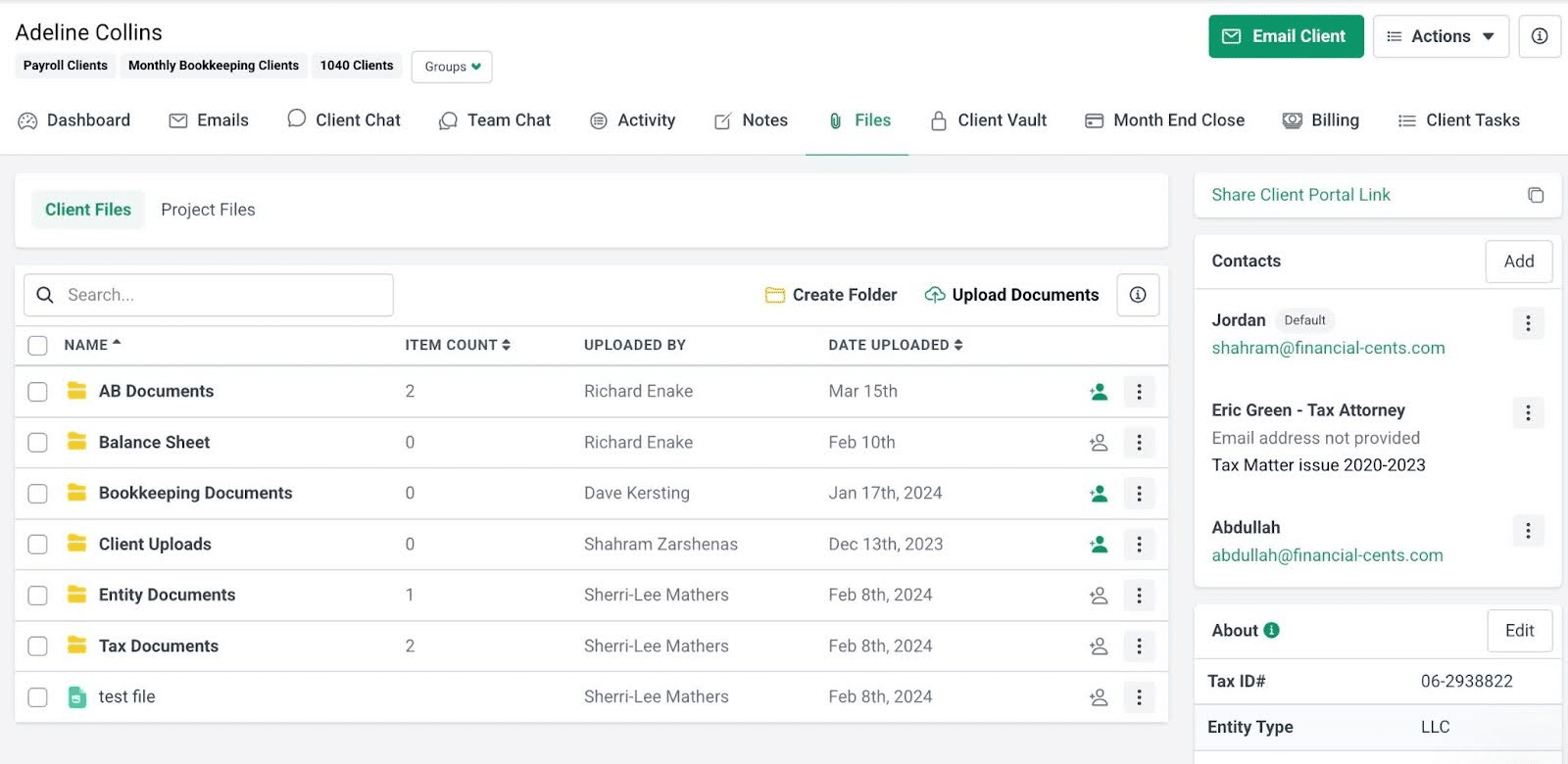
- Keep client-facing work organized in a secure portal: Financial Cents lets clients upload and sign documents in one place. You can then store key documents in the client’s profile, so your team always has the right file at each step.
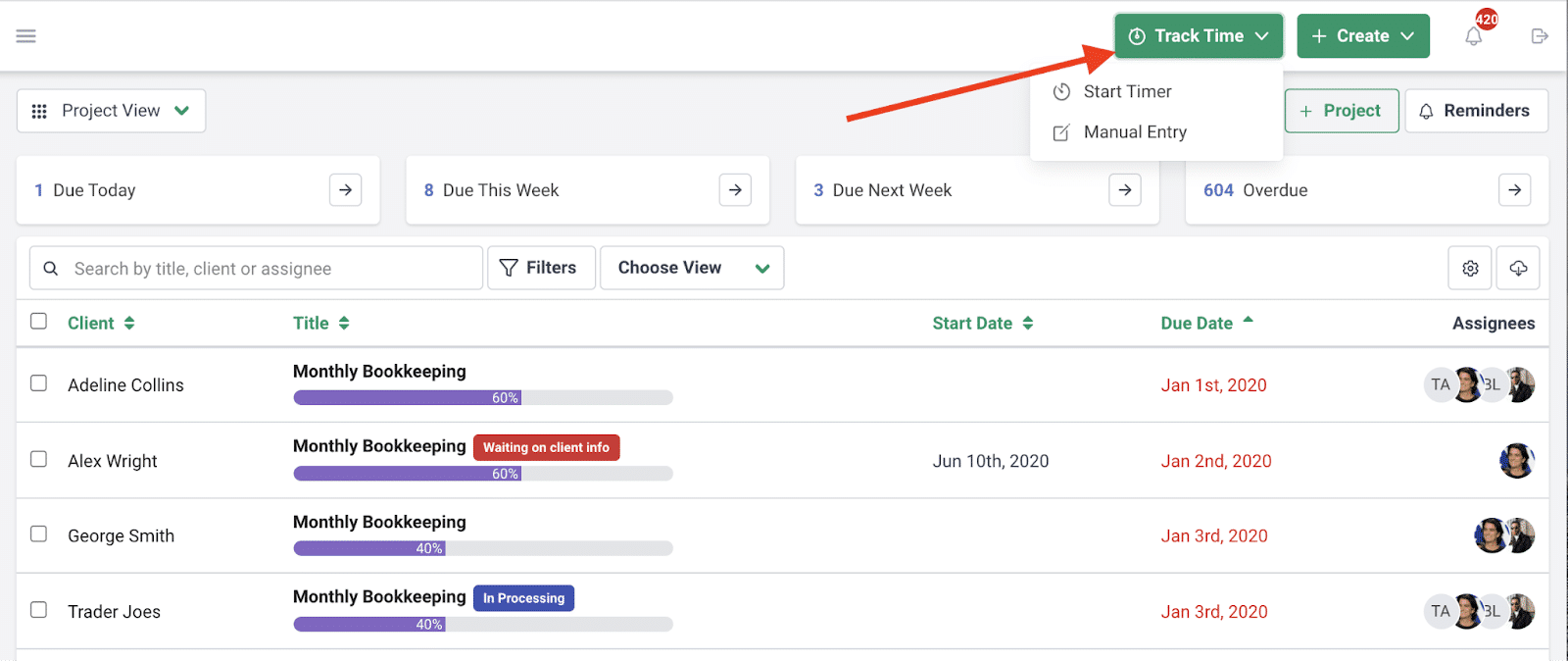
- Track time and manage billing: You can track time, send invoices based on tracked time, and automate payments with Financial Cents’ integrated accounting billing software. You can also save clients’ preferred payment methods and bill them every time an invoice is due (for recurring work, you can even schedule your invoices and collect payment automatically).
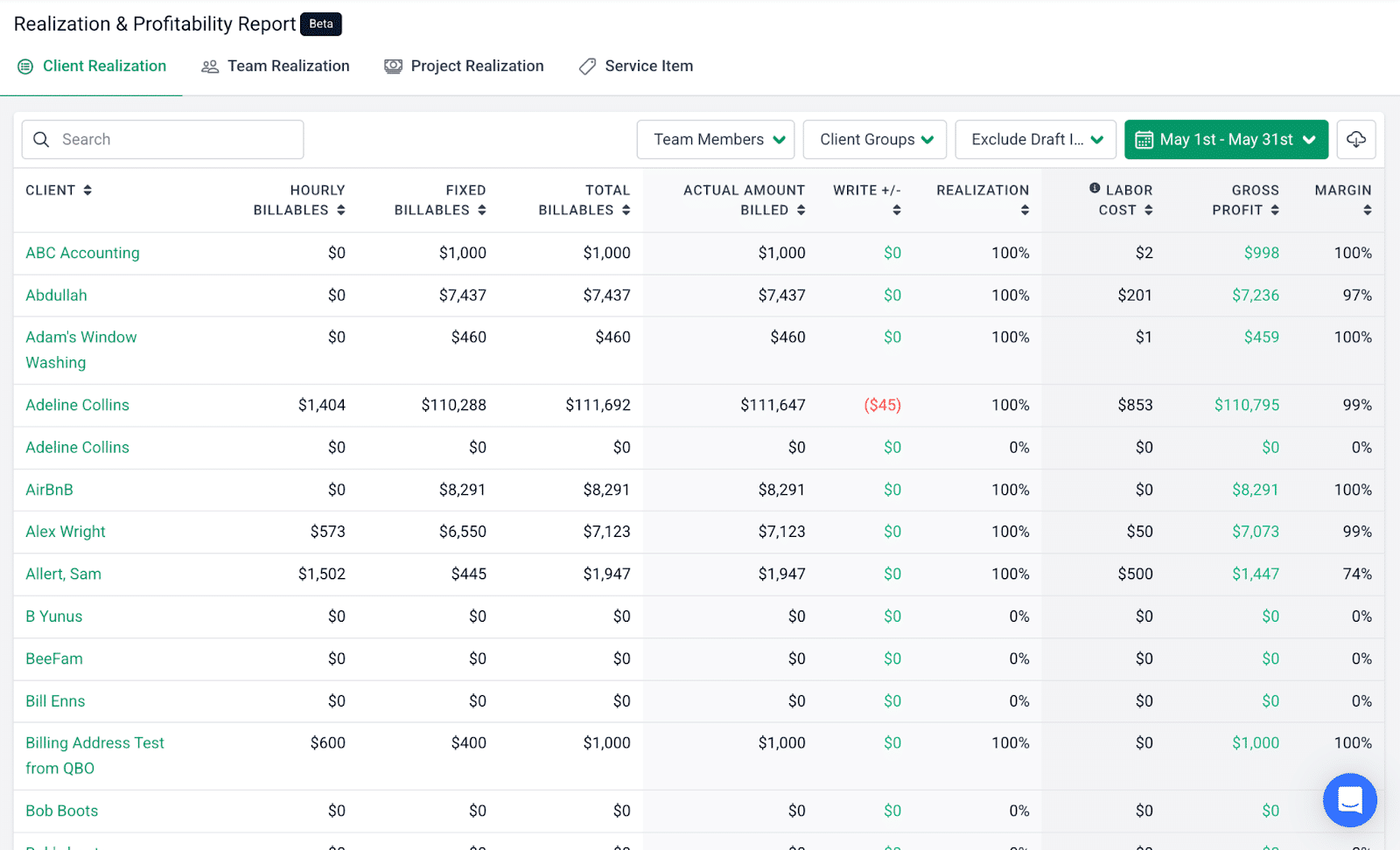
- Connect work activity to firm profitability: Financial Cents includes a variety of reports to help you manage and grow your firm, including reports for realization and profitability, utilization, work insights, client tasks, client uploads, revenue insights, and accounts receivable aging. This gives you a sense of how your firm is performing, so you can make decisions that improve efficiency, profitability, and team capacity.
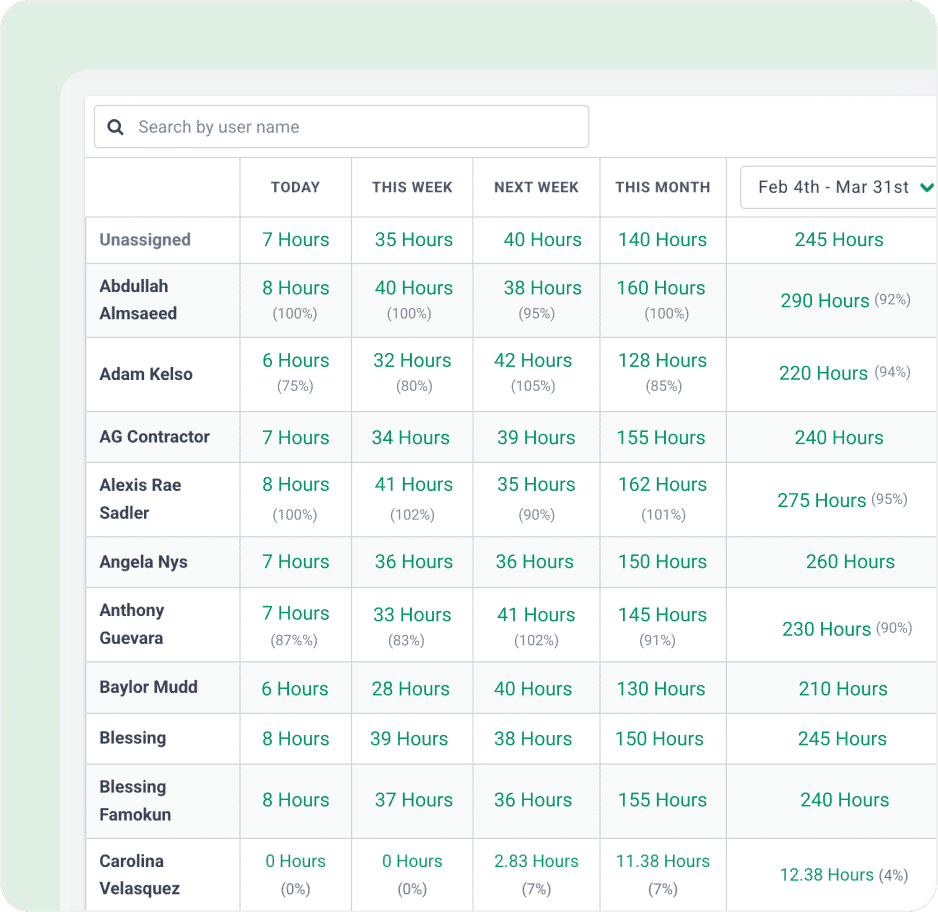
- Monitor team capacity: A centralized workload view shows every team member’s assignments and capacity in real time, so you can see who’s fully tapped and who still has bandwidth; then, you can redistribute work accordingly. This dashboard also uses historical trends to anticipate future workload and staffing needs.
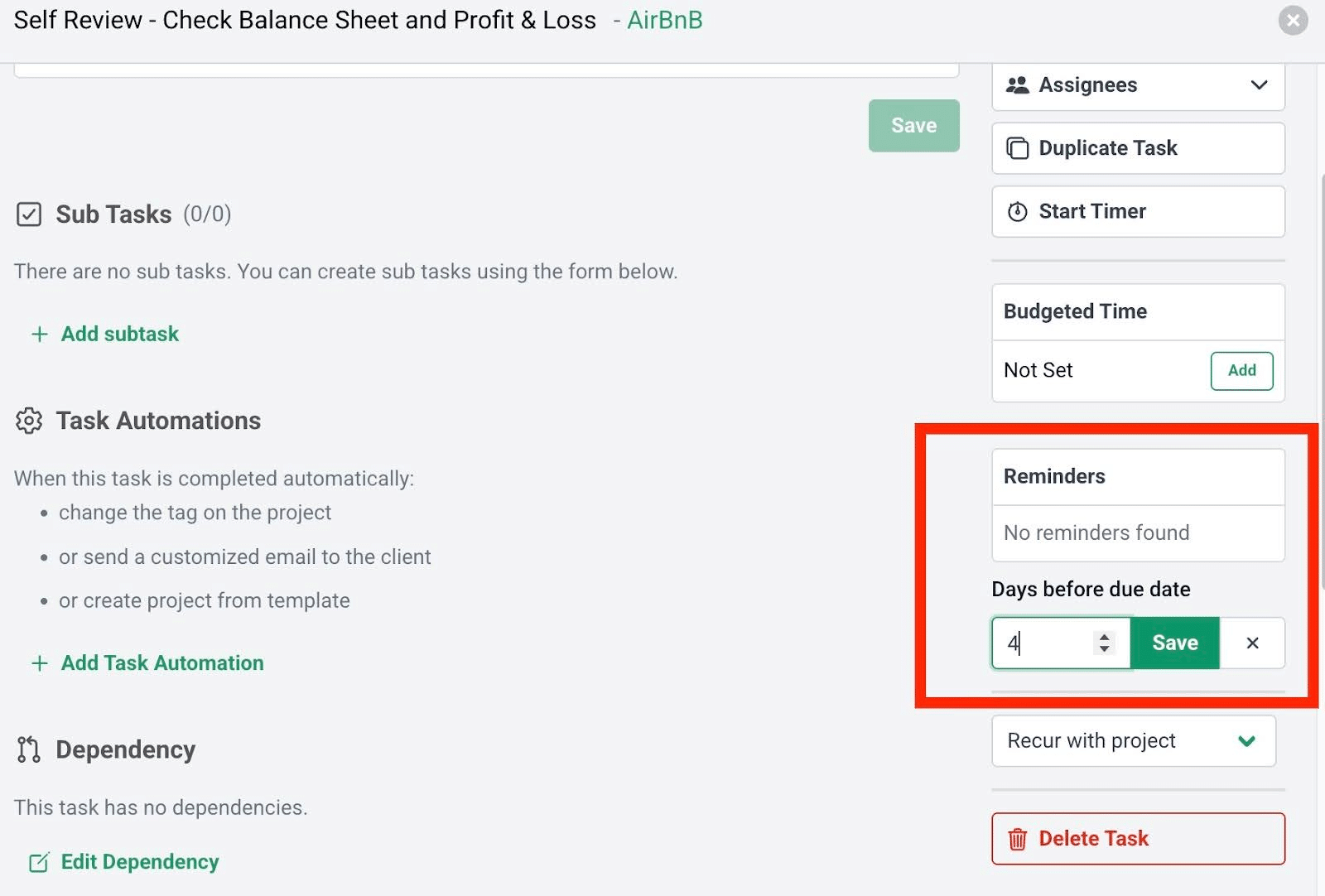
- Keep work from falling through the cracks as the firm grows: Financial Cents allows you to set automated reminders before tasks are due, at either the project level or the individual task level. Your team gets both in-app and email notifications, so no one misses a due date.