

A few months ago, while researching for our 2025 State of Accounting Workflow & Automation Report, we asked firm owners what the breaking point was when they realized their current system just wasn’t cutting it anymore, and that they needed to automate their workflows:
Here’s some of what they told us:
- “Long, long nights updating spreadsheets for internal processes, realizing shit wasn’t complete when I expected it to be. There was no visibility into engagement status.”
- “We needed automation when we took on more corporate and bookkeeping clients. It was too much to track manually.”
- “I was spending so much time sending emails and tracking things, and not getting the paid work done!”
- “I had too many piles of work around me and didn’t know what was where. It was just overwhelming.”
Chances are, you’ve felt the same way at some point. Maybe you could manage things early on, when you had fewer clients or weren’t in a busy season. But once your client load increased or tax season hit, things started to unravel. You missed tasks and deadlines, and your team spent a huge chunk of time on admin and tedious work instead of billable tasks.
According to the same report, before automation, 53.8% of firms spent over 5 hours per week scheduling and assigning work. Post-automation, 75.8% reduced this time to 5 hours or less, significantly improving efficiency.
It makes sense. Manual processes and spreadsheets simply can’t keep up with the pace of a growing firm. That’s where accounting workflow software comes in. It helps you centralize your work, automate recurring tasks, and stay on top of deadlines even as your client load increases.
In this article, we explain how workflow software helps you work faster and smarter, and share real examples of how accounting teams are using tools like Financial Cents to boost productivity and run more efficient firms.
What Is Workflow Software in Accounting?
Workflow software is a tool that helps you manage, standardize, and track recurring client work, like month-end close, tax prep, payroll, and bookkeeping, all in one place.
Unlike general project management tools, accounting workflow software includes features tailored to firm workflows, such as recurring task automation, workflow templates for common services, client collaboration tools, and visibility across multiple team members and clients.
Simply put, workflow software helps manage your workflow so your firm is organized, efficient, and can scale effectively.
The Biggest Productivity Challenges Accounting Teams Face
Here are some of the most common issues that slow accounting teams down:
Missing Deadlines Due To Scattered Tracking
When work is tracked in too many places, it’s easy for things to slip through the cracks. One team member might mark a task as complete in a spreadsheet, but forget to update the status elsewhere. Another might assume someone else sent the client reminder.
This scattered tracking creates confusion across the team. No one has a clear view of what’s done, what’s pending, and what needs immediate attention. You then end up spending valuable time chasing updates instead of doing the work you’re paid for.
Rework Caused by Inconsistent Processes
Without a standardized process, each team member handles tasks in their own way, which creates more work for your firm. You’ll have to double-check every project, correct mistakes, and spend more time onboarding new team members.
Inconsistent processes lead to rework, errors, and lost time that could have been avoided with a shared system.
Communication Breakdowns
In many firms, communication is happening, but it’s scattered across too many tools. Your team may be discussing work in Slack, email, comments in Google Docs, notes in your accounting task management tool, or even via a phone call.
This fragmented communication creates three major problems:
- Team members miss critical updates or instructions
- Information gets duplicated, lost, or misunderstood
- Work stalls while people wait for clarification or context
When the right people don’t have the right info at the right time, they spend time digging for context or waiting for replies, which slows everything down.
Too Much Time Spent on Admin Tasks
According to our Workflow & Automation report, manual administrative tasks were the second highest bottleneck firms faced, with 54.7% saying they wasted valuable time on repetitive tasks. That’s time that could’ve gone toward billable work or finding new clients.
As your firm takes on more clients, admin tasks increase and take more time. You have to automate such tasks, else you’ll be stuck doing repetitive work that affects productivity.
Bottlenecks Created by Unclear Responsibilities
When no one knows who owns a task, or when it’s supposed to move to the next person, work stalls.
Without role-specific task assignments and clear ownership, it’s hard to keep work moving efficiently. One delay has a ripple effect, pushing back the entire engagement timeline.
Difficulty Tracking Task Progress Across Team Members
When managers can’t easily see who’s doing what, or how close the team is to completing a task, they have to spend time asking for updates or reviewing systems for answers. This adds to their workload and also distracts staff from doing the actual work because they have to start explaining their progress.
The lack of visibility makes it hard to prioritize, reallocate resources, or spot issues before they become problems.
Difficulty Switching Between Clients and Projects
Most accounting firms juggle dozens, sometimes hundreds of clients at once. Each one comes with its own set of services, deadlines, and communication preferences. Naturally, your team needs to switch between clients and projects throughout the day.
But if your system doesn’t make it easy to pick up where they left off or if they have to dig through multiple tools, folders, and emails just to get context, they lose momentum with every switch.
That constant reorientation adds friction. Tasks take longer, focus drops, and small delays stack up. Over time, this slows down the entire team and significantly impacts productivity, especially during busy periods when efficiency matters most.
How Workflow Software Improves Productivity for Accounting Teams
Accounting workflow management software boosts productivity across your entire practice in the following ways:
Centralizes All Work in One Place
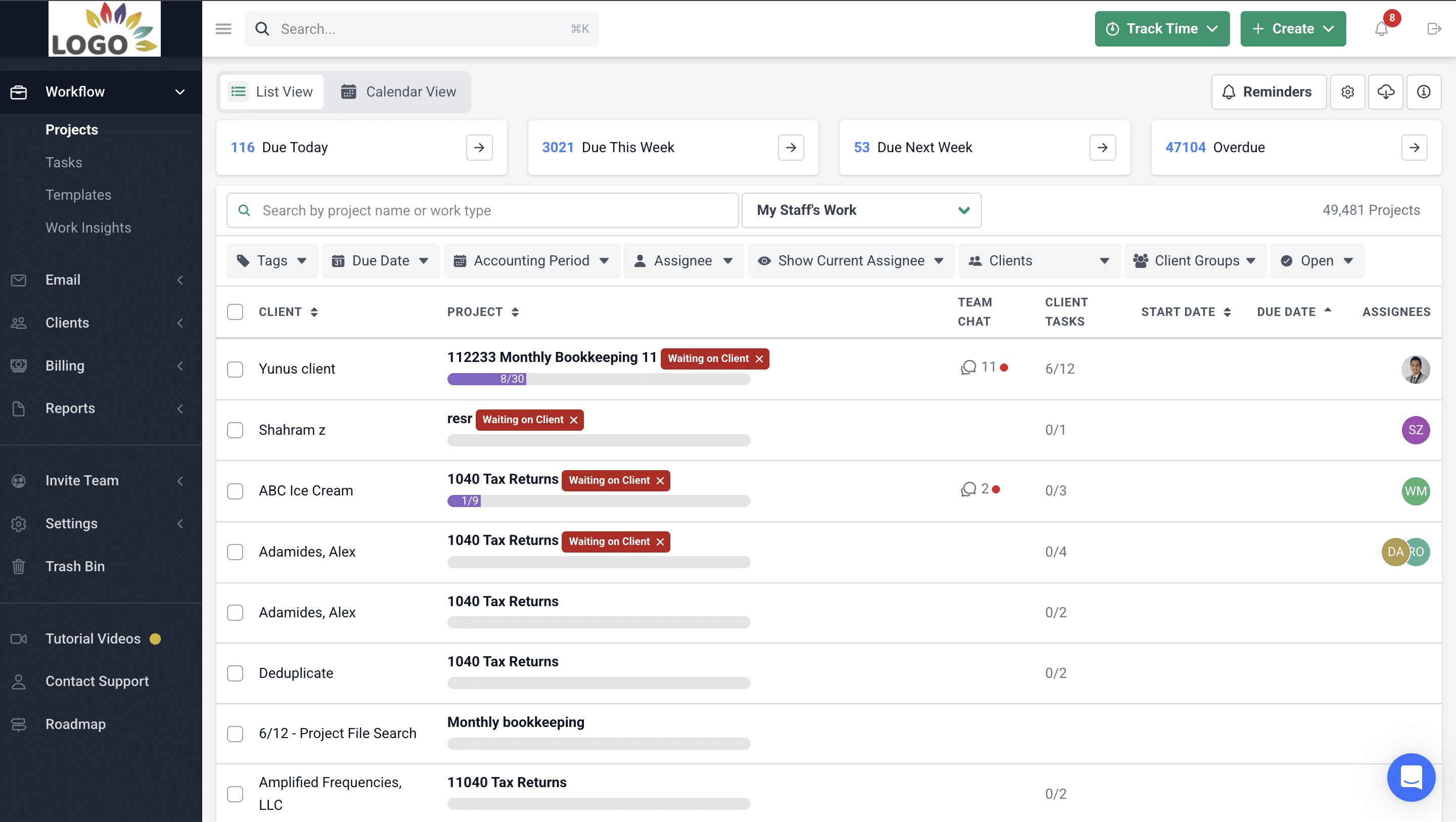
When work lives in one platform, your team stops jumping between multiple tools just to figure out what’s going on. They can open one dashboard and see everything they need to know about a client or project at one glance.
Financial Cents does this with its workflow dashboard, which gives you a centralized, real-time view of every project and task in your firm. Each client engagement shows up as a project with the full task list, assigned team members, due dates, and progress status. You can quickly spot what’s on track, what’s overdue, and what needs attention right now, which keeps projects moving.
Streamlines and Standardizes Processes
Productivity drops when every team member performs the same service in different ways. Workflow software fixes this by letting you standardize how your firm does tasks like month-end close, tax prep, payroll, bookkeeping cleanup, client onboarding, and more.
You build a repeatable process once, save it as a template, and your team follows the same steps every time. That keeps work consistent, no matter who completes it.
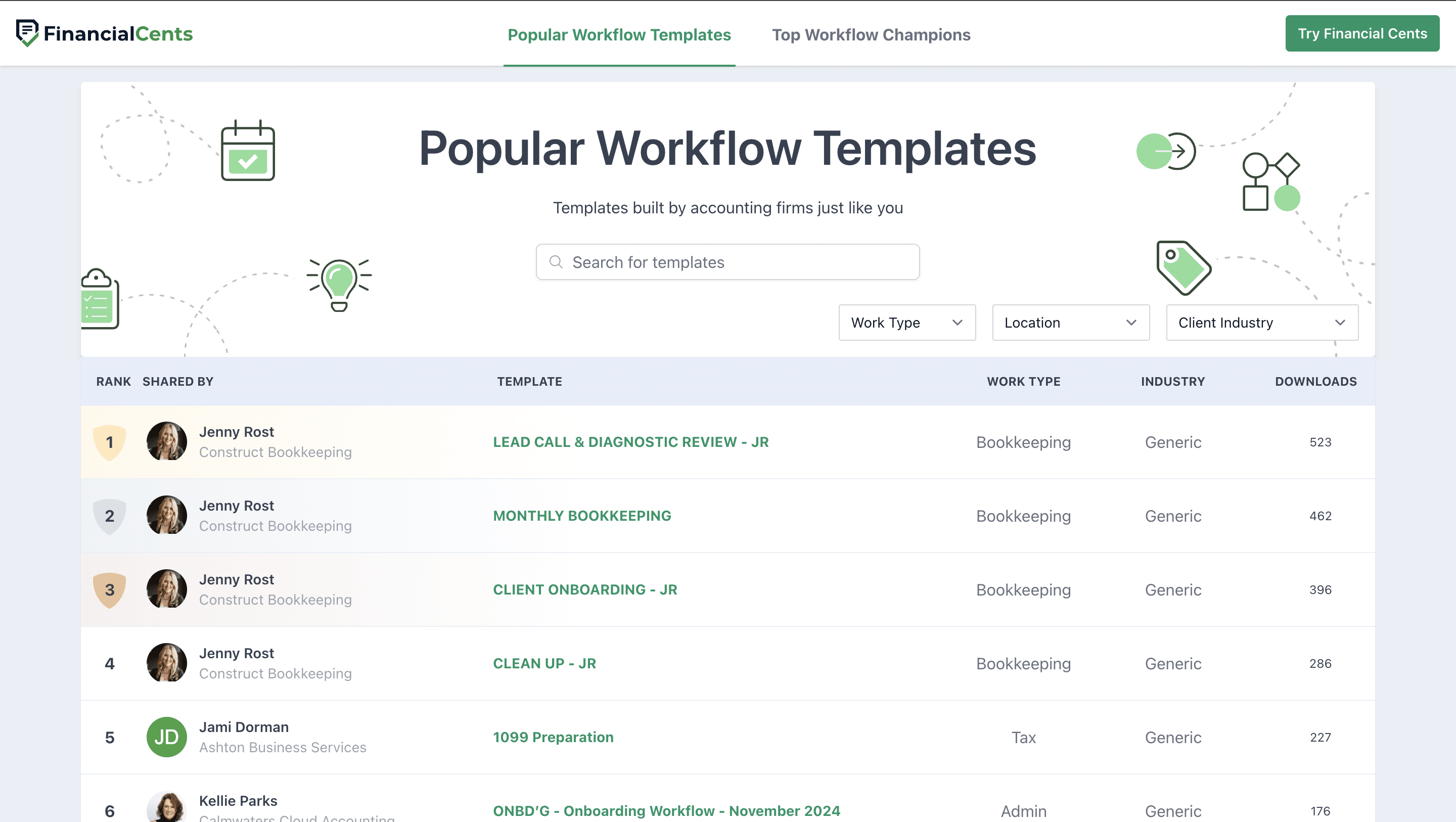
In Financial Cents, you can create accounting workflow templates by using any of the 300+ pre-built templates in our template library:
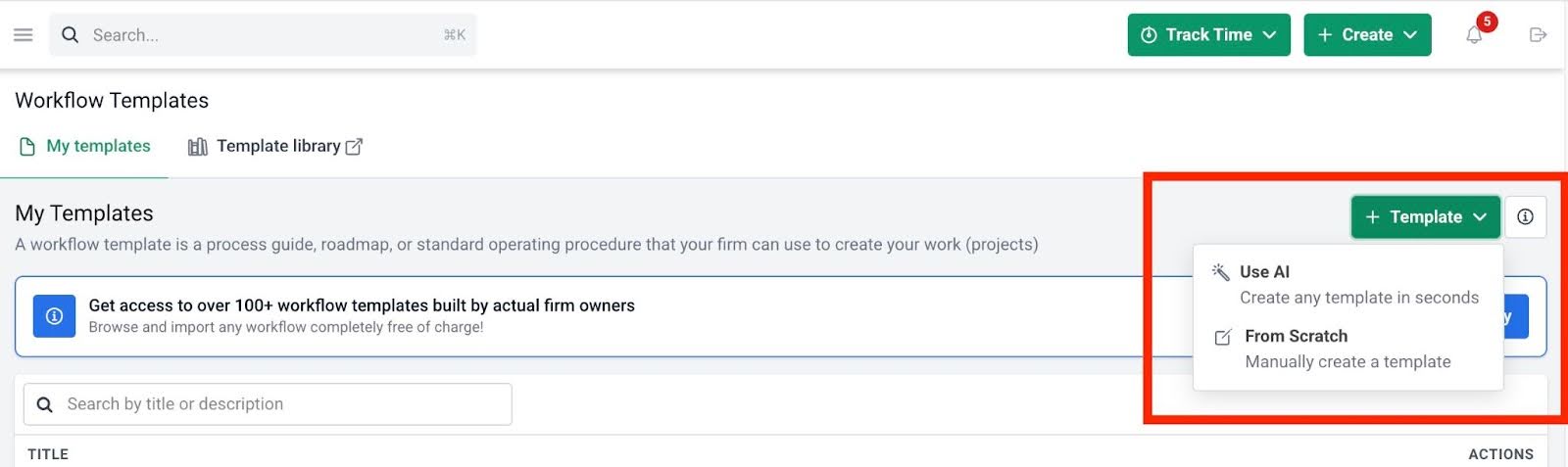
Or create a template from scratch and save it inside Financial Cents as a reusable template for subsequent use. You can also use the AI feature to help draft your template.
Automates Repetitive Tasks
Firms do a lot of work that repeats on a schedule, like monthly bookkeeping, payroll processing, sales tax filings, annual tax prep, and more. When you manage that work manually, someone has to remember to create the project, assign tasks, set due dates, and notify the team. That takes time, and it increases the chance that someone misses or forgets something.
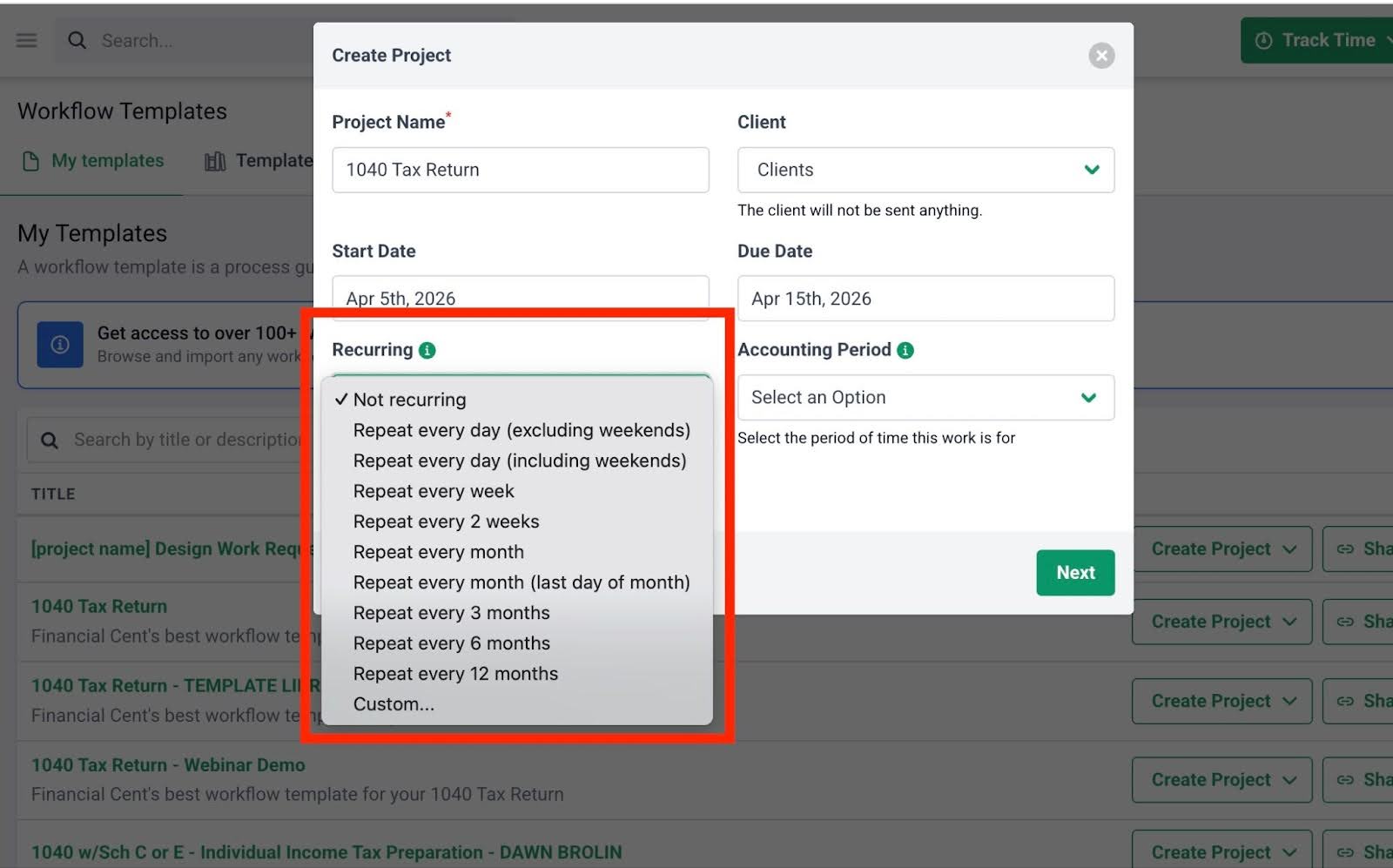
Workflow software solves this by letting you automate recurring projects, so they regenerate on a set schedule. Instead of rebuilding the same work from scratch every time, your team starts with a ready-to-go project that already includes the right steps, owners, and deadlines.
Financial Cents supports two types of recurrences, depending on how predictable the work is:
- Default Recurrences: Use these for standard schedules like daily, weekly, monthly, quarterly, or annually. Great for monthly bookkeeping, weekly payroll, or quarterly close tasks.
- Custom Recurrences: Use these when the schedule is dynamic. For example: the last day of the month, the first Friday of every month, or every Tuesday of the second week of the month.
Improves Team Collaboration & Accountability
When multiple people are working on the same project, collaboration gets tricky, especially if your team is remote or using a mix of tools to manage tasks and communicate. Infact according to our report, the vast majority of firms (51.4%) are only somewhat collaborative, and 11% are not collaborative at all.
Workflow software resolves this by keeping all communication, assignments, and updates in one place, so your team can work together without confusion or delays.
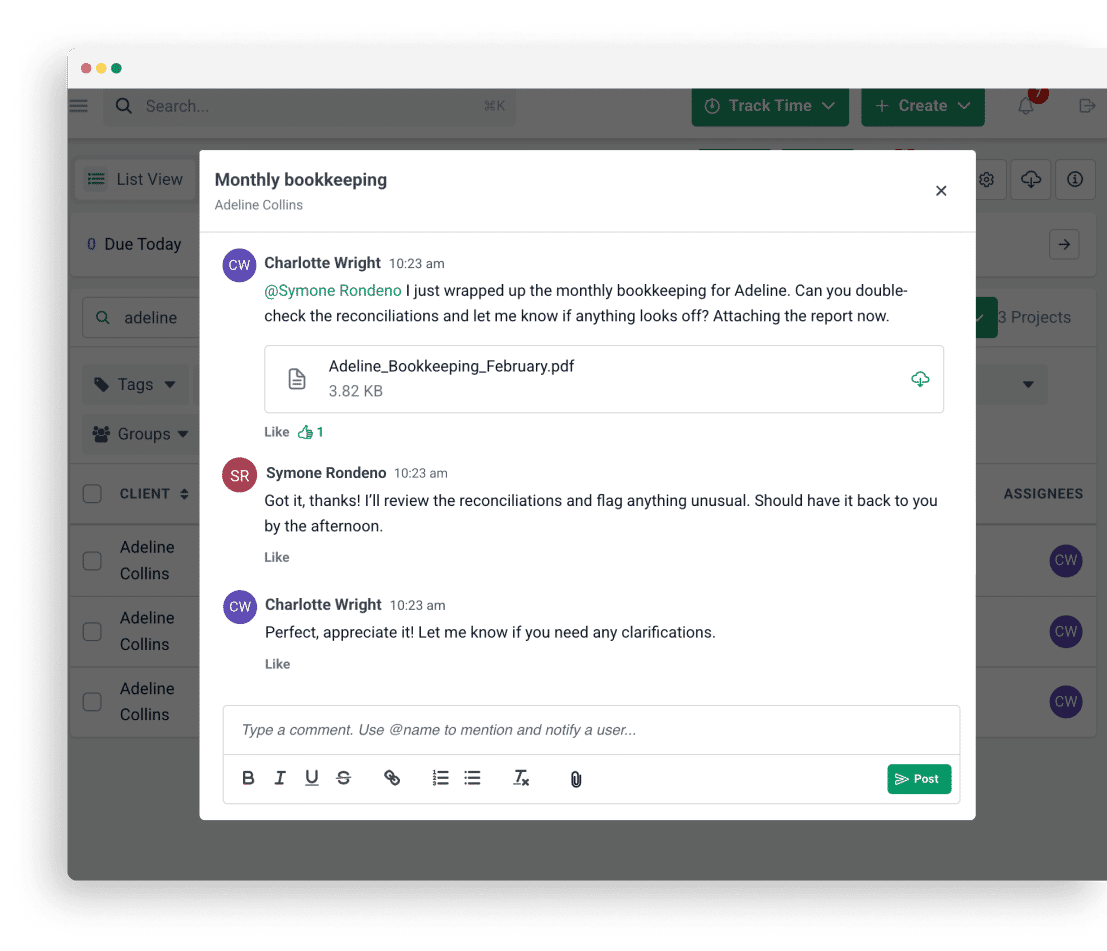
Financial Cents builds team collaboration and accountability into every task. Each one clearly shows who’s responsible, what needs to be done, and when it’s due. Team members can leave comments on tasks, tag others, share files, and track every update in a single timeline. That way, all the context stays inside the project, so nothing gets lost.
It’s like Alexis Sadler, CEO of Accounting Therapy, Inc, says:
Setting expectations on the team was the hardest part. It was hard to say, ‘Here's a job. We expect you to do it in five hours.’ When you hand that job to the assignee, that due date gets forgotten. There was no way to keep it top of mind.
With Financial Cents, they're looking at it in the project dashboard. Every time they log into Financial Cents, they will see the deadline and do everything they can to complete it in those five hours. It makes everybody's job easier.”"
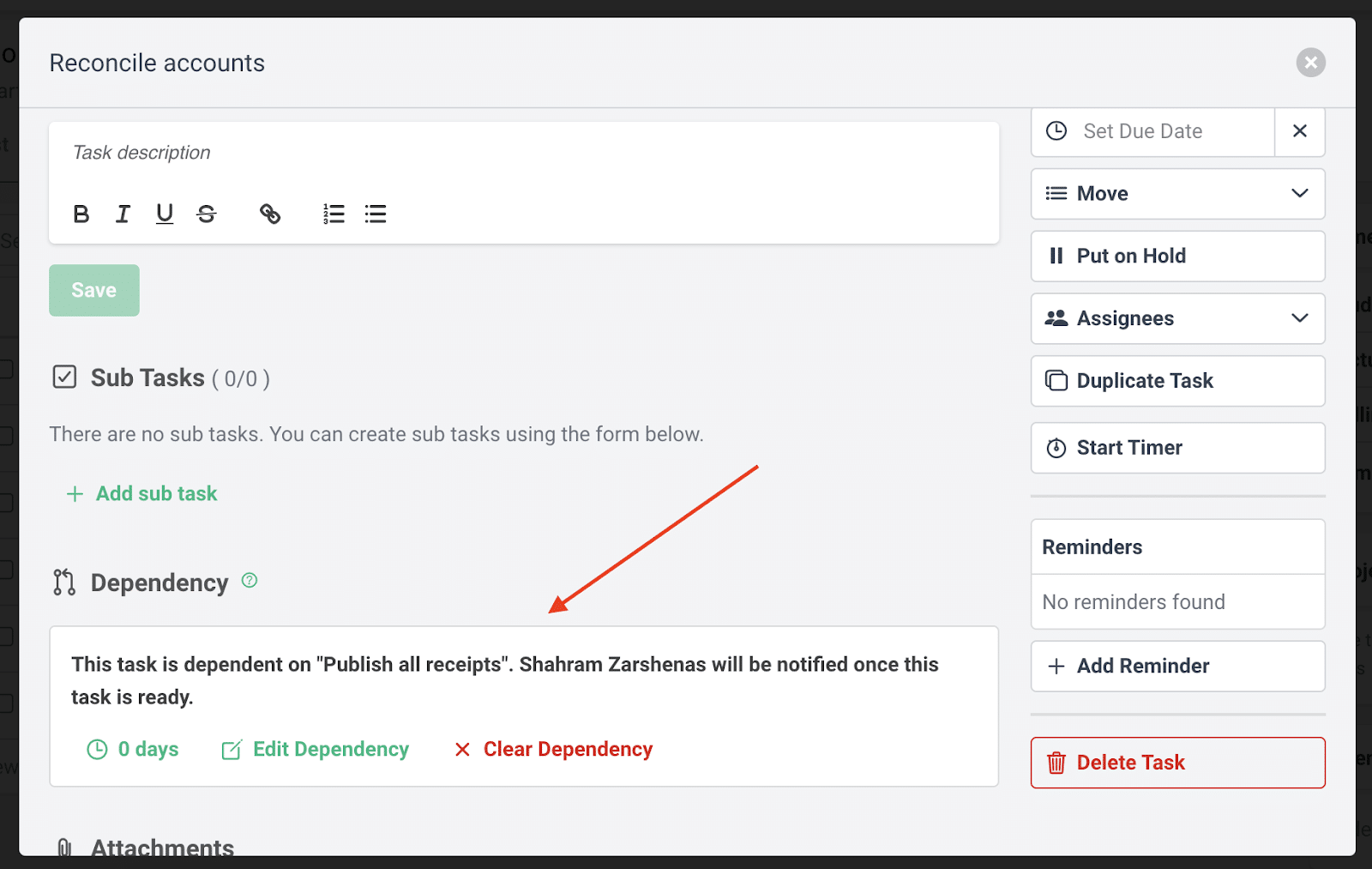
You can also add task dependencies so that one team member is notified to begin work only after the previous step is complete. This keeps handoffs smooth and ensures that tasks move forward in the right order:
Provides Visibility Into The Status of All Work
It can be hard to keep track of how every project is going if you have dozens of clients. And this is risky because without visibility, it’s easy to miss deadlines or overload certain team members.
Workflow software gives you that visibility. It pulls all your client work into one system and shows you exactly where things stand across your entire team.
In Financial Cents, firm owners and managers get real-time insight into team workload and project progress with the workload view. This breaks down tasks by due dates so you can see what’s due and reassign tasks if need be.
“If your managing partner wants to see the status of different things, he doesn’t have to ask anyone anymore. He could set up his own workflow views to filter the dashboard by whatever information he wants. The ability to apply tags to projects has been significant,” says Jenna Rodriguez, CPA, Managing Accountant, about this feature.
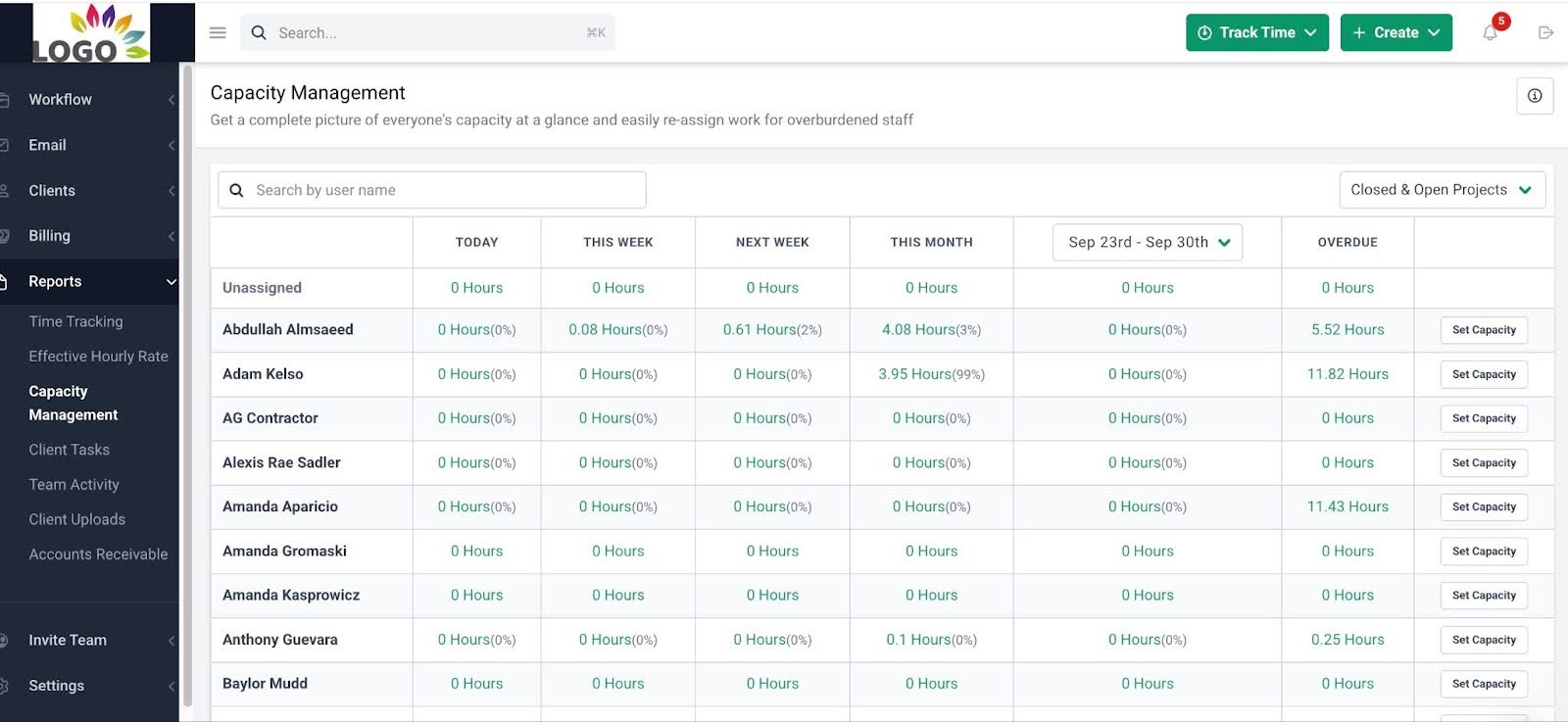
The capacity management report also shows all team members’ availability and assignments in real time. This helps you allocate work more evenly so nobody burns out.
Enables Better Reporting & Insights
It’s important to track and understand how your firm is performing so you can make smart decisions that improve efficiency, profitability, and team capacity. Workflow software makes that possible by providing you with the insights you need to improve your firm’s performance.
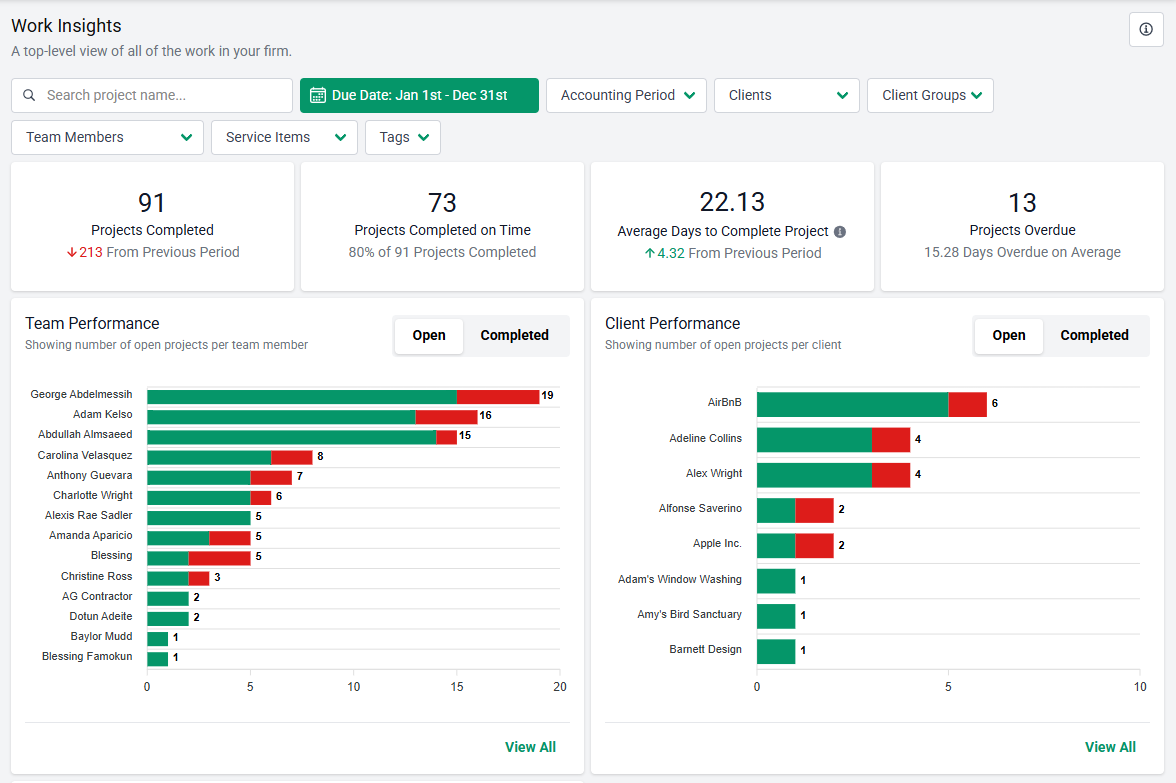
With Financial Cents, you get access to clear, actionable reports like time-tracking, effective-hourly rate, realization & profitability, utilization, etc.
These reports help you spot early signs of trouble, such as overworked team members, clients who consistently slow workflows, or services that take longer than expected. Instead of reacting after the fact, you can make real-time adjustments.
Reduces Client Delays
Clients can slow a project down when you’re waiting on documents, answers, or approvals. And it happens a lot. In our State of Accounting Workflow & Automation Report, 49.9% of respondents said they experienced delays of several days just trying to collect documents from clients.
Workflow software helps reduce these delays by automating client reminders.
In Financial Cents, you can send clients a request list of documents or tasks, and then let the system follow up for you. With automated reminders, clients get email and SMS nudges at set intervals until they complete the request. You don’t have to chase them manually, and nothing falls through the cracks.
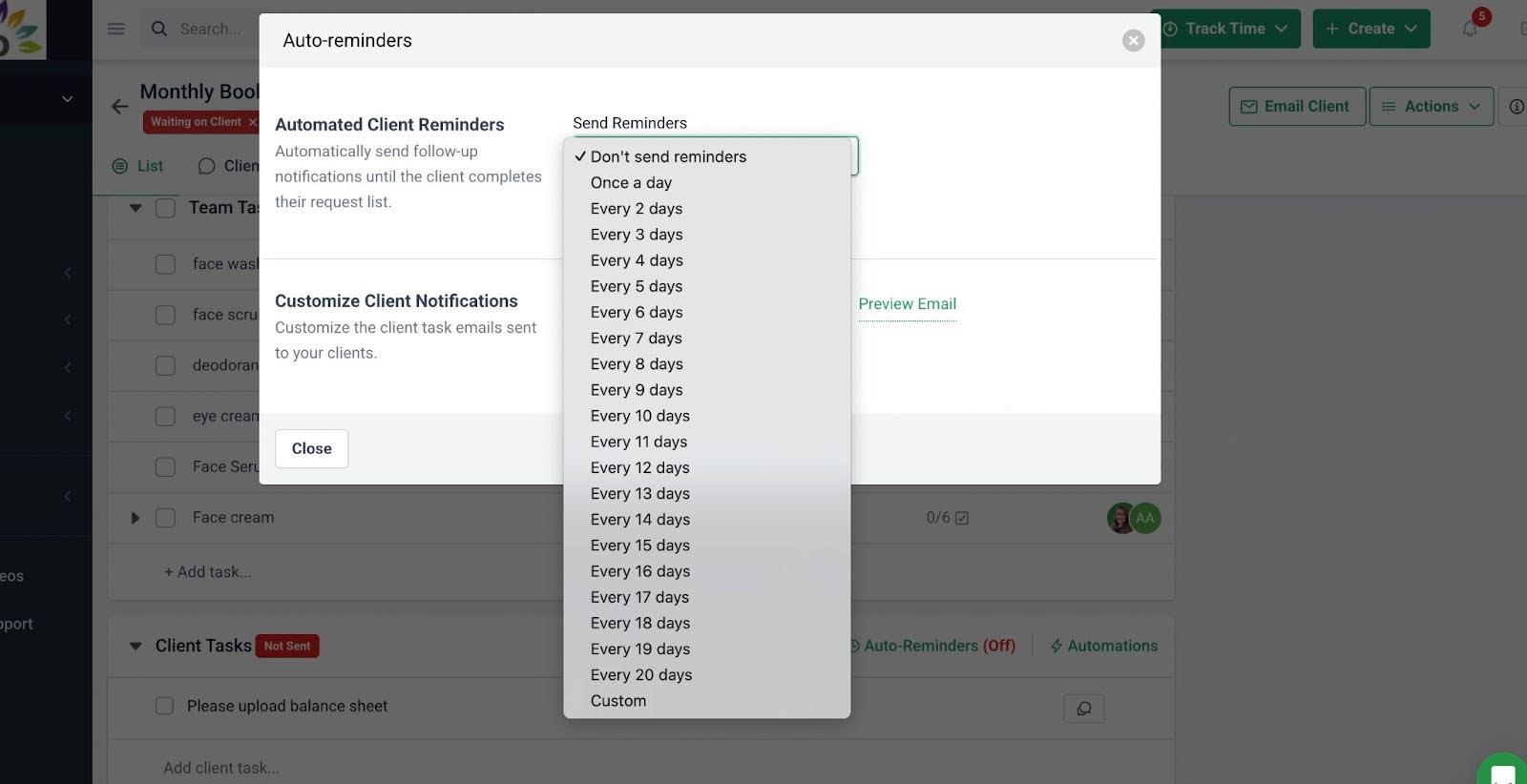
We know that once we send a request and set the reminders, Financial Cents will work for us to keep reminding clients until they send the information. Once we hit 'send,' we've done our part. Financial Cents notifies that it's been completed. That has improved how quickly clients send us information"
Carter Lance, Owner, Strategic Tax Planning PLLC.This saves your team hours of back-and-forth and gets responses faster, which keeps your projects on schedule.
Helps Prevent Missed Deadlines
Firms usually miss deadlines because they’re handling too much at once and often lose track of what’s due when.
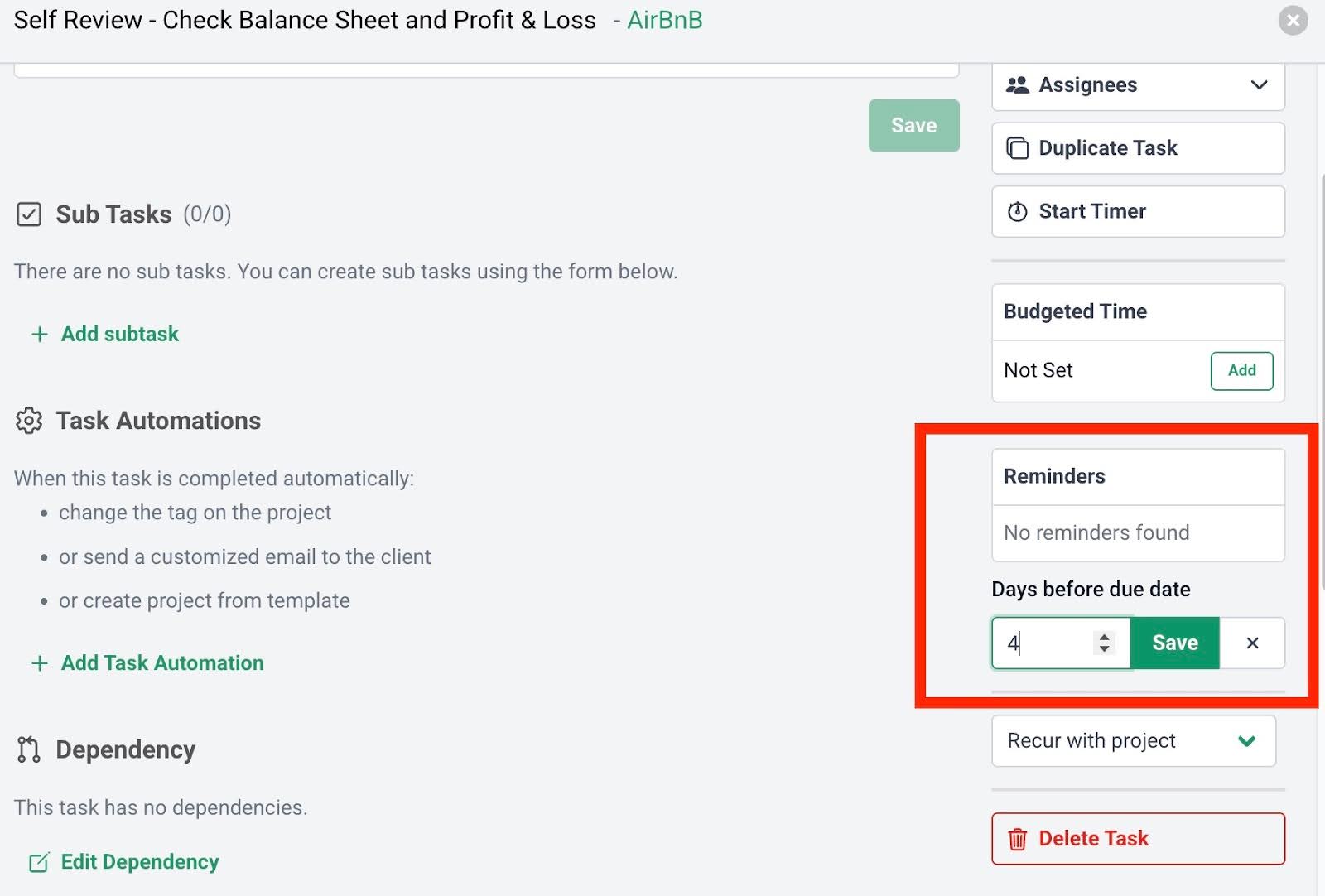
With Financial Cents, you can stay ahead of deadlines by setting automated reminders before tasks are due. You can add reminders at both the project and individual task level, depending on how your team works.
When a reminder is triggered, your team receives both in-app and email notifications, helping them stay focused and on schedule.
Reduces Onboarding Time for New Hires
With standardized templates and checklists, you don’t have to train new employees from scratch. They can follow clear, established steps, understand what’s expected, and start contributing faster.
Financial Cents lets you build and save your own staff onboarding templates or gives you access to templates created by experts, like this one from Debbie Foot of DFRZ Accounting Group LLP. It walks you through administrative setup, the first 30 and 90 days of onboarding, and how to provide ongoing support to keep new hires engaged and productive:
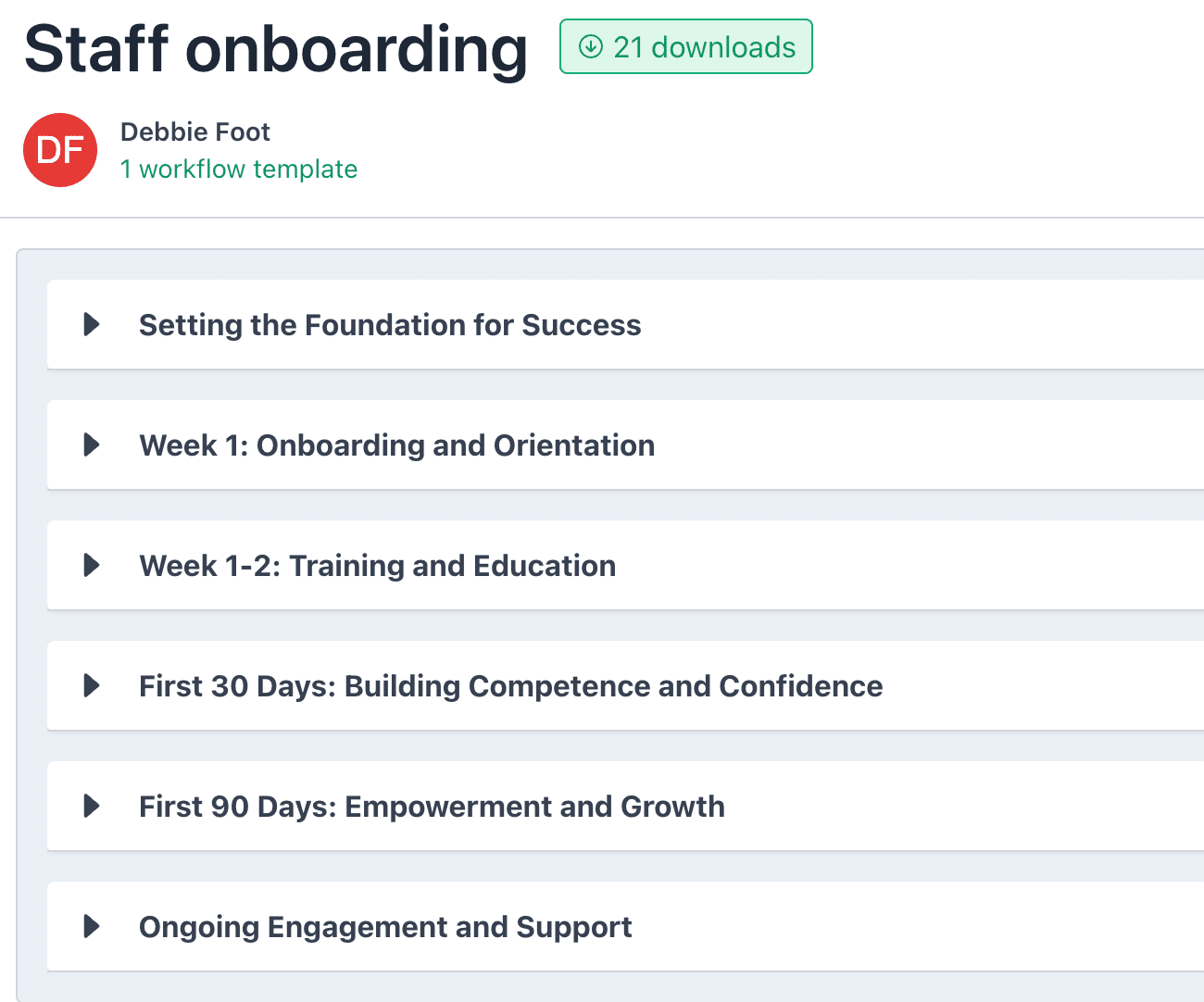
Templates like this reduce the time and effort spent on onboarding, and give your new team members the structure they need to succeed from day one. Carter Lance, Owner, Strategic Tax Planning PLLC, uses this feature and here’s what he says about it:
“The workflow templates resources make employee onboarding easier, knowing that their approach to work is going to be consistent as long as they follow that specific client’s template.
We often customize each client’s templates according to their unique financial situations. Following the template that has been created for that client or the recurrence of the work makes it easier to hand off tasks to new team members. We know that they’re doing it the way we expect as long as they follow the process.”
Manages Client Documents and Information
Managing documents and client information is one of the biggest day-to-day pain points for accounting teams. Too often, staff waste valuable time searching for the right file in drives or chats.
Workflow software like Financial Cents helps by keeping everything organized and easy to access. You can:
- Store key documents directly in the client’s profile, so things like prior returns, onboarding forms, or payroll reports are always a click away.
- You can also attach specific documents to individual tasks, so your team has the right files at each step of the workflow.
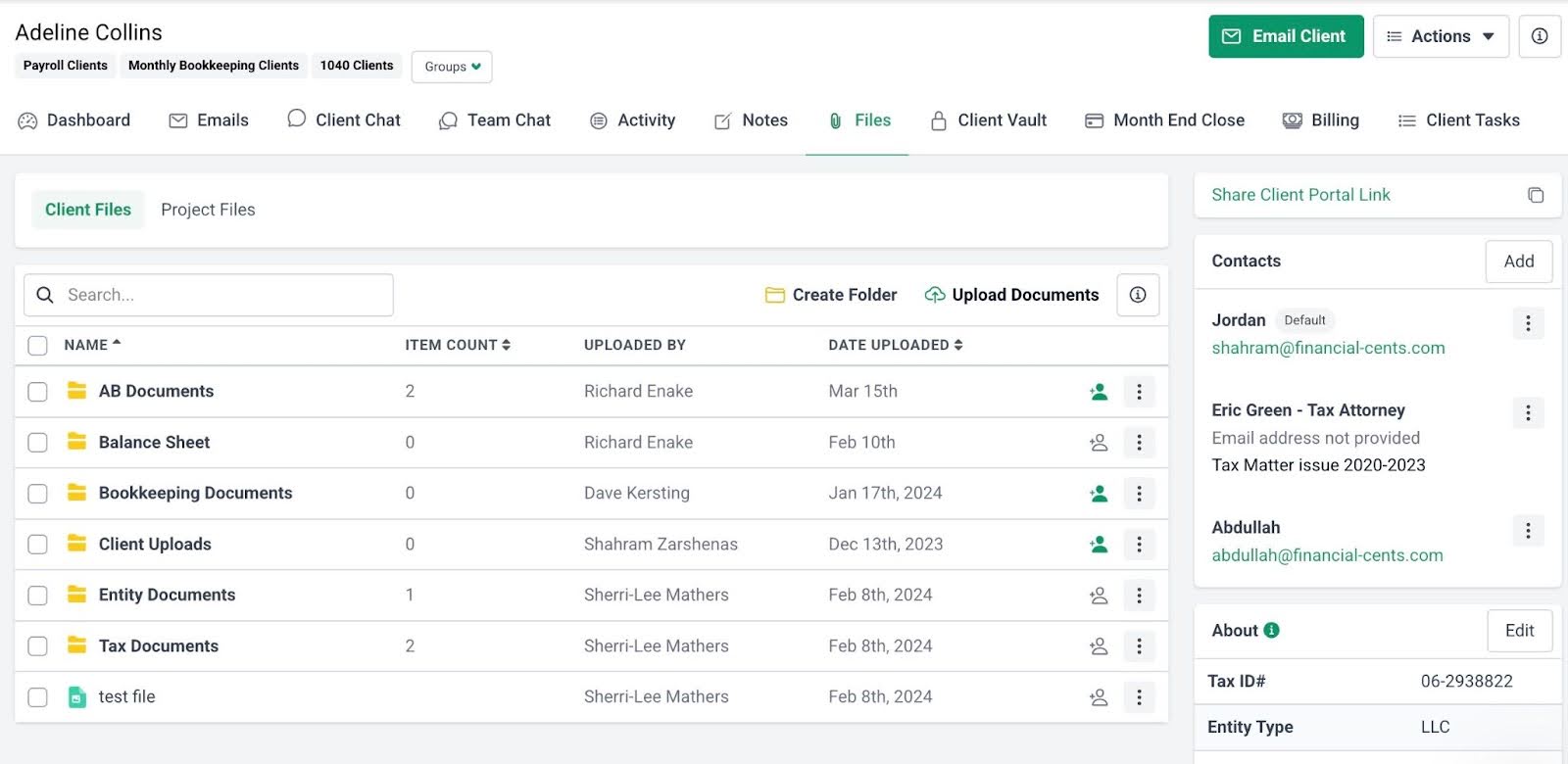
This makes it faster to find information, reduces back-and-forth, and keeps everyone on the same page. Kellie Parks, Founder of Calmwaters Cloud Accounting, loves this Financial Cents’ feature:
We can keep so many details within Financial Cents. They're in easy-to-action spaces. They can be within the client or in the project. We can even keep more granular resources in the description area of the subtasks."
How this 8-Person Accounting Team Manages 400+ Active Projects with Workflow Software
You don’t need a 100-person team to manage hundreds of clients; you just need great workflow software.
Take Payroll Restoration, for example. With only eight team members, they manage over 400 active client projects using Financial Cents.
Before using the software, founder Shannon Ballman Theis used a ticker file and spreadsheets to manage projects. But as her client base grew, she was spending hours on admin tasks, making it harder to track work and manage the firm.
So she decided to get workflow software and started using Financial Cents after trying Jetpack Workflow and ClickUp. Since then, the team has been able to:
- Gain real-time visibility into all projects and how everyone’s working.
- Quickly filter and save specific dashboard views to reuse later.
- Monitor employee capacity to make sure no one works more than 32 hours/week.
Now, the team runs more efficiently and stays on top of deadlines even with such a large client roster.
Read the full story here to see how they did it.
How to Choose the Right Workflow Software for Your Accounting Firm
Not all workflow tools are right for your firm. When evaluating your options, here are the key features to consider:
- Ease of Use
The tool should be intuitive and easy for your team to learn. If your team can’t start using it almost immediately on their own, they’ll soon abandon it.
- Built Specifically for Accounting Teams
Generic project management tools often lack the features accountants need. Look for software built with specific accounting workflow features like recurring task automation, client-specific dashboards, and deadline tracking for tax, payroll, and bookkeeping.
- Automation Capabilities
The tool should help you automate certain manual and repetitive tasks. This helps save time so your team can focus on higher-value work, such as building client relationships or providing client advisory services (CAS).
- Collaboration Features
Accounting work often involves handoffs between staff, reviewers, and managers. Good workflow software should streamline collaboration and reduce back-and-forth.
- Client Communication Tools
Clear, organized communication is essential, especially when you’re managing multiple clients with different needs and deadlines. Look for workflow software that makes it easy to communicate with clients in one centralized place, preferably through a secure client portal.
- Workflow Template Library
Your workflow software should have an extensive template library (Financial Cents has over 300 templates!) so you don’t have to build every process from scratch. Look for one that covers a wide range of firm workflows, e.g., month-end close, bookkeeping cleanup, payroll, tax prep, client onboarding, so you can find a starting point no matter what service you’re delivering.
- Reporting Features
You’ll want reporting that provides insights into workload, task completion, productivity, profitability, etc. These help you make better decisions and improve operations over time.
- Integration Options
Workflow software should fit into your existing stack. Check for integrations with the tools you already use for time tracking, invoicing, e-signature, document storage, etc.
- Pricing
Finally, the software should fit your budget, without forcing you to pay for features you don’t need. Look for transparent pricing, and consider how the value aligns with your firm’s size and growth plans.
Use workflow software to manage your firm
For your firm to be truly productive, you need structure, standardization, and visibility. Workflow software like Financial Cents solves all three.
It gives your team a central hub to manage client work, ensures everyone follows the same process using templates, and makes it easy to see what’s happening across all projects.
When you put that kind of system in place, your team spends less time on admin tasks and rework, you hit deadlines more consistently, and you distribute work more evenly across team members.
If your current systems feel disorganized or hard to manage, that’s a sign it’s time to make a change.
Explore Financial Cents to see how workflow software can help your team stay productive, organized, and ready to scale.
Share this article:



