While researching our 2025 State of Accounting Workflow & Automation Report, we asked firm owners what their breaking point was: the moment they realized their system wasn’t cutting it anymore and they needed to automate their workflows. Here’s some of what they told us:
- “Long, long nights updating spreadsheets for internal processes, realizing [things weren’t] complete when I expected [them] to be. There was no visibility into engagement status.”
- “We needed automation when we took on more corporate and bookkeeping clients. It was too much to track manually.”
- “I was spending so much time sending emails and tracking things, and not getting the paid work done!”
- “I had too many piles of work around me and didn’t know what was where. It was just overwhelming.”
Chances are, you’ve felt the same way. Maybe you could manage early on, when you had fewer clients or weren’t in busy season. But once your client load grew or tax season hit, things started to unravel: missed tasks and deadlines, and a team spending a huge chunk of time on admin instead of billable work.
According to the same report, before automation, 53.8% of firms spent over 5 hours per week scheduling and assigning work. After automating, 75.8% cut that to 5 hours or less.
Manual processes and spreadsheets simply can’t keep up with a growing firm. That’s where workflow software for accounting firms comes in. It centralizes your work, automates recurring tasks, and keeps you on top of deadlines as your client load increases.
In this article, we explain how workflow software helps your team work faster and smarter, with real examples of how accounting teams use Financial Cents to boost productivity.
TL;DR
- Workflow software in accounting helps firms manage, standardize, and track recurring client work, like month-end close, tax prep, payroll, and bookkeeping, in one place.
- It improves productivity by centralizing all work, standardizing processes with templates, automating recurring projects and reminders, improving collaboration and accountability, showing the status of all work, reducing client delays, and cutting onboarding time for new hires.
- The impact: before automation, 53.8% of firms spent over 5 hours a week scheduling and assigning work; after automating, 75.8% cut that to 5 hours or less (2025 State of Accounting Workflow & Automation Report).
- Real example: Payroll Restoration manages 400+ active client projects with an eight-person team using Financial Cents.
- How to choose: look for software built for accounting firms that’s easy to use, with automation, collaboration, client communication, templates, reporting, integrations, and transparent pricing.
What is Workflow Software in Accounting?
Workflow software is a tool that helps accounting firms manage, standardize, and track recurring client work, like month-end close, tax prep, payroll, and bookkeeping, in one place.
Unlike general project management tools, accounting workflow software includes features built for firm workflows: recurring task automation, templates for common services, client collaboration tools, and visibility across team members and clients. Simply put, workflow software helps manage your workflow so your firm is organized, efficient, and can scale effectively.
What Are the Biggest Productivity Challenges Accounting Teams Face?
The biggest productivity challenges are scattered tracking that leads to missed deadlines, inconsistent processes that cause rework, fragmented communication, too much admin work, unclear ownership, poor visibility into progress, and constant context switching between clients.
Missing deadlines due to scattered tracking
When work is tracked in too many places, things slip through the cracks. One team member marks a task complete in a spreadsheet but forgets to update it elsewhere. Another assumes someone else sent the client reminder.
No one has a clear view of what’s done, what’s pending, and what needs attention now, so you spend valuable time chasing updates instead of doing the work you’re paid for.
Rework caused by inconsistent processes
Without a standard process, each team member handles tasks their own way. You end up double-checking every project, correcting mistakes, and spending more time onboarding new team members. That rework could have been avoided with a shared system.
Communication breakdowns
In many firms, communication happens, but it’s scattered across Slack, email, comments in Google Docs, notes in a task tool, and phone calls. That creates three problems:
- Team members miss critical updates or instructions.
- Information gets duplicated, lost, or misunderstood.
- Work stalls while people wait for clarification or context.
Too much time on admin tasks
In our report, manual administrative tasks were the second-biggest bottleneck firms faced, with 54.7% saying they wasted valuable time on repetitive tasks. That’s time that could have gone toward billable work or finding new clients. As you take on more clients, admin work grows with them unless you automate it.
Bottlenecks from unclear responsibilities
When no one knows who owns a task, or when it should move to the next person, work stalls. One delay ripples through the whole engagement timeline.
Difficulty tracking progress across the team
When managers can’t easily see who’s doing what, they spend time asking for updates, and staff stop working to explain their progress. The lack of visibility makes it hard to prioritize, reallocate work, or spot issues before they become problems.
Constant switching between clients and projects
Most firms juggle dozens or hundreds of clients, each with its own services, deadlines, and communication preferences. If your team has to dig through multiple tools, folders, and emails to get context every time they switch, they lose momentum. Small delays stack up, especially during busy season.
How Does Workflow Software Improve Productivity for Accounting Teams?
Workflow software improves productivity by centralizing work, standardizing processes with templates, automating recurring tasks and reminders, and giving everyone visibility into who owns what and when it’s due. Here’s how each works in practice.
Centralizes all work in one place
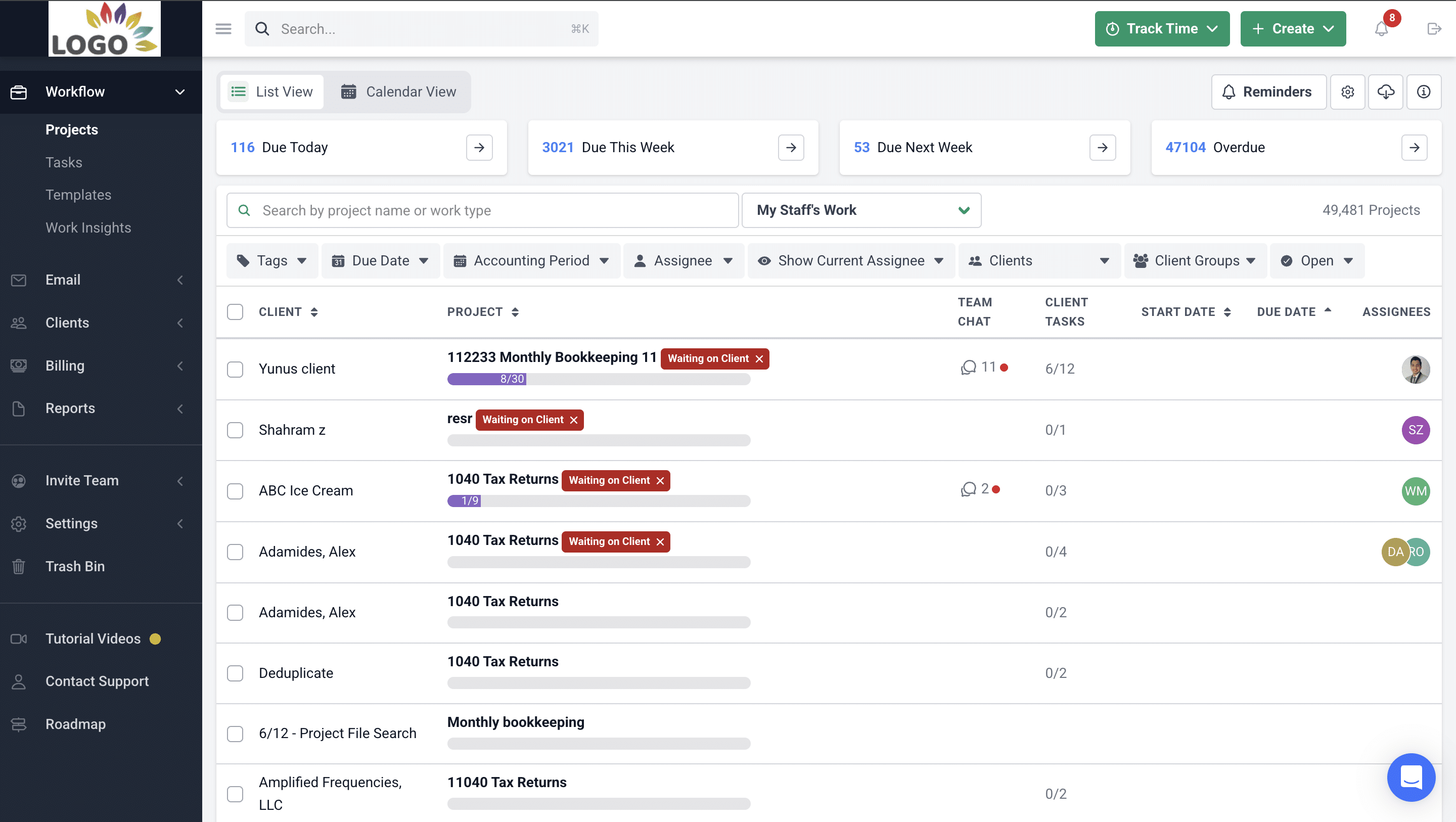
When work lives in one platform, your team stops jumping between tools to figure out what’s going on. In Financial Cents, an accounting practice management platform, the workflow dashboard gives you a real-time view of every project and task in your firm. Each client engagement shows its task list, assignees, due dates, and progress, so you can see what’s on track, what’s overdue, and what needs attention now.
Streamlines and standardizes processes
Productivity drops when every team member performs the same service differently. Workflow software lets you standardize month-end close, tax prep, payroll, bookkeeping cleanup, client onboarding, and more. Build the process once, save it as a template, and your team follows the same steps every time.
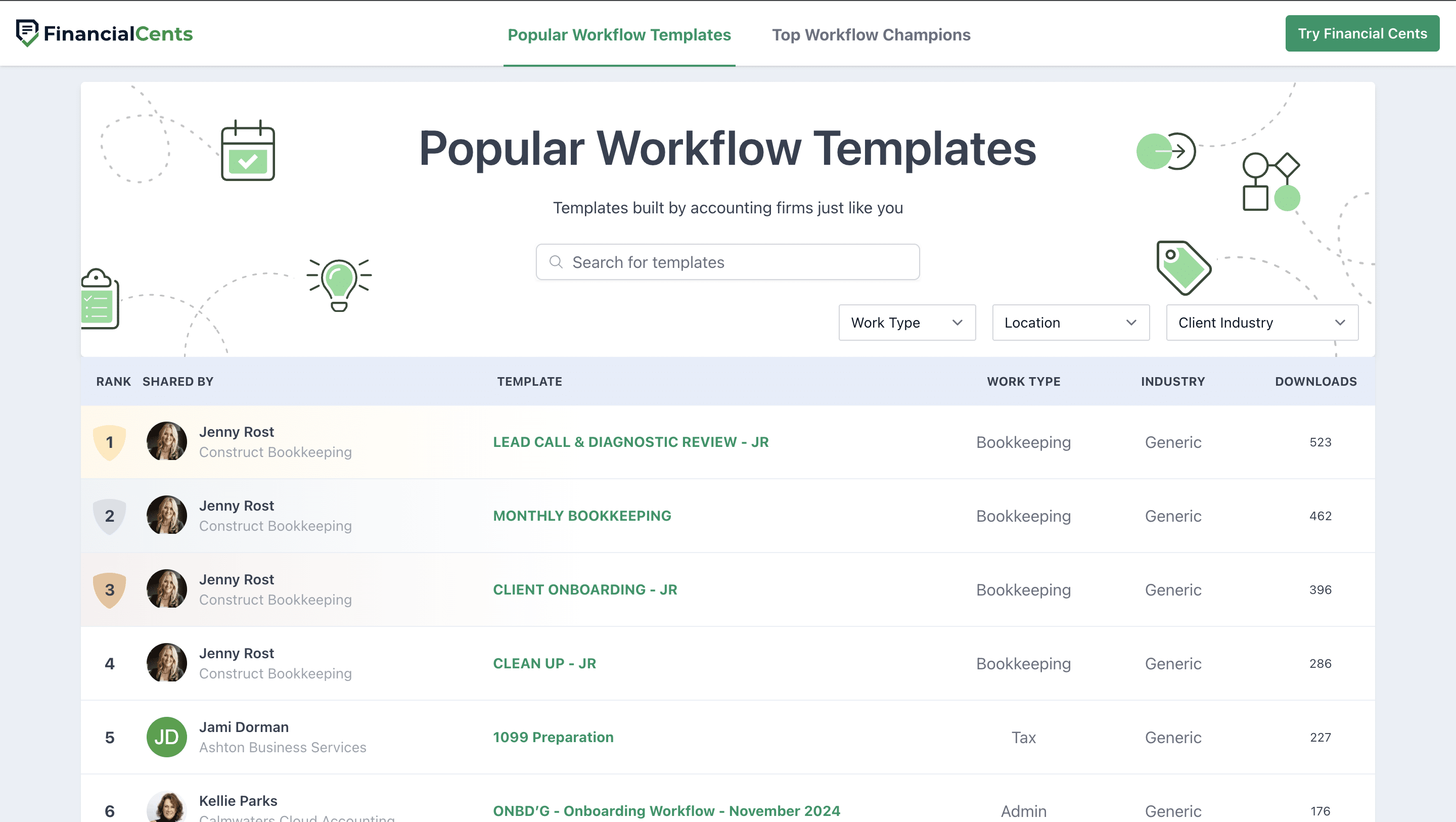
In Financial Cents, you can start from free accounting workflow templates or a growing library of templates contributed by accounting firms:
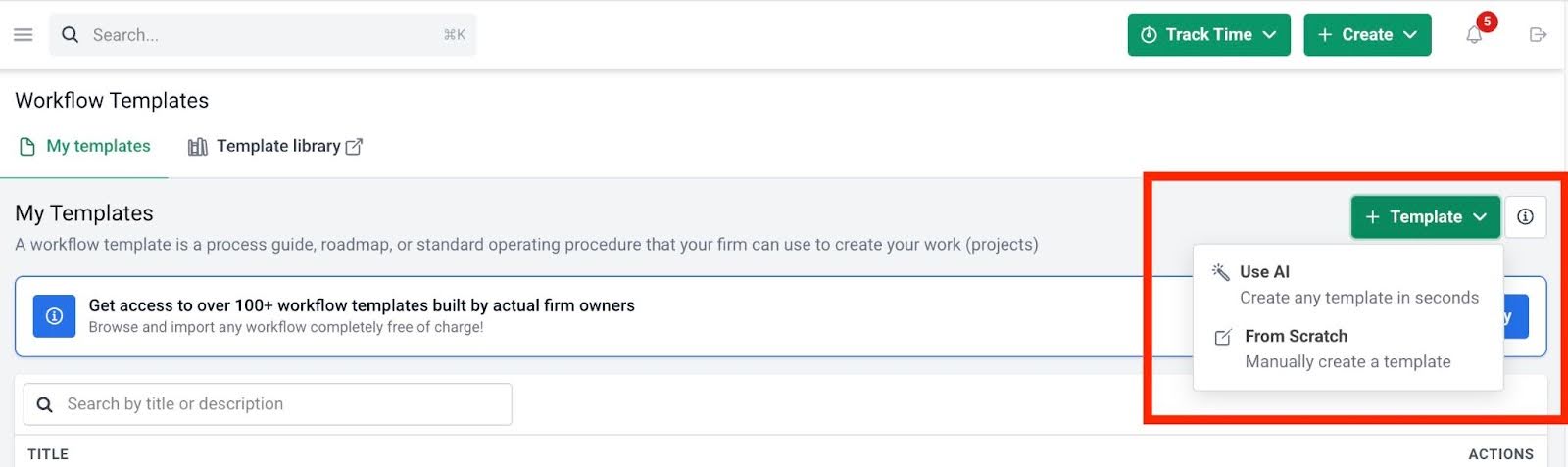
Or build a template from scratch, or let AI draft one for you, and save it for reuse.
Automates repetitive tasks
Firms do a lot of work that repeats on a schedule, like monthly bookkeeping, payroll, sales tax filings, and annual tax prep. Managing it manually means someone has to remember to create the project, assign tasks, set due dates, and notify the team every time.
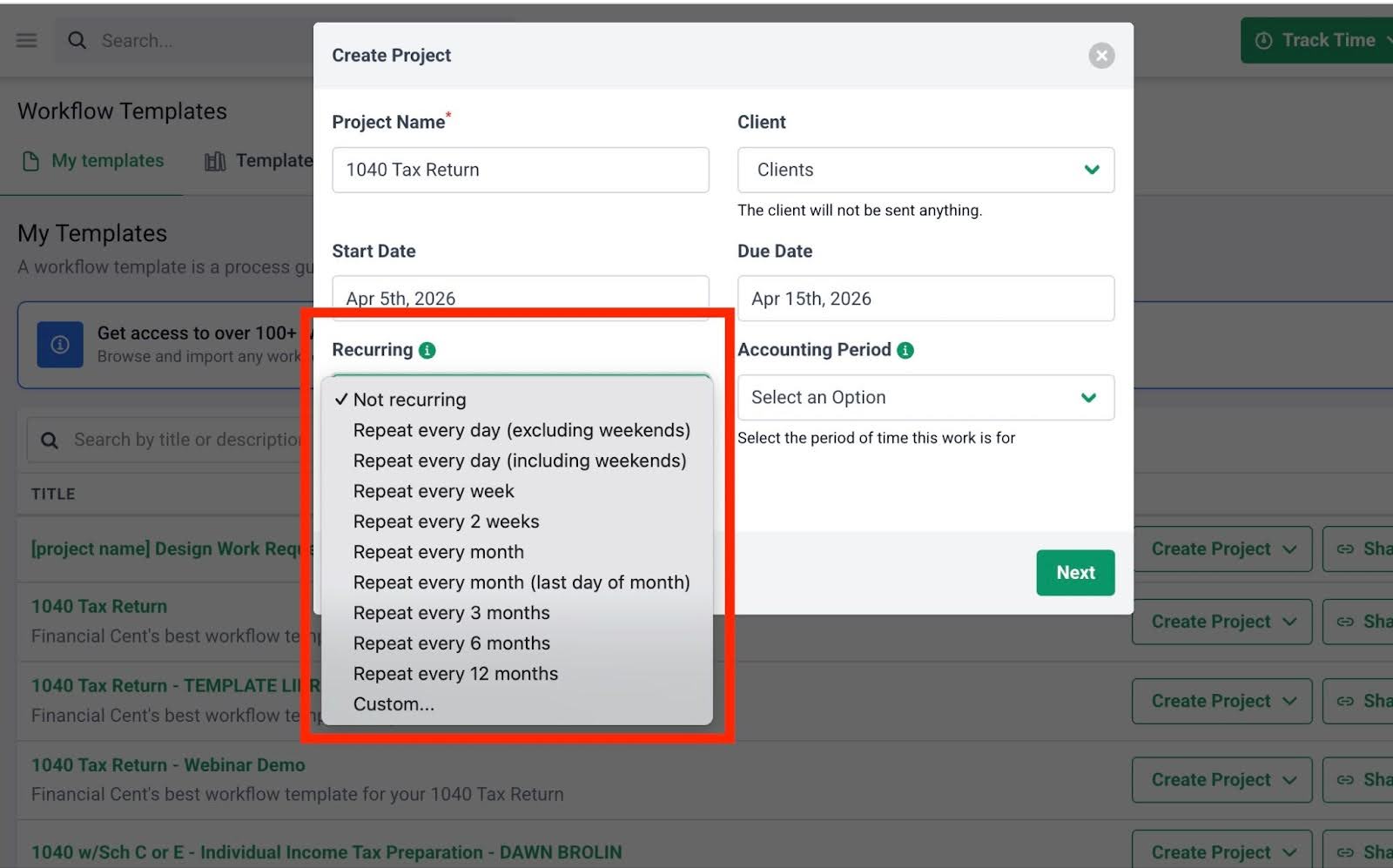
Workflow software recreates recurring projects automatically, so your team starts each cycle with the right steps, owners, and deadlines already in place. Financial Cents supports two types of recurrence:
- Default recurrences: Standard schedules like daily, weekly, monthly, quarterly, or annually, for monthly bookkeeping, weekly payroll, or quarterly close.
- Custom recurrences: Dynamic schedules like the last day of the month, the first Friday of every month, or every Tuesday of the second week.
Improves team collaboration and accountability
When several people work on the same project, collaboration gets tricky, especially if your team is remote or uses a mix of tools. In our report, 51.4% of firms described themselves as only somewhat collaborative, and 11% as not collaborative at all.
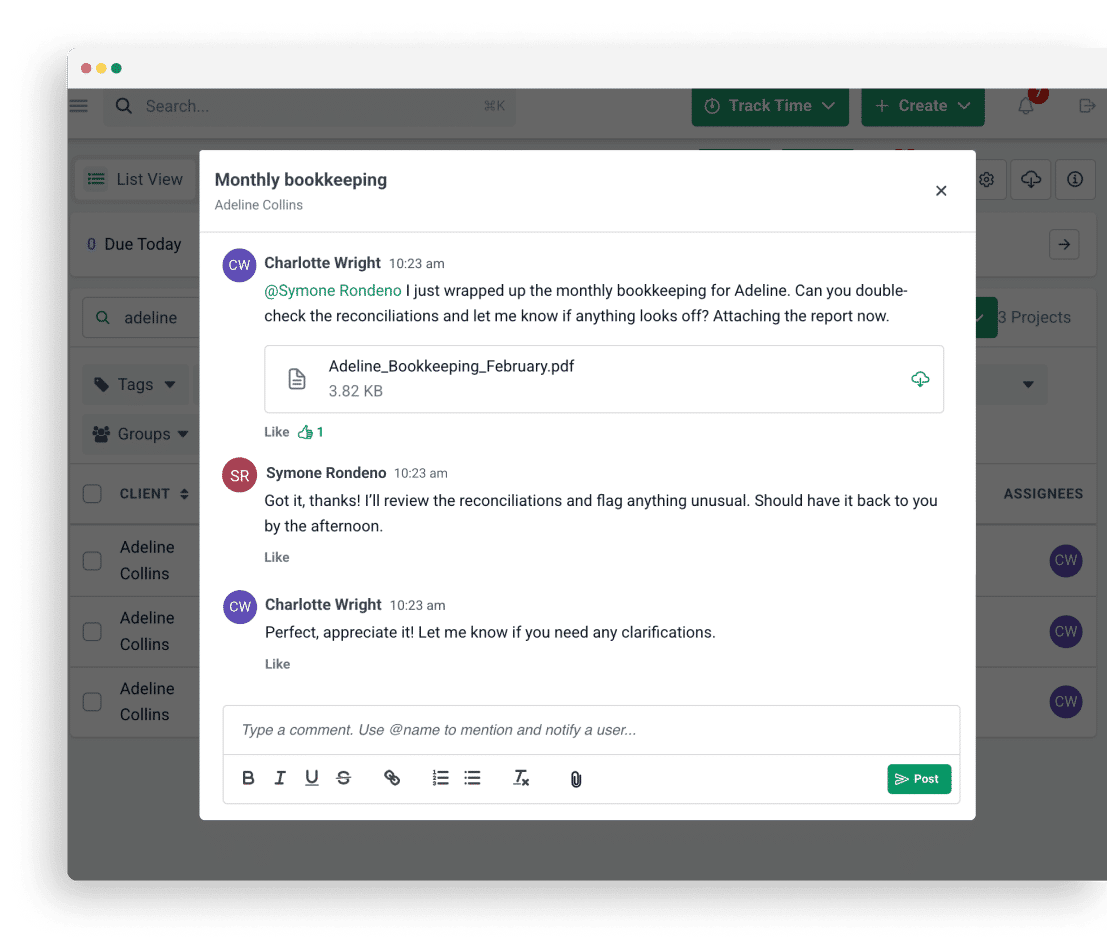
Financial Cents builds team collaboration and accountability into every task. Each one shows who’s responsible, what needs to be done, and when it’s due. Team members can comment, tag colleagues, share files, and follow every update in one timeline, so the context stays inside the project.
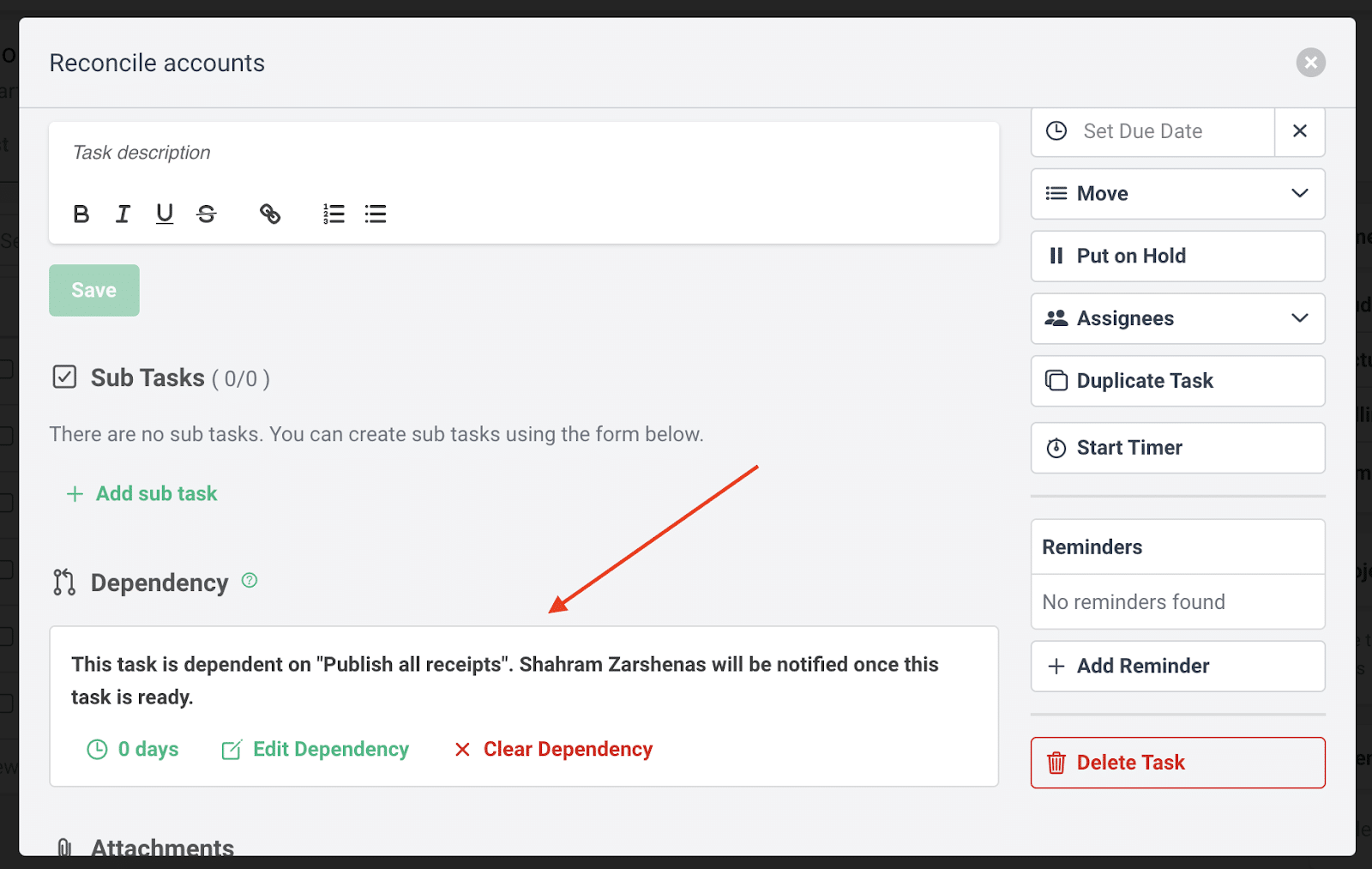
You can also add task dependencies, so a task can’t be completed until the step before it is done, and the next assignee is notified when their task comes up. That keeps handoffs smooth and work moving in the right order.
Provides visibility into the status of all work
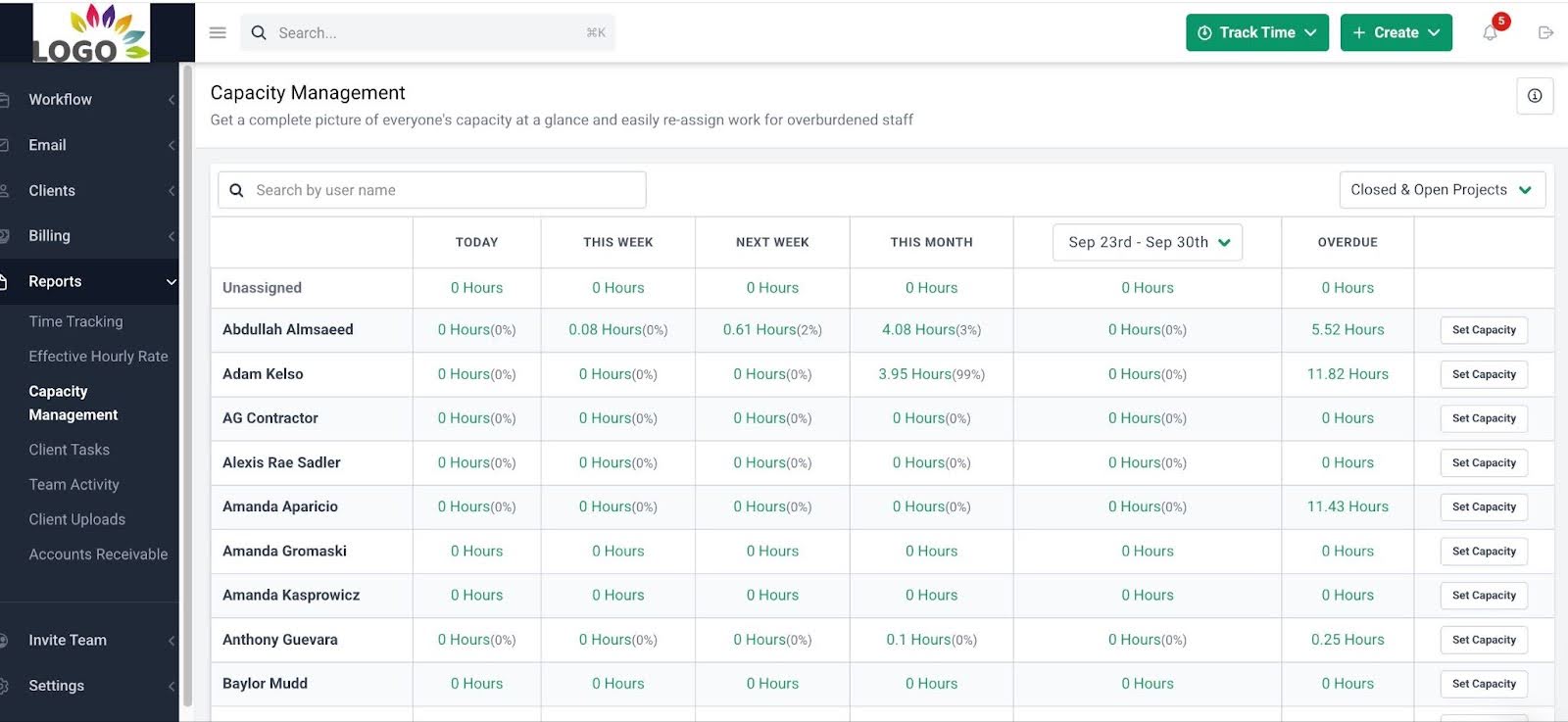
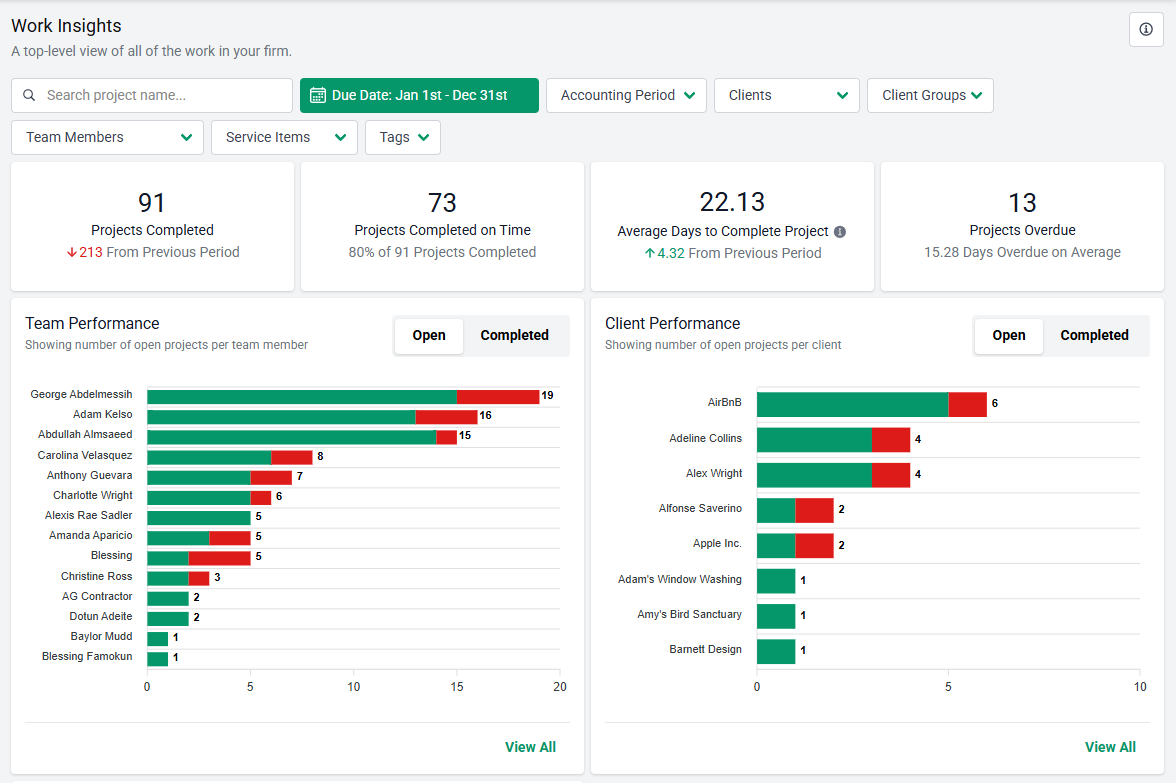
With dozens of clients, it’s hard to track how every project is going, and without visibility it’s easy to miss deadlines or overload certain team members. In Financial Cents, owners and managers see team workload and project progress in real time, broken down by due date, so they can reassign tasks when needed.
“If your managing partner wants to see the status of different things, he doesn’t have to ask anyone anymore. He could set up his own workflow views to filter the dashboard by whatever information he wants. The ability to apply tags to projects has been significant,” says Jenna Rodriguez, CPA, Managing Accountant at Pedante & Company.
The capacity management report shows every team member’s availability and assignments in real time, so you can spread work evenly and prevent burnout.
Enables better reporting and insights
Financial Cents gives you reports on time tracking, effective hourly rate, realization and profitability, and utilization. They help you spot overworked team members, clients who consistently slow workflows, and services that take longer than expected, so you can adjust in real time instead of after the fact.
Reduces client delays
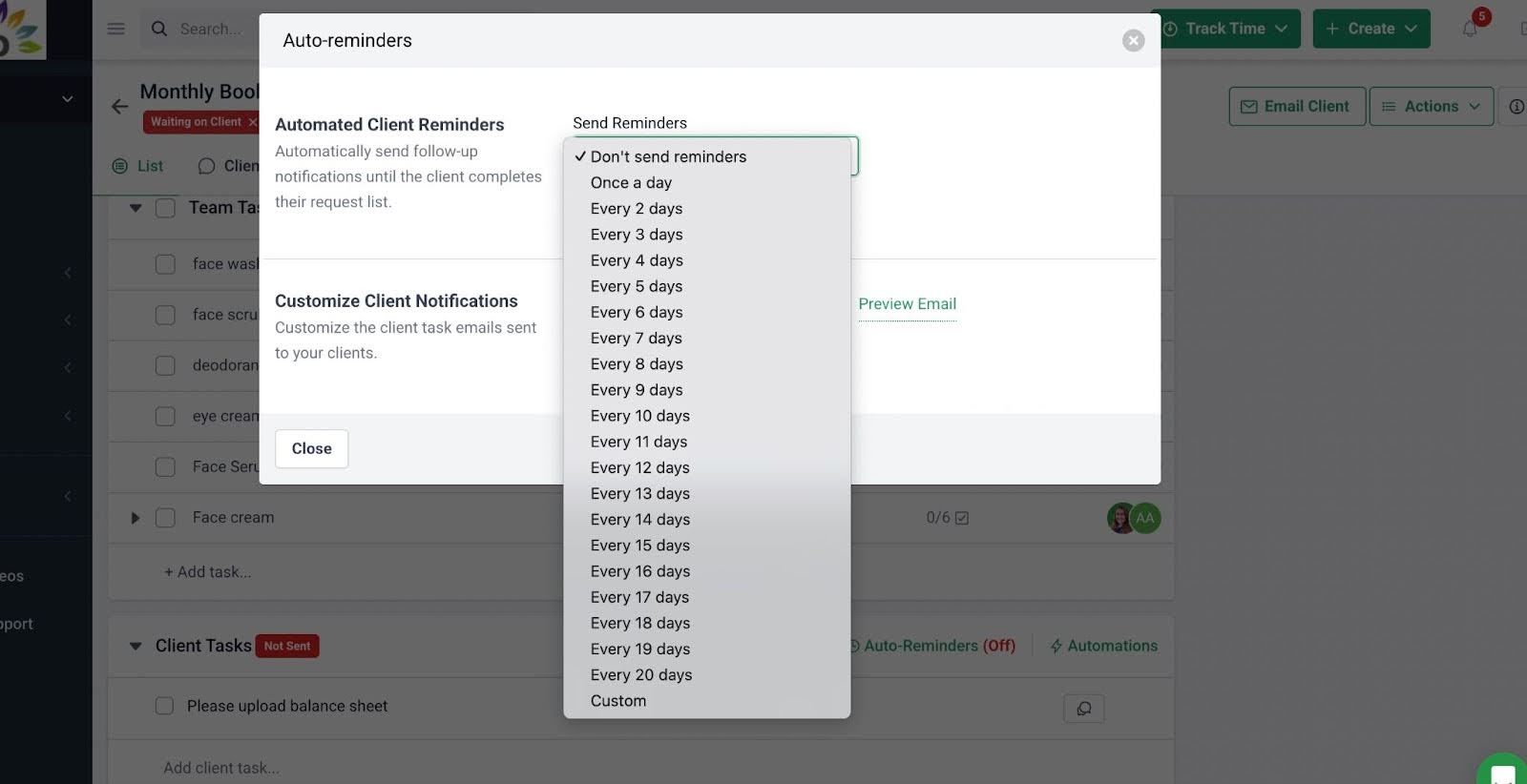
Clients slow projects down when you’re waiting on documents, answers, or approvals. In our report, 49.9% of respondents said they experienced delays of several days just collecting documents from clients.
In Financial Cents, you send clients a request list through the client portal, and automated email and SMS reminders follow up at set intervals until they complete it, so you don’t have to chase them manually.
Helps prevent missed deadlines
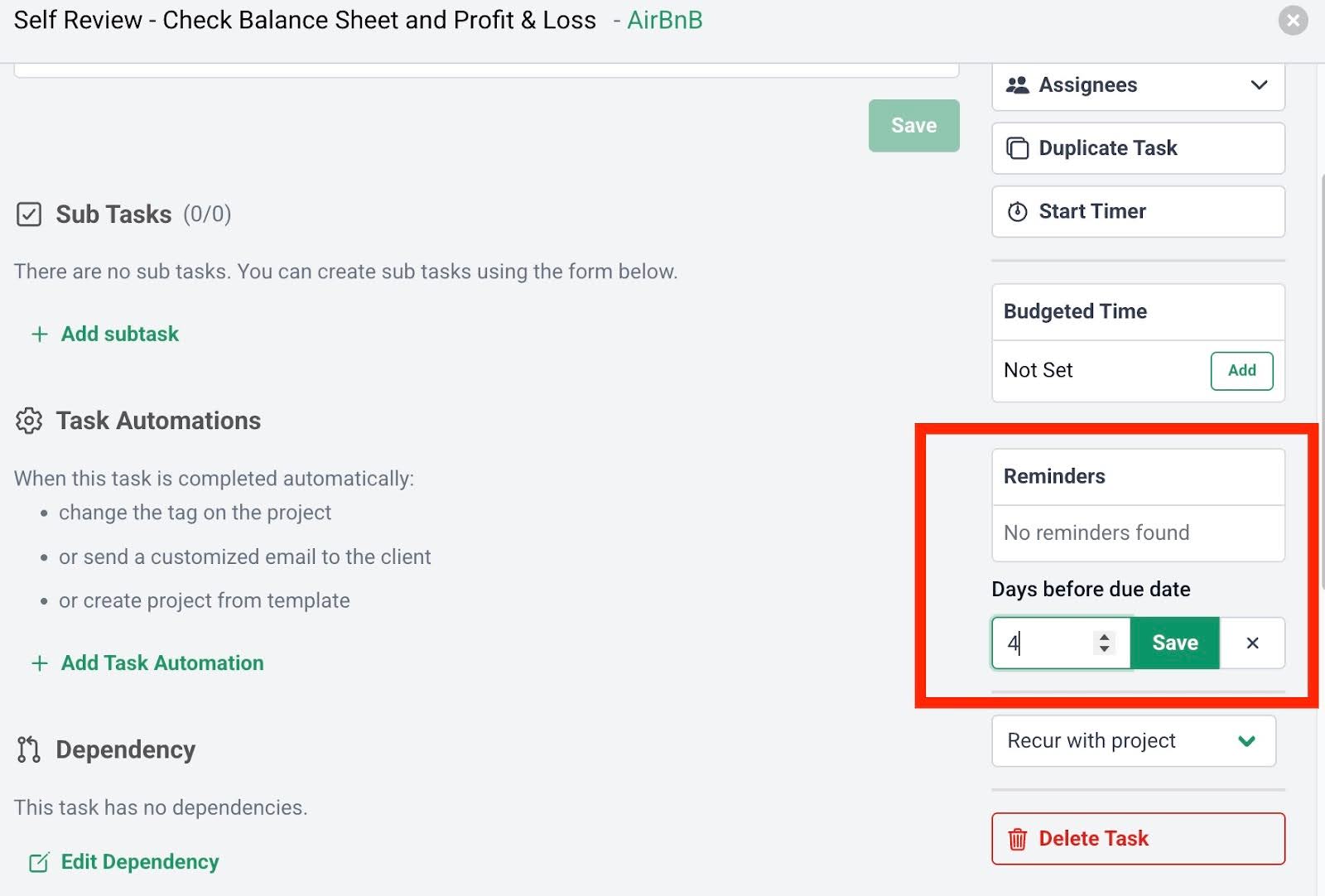
Firms usually miss deadlines because they’re handling too much at once and lose track of what’s due when. In Financial Cents, you can set reminders at the project and task level, and your team gets in-app and email notifications before work is due.
Reduces onboarding time for new hires
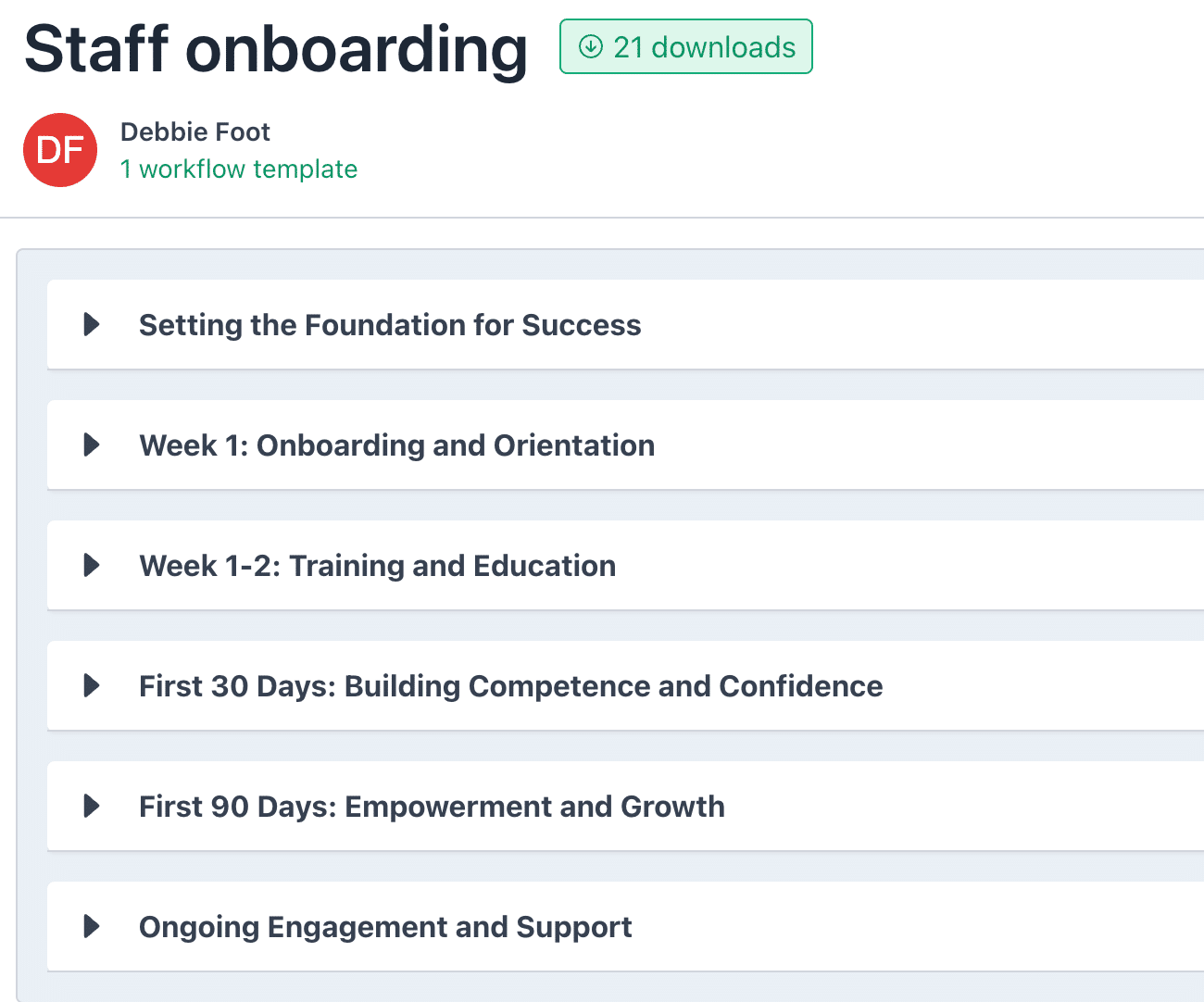
With standardized templates and checklists, new hires follow clear steps instead of learning everything from scratch. In Financial Cents, you can build your own staff onboarding templates or use ones created by experts, like Debbie Foot’s from DFRZ Accounting Group LLP, which covers administrative setup, the first 30 and 90 days, and ongoing support.
Manages client documents and information
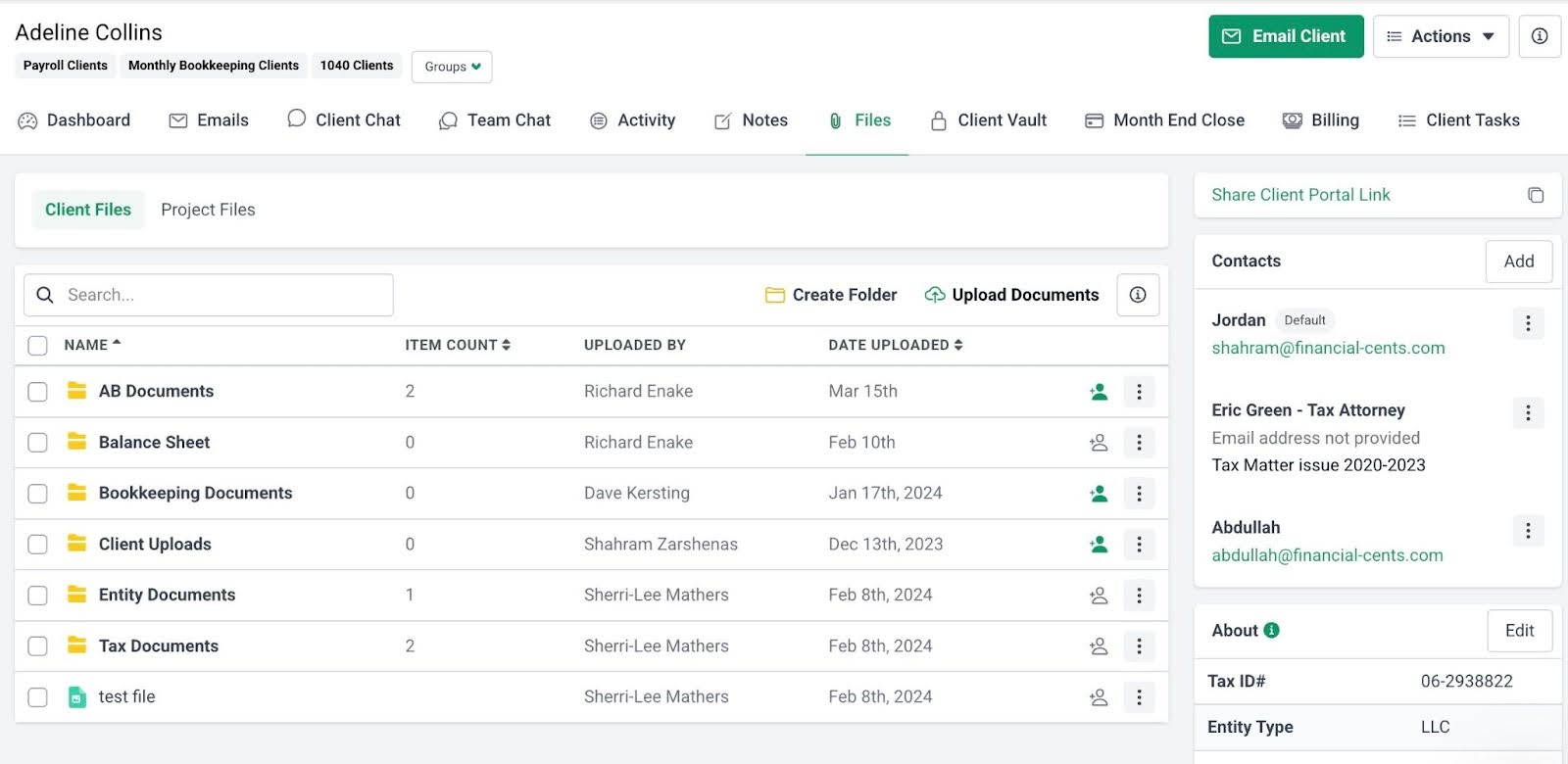
Too often, staff waste time searching for the right file in drives or chats. With document management for accountants built in, Financial Cents lets you:
- Store key documents, like prior returns, onboarding forms, and payroll reports, in each client’s profile.
- Attach specific documents to individual tasks, so your team has the right files at each step.
How an 8-Person Accounting Team Manages 400+ Active Projects with Workflow Software
You don’t need a 100-person team to manage hundreds of clients. Payroll Restoration manages over 400 active client projects with just eight team members using Financial Cents.
Founder Shannon Ballman Theis used a tickler file and spreadsheets to manage projects, but as her client base grew, she was spending hours on admin and struggling to track work. After trying Jetpack Workflow and ClickUp, she moved to Financial Cents. Since then, the team has been able to:
- Gain real-time visibility into every project and how everyone’s working.
- Filter and save dashboard views to reuse later.
- Monitor capacity so no one works more than 32 hours a week.
Customer story: See how Payroll Restoration manages 400+ projects with eight people
How Do You Choose the Right Workflow Software for Your Accounting Firm?
Choose workflow software that’s easy to use, built for accounting firms, and strong on automation, collaboration, client communication, templates, reporting, and integrations, at a price that fits your firm. Here are the key features to evaluate:
Ease of use
If your team can’t start using it almost immediately on their own, they’ll abandon it.
Built specifically for accounting teams
Generic project management tools often lack what accountants need. Look for recurring task automation, client-specific dashboards, and deadline tracking for tax, payroll, and bookkeeping.
Automation capabilities
The tool should automate manual, repetitive tasks, so your team can focus on higher-value work like client relationships and client advisory services (CAS).
Collaboration features
Accounting work involves handoffs between staff, reviewers, and managers. Good workflow software streamlines those handoffs and cuts back-and-forth.
Client communication tools
Look for software that keeps client communication in one place, ideally through a secure client portal.
Workflow template library
A broad template library means you don’t build every process from scratch. Look for templates covering month-end close, bookkeeping cleanup, payroll, tax prep, and client onboarding.
Reporting features
You’ll want reports on workload, task completion, productivity, and profitability, so you can improve operations over time.
Integration options
Check for integrations with the tools you already use for time tracking, invoicing, e-signatures, and document storage.
Pricing
Look for transparent pricing that fits your firm’s size and growth plans, without paying for features you don’t need. For a side-by-side comparison, see our list of the best accounting workflow software.
Use Workflow Software to Manage Your Firm
To be truly productive, your firm needs structure, standardization, and visibility. Workflow software like Financial Cents gives your team a central hub for client work, keeps everyone on the same process with templates, and shows what’s happening across every project.
With that system in place, your team spends less time on admin and rework, hits deadlines more consistently, and shares the workload more evenly.
Work falling through the cracks? Try Financial Cents free for 14 days, no credit card required. Start your free trial or book a free demo.
Frequently Asked Questions (FAQs)

Wesley Armstrong is the Customer Onboarding Manager at Financial Cents and a former Technical Support Specialist at SmartVault. He helps accounting and bookkeeping firms set up workflows that fit how they actually work, and writes about choosing, comparing, and switching practice management software.
Share this article