
Think back to the last time you met someone new. Before they said much, you probably formed an opinion based on how they dressed, spoke, and carried themselves. Those first impressions stick, and they’re hard to change.
Your clients do the same thing with your firm.
The moment a client signs your engagement letter for accounting services, they start paying attention to what you do next. Do you send a clear welcome message? Do you explain the next steps? Do they know who to contact? Do you follow up consistently? These early actions shape their perception and confidence in your firm before you begin any real work together.
That’s why onboarding matters so much in accounting. The first few encounters in the early weeks can make or break your working relationship. In fact, a customer onboarding benchmark report shows that poor onboarding is one of the top three reasons clients leave a service provider.
A good onboarding process prevents that. It sets expectations, reduces miscommunication, helps you collect accurate information, and demonstrates to clients that you run an organized, professional, and reliable firm.
In this guide, you’ll learn 10 practical ways to make your accounting client onboarding memorable. You’ll also get a free downloadable client onboarding checklist to help you standardize your workflow and create a consistent, high-quality experience for every client.
What Is Accounting Client Onboarding?
Accounting client onboarding is the structured process of welcoming a new client into your firm and setting up everything you need to start working together effectively. It covers the steps from the moment they sign your engagement letter to when your team begins regular service delivery.
“Onboarding is where you set the stage for the client relationship moving forward. It is critical that you get it right for the sanity of your firm, your team, and yourself, along with your clients,” says Kellie Parks, CPB.
During onboarding, you collect the client’s business details and financial information, review their historical records, clarify their goals, assign responsibilities, and explain how your processes work. The goal is to make communication smooth, set accurate expectations, and ensure your team has the information they need to deliver high-quality work from day one.
This is different from general business onboarding, where you might send a welcome packet and set collaboration expectations and boundaries.
With accounting onboarding, you have to collect sensitive financial documents, review their historical records, verify their identity for compliance, set up secure access in your client portal, and make sure you have accurate data before you start any work.
Because your work depends entirely on accuracy, deadlines, and regulatory requirements, you can’t start serving the client until all documents and information are fully gathered and properly set up in your system. That’s what makes accounting onboarding more detailed than most other industries.
10 Ways to Make Client Onboarding Memorable in Your Accounting Firm
1. Personalize the Welcome Experience
Clients differ by industry, size, systems, and the type of support they need. So while you can use a general welcome workflow, it’s important to personalize it for each client based on their goals and the services they signed up for. Personalizing your welcome message shows that you took the time to understand who they are and what they need.
Start with a clear welcome email that:
- Introduces the team member they’ll work with
- Outlines the first steps they should take
- Sets expectations for the next few days, weeks, and months
- Speaks directly to their business goals
- References the exact services they chose
If you don’t already have one, you can use our Accounting Welcome Email Template for your clients.
2. Set Clear Expectations from Day One
Use onboarding to outline communication guidelines, deliverables, responsibilities, and timelines. For example, tell them when they can expect their first monthly close, when you need documents, and how long reviews typically take. Clear expectations reduce confusion, improve turnaround times, and prevent scope creep.
3. Use a Client Onboarding Questionnaire
Instead of sending multiple emails to collect basic details, use a client onboarding questionnaire to gather everything you need in one place. A good questionnaire helps you collect business information, deadlines, key financial details, pain points, and software access, without going back and forth. It also ensures you don’t miss important information you need to set the client up correctly.
Here’s a free accounting client questionnaire template you can download and use.
4. Streamline Document Collection
Every accountant knows how frustrating document collection can be. You request bank statements, payroll reports, or prior-year returns, and then wait days or weeks with no response, despite multiple follow-ups. By the time the client finally sends the documents, you’re rushing to meet a filing deadline or complete the work on time.
This issue is very common.
Nearly half of the firms surveyed in the Financial Cents State of Accounting Workflow & Automation Report said they experience delays of several days when collecting documents from clients. These delays slow down onboarding, push deadlines, and increase stress for both your team and the client.
That’s why you need a structured document collection process instead of relying on ad-hoc emails. A tool like Financial Cents makes this easy. It offers a secure client portal where you can send document requests, track the status of each request, and automatically remind clients until they upload the documents onto the portal.
This keeps documents in one place, reduces back-and-forth communication, and helps you start work with complete and accurate data.
5. Automate Onboarding Tasks
Manual onboarding is slow and inconsistent. Automation saves time and ensures every client follows the same structured process, regardless of how busy you are. You can automate task assignments, due-date reminders, and document-request reminders until the client submits everything.
Automation removes the need for your team to track these tasks manually and ensures nothing slips through the cracks.
The impact is clear. Our report showed that the percentage of firms describing their onboarding as “smooth” jumped from 6.2% before automation to 67.5% after automation. That’s a major increase in efficiency and client satisfaction.
This dramatic improvement shows how much time, stress, and confusion firms eliminate by automating onboarding tasks.
6. Assign a Dedicated Account Manager
A new client shouldn’t have to guess who to contact when they have a question. Assigning a dedicated account manager removes confusion and gives the client one clear point of contact throughout onboarding.
We need one voice, one person the client communicates with during the onboarding process. And then they’re getting information from all the other individuals doing implementations or cleanup work to report that back"
Nikole Mackenzie, CEO & Founder, Momentum AccountingThe account manager’s role is simple: guide the client, keep the process moving, and make sure nothing is missed. Nikole shares that they have an onboarding manager who has been instrumental in building trust with clients. “You need someone who sets boundaries with clients, keeps everyone on schedule, and reminds everyone of timelines and deliverables,” Nikole says.
The account manager should schedule the kickoff call (and subsequent calls), send document requests, follow up, answer questions or route them to the right team member, monitor onboarding progress, and close out tasks.
A dedicated account manager also makes the client feel supported. It shows them your firm is communicative, organized, and invested in their success. This alone can reduce early churn and improve long-term satisfaction.
7. Communicate Your Value Early
Onboarding is another chance to remind clients why they chose your firm. Use this time to show them exactly how your process works, how you meet deadlines, ensure accuracy, and prevent compliance issues with the IRS or state agencies.
Also, walk them through how you keep their data secure, how you communicate if something is needed from them, and where their documents go.
When clients understand how your process protects them from errors, late filings, and penalties, their confidence increases, and they’re likely to stay longer with you.
8. Use Visual Onboarding Materials
Visuals make your process easier for clients to understand. Instead of sending long paragraphs, use checklists, simple diagrams, or short videos to explain your onboarding timeline, monthly workflow steps, communication flow, and deadlines. These visual aids give clients a quick, clear view of what to expect without overwhelming them with text.
For example, sending a one-page visual roadmap that outlines the first 30–60 days helps clients understand exactly what will happen and when. A short Loom video showing how to use your client portal can also reduce confusion and reduce basic support questions during onboarding.
Visual explanations make your process more transparent, reduce back-and-forth communication, and help clients follow instructions more consistently.
9. Automate Client Communication
Clients need consistent communication during onboarding, especially when they’re still learning your process. Manual follow-ups are easy to forget when your team is busy, which leads to delays, missed documents, and unnecessary back-and-forth.
Automating communication removes that risk. It ensures clients always know what’s happening, what they owe you, and what’s next, even during busy periods like tax season.
10. Gather Early Feedback
Don’t wait until the end of the year to find out whether your onboarding worked. Ask for feedback early, ideally within the first 90 days, when the experience is still fresh, and small issues can still be corrected.
Your feedback request should be short and direct. Ask questions like:
- Did anything feel confusing or unorganized?
- Did you know who to contact when you had questions?
- Was the onboarding process clear?
- Were the document requests manageable?
This feedback helps you identify patterns. For instance, if several clients say the document requests felt overwhelming, you may need to break them into smaller batches or add automated reminders. If clients say they weren’t sure who to contact, you may need to introduce the account manager more clearly at the start.
Gathering early feedback shows clients you care about their experience and are actively improving your process. It strengthens trust and helps you avoid bigger problems later in the engagement.
The Accounting Client Onboarding Checklist (Free Download)

To make onboarding easier for your team, we created a free Accounting Client Onboarding Checklist you can download and use right away. The checklist walks you through every step from the moment a client signs your engagement letter to the moment you transition them to regular monthly work.
The checklist covers:
- Initial Setup Tasks
-
- Sending the new client questionnaire
- Scheduling and completing the kickoff call
- Receiving documents and details from the client’s previous accountant
- System Access & Data Gathering
-
- Gaining access to the client’s accounting system
- Requesting access to all relevant systems and storing passwords, including:
- Bank accounts
- Payment processors
- POS systems
- Any other connected apps
- Setting Up the Client in Your Firm’s Tools
- Adding the client to your practice management tool (e.g., Financial Cents)
- Adding them to any other internal apps your firm uses
- Creating their folder in your document storage system
- Setting them up in your invoicing and billing system
- Customizing Their Workflow
Every client has different needs, so the checklist includes steps for tailoring their workflows based on the services they signed up for, such as:
- Bookkeeping
- Payroll
- Tax work
Customizing accounting workflows ensures your team assigns the right tasks, deadlines, and recurring schedules for each client.
Accounting Client Onboarding Checklist
More Onboarding Templates from Accounting and Bookkeeping Firm Owners
You can also explore onboarding templates created by real firm owners inside the Financial Cents Template Library, including:
- Client Onboarding Template by Jenny Roast, CEO of Construct Bookkeeping
- ONBD’G – Onboarding Workflow Template by Kellie Parks, CPB, FCPB Founder of Calmwaters Cloud Accounting
- New Bookkeeping Client Onboarding Template by Taylor Ammons, Integrator & Operator at Accounting Therapy, Inc
These templates give you practical, real-world examples of how other firms structure their onboarding workflows so you can adapt and improve yours.
Make Financial Cents Your Secret—Client Onboarding—Sauce
A memorable onboarding experience requires systems that help your team stay consistent, communicate clearly, and complete every step without missing anything. That’s where Financial Cents comes in.
Financial Cents creates the expectation that we know what we're doing and the client feels comfortable that we're being proactive in what we do"
Greg Scholten, EA, MBAIt does this by giving you all the tools you need to automate and streamline your onboarding process from start to finish.
Here’s how it helps:
Proposals & Engagement Letters
Proposals are the first real step in onboarding a new client, and Financial Cents makes this process fast, professional, and largely automated.
The software helps you create polished proposals and legally binding engagement letters in just a few steps. It guides you through all the essential sections, including introduction, services, payment, engagement letter & terms.
Here’s a video showing you all about how to use proposals in Financial Cents.
If you’re unsure how to phrase any section, Financial Cents’ AI writing assistant can help you generate professional, accurate content in seconds.
Financial Cents also makes it easy to add optional add-on services during onboarding. When building your proposal, simply check a box to include optional services clients can choose before signing.
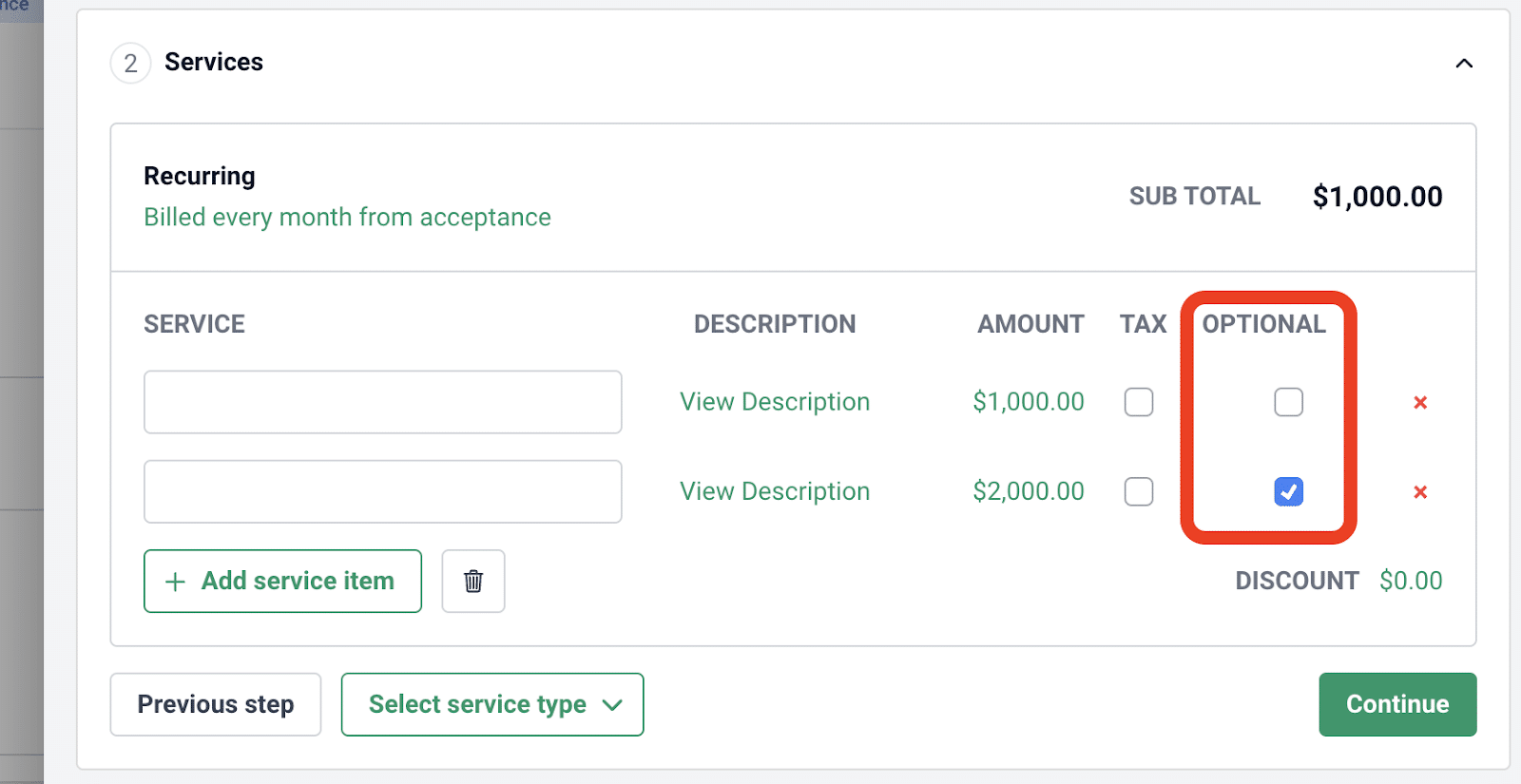
This makes upselling easier and helps clients understand additional ways you can support them.
You can also offer multiple pricing packages within a single proposal, and clients can compare the options and select the package that best fits their needs directly inside the proposal:
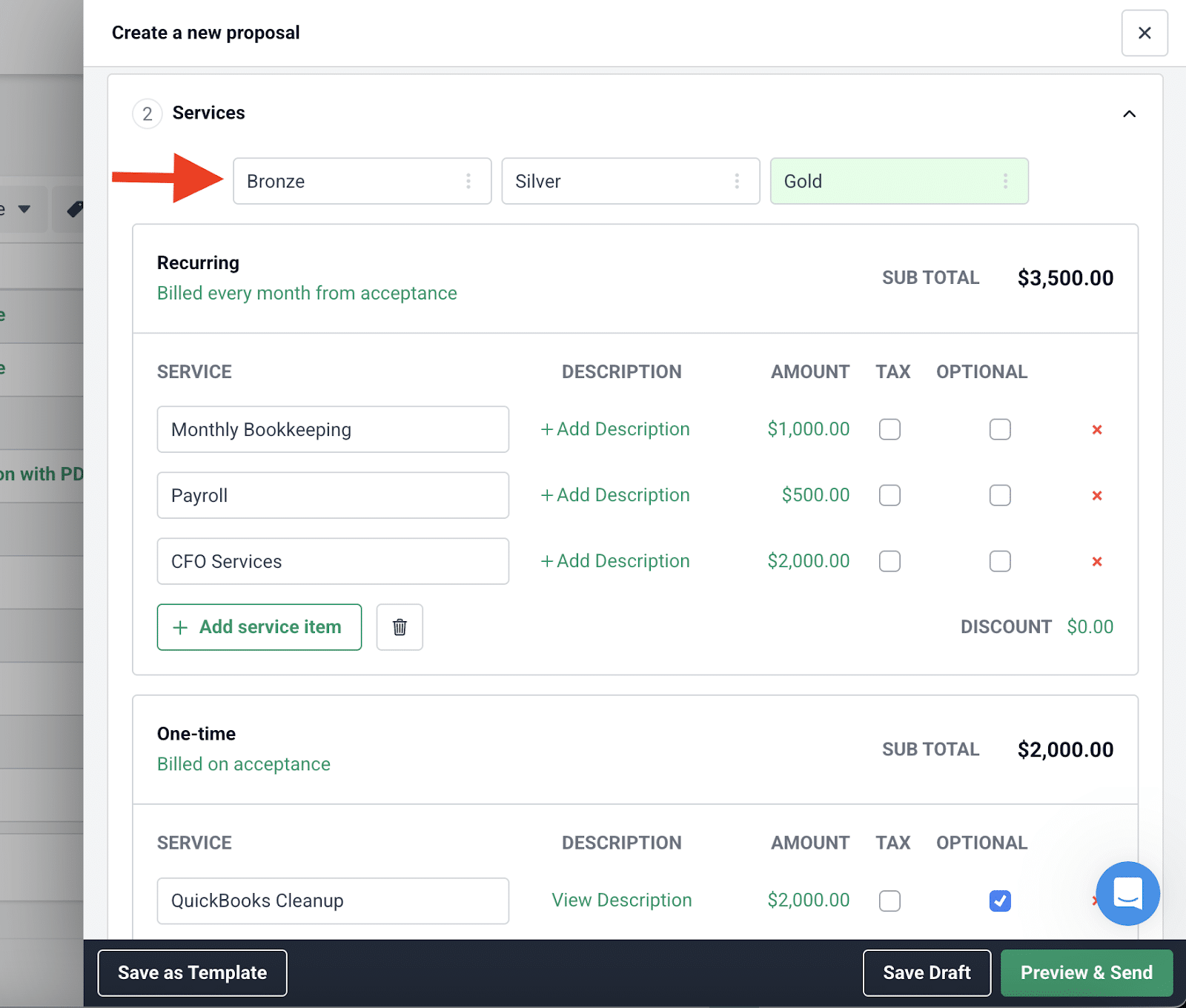
Once the client accepts the proposal, Financial Cents automatically generates the invoice, syncs it to QuickBooks Online, and sends it to the client. Clients can also review and sign electronically in a few clicks, reducing delays and allowing onboarding to begin immediately.
Finally, Financial Cents makes it easy to stay on top of every proposal with real-time tracking, including:
- When the client viewed, signed, or accepted
- Which services and add-ons they selected
- Who signed the document (with IP address verification)
The accounting proposal software helps you manage the entire approval and onboarding handoff seamlessly from one place.
Secure Client Portal
The Financial Cents client portal gives your team a simple way to onboard and manage clients efficiently. It centralizes all communication and collaboration so clients can access your requests, share documents, sign proposals, view reports, manage invoices, and message your team whenever needed.
This reduces the back-and-forth that usually happens through email and makes it easier for both sides to stay organized during onboarding.
Security is built into the portal. Financial Cents undergoes bi-annual security assessments by third-party cybersecurity experts, regular penetration testing, code vulnerability scanning, and full data encryption at rest and in transit.
Its cloud services are GDPR, HIPAA, SOC II, and SOC III compliant, meaning independent auditors have verified that the platform adheres to strict data protection standards, including access management, employee training, encryption controls, and system monitoring.
The portal is also extremely easy for clients to use. There are no passwords to create or remember. Financial Cents uses secure magic-link authentication to give clients instant access. This reduces login friction and makes clients far more responsive to your document requests during onboarding.
Workflow Management & Automation
With Financial Cents, you can create a standardized onboarding workflow that includes every task your team must complete. You can assign tasks to specific team members, add dynamic due dates, and set dependencies so tasks only appear when previous steps are done. This keeps your team organized and ensures nothing falls through the cracks.
Using the accounting workflow tool, you can also automate recurring onboarding steps, due-date reminders, client follow-ups, document-request reminders, and notifications when clients complete a step. This eliminates manual tracking, reduces errors, and speeds up onboarding.
Onboarding Checklist Templates
Financial Cents gives you access to ready-made onboarding checklist templates in its template library, so you don’t have to build your workflow from scratch. These templates were created by real accounting and bookkeeping firm owners who use them every day to onboard clients efficiently.
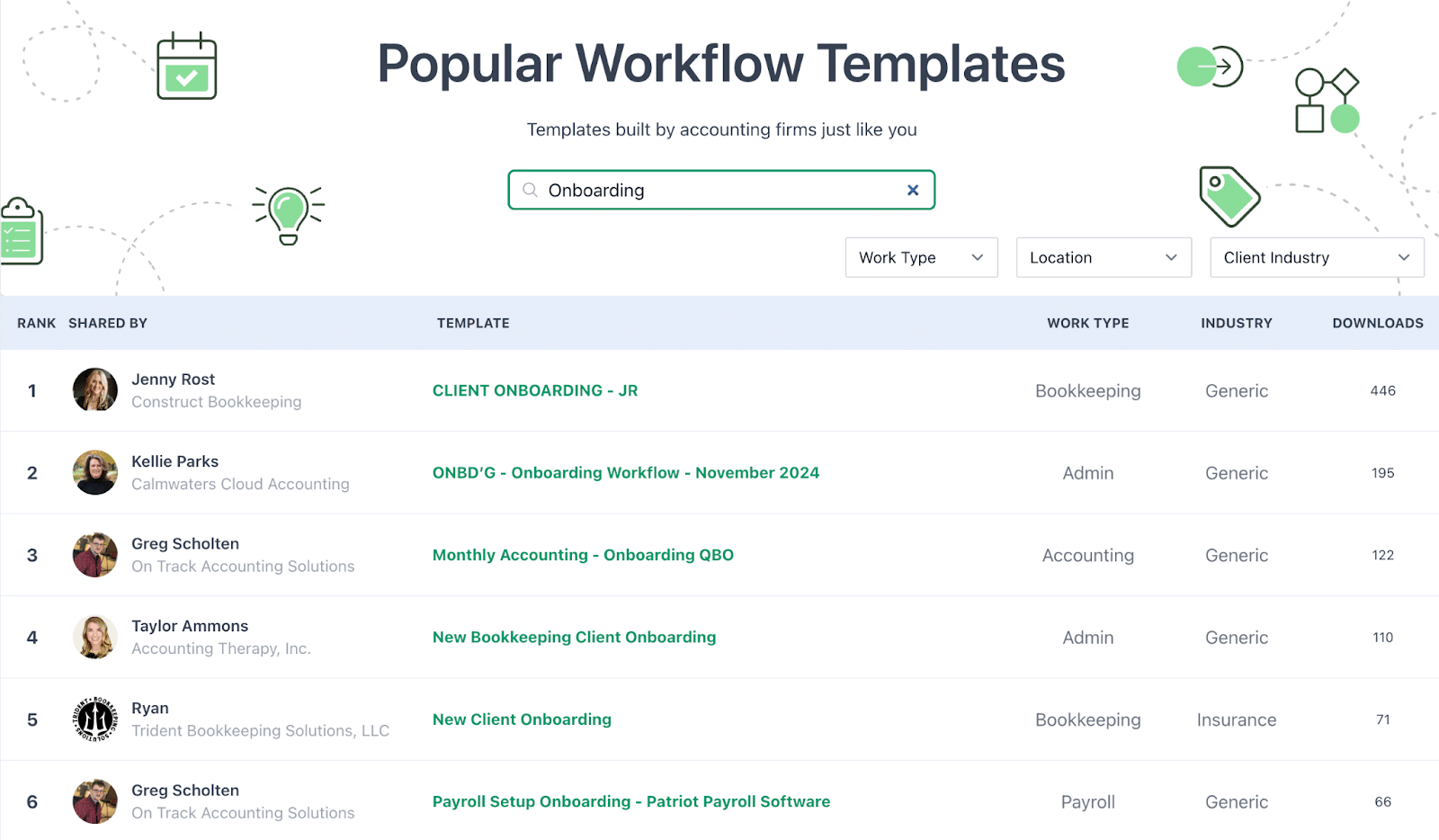
You can import any template into your account, customize it to fit your services, and assign it to new clients in seconds. This saves hours of setup time and ensures your team follows a consistent onboarding process.
The template library includes onboarding workflows for bookkeeping, admin, payroll, and other work types.
Automated Client Document Requests
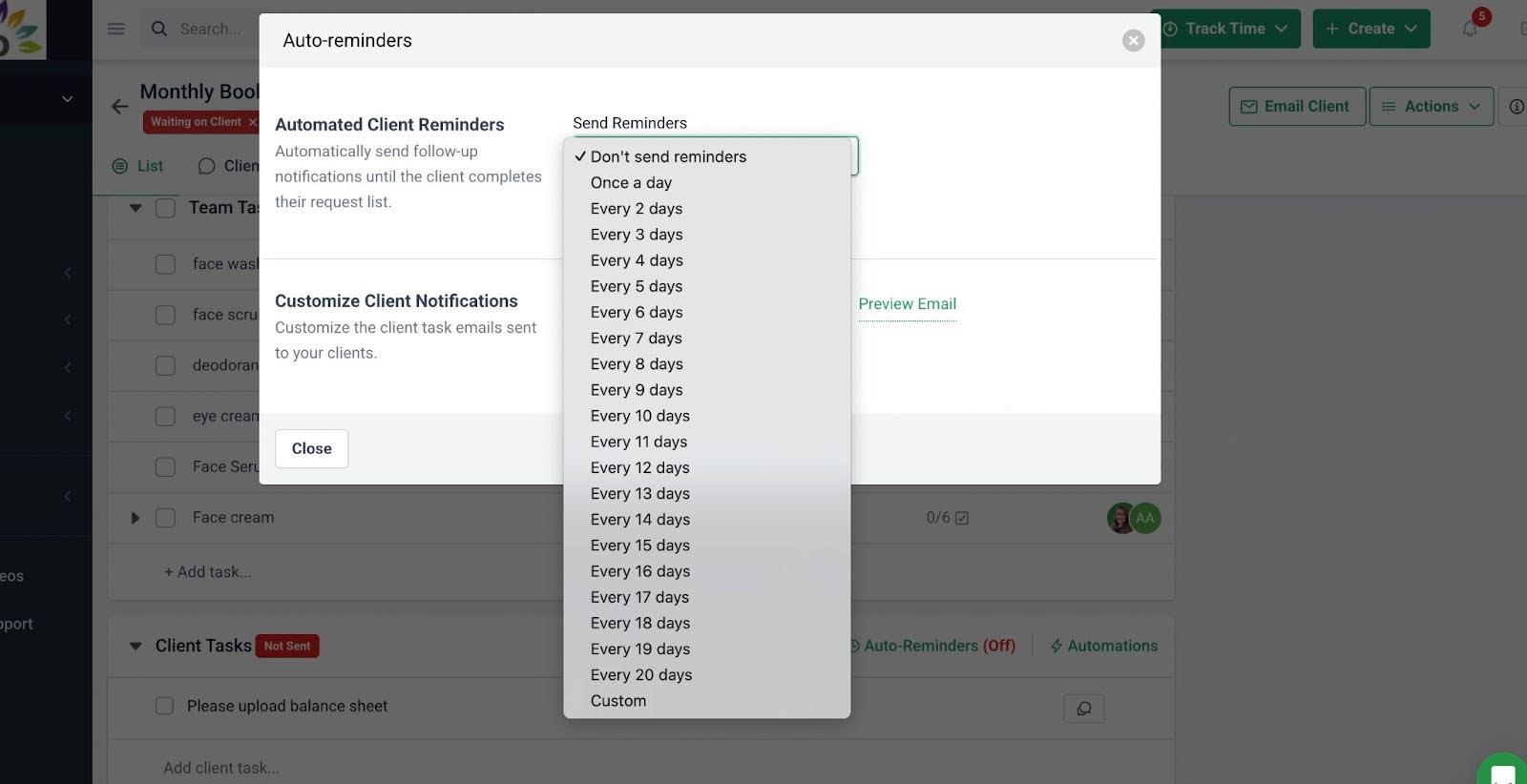
Financial Cents’ Client Task feature makes document collection faster and more reliable by letting you request all the files, information, and approvals you need at the start of a project. Instead of sending scattered emails, you can create a structured list of requests that clients can complete directly through the portal. Your team can track the status of each request in real time. You can instantly see which documents are completed, pending, or overdue.
The auto-reminders feature handles follow-ups for you. You can set reminder intervals, and Financial Cents will automatically notify clients via email and SMS until the request is completed. This keeps onboarding moving without your team having to chase anyone manually:
Centralized Client Communication
Clients often have questions during onboarding, and instead of letting those conversations happen across email, text, and other platforms (which makes it hard to track information), Financial Cents centralizes all client communication.
Every message, comment, and file upload is tied directly to the client’s profile. Your team can see the full conversation history in one place, preventing miscommunication and ensuring everyone is working from the same information. It also means any team member can step in and assist the client without asking them to repeat details.
The Client Chat feature also lets clients message your team directly through the portal and respond to requests without switching between different apps. This keeps your firm responsive, reduces errors, and helps you deliver a clear, organized onboarding experience from day one.
Here’s a video showing how the Client Chat in Financial Cents works.
Client Relationship Management
Financial Cents includes built-in client relationship management (CRM) tools that help you store and organize everything you need to manage a client effectively from day one. The CRM stores all client passwords, contact details, communication history, uploaded documents, notes, other sensitive information, etc
Your team can easily see what information has been collected, what’s still missing, and what tasks are waiting on the client. It also makes handoffs smooth—any team member can pick up where another left off because the full client history is documented.
A centralized CRM ensures your firm never starts ongoing work with incomplete information, and it helps you deliver a consistent onboarding experience.
Internal Team Collaboration Tools
Financial Cents offers accounting team collaboration tools that help everyone stay aligned and accountable during onboarding.
Your team can:
- Add comments directly inside projects
- Leave internal notes on tasks
- @mention colleagues to ask questions or hand off work
- Share updates in real time
- See who completed what and when
This keeps communication organized and tied to the correct client or task. Instead of sending Slack messages, forwarding emails, or trying to remember verbal instructions, all communication happens inside the workflow itself.
For example, if the person setting up the accounting system needs clarification from the payroll team, they can @mention them on the specific task. The full conversation stays linked to that task, making it easy to track decisions and next steps.
File Storage & Document Management
Financial Cents’ Document Management System (DMS) allows your firm to access, organize and securely store, organize, and access all client documents directly inside each client profile and project. This creates a single source of truth that reduces context switching, improves collaboration, and keeps every document tied to the relevant work.
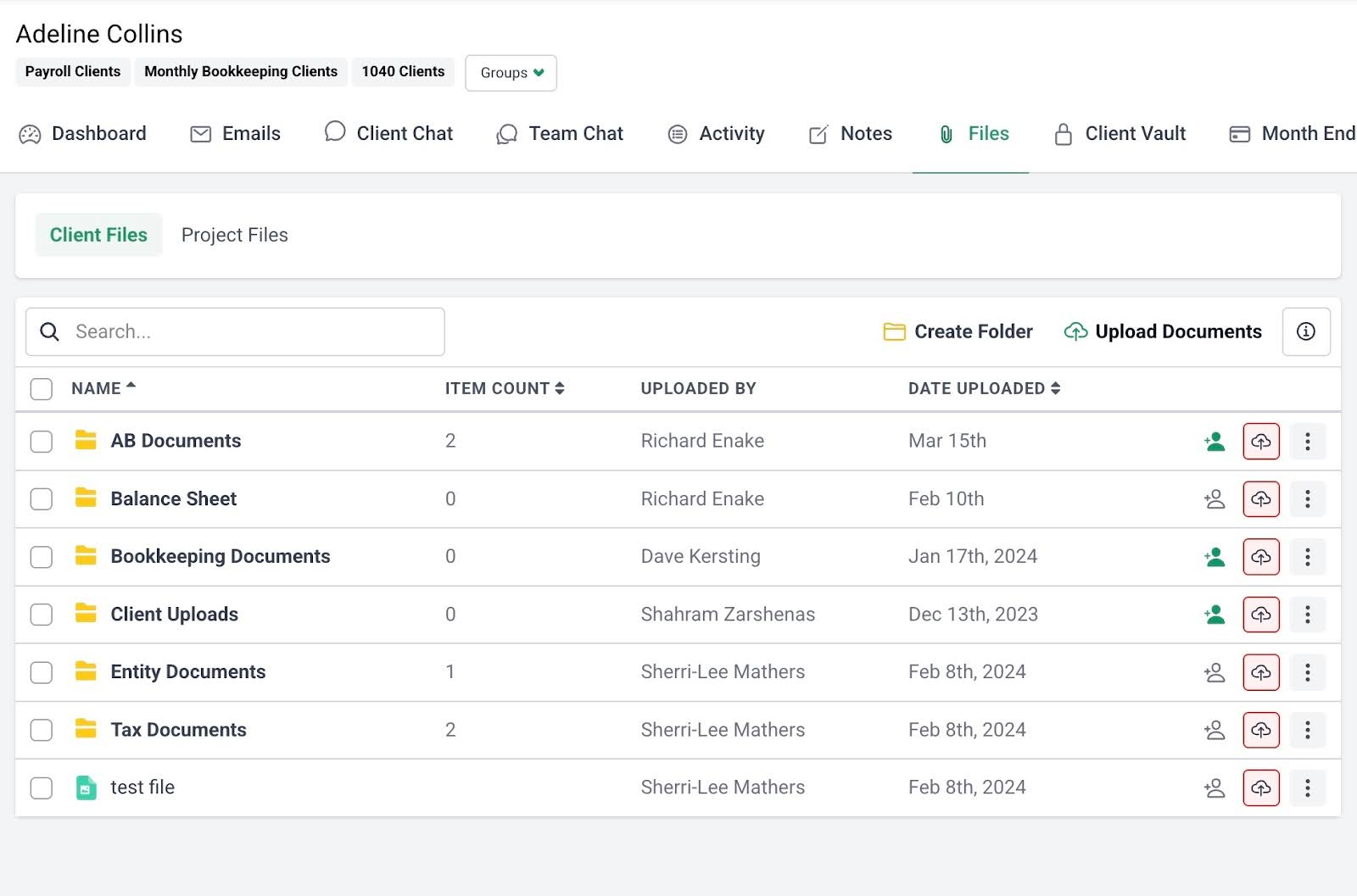
Key features include:
- Document customization: Rename, preview, categorize, and download documents to match your firm’s internal file storage system.
- Folder creation: Group documents of the same type, such as receipts, bank statements, or balance sheets, in clearly labeled folders so your team can find what they need instantly.
- Move documents: Easily move files across folders to keep everything organized as you gather more information during onboarding.
- Search: Use keywords or filters to quickly surface any document without digging through email threads or shared drives.
Because all documents live in the client’s profile and are linked to specific tasks or workflows, your team always works with the most accurate, up-to-date information. This reduces the chance of missing files, prevents duplication, and helps your team complete onboarding faster and more accurately.
Make Onboarding Seamless and Memorable for Clients
A memorable onboarding process happens because of clear communication, structured workflows, and systems that help clients feel supported from the moment they sign your engagement letter.
When you personalize the welcome experience, automate manual steps, collect complete information, keep communication organized, and set expectations early, you create an onboarding experience that builds trust and strengthens the client relationship from day one.
Templates and checklists make it easier to standardize your onboarding, but the real impact comes when you combine them with the right tools. Practice management software like Financial Cents allows you to:
- Automate your onboarding workflow
- Centralize all communication and document management
- Deliver a consistent, high-quality onboarding experience to every client
- Track client progress in real time
If you want to streamline onboarding and improve client retention, try Financial Cents by starting a Free Trial or explore how you can make onboarding memorable for your clients by Booking a Free Demo.