

A really easy way to document your workflow process is to use a screen recorder tool to capture your screen as you do the work. Just talk about the process and use a tool like ChatGPT to summarize and distill the transcript in process form.
You'll be amazed at what comes out of it. You can use it as a starting point for your process."
Once you see successful firm owners, like Roman, sparing no expense to ensure their bookkeeping workflows are efficient, you know there’s real leverage there.
Kellie Parks doesn’t even think you can do any meaningful work without bookkeeping workflows (and it’s easy to see why).
You can't scale if you're not doing good work. You can't do good work if you don't make your way through the process, and you can't efficiently make your way through a project if you're going to do the tasks out of order."
Kellie Parks, FCPB, Founder of Calmwaters Cloud AccountingWhen workflows live in the owner’s memory, small issues compound quickly, transactions are coded inconsistently, reviews are erratic, and client requests are sent too late in the process.
It is not surprising that, in 2024, over 57% of bookkeeping teams struggled with poor work-life balance (while 37% missed deadlines and 28% lost revenue opportunities) due to inefficient workflows.
For full-service accounting firms, inefficient bookkeeping workflows carry heavier consequences: they can make the subsequent tax returns and financial insights unreliable.
This guide walks you through the process and best practices of building bookkeeping workflows that give your growing team clarity on what needs to happen, when, how, and by whom.
TL;DR
- A bookkeeping workflow is the structured movement of work from receiving client source documents to delivering complete, accurate financials, including the tasks, the order, the owner, and the expected outcome.
- An efficient workflow has five core stages: client onboarding & setup, transaction capture & categorization, reconciliation, review & quality control, and reporting & client delivery.
- Build your workflow in 7 steps: document your current process, define each stage, standardize tasks and sequences, assign clear ownership, establish review points, set deadlines and SLAs, and automate where possible.
- Best practices that compound results: batch similar tasks, reduce manual handoffs, use checklists and templates, minimize context switching, and schedule recurring work consistently.
- Spreadsheets and email work for the first 5–10 clients, but scaling requires bookkeeping workflow software (like Financial Cents) to standardize processes, automate recurring work, track deadlines, and eliminate client chase, so your team isn’t dependent on memory or follow-up.
What is a Bookkeeping Workflow?
A bookkeeping workflow is the movement of bookkeeping work from the moment your team receives source documents from clients to when clients receive complete and accurate financial data.
Bookkeeping workflows define:
- The tasks that need to happen
- In what order do the tasks need to be done
- Who is responsible for which task
- Expected outcome of the tasks
This structure ensures all your bookkeeping engagements follow the same processes at all times, even when different team members handle the work.
The Difference Between a Task and a Workflow
Bookkeeping tasks are the list of things to do (such as bank reconciliation, expense categorization, etc.) to complete a bookkeeping project.
Bookkeeping workflows provide the structure and connection between the tasks in an engagement. It helps define automation triggers, dependencies, expected outcomes, milestones, task timelines, and any other information to prevent guesswork and improve accountability.
Tasks or bookkeeping checklists are like a to-do list. It’s the steps that you need to check off as they are done. The workflow is constantly moving. It is interconnected, and it will be updated based on other things that are happening within the team, said Roman Villard.
Read our guide on Bookkeeping Checklists with free templates here.
Both Tasks and workflows are about the things that need to get done. A workflow is a checklist with extra elements (information). Tasks are the basis of all workflows."
Kellie Parks, FCPB, Founder of Calmwaters Cloud AccountingWhy Efficient Workflows Matter
a. Faster month-end close
A structured workflow system shortens the time bookkeepers need to deliver accurate books every month. This faster closing makes timely financial insights available for clients, reduces last-minute rush for your team, and allows more time for advisory work.
It is common for firms that still rely on scattered checklists and email threads to take several weeks to close clients’ books, while firms with efficient workflows need only a few days.
b. Fewer errors and corrections
Beyond the time wasted, inefficient workflows increase stress levels and the chances of miscategorized transactions, missed reconciliations, duplicate entries, and overlooked adjustments.
Structured, automated workflows use rules, dependencies, and quality controls to reduce human error, resulting in fewer corrections and stronger client satisfaction.
c. Easier onboarding and delegation
Without documented workflows, bringing on new team members (or handing off clients) can be slow, disorganized, and disorienting. In that case, even your senior staff can become bottlenecks since only they know how some clients want their books done.
With an efficient workflow system, meanwhile, you can delegate entire onboarding cycles to junior team members, knowing that they have the necessary information to deliver work that meets your standards.
d. Improved client communication
Delayed requests, unclear status updates, and duplicate efforts are never far from a team using disorganized workflows. But a structured workflow system accounts for all client touchpoints through automated document requests, reminders, and status updates.
This centralization ensures that your clients share and receive timely information that builds trust and reduces email overwhelm.
e. More capacity without more headcount
Inefficient workflows are a primary reason bookkeepers waste time on low-value tasks, like manual scheduling, repeated explanations, and rework.
Optimizing workflows frees up significant hours for team members, directly increasing profitability and supporting firm growth.
The Core Stages of an Efficient Workflow for Bookkeeping Teams
Tools and firm preferences may differ, but successful bookkeeping teams all structure their work around the following core stages.
Client Onboarding & Setup
The purpose of the client onboarding and setup stage is to fully integrate your clients into your systems so that everyone, clients and team, has a great working experience.
When done well, all systems are connected, rules are documented, and the stage is set for recurring monthly engagements.
Key activities here include collecting and verifying all required access credentials and documents; setting up bank, credit card, and payment processor feeds; connecting accounting software; configuring the chart of accounts; and integrating it with your practice management app.
This stage is usually assigned to the onboarding specialist or a senior bookkeeper, and bookkeeping workflow automation, like client intake forms and auto-provisioning, enhances data collection and connects accounts in the general ledger software.
Transaction Capture & Categorization
This is where the bulk of the recurring bookkeeping work is done. This stage ensures that all transactions for the period are captured, categorized, and either resolved or flagged for client input.
Usually handled by a junior bookkeeper, this stage involves pulling transactions from bank feeds (or integrations), reviewing and categorizing transactions according to documented rules, and flagging items that require further clarification from the client.
An efficient workflow system helps bookkeepers identify transaction anomalies, reducing delays in the reconciliation or review process.
Reconciliation
Reconciliation is the process by which a bookkeeper verifies that financial data matches corresponding external records (such as bank and credit card statements).
The goal is to ensure accuracy and completeness by reconciling all applicable accounts, investigating and resolving discrepancies, and documenting any significant reconciling items or adjustments before the books are finalized.
Many firms prefer two different people to handle transaction capture (and categorization) and reconciliation for stronger quality control.
Review & Quality Control
This is where a senior bookkeeper reviews the financial data produced in the last step to catch errors, ensure compliance with client policies (and accounting standards/tax rules), and maintain consistent quality before the work is delivered to the client.
Review dashboards, exception reports, and automated anomaly alerts provide instant visibility into the process and enable reviewers to focus on high-risk areas of the client’s financial data.
In this stage, review checklists and sign-offs ensure quality is the same across the team, rather than depending on who happens to be reviewing the work in that month.
Reporting & Client Delivery
This is where the client receives complete, accurate financial data. The client account manager generates and delivers the financial reports and handles any follow-up questions the client may have.
Efficient workflows provide clear delivery timelines and formats to eliminate confusion and last-minute requests.
Scheduled report generation, branded PDF automation, and client portal enhance this stage and provide a professional experience for your clients.
How to Build Your Bookkeeping Workflow (Step-by-Step)
Step 1: Document Your Current Process
The purpose of building bookkeeping workflows is to get your standard operating procedures (SOPs) out of memory and computer drives and into a central location where they are accessible to everyone.
Most firms start by outlining the steps they currently use to complete their bookkeeping projects, including the relevant tools and client touchpoints.
Melyssa Brunet recommends talking to your team members, who are the people actually doing the work.
Everyone participates in the creation of the procedures, some more than others. We made sure everyone's feedback was taken before we went to the drawing board to complete. I think that openness amongst the team was what made it such a success."
Melyssa Brunet, Owner of TandemBooks Inc.This firmwide consultation often shows the bookkeeping team where their versions of the same process differ and which version works best.
When bookkeeping processes are not documented, individual team members execute tasks as they see fit. This individual approach will create inconsistencies in the final work delivered to clients if left unaddressed.
You can also document your workflows with video (like Roman described in the opening quote). Pick one client’s project and use a screen recording tool like Loom to capture your screen as you complete their work.
Step 2: Define each stage of work
Ultimately, every task in your bookkeeping process should fall into one of the stages covered above (client onboarding & setup, transaction capture & categorization, reconciliation, review & quality control, and reporting & client delivery).
Outline their stages and define the purpose, required input, expected deliverables, decision points, and milestones to prevent tasks from drifting, overlapping, or falling through the cracks.
Step 3: Standardize Tasks & Sequences
Once you’ve defined the stages of work, it’s time to standardize the individual tasks within them. This will ensure that all bank reconciliations (for example) are done in the same way, in the same order, and with the same expectations every month, across your client base.
Standardization reduces the need for your team members to worry about decision-making halfway through their work (which usually prompts them to do tasks in any way they see fit).
This is where checklist templates come in handy. They specify what should happen at every point in a project, and when followed, your team will deliver consistent work quality, regardless of who handles the work.
That means for every repetitive task, you’ll create a standard operating procedure (SOP) that contains step-by-step instructions, walkthrough videos, and policy documents, like capitalization thresholds, owner draw treatment, etc.).
Step 4: Assign Clear Ownership
Every task either has an owner or everyone will assume someone else is handling it.
Effective task assignment creates a sense of responsibility, so everyone knows who to hold accountable for any delay or misstep. It also ensures every task has a clear escalation path if issues arise.
Bookkeeping workflow software (such as Financial Cents) lets you assign task responsibility with a single click.
As a golden rule, the person handling a client’s books should be different from the person reviewing the work, for added accountability and quality control.
Step 5: Establish review points
Establishing review points requires defining what gets reviewed, who reviews it, and when the review should be done.
The idea is to fix reviews between stages so that errors can be caught more quickly, before they result in costly rework that harms important client relationships.
This requires you to create firm-wide (and client-specific) review checklists for balance sheet reasonableness, key reconciliations, unusual income statement trends, and tax compliance.
Some firm owners also document common review findings to help improve subsequent bookkeeping engagements.
Step 6: Set Deadlines & SLAs
Deadlines and service-level agreements (SLAs) make timelines, quality, and delivery expectations visible to everyone.
To maximize this, you have to set internal deadlines for tasks and client responses to prevent bookkeeping work from expanding beyond its allotted time.
For example, you can set a deadline for a client to send outstanding documents on the 4th of the month, with subsequent deadlines following accordingly.
That way, your team and clients will be more accountable for their deliverables.
Step 7: Automate Where Possible
Firms leaning into automation are moving up the value chain faster than those who are not. It’s never been easier to be busy, but this can be a trap. A culture of continuous improvement ensures the team is engaged in meaningful work."
Jason Staats, CPA, Founder, RealizeBookkeeping workflow automation keeps manual bookkeeping to a minimum, freeing capacity to get more work done and nurture client relationships.
For example, using the client task feature in your accounting workflow management software saves teams several hours per month. The task dependency feature also helps team members to know when to complete their assigned tasks.
Then there is the automatic client update feature, which informs your clients about the status of their bookkeeping work and communicates any next steps (all without manual effort).
At the end of the day, the more tasks you can automate in your firm, the more time your team can get back to provide complete (and accurate) client financial data and make more money.
Best Practices for Improving Workflow Efficiency
Firms that apply the following best practices can get higher returns on time and resources invested in building their workflows.
Batch similar tasks
Jumping between unrelated tasks is an easy way for bookkeepers to burn through their time and mental energy. But doing the same type of work in a sitting (or at once) enables team members to sustain their momentum throughout their workday.
Batching reduces setup time and mental load. Your team gets faster and more accurate when they stay in the same mental frame. When they have to constantly reset their focus between very different types of work, their accuracy and productivity levels will drop.
Reduce manual handoffs
When bookkeeping tasks have to wait for someone to manually hand them off to the next in line, workflow speed becomes dependent on team members’ availability and memory, and that’s not a reliable way to coordinate workflows.
Efficient workflows minimize handoffs by automating them. That way, your team members won’t have to worry about memorizing so many details. With workflow software solutions, all work information is visible to everyone, so team members can easily see when it’s their turn (and what they need) to complete a task.
Use checklists and templates
Checklists and templates standardize recurring tasks to improve consistency and ensure no step is skipped, even during the busiest periods.
This is especially useful when new team members join, and you need to ensure they follow your unique procedures to complete tasks.
These checklists include stage-specific checklists (like transaction capture, reconciliation, adjustment entry, etc.) that can be stored inside your workflow management software or linked to it.
Templating makes bookkeeping checklists reusable, so you don’t have to recreate the steps for a task from scratch every time.
If you’re using a workflow tool like Financial Cents, you can add links to external SOPs, policy documents, client-specific notes, and training videos to the checklist template to guide your team members.
Minimize context switching
As difficult as context-switching is for your bookkeepers (because they need utmost concentration to identify and resolve financial anomalies on time), the consequences go beyond the bookkeeper.
Frequently switching between clients, tools, or task types drains momentum and increases error rates. In that state, it becomes easier for them to forget where they left off and where to pick up.
The right bookkeeping workflow software will provide everything your team members need to serve each client in one place, limiting interruptions and speeding up the financial close.
Schedule recurring work consistently
Waiting for when bookkeeping engagements are due to create projects is a good way to let work fall through the cracks, to say nothing of the additional stress of creating these projects from scratch each time.
Proactive firms lock recurring engagements in their calendars to focus on meeting client deliverables when the time reaches.
This might seem like a small difference, but wait until you learn why the recurring work feature is one of the most sought-after features for accounting firm owners, according to the 2025 State of Accounting Workflow Automation.
How Workflow Software Helps to Scale Workflows in Bookkeeping Firms
Where you build your bookkeeping workflows is only half the job of building efficient workflows. Where that workflow is managed determines whether it actually scales your team and clients.
Spreadsheets, paper documents, and other manual systems can work early on, but require constant maintenance and follow-up as your firm grows, which can be counterproductive.
Bookkeeping workflow software turns documented processes into a living, scalable system that sees work the way bookkeepers do.
Here’s how bookkeeping workflow management software helps firms to build efficient bookkeeping workflows for their growing teams (using Financial Cents as an example):
1. Process standardization (Bookkeeping Workflow Templates)
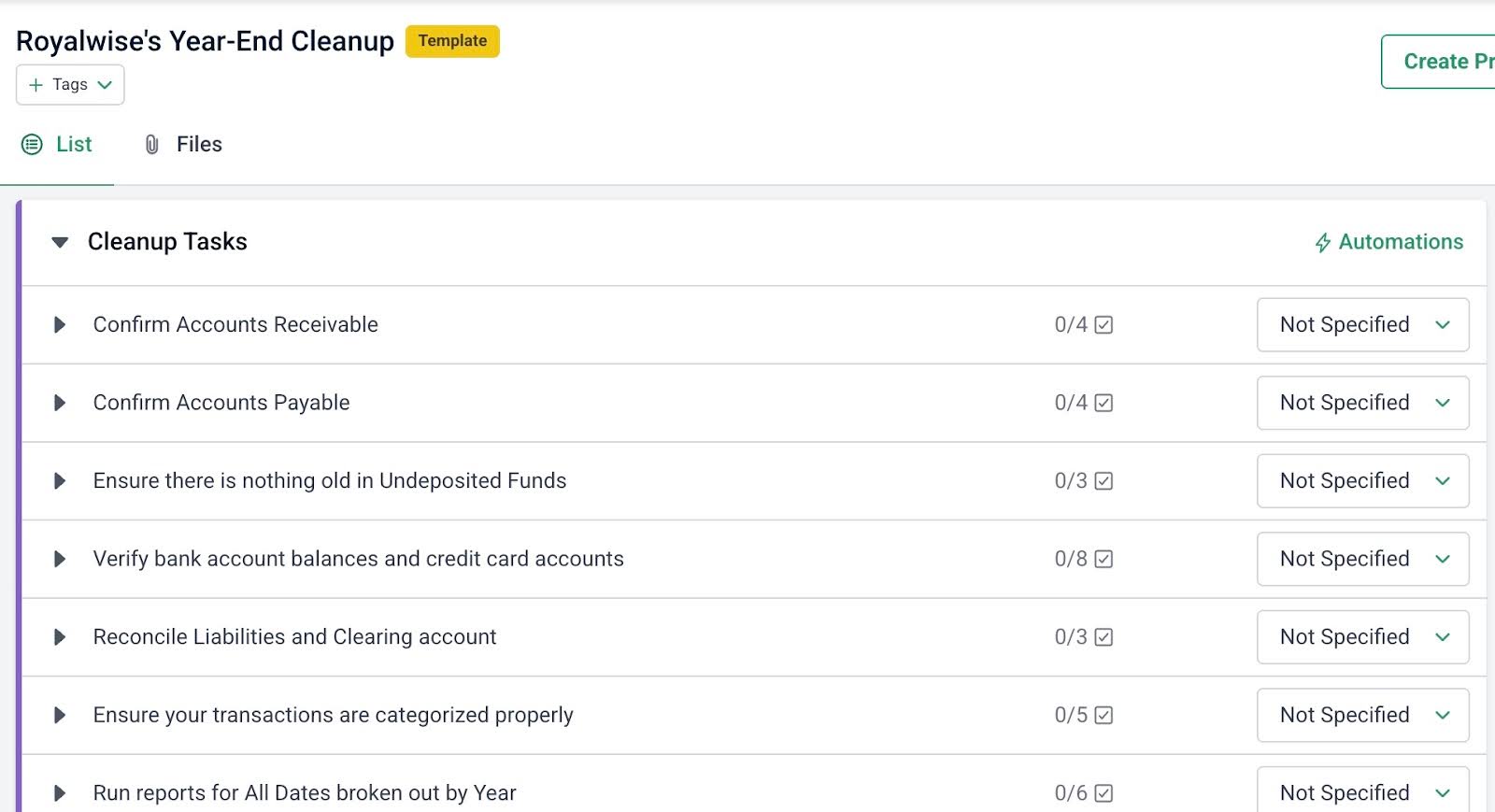
You can create your bookkeeping workflow templates from scratch in Financial Cents, but it is easier and quicker to customize its pre-built templates to suit your specific procedures.
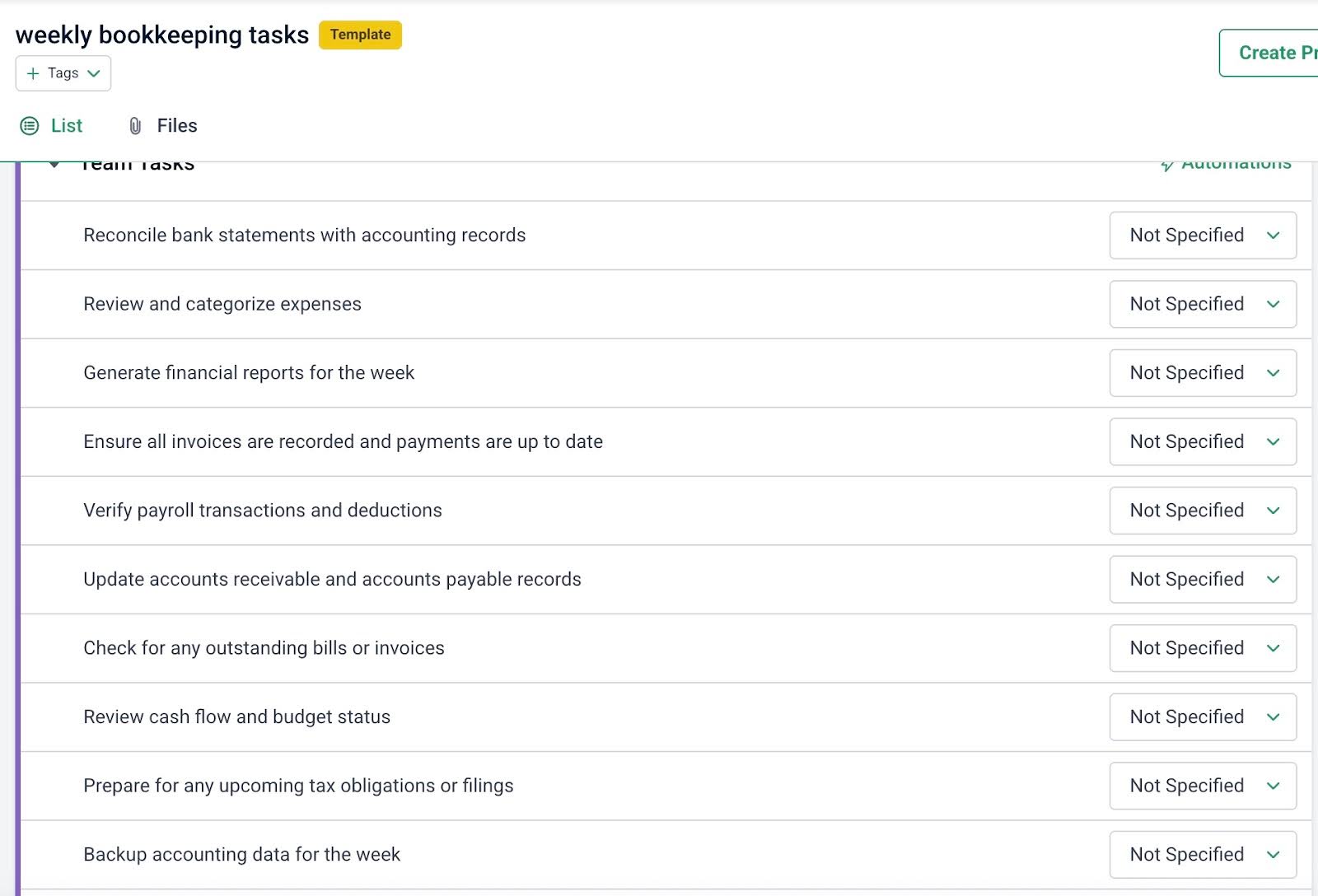
Most Financial Cents users create a master workflow template for their weekly, month-end, quarterly, and year-end bookkeeping projects. Then they adjust this master template to suit the specific needs of individual clients by adding or removing steps as needed.
The Financial Cents bookkeeping templates allow you to add automations like recurring work, start/due dates, and task assignment to further streamline the workflow.
2. Clear Onboarding for Client and Team Members
Financial Cents’ client and employee onboarding templates outline the steps for setting up your clients and new team members, from document collection and bank feed setup to policy documentation and welcome packet delivery.
Each onboarding project can be tracked in the workflow dashboard, which centralizes all onboarding tasks and gives your team visibility to ensure no step is missed.
This central view of all onboarding projects enables a memorable, repeatable experience for all clients and new hires.
3. Recurring task creation
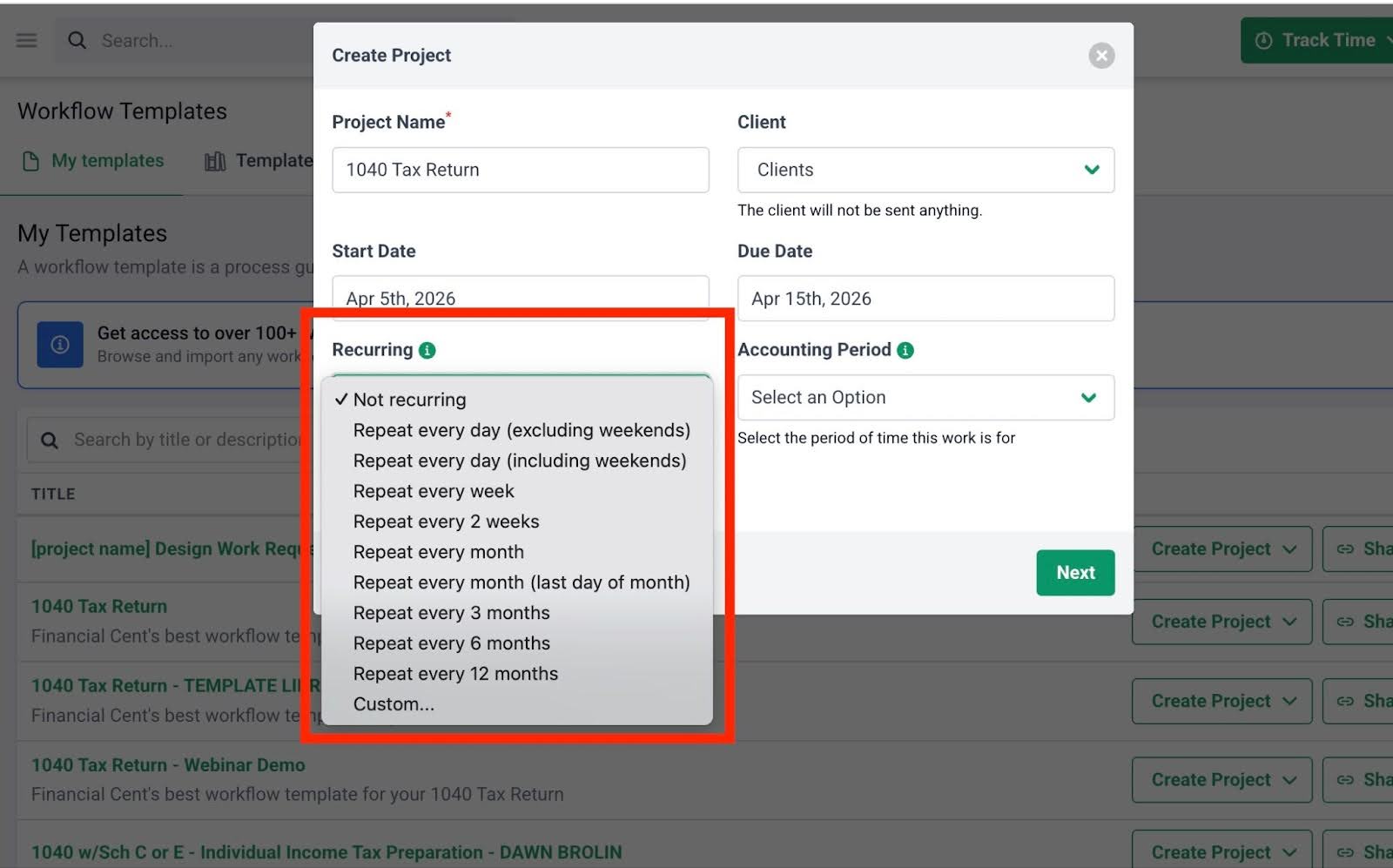
Bookkeeping is mostly a recurring engagement, so Financial Cents provides a recurring work feature that recreates bookkeeping projects for each week, month, quarter, and year without human intervention.
When bookkeeping projects are recreated in Financial Cents, every task, dependency, assignee, and deadline is also recreated automatically.
This feature not only saves bookkeeping teams the stress of manually recreating tasks but also reduces the risk of work falling through the cracks, especially during busy periods.
4. Deadline Tracking
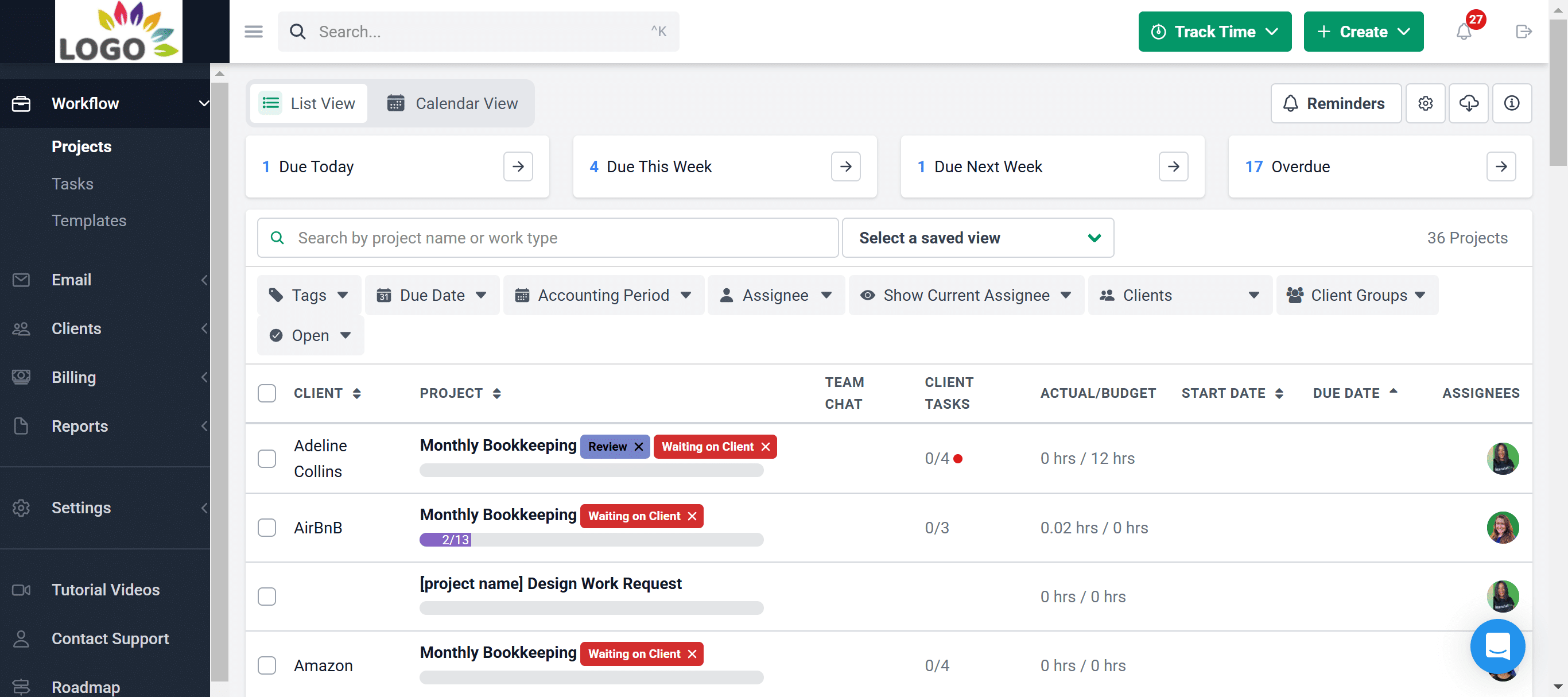
Financial Cents’ workflow dashboard is designed to show you all your projects on the dashboard.
Every project has a due date and a color-coded bar indicating progress. Each project also shows the number of tasks completed versus the total number of tasks. These enable firms to identify the projects at risk of missing their deadlines.
The Workflow Filters make it easy for you to search your workflow dashboard for specific projects to monitor deadlines. This ease and speed of finding information make it harder for projects to slip through the cracks.
If your managing partner wants to see the status of different things, he doesn't have to ask anyone anymore. He could set up his own workflow views to filter the dashboard by whatever information he wants."
Jenna Rodriguez, CPA, Managing Accountant, Pedante and Company, IncThere are also Workflow Tags that make it easy to identify projects in the Financial Cents’ workflow dashboard by status and workflow stage. The visibility helps bookkeeping teams to resolve issues faster.
The ability to apply tags to projects has also been significant."
Jenna Rodriguez, CPA, Managing Accountant, Pedante and Company, Inc5. Automated client reminders
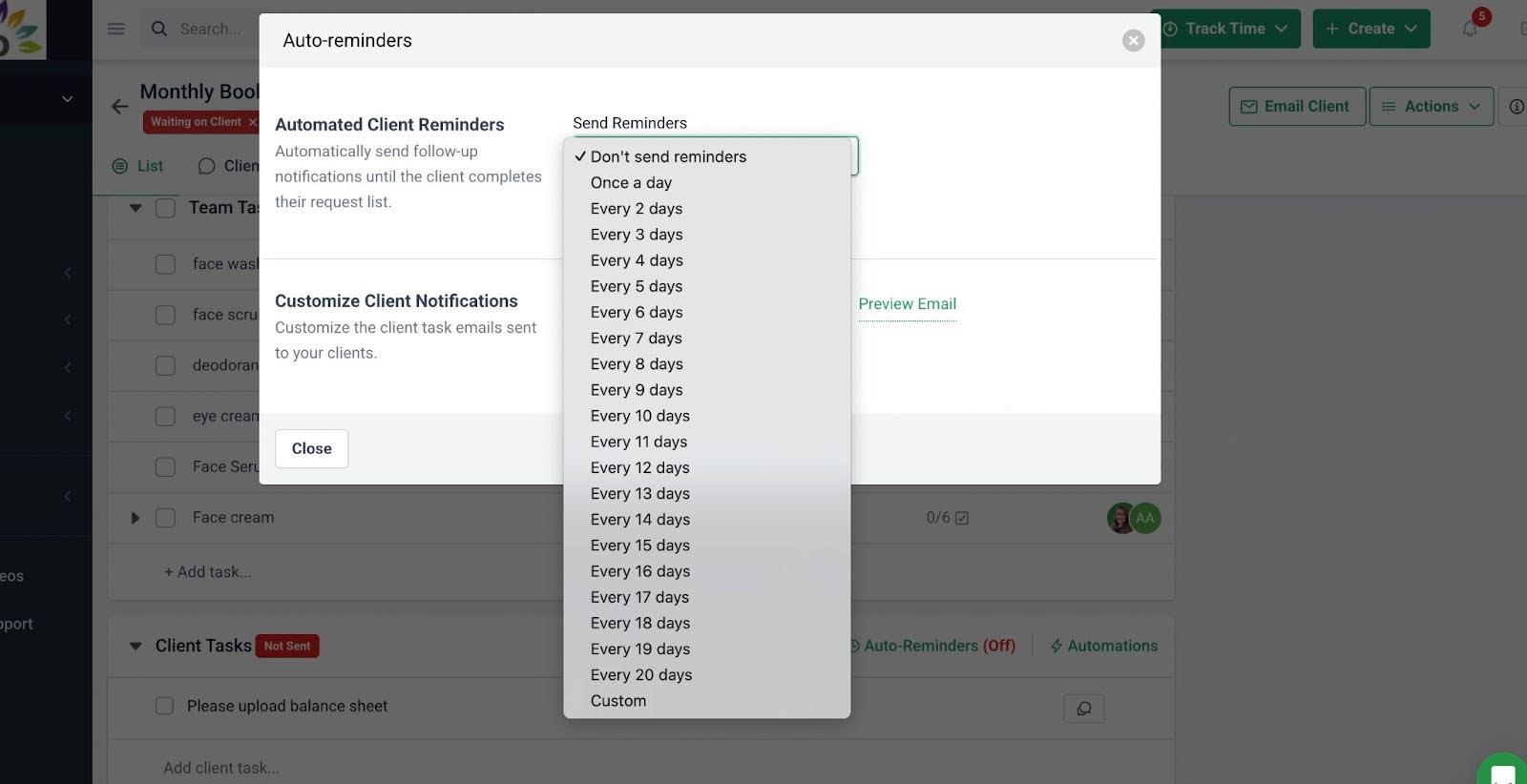
Every bookkeeper has struggled with unresponsive clients. That’s why most bookkeeping firm owners consider the client reminder feature as their second-most crucial feature in a workflow software.
Financial Cents’ automated client reminders help clients remember the files and information they need to send to your team without human intervention. These reminders are automated, so they go out as and when due (without fail) until the client completes the required steps.
Once set up, your clients will receive an email and text notification directing them to the passwordless client task portal, where they can upload documents, ask questions, provide transaction information, or simply view shared folders.
This removes the burden of chasing clients from your team and increases client responses to keep work on schedule.
6. Reduced manual follow-ups
The ease of seeing the status of a project without having to ask gives us time to focus on what matters most. That’s good for sanity."
Jenna Rodriguez, CPA, Managing Accountant, Pedante and Company, IncWere it not for the Financial Cents automation, firms like Pedante and Company would have spent billable hours updating the status of their work each week.
Financial Cents centralizes workflow status, task ownership, and dependencies in the workflow dashboard, so everyone in the team can see where each work item stands and where attention is needed more urgently.
The resulting clarity helps improve client work quality and job satisfaction for your team.
Give Your Bookkeeping Workflows the Structure and Automation to Grow with Your Firm
Can you imagine what happens when your workflows are not only centralized in one location but are also automated by the right tools?
It’s a no-brainer. Bookkeeping client service goes from stressful and reactive to calm, focused, and proactive.
Firms that offer other accounting services will free up the rest of the month for advisory work, tax projects, or new client onboarding.
Efficient bookkeeping workflows might require upfront investment in time and effort, but once completed, they give your firm structure and clarity in place of chaos and assumptions.
Every firm that has tried to build bookkeeping workflows without workflow software can confirm one thing: spreadsheets and paper documents can work in the initial stages. But once the firm adds more staff and clients, information silos and manual follow-ups multiply.
You might be able to do this on an Excel spreadsheet if you have five 10 clients, but then, as you grow, work will become unmanageable. You'd have to move toward workflow management software (like Financial Cents) to help you manage this step."
Veronica Wasek, Founder of 5MinuteBookkeepingFinancial Cents is built specifically for bookkeeping and accounting firms that want their workflows to scale without relying on memory, spreadsheets, or constant follow-up.
It standardizes processes, automates recurring work, tracks deadlines, and manages client dependencies in one place. This structure enables bookkeeping teams to turn your documented processes into recurring workflows, provide real-time visibility into the status of every client’s work, and eliminate client chase through a passwordless client portal.
Financial Cents has enabled us to consolidate our work, client tasks, and communications. We have everything in a single space, which is fabulous for visibility and accountability. Its intuitive interface and automation features help our team to improve efficiency."
Kellie Parks, FCPB, Owner, Calmwaters Cloud AccountingJoin other leading bookkeeping firm owners to make your bookkeeping workflows more efficient in Financial Cents.
Frequently Asked Questions
A bookkeeping checklist is a to-do list, the discrete tasks (bank reconciliation, expense categorization, etc.) that need to be checked off to complete a project. A workflow is the broader structure that connects those tasks: it defines the order, the owners, the automation triggers, dependencies, deadlines, and review points. Checklists are static; workflows are constantly moving and interconnected.
Most firms can document a working version of their core bookkeeping workflow in 2 to 4 weeks if they focus on one process at a time (start with monthly close), record team input, and refine iteratively. Trying to document everything at once usually stalls the project. Use video recording tools and AI summarization to speed up the initial documentation step.
Spreadsheets and shared docs can work when you have 5-10 clients and a small team. Once you scale beyond that, information silos, manual follow-ups, and missed handoffs multiply quickly. Bookkeeping workflow software like Financial Cents centralizes status, automates recurring work, and removes the dependency on memory and email chains.
The features that consistently deliver the most value are recurring task automation, automated client reminders, workflow templates, task dependencies, capacity management, deadline tracking with a centralized dashboard, and a passwordless client portal. Recurring work and client reminders are the two most-requested features in the 2025 State of Accounting Workflow Automation report.
Assign ownership based on skill level and segregation of duties: junior bookkeepers typically own transaction capture and categorization, mid-level staff handle reconciliation, and senior bookkeepers or managers handle review and quality control. As a rule, the person preparing the books should never be the same person reviewing them.
Build client deadlines directly into your workflow (e.g., “documents due by the 4th of each month”) and back them with automated reminders that send emails and SMS until the client uploads what’s needed. Tie client tasks directly to your internal workflow so when a client responds, your next task triggers automatically.



