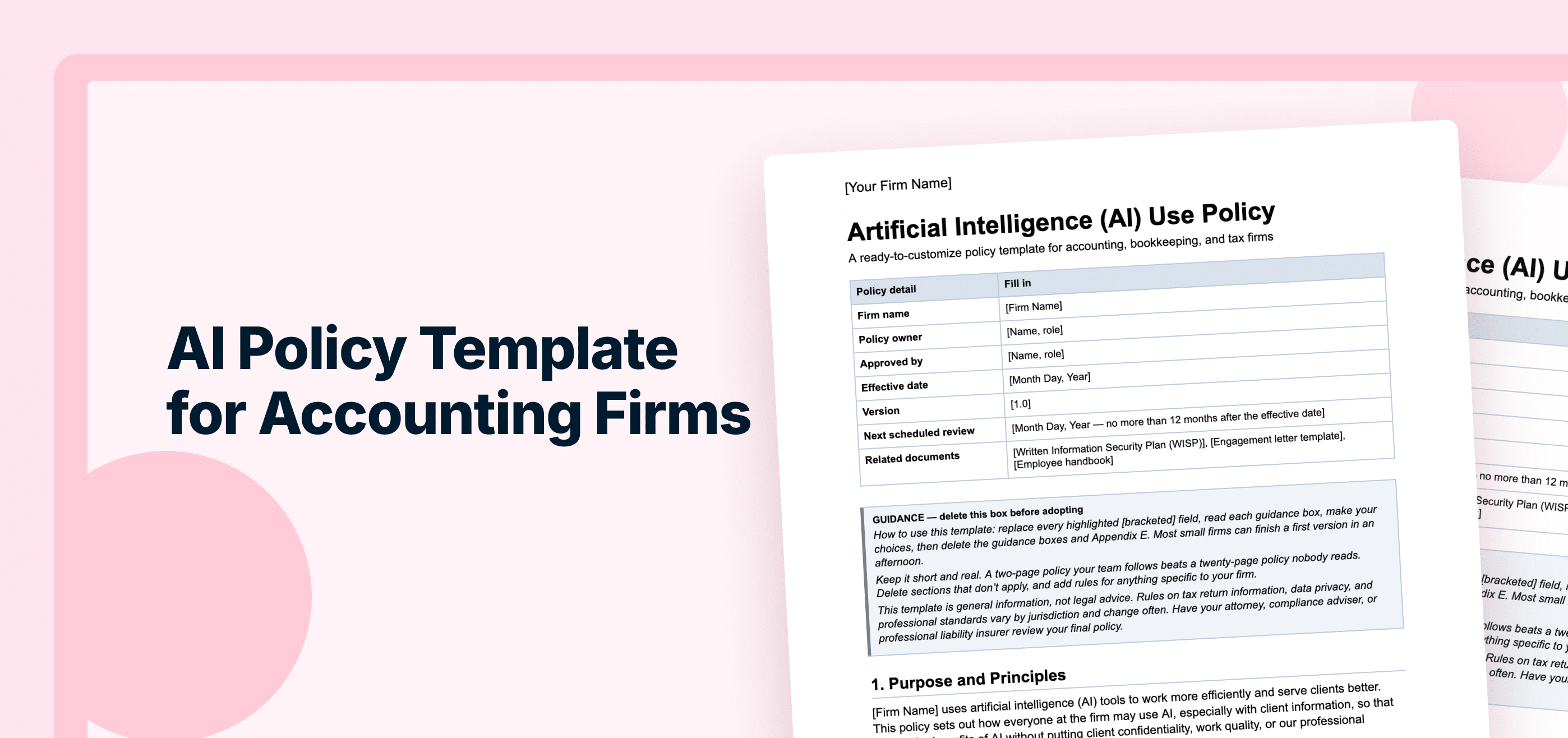
An AI policy template for accounting firms is a ready-to-customize document that sets which AI tools your team can use, what client data can go into them, who reviews AI output before it reaches clients, and what you disclose about your AI use. The free template in this guide covers all of that, plus a tools register, a vendor vetting checklist, and a staff acknowledgment form.
Let’s get straight to it. Your team is probably already using AI, even if your firm hasn’t formally adopted it. They’re likely using tools like ChatGPT and Claude to draft client emails, summarize meetings, research accounting questions, and prepare financial reports.
So instead of pretending it isn’t happening, it’s better to guide how your team uses it, to keep client data protected and make sure the work you send clients is accurate. In other words, you need a written AI policy.
Yet, according to Financial Cents’ 2026 State of AI in Bookkeeping & Accounting report, 87% of firms already using AI don’t have a formal, written AI policy.
This guide explains why you need an AI policy now, what to include in yours, and how to roll it out to your team. It also includes a free AI policy template for accounting firms that you can start using immediately.
TL;DR
- Your team is probably already using AI, so it’s better to guide how they use it rather than banning it. That’s what an AI policy for accounting firms is for.
- An AI policy sets which AI tools staff can use, what client data can go into them, who reviews AI output, and what you tell clients.
- Don’t just copy a generic HR template for your accounting firm. You need one with clear rules for data classification, redaction, approved tools, and prohibited information.
- The IRS Office of Professional Responsibility’s (OPR) June 2026 guidance expects firm leaders to have procedures for staff training, data handling, accuracy checks, and vetting AI tools.
- Having a policy pays off. 35% of firms with a formal AI policy report clear ROI, compared with 14% of firms with no policy and no plans to create one, according to Financial Cents’ report.
- Start with the free AI policy template for accounting firms below. Fill in your approved tools and a data traffic-light table, have staff sign it, and review it every 6–12 months.
What Is an AI Policy for an Accounting Firm?
An AI policy, also called an AI acceptable use policy or generative AI policy, is a written set of rules that guides how your team uses artificial intelligence at work. It covers which AI tools your team can use, what information they can share, which tasks they can use AI for, when they must review its outputs, and what they should disclose to clients. This reduces the risk of inaccurate work and protects client confidentiality and trust.
Unlike a generic workplace AI policy, an accounting firm’s policy accounts for the sensitive financial and tax information you handle and the professional standards you must uphold, such as Circular 230, AICPA standards, and state board requirements. It also needs to work with your existing data security obligations, including your Written Information Security Plan (WISP). That way, your team uses AI responsibly, and there’s less risk of professional or legal consequences.
Why Your Firm Needs an AI Policy Now
Here are four reasons why you need to write an AI policy for your firm:
Your Team Is Already Using AI
Most accountants already use AI in some form. In Financial Cents’ State of AI in Bookkeeping & Accounting report, 95% of the 486 bookkeeping and accounting professionals surveyed said they’re using or exploring AI for drafting emails (75%), summarizing documents or meetings (71%), and researching technical questions (69%).
“Whether you’ve given them permission or not, people are probably already using that stuff, so let’s try to give them a way to use it responsibly,” says Jason Staats, CPA.
The sooner you set guidelines, the less likely your team is to send clients wrong information or expose sensitive data.
There Are Regulatory Expectations to Meet
In June 2026, the IRS Office of Professional Responsibility (OPR) published Issue 2026-19, its introductory guidelines for responsible AI use in the tax profession. The guidance doesn’t create new AI-specific regulations. Instead, it explains how existing Circular 230 requirements apply when tax practitioners use generative AI.
Here’s some of what it says:
- Section 10.22 requires due diligence when you prepare tax returns and other documents, and when you make representations to clients or the Treasury Department. When AI helps with that work, you still need to verify its facts, citations, and calculations before you use the output.
- Section 10.35 requires competence to engage in practice before the IRS, and the guidance says practitioners “must understand both the law and the technology” they use.
- Section 10.36 is especially relevant to firm owners. It requires people with responsibility for overseeing a tax practice to take reasonable steps to establish procedures that help the firm comply with Circular 230. The OPR guidance applies this requirement to AI through staff training, secure data-handling protocols, accuracy monitoring, and third-party tool vetting. It also emphasizes documenting those procedures. In other words, writing an AI policy.
Other bodies like the AICPA and state boards of accountancy provide guidance and set professional standards that firms must consider when using AI.
AI Use Can Expose Client Data
When employees enter information into an AI tool, they need to understand how the provider handles that data. Depending on the tool, account type, and privacy settings, submitted information may be retained or used to improve AI models.
For example, OpenAI says it may use content from personal ChatGPT accounts to improve its models, depending on the user’s settings. Users can turn this off in Data Controls.
So if there’s no policy that tells your team which tools and plans to use and what information they can share, someone may paste sensitive client data into a tool that trains on it, which could breach your confidentiality obligations under IRC § 7216 and your WISP.
Firms With an AI Policy See Better ROI
An AI policy can help you get even more value out of AI. The Financial Cents report found that 35% of firms with a formal documented AI policy report clear ROI, compared to 14% of firms with no policy and no plans to create one.
To be clear, though, the policy itself doesn’t automatically create a return. But writing one forces your firm to decide which tools employees should use, what tasks AI can support, what information they can share, and who reviews the output. Those decisions help turn informal experimentation into a consistent process that your firm can evaluate and improve.
Read: What’s actually useful about AI in accounting today?
Is It Safe to Put Client Data Into ChatGPT or Other AI Tools?
It can be, depending on the tool’s plan and settings. Before client data goes into any AI tool, check four things: whether the vendor trains its models on your data, how long it keeps what you enter, whether it holds security certifications like SOC 2, and what admin controls it gives you.
If a tool meets those checks, you can enter identifiable client data into it. Even then, give it only the information it needs for the task. For any other tool, remove anything that identifies a client first, such as names, SSNs, and bank details, or use anonymized or dummy data.
“Regardless of the underlying security of the language model or any cloud app that you use, don’t give that system more information than it needs… If you’re going to chuck financial statements into a language model, you sure don’t need the business’s name on them,” Jason Staats says.
Read: How to use ChatGPT safely with client data
What to Include in an Accounting Firm AI Policy
Here’s everything your policy needs, section by section:
Purpose and Principles
First, write the purpose and principles of the policy. State the general benefit of your team using AI, and the rules they must follow when using it. For instance, “AI assists, and people decide” or “We verify before we rely.” These principles guide your team in situations that the rest of the policy doesn’t cover.
Scope
Next, list everyone the policy applies to, like staff and contractors, and every tool it covers, like chatbots, meeting notetakers, AI built into your practice management software, and AI agents.
Approved, Restricted, and Prohibited Tools
List all AI tools your team uses or might want to use in a tools register, and sort them into three groups: Approved, Restricted, and Prohibited. Approved tools are the ones your team can use, Restricted tools may be used only for specific tasks or by specific roles, and Prohibited tools should never be used under any circumstances.
Data Classification: The Traffic-Light System
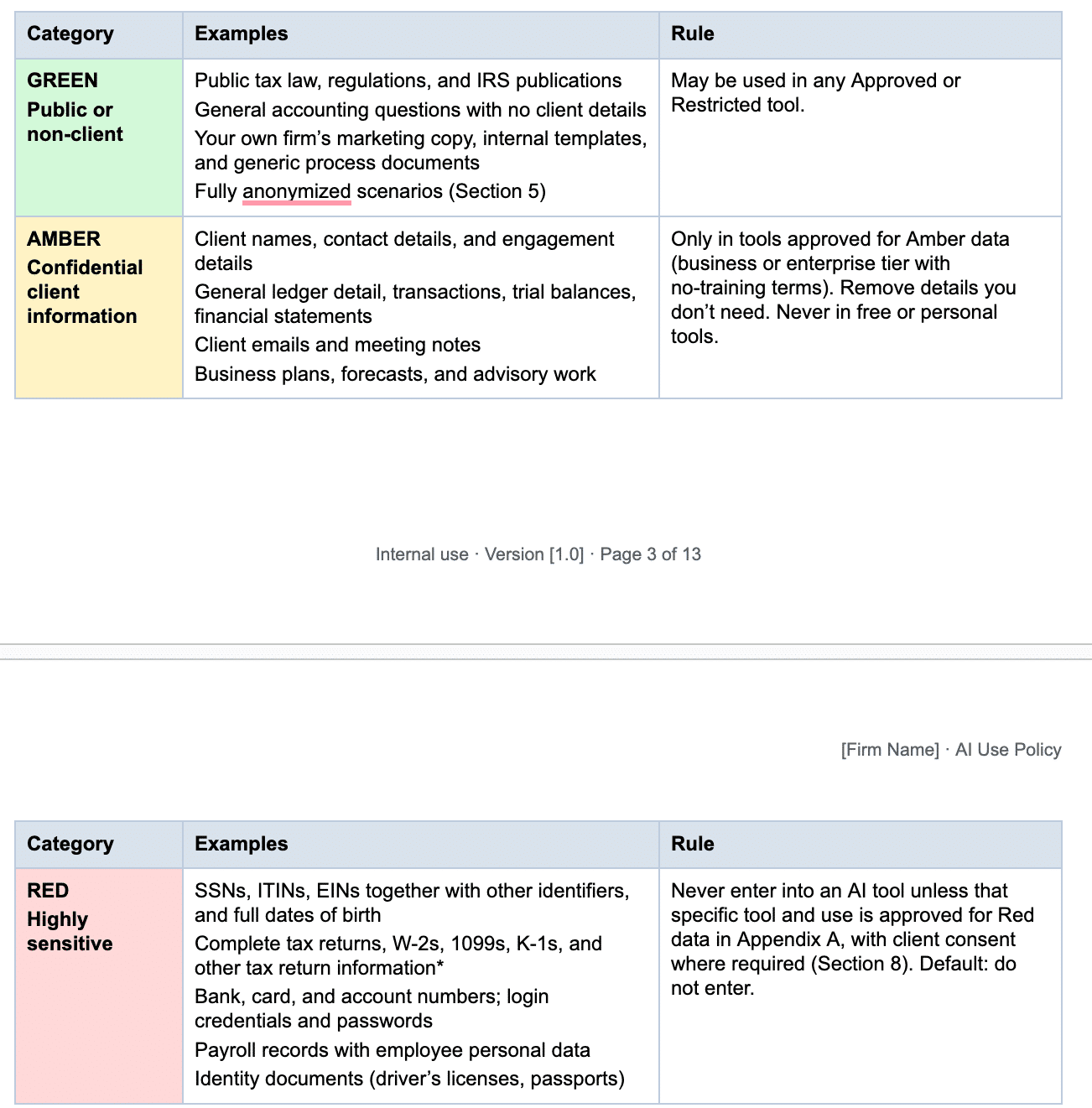
Give your team clear examples of what information they can enter into each tool. Use a traffic-light system of Green, Amber, and Red:
| Category | What it includes | Where it can go |
|---|---|---|
| Green | Public or non-client information: public tax law, IRS publications, general accounting questions with no client details, your firm’s marketing copy and internal templates | Any Approved or Restricted tool |
| Amber | Confidential client information: client names, contact details, general ledger detail, transactions, financial statements, forecasts | Business or enterprise tiers of tools, i.e., those with no-training terms |
| Red | Highly sensitive information: SSNs, ITINs, EINs, full dates of birth, complete tax returns, payroll records with employee personal data | Only tools approved for Red data in your register, on business or enterprise plans whose terms say they don’t train on your data, and only when the task truly needs it. Otherwise, redact it first. |
Redaction and Anonymization Rules
Dedicate a section to explaining how to anonymize Amber information before anyone enters it into a tool that isn’t approved for Amber data. Include rules like “Replace names with roles or placeholders” and “Round or scale figures when exact amounts aren’t needed.”
Human Review and Quality Control
Make it clear that your team has to review every AI output before using it. That includes checking all legal or tax citations against the primary source and verifying calculations and facts. State explicitly that no one should ever send AI-generated work to a client without first reviewing and approving it.
AI Agents and Automation
If you use AI agents (AI that takes actions on its own, such as sending emails, filing documents, or updating records), you need to set rules for them. List the approved AI agents, what information each can access, and the actions it can and can’t take.
Client Disclosure and Consent
Tell your team they must disclose to clients that the firm uses AI, and how. They can do this through your accounting engagement letter or a separate written or privacy notice. They also need to check with the firm’s policy owner or counsel before using AI in ways that may involve disclosure or use of tax return information under IRC § 7216.
Billing and AI Efficiency
Clarify how you bill clients when you use AI. Bill only for time actually spent. OPR warns that double billing for AI-assisted work may violate Circular 230 § 10.27, and expects you to pass AI cost savings on to clients. Your policy should tell employees to follow the firm’s billing method and ensure invoices accurately reflect the services and value provided.
Vendor Vetting Checklist
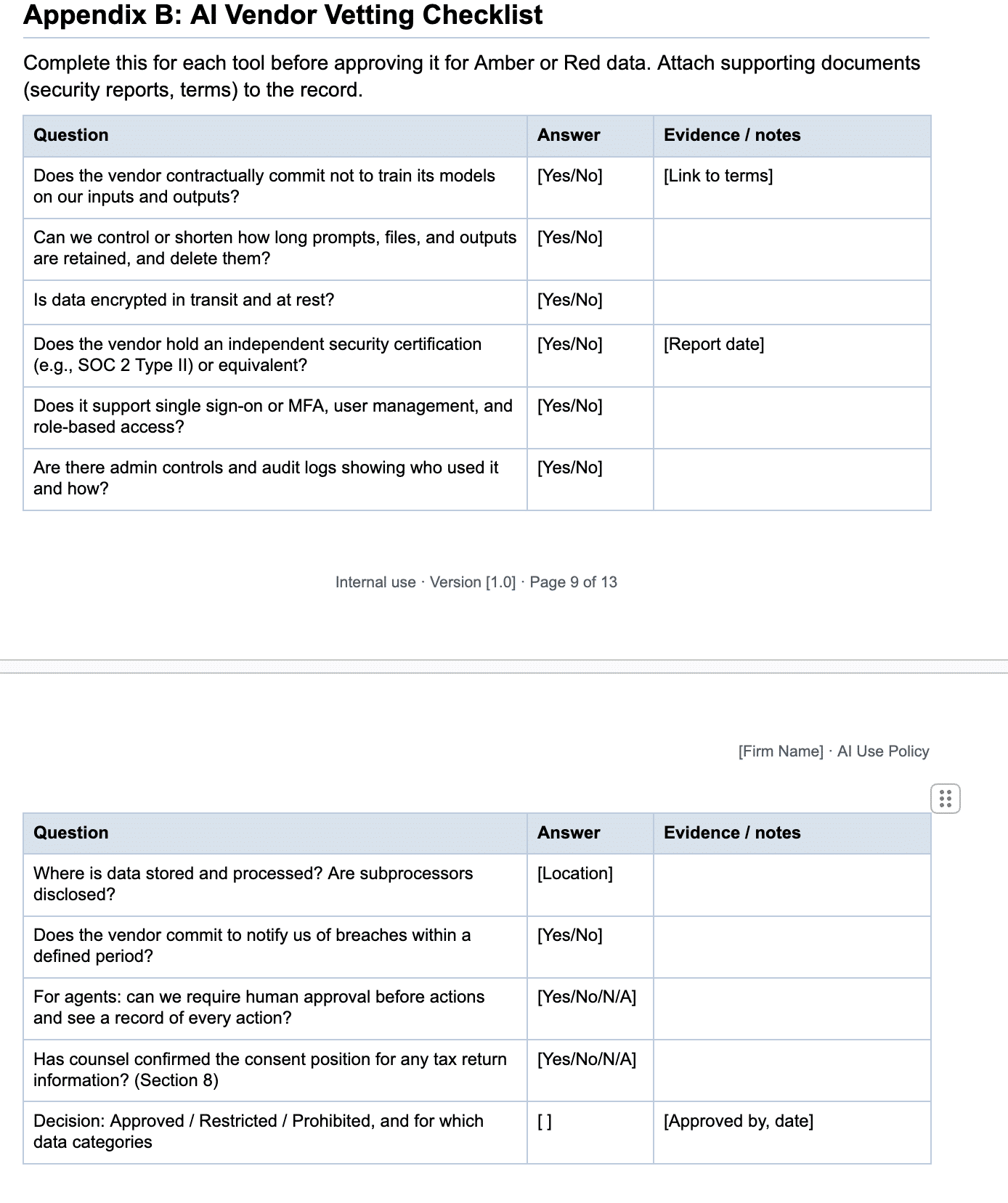
Next, provide a checklist to assess AI tools and vendors for Amber or Red data. This checklist should cover factors like security, retention, training on data, SOC 2, admin controls, and auditability.
Training and Acknowledgment
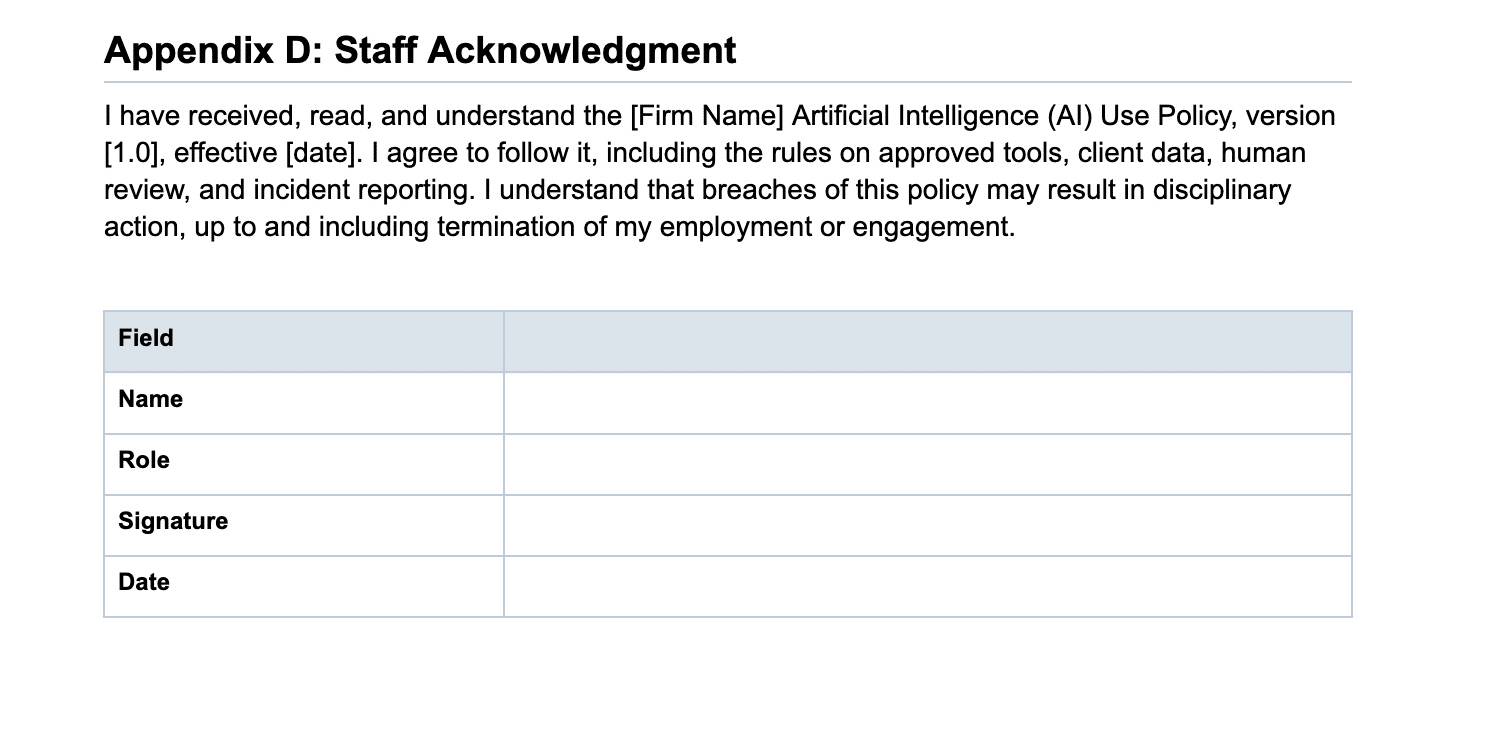
Require staff members and everyone covered by the policy to complete AI policy training before using approved tools for firm work. Have each person sign an acknowledgment confirming that they understand the rules and agree to follow them, and sign again when the policy is updated. Include the policy in onboarding for new team members too.
Incident Reporting
Tell your team how to act if an AI-related incident happens: who to contact and how quickly to report it. Direct them to your WISP for the response steps. Clarify what counts as an incident, such as entering prohibited client information into an unapproved tool, a security issue, a breach notice, or a change in terms from an AI vendor.
Ownership and Review Cadence
Finally, name who owns the policy and is responsible for updating it and answering questions about it. This makes one person accountable. Have the owner review the policy every 6–12 months, or sooner when you adopt a new tool, a vendor changes its terms, or regulations change.
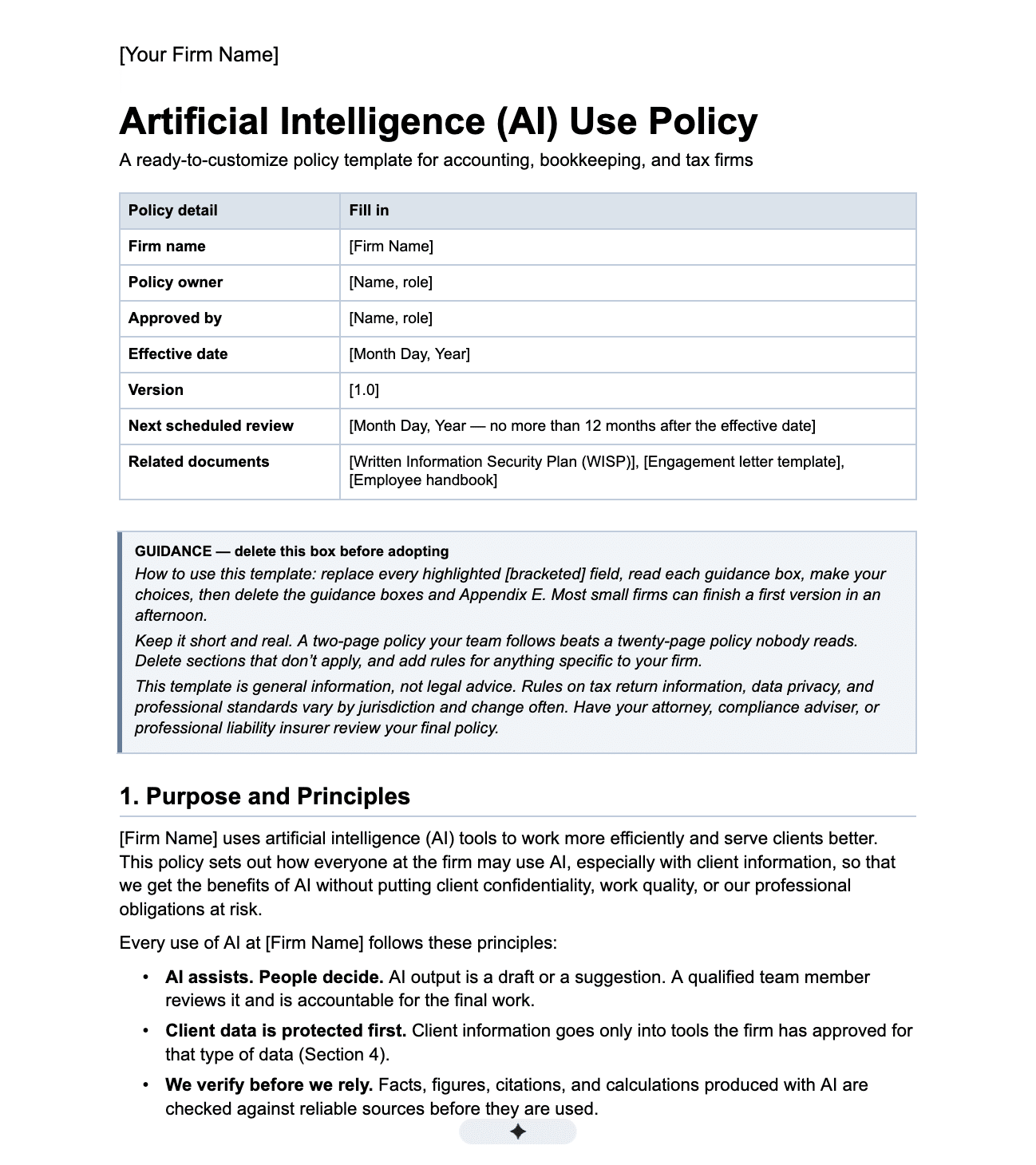
The Free AI Policy Template (Copy or Download)
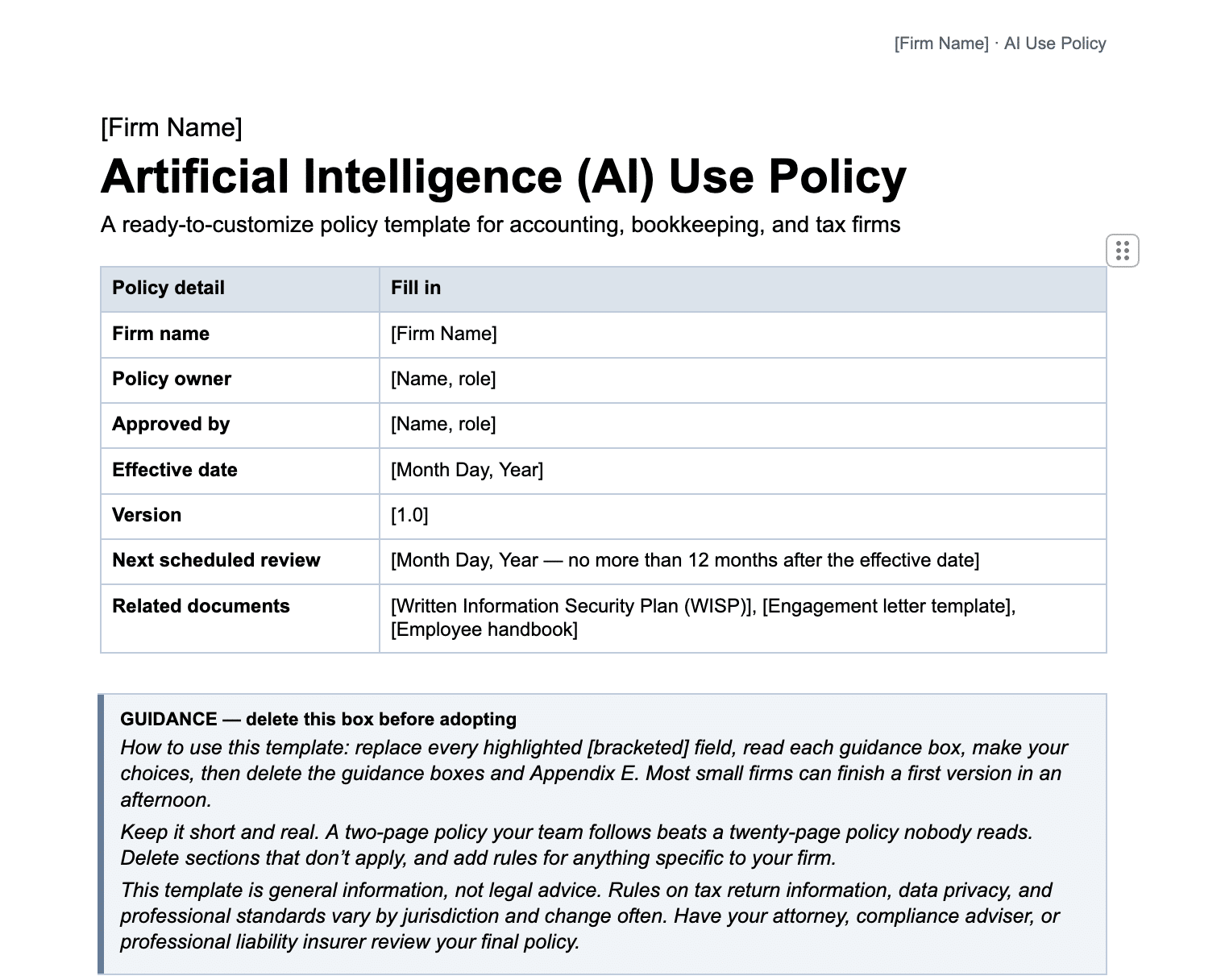
Here’s the free AI policy template, which you can copy or download below. The download version also includes an approved tools register, a vendor vetting checklist, a sample engagement letter clause, a staff acknowledgment form, and customization guidance.
You can use the template as is, or customize it for your firm’s size and the services you offer. The bigger your firm, the more detail your policy calls for, and your service line determines which sections to focus on and the examples to use. Just replace the bracketed fields, remove anything that doesn’t apply, and have your attorney or professional liability insurer review the final policy before you share it with your team.
Download the free AI policy template for accounting firms[Firm Name] AI Use Policy
Policy owner: [Name, role]
Approved by: [Name, role]
Effective date: [Date]
Version: [1.0]
Next review: [Date, within 12 months]
Related documents: [WISP], [Engagement letter template], [Employee handbook]
1. Purpose and Principles
[Firm Name] uses AI tools to work more efficiently and serve clients better. This policy explains how everyone at the firm may use AI, especially with client information. We follow five principles:
- AI assists, and people decide. A qualified team member reviews AI output and is accountable for the final work.
- Client data comes first. Client information goes only into tools approved for that type of data (Section 4).
- We verify before we rely. We check AI-produced facts, figures, citations, and calculations before we use them.
- We are transparent. We tell clients how we use AI and bill fairly for AI-assisted work.
- Our professional obligations still apply, including confidentiality, due diligence, and competence.
2. Scope
This policy applies to all owners, partners, employees, interns, contractors, and offshore or outsourced team members, on any device and in any location.
It covers every AI tool used for firm or client work, including AI assistants such as [ChatGPT, Claude, Copilot], AI features inside software we already use, meeting notetakers, document extraction tools, browser extensions, and AI agents that take actions on their own.
3. Approved, Restricted, and Prohibited Tools
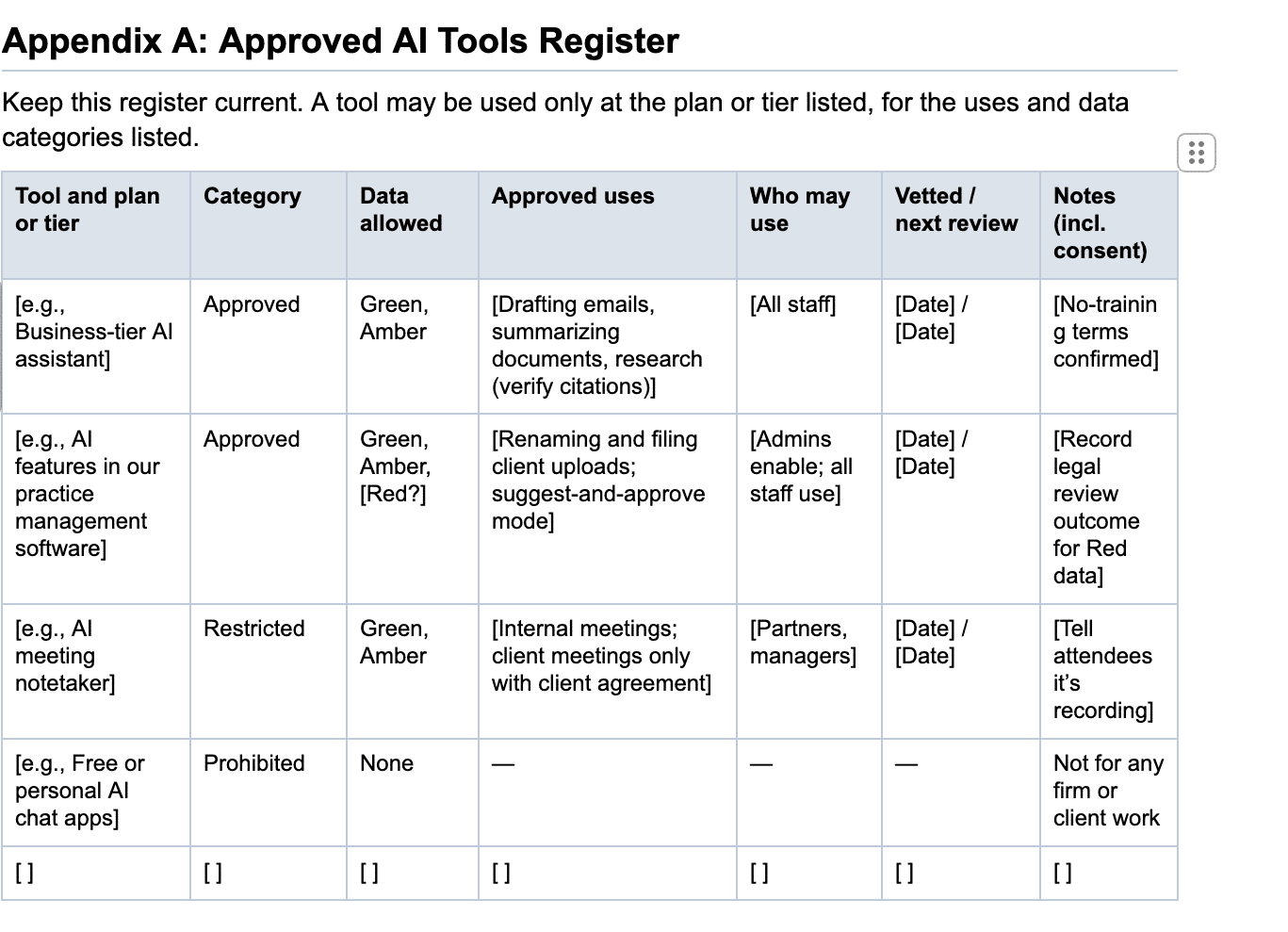
Use only the tools listed in the register below, at the plan or tier listed. Approved tools may be used for the listed tasks and data types. Restricted tools may be used only for specific tasks, by specific roles, or with Green data. Prohibited tools, including the free or personal version of any approved tool, may not be used for firm or client work.
To request a new tool or use, contact [policy owner]. New AI features that arrive in software updates count as new tools and must be reviewed before they are used with client data. Use only firm-managed accounts for work involving client data.
4. Client Data Rules: The Traffic-Light System
Classify information as Green, Amber, or Red before you enter it into any AI tool. When in doubt, treat it as the more restrictive category and ask [policy owner].
5. Redaction and Anonymization
When a task doesn’t need identifying details, remove them first. Replace names with placeholders like “Client A,” mask ID and account numbers, round figures when exact amounts don’t matter, and check file names and metadata. If you’re unsure whether something is properly anonymized, treat it as Amber.
6. Human Review and Quality Control
The team member who uses AI is responsible for the result. Before AI-assisted work is used, filed, or sent, verify facts and calculations against source documents and check every citation against the primary source. Also review AI drafts for accuracy, completeness, tone, and bias.
7. AI Agents and Automated Actions
Only agents listed in the register may be turned on, and only by [owners/admins]. New agents start in a mode where a person approves each action, and move to automatic actions only for low-risk tasks after [30 days] of reliable results.
Agents need a person’s approval before they send client-facing messages, make payments, file returns, or delete records. Agents access only the data their task requires, and every action leaves a record the workflow owner reviews regularly.
If an agent makes an error affecting client data, report it under Section 12.
8. Client Disclosure and Consent
[Firm Name] tells clients in general terms that we use AI tools to assist with our work and that qualified professionals review and take responsibility for all final work products. When AI plays a significant role in a specific deliverable, we disclose that in more specific terms where appropriate.
Federal law restricts how preparers use and disclose tax return information, with civil and criminal penalties for unauthorized use or disclosure (Internal Revenue Code sections 7216 and 6713, and related Treasury regulations). Before any tax return information goes into an AI tool, confirm with [policy owner/counsel] whether written client consent is needed. If it is, obtain it first. If you’re unsure, don’t enter the information.
9. Billing for AI-Assisted Work
We bill only for time actually spent and record AI-assisted work accurately. When AI meaningfully reduces the cost of a service, we pass the savings on through our fees or pricing. We charge clients for AI tools only if it’s agreed in the engagement letter.
10. Vetting AI Tools
Before a tool is approved for Amber or Red data, [policy owner] reviews it for training on our data, retention and deletion, encryption, security certifications such as SOC 2, admin controls and audit logs, data location, and breach notification terms. Approved tools are re-checked at least [annually] and whenever the vendor changes its terms.
11. Training and Acknowledgment
Everyone completes AI training before using AI for firm work, and again [annually] or when this policy changes. Everyone signs an acknowledgment when they join and after each update. Signed forms are kept in [location].
12. Incident Reporting
Report these to [name/email/channel] within [24 hours]: client data entered into an unapproved tool or personal account, Red data entered without approval, AI errors that reached a client or a filing, an agent taking an unexpected action, or a security issue or change in terms from an AI vendor.
We handle incidents under our [WISP] incident response procedures. Reporting quickly helps us fix the problem and prevent it from happening again.
13. Ownership and Review
[Policy owner] owns this policy and keeps the register current. We review it every [6 to 12] months, and sooner when we adopt a major new tool, a vendor changes its terms, or regulatory guidance changes. We keep records of tool reviews, training, acknowledgments, client consents, and incidents. Any changes to this policy are approved by [role] and communicated to everyone it applies to.
How to Connect Your AI Policy to Your WISP and Engagement Letters
Your AI policy should work alongside the documents your firm already uses, especially your WISP and engagement letters. For instance, your WISP already defines how employees should handle confidential client information or report a data breach, so your AI policy should reinforce those requirements. The same goes for engagement letters: they should include an AI disclosure, and your AI policy should reference it.
If your engagement letter doesn’t have that disclosure yet, here’s one you can use. You can add it to your own letter or to one of these accounting engagement letter templates:
“Our firm may use artificial intelligence tools to help perform certain tasks, such as research, document processing, data analysis and drafting communications. We use these tools in accordance with our data security and confidentiality procedures, and our team reviews AI-assisted work before relying on it or delivering it to you. We remain responsible for the professional services we provide and won’t use or disclose your tax return information with these tools except as permitted by law or with your written consent.”
Remember to have your attorney review the clause before you add it. The wording should reflect your actual AI practices and what your approved tools guarantee.
You can also disclose your AI use verbally, like Chad Davis, CPA, does. “Even in our sales pitches, I’m letting them know how we’re using AI throughout the entire relationship, how our tools are using it, so they can get excited about a relationship that’s embracing what’s coming,” says Chad.
Download the free WISP template
How to Roll Out Your AI Policy (and Get Staff to Follow It)
Writing your firm’s AI policy is one thing. Getting people to follow it is another. As Andrew Lassise, Chief Dorkestrator at Tech 4 Accountants, says, “Regardless of what your policy says, if they’re not doing it, it’s not going to really matter.”
Here’s how to roll it out to increase adoption.
Step 1: Find Out Which AI Tools Your Team Already Uses
Run a quick survey asking your team which AI tools they use for work. Make it anonymous so people feel comfortable being honest. Aside from general assistants like ChatGPT and Claude, they may be using AI features built into certain software, so ask about that too.
Step 2: Involve Admins and Service-Line Leads in Drafting
Get input from the people who do the work and use AI. This includes admins, who are doing the most client-facing AI work of any role, according to Financial Cents’ 2026 report: 21 of the 29 firm administrators surveyed said AI had changed email and client communication tasks the most, yet admins often lack written guidance on AI use.
“Not involving the end user early enough can be detrimental to integrating AI into the process,” says Michelle Gordon, CPA. Ask administrators and leads from tax, bookkeeping, and advisory teams to identify common use cases, risks, and questions the policy needs to address.
Step 3: Walk Your Team Through the Policy
Hold a 30-minute meeting to go over the policy and answer questions. Use examples from your firm’s actual workflows to show what’s allowed, what’s allowed only under certain conditions, and what’s prohibited.
Step 4: Collect Signed Acknowledgments
Have everyone covered by the policy, including contractors and offshore staff, sign the acknowledgment form. Keep the signed copies in one place, so you can show that your team received and agreed to the policy.
Step 5: Add the Policy to New-Hire Onboarding
Give new team members the AI policy and train them during onboarding. Make sure they sign the acknowledgment form before they start using AI tools or accessing client information.
Keep AI Inside the Workflows Your Firm Already Uses
Your AI policy is easier to follow when your team can use approved AI tools within the systems the firm already works in, like your accounting practice management software, rather than switching between a dozen standalone apps.
“For accountants, the more you can have certain information in one place in a way that is searchable (from meeting transcripts to files), AI in that context becomes really powerful for your accounting firm,” says Jason Staats.
Financial Cents brings AI into your client document workflows with three agents: AI File Renaming, AI File Validator, and AI File Routing. They work on client uploads inside the platform to name them correctly, check they’re the right documents, and file them in the right folder.
You can set the renaming and routing agents to act on their own or to ask before making any changes, and every AI action stays visible to your team. These agents are included on every Financial Cents plan, so you don’t pay extra for them.
Financial Cents is also a secure AI-powered accounting practice management tool, with SOC 2 controls and encryption for data in transit and at rest. If your team uses assistants like Claude or ChatGPT, you can also connect them to Financial Cents data through its MCP connection (available on the Scale plan), so they work with context from your practice management system.
Want to see how AI fits into your firm’s existing workflows? Book a demo today.
FAQs

The Financial Cents Editorial Team creates practical guides, templates, and resources for accounting, bookkeeping, and tax firms, drawing on our in-house experts and the firm owners we work with.
Share this article