

Operations managers using manual and disconnected tools are often surprised that their efforts are not enough to keep things from falling through the cracks.
That’s not surprising.
In the 2025 Workflow & Automation Report, more than half of firm leaders (55.5%) cited workflow inefficiencies (lack of visibility, weak accountability, and missed deadlines) as their biggest operational headaches.
Do you know what these firms had in common? They relied on manual and disconnected practice management systems.
It’s a reminder that we don’t rise to the level of our goals. We fall to the level of our systems.
“Systematization is the key to running a firm that reduces your workload, stress, and gives you the ability to scale to the level that you desire,” said Ryan Lazanis, CPA, Founder of Future Firm
The right accounting practice management software is a solid foundation for gaining the visibility and control needed to systematize your firm.
By the end of this article, you’ll understand how practice management software solves these operational challenges and how to evaluate the right solution for your firm.
TL;DR
- Accounting practice management software is an all-in-one platform that centralizes accounting workflows, client management, billing, documents, and team coordination.
- It is primarily designed for operations managers, admins, and firm owners who are responsible for keeping work moving, managing capacity, and meeting deadlines.
- Generic tools fall short because they aren’t built for recurring, client-dependent, and compliance-driven work. They force accounting teams to use manual workarounds.
- From an operations perspective, the most important practice management features are workflow automation, real-time visibility, and recurring task management.
Read: the best practice management software for accounting firms in 2026.
What Is Practice Management Software for Accounting Firms?
Accounting practice management software is an operational platform that manages the full lifecycle of client engagements, from proposal and engagement letter to service delivery, billing, and payment processing.
There are generic practice management software, which serve multiple industries, and there are practice management software for specific industries, like legal, medical, and accounting.
In accounting, these tools bring all project and client information (and communication) and team capacity management into one place.
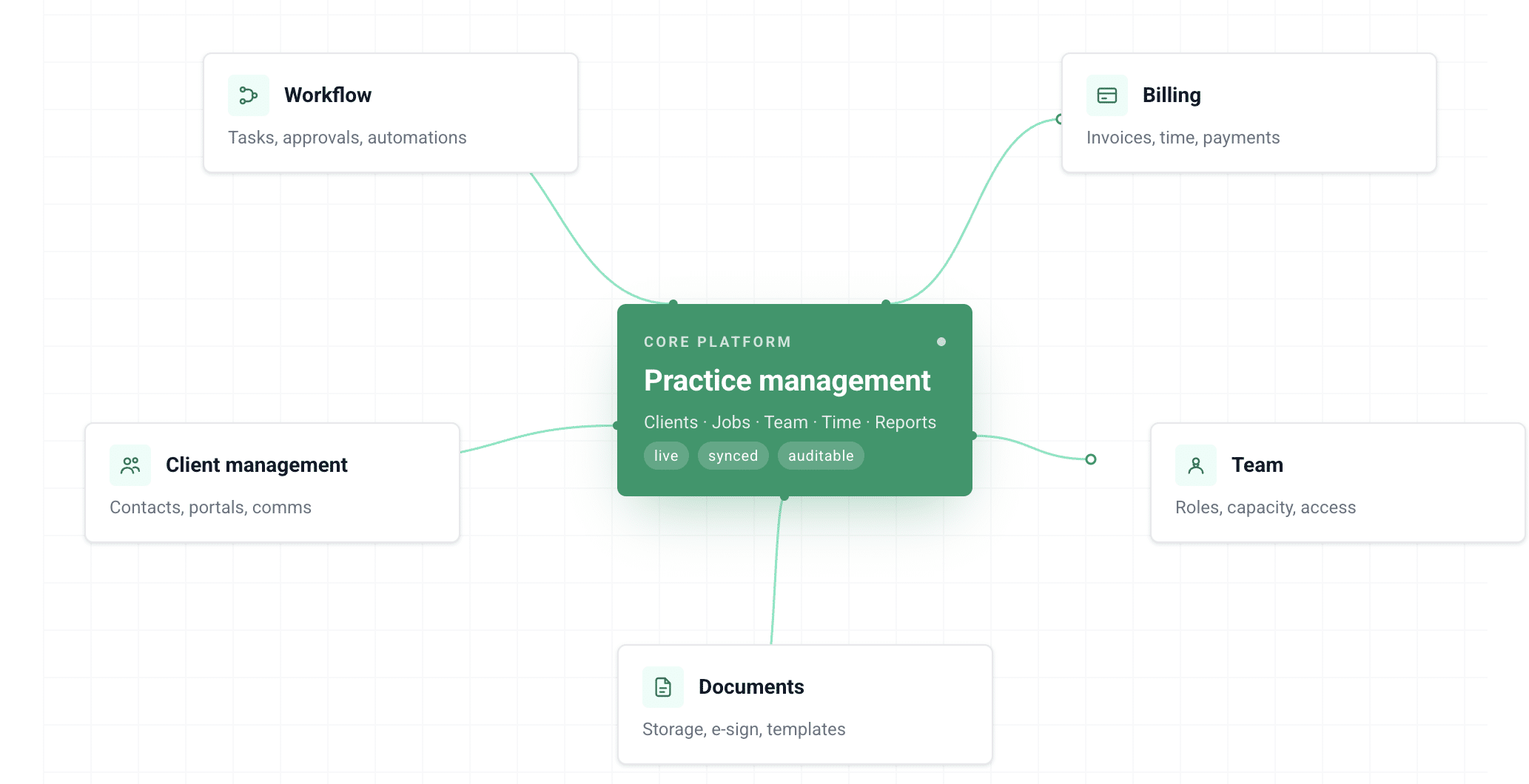
They use built-in templates to standardize work and auto-generate recurring workflows. They also handle client requests, manage dependencies, and update task status with little to no human input.
This ultimate guide to practice management software takes a deeper look at how accounting firm management works and what to look for when evaluating platforms.
How Practice Management Software Differs from Generic Project Management Tools
We were previously using a different project management system to track things, but it wasn't specifically built for accounting firms.
Once we implemented Financial Cents, it made a huge difference in how we track work and stay organized. The automatic triggers for dependent tasks have been life-changing for our staff.
Another thing is that we don’t have to worry about communicating back and forth via email, Slack, or other channels to make sure everyone knows what to do next.
It automatically happens in Financial Cents"
While the Asanas, ClickUps, and Trello of this world are more popular and can be adapted to many industries, they lose their appeal within accounting teams as a firm grows and must automate tasks across multiple clients.
The generic tools are designed to manage one-off projects like marketing campaigns, software development, or event planning. But accounting engagements are different.
Accounting work revolves around recurring monthly and quarterly cycles, strict compliance deadlines, and client-dependent deliverables.
That is why practice management software for accountants is built to capture the specialized needs of the accounting community.
Any operations manager who uses generic tools has to reinvent the wheel every time to meet the demands of accounting services. That was Stacey’s major consideration as she chose a practice management software for her firm:
We wanted a software solution that could scale with us. I like Financial Cents because it targets the accounting industry. The nuances of recurring work, task dependencies, and client requests made a lot of sense for us."
Stacey Feldman, Chief Operating Officer at Full Send FinanceCore Features an Operations Manager Should Understand
a. Workflow & project management
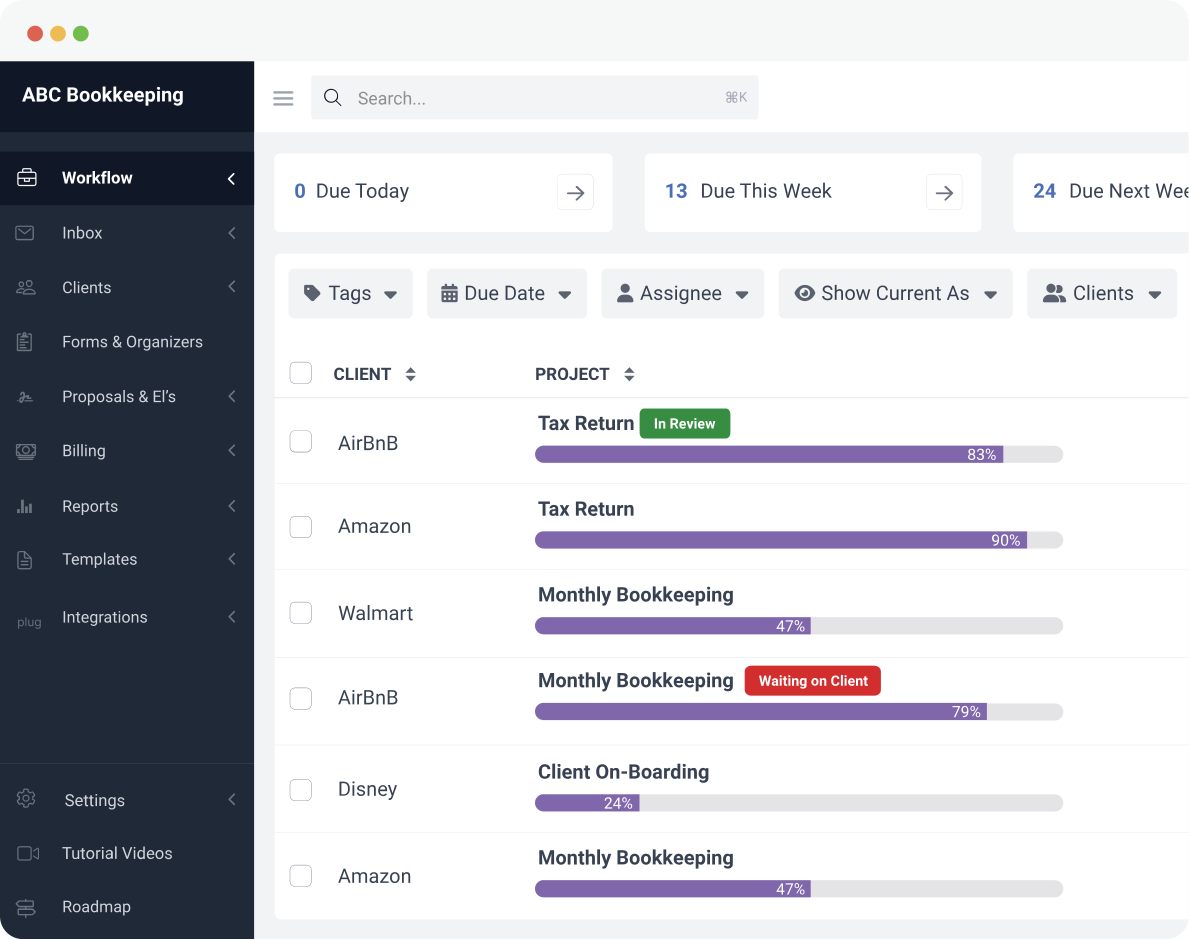
The workflow and project management feature automates recurring work, structures task dependencies, and uses accounting workflow templates to standardize service delivery across the firm. Its dashboard feature gives operations managers real-time visibility into all projects and makes it easy to spot bottlenecks and at-risk tasks early.
Your team members, too, will know what to do at all times (and what’s most urgent). The result is less time coordinating work, fewer missed steps, and consistent quality without having to micromanage anyone.
b. Centralised client database
The centralized accounting crm database acts as a single source of truth for client details, service history, communication, and documents. It eliminates the need to search across emails, spreadsheets, and shared drives to find critical information.
For operations managers, this means instant access to client context during calls and full visibility across the firm. Work doesn’t stall when someone is unavailable, because information isn’t locked in personal inboxes.
This ensures faster response times, fewer delays, and firm-wide knowledge that’s not siloed.
c. Team workload and capacity management
The capacity management feature makes it easy to see who is overloaded and who has room for more work by giving operations managers a real-time view of team workload and capacity.
Instead of reacting to missed deadlines or burnout, you can proactively reassign tasks to keep work moving smoothly. The Payroll Restoration team has used this feature particularly well:
Financial Cents helps us with capacity planning and determining when we need to hire another person. Because we set our capacity to 32 hours a week for all of our full-time staff, and if everybody is hitting 32 or more hours of scheduled projects every week, then we know that we're late in hiring.
Ideally, we would bring in another person when everybody is consistently at about 28 hours of productive time."
d. Client portal and document collection
Over 60% of firm owners in the 2025 State of Accounting Workflows and Automation Report said their document collection time has dropped to just 1–3 days.
This is largely driven by accounting firm client portals and task-based requests built into accounting practice management software. When creating a project, teams can request documents upfront, with automated reminders that follow up until clients submit the required documents.
For Financial Cents users, the experience is even simpler for their clients. No logins required. They can upload files, sign documents, and communicate in just a few clicks.
e. Time tracking and billing
If your team is tracking time manually or across disconnected systems, there’s bound to be gaps in both visibility and revenue.
The time-tracking feature in practice management software allows ops managers to track time directly against tasks and client work.
When combined with the accounting billing tool, the time log can be used for invoicing, which increases the chances of timely payment.
f. Reporting and Insights
This feature provides centralized dashboards to get a clear picture of what’s happening across the firm, rather than the exhausting and time-consuming process of asking team members and piecing together information from different tools.
Instead of digging through emails or building accounting spreadsheet templates, you can spend ten minutes on a dashboard and immediately know exactly where to direct your attention.
- Realization reports: Your most profitable clients, work items, and team members.
- Client uploads report: All client uploads across the firm.
- Work Insights report: Work efficiency and any bottlenecks slowing work down.
- Revenue Insights: Metrics that show the services driving the most revenue.
Why Accounting Operations Managers Need Practice Management Software?
Operations managers implement accounting firm management software because of the need to:
-
Track the Status of Client Work
When work is managed in spreadsheets or across inboxes, there’s no real-time view of what’s happening in the firm. You only discover the true state of some projects when someone finally responds, or a deadline is missed.
This forces operations managers to spend a significant portion of their week on status checks, chasing team members for updates, and manually tracking deadlines.
The accounting practice management software gives you a live dashboard to track everything happening across your firm without a single conversation or follow-up email that might interrupt your team members.
-
Manage Recurring Work
Recurring projects need to be recreated whenever they are due, but without practice management software for accountants, they become a major burden.
Every new bookkeeping client multiplies the number of projects to create, tasks to assign, and files and information to collect (at the start of) every month.
At 50 clients, your non-billable time will go through the roof, as will your team’s chances of forgetting to recreate a project (or adding a task). All of this can damage your firm’s revenue and reputation.
With a practice management system, recurring projects are automatically generated, and tasks are assigned to team members based on their roles. This frees you up to focus on client management, advisory, and other strategic tasks.
-
Ensure Accountability
The lack of a central location to view your tasks and define who’s handling what creates room for assumption.
But accountability is built into the system of every practice management software for accountants. Every task has an owner, a due date, and a status report that ensures that team members not only know who’s responsible for what, but also when tasks are due and where the work stands.
A tool like Financial Cents automatically assigns any task without an owner to the person who created it, instead of leaving tasks unassigned. This forces users to select the team member responsible for the tasks.
We can easily see the status based on task pods and by individual. It’s given us that visibility we didn’t have before."
Jessica Wong, Finance Director, Fiscally Professional CorporationInterested in looking into workflow management systems? See the list of the best workflow management software for accounting admins and ops managers
How to Evaluate Practice Management Software: An Ops Manager’s Checklist
A common mistake firms make when selecting a software solution is overlooking the core features of the tool they’re considering. It’s always better to confirm what the tool can do through a demo or free trial.
You can combine that with asking questions like these:
1. Does it support recurring client work natively, or do you have to recreate tasks manually every month?
Make sure the software has the recurring work feature, which other firms have noted is one of their most important features in a practice management tool.
The right tool will allow you to set a recurring frequency when creating the project the first time, and it will automatically regenerate the work when it is due on a weekly, monthly, quarterly, or yearly basis.
If your new tool requires you to manually create projects each time they are needed, it will quickly become a burden of its own.
We tried to make Asana work for the main problem that we were trying to solve (recurring work), but Asana only helps you through all the steps of a project.
It's hard to get it to remind you to do those same steps every month, quarter, or year. We also tried to recur projects on the calendar, but none of that was working."
2. Can you assign ownership to individual tasks and see real-time status without checking in with the team?
You shouldn’t need to click into each project in your practice management software to know what’s done, what’s in progress, or what’s overdue.
It should have a workflow dashboard where you can assign tasks to team members and track the status in real time.
The top tools use automated tags to display the status of each project in the dashboard. The workflow filter allows you to quickly find information about projects, clients, and team members.
3. Does it have a client-facing portal with automated reminders?
Some practice management software solutions don’t have an inbuilt client portal. This makes the document collection process more difficult than it needs to be.
Others require you to use a third-party client portal solution to collect client data online, which can increase your costs and tech stack complexity.
The best accounting practice management platforms include built-in client portals, client tasks, and automated reminder features, which reduce time spent chasing clients and enable the secure and convenient exchange of files and information with your clients.
4. Does it integrate with your existing tech stack?
The lack of necessary integrations creates room for information silo, duplicate data entry, and errors because the practice management software will operate in isolation.
Check for the tools you already use that the software you’re considering integrates with. With adequate integration, a client’s information added in one tool will be updated in your other tools, which saves time, to begin with.
5. How long does onboarding take, and is there a setup process that won’t disrupt active client work?
Ask the software provider about realistic timelines to set up your clients, workflows, and firm size. A solution like Financial Cents can be implemented in hours, rather than weeks or months.
A practice management solution with a structured onboarding process, clear migration support, and a way to roll out workflows gradually without interrupting ongoing client work will make the transition more controlled.
6. Is it specifically built for accounting firms?
A software designed from the ground up for accounting, bookkeeping, and tax workflows will always feel more intuitive to your team than a generic one.
For example, Trello and Asana were not built for deadline-driven workflows like bookkeeping or tax. Setting up due dates, especially for repeating monthly work, often requires manual adjustments or workarounds.
Asana wasn't designed for the bookkeeping or tax industry. For example, it was super complicated to get the due dates to populate, so I was having to go in and do a lot of work to manually change these due dates."
Sarah Landrum, Office Manager, Ascension CPA7. What does support look like?
Adequate support will help you get value faster by making help available when you need it during your implementation and post-implementation.
Beyond the help content, look out for the availability of migration assistance. This could be free or paid. Plus, some of the best tools also have a community of users who are helping each other understand the tool and resolve challenges.
You can also find this new practice management software migration tips.
How to Make the Case for Practice Management Software to Firm Leadership
Some of the operations managers we know already understand the value of accounting practice management software. Their challenge is communicating it in a way that gets the support of a leadership that is focused on cost, efficiency, and growth.
If you’re in that situation, the following tips will help:
Quantify the current cost of inefficiency
The average firm owner will want to use a tool if they are sure it will save them money. But merely repeating your need for a practice management software solution may not get the job done. You’ll have to do more showing than telling.
Document the number of hours per week your team spends chasing client documents, re-creating recurring tasks, and following up on overdue work. Multiply those hours by your firm’s hourly rate and convert to annual figures.
When your firm’s leadership sees how the software reduces errors, speeds up turnaround time, improves client satisfaction, and frees up capacity, it will be easier for them to buy into the idea of a new practice management software.
Show the ROI of practice management software
You can also use the data from the 2025 Workflow & Automation Report to drive your point home.
For example, most firms reported better standardized systems and processes (28.7%), followed by the ability to get work done faster (22.3%), as their biggest achievements after implementing an accounting management software.
When your firm owner sees that an accounting practice management software that costs less than $5,000 per year will save them $19,000/year, it will be almost impossible to ignore your request.
Read more about the cost of using an accounting practice management software here.
Frame it as a capacity and revenue question
Another approach is to help your leadership team see that the practice management software will give your team the structure needed for growth without proportionate hiring.
By taking on the manual tasks that accountants and bookkeepers usually spend hours doing every week, the firm can save 56 hours a month per team member; hours that can be used to serve more clients.
Reference Case Studies
After all is said and done, a real-world example can be the best icing on the cake. This shows firm owners how a similar firm has gone from where they are now to where they want to be.
Here’s one example: Stacey Feldman joined the Full Send Finance team, and after one year, they grew by 150%.
This growth was mostly due to moving the firm to an accounting practice management system that enabled scalable operations.If you want more case studies to use, here are other case studies from different firm types and sizes.
Streamline Your Accounting Firm Operations with the Right Software
Christi sees Financial Cents as her digital command centre because of how much it has held her and her team’s brains in times when everything was going to come crashing down.
She achieved this level of functionality because she chose the practice management software that was tailor-made for her firm’s operational challenges.
Here are some of Financial Cents’ features that made that possible:
I. Recurring project management
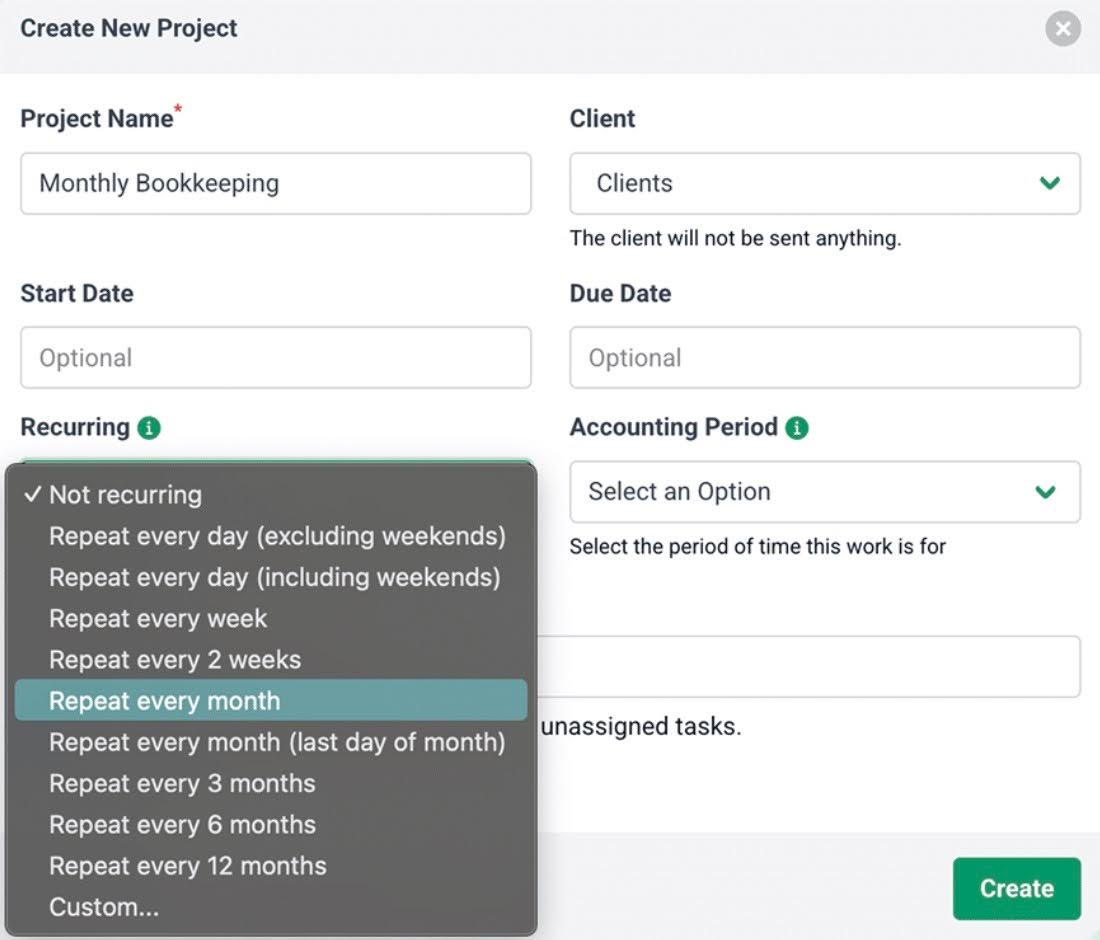
Financial Cents automates recurring projects in two ways:
- The standard recurrences: they auto-create projects on regular schedules (like every Monday, 15th of every month, etc.).
- The custom recurrences: they allow ops managers to set up recurrences based on custom schedules (like first Monday of the month or last Friday of every quarter).
Whichever one you use, projects are recreated in Financial Cents when (1) the previous copy has been completed or (2) the previous copy has passed its due date.
That way, you never have to recreate your repetitive projects from scratch every month.
II. Workflow templates
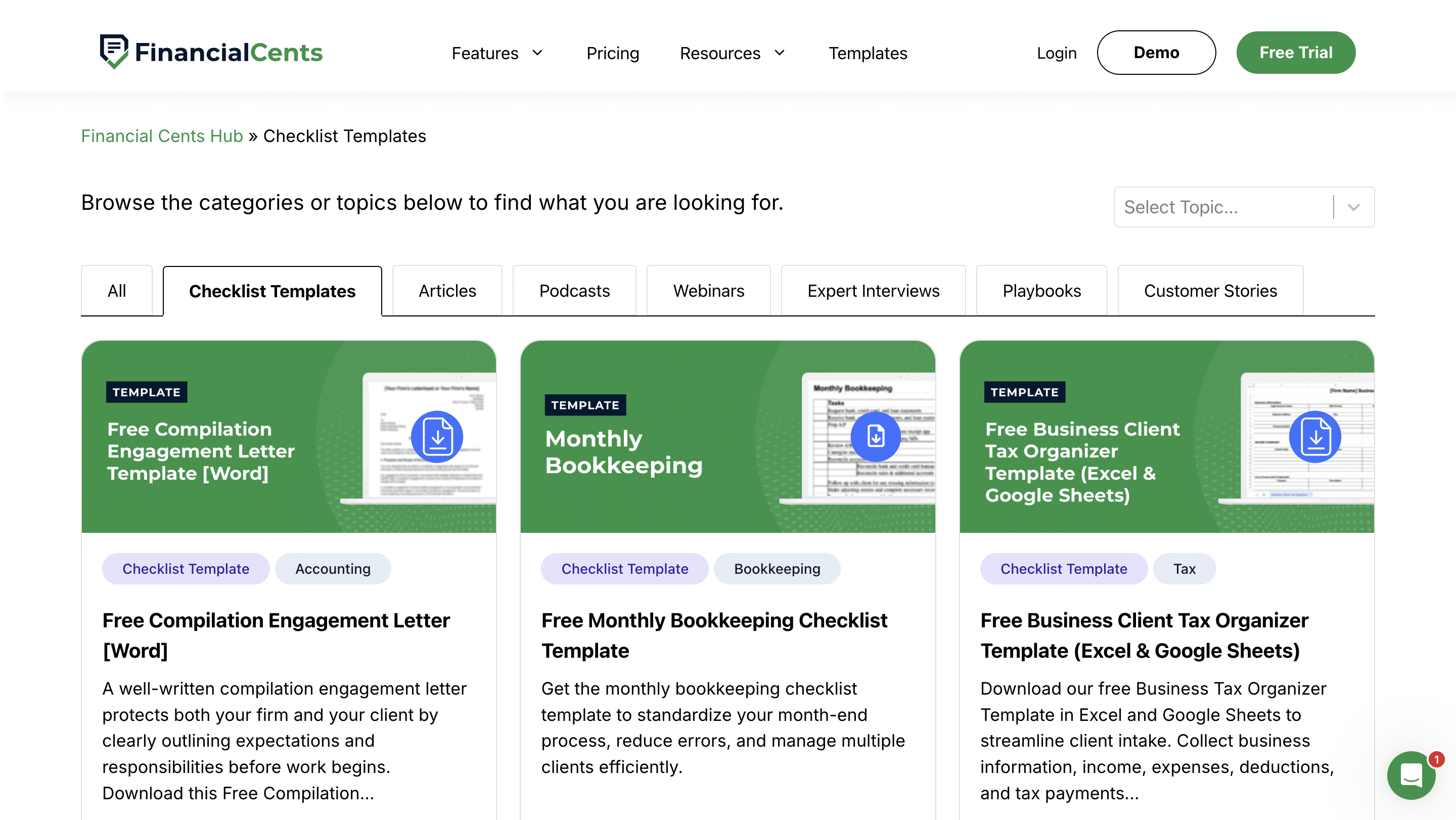
Financial Cents allows you to turn every service (monthly bookkeeping, 1040 tax return, or audit) into a repeatable workflow template.
Once templated, recurring projects can be automated from the templates for subsequent uses.
The workflow templates guide every member of your firm on the step-by-step process needed to complete every client’s work, ensuring work quality stays consistent across the team.
III. Team workload dashboard
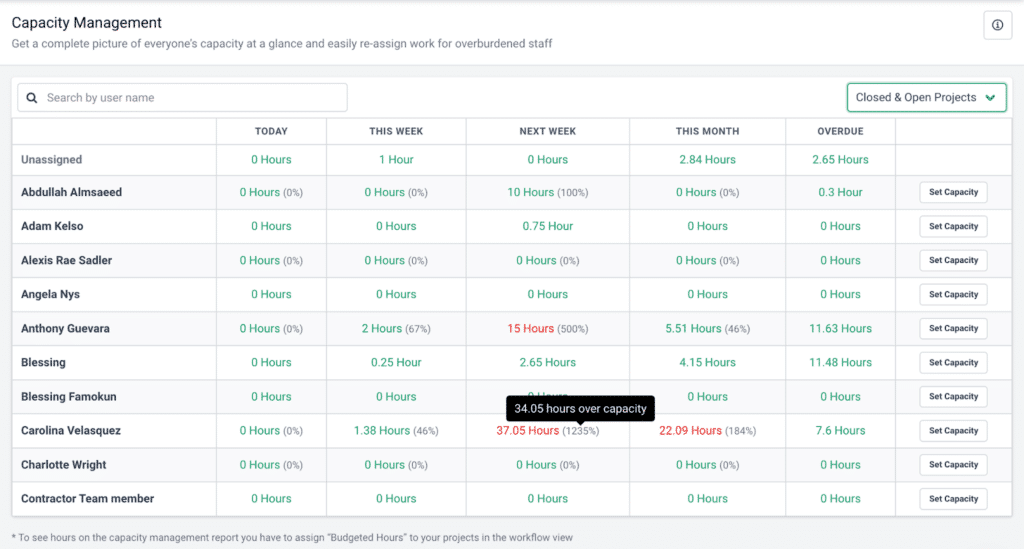
With the capacity management tool, seeing who’s working on what, what’s overdue, and where bottlenecks are forming in your firm is as simple as ABC in Financial Cents.
It updates your team’s workload information in real time, so that you can make time-sensitive decisions.
Once Financial Cents flags a team member who’s at capacity, you can use the reassignment feature to move their tasks to someone else to maintain workload balance and prevent burnout.
IV. Automated client reminders
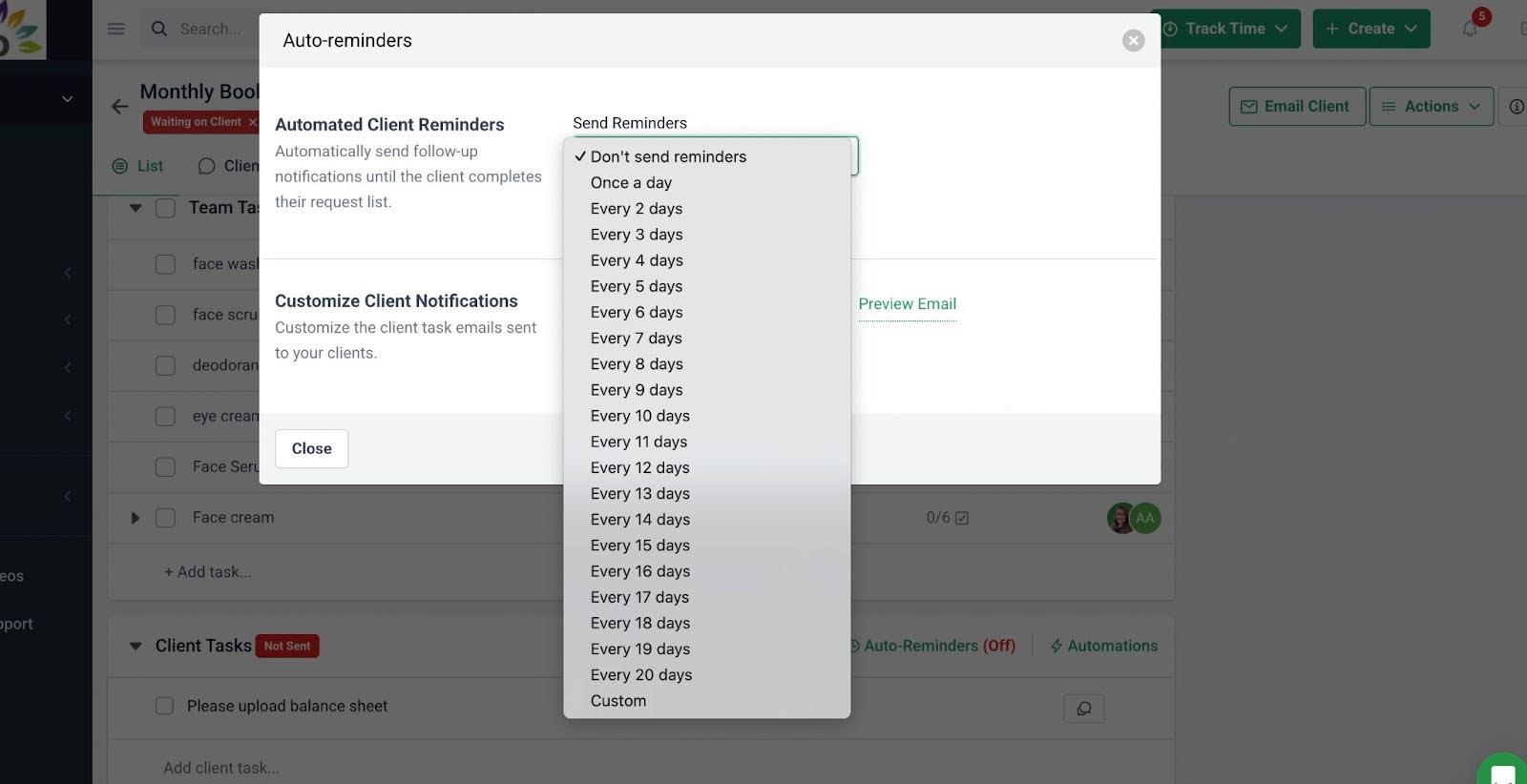
Financial Cents’ client task and auto-reminder feature automates the process of client chase by sending requests to clients based on your predefined timeline.
Once a request is sent, the auto-reminders will continue to go out to the client until they respond.
You can even use the SMS feature to notify your clients on their phones for a quicker response.
V. Client Portals
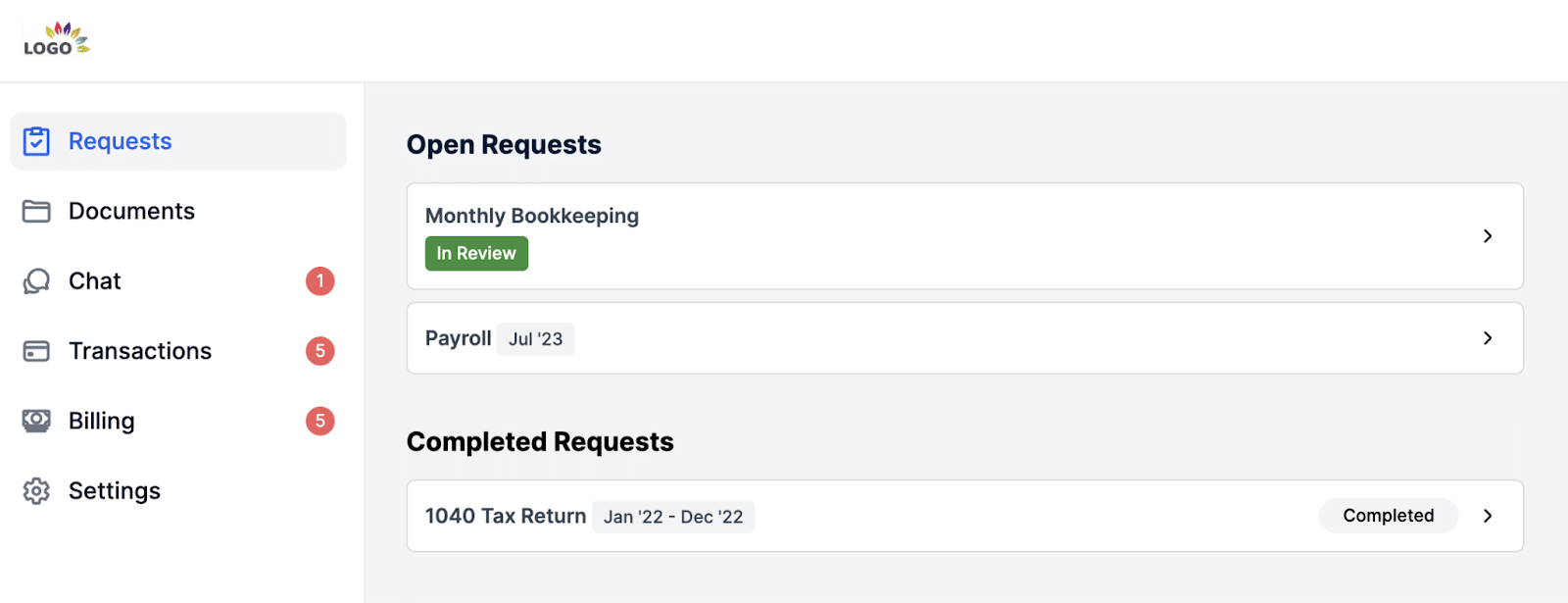
The Financial Cents team understands the emotional toll maintaining login information can have on clients.
That’s why we made our client portal passwordless (yet more secure). The magic link technology ensures your client only needs to enter their email to be authenticated.
Once they are in the portal, they can upload documents, communicate with your team, view documents in shared folders, sign documents, make payments, and review uncategorized transactions.
This saves clients the stress of managing multiple email threads, where things easily get lost.
VI.Time tracking integrated with billing
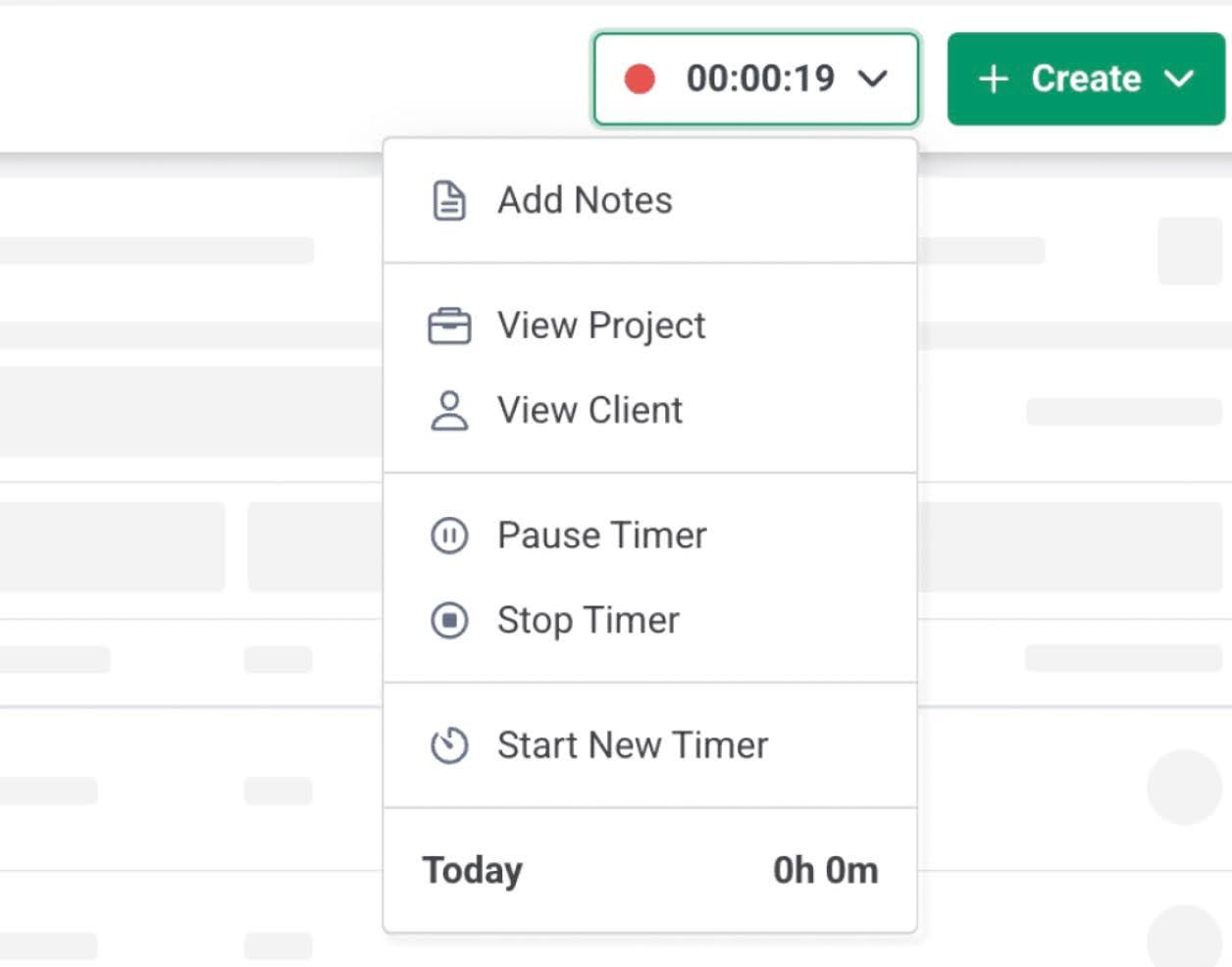
Financial Cents’ time tracking feature is accessible everywhere in the app to make it very easy for your team to track time against the work being done. It provides timely insight into how your team is spending time.
The tracked time is integrated with the billing solution for subsequent invoicing and payment processing, all inside Financial Cents.
VII. Month-End Close
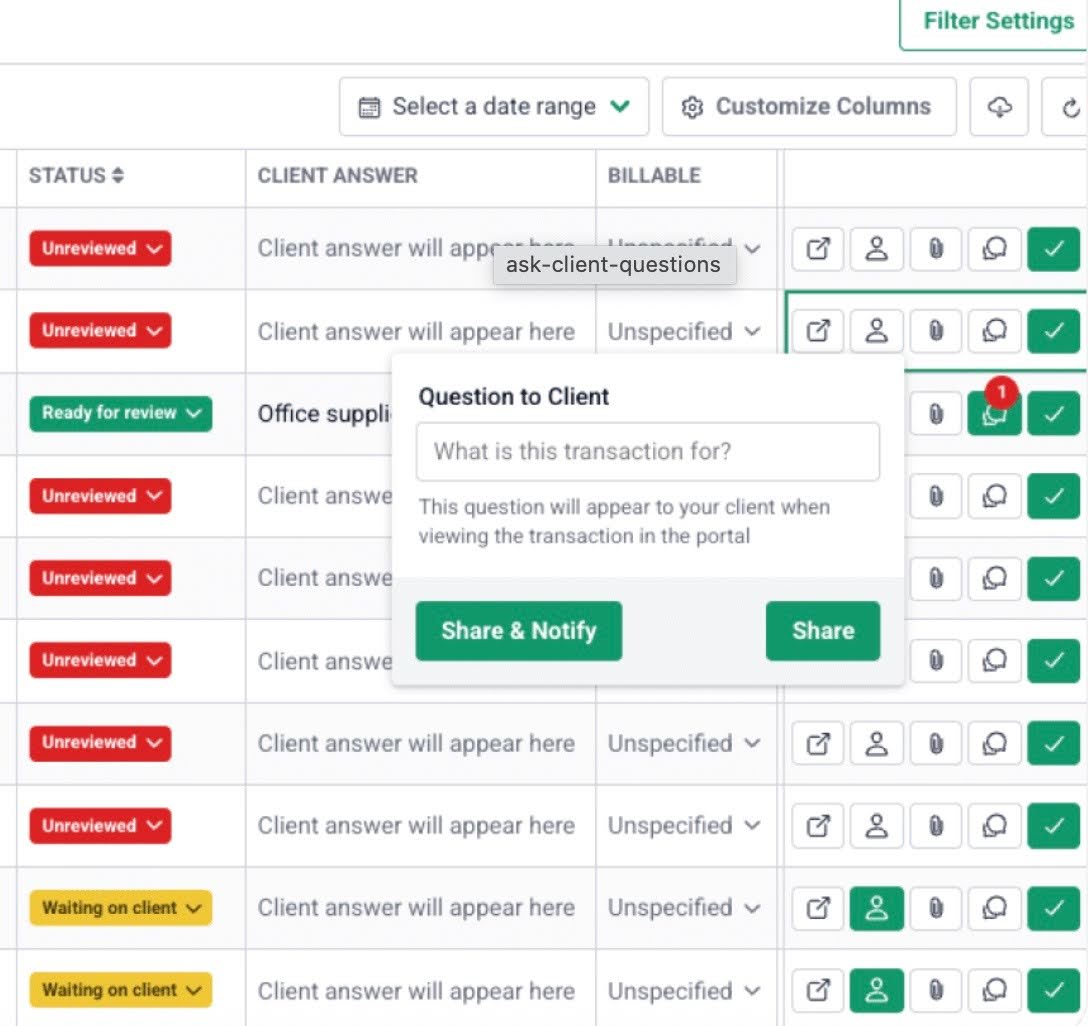
The Financial Cents month-end close feature enables bookkeeping teams to review transactions and manage the close processes within each client’s profile.
Its built-in tools allow bookkeepers to review transactions, collect W-2 and 1099 information, and push updates to QuickBooks Online from Financial Cents.
This keeps one of the most critical accounting firm workflows structured, visible, and repeatable.
VIII. Easy, fast setup
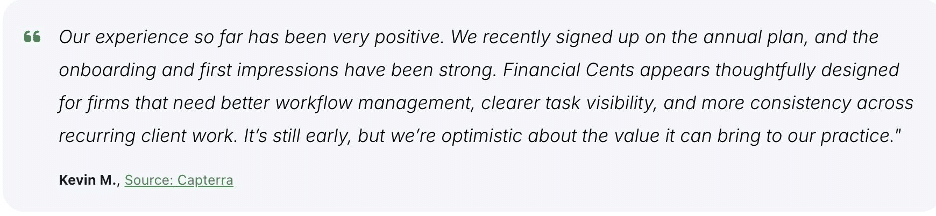
Rated the best easy-to-use accounting practice management software in 2026, the Financial Cents user interface is designed to be intuitive for accounting professionals.
Because it is built with the needs of accounting firms in mind, your team will be able to implement it without disrupting their current work and deadlines.
The clean dashboard view gives operations managers instant oversight of due dates, assignees, client status, and workload, all without digging through emails or spreadsheets.
Your Practice Management System is Where Operational Efficiency is Won or Lost
Practice management software is often marketed to firm owners because they make the purchasing decision. But if you’re responsible for keeping work on track, managing deadlines, and ensuring nothing falls through the cracks, you need it just as much.
Beyond the decision to adopt a tool, the type of practice management software you choose is crucial. Generic tools can handle basic task tracking. But when it comes to the operational realities of accounting firms, they fall short.
These tools require workarounds for recurring workflows, client portals, and integrated billing. But accounting-specific platforms are built around them from the start.
Lastly, don’t focus on price alone when evaluating options. The real return comes from visibility into work, accountability across the team, and integrations that keep your tech stack connected.
According to Jenna Rodriguez, a practice management software that’s easy for your team to adopt and powerful enough to handle your complex dependencies pays for itself in time savings.
In the internal office email alone, we save enough time to pay for our Financial Cents subscriptions. If you're considering Financial Cents, I'd say definitely give it a run. There is no learning curve, and the support is very impressive."
Jenna Rodriguez, CPA, Managing Accountant, Pedante and Company, IncJoin Jenna and thousands of other firm owners to coordinate your workflows, clients, and team members from one platform. Click here to start your free 14-day trial.
Frequently Asked Questions (FAQs)
Accounting practice management software is built for recurring, compliance-driven client work. It includes native features like recurring workflows, client portals, billing, and templates.
General project management tools require manual setup to replicate accounting-specific processes.
Most small to mid-sized firms can implement accounting practice management software within a few hours to a few days because of its intuitive interface and prebuilt templates.
Setup time depends on workflow configuration, team training, and data migration.
Price ranges from $20 to $100+/month per user, depending on the features and level of automation the firm needs.
Platforms like Financial Cents include built-in time tracking and billing features, so firms do not need separate tools for these.
Focus on support for recurring work, real-time visibility into tasks and workloads, strong client communication tools, clear accountability, integrations, and ease of onboarding.
These features will give you the operational control to grow your firm sustainably.
It standardizes workflows, automates recurring tasks, and provides visibility into deadlines and overdue work, so that you can manage your firm’s time and resources effectively.
Share this article:



