
![blog cover image for How Much Does Accounting Practice Management Software Cost? [2026 Guide]](https://financial-cents.com/wp-content/uploads/2026/01/How-Much-Does-Accounting-Practice-Management-Software-Cost_-2026-Guide.jpg)
Accounting practice management software typically costs $19–$100+ per user per month in 2026. Solo plans usually start around $19–$60 a month, small and mid-sized firms generally pay $50–$90 per user, and larger firms often move to custom pricing. Per-client plans commonly run $10–$50 per client per month.
Starting prices rarely tell the true cost of accounting practice management software. It’s common for two firms on the same pricing tier to pay very different amounts (or for two tools with the same prices to result in different total costs).
Another common scenario is platforms advertising low monthly fees while separating core features and functionalities into paid add-ons that only become clear after you have committed too many resources to the platform, and switching tools now feels too expensive.
That is why we recommend knowing your estimated ROI by modelling your firm’s size, workflows, automation needs, and growth plans using the practice management ROI calculator.
In this guide, we’ll show you how to do your estimates today, what accounting practice management software realistically costs in 2026, and the factors driving those costs, so you can choose a tool that supports your firm now and in the future.
TL;DR
- Accounting practice management software costs $19–$100+ per user per month in 2026, depending on firm size, pricing model, and feature depth. Most vendors discount annual billing.
- By firm size: Solo practitioners typically pay $19–$60/month, small firms $50–$80 per user, and mid-sized firms $69–$90+ per user. Large firms with 25+ users usually get custom quotes.
- Pricing models: Vendors charge per user, per client ($10–$50/month per client), through flat-rate tiers, with add-on modules, or with custom enterprise pricing.
- Popular tools compared:
- Financial Cents: $19–$69/month per user (annual billing)
- Karbon: $59–$89/month per user
- Canopy: $74–$149/month per user
- Jetpack Workflow: $40–$59/month per user
- Pixie: $129–$329/month, based on client count
- TaxDome: $700–$1,100/year per user (three-year plan)
- What drives the cost: feature depth and automation, team size, client volume, integrations, document storage, and onboarding or migration fees.
- Watch for hidden costs: Low starting prices can hide paid add-ons, storage limits, gated integrations, and implementation fees.
- Financial Cents for a 10-person firm: about $5,880/year on Team or $8,280/year on Scale with annual billing, with unlimited clients and storage on every plan.
- Best way to choose: Model your team size, feature needs, and growth plans, then test shortlisted tools on a free trial before committing.
How Practice Management Software Is Typically Priced
Most practice management software vendor uses one of the following pricing strategies:
1. Per-User Subscription
Under a per-user pricing model, firms pay a recurring monthly or annual fee for each team member using the software.
Prices range from $19 to $100/month per user, depending on the vendor and the factors mentioned earlier (team size, growth stage, and usage pattern).
Pros
- Simple to understand and easy to budget for.
- Costs increase predictably as headcount grows.
- Pricing generally aligns with the number of people actively using the system.
Cons
- Total cost can rise quickly as the firm adds staff.
- Firms may limit licenses to control costs, which can reduce workflow visibility and team collaboration.
- Part-time, seasonal, and administrative users are often priced the same as full-time staff.
2. Per-Client Pricing
This model charges based on the number of clients you’re serving in the system, rather than the number of team members using it.
While it favors firms with numerous higher-value clients, prices can be too high for bookkeeping and payroll firms providing standardized services to a high volume of clients.
Pros
- Adding users does not increase cost, which supports firm-wide adoption.
- Works well for firms with relatively low client counts and higher-value engagements.
- Easier to forecast expenses when client volume is stable and clearly defined.
Cons
- It can become expensive for firms with many clients and low fees per client.
- Client definitions vary by vendor (active, archived, prospects), which can inflate costs.
- Costs increase quickly when growth comes from adding clients rather than revenue per client.
3. Flat-Rate Tiered Plans
The flat-rate model uses tiered plans that charge accounting firms a fixed monthly or annual fee for all features.
Each tier bundles a specific level of features and functionality within a predictable cost structure, while placing limits on users, clients, or usage.
This has proven to work best for firms with a stable team structure and clearly defined workflow needs, while forcing firms growing unevenly across users, clients, or services to upgrade their tiers earlier than planned.
Pros
- Predictable, fixed pricing with fewer variable cost factors.
- Encourages full team adoption, visibility, and collaboration within tier limits.
- It can be cost-efficient for firms that fit cleanly within a tier’s user and feature caps.
Cons
- Feature gating may force upgrades before the firm is operationally ready.
- Large price jumps between tiers can lead to paying for unused capacity.
- Less flexible for mid-sized firms that outgrow lower tiers quickly but don’t need the next tier’s full feature set.
4. Add-Ons & Modules
Under the add-ons or modular pricing model, the base platform usually comes at a modest price. Advanced features and functionalities are sold separately as optional modules, which allows firms to pay for the additional features they truly need.
Modular pricing can work well for niche accounting firms with narrow needs, but can become expensive quickly as the firm scales and needs advanced functionality.
Pros
- Lower initial cost makes it accessible for small and mid-sized firms.
- Flexibility to enable only the features required at a given stage.
- Easier to tailor the system to specific workflows or service lines.
Cons
- Total cost can escalate quickly as the firm’s needs expand.
- Core practice management features (automation, reporting, client portals) may not be included by default.
- Vendors may shift previously included features into paid add-ons over time, which will increase costs.
5. Custom Quotes/Enterprise Pricing
Software providers use enterprise pricing to tailor pricing to each accounting firm based on several factors, like team size, client volume, service complexity, and required features.
This model is most common among larger or more complex firms and is often used along with per-user or per-client pricing structures.
Pros
- It can be cost-effective for large or complex firms with high usage and specific requirements.
- Allows firms to negotiate pricing, terms, and feature access based on their needs.
- Often includes premium onboarding, dedicated support, and service-level agreements (SLAs).
Cons
- Lack of transparent pricing makes it difficult to compare tools objectively.
- Smaller or less complex firms may overpay for enterprise-level features they don’t fully use.
- Typically involves longer sales cycles, contract commitments, and more hands-on implementations.
How Much Does Accounting Practice Management Software Cost in 2026?
← Scroll to see more →
| Category | Price Range | Typical Features Overview | Best Suited For |
|---|---|---|---|
| Solo User Firms | $19–$60+/month | Task management, client portal, limited integrations | Single firm owners / solo practitioners |
| Entry Level / Small Firms | $49–$80/month per user | Team collaboration, basic automations, standard integrations | Small teams (2–10 users) getting organized |
| Mid-Tier Firms | $69–$90+/month per user | Advanced automation, analytics, and deep integrations | Growing / mid-sized firms (10–30+ users) |
| Enterprise / Large Teams | $89–$100+/month (or custom) | Custom features, premium support, scalability | Large and complex firms (25+ users) |
| Per-Client Model | $10–$50/month per client | Scales by client volume, portals, and basic tools | Firms with high-value or high-volume clients |
| Flat Fee Pricing | Varies | Access to all core features, predictable costs | Firms seeking unlimited users and cost certainty |
The following categorization is meant to provide clarity. Firms of all sizes can (and do) subscribe to higher or lower tiers that satisfy their practice management needs.
For example, a solo firm owner may choose a tier designed for teams of 10-30 members if that plan is where they find the features and functionalities needed to operate efficiently.
a. Solo User Firms (single user)
Typical Price Range: $19 – $60+ per month
This pricing range is designed for solo firm owners who are moving away from manual practice management methods, such as spreadsheets and email, to enjoy greater organization, visibility, and automation.
Many new firm owners use tools in this range to document their workflows and systematize their firms before hiring their first team member.
This tier is not ideal for multi-user firms that require advanced automation, collaboration, and reporting.
Typical Features Include:
- Basic task and deadline tracking.
- Client lists and simple workflow templates.
- Limited document management.
- Email notifications and reminders.
- Basic or minimal reporting.
Most platforms at this level offer limited integrations with third-party tools such as email, calendar applications, accounting software, and tax systems, while reserving deeper integrations and automations for higher-tier plans.
b. Entry Level/Small Firms
Typical Price Range: $49 – $80/month per user
This range is most common among small accounting teams moving from manual processes to organized, collaborative workflows. Firms at this stage are starting to share visibility across tasks, deadlines, and client work for the first time.
It introduces structure and collaboration to small accounting firms, but firms with growing client volumes or more complex workflows may require more advanced automation, reporting, and customization available in higher tiers.
Typical Features Include:
- Team collaboration tools (such as task assignment, shared workflows, and visibility into work in progress).
- Client requests, secure client portals, and basic workflow automation.
- Document management with limited organization and permissions.
- Time tracking and billing.
- Standard reporting.
- Integrations with accounting, tax, email, calendar, and automation tools, like Zapier.
c. Mid-Tier Firms
Typical Price Range: $69 – $90+/month per user
Designed for established accounting practices that are actively scaling and looking to improve efficiency, consistency, and profitability across teams, firms at this stage manage higher client volumes, multiple service lines, and recurring work that requires complex coordination.
These firms prioritize the reduction of manual work and improvement of profit margins through deeper automation, analytics, firm-wide visibility, and other benefits that help them grow without adding headcount at the same pace.
Typical Features Include:
- Advanced workflow automation (recurring work, client tasks, task dependencies, etc.).
- CRM and document management.
- Time, billing, and payment processing.
- Customer support and guided onboarding.
- Profitability and realization reporting, capacity planning, and utilization insights.
- Integrations with multiple accounting and tax platforms.
d. Enterprise/Large Teams
Typical Price Range: often custom-quoted for 25+ users
This pricing tier is created for large or highly complex accounting firms that manage high client volumes, multiple service lines, and often operate across multiple locations.
These firms value customizability, consistency, and scalability to tailor client experiences to specialized teams.
Typical Features Include:
- Enterprise-grade security, compliance controls, and dedicated support with service-level agreements (SLAs).
- Unlimited document storage and historical records, branded client experiences, and seasonal or flexible user licensing.
- Advanced analytics, AI-driven reporting, and scalability.
- Advanced integrations, including custom applications and native enterprise APIs.
Other Pricing Models
- Per-Client Model
Typical Price Range: $10 – $50/month per client
Firms are charged based on the number of clients managed in the system rather than the number of users, so costs increase as client count grows and features are focused on client relationship management.
Per-client pricing can be cost-effective for firms with a relatively small number of high-value clients and small teams. This allows firms to add users without increasing software costs, encouraging firm-wide adoption and collaboration.
- Flat Fee Pricing
Price Range: Varies widely
Flat-fee pricing provides a single, predictable cost regardless of team size. The plans often cover a set number of users and a defined set of core features.
Vendors may offer modular add-ons or comprehensive plans to expand functionality as needed.
This model appeals to firms seeking predictable, all-in-one pricing that allows them to add users and clients without worrying about per-user or per-client charges.
Pricing Examples
The examples below are based on Financial Cents’ per-user pricing model and assume annual billing, which is the most common option among accounting firms due to cost savings (compared to monthly plans).
Solo Practitioner (1 User)
Estimated Cost: $19/month (billed annually at $228/year)

This plan is for solo CPAs, bookkeepers, etc., who need structured workflows and deadline management to replace spreadsheets and email.
The Solo Plan in Financial Cents includes
- Workflow and automations
- Client tasks & requests
- Client portal
- Document management
- Client CRM & database
- Time tracking
- Invoicing & billing
- Proposals & engagement letters
- QuickBooks Online Integration
- Budgeting & reporting
Small Firm (3–10 Users)
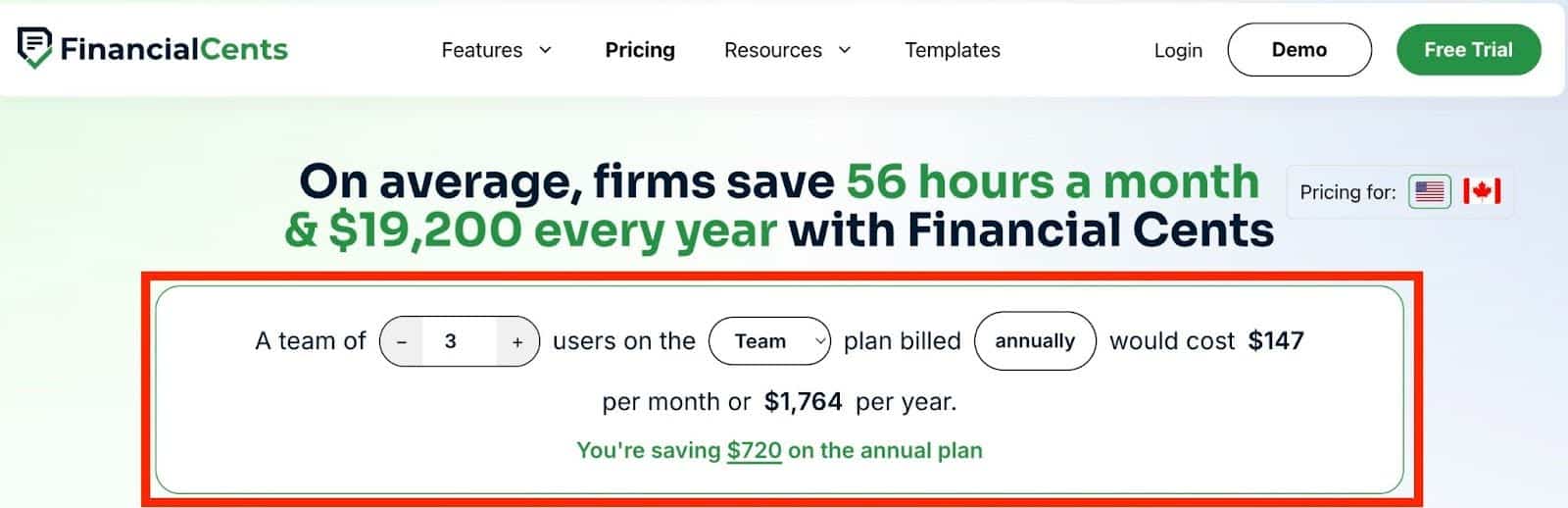
Small firms often start on a lower tier (Team plan of between $1,764/year for three users and $5,880/year for ten users).
The Team plan usually focuses on workflow consistency and collaboration. The feature includes:
- Integrated email
- E-signature
- Unlimited tags, client groups, and custom fields
As their workflow, automation, and reporting needs evolve, they upgrade to the Scale plan (between $2,484/year for three users and $8,280/year for ten users).
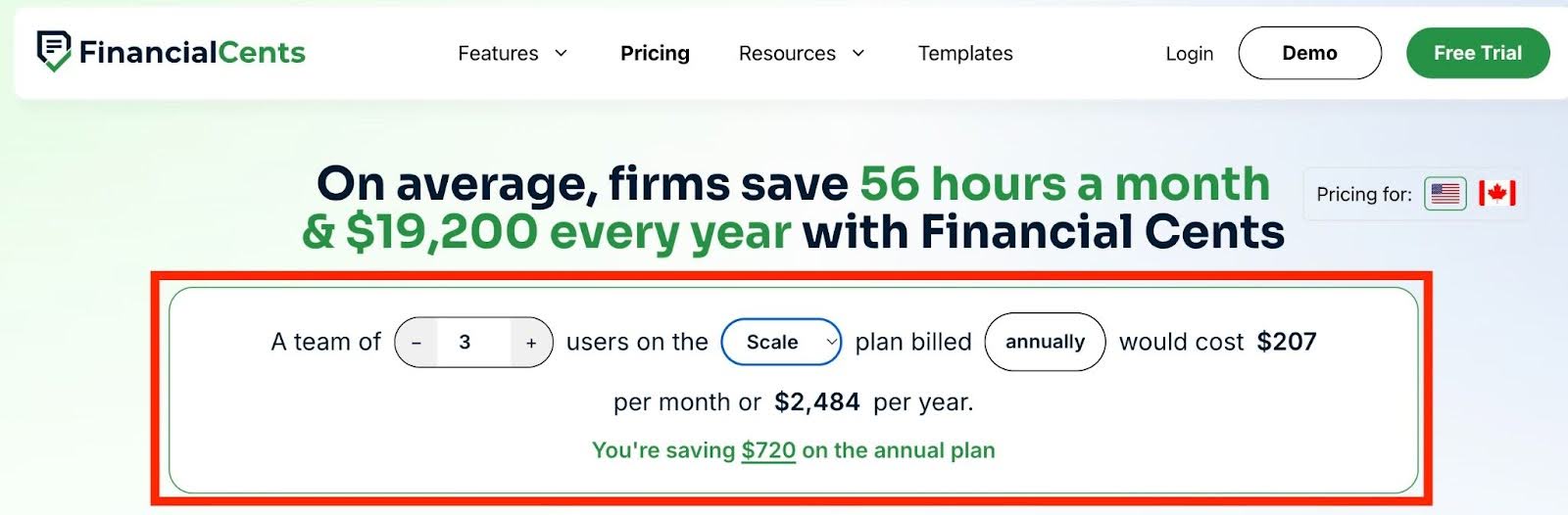
The Scale plan adds deeper automation, more reporting, and better firm-wide visibility. The features include:
- Auto-follow-ups for client tasks
- Customize client task emails
- Auto-send email updates
- Auto-create work
- Optional upsell services in proposals
- SmartVault Integration
- OneDrive & Google Drive Integration
- Open API
- Branded client portal
- Profitability reports
Mid-Sized Firm (10–30 users):

At this stage, practice management software is an operational command center, and the firm is willing to pay more for advanced features that replace manual coordination, reduce missed deadlines, and avoid additional hires.
Estimated Monthly Cost Range:
Team plan costs $490 ($5,880 yearly) for 10 users and $1,470 ($17,640 yearly) for 30 users.
To use the branded, secure, and passwordless client portal, and other advanced features and integration, the firm can upgrade to the Scale plan at $690 ($8,280 yearly) for 10 users and $2,070+ ($24,840 yearly) for 30 users.

Enterprise/Multi-Service Firm:
This tier is built for large firms that don’t find per-user costs or per-client models appealing. They prefer price customization that enables them to achieve control, standardization, and firm-wide visibility.
Beyond headcounts, their pricing reflects the complexity of multi-office (or multi-service) accounting operations, and they enjoy advanced features like robust reporting and native integrations.
Estimated Monthly Cost Range: customized to the needs of individual firms
This tier (in Financial Cents) includes
- Everything in the Scale Plan, plus
- IP Fencing/IP Whitelisting
- Mandatory 2FA Option
- Custom user permissions
- Webhooks
- Priority support
- Premium training & onboarding
- Dedicated customer success manager
Note:
The most accurate way to estimate the cost of practice management software is to model your own firm based on your team size, feature needs, and growth plans.
Running your numbers through a practice management pricing calculator like Financial Cents’ will show you the actual amount you’ll have to pay. This will help you compare the expected efficiency and capacity gains with the investment before you commit your resources.
Feel free to go ahead and model your own firm’s size and growth plans using the Financial Cents pricing calculator today. Adjust users and features to see how pricing changes as your firm scales.
2026 Top Accounting Practice Management Software Options Prices Compared
The following prices are typical ranges, not exact figures, because software providers often bundle features, charge add-ons, or adjust plans frequently.
We have noted features that are commonly sold as add-ons, especially for platforms like Canopy.
One more thing, a tool can technically support a feature, but the depth of that feature (automation, reporting, scalability) may vary widely, so this information is not meant to replace your detailed evaluation.
See a review of the best accounting practice management software options in 2026.
← Scroll to see more →
| Feature | Financial Cents | Karbon | Canopy | Jetpack Workflow | Pixie | TaxDome |
|---|---|---|---|---|---|---|
| Pricing Model | Per user | Per user | Per userFormerly modular | Per user | Per client | Per user |
| Price Range | $19–$69/month per user | $59–$89/month per user | $74–$149/month per user | $40–$50/month per user | $129–$329/monthBased on number of clients | $700–$1,100/year per user3-year plan |
| Workflow Automation | Advanced | Advanced | Available | Available | Available | Advanced |
| Workflow Management | Advanced | Advanced | Advanced | Available | Available | Advanced |
| Document Management | Available | LimitedRelies on third-party integrations | Available | Limited | Available | Available |
| CRM | Available | Available | Available | Very Limited | Available | Available |
| Secure Client Portal | Available | Available | Available | Not Available | Available | Available |
| Time Tracking | Available | Available | Available | Limited | Not Available | Available |
| Native Billing & Invoicing | Available | Available | Available | Not Available | Not Available | Available |
| Workflow Templates | Available400+ templates | Available | Available | Available | Available | Available |
| Proposals & Engagement Letters | Available | Available | Available | Not Available | Not Available | Available |
| Month-End Close | Available | Not Available | Not Available | Not Available | Not Available | Not Available |
| Unlimited Storage | Available | Available | Available | Available | Not Available | Available |
| Unlimited Clients | Available | PartialDepends on plan | Limited2,500 clients | Available | Not Available | Available |
If TaxDome, Karbon, or Jetpack Workflow is on your shortlist, our TaxDome pricing, Karbon pricing, and Jetpack Workflow pricing guides explains its plans, billing commitments, add-ons, and example costs for different firm sizes.
What Drives the Cost of Practice Management Software?
The price of a practice management software solution increases with the size, complexity, and capacity of the following components:
I. Feature Set & Automations
Two main reasons explain why the depth of a platform’s feature set is a primary driver of practice management software for accounting costs.
Advanced features, such as AI-driven automations, custom workflow templates, real-time dashboards, and profitability analytics, require more resources to build and maintain. It only makes sense that such features are available at a higher price than others.
Advanced features reduce manual coordination and automate recurring work, which enables firms to handle greater client volume without adding staff. This added value attracts additional costs.
II. User Base & Team Size
Most accounting practice management platforms use per-user pricing, which means that costs increase as more team members need to use it. As firms grow, the number of users begins to determine how much you spend on the tool. That’s not all.
Team growth also introduces additional operational needs. Larger teams require more complex features and functionalities, such as role-based permissions, stronger access controls, and more advanced reporting. In many cases, this will necessitate an upgrade to a higher pricing tier.
III. Client Size
The number of active clients your firm manages also directly influences the costs of practice management software. Some vendors charge according to the number of clients, which increases your final payments as you add more clients.
The client base also has an indirect impact on costs. Many platforms may not charge per client, but they limit how many clients a firm can serve at a given tier. For example, you may realize that you can’t store more documents or use more automations once your client count reaches a certain point.
The idea is to force you to consider higher plans or purchase additional add-ons to enjoy certain features and functionalities at scale.
IV. Integrations
In many practice management software solutions, the lower the plan you’re on, the more limited your integrations will be. This can show up through one-way (versus a two-way or API access) integrations.
That is because building and maintaining secure, reliable integrations requires continuous development, testing, and compliance, especially when connecting to tax software, accounting platforms, and payment systems. As a result, vendors reserve advanced integrations for higher pricing tiers.
V. Document Management & Storage
The investment in infrastructure required to securely store, organize, and govern large volumes of client files makes the document management feature a major driver of practice management cost.
As if raw storage capacity is not costly enough, features like version control, role-based permissions, audit trails, document retention policies, etc., increase development costs and therefore, the price of the apps.
That is why many practice management software vendors limit storage by plan, charge for additional space, or restrict advanced document management capabilities to higher tiers. Only a few platforms, like Financial Cents, provide unlimited document storage in their plans.
VI. Onboarding and Migration
Although Financial Cents and some other tools offer self-service onboarding, practice management software solutions with more complex interfaces or feature sets require paid implementation services.
From migrating clients, workflows, templates, and historical data, as well as training teams to use the system effectively, these one-time fees can significantly increase software spend in the first year.
Platforms with steeper learning curves may even require ongoing implementation support to ensure teams adopt the system correctly and minimize disruption to client work.
How to Budget for Accounting Practice Management Software
- Set a baseline budget (e.g., $X per user or $Y total)
Defining a realistic price range based on your firm’s size, expected usage, and prevailing market pricing will help you to evaluate practice management software with clarity and discipline.
Without one, every tool can appear like the right fit, which makes it harder to compare options objectively or make a confident decision.
It also protects you from overspending on features you don’t need now, while identifying tools that are too simple to grow with your firm.
- Build cost into annual technology planning
The best managed accounting firms treat practice management software as part of their core infrastructure. Planning for team growth and workflow complexity enables them to budget accurately for possible tier upgrades and evolving needs.
Many practice management software providers also offer discounts for annual billing, which can significantly reduce long-term costs.
- Use free trials and sandbox accounts before committing
The only reliable way to assess a tool’s ease of use, automation depth, and functionality gaps is to test it with real-world accounting projects.
Free trials and sandbox accounts allow you to import sample data, set up workflows, and manage projects, teams, and clients to evaluate how the software fits your firm’s day-to-day operations.
- Involve your team in evaluating the tool
Since your team will use the system (maybe even more than you), it makes sense to include their feedback in your decision-making, and that is impossible if you evaluate tools all by yourself.
Involving your team helps with identifying adoption risks, clarifying training needs, and assessing the tool’s specific impact on day-to-day operations.
Why Financial Cents Is a Competitive Option
Financial Cents was built directly from feedback from accounting professionals, which shows in how closely its core features align with the realities of day-to-day accounting operations.
Its pricing model is transparent, predictable, and reduces the risk of discovering later that essential capabilities require costly upgrades.
- An all-inclusive price for workflow automation, client portal, document management, billing, payments, etc.
Financial Cents uses a pricing model that includes all features (workflow, automation, client portals, document management, time tracking, billing, and payment processing) across all plans to save firms the financial and administrative cost of relying on multiple tools.
- Recurring work, client reminders, and other automation that save time and increase team capacity
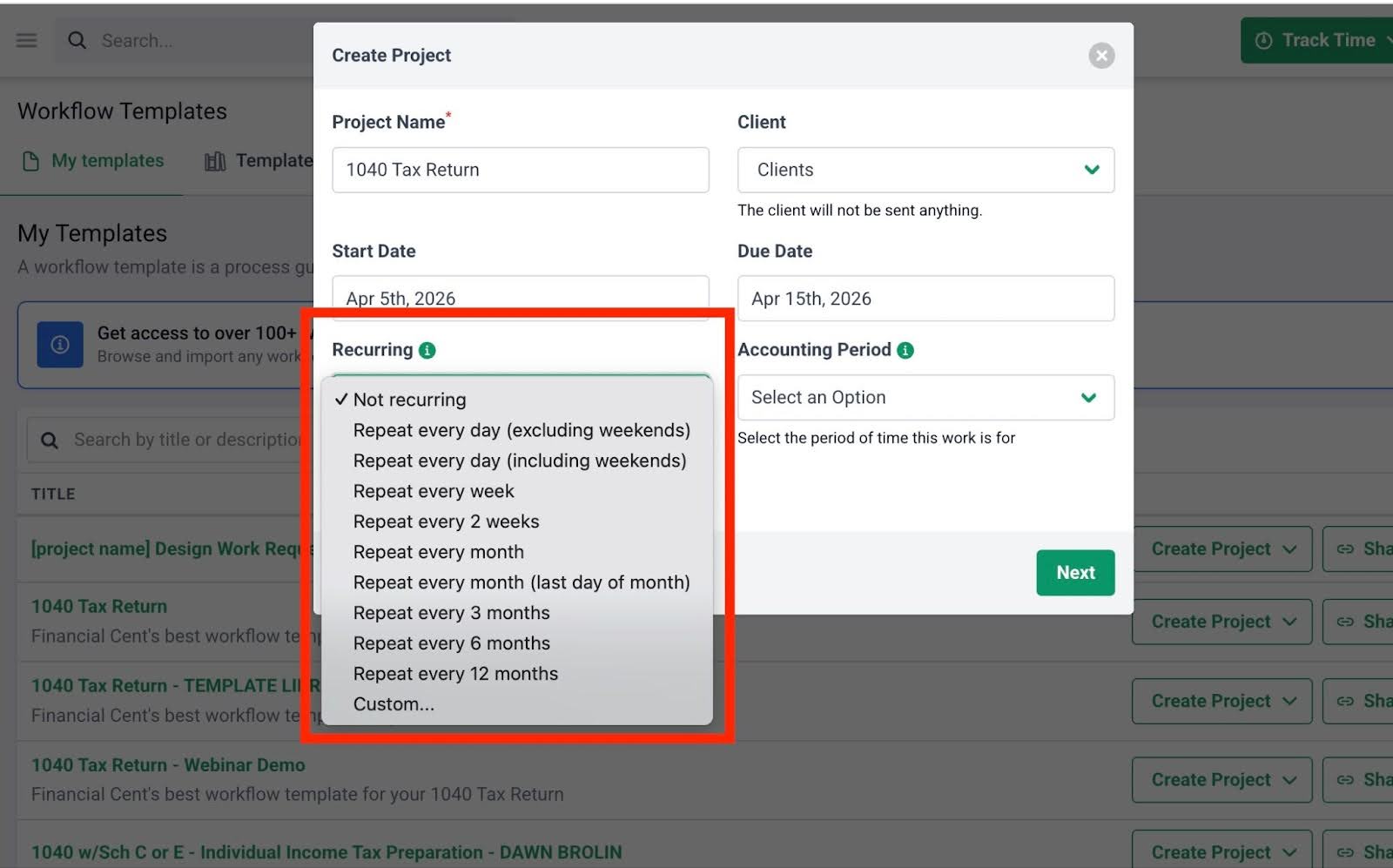
Financial Cents’ recurring work feature automatically recreates future projects, while built-in client reminders follow up until clients provide the required documents. Combined with other automation features, Financial Cents reduces manual coordination, improves deadline compliance, and frees staff to focus on higher-value work.
- Supports scalability as firms grow without surprise add-ons
Financial Cents is also designed to scale without surprise costs. All plans include unlimited clients and storage, and firms can move from Solo to Team to Scale tiers as they grow, which activates advanced automation, collaboration, and reporting features without disrupting workflows and client deliverables.
- Free trial & Demo available so firms can test before committing
A Free Demo to see a walkthrough of the system and a 14-day free trial with full feature access allows firms to test real workflows before committing. Financial Cents is rated 4.9/5 in terms of ease of use and overall efficiency on leading review platforms, like Capterra and GetApp.
Click here to Book a Free Demo
Why You Should Evaluate Practice Management Software Beyond Starting Price
The differences in pricing models, team size, feature depth, and growth trajectory (of each firm) have made choosing a tool based on its starting price a risky decision. What looks affordable upfront can become costly (or limiting) over time.
To get the most out of your decision, identify your priority features, compare pricing models using this guide, and test shortlisted tools through free trials to see how they perform in your workflows.
With Financial Cents, a free trial gives you access to all its accounting management features, which have enabled accounting firm owners to manage every aspect of their firm from one place, instead of jumping between multiple apps every day.
This has helped Infinite Accounting Solutions and Butler and Sanchez LLC to manage their clients better and coordinate multi-state offices, respectively.
If you’re ready to end your search for accounting practice management software today, start by using all Financial Cents features and functionalities for free.
Frequently Asked Questions (FAQs)

Wesley Armstrong is the Customer Onboarding Manager at Financial Cents and a former Technical Support Specialist at SmartVault. He helps accounting and bookkeeping firms set up workflows that fit how they actually work, and writes about choosing, comparing, and switching practice management software.
Share this article



