

As an accountant running a bookkeeping firm, on any given Monday, you’re juggling 40+ recurring tasks.
You know what needs to happen. You’ve done it a hundred times. But the sheer volume of recurring work, repeating across different clients on different schedules, makes it almost impossible to hold it all in your head without something slipping through.
You’re not imagining the chaos either. Our 2025 state of accounting workflow and automation report revealed that 55.5% of accounting firms cited workflow inefficiencies as their number one challenge in 2024, and 54.7% identified manual administrative tasks as a major bottleneck.
That means there are other firms like yours quietly drowning in the same problem you’re currently facing.
In this article, we’ll show you 10 practical tips you can put to work, so you can bring order to recurring tasks, stop missing deadlines, and free up your hours.
TL;DR
Recurring task management is how your firm handles the work that repeats on a schedule across every client: monthly closes, payroll runs, quarterly filings, year-end work, and everything in between. It’s the backbone of your revenue, and it’s also the first thing to break when your firm relies on memory, spreadsheets, or generic project tools.
The fix is building a system. Here are the four moves that do the heaviest lifting:
- Build a standardized workflow template for every service type. Monthly bookkeeping, payroll, quarterly reviews, and year-end should each have one documented process that your whole team runs.
- Assign a single named owner to every recurring task. Make it someone’s responsibility from the start to the finish, and give visibility to everyone so they know who to reach out to.
- Use software with native recurring task features. Generic tools force you to recreate work every cycle. Top accounting practice management software rolls it forward automatically.
- Set internal deadlines before client deadlines. Give your team a buffer to review, fix, and deliver without panic.
The rest of this article walks through 10 practical tips you can start implementing this week.
What Are Recurring Tasks in Accounting?
Recurring tasks are the work your firm does on a fixed schedule, for the same clients, over and over again. They show up monthly, quarterly, or annually, and they don’t stop coming just because you’re busy with something else. Most client engagements are built around them, which means they’re also the backbone of your firm’s revenue.
Some common recurring tasks in accounting include:
- Monthly: bookkeeping close, bank reconciliation, payroll processing, financial statement preparation, accounts payable and receivable
- Quarterly: estimated tax payments, quarterly reviews, payroll tax filings (941s), sales tax returns
- Annually: year-end close, 1099 preparation, tax return preparation, engagement letter renewals.
The challenge with recurring work is that it’s fundamentally different from one-off projects. A project has a start and an end. You finish it, you close it out, you move on. Recurring tasks don’t behave that way. The moment you wrap up this month’s close, next month’s is already waiting to be set up.
Multiply that across every client on your roster, and you’ve got a constant stream of work that needs to restart on its own, on a predictable schedule, without you or anyone on your team having to remember to kick it off. Without a system to handle that, something eventually gets lost in the muddle.
Why Recurring Task Management Is Harder Than It Looks
On paper, recurring work should be the easiest part of running your firm. You know what to do, you know when it’s due, and you know who it’s for. In practice, though, it’s where most firms lose the most time and make the most mistakes. Here’s why.
The “I’ll remember it” trap
When your team is lean, it feels faster to keep everything in your head, or to fire off a quick email reminder, than to set up a proper system. And for a while, that actually works. Until the week you’re buried in client calls, one monthly close slips, and suddenly you’re two weeks late on a deliverable a client has been waiting for. One missed task rarely stays one missed task. It cascades.
No single source of truth
Your recurring work is probably scattered across four or five places right now. A spreadsheet someone built some years ago. A few sticky notes. A mental checklist only you can see, and so on. Nobody on your team, including you, has a live view of what’s been done, what’s in progress, and what’s already late. You find out something fell through when it’s near a deadline, or worse, when the client tells you.
Task recreation overhead
If your accounting workflow tools don’t support recurring work natively, someone on your team is manually recreating the same tasks every single month. For a firm with 50 clients, that’s 50 bookkeeping projects to duplicate, rename, and assign at the start of every month, before any real work has even begun.
Unclear ownership
In a lean team, everyone has a rough sense of what they’re responsible for. That works right up until it doesn’t. Then “we all know what we need to do” quickly turns into “I thought you were handling that.” Without a single named owner on every recurring task, accountability is never gained.
Busy season disruption
Recurring tasks don’t pause just because the busy tax season showed up. Your monthly closes, payroll runs, and quarterly filings keep coming, on the same schedule as always. Without a system that keeps recurring work moving in the background, you’re left with two bad options. You drop the recurring tasks and hope your clients don’t notice. Or you try to do both, and you and your team burn out.
This is why 66.1% of accounting firms rate recurring task features as the most important capability in a workflow management tool. It’s the thing that determines whether the core work of the firm keeps moving.
Stelle Anderson learned this the hard way. Her team at Infinite Accounting Solutions was running on Trello, which worked well at first, but started to fall apart as the firm scaled. Trello has no native recurring task feature, so her team had to build a brand new board for every monthly project, for every client, every single month. The admin hours went up significantly. “Trello worked well until we got too big for it,” Stelle said, which is the exact moment most firms start hunting for something built for recurring task management.
10 Recurring Accounting & Bookkeeping Task Management Tips
1. Map Every Recurring Task Before You Try to Manage It
Before you build any system, build a list. Sit down and audit every recurring task your firm handles, broken out by client and by frequency (weekly, monthly, quarterly, annual). Don’t rely on memory. Open your engagement letters, your client folders, your calendar, and your invoicing history, and pull everything into one document.
Most firm owners go into this exercise thinking they have a rough idea of their recurring workload, and come out of it realising they were off by 30–40%. They also usually find tasks they’ve been quietly missing. This audit is the single most useful piece of work you’ll do this quarter, because everything that comes next, templates, ownership, automation, capacity, is built on top of it.
2. Build a Standardised Workflow Template for Each Service Type
Once your audit is done, group recurring tasks by service type (monthly bookkeeping, payroll, quarterly reviews, year-end, and so on) and build a standardised template for each one.
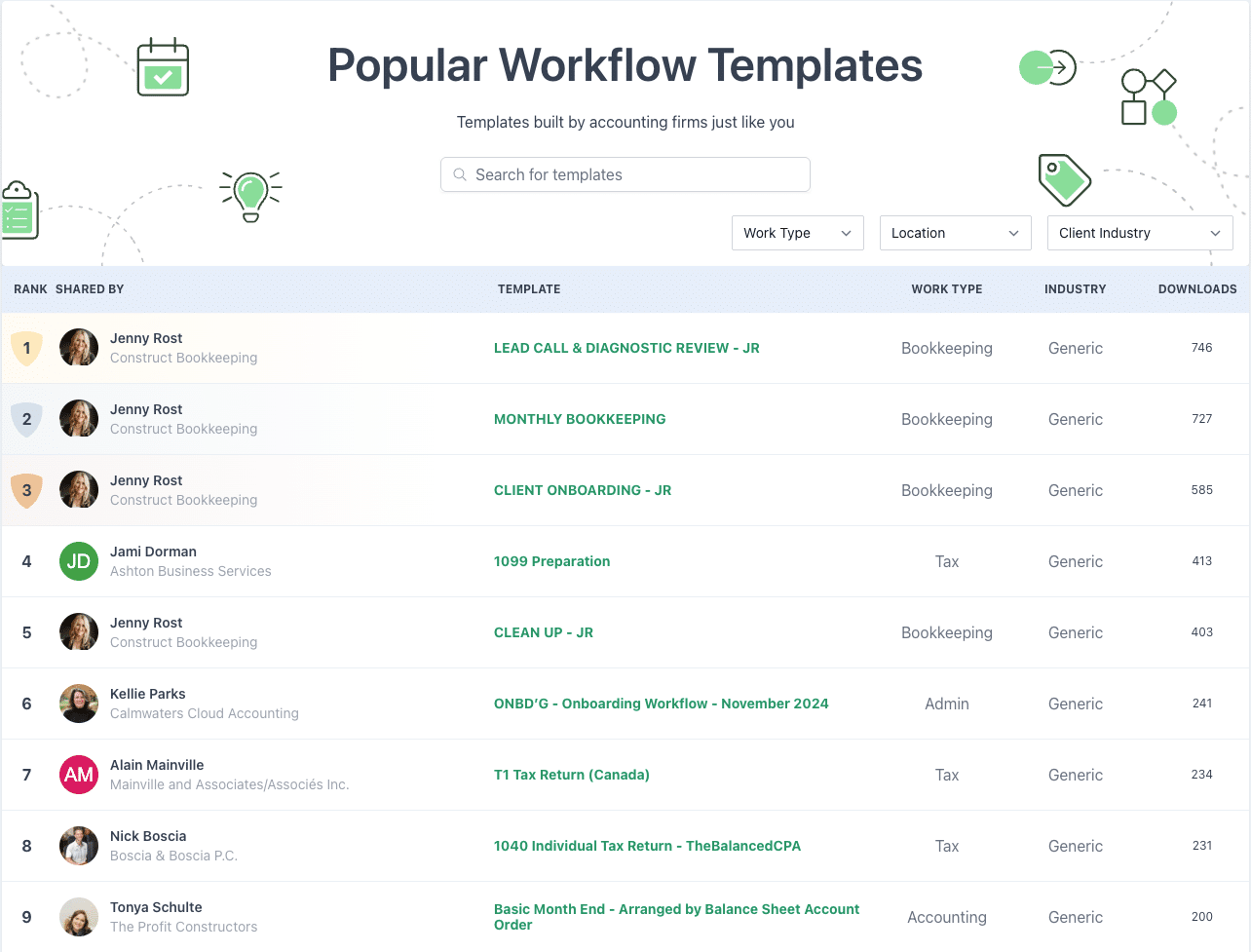
Firms that standardise their accounting processes onboard new team members faster, make fewer errors, and hit deadlines more consistently. The opposite is also true. When every staff member does the same work slightly differently, you multiply risk. If you don’t want to build from scratch, Financial Cents has a library of free accounting workflow templates you can clone and adapt.
2. Assign a Single Owner to Every Task
Every recurring task needs one named owner. In Financial Cents, you can assign tasks and sub-tasks to specific team members, so there’s never ambiguity about who’s responsible for reviewing tax returns, who’s reviewing the payroll run, and who’s sending the monthly package to the client. Ownership is visible on the dashboard, which means accountability is the default when building out your accounting or bookkeeping workflow.
3. Set Internal Deadlines, Not Just Client Deadlines
Client deadlines tell you when work has to be delivered. Internal deadlines tell you when work has to be done to hit that delivery comfortably. These are two different things, and firms that only track the first are always working in a panic.
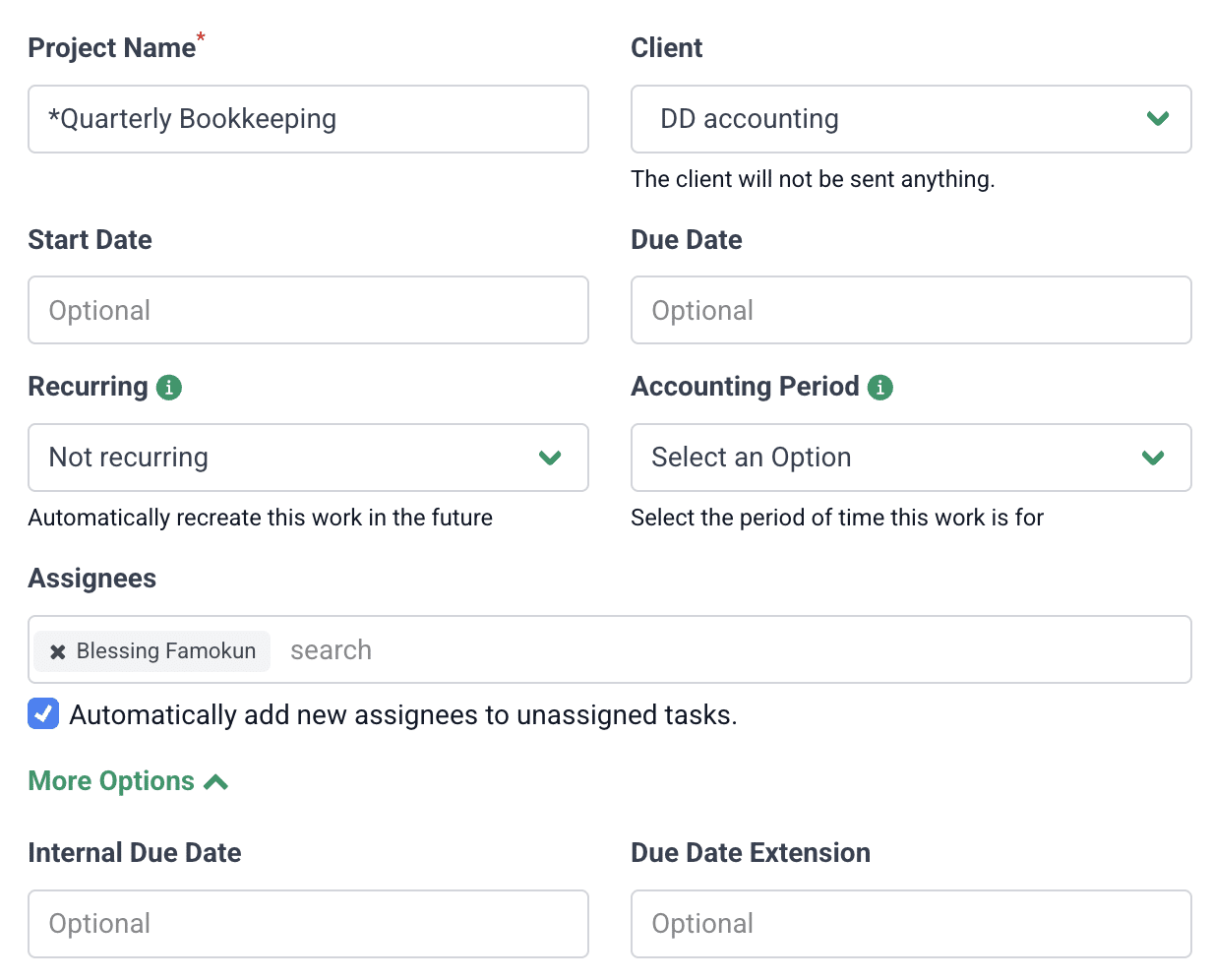
Build internal due dates into every recurring workflow, one for when the task should start, one for when it should be handed to review, and one for the final send. Sarah Landrum, Office Manager at Ascension CPA, saw the difference once her team moved to Financial Cents practice management. The way due dates are set up, she said, “helps us save time and keeps the team more accountable.” When due dates need to be updated or changed, dependent dates adjust automatically, so you’re not spending the afternoon manually pushing ten due dates down the line.
4. Use Software That Auto-Recreates Recurring Work
If your accounting workflow software can’t recreate recurring tasks on its own, you’re not managing recurring work; you’re re-entering it.
Dedicated accounting task management software removes that overhead entirely. You set up the recurrence once (monthly on the 5th, quarterly after the close, annually in January), and the system rolls the work forward for you, every cycle, without anyone having to remember to kick it off.
5. Use a Centralised Dashboard for Real-Time Visibility
If your only way of knowing where work stands is to Slack someone or open a spreadsheet, you’re already behind. You need a single dashboard that shows, in real time, what’s in progress, what’s overdue, what’s waiting on a client, and what’s done.
The time savings from this alone are significant. According to our 2025 report, 22.9% of firms used to spend 6 to 10 hours a week just reviewing and updating work status. After adopting automation and a centralised dashboard, only 6.2% still did. That’s hours back in your week, for every team member.
7. Automate Client Reminders for Document Collection
Chasing clients for documents is one of the biggest workflow bottlenecks in this industry. 64% of firms flagged it as a top challenge in our report, which is also why client request reminders are the most used automation inside Financial Cents.
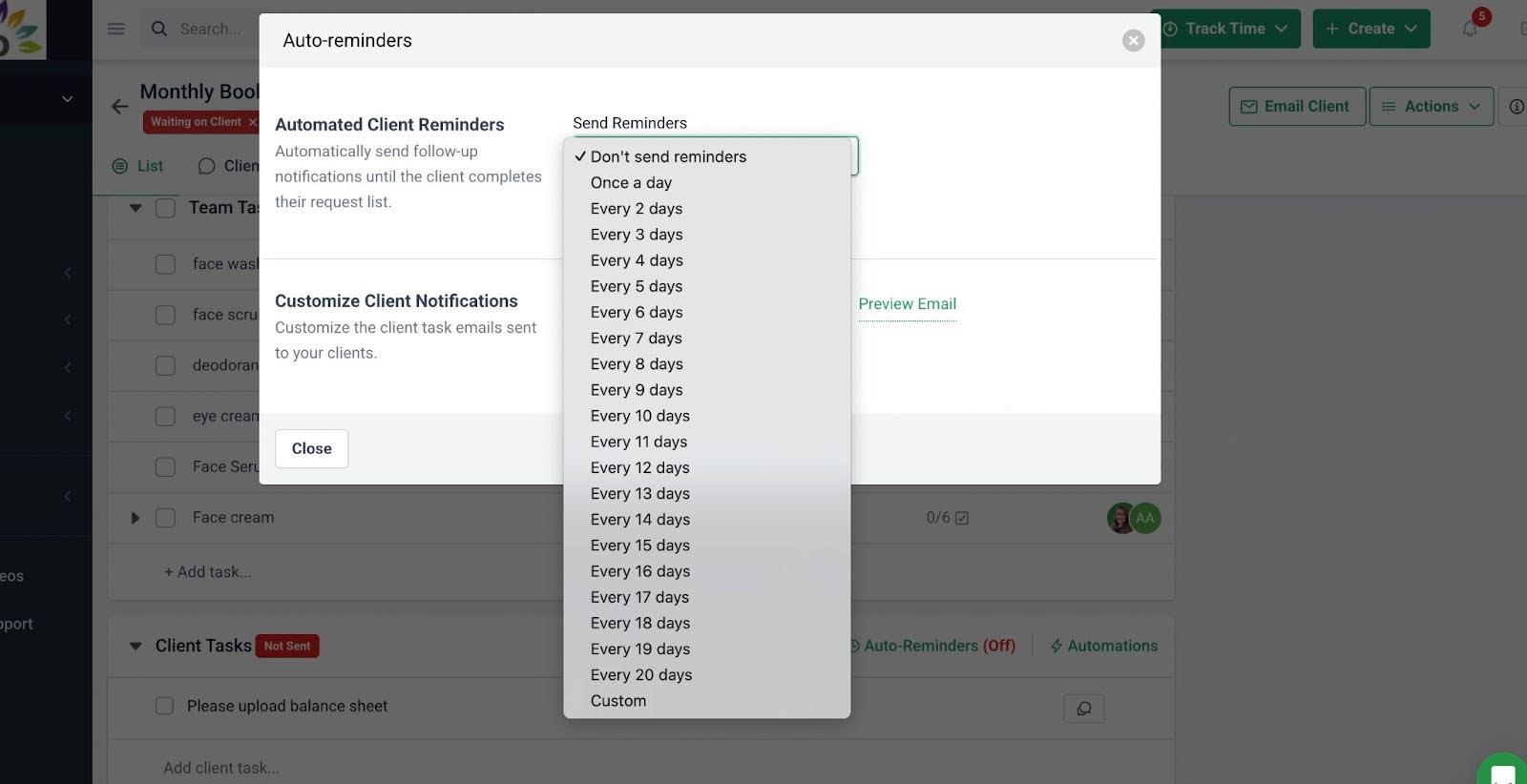
Set it up once per client, and the system takes it from there. Monthly reminders go out on a fixed date. Overdue nudges fire automatically.
Arta, an administrator at Controller4Hire, put it well: with automated recurring reminders, “the documents will magically appear every month when you’re ready to start your work.” That’s what you want. Documents are showing up on schedule, so the real work can actually start on time.
8. Create Client-Specific Task Variations (Don’t Use One-Size Templates)
A single template rarely fits every client. A restaurant client’s monthly bookkeeping has different moving parts from a SaaS client’s. A non-profit has different compliance steps from a sole proprietor. If you force everyone into one generic template, you’ll either over-deliver on clients who don’t need all of it, or under-serve clients who need more.
In Financial Cents, you can clone and modify templates for specific client groups, by industry, by service tier, by entity type, by anything that matters to how the work actually gets done. You’re not starting from zero, and you’re not forcing the wrong template onto the wrong client.
9. Review and Refine Recurring Workflows Regularly
Your recurring workflows aren’t build-once, forget-forever. A template that worked brilliantly 18 months ago is probably 20% out of date right now, and that 20% is where errors creep in.
Block time every quarter to review your templates. What’s outdated? What step is your team consistently skipping or working around (usually a sign it’s unnecessary)? What’s been added informally that should be formalised? Small refinements add up to a system that actually reflects how your firm works today, not how it worked two years ago.
10. Track Capacity Before You Add Recurring Clients
Every recurring client you onboard is a permanent load on your team. Firms often get into trouble when they say yes to new clients without knowing what their team is already carrying.
Before you sign the next monthly bookkeeping engagement, look at your numbers. How many hours of recurring work does each team member already hold? Where are the pinch points in the month? Financial Cent’s capacity management feature is how you protect the work you have already committed to. If your team is maxed, the answer isn’t another client at current pricing. It’s better pricing, or a new hire, or a ‘not right now.’
How Financial Cents Helps Firms Manage Recurring Tasks
Most tools you’ll look at were built to manage generic projects. Financial Cents wasn’t. It was built specifically for the way accounting and bookkeeping firms work, which means recurring tasks aren’t an afterthought. Here’s how it handles the parts of recurring work that accounting firms struggle with most.
1. Recurring Projects
You set up a recurring project once, choose the frequency (monthly, quarterly, annually, or a custom schedule), and the system rolls the work forward automatically every cycle.
2. Workflow Templates
Financial Cents gives you a full library of workflow templates you can clone and plug straight into your recurring projects, covering monthly bookkeeping, payroll, quarterly reviews, year-end work, and more. You can also build your own from scratch and save them for reuse, so every team member runs the same process the same way, every time.
3. Task Assignment and Ownership
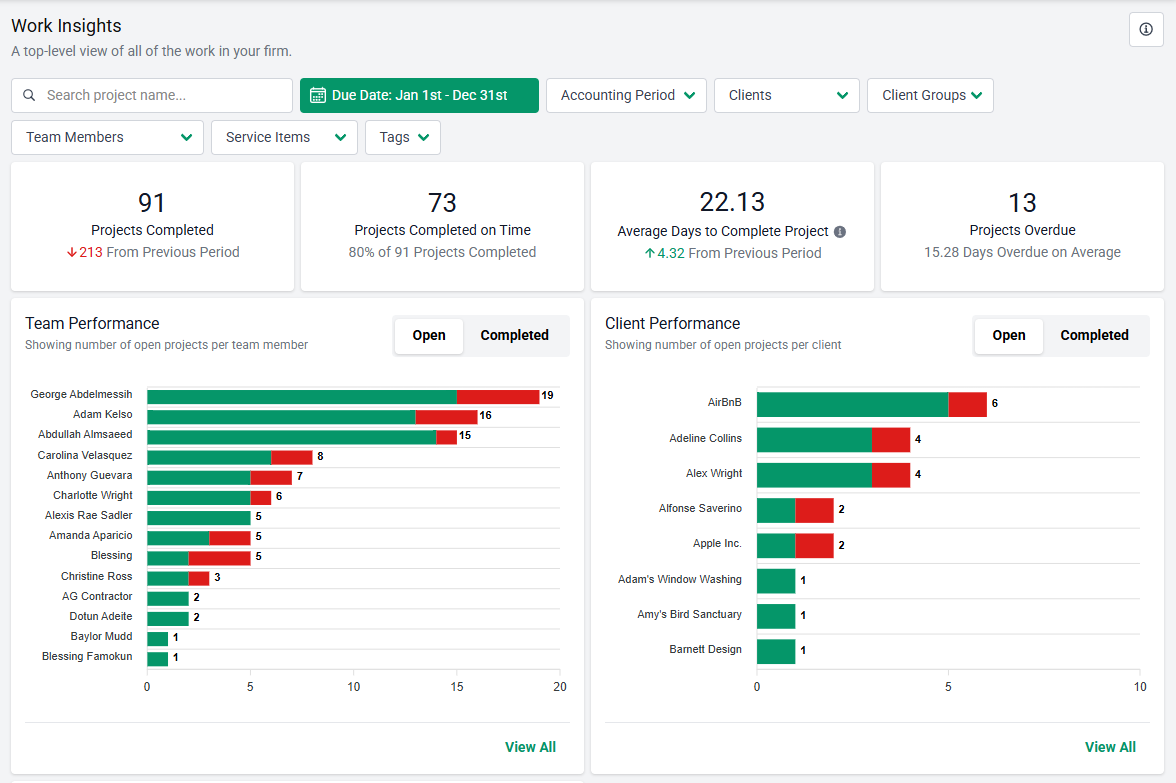
Every task and sub-task can be assigned to a specific team member. Ownership is explicit on the dashboard, which means when something is running late, you know exactly who’s responsible. At the end of a fixed period, you can also track how quickly and efficiently those tasks were completed.
4. Client Portal and Automated Reminders
The passwordless client portal takes the most draining part of recurring work off your plate: chasing clients for documents every single month. You set up the request list once, and Financial Cents sends it out on a schedule, with automated reminders firing until the client uploads what you need.
5. Dashboard Visibility
A centralised dashboard shows everything at once. What’s in progress, what’s overdue, what’s waiting on a client, what’s ready for review, and what’s done. You stop finding out about missed deadlines from your clients, and start catching things while there’s still time to fix them.
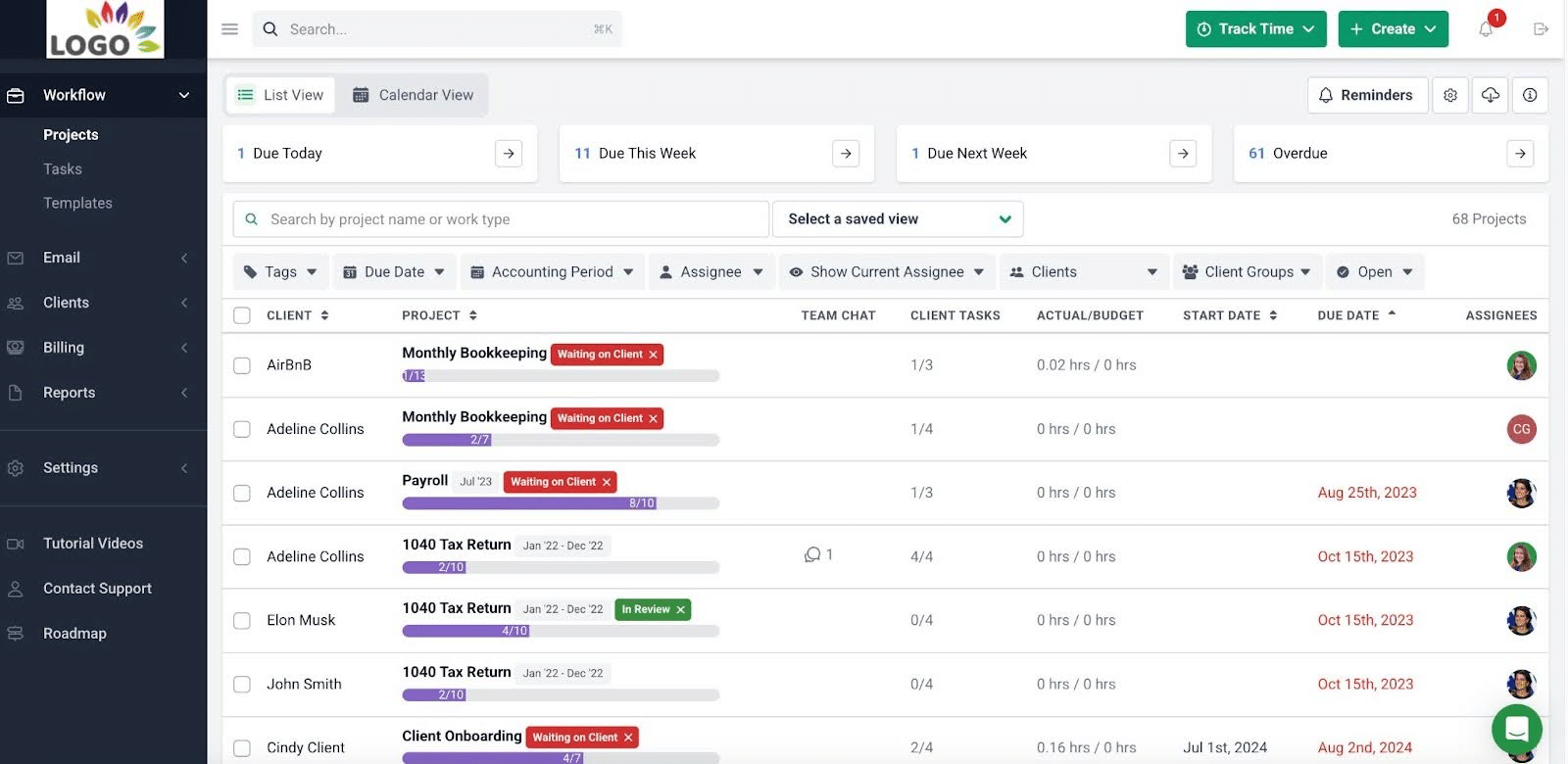
6. Due Date Tracking
Internal due dates keep the team accountable for every recurring task. When one date shifts, dependent dates adjust automatically, so you’re not manually pushing ten deadlines down the line whenever a client delays or a task runs over.
Kellie Parks, Founder of Calmwaters Cloud Accounting, sums up why the combination works. In Financial Cents, she said, “tasks are automatically recurring, but there are due dates on them as well.” Recurrence and accountability living in the same place, inside the same tool, is what keeps recurring work moving without constant intervention from you.
Conclusion
Recurring task management is where accounting and bookkeeping firms either build momentum or quietly lose it. They’re the foundation of your firm’s revenue, and most client engagements are built around them, which means they deserve a dedicated system rather than improvised management across spreadsheets, sticky notes, and memory.
Build a standardised workflow template for each service type, and use accounting workflow software that auto-recreates recurring work on a schedule. Everything else in this article compounds off those two moves.
Again, you don’t have to do any of this all at once. Start with a task audit, build one template, roll it out for one service line, and expand from there. Firms win by implementing incrementally, not by rebuilding everything in a weekend.
If you’re ready to stop duplicating tasks every month and start running recurring work on autopilot, start a free trial of Financial Cents. It’s accounting practice management software built for firms like yours, with recurring projects, templates, client automation, and dashboard visibility already in the box.
FAQs
Accounting task management is the system your firm uses to track, assign, and complete work across every client and every service line. It covers everything from who owns a task, when it’s due, where it stands right now, and whether it’s been delivered on time.
Recurring accounting task management is how your firm handles the work that repeats on a schedule, monthly closes, payroll runs, quarterly filings, year-end work, across every client, every cycle, without anyone having to manually kick it off each time.
A recurring task is a single unit of work that repeats, like a weekly payroll approval. A recurring project is a full workflow of multiple tasks that repeat together, like a monthly bookkeeping close. Most firms need both.
A small firm with 30 to 50 monthly bookkeeping clients typically runs 150 to 300+ recurring tasks a month, before quarterly and annual work is added. Once you pass a handful of clients, manual tracking stops scaling.
A spreadsheet can work for a solo practitioner with a small book. It won’t auto-recreate tasks, send client reminders, or show real-time status, so most firms move to accounting workflow software once they cross 10 to 15 recurring clients.
Clone the master template and modify it for that specific client, rather than editing the template for everyone. Tools like Financial Cents let you apply client-specific variations without affecting the rest of your book.
A chronically late task is usually a signal, not a discipline problem. Check three things: is the deadline realistic, is it waiting on a slow client (an automated reminder can fix that), and is it assigned to the right person with the right inputs. Fix the root cause.
Share this article:



