
Best for firm owners who want to:
-
Firm owners and managers dealing with disorganized files and client communication.
-
Accounting, bookkeeping, and tax teams struggling with information silos and missed deadlines.
-
Accounting firm owners looking to reduce the time spent on administrative, non-billable work.
Information silos are most common when an accounting team uses multiple tools to manage the different aspects of their firm—like documents, client emails, and workflows.
This can be the reason your staff:
- Search through email chains for client messages.
- Waste time finding the latest document version.
- Struggle to see the most up-to-date information on client projects.
Financial Cents’ all-in-one practice management features provide a central base for your client data, work information, and team updates, making it easy for team members to find all project resources in one or two clicks.
Here’s how to achieve the same in your firm 👇
Step-by-Step Guide:
Step 1: Centralize Client Communication with Client Chat
Accounting firms like yours use Financial Cents’ built-in Client Chat and email integration to keep all client communications in one place.
Here’s how they do it: 👇
Step 2: Organize Client and Project Files in One Place
Financial Cents lets you store documents inside the project and within the client’s profile. Both locations serve slightly different purposes but have the same effects—clarity and findability.
See how they work here 👇
 Our major benefit from Financial Cents has been organization. We have full insight into what our team is working on. We can assign projects, create filters, and see what is assigned to each team member to help capacity management.”
Step 3: Improve Team Collaboration with Shared Workspaces
This step helps you keep all work-related conversations on the work or inside the client’s profile, giving every assignee perspective on what others have said and done on the project for reference.
This short video shows how:
Without these collaborative features, your team would have to depend on:
- Internal Emails: emails are prone to attacks and email collaboration exposes your team members to non-work-related emails that could distract them from work.
- Slack Messages: Slack’s numerous collaboration channels can be overwhelming to navigate. This can result in information overload, leading to important client work slipping through the cracks.
Step 4: Monitor Work Progress in Real Time
At the end of the day, you want to be sure your team members are making progress on the work that drives revenue and growth. This step helps you make sure of that.
See how accounting firms stay on top of project status and help their teams hit their deadlines in Financial Cents. 👇
Why Centralizing Work Information is a Game Changer
Centralizing work information and documents is crucial in that it:
- Eliminates scattered emails and missing files: If your firm relies on individual, disconnected email exchanges between your clients and team members, files and information will be lost in those inboxes.
Practice management software like Financial Cents pulls these emails into your workflow tool for all team members to access in a dedicated folder.
Combined with the client chat feature (which enables your client to communicate and exchange files with your team in the client portal), every team member can access client information and documents from anywhere and at any time. - Reduces time spent searching for client communication: Effective communication is continuous, but if your team can’t see what was last said to a client without drilling through email chains and calling on their colleagues, it’ll be difficult to build on previous conversations.
Your team will waste time unnecessarily, and the delay in response will frustrate your clients.
By keeping an audit trail of client conversations in email and the client portal, Financial Cents, and other similar tools, centralize your client communication, enabling anyone in your team to provide client updates where necessary at a moment’s notice.
- Enhances team collaboration and accountability: Centralization provides access to the same set of information (and versions of documents). This keeps all team members on the same page, facilitating quality and consistent client experiences.
- Ensures staff can onboard quickly and work efficiently: A central information and communication system can be the difference between a smooth client onboarding and one where clients will have to provide the same documents and answers over and over again.
A tool that shows your staff what has been said and done for a client will help them know how to take the onboarding process to the next level more quickly. This results in faster client onboarding and satisfaction.
I would dig through them to look for certain pieces of paper or files. That is why I started using Financial Cents to track information and due dates so I don’t miss deadlines.”
Put Work Info and Docs at Your Team’s Fingertips with Financial Cents
Financial Cents stores your work resources in one place to aid productivity at scale, using features like:
- Document Management System: client documents are organized into folders for ease of access. This feature includes the Canadian Data Storage solution that keeps firms in Canada compliant with relevant data privacy and residency regulations.
- Client Management System: the complete record of each client, including their contact details, secure vault (for sensitive info like usernames, passwords, credit card, etc.), billing information, and custom fields (like EIN, SSN, birthdays).
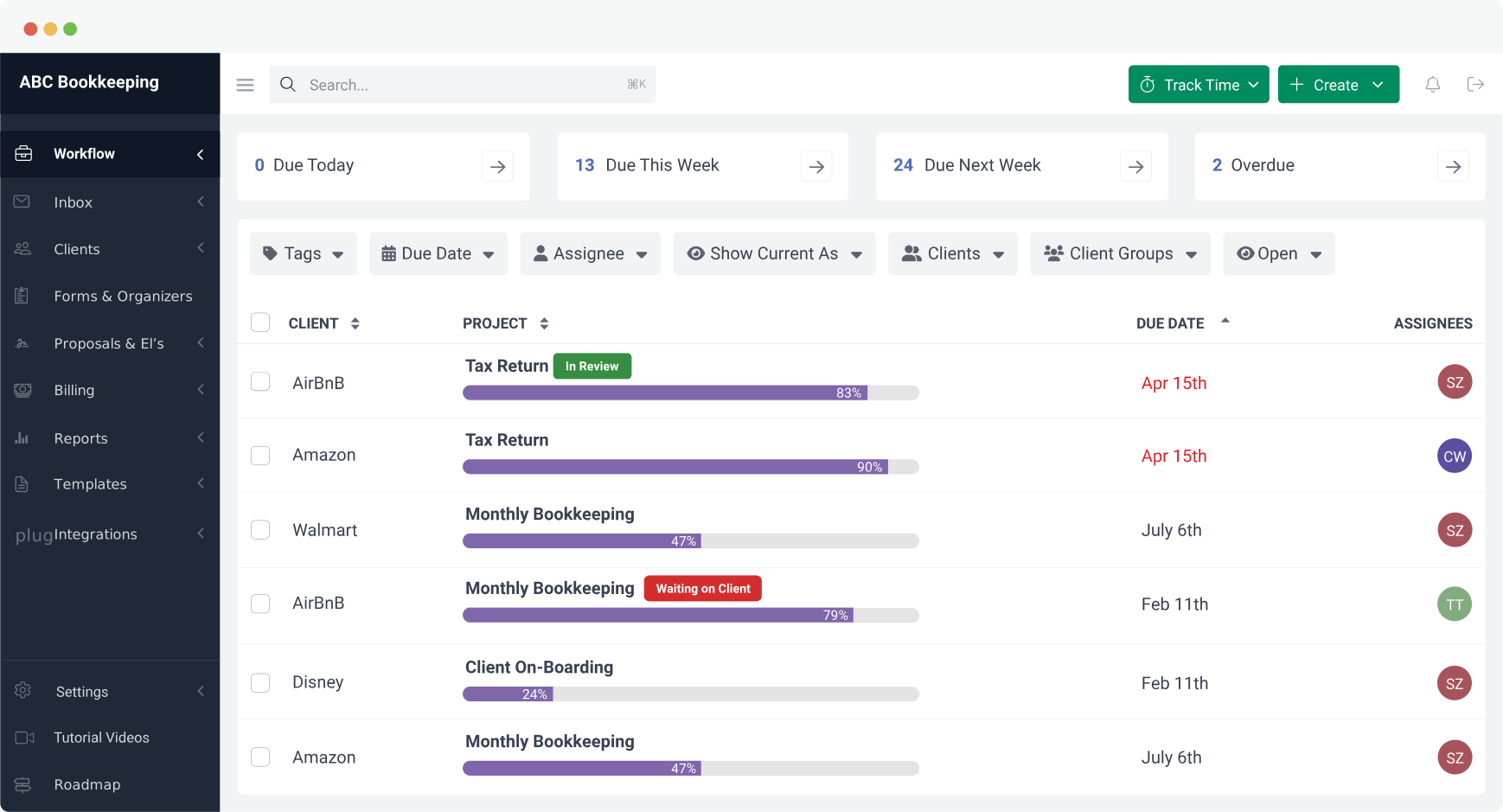
- Workflow Dashboard: all projects in your firm together with their status, assignees, and due dates to know where each client’s work stands at a glance.
This comprehensive view of your clients makes their files, information, and projects accessible and actionable. This gives your team more time to focus on delivering better results and building stronger client relationships.
Using separate applications for these functions leads to data duplication, retrieval challenges, and a waste of productive hours.
Start saving time now with our 14-day free trial.









Many of the other tools are poor at managing updates and bugs. Some use subcontracted developers, providing real client data samples. Others have suffered breaches without proper notifications.
Of the pre-built systems out there, I do think Financial Cents has a solid offering.
One of my top goals is to make the process easier for clients. Glad I made the switch!
Many of the other tools are poor at managing updates and bugs. Some use subcontracted developers, providing real client data samples. Others have suffered breaches without proper notifications.
Of the pre-built systems out there, I do think Financial Cents has a solid offering.
One of my top goals is to make the process easier for clients. Glad I made the switch!
If you’re not using this feature, I highly recommend it! Remembering to follow up with clients can be a serious bottleneck and I love how this solved that problem!
If you’re not using this feature, I highly recommend it! Remembering to follow up with clients can be a serious bottleneck and I love how this solved that problem!