

Just because your firm can pay the software subscription price doesn’t mean it can afford the long-term costs of using the platform. Add-on costs, still one of the biggest pricing challenges in 2026, can increase the total cost of ownership far beyond your expectations.
In this case, Karbon’s per-user price is only a part of the total costs. Implementation fees, usage-based charges, premium features, and E-signature credits can add thousands of dollars to a firm’s annual spend.
Karbon has done a good job of publicizing its pricing information, but getting a clear sense of the overall costs for your firm can take a fair bit of calculations.
Meanwhile, the 2026 Bookkeeping Firm Tech Stack Report shows that managing capacity and integrating cloud-native systems are now the top operational priorities for growing firms. Yet, choosing the wrong tier can turn your software upgrade into a massive budgetary drain.
This guide explains Karbon pricing plans in detail, including what each tier costs, which features are included, and how much firms of various sizes can expect to pay, so you can determine whether the expected benefits justify the expense.
TL;DR
- Karbon is a premium accounting practice management platform designed primarily for growing and established accounting, bookkeeping, and tax firms.
- Pricing plans are $59/month per user (Team) and $89/month per user (Business) when billed annually. Enterprise pricing is custom.
- Firms evaluating Karbon should focus on the Business plan, as it includes many of the automation and workflow features that growing firms need.
- Costs scale directly with team size. A 5-person firm on Business pays $5,340/year, while a 10-person firm pays $10,680/year before add-ons.
- Additional costs significantly increase your total spend, including Email Insights, eSignature credits, implementation services, training, coaching, and support plans.
- Karbon is often worth the investment for firms with 10+ team members and complex workflows, but smaller firms may find the cost difficult to justify.
- If you’re a solo accountant or a firm with fewer than 10 employees, it’s worth comparing alternatives like Financial Cents before committing.
Quick Overview: What is Karbon Used For?
Karbon is a cloud-based practice management platform for accounting, bookkeeping, and tax firms.
It combines workflow management, task tracking, team collaboration, client communication, capacity planning, and reporting into a single system to save firms the stress of managing work across spreadsheets, email inboxes, project management tools, and separate communication platforms.
Karbon’s value shines better in growing and established firms where work is coordinated across several accountants, bookkeepers, tax professionals, managers, and partners. It provides the much-needed visibility into who is doing what, which work is due, and where bottlenecks are developing.
Karbon consistently ranks among the top-rated practice management solutions in its category on software review sites like G2, which is not surprising. Its depth of functionality and focus on operational efficiency position it as the premium or “enterprise-oriented” option within the accounting software market.
This makes it especially important to understand its final cost before committing your time and resources.
Karbon Pricing Plans: At a Glance
Karbon uses three pricing tiers for firms at different stages of growth. The first two plans use straightforward per-user pricing, while the Enterprise plan requires a custom quote. Meanwhile, the Business plan requires a minimum of three (3) users.
- Team: $59/month per user (when paid annually) Or $79/month per user (when paid monthly)
- Business: $89/month per user (when paid annually) Or $99/month per user (when paid monthly)
- Enterprise: Custom Pricing
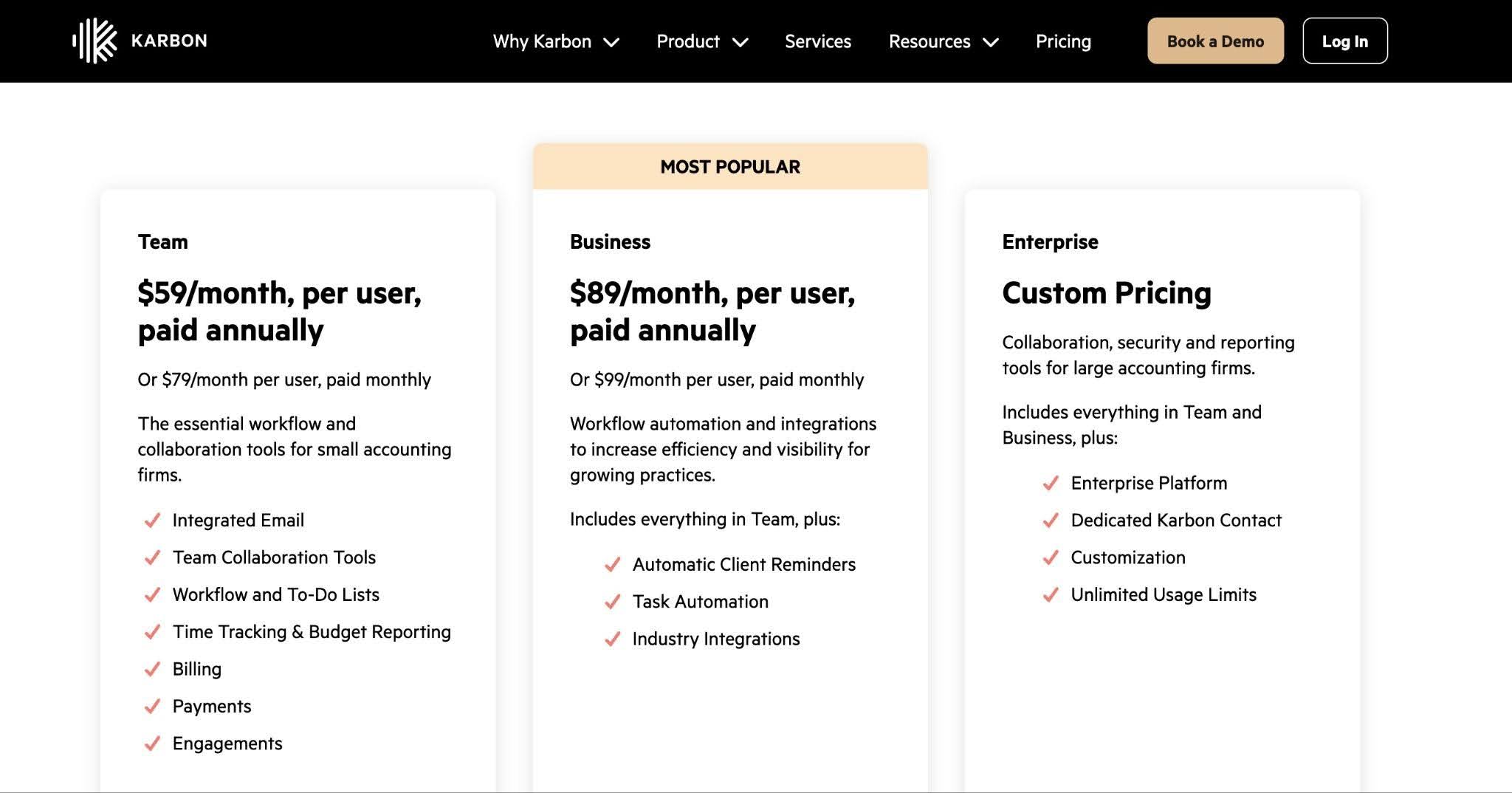
Source: Karbon’s pricing page
Karbon Team Plan: Features, Limits & Who It’s For
At $59.month per user, the Team plan is Karbon’s entry-level offering. It provides the core functionality accounting firms need to organize work, manage recurring accounting processes, and ensure visibility across client engagements.
The Team plan represents a significant operational upgrade for firms moving away from spreadsheets, email-based task management, or generic project management tools.
However, it is a stripped-down foundation and is hardly a long-term solution for growing firms looking to scale their efficiency levels.
What’s included in the Team Plan
The team plan provides access to Karbon’s core features for communication and basic task management, including:
- The Triage Inbox: A two-way integration with Microsoft 365 and Google Workspace that pulls emails into a shared space.
- Client Timelines: A shared view of historical communication and internal notes associated with each client contact.
- Kanban and List Views: Visual dashboards that let you track active engagements as they move through the stages.
- Team Collaboration: The ability to comment and tag team members directly inside client emails or work cards in one central location.
- Time Tracking & Budget Reporting: Built-in timers and auto-suggested time entries that tie directly to active client jobs.
- Billing & Payments: An integrated invoicing tool that converts tracked time or fixed-fee milestones into branded invoices.
- Engagements: A proposal builder that defines service scopes and sets up payment collection.
- Basic Client Portal Functionality: A secure client communication environment where clients can upload requested tax files and view outstanding invoices.
- Document Management: A central document hub that allows teams to organize, search, and store files with the relevant tasks.
- Core Ecosystem Integrations: Two-way data syncs with major cloud accounting platforms like QuickBooks Online and Xero.
Limits of the Team Plan
The Team plan lacks some of the more advanced capabilities that larger and fast-growing firms rely on to manage multiple service lines, large volumes of recurring work, and staff coordination.
Common limitations include:
- Fewer automation capabilities
- More limited workflow customization
- Reduced capacity planning functionality
- Less advanced reporting and analytics
- More limited integration options compared to higher tiers
- 40 Work Templates (Firms in the Team plan can only use a maximum of 40 templates for client work)
- A maximum of 10 contact types (Firms are limited to 10 client categories, such as clients, prospects, supplies, etc.).
- Workflow Statuses are limited to 35
- Task Automations are very basic
- User Permissions/Role Management is restricted
- Stripped-Down Analytics
What’s not included
Karbon’s Team plan does not currently include any of the following:
- Automatic Client Reminders
- Tasklis Automators
- Full Industry Integrations
- User Permissions and Role Management
- Client Groups
- Karbon API Access
Since Karbon could update its packaging anytime, it’s worth confirming the current feature mix before making a purchase decision.
| Pros | Cons |
|---|---|
| More affordable entry point to Karbon | Lacks the automation features that deliver the biggest time savings for most growing firms |
| Good for getting basic workflows organized | Usage limits can feel restrictive as the client base grows |
| Full access to core document and billing tools | Many firms find they need to upgrade to Business almost immediately |
| Scales better than many entry-level solutions | Less operational insight |
Who Is the Team Plan Best For?
For firms with straightforward workflows, like those moving from spreadsheets or manual workflows. These firms primarily need structured task and workflow management without immediately investing in higher-tier offerings. It works even better when the firm does not intend to scale its headcount or service offerings rapidly.
For growing firms keen on efficiency in their accounting firm, the Business plan is the de facto starting point because some of the features the Team plan lacks (such as task automation) are crucial to their operations.
Karbon Business Plan: Features, Limits & Who It’s For
The Business Plan is Karbon’s most popular plan. It costs $89/month per user when billed annually and is designed for firms optimizing for improved efficiency across increasingly complex operations and better visibility into capacity.
It builds directly on the Team Plan by adding the automation and integration capabilities that most growing accounting firms need to scale efficiently. The Business Plan is where many firms experience the productivity gains that justify Karbon’s premium positioning.
The Business Plan is where the per-firm price becomes clearer. The value proposition either justifies the investment or prompts firms to look at more affordable options.
Here’s how costs change for the firms using the Business Plan:
| Team Size | Annual plan (Monthly cost) | Annual Total |
|---|---|---|
| 5 Users | $445/month | $5,340/year |
| 10 Users | $890/month | $10,680/year |
| 20 Users | $1,780/month | $21,360/year |
| 30 Users | $2,670/month | $32,040/year |
What’s included
The Business plan includes everything in the Team plan, plus:
- Expanded Usage Caps: This plan allows you to use up to 75 workflow templates.
- Automated Client Reminders: Ability to build client request checklists into your workflow templates and schedule reminder emails automatically.
- Advanced Workflow Management: A multi-layered tool that separates master templates from active engagements to allow managers to adjust individual client project sequences where necessary.
- Enhanced Workflow Automation: A logic-driven workflow system that uses rules to trigger immediate action.
- Capacity Planning & Workload Management: A centralized dashboard that weighs individual employee weekly hour limits against planned and unplanned job budgets.
- Time and Budget Tracking: Allows your firm to track time directly against active jobs, monitor staff utilization, and generate detailed “Budget vs. Actual” variance reports.
- Advanced user permissions and access control: Role-based permissions that determine which information and features each employee can access.
- Greater Visibility into Work Progress: Real-time dashboards and reporting that help managers monitor work status, identify overdue tasks, and track workload distribution.
- Additional Integrations: Access to more integration options that help connect Karbon with other software the firm uses.
- Priority Support: Faster access to customer support and implementation guidance compared to lower-tier plans.
Limits
The Business Plan is still limited by:
- 75 Work Templates (If your firm needs more than 75, you will have to upgrade your plan)
- 25 Contact Types (You can’t organize your customer database by more than 25 categories)
- Workflow Statuses: 50
- Work Types: 45
- Contact Types: 25
- Limited custom reporting
What’s not included
A firm in the Business Plan cannot access:
- Advanced security features and SLAs
- Dedicated account management and premium support
- Enterprise-grade customization and data governance tools
- Custom Webhooks or Direct API Access
- No Snowflake BI Integration
For most small and mid-sized firms, these limitations are not deal-breakers. However, larger organizations with highly customized processes will eventually outgrow the plan.
| Pros | Cons |
|---|---|
| A clearer understanding of workloads, deadlines, capacity, and team performance. | Firms with poorly defined workflows may not fully benefit from their advanced capabilities. |
| Better suited for growing firms than entry-level practice management systems. | Limits on templates and contacts can still constrain faster-growing firms |
| Delivers the automation and reminders that drive time savings | Lacks some advanced analytics, and customizations are reserved for Enterprise |
| Most popular plan, meaning robust community knowledge and best practices | Electronic signatures still require purchasing separate transactional credit bundles |
Best for
It is particularly powerful for firm owners who employ a multi-layered team structure, using an in-house management layer to oversee workflow pipelines executed by a high-volume offshore partner.
The automation rules keep work moving smoothly across time zones, while the built-in time and budget tracking provide owners with the data they need to monitor employee utilization and accurately adjust client pricing based on profit margins.
Karbon Enterprise Plan: What’s Included & How to Get Pricing
Karbon doesn’t provide a uniform price for the enterprise plan because of the unique needs of the firms using it. Enterprise users have to speak with Karbon’s sales team to get a quote that matches their specific needs and operational requirements.
This tier provides the additional controls, structural stability, and workflow customization required to keep firms with dozens or hundreds of employees, multiple offices, and strict compliance requirements running smoothly.
What’s Included
The Enterprise plan adds the following features to everything in the Business plan:
- Unlimited Usage Limits: No caps on work templates, contact profiles, workflow statuses, or other resources.
- Enterprise Platform: Advanced customization, deeper workflow configuration, and scalability tools
- Dedicated Karbon Contact: Personalized account manager for ongoing support and success.
- Advanced Security & Compliance: Enhanced features, SLAs, and enterprise-grade controls
- Customization & Integrations: Bespoke setups, fully managed data imports, and deeper API/custom development options
- Dedicated Infrastructure: Option for dedicated data hosting in local Azure cloud centers and bulk storage for all historical firm documents, time entries, and communication logs.
- Snowflake BI & Advanced Data Export: Access to deep, custom reporting engines and data extracts that allow you to plug your practice management metrics directly into external Business Intelligence (BI) tools.
Pricing
Book a demo with Karbon to discuss team size and operational requirements, review implementation needs and desired features, and receive a customized pricing proposal.
Its pricing is tailored to each firm based on the number of users, firm size, required functionality, support requirements, implementation complexity, and contract length.
Bear in mind that the Enterprise plan does not necessarily include every available feature or service. Certain capabilities, implementation services, or premium offerings may still be offered as add-ons. An example is the Annual Service Plan ($1,499/year for quarterly reviews and extra assistance).
| Pros | Cons |
|---|---|
| Access to Karbon’s most advanced capabilities and service options. | No public pricing transparency |
| Dedicated support resources | Enterprise deployment is a significant software investment. |
| Unlimited scalability for large operations | Does not automatically give access to all of Karbon’s features. |
| Personalized support and dedicated success resources | Many small and mid-sized practices won’t need the additional controls or customization. |
Best for
The Enterprise plan is best for large accounting, tax, or bookkeeping firms (50+ users) with complex workflows, high client volumes, strict compliance needs, or requirements for heavy customization and dedicated support.
The Hidden Costs: Add-Ons That Affect Your Total Bill
Many firm owners eventually realize that their final payment for Karbon is significantly higher than the advertised cost of the Team, Business, or Enterprise plan because of the following add-on costs.
- Email Insights
The Email Insights feature provides visibility that firms need to analyze communication patterns, client email activity, and team responsiveness, and is available for $10/month per user.
A 10-person firm that relies on email in its client service delivery will have to add $1,200/year to its bill to implement this feature across the team.
The Email Insight feature is available as a paid add-on for Team and Business plans, but is included in the Enterprise) plan.
- Custom Reporting
Karbon also offers custom reporting as an add-on for firms on the Team and Business Plans, and it costs 6,000 (One-time or annual, depending on scope).
This add-on gives these firms access to customized dashboards, specialized KPI tracking, department-specific analytics, and advanced management reporting without upgrading all the way to the Enterprise tier.
- E-Signature Credits
Karbon’s eSignature feature uses a credit-based system. Each e-signature request consumes one credit, while a KBA (knowledge-based authentication) request consumes two.
The e-signature bundles are sold in bundles that last for one year.

Source: Karbon’s pricing page
If you’re a tax firm sending 1,500 signature requests and 300 KBA requests annually, you’ll need 1,500 credits and 600 additional credits (a total of 2,100 credits) in a year. That amounts to another $1,400 besides the base price.
However, Karbon’s proposal and engagement letter feature does not require E-signature credits.
- Payment Processing
Karbon applies per-transaction fees to the payments sent through its built-in Billing & Payments feature:
- Standard Visa/Mastercard: 2.6% + $0.30
- Premium/International cards: 3.6% + $0.30
- American Express: 3.9% + $0.30
- ACH Direct Debit: 1% + $0.30 (capped at $5.00 per transaction)
That means if your firm processes $500,000 annually through standard credit cards, your processing fees could exceed $13,000 annually, even before transaction charges.
ACH payments are significantly more cost-effective for larger invoices due to the fee cap. Some firms route high-value monthly recurring retainer fees exclusively through ACH to protect their profit margins.
- Assisted API Enablement
Firms who need Karbon’s assistance in setting up their API endpoints will have to purchase Karbon’s assisted API Enablement for a one-time fee of $999.
Most small and mid-sized firms will appreciate this because it saves them the time and stress of dealing with technical setup requirements.
- Service Plan (Tech or Account Manager)
Karbon’s service plans offer additional support and guidance for teams at $1,499/year for the Tech Service Plan and Account Manager Service Plan.
This add-on gives you a dedicated technical specialist or an account manager assigned to your Team or Business account to help with guided data hygiene reviews to aid reporting and collaboration, bulk work assistance, and ongoing support for time & billing.
- Team Training
Karbon also offers a paid training service designed to improve adoption and team proficiency. This service includes live sessions for up to 12 team members on how to use Karbon’s key features. It is priced at $499 per team.
- Coaching
Karbon’s coaching service is for firms seeking more hands-on guidance to optimize their workflows and encourage adoption.
Karbon charges $499/hour for online sessions, $2,500/day, or $10,000/week for in-person consulting sessions.
What Do These Add-Ons Mean for Your Final Cost?
A common assumption is that a 10-person firm on the Business plan will simply pay:
10 users × $89/month = $890/month or $10,680 per year.
But in practice, that firm’s budget could easily include the following.
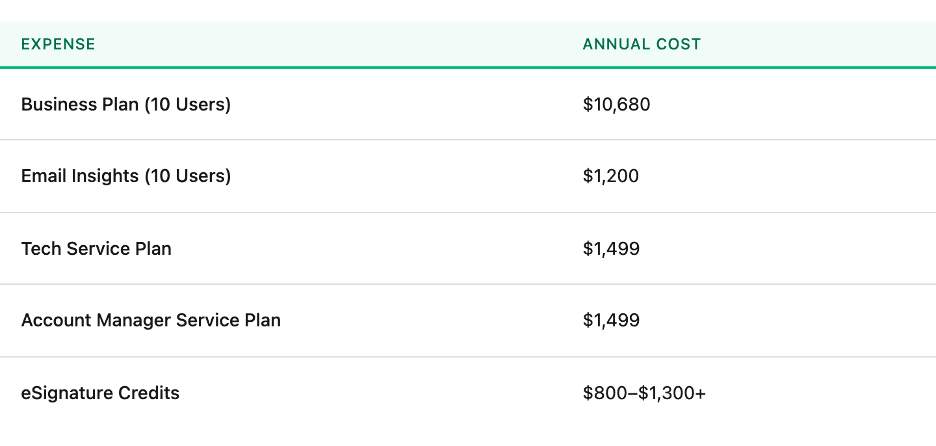
By the time you factor in the training and payment processing fees, a software budget that appeared to be around $11,000 annually has exceeded $15,000/year.
Real Cost Math: What Your Firm Actually Pays
To understand the true cost of ownership, you have to multiply those numbers by your headcount. This is what that looks like in an annual billing situation:
- 3-Person Firm (Team Plan): 3×$59×12=$2,124/year
- 3-Person Firm (Business Plan): 3×$89×12=$3,204/year
- 5-Person Firm (Team Plan): 5×$59×12=$3,540/year
- 5-Person Firm (Business Plan): 5×$89×12=$5,340/year
- 10-Person Firm (Business Plan): 10×$89×12=$10,680/year
- 15-Person Firm (Business Plan): 15×$89×12=$16,020/year
Going by these numbers, your baseline subscription cost sits at $5,340 for a 5-person firm on the Business plan. But you know that doesn’t represent your total credit card charge.
In reality, your total spend could be Subscription (5 Seats) + eSignature Bundle (500 Credits) + Assisted Setup & API Activation.
Total Spend: $5,340 + $450 + $999=$6,789
Compared with Alternatives (like Financial Cents)
Financial Cents pricing uses a different framework designed for small to mid-sized practices. It removes the enterprise price tag while maintaining core management workflows:
- Solo Plan: $19/month per user (for a single user looking for core tracking, an integrated client portal, and QuickBooks sync.
- Team Plan: $49/month per user (with native e-signatures and integrated email management).
- Scale Plan: $69/month per user (unlocks advanced task dependencies, automated client follow-ups, and profitability reporting).
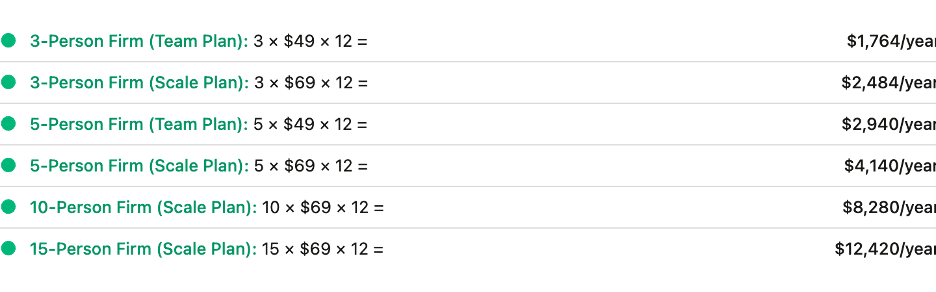
That means, opting for Financial Cents saves a 10-person team on the Scale plan $2,400 annually on base subscriptions alone (compared with Karbon’s Business plan).
This is more reason why software comparisons should be based on total annual cost, not just advertised per-user pricing. The addition of subscription fees, training, reporting, eSignatures, and support services increases the difference between platforms and makes decision-making easier.
Is Karbon Worth the Cost?
As you can already imagine, the amount of work the Karbon team has put into the product means that it must definitely be worth it for some firms. Knowing which type of firm it would be is the ultimate question.
Karbon’s value proposition is that it helps accounting firms coordinate work, communication, capacity, and workflows from a single system. According to the Karbon 2024 Firm Usage Research, firms using the platform save an average of $34,688 per employee, per year.
While this statistic comes from Karbon’s own customer research (and not an independently verified industry benchmark), that figure represents a significant operational improvement for such firms.
Actual results will vary based on size, procedures, adoption levels, and existing operational challenges.
Karbon’s PROs and Why It is Worth It
- Robust workflow and work management capabilities (worth it if you manage 10+ staff and need sophisticated workflow coordination)
Karbon’s workflow management, workload balancing, and capacity planning features are more valuable when work is being coordinated across multiple accountants, bookkeepers, managers, and partners. This is more valuable as your team size grows and visibility becomes harder.
- Strong email integration and collaboration tools (worth it if your firm relies heavily on email collaboration)
If you still conduct a large portion of your client communication through email, Karbon’s ability to connect emails directly to client work and create a shared communication history will reduce information silos and improve team coordination in your firm.
- Scales well for growing firms (worth it if your software budget already supports a $10,000+ annual investment)
A 10-person team on the Business plan spends approximately $10,680 annually before add-ons. This is more justifiable when you are growing, and operational efficiency and staff productivity become a priority.
● Designed specifically for accounting firms (Worth it if you need strong Xero or QuickBooks workflow integration)
Karbon is particularly attractive to firms operating heavily within the Xero and QuickBooks ecosystems.
CONs and Why You Should Consider Alternatives
- Many firms ultimately need a business plan to access the features they want most (Consider alternatives if you need automation, but can’t justify the Business Plan)
One of Karbon’s challenges is that the capabilities firms are most interested in, particularly around efficiency and operational management, are found in the Business tier.
If your budget doesn’t comfortably support that plan, it may be worth evaluating Karbon alternatives that offer more automation at a lower price point.
- Steeper learning curve than easy-to-use practice management platforms (Consider alternatives if your team struggles with adopting complex software)
If your team historically struggles with software rollouts, ease of use should be a major consideration in your evaluation process.
- No dedicated solo-practitioner pricing tier (Consider alternatives if you’re a solo accountant or a firm under five people)
First, Karbon does not offer a dedicated solo-practitioner plan. Second, many small firms find themselves paying for features and functionality they won’t fully use until their team grows.
- May provide more functionality than very small firms actually need (Consider alternatives if you’re still building your client base)
Early-stage firms benefit more from keeping software costs lean and processes simple. Investing several thousand dollars annually into a premium practice management platform will not generate sufficient returns when client volume is still relatively low.
For these firms, the challenge isn’t necessarily whether Karbon is good software. It’s whether they’re able to extract enough value from its advanced capabilities to justify the investment.
- Demo Request Required to Access a Free Trial of Karbon (Consider alternatives if you prefer a public self-service free trial)
The traditional free trial system allows you to access a product and test its capabilities for a limited time. Karbon does not allow that.
To see how Karbon works, you have to request a personalized walkthrough. Then, a product specialist assesses your team’s firm’s tech stack and challenges to show you exactly how Karbon fits your firm. After the demo, Karbon’s team will build a tailored sandbox environment for your team to test it.
A More Affordable Alternative for Small and Mid-sized Firms
Financial Cents’ pricing system offers a more affordable path to modern accounting practice management for firms that find the Karbon pricing system out of reach.
Financial Cents is designed for firms that want powerful workflow, client, and team management tools without the complexity of enterprise-grade platforms.
It matches Karbon’s key features, from workflow management to workflow automation, client portal, time tracking, billing, document management, proposal tool & engagement letters, and recurring workflow templates. And at significantly lower price points: $19/month for solo firm owners and $49/month per user for small teams.
The difference often comes down to simplicity and accessibility. Firm owners who migrate away from Karbon consistently cite feature fatigue and data silo frustrations as their primary triggers.
For example, Dawn Brolin, CPA, CFE, and founder of Powerful Accounting, Inc., moved her three-person firm away from Karbon to Financial Cents to manage, search, and request client data more seamlessly.
Dawn said, “I finally switched to Financial Cents out of the frustration of client data searchability. One of the key things was searching for information (like a client’s phone number), and I used this feature in Financial Cents recently.”
If you’re still evaluating your options, this YouTube video on choosing the best practice management software has a ton of valuable insights.
For a deeper analysis of how Karbon compares with Financial Cents, see this guide on Financial Cents vs Karbon for small accounting firms.
Who Should Choose Karbon in 2026?
Karbon can serve a firm of any size, but the Karbon pricing structure and feature packaging make it a much stronger fit for firms with larger teams and more complex operational needs.
Its high per-user prices mean costs will add up quickly as your firm grows. While the Team plan provides access to Karbon’s core workflow capabilities, many of the automation, reporting, and operational management features firms need are available only in the Business plan (and above).
What is more, additional costs for E-signatures, reporting, training, and support services can increase your total investment significantly.
For firms with 10 or more team members, complex workflows, and a need for deeper visibility into capacity and work management, those costs may be justified. For solo firm owners, newer firms, and many practices with fewer than 10 employees, the return on investment is harder to justify.
That’s why it is best to compare Karbon against other accounting practice management solutions before making a decision.
Financial Cents is one alternative that small and mid-sized firms looking for easy-to-use workflow, automation, client management, and team management features frequently consider.
See how Karbon compares against its other alternatives here, and if you’re ready to see how Financial Cents will work in your firm, click here to book a demo or try it for free for 14 days.
Frequently Asked Questions (FAQs)
For many growing firms, Business is the plan where firms realize the efficiency gains Karbon is known for.
Share this article:



