
![blog cover image for TaxDome Pricing Explained [2026]: Plans, Add-Ons, and What Firms Actually Pay](https://financial-cents.com/wp-content/uploads/2026/09/Taxdome-pricing-plans-and-addons.png)
At first glance, estimating your TaxDome bill looks like basic arithmetic: pick a plan, multiply the per-seat price by your team size, and you see what the software will cost your firm.
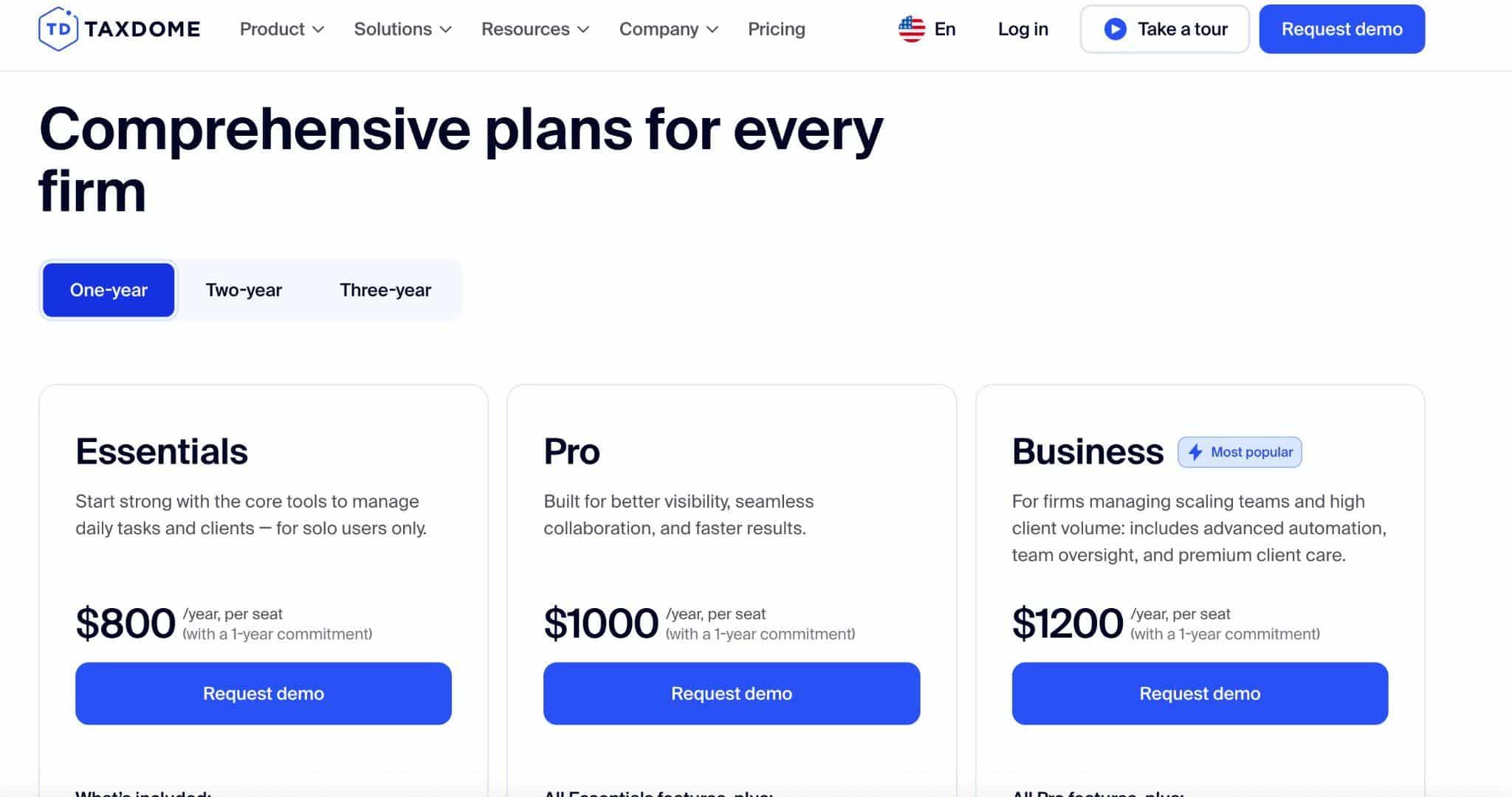
TaxDome’s pricing page makes that part easy. As of September 2026, it lists Essentials at $800, Pro at $1,000, and Business at $1,200 per seat per year on a one-year commitment. But those figures alone won’t tell you what your firm will actually spend.
The calculation gets more complicated once you factor in commitment length, seasonal staffing, usage-based charges, payment processing, and the work of migrating data, configuring workflows, training staff, and getting clients comfortable with a new system.
Two firms paying for the same platform can therefore end up with very different total costs.
This guide breaks down TaxDome’s 2026 plans, add-ons, seat and commitment terms, and potential costs at different firm sizes. It also compares TaxDome with alternatives so you can weigh not just what the software costs, but what you’re getting for that cost and how much flexibility you’re giving up to get it.
TL;DR
- TaxDome has three core plans: Essentials, Pro, and Business. Pricing is per seat, with different annualized rates for one, two, and three-year commitments.
- The three-year commitment has the lowest annualized rate: $700/year per seat for Essentials, $900/year for Pro, and $1,100/year for Business, with the corresponding one-year rates being $800, $1,000, and $1,200 a year per seat.
- Essentials is for solo practitioners. Pro and Business support multi-user firms, with higher tiers that add capabilities and per-seat costs.
- The annualized rate is not the same as the total commitment value. For example, a two-year Pro commitment at $950/year per seat represents $1,900 per seat for the full two-year commitment.
- Additional costs may apply depending on how your firm uses TaxDome. These include seasonal seats, usage charges, payment processing, taxes, implementation, migration, and other services or third-party costs.
- If you’re comparing TaxDome with other practice-management platforms, look beyond the per-seat price. Alternatives like Financial Cents and Karbon offer different approaches to pricing, workflow, client management, implementation, and firm size. The right comparison depends on the capabilities your firm will actually use and the commitment you’re comfortable making.
TaxDome Pricing at a Glance
TaxDome uses a seat-based pricing model, which allows firms to pay for users who need workspace access. The per-seat price decreases when a firm chooses a longer commitment term.
| Plan | 1-year price per seat/year | 2-year annualized price | 3-year annualized price | Who can buy it | Upfront billing | Key inclusions | Important limits |
|---|---|---|---|---|---|---|---|
| Essentials | $800 | $750 | $700 | Solo users only | Billed upfront | Core TaxDome tools for managing client work CRM, document storage, client portal & mobile app, e-signature, secure chat/email/SMS | Cannot add team members. No bookkeeping hub or IRS transcripts |
| Pro | $1,000 | $950 | $900 | Firms with multiple users | Billed upfront | Broader practice management, workflow, team collaboration, client portal, and automation capabilities | No stated limit on paid seats Seasonal/ad-hoc team members require a $100/month fee. |
| Business | $1,200 | $1,150 | $1,100 | Firms with multiple users | Billed upfront | Pro features plus additional business-level capabilities | No stated limit on paid seats Designed primarily for enterprise-scale firms Seasonal hires require an additional $500 per four months. |
Note: The prices in this guide are TaxDome’s published U.S. rates as of September 2026. TaxDome uses different pricing in Canada and other markets, so firms outside the U.S. should check the pricing available in their country before comparing costs.
Pricing as checked on September 24, 2026. Verify these figures and terms with TaxDome before purchasing, as pricing and commitment terms can change.
The two- and three-year figures shown are annualized prices, not the total cost of the commitment. For example, the $950 shown for Pro on a two-year commitment represents $950 per seat per year under that commitment. That equals $1,900 per seat over two years, so $1,900 will be the amount due at checkout.
TaxDome offers installment payment plans when your cumulative invoice exceeds $9,000.
How TaxDome Billing and Seat Pricing Work
TaxDome’s pricing comes down to three variables: the plan you choose, the number of seats you need, and the length of your commitment.
The first two are straightforward. Your plan determines which features you get, while your seat count determines how many users you are paying for. In general, each team member who needs TaxDome workspace access will require a seat.
Other important details about TaxDome billing and seat pricing include:
- Lower Annualized Rates for Two- and Three-Year Plans: The commitment term is the variable most likely to make the price you see on the pricing page more different from your initial expectation.
TaxDome offers one, two, and three-year commitments, with a lower annualized per-seat price for longer commitments:
- 1 year: highest annualized rate
- 2 years: lower annualized rate
- 3 years: lowest annualized rate
- The Trade-Off: The trade-off for the lower annualized rate is the rigidity of long-term commitment to TaxDome.
- Upfront Billing: TaxDome bills subscriptions upfront for the selected billing period. Confirm with the sales team whether your particular invoice qualifies for installment payment and how the payment schedule would work to understand the expected cash outlay.
Essentials is for Solo Users Only
If only one person needs TaxDome access in your firm, its Essentials plan provides enough core functionality at the lowest per-seat price.
The calculation changes when you hire someone who also needs access to it. Since Essentials is restricted to solo users, you’ll need to move to a plan that supports multiple users (i.e., the Pro plan). This makes a firm’s future hiring plan an important consideration when choosing a commitment term.
A solo practitioner who expects to remain solo may be comfortable choosing a longer commitment in the Essentials plan. If you expect to hire soon, compare the cost of starting with Essentials now and upgrading later with the cost and flexibility of starting on Pro from the beginning.
Prorated Upgrades
TaxDome supports prorated upgrades. If you need to add seats or move to a higher-tier plan midway into your subscription, the additional charge will be adjusted based on the timing of the upgrade. You won’t be required to pay the full annual subscription again.
The exact calculation depends on the nature of the change you’re making and the time remaining in the current subscription. To be safe, ask TaxDome to show you the prorated calculation before making a mid-term change, especially if you’re moving from Essentials to Pro or changing several seats at once.
Downgrading Seats or Plans
If you need to reduce your seat count or move to a lower plan, the reduction or downgrade will take effect on your next renewal. Before then, though, the seats must be unassigned. That’s a way of saying none of your team members are using those seats at the time of the downgrade.
In other words, if you purchase five Pro seats and your team reduces to two before the paid period ends, the three unused seats won’t generate a refund, because TaxDome subscriptions are non-refundable.
If you change your billing cycle, say from a three-year commitment to a one-year commitment, the downgrade will take effect after your current subscription runs out.
Renewal Timing
All full-time seats in TaxDome renew on the same date. Monthly seats renew after 30 days.
If you’re considering TaxDome, ask the sales team to clarify the following before you sign:
- When must I request changes before renewal?
- How much advance notice do I receive before renewal?
- Is my price protected for the full commitment?
TaxDome Plans Breakdown: Essentials vs Pro vs Business
The three TaxDome plans are designed to address the needs of accounting firms at different growth levels.
Source: Taxdome
Essentials
Price: $800/year per seat on a one-year commitment; $750 annualized on a two-year commitment; $700 annualized on a three-year commitment.
Best For: Solo practitioners who want TaxDome’s core practice-management and client-facing capabilities.
Essentials provides the fundamental tools a solo firm needs to manage client work, from proposals and workflow automation to payments, client relationship management, document collection, and E-signature.
The biggest limitation is team access. Essentials is restricted to solo users, so it’s not the plan to build around if multiple employees will eventually need their own TaxDome workspace access.
Important limits to check
- Activity feed history is limited to seven days.
- 24-hour support response time.
When should you upgrade?
The most obvious trigger is hiring someone who needs TaxDome workspace access. A solo practitioner might also choose Pro if they need capabilities that aren’t available on Essentials.
Pro
Price: $1,000 per seat on a one-year commitment; $950 per seat annualized on a two-year commitment; $900 per seat annualized on a three-year commitment.
Best For: Small and growing accounting, bookkeeping, and tax firms that need multiple users and visibility into how work is managed across the team.
Pro retains the core client-management functionality available in Essentials while adding capabilities that are more valuable when several people are working together. This includes roles and permissions, IRS transcript functionality, team collaboration, and additional reporting and Bookkeeping Hub connections.
Important limits to check
- Bookkeeping Hub connection is limited to 120
- Activity feed history is limited to 30 days
- Team chats are limited to 60 days
When should you upgrade?
Pro is the natural starting point for a multi-user firm. Consider Business when your firm’s volume or requirements move beyond Pro’s limits, especially if you need additional Bookkeeping Hub connections, longer chat history, higher-touch client service capabilities, or the support and customer success resources available at the Business level.
Business
Price: $1,200 per seat on a one-year commitment; $1,150 per seat annualized on a two-year commitment; $1,100 per seat annualized on a three-year commitment.
Best For: Larger or higher-volume firms that need additional client service, connectivity, staffing, historical record, and support capabilities.
Business builds on Pro with features that are more valuable for large and enterprise firms, including client care, unlimited Bookkeeping Hub connections, longer activity-feed and chat history, client-import assistance, seasonal seats, premium support with a stated 6-hour response time, business reviews, and Customer Success Manager availability.
Important limits to check
- Business’s eligibility requirements for Customer Success services
- Seasonal seat pricing and term requirements
- The specific activity and chat history periods included
- Any limits that still apply to particular features.
When should you upgrade?
Business is worth evaluating when your firm’s team size, client volume, connectivity requirements, client-service needs, or support expectations are more complex than what Pro provides.
TaxDome Add-Ons and Costs Outside the Subscription
Once you’ve calculated the core subscription, the next step is to identify the additional charges and expenses that may apply to your firm’s particular setup. Some of these costs are charged by TaxDome and others by third-party providers or consultants.
| Item | Included in which plan? | Published price | Usage trigger | What to confirm |
|---|---|---|---|---|
| White-labeled mobile app | Custom quotes for firms on Pro and Business plans. | Not publicly listed | If your firm wants a branded mobile experience instead of the standard TaxDome client app. | Whether it is available for your plan, the setup costs, ongoing fees, branding requirements, and renewal terms. |
| Onboarding/implementation services | Pro and Business | Not publicly listed | If you want TaxDome’s team to assist with setup, migration, configuration, or training | Whether the service is optional, what is included, one-time vs. recurring fees, and what your firm must provide |
| SMS | All plans | Initial setup fee of $30.15 US (or CA$40.70), then $11.15 USD (or CA$15.05) monthly subscription fee from the second month. Plus, $0.04 per incoming and outgoing SMS | When your firm sends SMS messages through supported TaxDome functionality | Supported countries and carrier restrictions |
| KBA/e-signature usage | All plans | $1, 1£, 1€, 1.5 CAD, 1.5 AUD per signature verification for firms in the US, UK, Europe, Canada, and Australia respectively. | If a signing workflow requires knowledge-based authentication | Cost of KBA signature in your specific currency |
| Payment processing | All plans | Depends on the payment method and provider. E.g: Cards & wallets: 2.9% + $0.30 per transaction. American Express & international cards: an additional 1% per transaction. ACH debit: 1% per transaction (maximum $10) | When clients pay invoices or other charges through TaxDome’s payment functionality | Whether rates differ by currency |
| Marketplace templates/consultants | All plans | Varies by creator | When purchasing templates or hiring a consultant | Whether the provider is TaxDome or a third party, and whether the fee is one-time or recurring |
| Temporary/seasonal seats | Available on Pro and Business plans | $100/month per seat for Pro or $500 per seat per 4-month period for Business | When additional users need access for only part of the year | Minimum term, activation/deactivation rules |
| Bookkeeping Hub connections | Pro and Business | 120 connections for Pro and unlimited for Business | When connecting bookkeeping platforms or additional client accounts | What counts as a connection and what “unlimited” means on Business. |
| Website/branding services | Pro and Business | Not publicly listed as a standalone fee | When using TaxDome’s website or additional branding capabilities | What is included with the plan, what requires an additional service, and whether setup or customization costs extra |
| Migration assistance | Basic migration available for all plans | Not publicly listed; confirm with sales | When moving client, document, workflow, or other data from another system | What data can be migrated, who performs the migration, and what is included |
| Taxes/VAT/local sales taxes | All plans | U.S. firms can match TaxDome tax rates to QuickBooks Automated Sales Tax. Canadian firms can sync sales tax rates from QuickBooks Online. Sales tax is included in the payment total for other countries. | When applicable taxes are imposed on the subscription or services | Whether tax is added at checkout or how VAT/sales tax is handled. |
TaxDome Charges Are Not The Same As the Cost of Using TaxDome
One reason software pricing gets confusing is the inability to differentiate what a platform charges from the costs that result from use of third-party services.
With TaxDome, your costs could be separated into three categories:
Direct TaxDome Charges
These are amounts paid directly to TaxDome for core plan and seat subscriptions, applicable seasonal or temporary seats, optional TaxDome services, and any usage-based TaxDome charges that apply to your account.
Third-party Charges
These are costs created by services your firm uses alongside or through TaxDome, such as payment processing, connected software subscriptions, currency-conversion or foreign-exchange charges, and other third-party provider fees.
Implementation Costs
These are costs associated with setting the platform up and getting your team to adopt it. It could include data migration, workflow configuration, practice setup, data cleanup, staff training, client onboarding, and independent consultant or specialist fees.
An accounting software implementation checklist helps you map these steps and estimate the internal time before you sign.
What Firms Actually Pay: TaxDome Cost Scenarios
The easiest formula to estimate your TaxDome total cost is to start with the core subscription, then account for the costs that depend on how your firm uses the platform:
Core seats × plan rate × commitment years + seasonal seats + add-ons/usage fees + third-party fees + implementation labor = estimated total cost
The examples below use TaxDome’s one-year rates and exclude taxes, payment-processing fees, optional services, and other variable costs.
One-Year TaxDome Cost by Firm Size
| Core users | Essentials | Pro | Business |
|---|---|---|---|
| 1 | $800/year | $1,000/year | $1,200/year |
| 3 | Not available | $3,000/year | $3,600/year |
| 5 | Not available | $5,000/year | $6,000/year |
| 10 | Not available | $10,000/year | $12,000/year |
| 25 | Not available | $25,000/year | $30,000/year |
Firms with 25 or more seats are required to request a custom quote, so it’s unlikely that firms at this size get exactly $25,000 or $30,000 in the final quote. It could be more or less.
The table above shows how quickly the subscription cost scales with headcount. With five users, Business costs $1,000 per year more than Pro at the one-year rate. At 10 users, that difference increases to $2,000 per year.
But permanent seats aren’t the only seats to pay for. Seasonal seats can change the total. TaxDome offers a seasonal-seat option on applicable plans for firms that need additional users during a busy period but don’t want to maintain those seats year-round.
At the currently published rate of $100/month per Pro seat, five additional Pro seats used for three months would cost: 5 seats × $100 × 3 months = $1,500
For the Business seasonal seat, TaxDome puts it at $500 for a four-month term. At that rate, five of these seats would cost: 5 seats × $500 = $2,500.
These examples are based on current seasonal pricing and should be treated as illustrative until TaxDome confirms that your specific plan and use case are eligible.
Before budgeting for seasonal seats, confirm the minimum activation period, how and when they can be cancelled, and whether any other restrictions apply.
One, Two, and Three-Year Commitments
Since TaxDome’s longer commitment terms reduce the annualized per-seat rate:
- One-year Pro of $1,000/year per seat becomes $950/year per seat for two-year Pro and $900/year per seat for three-year Pro.
- One-year Business of $1,200/year per seat becomes $1,150/year per seat for two years and $1,100/year per seat for three years.
The major difference is between the annualized rate and the total commitment value. For example, a two-year Pro commitment at $950/year per seat is $1,900 per seat for the full two-year commitment. For five seats, that’s $9,500. The three-year rate of $900 per seat/year produces a $13,500 total commitment for five seats.
Five-Person Firm
| Commitment | Pro annualized rate | Pro total commitment | Business annualized rate | Business total commitment |
|---|---|---|---|---|
| 1 year | $5,000/year | $5,000 | $6,000/year | $6,000 |
| 2 years | $4,750/year | $9,500 | $5,750/year | $11,500 |
| 3 years | $4,500/year | $13,500 | $5,500/year | $16,500 |
For five seats, the two-year Pro rate is $250 lower per year than the one-year rate, while the three-year rate is $500 lower per year.
Over the full commitment, that translates to:
- Pro, two years: $500 less than paying the one-year rate for two years.
- Pro, three years: $1,500 less than paying the one-year rate for three years.
- Business, two years: $500 less than paying the one-year rate for two years.
- Business, three years: $1,500 less than paying the one-year rate for three years.
Ten-Person Firm
| Commitment | Pro annualized rate | Pro total commitment | Business annualized rate | Business total commitment |
|---|---|---|---|---|
| 1 year | $10,000/year | $10,000 | $12,000/year | $12,000 |
| 2 years | $9,500/year | $19,000 | $11,500/year | $23,000 |
| 3 years | $9,000/year | $27,000 | $11,000/year | $33,000 |
At 10 seats, the difference is more substantial compared with paying the one-year rate for the same period:
- Pro, two years: $1,000 lower total commitment
- Pro, three years: $3,000 lower total commitment
- Business, two years: $1,000 lower total commitment
- Business, three years: $3,000 lower total commitment
While these are significant reductions in subscription cost, they come with longer commitments. The question a firm has to answer for itself is whether the lower rate justifies committing its firm for the additional length of time.
Is TaxDome Worth the Cost?
Whether TaxDome is worth the price depends largely on how much of the platform your firm will actually use.
Where TaxDome Earns Its Cost
Breadth of Features
A firm that ends up consolidating its client portal, document management, e-signatures, workflows, payments, communication, and practice management will get way more value from TaxDome than a firm that only uses basic workflow and task management features.
This consolidation enables them to bring all internal and client-facing processes into one platform, which gives their team fewer places to track work and client information.
Clients can also use TaxDome’s centralized workspace to exchange documents, complete requests, sign paperwork, communicate with the firm, and make payments efficiently.
TaxDome is an established platform with broad adoption
TaxDome also has the scale and track record that firms need from their practice management platform software.
The company says its software is used by more than 15,000 accounting firms. It also reports an average rating of 4.7/5 across Capterra, G2, and GetApp. Those figures may not guarantee TaxDome will be the right fit for a particular firm, but they indicate how established the platform has become.
Its mobile experience also offers tremendous value for firms that want clients to interact with the practice from their phones, including accessing documents and completing tasks.
Where Firms Push Back on the Cost
Most of the cost concerns raised by firms revolve around whether TaxDome’s pricing structure makes economic sense for their particular size, team structure, and usage.
Price increases
Discussion among tax and accounting professionals in communities (like Reddit’s r/taxpros) questions the sustainability of TaxDome’s price increase from $400 to $800/year (Essentials plan) within the last three years.
Longer commitments for lower annualized rates
TaxDome’s lower annualized rates come with longer commitments. A firm may prefer the lower rate, but it is also giving up flexibility by committing to the platform for a longer period.
Per-seat costs as teams grow
A price that feels manageable for one or two users can become a much higher annual expense when 10, 20, or more employees need access.
Paying for functionality that a smaller firm may not use
If a small firm has access to a broad collection of capabilities, but only uses a fraction of them, those features will hold little value for the firm even though they are generally valuable.
For tax-heavy firms, the real question is whether the software keeps deadlines and client requests moving during busy season. Tax firm practice management software built around recurring tax workflows can cover that without the breadth, or the price, of a full suite.
Calculate the ROI Before You Commit
To calculate TaxDome ROI for your firm:
Start with the value you expect to gain
Annual ROI value = displaced software costs + value of administrative time saved + reduced document/payment chase + value of improved workflow visibility.
Then subtract the costs
Estimated TaxDome cost = subscription + seasonal seats + add-ons/usage fees + third-party fees + implementation and migration costs.
The difference between the two figures is your potential return on investment.
TaxDome Alternatives Worth Comparing
TaxDome’s per-seat model and multi-year commitments suit some firms well, but they aren’t the only way to pay for practice management. Other platforms price by user or by client volume, offer monthly billing, and make different trade-offs between feature breadth and ease of adoption. If you want the wider view, our roundup of the best practice management software for accountants compares the leading options.
The four below are the ones firms most often weigh against TaxDome on price and commitment.
| Software | Pricing model | Commitment | Best for | Starting Price (annual billing) |
|---|---|---|---|---|
| Financial Cents | Tiered per-user pricing | Allows monthly flexibility and annual savings | Small and growing accounting, bookkeeping, and tax firms looking for an all-in-one practice management software that is easy for the team and clients to adopt | Solo: $19/month Team: $49/month per user |
| Karbon | Tiered per-user pricing | Allows monthly flexibility and annual savings | Firms that need practice management, collaboration, and workflow capabilities at larger or enterprise scale | Team: $59/month per user |
| Canopy | Tiered per-user pricing | Allows monthly flexibility and annual savings | Tax and accounting firms looking for a practice management platform with strong tax workflow and client management capabilities. | Standard: $74/month per user |
| Pixie | Tiered by client volume | Monthly and annual | Solo bookkeepers, small firms, or UK/international practices looking for simple, client-based budget software. | $129/month for 250 or fewer clients |
Financial Cents
Financial Cents is worth comparing if you want an all-in-one accounting practice management system that provides firm-wide visibility into client work and information, automates recurring workflows and client requests, and centralizes team capacity.
The platform also combines those operational features with client-facing tools such as a passwordless client portal, document management, proposal software and engagement letters, e-signatures, and billing.
Its implementation approach is designed for quick adoption, so firms do not have to build out a highly customized operating environment before getting expected value from the platform.
Firm Size Fit: Small and growing accounting and bookkeeping firms that prioritize workflow management, visibility into client work, automated follow-up, and a relatively quick adoption path.
See how Financial Cents compares with TaxDome in this Financial Cents vs. TaxDome guide.
Karbon
Karbon takes a broader practice management approach, combining workflow management with email and communication management, collaboration, client management, and reporting.
Its emphasis on team collaboration and centralized communication makes it ideal for firms with more complex internal workflows and coordination requirements, which make the implementation and configuration more demanding.
Firms should evaluate not only the software’s capabilities but also the migration, configuration, training, and adoption work required to make those capabilities useful to the team. Support and onboarding should also be part of that evaluation.
Firm Size Fit: Established accounting firms that need substantial workflow, communication, collaboration, and practice management capabilities.
See Karbon vs. TaxDome for a closer comparison.
If Karbon is on your shortlist, our Karbon pricing breakdown walks through its plans and what firms typically pay.
Canopy
Canopy is a practice-management platform built for tax and accounting firms, bringing client management, workflow, document management, billing, payments, and tax resolution into one system.
Its client portal and document tools support client communication and document collection, while its workflow and practice-management features help firms manage work across engagements. Its tax-focused capabilities also make it more relevant for firms that want practice management closely connected to their tax operations.
Firm Size Fit: Tax and accounting firms that want a broad practice management platform and expect to use its tax, client management, workflow, document, and billing capabilities.
This TaxDome vs. Canopy guide provides a detailed comparison.
Smaller firms weighing Canopy’s per-user price can also assess Financial Cents and Canopy side by side
Pixie
Pixie takes a simpler approach, with pricing structured around client volume rather than the per-seat model used by many larger practice-management platforms.
That makes it worth considering for smaller firms that don’t need the extensive features of a larger all-in-one platform and would rather pay according to the number of clients they manage.
Firms should compare the depth of Pixie’s client management, workflow, portal, billing, implementation, and support capabilities against the processes they actually need to manage.
Firm Size Fit: Solo practitioners and smaller accounting, bookkeeping, and tax firms looking for a simpler, client-focused practice management system.
Here’s a more detailed review of TaxDome alternatives in 2026.
Which TaxDome Plan Is Right for Your Firm?
A firm-scenario guide:
Solo practitioner wanting a broad all-in-one: Evaluate Essentials
At $800 per seat/year on a one-year commitment, Essentials is a good starting point for a solo practitioner who wants TaxDome’s broader client and practice management capabilities.
Before committing, compare the current feature set against your requirements to understand what you might be missing out on.
Solo practitioner needing advanced capabilities: Consider Pro
A solo practitioner may still need the higher Pro tier if the workflow depends on capabilities such as advanced reporting, IRS transcripts, or Bookkeeping Hub connections.
But be sure those capabilities provide enough value to justify the additional $200 per year on the one-year Essentials rate.
Small or growing multi-user firm: Pro is the baseline
Essentials is limited to solo users, so firms with multiple people who need workspace access have to start their comparison with Pro.
Higher-volume firm with greater support and Bookkeeping Hub connection needs: Assess Business
Business plan will be worth it if your firm needs capabilities that go beyond the Pro tier, such as unlimited Bookkeeping Hub connections, longer activity or chat history, Client Care, seasonal-seat options, and higher-level support.
Firms with 25+ seats: Request a written custom quote
If your firm needs 25 or more seats, TaxDome wants you to request a custom quote. That will allow you to evaluate the entire package, not just the headline subscription price.
While at it, evaluate the per-seat pricing, minimum seat commitment, additional-seat pricing, seasonal-seat pricing, implementation or migration costs, support and onboarding terms, etc., more specifically.
Firm that only needs a portal, workflow, or document collection: Compare narrower alternatives
TaxDome’s feature breadth is one of its strengths, but for small firms, that can also mean paying for capabilities you don’t need.
If your primary requirement is client portal software, document collection, or workflow and task management, compare specialized or lighter-weight alternatives before committing to a broader practice management platform like TaxDome.
A quick TaxDome decision checklist
Answer these questions before choosing a plan:
- How many people need their own workspace access today?
- How many are likely to need access within the next 12–24 months?
- Which Pro or Business capabilities will we actually use?
- How many seasonal users will we need, and for how long?
- Do we need advanced reporting, IRS transcripts, or Client Care?
- What add-ons or usage-based services will we require?
- What will implementation and migration require from our team?
Look Beyond the Per-Seat Price Before You Commit
Your firm’s TaxDome bill can look very different once you move beyond the advertised per-seat price. Team size, commitment length, annualized rates, seasonal seats, and costs beyond the subscription all determine the final number. But immediate financial cost is only half the equation.
TaxDome can earn that cost back when a firm genuinely uses its broader suite to replace disconnected tools and processes. The more work you can bring into one platform, the more that consolidation delivers value.
The challenge is whether your firm will capture that value. For small and growing accounting, tax, and bookkeeping firms, Financial Cents is another option worth considering.
Its accounting practice management system combines workflow automation, workload visibility, client requests and reminders, document management, a passwordless client portal, proposals, engagement letters, e-signatures, billing, capacity, and reporting for a lower price and with more flexible commitment terms.
If you’re considering TaxDome and Financial Cents, compare what each platform replaces in your firm, what your team will actually use, and what it will cost to operate in the long run.
Compare Financial Cents and TaxDome or use the Financial Cents ROI calculator to run the numbers.
Frequently Asked Questions (FAQs)
• Essentials: $800/year per seat
• Pro: $1,000/year per seat
• Business: $1,200/year per seat
The annualized rates fall to $700, $900, and $1,100 per seat/year, respectively, with a three-year commitment.
TaxDome also offers seasonal-seat options on the Pro and Business plans.
Karbon and Canopy are large and enterprise practice management options with broader capabilities, while Pixie takes a simple, client-volume-oriented approach that may suit smaller firms.



