
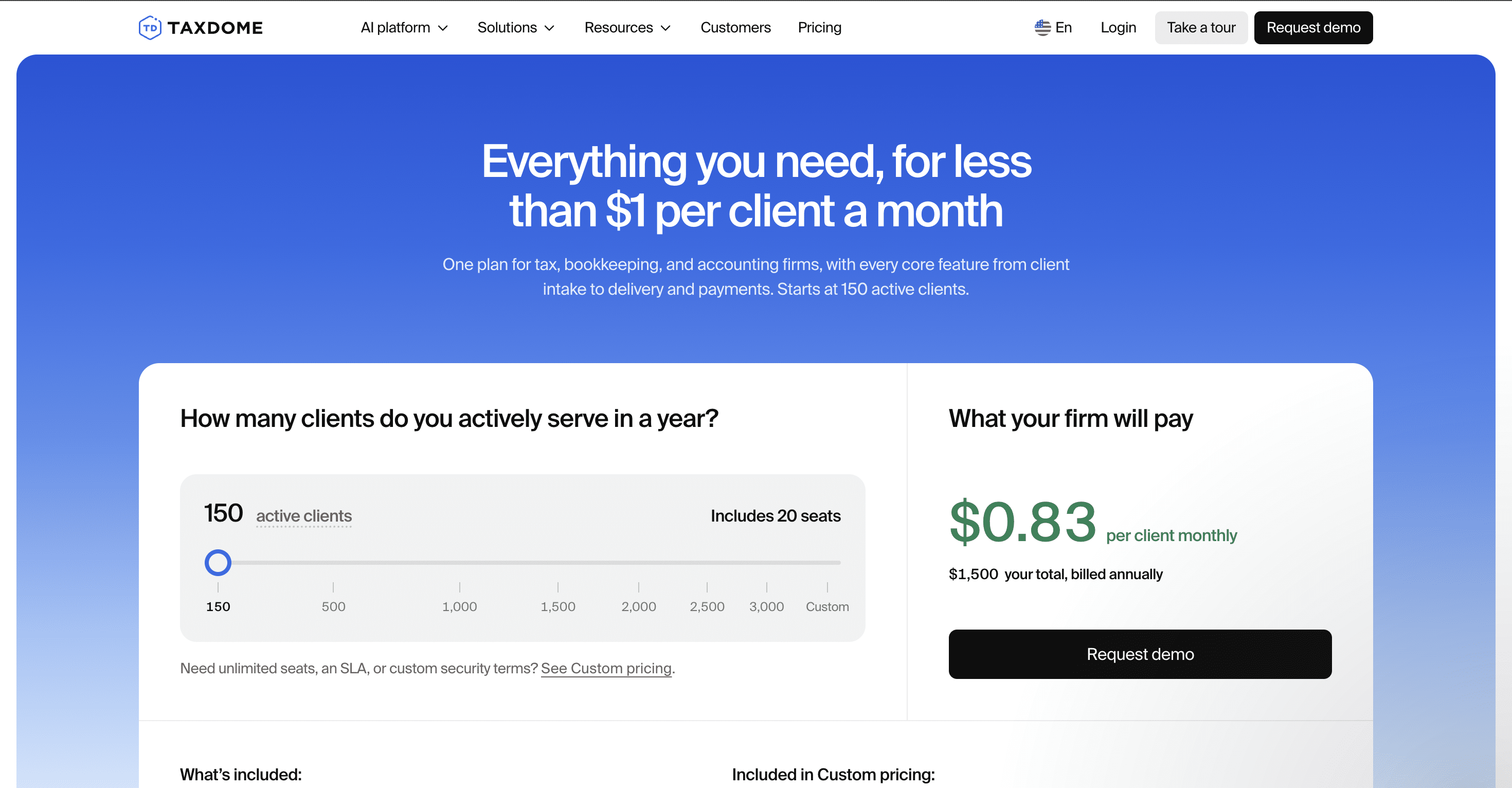
TaxDome changed its pricing on November 2, 2026. Instead of three per-seat plans on one- to three-year terms, it now sells one plan priced by how many active clients your firm serves, starting at $1,500 a year for up to 150 active clients, with 20 seats included.
That makes your TaxDome bill depend on your client list, not your headcount, and it changes what the software will cost your firm for almost every firm. Existing customers move to the new pricing at their first renewal on or after January 1.
This guide explains how the new pricing works, what it costs at different client counts, which features cost extra, and how it compares with TaxDome alternatives, so you can budget accurately or decide whether to switch.
TL;DR
- TaxDome now sells one plan priced per active client: $1,500 a year for up to 150 active clients (about $0.83 per client a month), rising to $9,000 for 1,000 and $16,500 for 3,000.
- The plan includes 20 seats. Firms with more than 20 staff or more than 3,000 active clients need custom pricing.
- Billing is annual and upfront. There’s no monthly option, no multi-year plan, and no free trial, only demos.
- AI document organization, AI tax return delivery, and MCP and API access are a $200/month add-on. Client Care ($100/month), Premium support ($249/month), and implementation, migration, and other services cost extra.
- Existing customers keep their current plan until their first renewal on or after January 1, then move to per-client pricing.
- The new model is cheapest for firms with many staff and few active clients, and most expensive for solo practitioners and firms with many clients per staff member. Per-user alternatives like Financial Cents and Karbon price by team size instead.
TaxDome Pricing at a Glance
| Active clients | Price per year | Per client per month | Seats included |
|---|---|---|---|
| Up to 150 (minimum) | $1,500 | $0.83 | 20 |
| 200 | $2,100 | $0.88 | 20 |
| 300 | $3,300 | $0.92 | 20 |
| 400 | $4,125 | $0.86 | 20 |
| 500 | $5,175 | $0.86 | 20 |
| 750 | $6,900 | $0.77 | 20 |
| 1,000 | $9,000 | $0.75 | 20 |
| 1,500 | $11,625 | $0.65 | 20 |
| 2,000 | $13,500 | $0.56 | 20 |
| 3,000 | $16,500 | $0.46 | 20 |
| More than 3,000, or more than 20 seats | Custom quote | — | Unlimited |
Prices from TaxDome’s pricing calculator, checked November 3, 2026. The per-client rate rises between 150 and 300 clients before falling, and TaxDome doesn’t publish its pricing bands. Prices shown are U.S. rates; TaxDome prices differently in Canada and other markets.
How TaxDome’s Per-Client Pricing Works
- Active clients: a client counts if they had any activity in the past 12 months, such as logging in, uploading a document, sending a message, or receiving an invoice. Contacts with no activity are free, and importing your client list costs nothing.
- Each account counts separately: a client with a personal return and a partnership return counts as two active clients.
- Minimum: you pay $1,500 a year even if you have fewer than 150 active clients.
- Growth during the year: clients you add mid-year are billed from $15 each, or you can buy a volume pack. TaxDome doesn’t publish pack prices.
- Seats: 20 are included at no per-seat charge. More than 20 means custom pricing.
- Billing: annual, paid upfront. There’s no monthly billing and no multi-year plan.
What Changes for Existing TaxDome Customers
If you’re already on TaxDome, nothing changes until your first renewal on or after January 1. At that renewal, you move from per-seat pricing to the per-client plan. TaxDome says it will share the details before your renewal.
Your new price depends on how many active clients you have, not how many seats you paid for. A firm with five seats and 150 clients could pay less than before; a solo practitioner or a small team with hundreds of clients could pay much more. Before your renewal:
- Count your active clients for the past 12 months, counting each entity separately.
- Run that number through TaxDome’s calculator, and add $2,400 a year if you use AI features, MCP, or the API.
- Ask TaxDome how mid-year client growth will be billed and whether any transition discount applies.
- Compare the total with alternatives to TaxDome before you renew, since TaxDome bills the full year upfront.
What’s Included in TaxDome’s Plan
Every firm on the standard plan gets the same feature set: the client portal and client mobile app, tax organizers, document request lists, tax return delivery, IRS transcripts, workflow automation, team chat, CRM with unlimited contacts, two-way SMS, unlimited document storage and e-signatures, KBA, a PDF editor, proposals with service packages, time tracking, billing and payments, the Bookkeeping Hub, and integrations with QuickBooks Online and tax software.
TaxDome Add-Ons and Costs Outside the Subscription
Once you’ve estimated the core subscription, identify the add-ons and usage-based charges that apply to your firm. TaxDome says nothing in the plan requires an add-on, but some features competitors include sit behind one.
| Add-on | Price | What’s included |
|---|---|---|
| AI | $200/month per firm | AI document organization, AI tax return delivery, MCP and API access; Atlas agents coming soon |
| Managed Client Care | $100/month | TaxDome answers your clients’ everyday platform questions |
| Premium support | $249/month | Phone access, a private Slack channel, up to three 30-minute sessions a month, 2-hour ticket SLA |
| White-labeled client app | Custom quote | A branded iOS and Android client app |
| Extended API (coming soon) | Custom quote | Extended access to documents and chats |
TaxDome also sells one-off services, including workflow optimization ($749), custom automation builds ($399), website builds ($799), team training (from $499), and a named account manager ($149/month in 6- or 12-month packs).
| Usage cost | Price | How it’s charged |
|---|---|---|
| SMS | $30.15 one-time setup (CA$40.70), then $11.15/month per firm (CA$15.05), plus $0.04 per SMS sent or received | Deducted from your firm balance; the monthly fee covers the Twilio subscription and phone number |
| KBA for e-signatures | $1 per signer attempt (CA$1.50, £1, €1) | Charged for every attempt, pass or fail; spouses signing count as two; ITINs aren’t supported |
| TaxDome Payments (cards and wallets) | 2.9% + $0.30 per transaction | Deducted from each payout; you can pass a 3% technology fee to clients paying by card |
| American Express and international cards | Additional 1% per transaction | On top of the card rate |
| ACH debit | 1% per transaction, up to $10 | Deducted from each payout |
| Marketplace templates and consultants | Varies by creator | Confirm whether the fee is one-time or recurring |


Switching from TaxDome?
We’ve got you covered. Our team migrates your data, sets up your workflows and trains your team.
Book a switch callTaxDome Charges Are Not the Same as the Cost of Using TaxDome
One reason software pricing gets confusing is the inability to differentiate what a platform charges from the costs that result from using third-party services. With TaxDome, your costs fall into three categories:
Direct TaxDome Charges
These are amounts paid directly to TaxDome for your plan, any add-ons, optional TaxDome services, and usage-based TaxDome charges that apply to your account.
Third-Party Charges
These are costs created by services your firm uses alongside or through TaxDome, such as payment processing, connected software subscriptions, currency-conversion charges, and other third-party provider fees.
Implementation Costs
These are costs associated with setting the platform up and getting your team to adopt it, including data migration, workflow configuration, data cleanup, staff training, client onboarding, and consultant fees. An accounting software implementation checklist helps you map these steps and estimate the internal time before you sign.
What Firms Actually Pay: TaxDome Cost Scenarios
Source: Taxdome
The easiest formula to estimate your TaxDome total cost starts with your active-client price, then adds the costs that depend on how your firm uses the platform:
Active-client price + add-ons + usage fees + third-party fees + implementation labor = estimated total cost
Because TaxDome now charges per client and many alternatives charge per user, the clearest comparison is by firm shape. The examples below use annual pricing and exclude taxes, payment processing, and optional services.
| Firm | TaxDome | TaxDome + AI add-on | Financial Cents Team (annual) |
|---|---|---|---|
| Solo, 100 clients | $1,500 | $3,900 | $228 (Solo) or $588 (Team) |
| 3 users, 400 clients | $4,125 | $6,525 | $1,764 |
| 5 users, 150 clients | $1,500 | $3,900 | $2,940 |
| 10 users, 400 clients | $4,125 | $6,525 | $5,880 |
| 10 users, 1,000 clients | $9,000 | $11,400 | $5,880 |
| 20 users, 1,000 clients | $9,000 | $11,400 | $11,760 |
The pattern: TaxDome’s new model is cheapest for firms with many staff and relatively few active clients. It costs more for solo practitioners, who pay the $1,500 minimum, and for firms that serve many clients per staff member.
Is TaxDome Worth the Cost?
Whether TaxDome is worth the price depends largely on how much of the platform your firm will actually use.
Where TaxDome Earns Its Cost
Breadth of Features
A firm that consolidates its client portal, document management, e-signatures, workflows, payments, communication, and practice management will get far more value from TaxDome than a firm that only uses basic workflow and task management features.
This consolidation brings internal and client-facing processes into one platform, which gives your team fewer places to track work and client information. Clients can also use TaxDome’s workspace to exchange documents, complete requests, sign paperwork, communicate with the firm, and make payments.
TaxDome Is an Established Platform With Broad Adoption
TaxDome says its software is used by more than 15,000 firms, and it reports an average rating of 4.7/5 across more than 7,600 reviews. Those figures don’t guarantee TaxDome is the right fit for your firm, but they show how established the platform has become. Its client mobile app also adds real value for firms whose clients prefer to work from their phones.
Where Firms Push Back on the Cost
Per-client pricing grows with your client list
A firm that adds clients without adding staff now pays more each year, and clients added mid-year are billed from $15 each.
Annual upfront billing
There’s no monthly option, which can strain cash flow for small firms.
AI and API cost extra
AI document organization, MCP, and API access sit in a $200/month add-on.
Repeated price changes
Discussion among tax professionals on Reddit’s r/taxpros questioned TaxDome’s price increase from $400 to $800 a year for its solo plan over about three years, before the move to per-client pricing.
For tax-heavy firms, the real question is whether the software keeps deadlines and client requests moving during busy season. Tax firm practice management software built around recurring tax workflows can cover that without the breadth, or the price, of a full suite.
Calculate the ROI Before You Commit
Start with the value you expect to gain
Annual ROI value = displaced software costs + value of administrative time saved + reduced document and payment chasing + value of improved workflow visibility.
Then subtract the costs
Estimated TaxDome cost = active-client price + add-ons + usage fees + third-party fees + implementation and migration costs. The difference between the two figures is your potential return on investment.
TaxDome Alternatives Worth Comparing
TaxDome’s per-client model and annual upfront billing suit some firms well, but they aren’t the only way to pay for practice management. Other platforms price by user or by client volume, offer monthly billing, and make different trade-offs between feature breadth and ease of adoption. If you want the wider view, our roundup of the best practice management software for accountants compares the leading options.
| Software | Pricing model | Commitment | Best for | Starting price |
|---|---|---|---|---|
| TaxDome (for reference) | Per active client | Annual, upfront | Tax-focused firms that want a broad all-in-one suite | $1,500/year (up to 150 active clients) |
| Financial Cents | Per user; price doesn’t change with client count | 12-month agreement; monthly billing for 5+ users | Small and growing accounting, bookkeeping, and tax firms that want an all-in-one platform that’s easy for the team and clients to adopt | Solo: $19/month; Team: $49/user/month (annual) |
| Karbon | Tiered per-user pricing | Monthly or annual | Larger firms that need deep workflow, collaboration, and email management | Team: $59/user/month (annual) |
| Canopy | Tiered per-user pricing, plus add-ons | Monthly or annual | Tax and accounting firms that want strong tax workflow and client management | Standard: $74/user/month (annual) |
| Pixie | Tiered by client volume | Monthly or annual | Solo and small firms, or UK and international practices, that want simple client-based pricing | $129/month for up to 250 clients |
Financial Cents
Financial Cents is worth comparing if you want an all-in-one accounting practice management system that gives you firm-wide visibility into client work, automates recurring workflows and client requests, and shows your team’s capacity. It combines those operational features with client-facing tools such as a passwordless client portal, document management, proposal software and engagement letters, e-signatures, and billing, and it’s priced per user, so adding clients doesn’t change your plan price.
Firm size fit: small and growing accounting, bookkeeping, and tax firms that prioritize workflow management, automated follow-up, and a quick adoption path. See how the two compare in this Financial Cents vs. TaxDome guide.
Karbon
Karbon combines workflow management with email and communication management, collaboration, client management, and reporting. Its emphasis on team collaboration and centralized communication suits firms with complex internal workflows, which also makes implementation and configuration more demanding.
Firm size fit: established firms that need substantial workflow, communication, and collaboration capabilities. See Karbon vs. TaxDome for a closer comparison, or our Karbon pricing breakdown for its plans.
Canopy
Canopy is built for tax and accounting firms, bringing client management, workflow, document management, billing, payments, and tax resolution into one system. Its tax-focused practice-management features make it relevant for firms that want practice management closely connected to their tax operations.
Firm size fit: tax and accounting firms that expect to use its tax, client management, workflow, document, and billing capabilities. This TaxDome vs. Canopy guide compares them in detail, and smaller firms can also assess Financial Cents and Canopy side by side.
Pixie
Pixie prices by client volume rather than per user, which makes it worth considering for smaller firms that don’t need a large all-in-one platform and would rather pay according to the number of clients they manage.
Firm size fit: solo practitioners and smaller firms looking for a simpler, client-focused system. Here’s a more detailed review of TaxDome alternatives in 2026.
Is TaxDome’s New Pricing Right for Your Firm?
Many staff, few clients: TaxDome’s base plan can be good value
A firm with around 10 staff and 150–300 active clients pays far less per person than under TaxDome’s old per-seat plans, especially if it doesn’t need the AI add-on.
Solo practitioner: compare the $1,500 minimum
You’ll pay at least $1,500 a year, so compare it with solo plans from per-user alternatives before you commit.
Many clients per staff member: model your growth
Your TaxDome bill grows with every active client, so a per-user platform may cost less as your client list grows.
More than 20 staff: request a written custom quote
Evaluate the full package: the per-client rate, seat terms, add-ons, implementation and migration costs, and support terms.
Only need a portal, workflow, or document collection: compare narrower alternatives
If your main requirement is client portal software, document collection, or workflow and task management, compare lighter-weight alternatives before committing to a broader platform.
A quick TaxDome decision checklist
- How many active clients did we serve in the past 12 months, counting each entity?
- How many clients do we expect to add in the next 12–24 months?
- Will we need more than 20 seats?
- Do we need AI features, MCP, or the API ($200/month)?
- Which add-ons or usage-based services will we use?
- What will implementation and migration require from our team?
Look Beyond the Headline Price Before You Commit
Your TaxDome bill can look very different once you move beyond the starting price. Your active-client count, growth during the year, add-ons, and costs beyond the subscription all determine the final number. But immediate financial cost is only half the equation.
TaxDome can earn its cost back when a firm genuinely uses its broader suite to replace disconnected tools and processes. The challenge is whether your firm will capture that value.
For small and growing accounting, tax, and bookkeeping firms, Financial Cents is another option worth considering. Its accounting practice management system combines workflow automation, workload visibility, client requests and reminders, document management, a passwordless client portal, proposals, engagement letters, e-signatures, billing, capacity, and reporting, priced per user.
Book a Financial Cents demo for a personalized walkthrough of what your firm would pay and how setup works, compare Financial Cents and TaxDome side by side, or use the Financial Cents ROI calculator to run the numbers.
Frequently Asked Questions (FAQs)

Wesley Armstrong is the Customer Onboarding Manager at Financial Cents and a former Technical Support Specialist at SmartVault. He helps accounting and bookkeeping firms set up workflows that fit how they actually work, and writes about choosing, comparing, and switching practice management software.
Share this article