There are no flying cars yet, but remote work is here to stay, and it’s steadily changing how businesses operate.
For accounting firms, moving from a traditional office to a remote or cloud-based model can be as exciting as it is challenging. It meets the growing demand for flexibility and brings real benefits, like attracting top talent, better work-life balance, and higher employee satisfaction.

The question is no longer “Should we go virtual?” but “How do we do it well?” In this article, we explain why it pays to run a virtual accounting firm and walk through the steps for a smooth transition, from moving your systems to the cloud to managing remote teams and clients.
TL;DR
- Why go virtual: remote and cloud-based accounting firms hire from a wider talent pool, retain staff better through flexibility, and cut rent, utility, and office costs.
- The main concerns: data security, productivity, and communication. Each is manageable with encrypted cloud tools, a WISP, clear performance metrics, accounting-specific project management, and set communication protocols.
- How to transition your team: document your processes as SOPs, move work into cloud-based practice management and document management, and lead with regular check-ins, recognition, and a strong remote culture.
- How to move your systems to the cloud: audit current tools, choose cloud tools for each job, plan the data migration, set up security first, pilot with a small group, switch outside busy season, and retire old systems.
- How to bring clients along: explain the change openly, highlight the benefits, onboard them into the new process, and move documents and communication into a secure client portal.
Why Should Accounting Firms Go Virtual?
Going virtual gives accounting firms an edge in hiring and retention, access to a wider talent pool, and lower operating costs.
Competitive advantage in the job market
Offering remote work is a powerful hiring advantage. Professionals increasingly value flexibility, and firms that offer it stand out from competitors stuck in the old ways.
It also helps you retain employees. People who can work from home are often more satisfied with their jobs, which reduces the cost and disruption of turnover.
Access to a wider talent pool
Your hiring pool is no longer limited to your city or region. Whether you need an expert in specific accounting software, a tax specialist with international experience, or a financial analyst who knows a particular industry, remote work lets you find the right fit regardless of location. That diversity brings fresh ideas and creative problem-solving.
Cost savings
Going virtual can significantly cut your operating costs: rent, utilities, and office supplies. You can redirect those savings into growth initiatives like technology upgrades, employee development, or competitive salaries.
Why Do Accounting Firms Hesitate to Go Virtual?
Most firms hesitate because of three concerns: data security, maintaining productivity, and keeping communication clear without face-to-face contact. All three are manageable with the right measures.
Security risks and data protection
Handling sensitive client data outside the office can make any firm owner nervous. It’s a valid concern, but a manageable one:
- Secure cloud storage and VPNs: Use encrypted accounting document management software to store and transmit data securely, and VPNs to protect client data accessed remotely. Our guide to cybersecurity for accountants covers more.
- Employee training: Regularly train your team on file-sharing security risks, including recognizing phishing attempts, using strong passwords, and handling data securely.
- Regular security audits: Conduct periodic security audits to find and fix vulnerabilities.
- Incident response plan: Keep a plan for containing, investigating, and fixing security breaches. A written information security plan (WISP) helps with this.
Maintaining productivity and managing performance
The worry that a virtual firm will be less productive is common but often unfounded. With the right strategies, you can maintain and even improve productivity:
- Clear performance metrics: Define what success looks like for each role and project, so everyone knows what’s expected.
- Accounting project management tools: Use accounting project management software to track tasks, deadlines, and progress, and capacity management to balance workloads.
- Regular check-ins: Discuss progress, address challenges, and give feedback on a regular schedule.
- Flexible working hours: Accommodate different time zones and personal schedules, which can boost productivity and job satisfaction.
- Performance reviews: Give constructive feedback and recognize achievements regularly.
Clear communication and collaboration
Without face-to-face interaction, misunderstandings happen more easily. Consistent communication keeps a remote team cohesive:
- Reliable communication tools: Use team collaboration tools like Financial Cents for project communication, Slack for instant messaging, Zoom for video calls, and Google Workspace for shared documents.
- Communication protocols: Set expectations for response times, which channels to use for which messages, and how virtual meetings run.
How Do You Transition to a Virtual Accounting Firm?
To transition to a virtual accounting firm, document your processes as standard operating procedures (SOPs), move your work into cloud-based accounting technology, and adapt how you lead your team.
Develop standard operating procedures (SOPs)
SOPs give you a roadmap for consistency and efficiency, which matters even more when your team isn’t in the same room.
- Define key processes: Document critical processes like client onboarding, financial reporting, and internal audits, including each step, who’s responsible, and the tools required.
Recommended: Step-by-Step Paperless Accounting Transition Guide (+ Checklist)
- Create detailed guidelines: Write policies and procedures that are easy to follow, with the templates and checklists each task needs.
- Update them regularly: Treat SOPs as living documents that change with technology, regulations, and your firm’s practices, and assign someone to keep them current.
- Use them for training: SOPs shorten the learning curve for new hires, so they become productive members of the team faster.
- Keep them accessible: Store SOPs where everyone can reach them. In Financial Cents, you can keep process notes and documents inside the same workflows your team uses every day, so the information is there regardless of location.
Use the right technology
Technology is the backbone of remote work. The right tools keep communication, collaboration, and productivity on track:
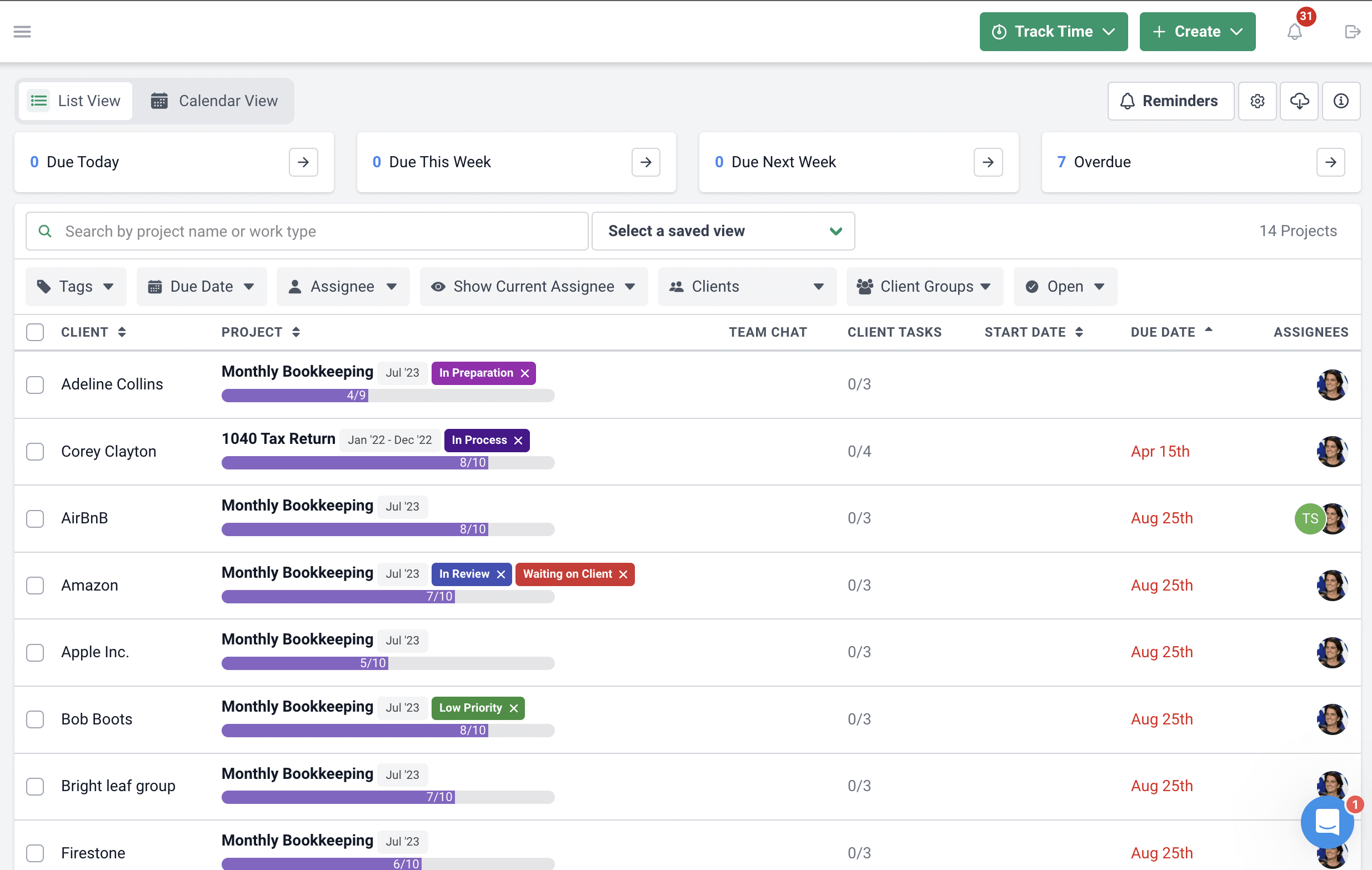
- Accounting-specific project management: Project management tools built for every industry are hard to fit to accounting work. Accounting-specific software like Financial Cents shows your team’s tasks and client requests at a glance, automates recurring tasks, assigns projects, and manages workload.
- Video and messaging tools: Microsoft Teams, Slack, or Zoom for real-time communication, screen sharing, and virtual meetings.
Alternatively, an accounting practice management platform combines both. Our comparison of the best practice management software for accounting firms breaks down the features that matter most when moving to the cloud.
Lead your virtual team
Leading remotely often means shifting your management style and building a strong remote work culture. Here’s how to keep morale, productivity, and cohesion high:
- Regular communication: Hold daily check-ins, weekly team meetings, and monthly one-on-ones. A shared meeting agenda helps.
- Virtual team-building: Virtual coffee breaks, online games, or team challenges help build relationships and a sense of community.
- Employee recognition: Celebrate achievements and milestones with virtual shout-outs or remote-friendly rewards.
How Do You Move Your Firm’s Systems to the Cloud?
Moving to cloud accounting works best in stages: audit what you use today, choose cloud tools for each job, plan the data migration, set up security before anyone logs in, pilot with a small group, and switch over outside busy season.
- Audit your current systems: List every tool, file location, and process your firm relies on, including desktop software, shared drives, spreadsheets, and paper files. Note who uses each one and what data lives there.
- Choose cloud tools for each job: Most firms need cloud accounting software (such as QuickBooks Online or Xero), practice management for workflows and deadlines, document management with a client portal, and e-signatures. An all-in-one platform covers several of these at once, which means fewer logins and fewer integrations to maintain.
- Plan the data migration: Decide what moves, what gets archived, and what gets deleted. Start with client records and active work, then documents. In Financial Cents, you can import clients from a CSV file and rebuild recurring work from workflow templates, and two-way sync with Google Drive, OneDrive, and SharePoint (Scale plan) lets you keep existing file storage during the move.
- Set up security first: Turn on two-factor authentication, set role-based permissions, choose where your data is stored, and update your WISP before onboarding staff or clients.
- Pilot, then roll out: Move one service line or a small group of clients first, fix what doesn’t work, then expand. Train your team on the new tools before cutover day.
- Time the switch carefully: Avoid switching during tax season or year-end. A quieter month gives your team room to learn without risking deadlines.
- Retire the old systems: Once everything runs in the cloud, archive what you need for retention, cancel old licenses, and remove local copies of client data.
How Do You Transition Clients to a Virtual Working Style?
Transition clients by explaining your plans openly, showing how remote service benefits them, onboarding them into your new process, and moving their communication and documents into a secure client portal.
Some clients worry that working with a remote firm means lower service quality. Transparency and clear benefits build their confidence:
- Transparent communication: Explain your transition plans, how service quality will be maintained, and the security measures that protect their data.
- Highlight the benefits: Emphasize better accessibility, faster response times, and access to a wider range of expertise.
- A smooth onboarding process: Build a client onboarding process that makes clients comfortable with the remote setup, with clear instructions on how to communicate and collaborate with your team.
- A client portal: A secure client portal gives clients one place to upload documents, see requests, and message your team, with no email back-and-forth or lost files.
Going Virtual Is Achievable
Remote work isn’t a temporary fix. It’s a strategic way to future-proof your accounting firm. Embracing it lets you innovate, improve efficiency, and serve clients well wherever they are.
Treat the move as a marathon, not a sprint. Take it step by step, learn as you go, and keep refining your approach.
That’s why so many accounting firm owners choose Financial Cents as the cloud practice management software they run their virtual firm on.
Manage your virtual firm with Financial Cents. Start a free trial or book a demo.
Frequently Asked Questions (FAQs)

Shahram Zarshenas is the co-founder and CEO of Financial Cents. A former investment banker for software companies, he has helped thousands of accounting and bookkeeping firms document their workflows, organize their teams, and scale.
Share this article