

Plenty of accounting firms claim they’re paperless. They tout it on their website and in their client proposals. But that’s not quite true.
Sure, they’re digital now, with their cloud accounting software and project management tools, but they’re still not fully paperless. When you walk into their office or study their process, you’ll find paper tax returns, hand-signed engagement letters, email attachments with no version control, and client documents that arrive as photos in a text message.
Being truly paperless is about building digital systems that replace every paper-dependent step in your workflow. Getting documents from clients, for instance, is now the single biggest workflow challenge accounting firms face, ahead of even manual admin work, according to Financial Cents’ 2025 State of Accounting Workflow and Automation Report. And it’s exactly the kind of bottleneck a paperless system is built to remove.
We detail everything you need to know about how to go paperless in accounting, from why it matters, to a step-by-step guide on transitioning, and why you need an accounting practice management system to make everything stick.
TL;DR
- Being truly paperless means no step in your process depends on paper. Every document in your firm is created, shared, signed, and stored digitally.
- The benefits of paperless accounting are faster document collection, fewer errors, lower overhead, stronger security, and easier scaling.
- Help clients accept the digital system by offering a simple, low-friction portal, like Financial Cents, they can use easily.
- Phase the transition over 30 to 90 days rather than switching everything at once, and start with client-facing work (document requests, e-signatures, the portal), where paper costs you the most time.
- A practice management platform is what makes the whole system work. Without it, going paperless just moves your clutter from paper to digital.
What is Paperless Accounting?
Paperless accounting means handling every document in your firm digitally, from creation to storage, so no step in your process still depends on paper. In practice, that spans client documents, engagement letters, e-signatures, invoices, tax returns, work papers, and internal communication, basically every touchpoint where paper exists.
Benefits of Going Paperless for Accounting Firms
Faster Document Collection
Getting documents from clients is usually slow and frustrating. Our State of Accounting Workflow & Automation report found that for more than half of the firms surveyed, gathering the documents they needed took several days or longer. A paperless setup fixes this. It replaces the email back-and-forth with an accounting client portal and automated reminders, so clients upload straight into the right place, and the system sends reminders for you. This helps you get documents from accounting clients faster.
Reduced Errors
Paper leaves more room for error. For instance, a team member might unknowingly work from an outdated printout or file the same document twice with different numbers. But with everything digital and under version control, everyone has one current copy and a record of who changed what and when, so you catch mistakes early or avoid them entirely.
Security
Accounting firms hold some of the most sensitive data a client has, like Social Security numbers, bank details, and full financial histories. Paper files get lost, and they can fall into the wrong hands. But digital systems offer security like file encryption and role-based access.
Lower Overhead
Paper carries running costs like printing and ink, physical storage, shredding services, and postage. Going fully paperless cuts those costs and lowers your overhead. It also frees up the office space your files and cabinets used to take.
Client Experience
A paperless accounting firm gives clients a smoother experience. They no longer have to print and scan forms or send a box of receipts to your office. Instead, they can upload documents from their phone, sign engagement letters with a tap, and get their finished return through a secure portal. That ease is part of what makes them stay longer with you.
Scalability
Paper-based processes limit your growth, because every new client adds manual steps until the work outpaces what you can handle. A digital process cuts those steps with standardized accounting workflows and templates, so each new client adds far less admin than before. You can then take on more clients without your workload rising at the same rate.
How to Go Paperless in Accounting: Step-by-Step
Here’s the step-by-step process to transition to a paperless system.
Step 1: Audit Where Paper Still Lives in Your Firm
The first thing to do is find every place paper still shows up in your firm. You’ll be surprised where it turns up, especially if you already think you’re paperless.
Walk through each core process from start to finish: client onboarding, document collection, tax preparation, review, invoicing, and client delivery. At each one, watch for paper and manual workarounds. For instance, is there any point where you collect physical records or print a document only to sign and scan it back in? Or where you chase a client over email for a document they forgot? This audit gives you a clear list of what to fix.
Step 2: Set Your Record Retention Policy First
Next, learn your legal obligations for the client data you hold. You don’t want to delete a record you’re still required to keep, or hold one longer than you should. The IRS says to keep most tax records for three to seven years, depending on the situation, so if you prepare returns, make sure your system holds client records for the full period. Your state board of accountancy may set its own minimums for client records, and those vary by state, so confirm yours.
The AICPA expects every firm to keep a written document retention policy, which can help defend the firm against a claim and show you’re complying with the federal and state laws on document retention. You can download its policy template to build from. For the data you keep, the FTC Safeguards Rule requires you to develop, implement, and maintain a comprehensive, written information security program (WISP) to keep customer information secure and confidential.
Step 3: Choose the Right Software Stack
Now, decide on the software that suits your needs. To be truly paperless, your stack needs to cover four functions:
- Accounting practice management tools for your workflows, task tracking, and client management. e.g., Financial Cents.
- Accounting document management system with a client portal for secure file storage, client uploads, and folder organization. e.g., Financial Cents or SmartVault. Or use a use secure file sharing tool for accounting documents.
- E-signatures for digital engagement letters, tax return delivery, and approvals. e.g., Financial Cents’ e-signatures or Adobe Sign.
- Cloud accounting software for the bookkeeping work itself. e.g., QuickBooks Online or Xero.
These tools need to connect, so documents flow between systems automatically. A fragmented stack causes chaos and creates more manual work for you.
Step 4: Create Your Digital Document Structure
Set up your digital filing system to keep documents organized and easy to find. Make sure it’s consistent and can scale with your firm. That means getting four things right:
- A client folder hierarchy, e.g., Client Name > Year > Service Type, so every document has a predictable home.
- Naming conventions so the team labels files the same way every time, and anyone can find what they’re looking for immediately.
- A template folder structure you duplicate for each new client, so every client is set up the same way.
- Access controls so each staff member sees only the client files they’re responsible for, which keeps things secure.
Step 5: Digitize Your Existing Paper Records
Now, start scanning your existing paper records into your digital storage. This can feel daunting, especially if you have thousands of paper records, but you don’t have to do it all at once. Start with active clients and the current tax year, then work backward from there. And for older records outside retention requirements, you may not need to scan them at all. Just log that they exist and when each can be destroyed, then shred them on schedule.
For each paper batch, run the same steps: sort → scan → name → file → shred. The IRS has accepted digital copies since 1997, so once you’ve scanned a record, you can shred the original. Use a document scanner rather than a phone camera, since it produces clearer images and searchable PDFs you can pull up later.
Step 6: Build Your Paperless Workflows
With your old records digitized, time to turn to the work itself. Build digital workflows for the processes you run every day, starting with client onboarding. When a new client signs on, they fill out a digital intake form and sign the accounting engagement letter electronically, and the system creates their client folder and sends a welcome email automatically.
For ongoing document collection, the system sends the client an automated task request. The client uploads the files to the portal, you get a notification, and each file lands in the right folder automatically.
For tax return delivery, you prepare the PDF, upload it to the client portal, and send an e-signature request. Once the client signs, the system notifies everyone and files the signed copy.
For month-end close, you can build a checklist in your practice management software, assign the tasks, and attach documents to each step. The month-end close software then automatically notifies whoever it is to review and approve when it’s their turn.
Recommended: Download a free month-end close checklist
Step 7: Train Your Team
To get your team using the new system, you have to train them, and that takes more than handing out login details. For one, hold dedicated training for each tool (not all at once), so the team isn’t overwhelmed, and they get familiar with each workflow.
Back the training with written SOPs that spell out exactly how each accounting paperless workflow should be done, so anyone can follow the steps and run the workflows even in your absence.
Then designate a workflow champion, i.e., one person responsible for enforcing the new system and answering questions as they come up. Pick someone who knows the system well and the team listens to, since they’ll have an easier time getting everyone else on board.
Finally, after 30 days, check whether the team is sticking with the system. Have old habits like printing or emailing files instead of using the portal started creeping back in? Correct them before they settle in again.
Step 8: Help Your Clients Adjust
After securing team buy-in and training them, you have to do the same for your clients. Not all clients will embrace the digital system immediately. Many will resist change, especially older clients or those used to physical paperwork.
But if you communicate the change well, explain the benefits to them (like faster turnaround and better security than email), and then show them how to use the portal, many will come around. Dawn Brolin, CPA, CFE, & CEO of Powerful Accounting, recommends setting a clear client communication policy at the start of the engagement, including a firm rule that you won’t accept documents over email.
To get even more client buy-in, make the portal experience as simple as possible, since fewer clicks mean higher adoption.
Still, you’ll likely have one or two clients who can’t use digital tools at all, whether from limited comfort with technology or no reliable internet access. Keep a fallback for them, like accepting their documents by mail or in person and scanning them in yourself, so they can still work with you, and your records stay digital.
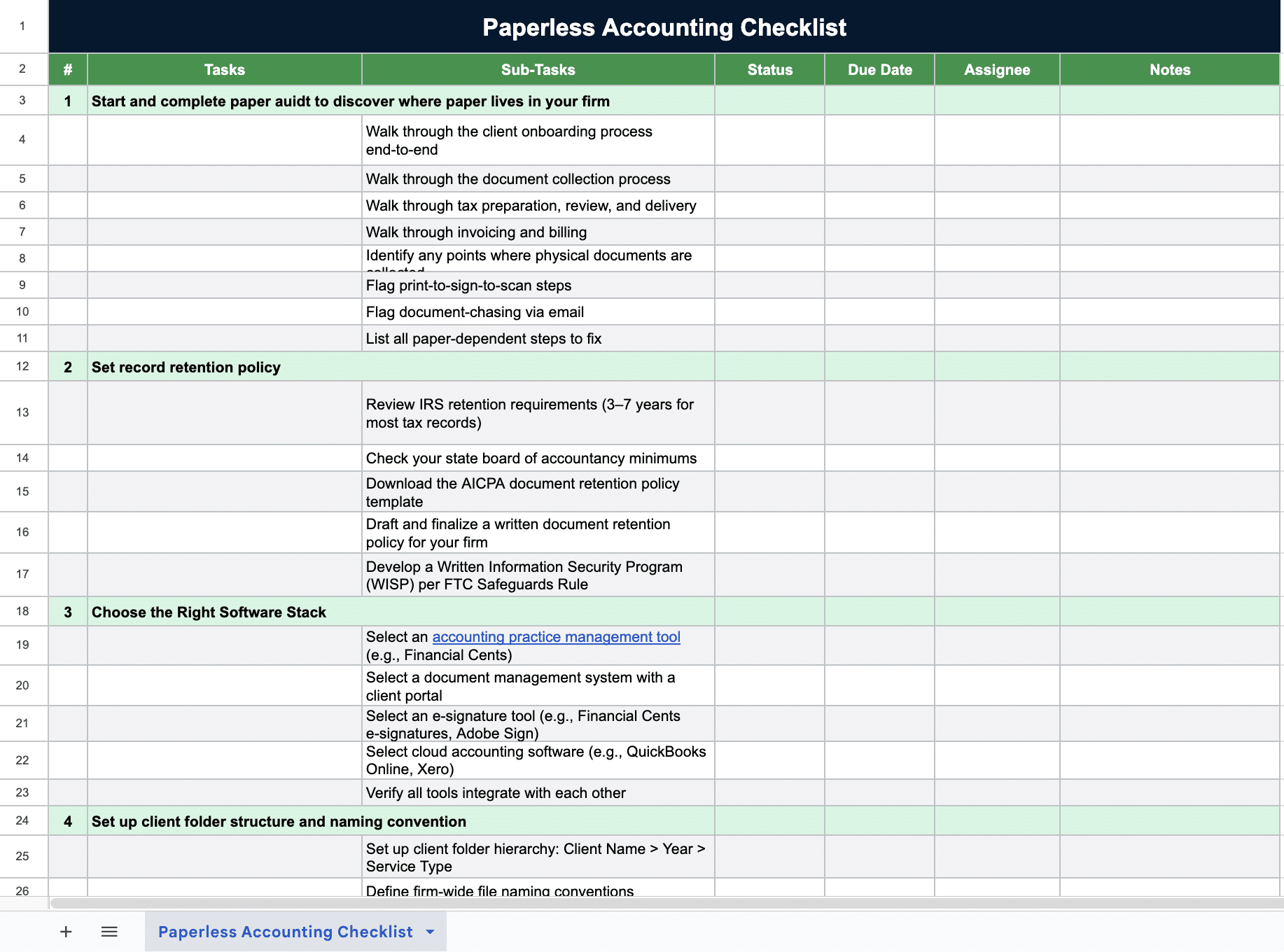
The Paperless Accounting Checklist
We put every step in this guide into one checklist you can work through and tick off as you go.
Common Challenges With Going Paperless and How to Overcome Them
When transitioning, you’ll run into a few challenges. The most common ones include:
Team Reverting to Old Habits
It’s common for teams to fall back on what’s familiar after a while, or once they get busy. They’ll start doing things the old way again, like printing documents, emailing attachments, or saving files to a desktop, because it feels easier. That undoes the hard work it took to digitize your firm.
To prevent this, check in regularly to see how the team is finding the new system, and fix any friction before old habits settle back in for good.
Client Resistance
Clients often resist new technology because they’re used to the old ways. But you can get around this by removing as much friction as possible, like ensuring the portal is simple to access and use, so the digital option is the obvious choice for them.
Financial Cents, for instance, doesn’t use usernames and passwords for its client portal, since those are often a hassle for clients. Instead, clients get a secure magic link by email to log in, which removes one more step for them. That’s what Wendy Kelley, Founder, Bookkeeping Simplified, loves about Financial Cents:
Software Sprawl
Going fully paperless means using several tools for document storage, e-signatures, client portal, accounting workflow automation, etc. If those tools aren’t connected, files end up scattered across separate tools. It’s better to choose tools that integrate with each other or a single platform that combines multiple functions.
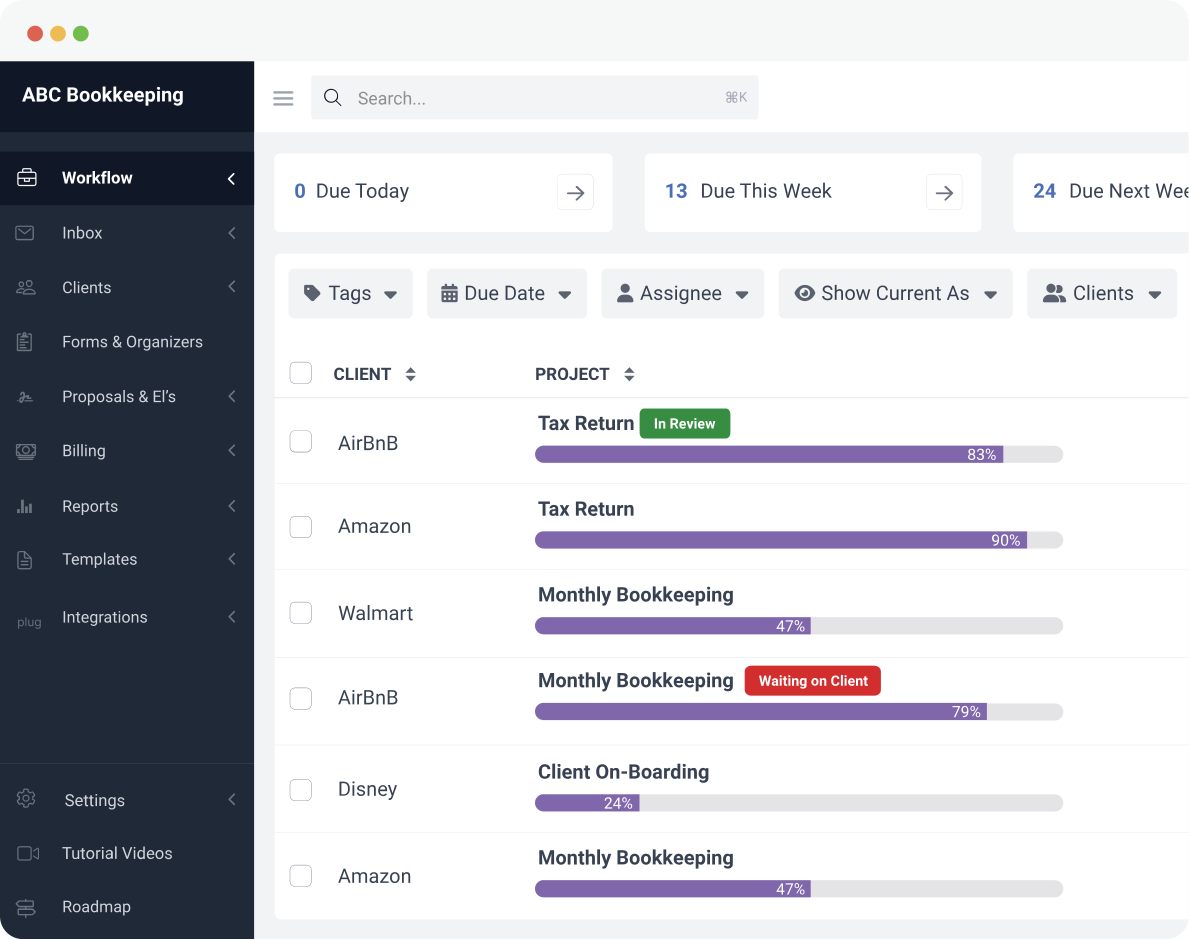
Financial Cents brings practice management, workflow management, document management, a client portal for accountants, and e-signatures together, so documents and tasks are in one place instead of across four disconnected apps. That removes the manual handoffs between systems and makes it easier to keep your work organized.
The Practice Management Layer That Makes Paperless Stick
A practice management system is an all-in-one platform that lets you manage all your firm’s operations in one place. This includes client and task management, workflows, document storage, accounting communication, and billing. These platforms make it possible to be truly paperless, since they handle every step digitally and connect your other tools, so no step depends on paper.
Financial Cents is one such practice management software for accountants. Some of the features it has for paperless firms are:
- Document management with a built-in client portal, so clients can upload documents directly digitally, and you can store and find all files associated with a project in the designated folder.
- Automated client document requests with reminders, so the system follows up with clients to send the requested documents until they oblige. Stelle Anderson, Owner of Infinite Accounting Solutions, loves this about Financial Cents:
- E-signatures for accountants for engagement letters and other client documents, so nothing has to be printed to sign.
- Workflow templates for every recurring accounting service, so each process runs the same way every time.
- Integrations with SmartVault, Google Drive, Zapier, and QuickBooks, so information transfer is seamless.
Go Paperless One Step at a Time
Going paperless doesn’t happen all at once. Instead, it’s a process, and it takes some time. The firms that see the best results phase it in over 30 to 90 days, giving their team and clients time to adjust rather than forcing everything at once.
A good place to start is the client-facing work, since document requests, e-signatures, and the client portal are where paper and email cost you the most time. Digitize those first, and you’ll see results early.
Then get the right practice management software to connect everything into one system. Without it, going paperless only moves your clutter from paper to digital.
Financial Cents is one option built exactly for this, and firms have used it to automate and digitize their workflows. As Terri Evans, Owner, Safe Harbor Bookkeeping, says,
Frequently Asked Questions
Share this article:



