

What if every file a client uploaded already showed what it was, which period it covered, and which folder it belonged to?
That would mean less time spent renaming documents, checking whether clients submitted the right statements, and moving files into the correct location. That’s where AI document classification can help accounting firms.
Most firms already use AI in accounting, but mostly in general-purpose chatbots that sit outside the systems where client work happens. Financial Cents’ 2026 State of AI in Bookkeeping & Accounting report found that 95% of firms have adopted AI in some capacity. Of these AI-active firms, 96% use general-purpose assistants such as ChatGPT and Claude. Only 37% use AI inside their practice management software.
Asking a general-purpose chatbot to identify a document is one thing. But using a tailor-made AI tool to organize your documents where your team is already managing client work? That is a more direct way to reduce repetitive document-handling work.
This guide explains what AI classification is, how it works in plain English, which document-handling tasks it helps firms automate, where human review remains essential, and how to introduce it without losing control.
TL;DR
- AI document classification helps accounting firms organize client files by identifying document types and relevant details to support consistent naming, validation, and filing.
- Common use cases include tax-season intake, month-end close, and client onboarding.
- Financial Cents offers three AI agents for document handling: AI File Renaming suggests filenames based on firm rules, AI File Validation flags potential document or period mismatches at upload, and AI File Routing recommends appropriate folders for files.
- Human oversight remains essential. Blurry images, bundled PDFs, and similar-looking documents can lead to errors.
- Start small and measure results. Standardize naming conventions and folder structures, pilot one workflow in review mode, and track acceptance rates, errors, exceptions, and time saved before expanding automation.
- Check security and governance before adopting AI. Understand how vendors handle client data, whether it is used for model training, what access controls and malware protections are available, and whether administrators can disable AI features.
What Is AI Document Classification?
AI document classification is the use of artificial intelligence to identify what a document contains and assign it to an appropriate category. For accounting firms, that might mean recognizing a file as a W-2, 1099-NEC, bank statement, invoice, or payroll report based on its contents.
Traditional document sorting relies on predefined rules, such as filenames, keywords, or folder structures. For example, a rule might send every file containing “invoice” in its name to an invoices folder. But if a client uploads a file called scan_0047.pdf, that tool may not know where to put it.
AI classification goes deeper. It can analyze a document’s contents to determine what it appears to be, even when the filename provides little useful information.
It can also identify and use relevant details, such as the tax year or statement period, to suggest a filename, flag a potential mismatch, or recommend a folder.
How AI Document Classification Differs From OCR
OCR reads the text in a document; AI document classification decides what kind of document it is.
Optical character recognition (OCR) converts text in scanned documents and images into machine-readable text. AI document classification uses document content and other clues to determine what kind of document it is.
For example, OCR might extract the text from a scanned W-2, while classification identifies the file as a W-2 rather than a bank statement or invoice.
What Is Intelligent Document Processing (IDP)?
Intelligent document processing (IDP) is a broader approach to automating document handling. It can combine OCR and document classification to process documents within a larger workflow.
How AI Document Classification Works (Without the Jargon)
You don’t need to understand complex terms to know how AI document classification works. The process is straightforward:
1. Read the File (Text and Images)
The system first analyzes the document’s contents. Depending on the file, it may read existing digital text, use optical character recognition (OCR) to interpret scanned text, or analyze visual features such as tables and document layout.
For example, when a client uploads a scanned bank statement, the system needs to interpret its text and layout to identify the document. The same process applies to digital PDFs, spreadsheets, and photos of invoices.
2. Identify What It Is and the Details That Matter
Next, the AI uses clues in the document to identify what it is and extract relevant details, such as the form type, tax year, statement period, client name, or account information.
It can even tell a January 2026 bank statement apart from a February 2026 bank statement.
3. Score Its Confidence
The system assesses how confident it is in its classification based on the available evidence. A clear, familiar document may be easier to identify than a blurry scan or a file that looks like several document types.
Some tools use confidence thresholds to determine what happens next. High-confidence results may qualify for automatic processing, while uncertain results are flagged for human review.
4. Act: Suggest a Name, Flag a Mismatch, or Suggest a Folder
With the file identified, AI supports the next step in the document workflow. That could be:
- Suggesting a filename based on the firm’s naming convention.
- Flagging a potential mismatch between the file and what the firm requested.
- Recommending a folder where the document should be stored.
Your staff can review suggestions, correct mistakes, and handle exceptions.
Why AI Document Classification Is More Accessible for Small Firms
Traditional document classification systems often relied on predefined rules or models trained to recognize specific document categories. Setting them up and maintaining them requires significant technical expertise, especially when firms handle a wide variety of documents.
Modern AI models, including large language models (LLMs), can interpret document content and context more flexibly. They can often recognize document types they haven’t been explicitly trained to identify.
This has made AI document classification more accessible to smaller accounting firms that handle varied client documents but don’t have the resources to build and maintain custom classification systems.
Types of Classification Accountants Will Run Into
AI document classification can help organize incoming files in several ways, depending on your firm’s workflow:
Classification by Document Type
AI document classification examines a file’s content to distinguish between documents that may look similar but serve different accounting purposes.
An example is when a client uploads a batch of tax documents. The AI can identify a Form W-2, Form 1099-NEC, and Schedule K-1 to help the firm organize files and make them easier for staff to review.
Classification by Period
AI document classification also identifies dates or reporting periods in a document even when documents are the same type.
For example, when a client uploads four bank statements covering different months, the AI can identify the period on each statement and use that information to suggest a consistent filename or the appropriate folder.
Classification by Client or Entity
This is where AI document classification tools use information such as a business or taxpayer name to identify the relevant client or entity for a document.
This is particularly useful for firms serving clients with multiple businesses or corporate entities, where personal tax documents and business records may arrive together.
However, similar business names and documents referencing multiple entities can make classification less reliable here, so staff should verify the association before filing sensitive documents.
Single-Label vs. Multi-Label Classification
Classification systems can assign one or multiple labels to a document:
- Single-label classification assigns one category to a file. For example, a PDF containing a single invoice can be labeled “Vendor Invoice.”
- Multi-label classification assigns multiple categories to the same file when more than one label is relevant. For example, a document containing both an invoice and a payment receipt can have both labels.
- Bundled PDFs (page-level recognition): When clients scan several unrelated documents into one PDF, a tool with page-level recognition can identify where each document starts and ends, for example, a bank statement on pages 1–3, a phone bill on pages 4–5, and a lease on the rest.
Where to Use AI Document Classification in an Accounting Firm
AI document classification works best when an accounting firm repeatedly receives similar documents and needs to make the same decisions about them. Here are some routine tasks your staff can use AI to support:
- Naming client uploads consistently
- Catching the wrong document (or wrong period) at upload
- Filing documents into the right folder
- Tax season intake: sorting high volumes of tax documents
- Month-end close: organizing statements and supporting documents
- Onboarding and engagement documents
- Receipts and bills
1. Naming Client Uploads Consistently
Clients rarely follow an accounting firm’s preferred naming conventions. One might upload a bank statement as March_Statement.pdf, while another sends scan_0047.pdf. Someone on your team must then open the files, identify their contents, and rename them so they’re easier to retrieve.
AI document classification can identify a document type and relevant details and then use that information to suggest a filename that follows your firm’s naming convention.
Financial Cents’ AI File Renaming Agent applies this within the client workflow. Firms can configure naming rules for Bookkeeping, Tax, and other service categories.
The agent offers two review modes:
- Always Ask: Staff can approve, edit, or reject each suggested filename.
- Just Do It: The agent automatically renames files when its confidence is very high and holds lower-confidence suggestions for staff review.
2. Catching the Wrong Document (or Wrong Period) at Upload
Sometimes, clients submit the wrong file without knowing it. They might upload a February bank statement when you requested March’s or submit a receipt instead of a bank statement.
These mismatches go unnoticed until someone reviews the records. This often leads to extra admin work, follow-up, potential delays, etc.
AI document classification helps identify what a file appears to contain and compare it with the document requested.
Financial Cents’ AI File Validation Agent checks whether an uploaded file appears to match the client’s task and flags potential issues while the client is still in the portal.
When the agent identifies a possible mismatch, the client sees a short note beneath the file in the portal and can choose Keep File or Replace it. The agent flags potential problems but never blocks the upload.
3. Filing Documents Into the Right Folder
Even when clients submit the correct documents, staff still need to file them in the right places. That takes time as well. Plus, inconsistent filing leaves documents scattered across general upload folders and forces team members to search for files manually.
AI document classification can help to identify a document’s type and recommend an appropriate destination within the firm’s folder structure.
Financial Cents’ AI File Routing Agent does this by suggesting where client-uploaded documents belong within the firm’s workflow. It leaves the original in the relevant tasks and files a copy in the appropriate folder. If it’s unsure of any file, it lets your team members do the filing manually.
4. Tax Season Intake: Sorting High Volumes of Tax Documents
During tax season, clients may upload batches of W-2s, 1099 forms, Schedule K-1s, tax organizers, and supporting records, with inconsistent filenames. Manually sorting these files can slow intake and make it harder for preparers to find the documents they need later.
AI document classification helps identify incoming documents by type and tax year. Firms can then use that information to organize their files and stay equipped for the actual work of tax preparation.
5. Month-End Close: Organizing Statements and Supporting Documents
Bank statements, credit card statements, payroll reports, and supporting invoices arrive repeatedly throughout the month. AI document classification can reduce manual handling.
The system identifies document types and relevant details, such as the reporting period or business entity, then uses that information to suggest consistent filenames or appropriate folders.
This helps accounting teams organize incoming documents to find the records they need and spot files that may be missing more quickly.
6. Onboarding and Engagement Documents
AI document classification also organizes the files your firm collects during onboarding (engagement letters, client information forms, prior-year tax returns, and identification documents).
The system might recognize a signed engagement letter, a prior-year tax return, or an ACH authorization form and suggest the appropriate filename or client folder. Staff can review the suggestions and confirm that each document is stored in the right place.
7. Receipts and Bills
AI document classification can distinguish between receipts, supplier invoices, bills, and other transaction documents.
While dedicated bookkeeping tools such as Dext and Hubdoc offer document capture and data extraction capabilities that can pull details from receipts and invoices, classification serves a different purpose. It identifies what a document appears to be and associates it with the relevant client or folder.
This table summarizes the main opportunities and the limits firms should keep in mind.
| Accounting document | What AI classification can help with | What still needs checking |
|---|---|---|
| W-2, 1099-NEC, Schedule K-1 | Identify and categorize tax forms | Correct tax year, completeness, and accuracy of financial information |
| Bank statements | Identify statements and suggest filenames or folders | Reporting period, missing pages, and reconciliation |
| Credit card statements | Recognize statement type and support period-based organization | Correct account, reporting period, and transaction completeness |
| Payroll reports | Identify and route payroll documents | Correct pay period and accuracy of payroll records |
| Receipts and invoices | Distinguish receipts from invoices and other documents | Transaction details, tax treatment, and extraction accuracy |
| Engagement letters | Identify engagement-related documents | Required signatures, terms, and completion |
| Client information forms | Categorize onboarding documents | Required fields, completeness, and consistency |
| Financial statements | Recognize financial reports and suggest filing locations | Reporting entity, period, and accuracy of figures |
Where AI Classification Still Needs a Human
AI classification still needs human review for low-quality images, bundled PDFs, look-alike documents, handwriting, and anything that requires professional judgment.
1. Blurry Phone Photos
Poor lighting, cropped edges, or low resolution can make text difficult for AI to read. This can lead to misclassification or missed details, such as the document’s date or reporting period.
An example is a dark, shaky photo of a receipt that leaves the date or transaction details unreadable. These types of files require a team member to review and confirm the missing information.
2. PDFs Containing Multiple Documents
When a single PDF combines several bank statements, receipts, or invoices, a system that doesn’t support document splitting or page-level recognition will recognize the general contents without identifying every individual document or separating them correctly.
Staff should verify where one document ends and another begins before splitting the file to ensure that pages aren’t assigned to the wrong document.
3. Look-Alike Documents
A transaction history export and an official bank statement serve different purposes, but because the documents contain similar information, AI can mistake one for the other.
Human review is important when a workflow requires a specific record, such as an official bank statement for reconciliation.
4. Handwritten Notes
Handwriting can be difficult for AI to interpret, especially when notes are faint, abbreviated, or mixed with printed text.
When classification depends on these details, staff will need to review the document to confirm its contents and ensure it is categorized correctly.
5. Documents Requiring Professional Judgment
AI can correctly identify a tax form or financial statement without determining how reasonable the information is, whether the supporting evidence is sufficient, or what the document means for an accounting or tax decision. These assessments require professional judgment.
Understanding Confidence Scores and Review Modes
AI document classification tools use confidence scores to indicate how certain they are about a document’s classification. These scores can help determine whether a result is processed automatically or flagged for human review.
The exact scoring methods and thresholds vary by product. But platforms like Financial Cents use different review settings to balance automation with human oversight:
- AI File Renaming: Always Ask lets staff approve, edit, or reject each suggested filename, and Just Do It automatically applies high-confidence suggestions while holding lower-confidence ones for human review.
- AI File Validation: When an upload appears not to match the requested document or period, the agent flags the potential mismatch and gives the client the option to Keep File or Replace File. The validator is deliberately conservative and only flags a file when it’s highly confident something is wrong. If a client keeps a flagged file, your team sees an advisory, so nothing slips through silently.
- AI File Routing: Staff can accept, change, or reject each folder suggestion, or let the agent file a copy automatically when it’s confident. The original always stays on the client task, and the agent never creates new folders.
Financial Cents’ 2026 State of AI in Bookkeeping & Accounting report reinforces the importance of human oversight. It found that 90% of firms agreed that human judgment matters more, not less, as AI adoption grows, while only 19% trusted AI output enough to use it with limited review.
Human review should be part of a well-designed document workflow, not a temporary stage firms should expect to outgrow. The goal is to spend less time on repetitive administrative decisions while preserving human judgment wherever accuracy, context, or professional responsibility demands it.
Security and Privacy Questions to Ask Before Using AI on Client Documents
Accountants, bookkeepers, and CPAs have a legal, professional, and ethical obligation to protect client information. Before using AI to process documents, understand how the tool handles client data, protects sensitive information, and controls access.
Your due diligence should start with asking:
Where Are the Files Processed?
In addition to where documents are stored and processed, ask about the AI providers or sub-processors that receive them, and whether data crosses international borders. Understand how the vendor protects information in transit and at rest, how long it retains documents and derived data, and what happens when your team deletes a file.
This is one instance where using AI document classification within an all-in-one accounting practice platform may offer more advantages than submitting sensitive client documents to a standalone AI tool, as Andrew Lassise explains:
Does Client Data Train Models?
Before using an AI tool with client documents, find out whether the provider can use uploaded files, prompts, or AI-generated outputs to train or improve its models.
Look for clear contractual terms covering data use and confirm whether any exclusion from model training extends to every provider in the value chain that handles your data.
These checks help your firm understand how client information is used and reduce exposure.
Does It Scan for Viruses?
Client-uploaded documents may contain malware or other malicious content. You need to understand what safeguards protect the upload and processing pipeline before an AI system works on a file.
Ask whether the software scans uploaded files for malware, how it handles files flagged as potentially malicious, and whether those files are excluded from AI processing until they’re cleared. Also find out whether the vendor uses additional safeguards to prevent malicious files from affecting the wider system.
Access Controls and Multi-Factor Authentication (MFA)
Weak passwords or compromised staff accounts can expose sensitive client documents. The extent of that exposure depends partly on the permissions given to the account.
Ask how the vendor restricts access to client documents and AI outputs. Look for role-based access controls that limit users to the clients and information they need for their work, multifactor authentication (MFA), and logs that help administrators monitor access to sensitive information. These controls are part of broader cybersecurity for accounting firms.
Can You Turn AI Off Firm-Wide?
You need to understand how to disable individual AI features or switch off AI processing across the firm if your policies, client requirements, or risk assessments change.
For example, a client in a highly regulated industry may have contractual or internal policies that restrict the use of AI to documents. If you take on clients like this, your software should let you meet those requirements without abandoning the wider platform.
Does the Software Maintain an Audit Trail of AI Actions?
If an AI system renames or routes a file incorrectly, having a record of its actions can help your staff trace what happened.
Ask whether the software records when an AI agent suggests a filename, flags a potential mismatch, or recommends a folder. Find out if the audit trail also shows who reviewed each suggestion and when the final action was taken.
What the Data Says About AI Data Security and Governance
Security concerns remain a barrier to AI adoption in accounting. The 2026 State of AI in Bookkeeping & Accounting report found that 22% of firms not actively using AI cited data security and client confidentiality as a concern, making it the second most common barrier to adoption.
The report also revealed a governance gap: 87% of AI-active firms had no formal written AI policy. Firms with a documented policy were more likely to report clear, measurable ROI than firms with no policy and no plans to create one (35% versus 14%).
A practical AI policy should define which tools staff may use, what client information they can submit, how vendors are evaluated, when human review is required, and who is responsible for monitoring compliance.
How to Roll Out AI Document Classification: A 5-Step Plan
This five-step plan will help your firm introduce AI safely, maintain control over client documents, and track how well it reduces manual work.
1. Audit Your Top Document Types
Review your current document intake process and identify the 5 to 10 document types that account for the most sorting, renaming, validation, and filing work.
For a bookkeeping firm, it may be that your staff spends considerable time identifying and filing monthly bank and credit card statements.
Prioritize document types that arrive frequently and follow predictable patterns. Leave unusual documents and those requiring significant professional judgment outside the initial rollout.
2. Define a Naming Convention and Folder Structure First
If your filing system is inconsistent, AI will reproduce that inconsistency faster. Define naming rules for common document types and configure them in your practice management software. Establish a folder structure that clarifies where staff should store each document.
For example, your firm might adopt a naming convention like ClientName_BankStatement_March2026 and create a dedicated folder for monthly bank statements.
3. Start With One Workflow
Choose a recurring workflow with clear requirements and manageable risks. Monthly bank statement collection is a good starting point because the document type and expected reporting period are usually easy to define.
Configure the tool to support a specific task, such as suggesting filenames, flagging potential mismatches between uploads and requests, or recommending folder destinations.
Avoid automating every task across all document types at once. A focused rollout makes it easier to identify problems, train staff, and measure performance before expanding to other workflows.
Measure the implementation and track time savings, error rates, and staff ease of use and confidence.”
4. Run in Review Mode and Track How Often Staff Edit or Reject Suggestions
Start AI document classification in review mode, where it requires human approval to apply suggested filenames or folder recommendations.
This will give your team a chance to catch mistakes before they affect your filing system. It also helps your team assess the tool’s performance before expanding the automation.
Some of the important metrics to track from day one include:
- Acceptance rate: What percentage of suggestions do staff accept without changes?
- Correction rate: How often do staff edit or reject suggestions?
- Error rate: How often does a suggestion prove incorrect when checked against the source document?
- Time saved: Does the workflow require less staff time than it did before implementation?
- Exception rate: How often does a document require additional review or manual handling?
Use the results to identify where the tool struggles. Frequent corrections may indicate that your naming rules need refinement, the classification system needs adjustment, or certain document types aren’t suitable for automation yet.
5. Move to Auto-Apply for Document Types the AI Handles Reliably
Once the system consistently produces accurate results for a particular document type, consider allowing it to perform that specific action automatically.
For example, if the AI consistently suggests correct filenames for standard monthly bank statements, you can enable automatic renaming for those files while keeping unusual documents in review mode.
Two Common Implementation Mistakes
Automating Before Standardizing the Process
Many firms activate automation before defining consistent naming conventions and folder structures. Without clear standards, even a capable AI system may produce inconsistent filenames or recommend inappropriate destinations.
Standardize the process first, then test the tool against those standards to give your staff a clear basis for evaluating suggestions.
Not Measuring Results
Adopting AI alone isn’t enough and needs to be measured. The 2026 State of AI in Bookkeeping & Accounting report found that only 20% of AI adopters overall reported clear, measurable ROI.
The report also found a substantial difference between firms classified as “running” with AI across their organization and those where a few people dabble. Firms in the first group were more than 14 times as likely to report measurable ROI as those in the second group (56% versus 4%).
To assess whether AI is improving your workflow, establish a baseline before implementation and track results from day one. Measure the percentage of suggestions accepted without edits, monitor correction and error rates, and compare the time staff spends handling documents before and after implementation.
What AI File Sorting Looks Like in an Accounting Firm
Many AI document-processing platforms are intelligent document processors (IDP) that operate separately from the software accounting firms use to manage client work. They may require additional setup, integrations, or usage-based fees, which increases the cost of the firm’s technology stack.
Financial Cents AI does it differently by embedding AI document handling into the workspace where clients already upload files: the secure client portal and document management system.
Its AI File Renaming, AI File Validation, and AI File Routing Agents are included with every plan (including free trials) without additional add-on fees. Firms can therefore use these capabilities within their existing client workflows without purchasing a separate classification tool.
Here’s what that looks like in a typical tax season week:
Monday: Incoming Files Get Consistent Names
As clients upload documents through the portal and client tasks, Financial Cents’ AI File Renaming Agent reads their contents and suggests filenames based on the firm’s naming conventions.
For example, a file uploaded as IMG_1234.jpg gets a more descriptive name identifying it as a specific tax document.
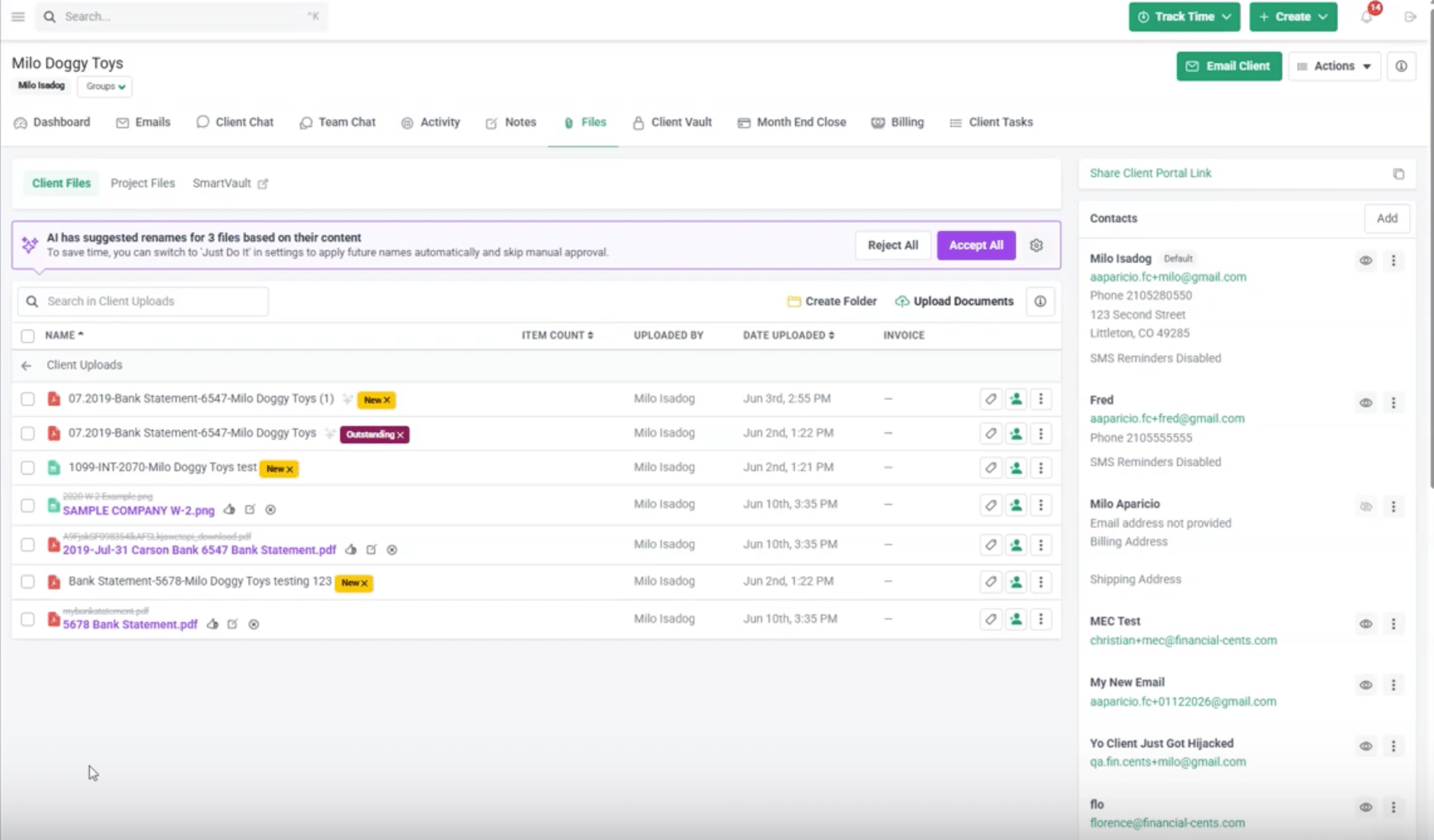
Firms can configure naming rules for Bookkeeping, Tax, and other services for consistency across incoming documents.
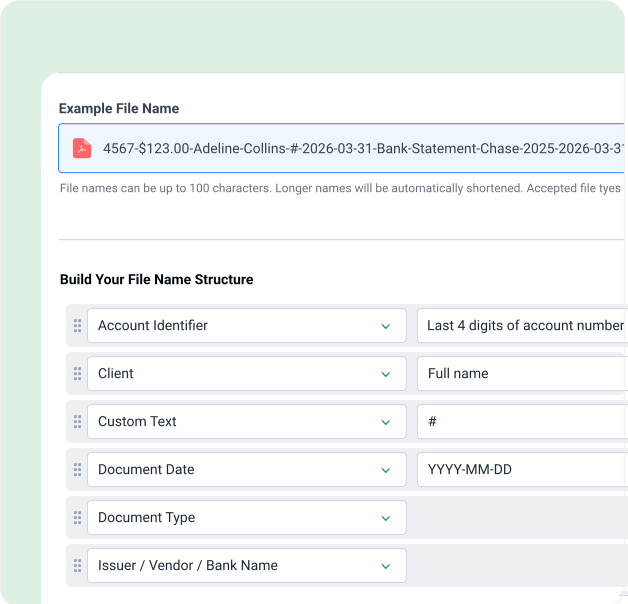
You can choose between two review modes:
- Always Ask: Your staff review each suggested filename and can approve, edit, or reject it.
- Just Do It: The agent automatically renames files when confidence is very high and holds lower-confidence suggestions for review.
Tuesday: Potential Document Mismatches Surface Earlier
As clients continue uploading documents, some files may not match what your team requested. Financial Cents’ AI File Validation Agent checks whether an uploaded document appears to match the request in a client task, including the document type and reporting period.
For example, a client asked to submit a March bank statement might upload one covering February instead. If the agent flags a potential mismatch, the client sees a short note beneath the file and can choose to Keep it or Replace it.
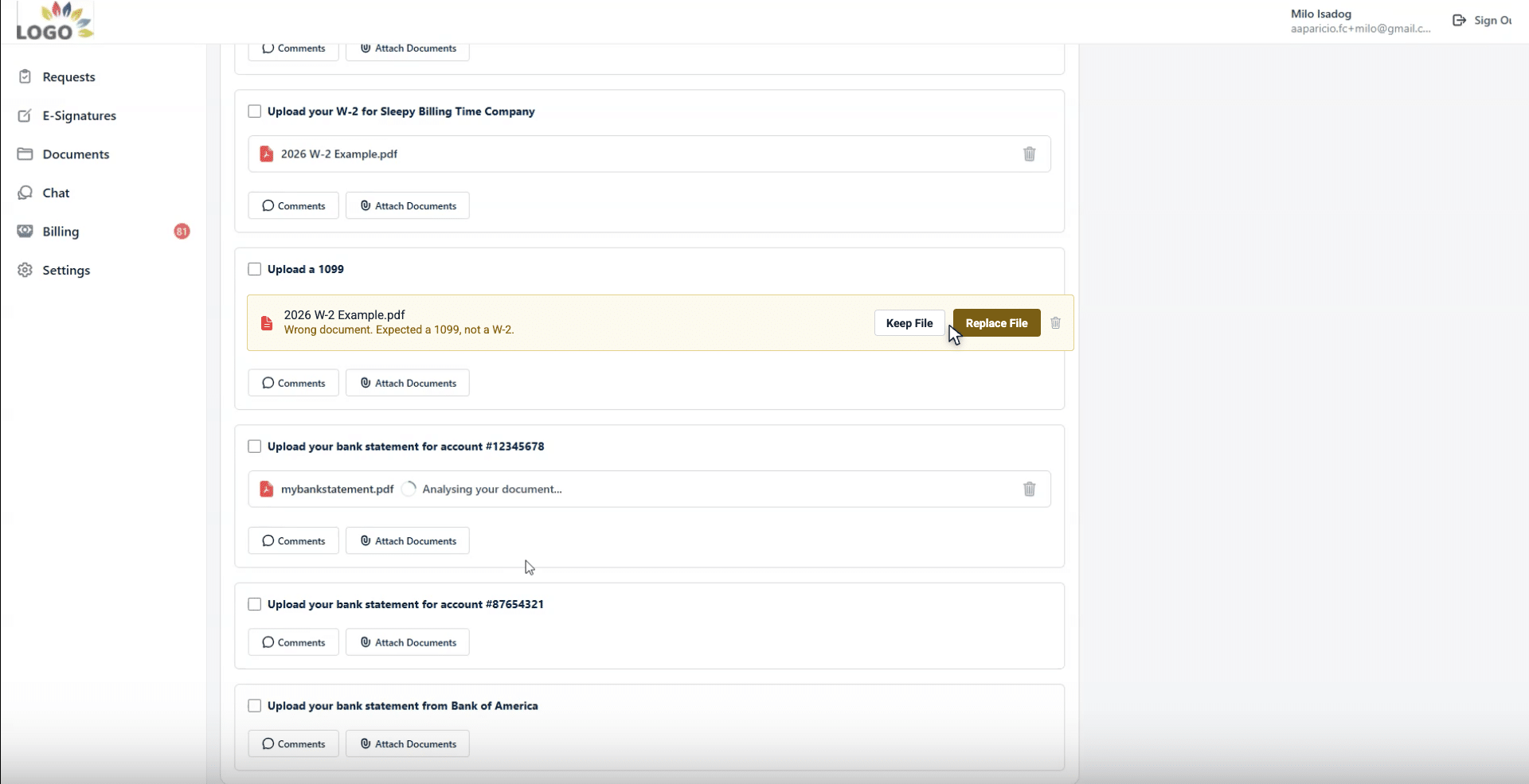
Wednesday: Documents Get Routed to the Right Folders
Even when clients submit the correct documents, staff still need to file each one in the appropriate location. Financial Cents’ AI File Routing Agent suggests a destination folder for documents clients upload to a client task. Your staff can accept, change, or reject the suggestion, or let the agent file a copy automatically when it’s confident.
For example, a file identified as a payroll report might be recommended for the appropriate payroll folder instead of remaining in general uploads.
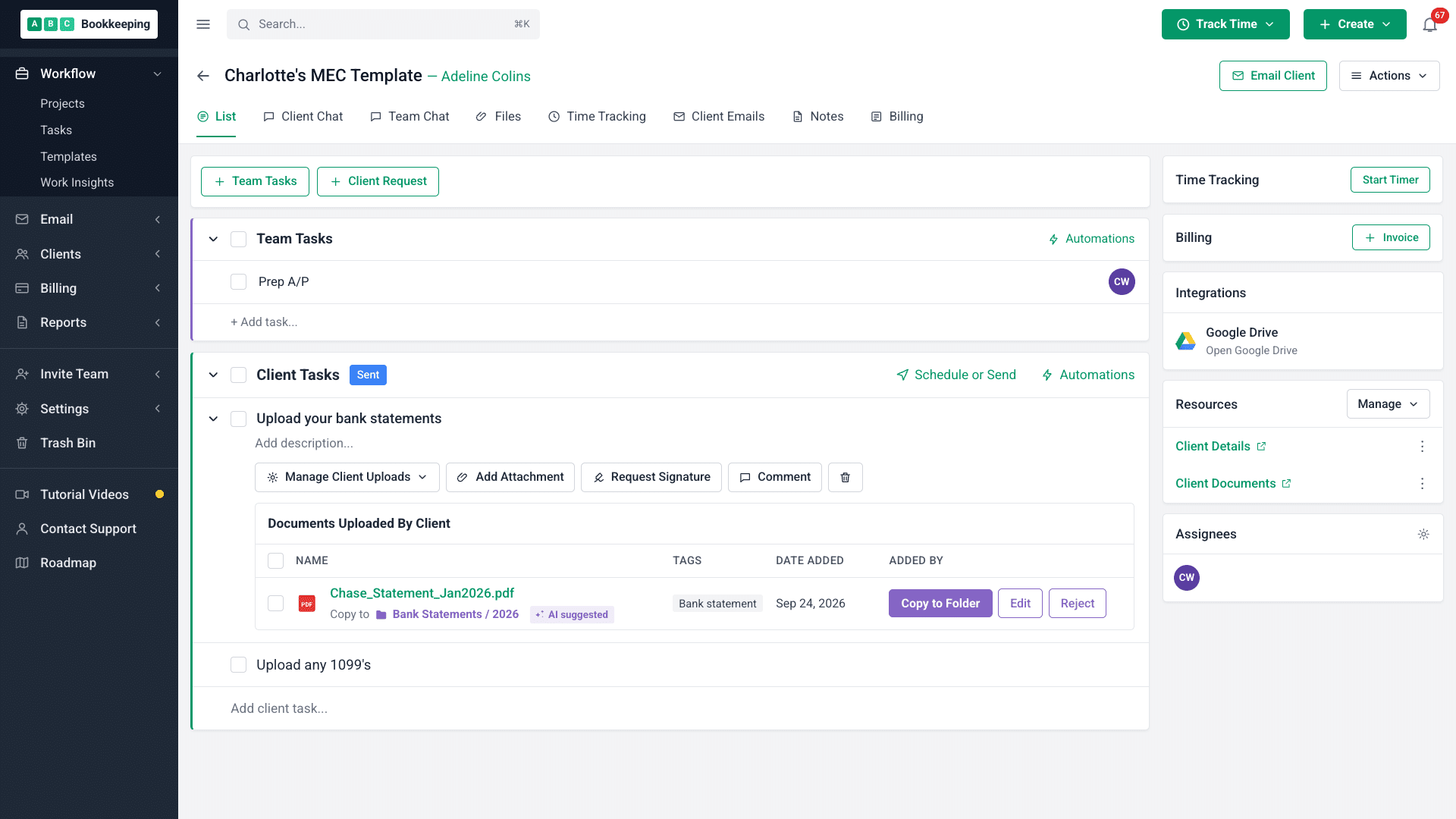
Thursday and Friday: The Team Focuses on the Work That Needs Judgment
By the end of the week, the team has had help with three routine but time-consuming document-handling decisions:
- What should this file be called?
- Does it appear to match what the client was asked to submit?
- Where should it be stored?
With less time spent on repetitive file administration, your staff can focus more on reviewing records, resolving exceptions, and handling work that requires their accounting expertise.
Make Document Handling Easier Without Losing Control
AI document classification gives smaller accounting firms a practical way to automate routine document-handling tasks without investing in complex enterprise systems.
However, the greatest operational value often lies at document intake, where identifying, naming, validating, and filing client uploads can create unnecessary work.
By bringing classification into your client portal and client tasks, you can catch potential document issues earlier and reduce the manual work that delays accounting teams.
Remember! Successful implementation requires human oversight. Start with a single workflow, standardize your naming conventions and folder structure, and review AI suggestions before expanding the automation. As the technology proves reliable, you can automate more routine decisions while leaving exceptions and professional judgment to your team.
Financial Cents designs its AI File Renaming, AI File Validation, and AI File Routing tools this way to help small and mid-sized accounting, bookkeeping, and tax firms reduce repetitive file administration without giving up control over important document-handling decisions.
Ready to automate your team’s routine document-handling tasks? Try Financial Cents free for 14 days.
Frequently Asked Questions (FAQs)
For accounting firms, this might mean recognizing a W-2, 1099-NEC, bank statement, invoice, or payroll report and using that information to support consistent naming, validation, and filing.
For example, OCR might read a scanned invoice, classification identifies it as an invoice, and data extraction captures details such as the supplier name and total amount. An IDP system combines these capabilities in one workflow.
• Document-type classification: Identifies whether a file is a W-2, bank statement, invoice, or another document type.
• Period classification: Identifies relevant dates, tax years, quarters, or reporting periods.
• Client or entity classification: Uses available information to help associate a document with the relevant client or business entity.
• Single-label classification: Assigns one category to a document.
• Multi-label classification: Assigns multiple categories when more than one label applies.
Not every tool supports every type, and identifying multiple documents within one PDF may require additional page-level recognition or document-splitting capabilities.
Test the tool against your own tax documents, track how often staff corrects its suggestions, and review uncertain results.
Before adopting a tool, check whether documents or prompts may be used for model training, whether third-party providers can access them, how long data is retained, and whether the vendor provides encryption, access controls, and malware scanning.
Firms should also consider applicable confidentiality obligations, client requirements, and internal AI policies. Avoid uploading sensitive client information to tools that haven’t been approved for that use.
You’ll mainly need to configure naming conventions, define folder structures, choose review settings, and train staff on the process.
For example, Financial Cents’ AI File Renaming agent holds lower-confidence suggestions for review even when the firm uses its Just Do It mode.
Staff can then inspect the document, correct the suggestion, or handle the file manually.
Share this article:



