

Your client has uploaded the documents you need to prepare their tax return. There’s just one problem: none of them are named properly. Instead, you get files like IMG_4471.pdf, Scan0003.pdf, and final-FINAL(2).pdf.
So you have to open each file, identify what it contains, and rename it according to your firm’s naming convention so your team can easily find and use it later.
Now imagine doing that for dozens of clients every month. You could spend hours on repetitive work you can’t bill for.
AI can automate much of this work. An AI document renaming tool can read a document, identify details such as its type, date, and account, and use that information to create a consistent filename.
In this guide, we compare the best AI file renamers for accounting firms in 2026. We’ll also see why file naming is important in accounting, how AI file renamers work, and whether a standalone tool or one built into your practice management software is the better choice.
TL;DR
- AI file renamers analyze a file’s contents and use the information they find to create descriptive filenames based on your firm’s naming convention.
- Consistent file naming matters in accounting because it makes client documents easier to identify, organize, retrieve, and hand off without wasting time opening files individually.
- AI file renamers can be standalone tools or built into practice management software. With a standalone tool, you typically upload files or connect a folder to the renamer. With embedded AI, the renaming happens within the practice management platform where your team already manages client documents.
- Best AI renamer standalone options include RenamerX, Zush, Renamer.ai, RenameClick, Renamed.to, and FilesDesk.
- Best practice management with AI file renaming option is Financial Cents. It allows firms to rename incoming client files within the platform according to their naming convention, and it’s included at no extra cost.
Best AI File Renaming Tools for Accounting Firms at a Glance
| Tool | Best for | Accounting-specific? | Automation | Security | Pricing |
|---|---|---|---|---|---|
| Financial Cents | AI renaming inside practice management software | Yes | Renames files automatically; holds low-confidence suggestions for review. | SOC 2 certified and encrypts data in transit and at rest | 14-day free trial. Pricing starts from $19/user/month, $49/user/month, $69/user/month, and custom pricing |
| RenamerX | Local AI file renaming | No | Automatically renames files with Auto Apply | Local processing; optional external AI providers | Free plan with 50 credits per month. Pro plan costs $36 for a lifetime license |
| Zush | Renaming a broad mix of file types | Partly. It has an accounting workflow | Automatically process new files added to watched folders | Stores BYOK API keys locally in macOS Keychain | Free 50 AI renames. Pro costs $10/month and $48 for a one-time license |
| RenameClick | Renaming and organizing files with local AI | No | Auto Flow watches folders and renames or moves files | Doesn’t collect or store file content, filenames, or AI results on its servers | Free plan; Pro costs $8 per month or $36 as a one-time lifetime purchase. |
| Renamer.ai | Bulk renaming and automated folder processing | Partly. It has an accounting workflow | Magic Folders automatically process new files | Enterprise-grade encryption to protect files and complies with GDPR privacy requirements | Free plan with 25 renames/month. Paid plans start at $9.95/month, up to $29.95 per month and $99.95/month |
| Renamed.to | Batch renaming of office documents and building custom integrations | Partly. It has an accounting workflow | Bulk renaming of hundreds of files in seconds with intelligent sorting | Doesn’t share your data with third parties and follows industry-standard security practices for data handling | 50 free renames. Pay-as-you-go from $9 for 1,000 credits or $49 for 10,000. |
| FilesDesk | Affordable own-key license | Partly | Watch folders can automatically rename and organize files | Local processing; optional BYOK and external AI providers | Free AI trial. Paid starts at $8/month, $20/month, and $40 for a one-time self-managed license |
Note: These features and prices were verified in September 2026. They can change, so check each provider’s current pricing and documentation before purchasing.
What Is an AI File Renamer?
An AI file renamer uses artificial intelligence to analyze the content of a file and generate a filename based on the information it finds.
For example, it can open a file named IMG_4471.pdf, recognize it as a March 2026 Chase bank statement for the account ending in 4567, and rename it 2026-03-Chase-4567-Statement.pdf.
This differs from a batch renaming tool. A batch renamer applies rules you set, like replacing a word, adding a date, or numbering files in sequence, without reading what’s in the files.
Accounting firms can use these tools to rename W-2s, bank statements, 1099s, engagement letters, and other documents for tax preparation, audits, and team hand-offs.
Why Consistent File Naming Matters for Accounting Firms
Have you ever had a looming deadline and spent more time looking for a document than actually working on it? You know they’ve sent it, but it’s sitting with other vaguely named docs, so you keep opening file after file looking for it.
Consistent file names make documents easier to find. Here are four places it saves time:
- Audit prep: Clear, consistent filenames make it easier to find supporting documents when preparing for an audit or responding to a document request.
- Team hand-offs: When another accountant or manager takes over a client, descriptive filenames give them immediate context about each document.
- Tax prep: A tax return can require multiple W-2s, 1099s, bank statements, receipts, and other supporting documents. Consistent names help staff identify the right documents without opening files one by one, which matters when your tax practice management software is tracking dozens of returns at once.
- Retrieval of older documents: The IRS requires taxpayers to keep records for three years and even longer in some cases. And so if they ever request these documents, it’s easier to retrieve them.
How AI File Renamers Work (Step by Step)
Step 1: Receive the file
First, the tool needs access to the files you want to rename. Depending on the tool, you might drag and drop files into an app, connect a folder where it processes files automatically, upload files/folders or send files through an API. For AI-powered accounting practice management software like Financial Cents, the renamer can access all documents uploaded on the accounting client portal.
Step 2: Analyze the document
The AI reads the document using OCR or vision models to extract details. What it pulls depends on the type of tool.
General-purpose renamers pull whatever details stand out, like a date, a company name, or a title. While accounting-specific renamers look for the details firms file by, such as document type, bank or institution name, account number, statement date, and client.
Step 3: Apply your naming convention
Next, the tool uses the information it identifies to create a filename that follows your firm’s naming convention.
For example, if your convention includes the date, client name, document type, and financial institution, it might rename a file named Scan0003.pdf to 2026-03-Acme-Co-Bank-Statement-Chase.pdf.
The available controls vary by tool. Some let you set the field order, date format, and separator, and choose what happens when a detail is missing. Others offer preset formats with limited customization.
Step 4: Rename the file
The tool then either applies the new name automatically or shows the suggested name for review, depending on its workflow. Some tools also flag files and names they aren’t confident about.
Step 5: Preserve the original filename
Many tools keep the original file name, in case you want to trace a renamed file back to the original or undo the change.
Read: How to get documents from clients faster
The 7 Best AI File Renaming Tools for Accounting Firms in 2026
1. Financial Cents: Best for AI File Renaming Built Into Your Practice Management Software
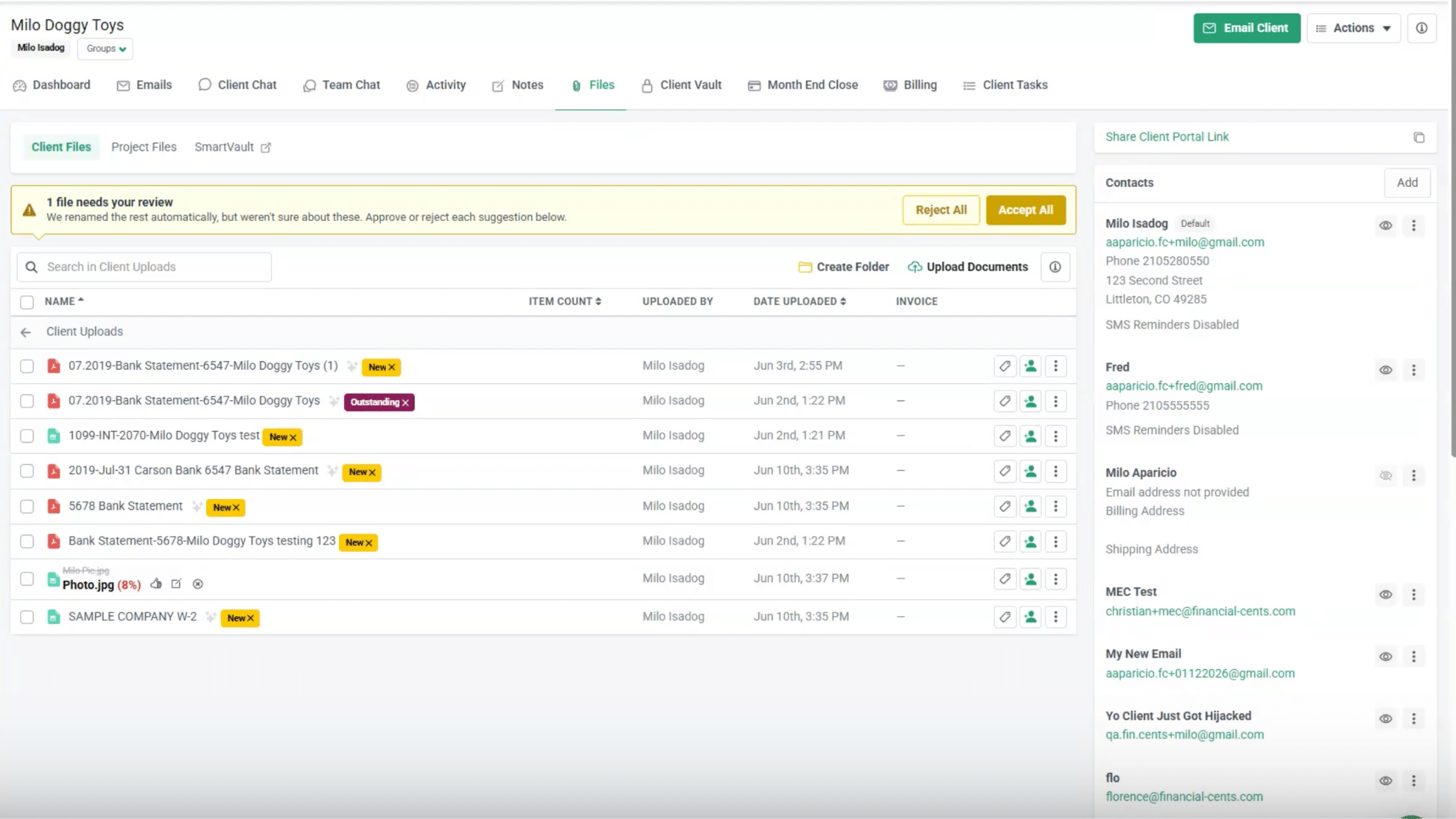
Financial Cents is a practice management software that has an AI File Renaming agent built into the platform where firms already manage client documents, tasks, and files. So when clients upload documents to the accounting client portal, the agent analyzes and renames them according to your firm’s naming convention.
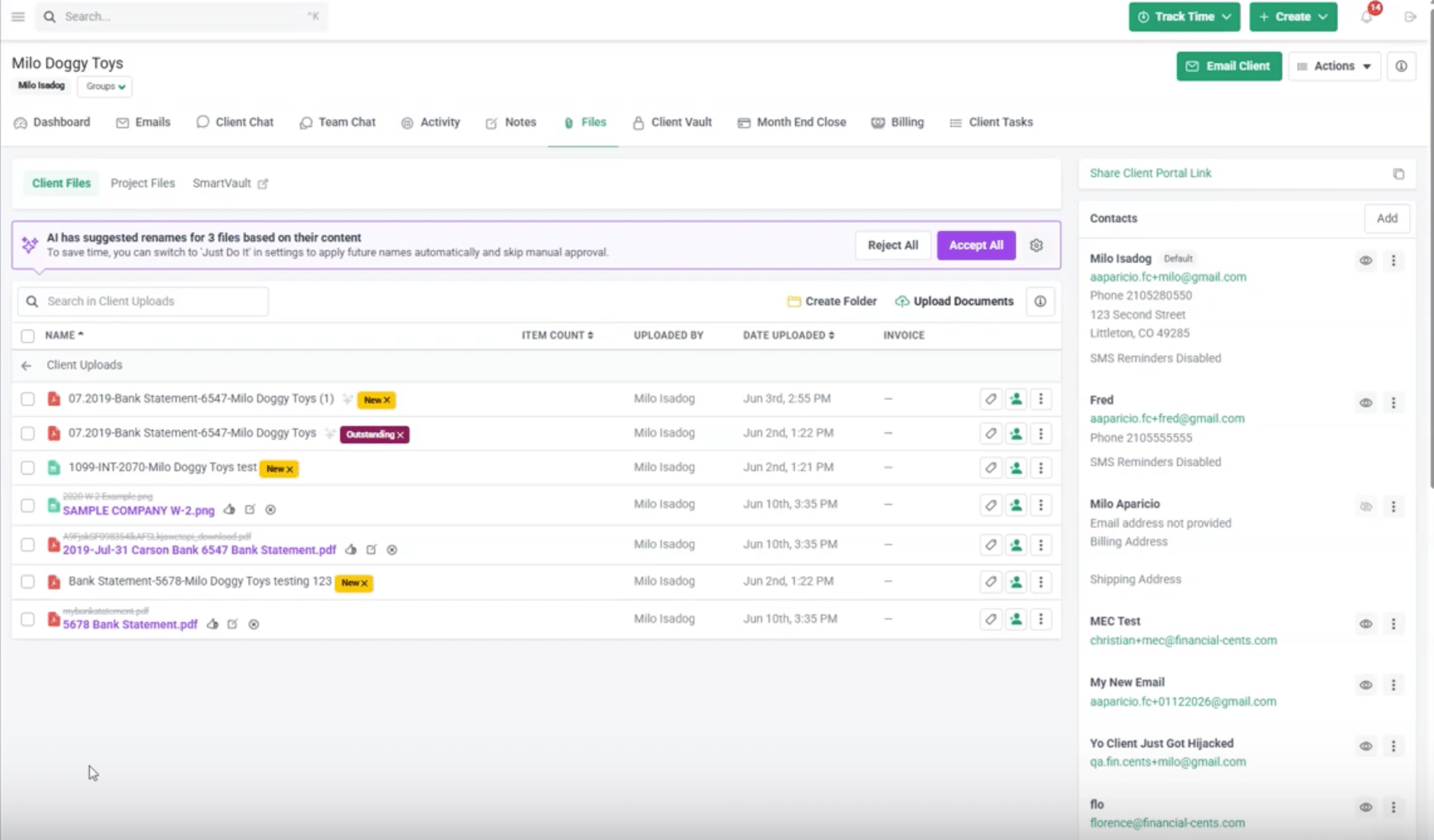
When the AI is unsure about a proposed name, Financial Cents shows a confidence percentage and lets the team accept or reject it. It currently supports PDFs, images, Excel, Word, CSV, and TXT files.
Accounting understanding
It’s made specifically for accounting firms, and the available fields reflect the information these firms commonly use to file client documents like:
- Account identifier
- Client
- Custom text
- Document date
- Document type
- Issuer or vendor, or bank name
- Tax year or period
- Upload date
Naming controls
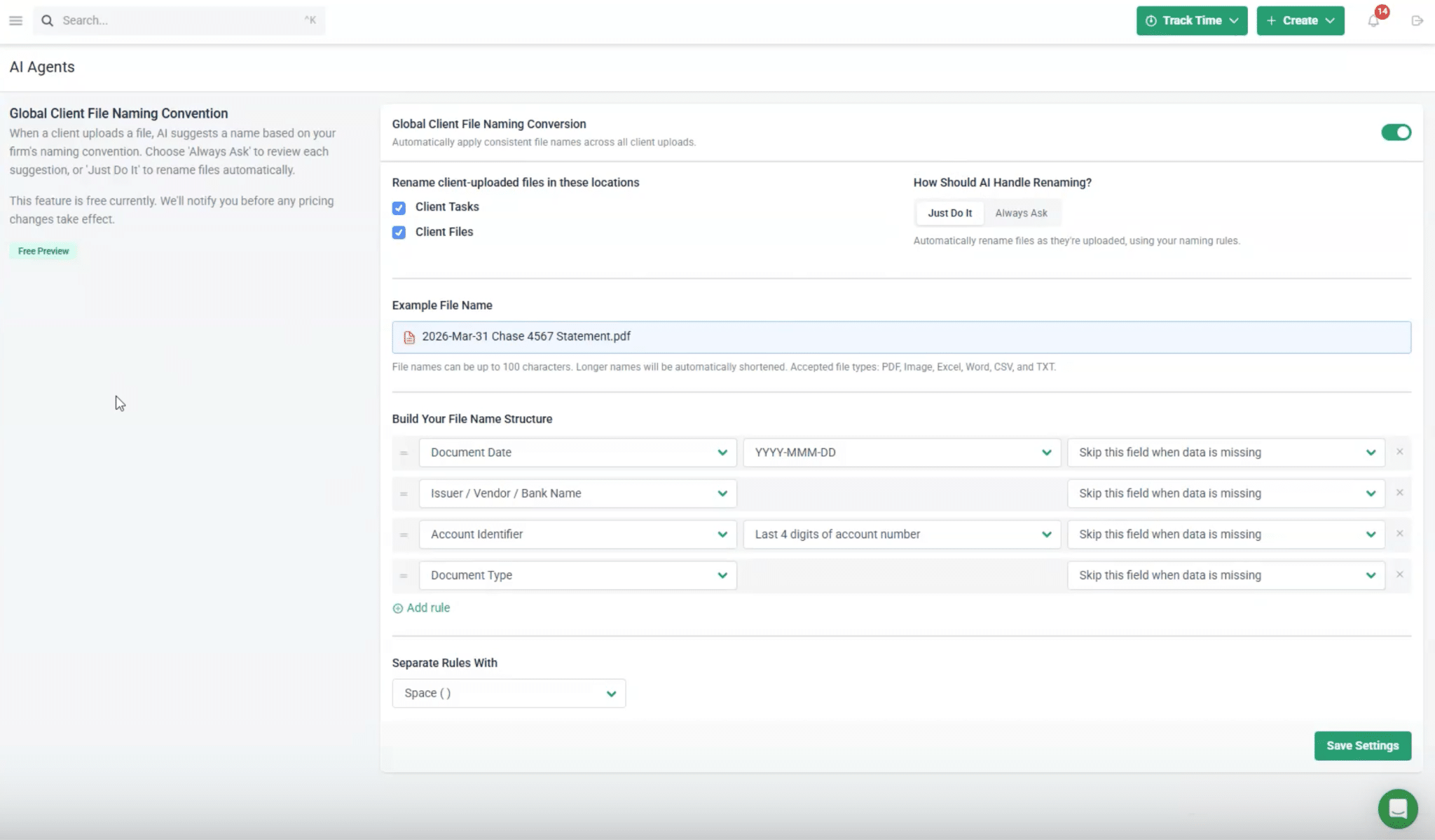
You can choose which fields appear in the filename and arrange them in the order you want. You can also choose a date and client format and a separator (dash, underscore, period or space), and decide what happens when information is missing.
Automation
Financial Cents offers two ways to handle renaming:
- Just Do It: The agent renames files automatically when they are uploaded. But if it has very low confidence in the suggested name, it won’t rename automatically, but will hold for review.

- Always Ask: The agent suggests a name and waits for your team to approve, edit, or reject it. You can also accept or reject suggestions in bulk.
Security
Financial Cents is SOC 2 certified and encrypts data in transit and at rest. It also has access controls, multi-factor authentication, and audit logs. Read the full Financial Cents security practices.
Pricing
The AI document renaming agent is included with Financial Cents plans, which start from $19/user/month (billed annually), $49/user/month (billed annually), $69/user/month (billed annually), and custom pricing. There is a 14-day free trial too.
Limitations
The agent renames files that clients upload to Financial Cents. So if you need to organize legacy folders or rename files on your computer, you’ll need a standalone automatic file renaming tool.
2. RenamerX: Best for Local AI Renaming With Flexible Naming Rules

RenamerX is a desktop app for Windows and macOS that uses AI to rename and organize files based on rules you set. It uses the document text, image metadata, and supported media details to produce filenames that describe what the file really is.
Accounting understanding
RenamerX doesn’t have accounting-specific features or preset fields for common accounting documents. However, you can create naming templates and custom instructions to suit your firm’s filing rules.
Naming controls
It separates information extraction from filename formatting. Templates determine which fields to include and their order, then apply formats, separators, output language, and controlled vocabulary. You can also use custom instructions to guide how the AI extracts information.
Automation
RenamerX offers two main workflows:
- Review First: RenamerX suggests filenames and sends them to a review queue. You can check and edit suggestions before applying them to your files.
- Auto Apply: It renames files automatically without waiting for approval.
Security
RenamerX’s built-in AI processes file content on your device. If you connect a cloud provider, it sends that provider the extracted text, image previews, file name, and full file path, under the provider’s own terms.
Pricing
It has a free plan with 50 credits per month. Its Pro plan costs $36 for a lifetime license and includes unlimited credits, Watch Folders, and Auto Apply.
Limitation
RenamerX has no accounting-specific workflows; you’ll have to customize it yourself.
3. Zush: Best for Renaming a Broad Mix of File Types
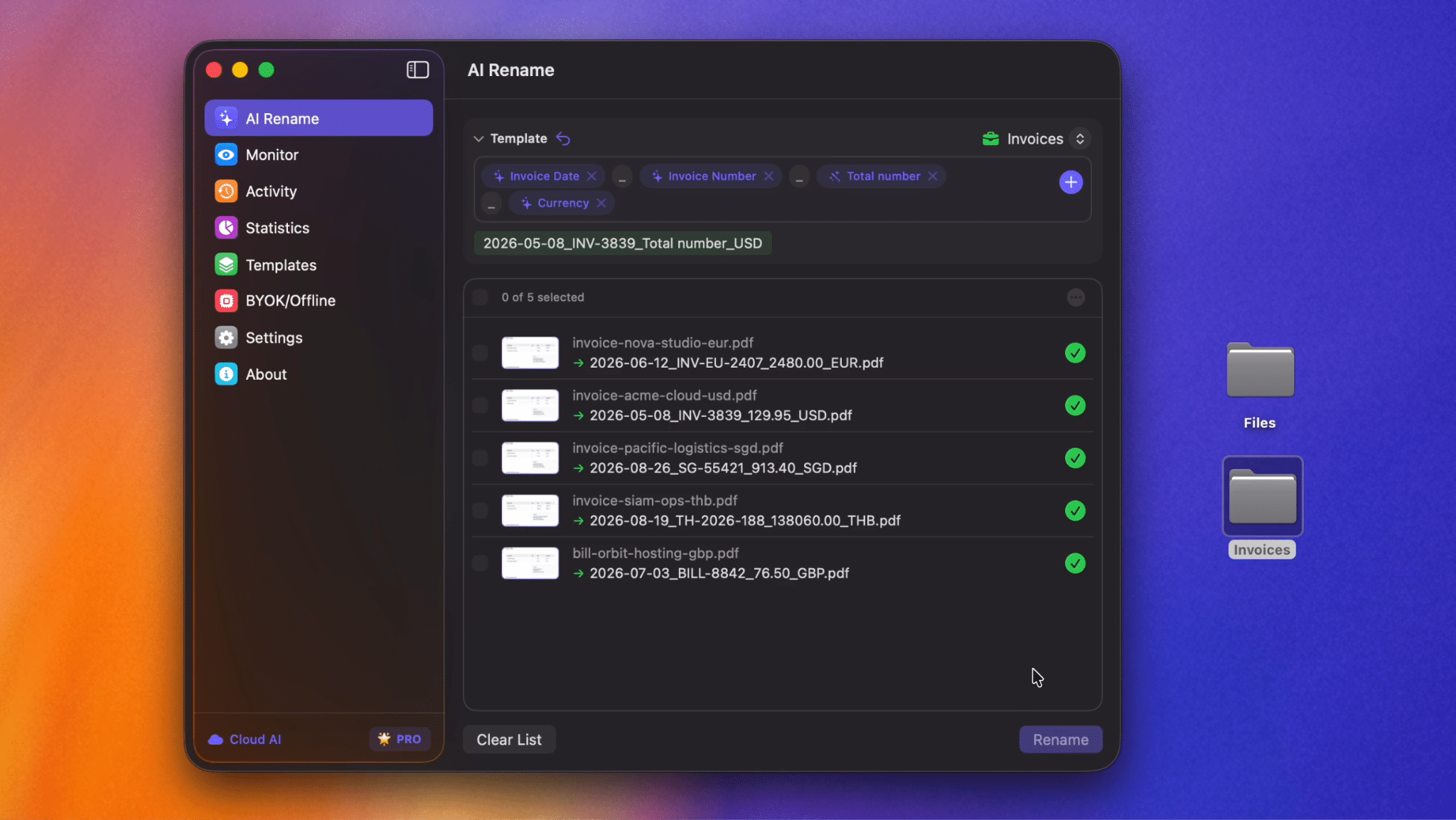
Zush suits firms that need to rename a wide range of file types. It can analyze 100+ file formats, including PDFs, Office documents, images, audio, and video.
Accounting understanding
Zush has an accounting workflow for invoices, receipts, statements, tax forms, spreadsheets, and scans. You can also create reusable templates for different clients, entities, or workflows.
Naming controls
Zush offers 145+ Naming Blocks, ready-made templates, custom prompts, separators, date formats, and other formatting controls.
Custom AI Blocks let you define the information Zush should extract and reuse that field across templates.
Automation
For recurring workflows, Folder Monitoring can watch folders such as Downloads or Screenshots and automatically process new files.
Security
Zush lets you choose how AI processes your files. If you use a local model or a provider you trust, your files are handled according to that provider’s privacy policy. It stores BYOK API keys locally in macOS Keychain, not permanently in the Zush backend.
Pricing
Zush offers 50 free AI renames. Its Pro plan costs $10 per month and $48 for a one-time license.
Limitation
Zush doesn’t show confidence scores for its suggested filenames.
4. RenameClick: Best for Renaming and Organizing Files With Local AI
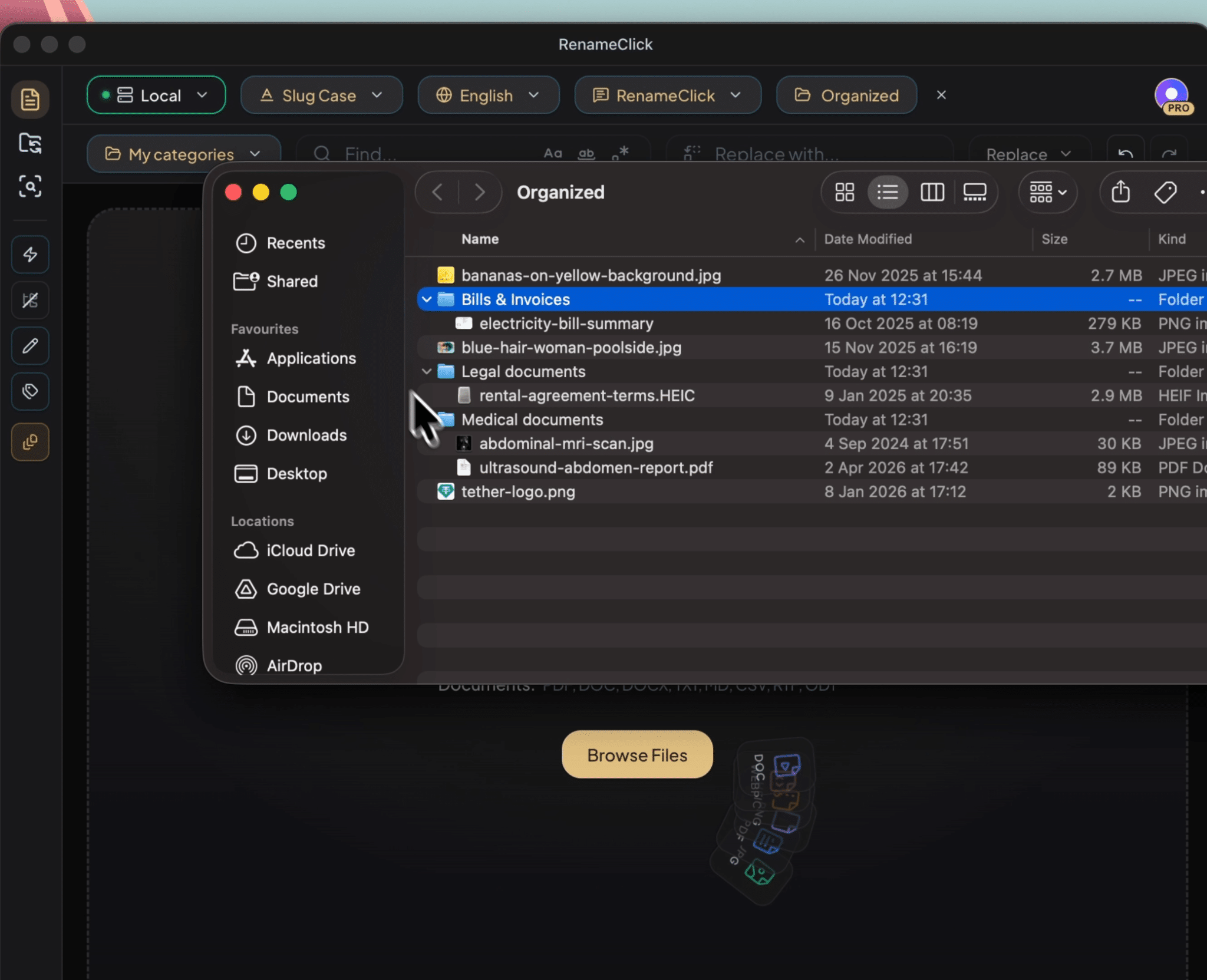
RenameClick can rename files, organize them into folders, or do both. It supports documents, images, and audio files, and lets you use a built-in model, connect Ollama or LM Studio, or use your own API key for OpenAI, Google AI, or Alibaba Cloud.
Accounting understanding
RenameClick doesn’t offer accounting-specific fields or templates. However, you can specify fields (like statement date, bank name), order, language, and missing values with Custom Instructions.
Naming controls
You can use built-in formats or write custom instructions that specify the fields, their order, language, separators, and how missing information should be handled. You can also edit suggested names before applying them.
Automation
Its Auto Flow feature can watch folders for incoming files and move, copy, or rename them.
Security
RenameClick’s built-in AI processes files locally after installation. It also supports optional cloud providers using your own API key, in which case those providers receive the content needed for analysis. It doesn’t collect or store file content, filenames, or AI results on its servers.
Pricing
The free plan allows 100 successful renames or moves per month. Pro costs $8 per month or $36 as a one-time lifetime purchase.
Limitation
RenameClick doesn’t support some file types like some video and audio formats, older Office file types, email files, archives, and executables.
5. Renamer.ai: Best for Bulk Renaming and Automated Folder Processing
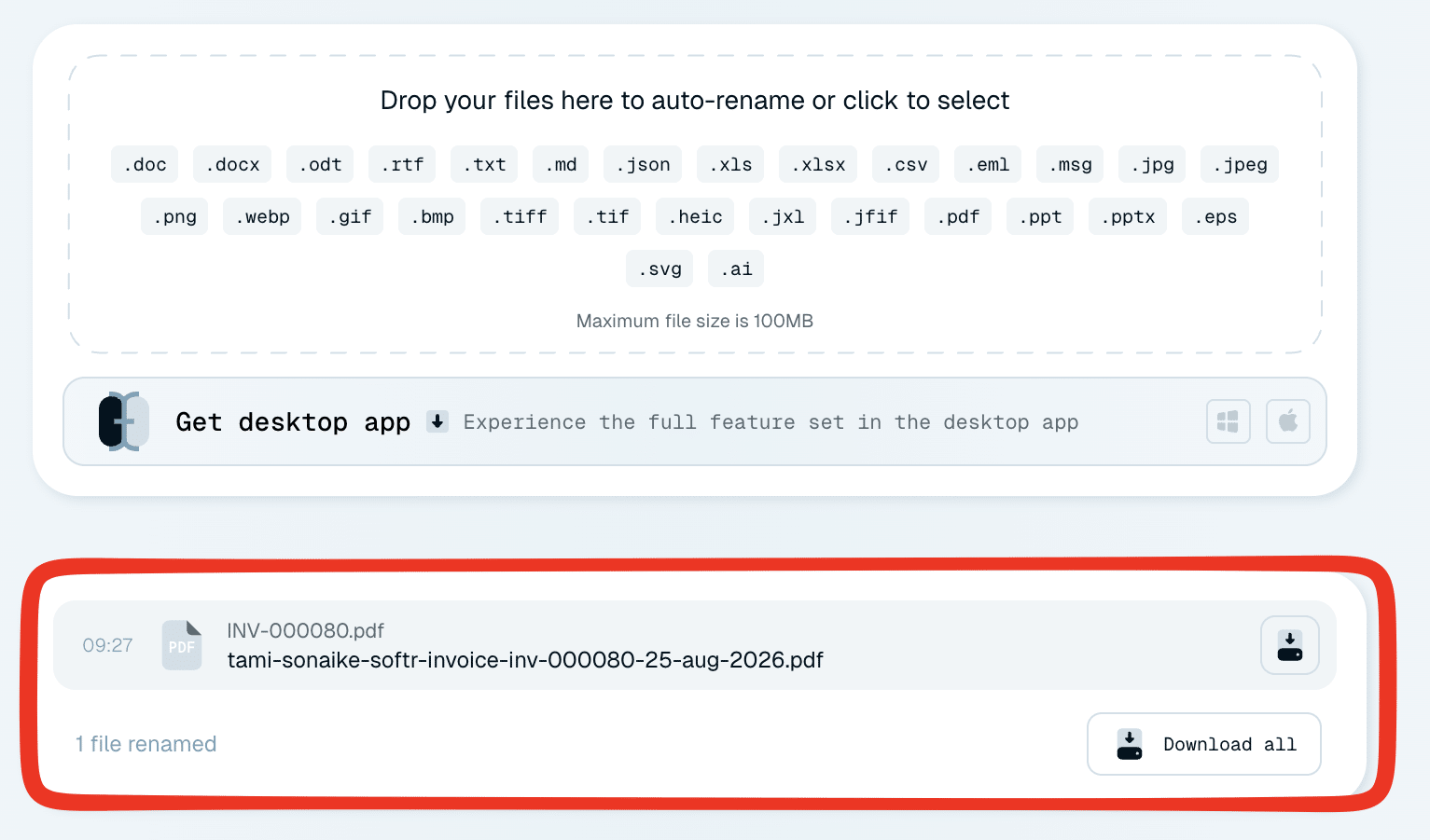
Renamer.ai is a desktop and web-based tool that renames and organizes your files with AI. It can rename multiple files at once with its bulk renaming feature. It can also detect and translate 20+ languages, which can be useful for teams managing documents in multiple languages.
Accounting understanding
It has an accounting layer where it generates clear filenames, individually or in bulk, for documents such as invoices, receipts, bank statements, contracts, and tax forms.
Naming controls
Its drag-and-drop template builder lets you create custom naming templates using fields such as document type, date, ID numbers, company or person names, invoice numbers, amounts, and other document details. It also offers pre-built templates for common use cases.
Automation
Magic Folders monitor selected folders and automatically process new files as they arrive.
Security
Renamer.ai uses enterprise-grade encryption to protect files and complies with GDPR privacy requirements. It only keeps files as long as necessary to complete the naming process.
Pricing
The free Starter plan includes 25 renames per month. Paid plans start at $9.95/month for 200 files, with higher-volume plans at $29.95/month for 1,000 files and $99.95/month for 5,000 files.
Limitation
Renamer.ai uses monthly file limits, so firms processing substantially more documents during periods such as tax season may need a higher-priced plan.
6. Renamed.to: Best for Batch Renaming of Office Documents and Building Custom Integrations
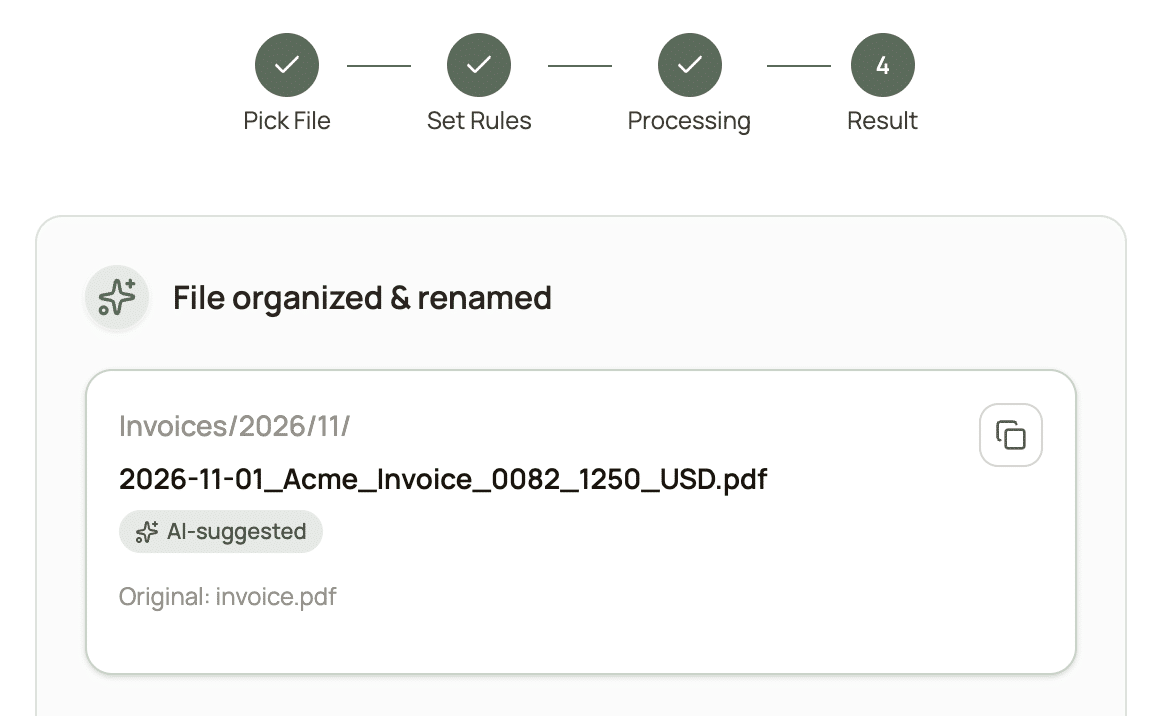
Renamed.to is an AI file renaming and organization tool that works with Google Drive, Dropbox, and OneDrive. It can batch-rename PDFs, Office documents, and scanned images, which you can then download individually or as a ZIP. It also offers developer tools including an API, a command-line tool, and a desktop file watcher, plus connections through Zapier, Make, and n8n.
Accounting understanding
Renamed.to has a dedicated workflow for accountants and bookkeepers. It extracts vendor, date, amount, and invoice number from PDFs and Office documents to rename invoices, receipts, bank statements, and other financial documents.
You can also connect Renamed.to to QuickBooks or Xero through automation platforms such as Zapier and n8n.
Naming controls
You can choose from predefined templates or create custom naming instructions. Templates can specify fields such as vendor, invoice number, date, and amount, which you can save and reuse.
Automation
Renamed.to provides a confidence score with each suggested filename, allowing your team to review changes before applying them. It can bulk-rename hundreds of files in seconds and sort them automatically.
Security
Files are temporarily stored for up to 10 minutes during processing and deleted afterwards. It doesn’t share your data with third parties and follows industry-standard security practices for data handling.
Pricing
Renamed.to uses a pay-as-you-go credit model rather than a required monthly subscription. New accounts get 50 free renames, followed by credit packs starting at $9 for 1,000 renames or $49 for 10,000.
Limitation
It doesn’t have a one-time purchase like some of the other tools on this list. Also, it’s cloud-only, meaning processing always requires an internet connection.
7. FilesDesk: Best for Affordable Own-Key License
FilesDesk reads each file’s content using OCR for scanned PDFs, text extraction for documents, EXIF data for photos, and AI vision for images, then generates filenames based on the file’s actual contents. It offers three AI options: managed cloud credits, bring-your-own-key connections to supported AI providers, and local AI through Ollama.
Accounting understanding
FilesDesk specifically lists bookkeepers among its users and supports workflows for receipts, invoices, statements, and other financial records. If you need accounting-specific fields like account number or tax year, you can request those through a custom prompt.
Naming controls
FilesDesk includes built-in templates and lets you create custom templates with extracted fields such as date, vendor, amount, document type, client, and original filename. You can also use custom AI prompts to control what information the tool extracts and how it formats the result.
Automation
Watch Folders automatically rename new files as they arrive using your selected templates or AI accounting rules. You can also move files into folders based on your rules.
Security
FilesDesk’s local AI option keeps processing on your computer. If you use its managed cloud mode or connect an external provider through your own API key, the relevant file content is processed by that service.
Pricing
FilesDesk offers a free trial with 15 AI credits. Its paid AI plans include an $8/month plan with 500 credits and a $20/month plan with 2,000 credits. It also offers a $40 one-time Self-Managed License for users who want to use their own API key or local AI.
Limitation
One license covers one computer, so each staff member needs their own. Also, monthly credits don’t roll over.
What to Look for in an AI File Renaming Tool
When comparing automatic file renaming tools for your firm, here’s what to consider:
- Accounting-specific understanding: Can the tool recognize documents such as W-2s, 1099s, and bank statements, or does it simply extract generic text? A tool that understands document types can create more useful filenames with less manual setup and correction.
- Naming convention customization: Look for control over the fields included in a filename, their order, date formats, separators, and what happens when information is missing.
- Integration with your workflow: Consider where the tool fits into your existing process. An AI renamer built into your practice management platform or document management software for accountants can work with documents as clients upload them. A standalone tool may be better for cleaning up files stored elsewhere.
- Security and compliance: Check how the tool processes and protects client data. Look for relevant certifications such as SOC 2, encryption in transit and at rest, and whether files are processed locally or sent to a cloud AI provider. Since these tools read sensitive client data, apply the same data security best practices for accountants you’d use for any system that touches tax documents.
- Automation vs. control: Some tools rename files automatically, while others let your team review, edit, and approve suggested names first. Ideally, you should be able to choose the level of accounting automation that fits your workflow.
- Bulk handling: Tax season can mean processing dozens or hundreds of files at once. Check whether the tool supports batch processing or whether there are limits on the number or size of files you can process.
- Original filename preservation: Look for tools that preserve the original filename or keep a history of the change so your team can trace where a renamed file came from.
Example File Naming Conventions for Accounting Firms
A naming convention works best when it puts the field your team searches by first. Here are four examples you can adapt to your own firm.
1. Bookkeeping: monthly source documents
[Client]_[YYYY-MM]_[Institution]_[Account last 4]_[Document type]
Example: Acme-Co_2026-03_Chase_4567_Bank-Statement.pdf
Monthly bookkeeping depends on matching statements to periods and accounts. When the client and period come first, a month’s documents sort together, and the account number tells statements from the same bank apart.
2. Tax preparation: individual returns
[Tax year]_[Client last name]-[First initial]_[Form type]_[Issuer]
Example: 2025_Smith-J_W-2_Northwind-Inc.pdf
Tax work is organized by tax year, so the year goes first. Putting the form type and issuer in the name helps staff confirm they have every W-2 and 1099 without opening each file. A client with three 1099s from three brokers ends up with three clearly distinct files.
3. Business tax and year-end: entity documents
[Client entity]_[Tax year]_[Document type]_[Period or detail]
Examples: Bright-Dental-LLC_2025_Payroll-Report_Q4.pdf, Bright-Dental-LLC_2025_Fixed-Asset-Register.xlsx
For entity clients, starting with the entity name keeps related businesses owned by the same person from mixing together.
4. Audit and review support: supporting evidence
[Client]_[Fiscal year]_[Workpaper ref]_[Document type]_[Date]
Example: Acme-Co_FY2025_B-3_Loan-Agreement_2025-06-15.pdf
Audit files have to tie back to workpapers. A reference such as “B-3” lets a reviewer go straight from a workpaper to its supporting document, and the full date records when the document became effective.
Tips that apply to every convention:
- Use YYYY-MM-DD dates. Files then sort chronologically.
- Pick one separator and stick with it. Dashes within a field and underscores between fields is a common choice.
- Abbreviate consistently. If one file says “Stmt” and another says “Statement”, search results will split.
- Decide what to do when a field is missing. For example, use “Unknown” or leave the field out, so the AI renamer handles gaps the same way every time.
Common File Naming Mistakes AI Tools Can’t Fix
An AI renamer applies the convention you give it. If the convention is missing or unclear, the tool can’t fix that for you.
- No naming convention or it isn’t enforced: Without a documented naming convention, everyone in the firm may name files differently, making documents harder to find and organize. Or if it exists but isn’t enforced, it’ll cause the same problem.
- Mixing client-facing names and internal conventions: If clients name uploads one way and staff rename them another, the same document can carry two identities. Apply one convention on upload so files keep the same name in the portal and internal folders. Otherwise, you may struggle to identify files after they’re uploaded or moved into your internal system.
- Relying on folder structure alone: Folders provide useful context, but that context can disappear when someone downloads, shares, or moves a file. A descriptive filename gives the document context wherever it goes.
- Inconsistent date formats: Mixing date formats like MM-DD-YYYY vs. YYYY-MM-DD vs. January 2026 makes files harder to sort consistently. Pick one format and use it across the firm.
Streamline Your Firm’s File Organization With the Right Practice Management Platform
Many firms are still using AI through standalone, general-purpose tools. Financial Cents’ 2026 State of AI in Bookkeeping & Accounting Report found that 96% of firms using AI rely on general-purpose chatbots like ChatGPT, Claude, Gemini, and Copilot, while only 37% use AI features built into practice management software.
The report also found that only 11% of firms were running with AI, i.e., had embedded AI into their daily workflows. And those firms were more than 15 times as likely to report measurable ROI from AI than firms that hadn’t embedded it into their workflows.
Building AI into the software your team already uses can make it easier for teams to leverage the technology. As Shahram Zarshenas, CEO of Financial Cents, explains:
That’s the approach behind Financial Cents’ AI File Renaming Agent. It lives inside the document management system and client portal, so you can configure your firm’s naming convention once and automatically apply it to every client upload.
It also works alongside other AI features in Financial Cents, like AI File Validator, which checks whether clients uploaded the right documents, and accounting workflow templates that help standardize recurring work.
Book a Demo to Learn How Financial Cents’ AI Renaming Agent Works
Frequently Asked Questions (FAQs)
If you’re weighing a switch, compare how the best practice management software for accounting firms handles document collection and AI features.
An AI renamer built into practice management software works differently. Financial Cents includes AI file renaming in its plans with no separate rename credits, and it renames files as clients upload them. Documents get named as they arrive rather than piling up for a bulk cleanup.



