
Every accounting professional knows the sinking feeling of a looming deadline held hostage by a missing bank statement or W-2.
You request the documents, wait a few days, and follow up. The client promises to send them by Friday, but Friday comes and goes. Nothing. By the time the files arrive, your team can only scramble to review them, resolve discrepancies, and finish the work before the deadline.
It’s not just your firm. In Financial Cents’ 2025 State of Accounting Workflow & Automation Report, collecting documents from clients ranked as the #1 workflow challenge firms face.
And the costs go beyond late submissions for many firms. Their teams also spend hours writing follow-up emails, tracking outstanding files, and reminding clients about requests that should have been completed weeks earlier.
Some firms respond to this by sending more emails more frequently, but that’s hardly the solution. The solution is to build a collection process that makes requests clear, gives clients an easy way to submit files, and follows up automatically when something is missing.
This guide shows how to build that process, with copy-and-paste templates for requesting documents and following up when clients are unresponsive. You’ll also learn how to use automated reminders and a client portal to keep work moving without manual chase.
TL;DR
- To collect documents from clients without chasing them, send itemized requests with due dates, give clients one secure upload location, automate reminders, and escalate to a personal call only when reminders fail.
- Send specific, itemized checklists tailored to each client and service instead of vague requests that leave clients guessing what to provide.
- Give clients one easy place to upload documents, ideally a secure, passwordless client portal that lets them access requests without creating or remembering passwords.
- Automate reminders on a fixed schedule to follow up on outstanding documents without much human effort.
- Connect document requests to recurring work so requests go out alongside tax and month-end projects automatically.
- Reserve personal calls for unresolved requests when automated reminders have not led the client to submit the outstanding documents.
Why Don’t Clients Send Documents on Time?
Sometimes, accounting firms don’t realize how hard they’ve made it for clients to respond to certain requests.
Generic Requests Are Easy to Ignore
An email that says, “Please send everything we need for your taxes” puts a huge burden on the client to figure out what “everything” means.
Do they need to send W-2s, 1099s, mortgage interest statements, or receipts for deductible expenses? Should they include documents they’ve already submitted? They may even be unsure whether a particular file is relevant.
The more of this second-guessing they have to do, the easier it is for them to put it off, send incomplete information, reply with more questions, or do anything else besides actually sending the required information.
Clients Don’t Recognize the Document Names
Accountants and bookkeepers work with financial documents every day, so it’s easy to forget how little about financial documents and terminology their clients may know.
While a request for a general ledger, trial balance, or Form 1099-NEC might make perfect sense to your team, it could leave a client wondering what you’re talking about. Even when they recognize the document’s name, they may not know which software to get it from. They may end up sending the wrong file or submitting an incomplete response.
Forgotten Passwords and Logins Create Friction
Sometimes a client understands your request and is ready to send the documents. But then they discover they’ve forgotten their portal password, can’t access the linked email account, or need to reset their login.
What should have taken a minute becomes another task. If the client is busy (which they often are), they may close the tab and tell themselves they’ll return later, which could delay the submission even further.
Requests Arrive Through Too Many Channels
If one document request arrives by email, another by text, and a third through the client portal, the client may send a bank statement as an email attachment, upload a payroll report to the portal, and reply to the text. Now it’s harder for the client to remember which files they’ve already sent or where they sent them.
Without a single place to manage requests and submissions, document collection takes more time than it should.
There’s No Clear Deadline
Without a specific due date, clients may not prioritize your request over the other tasks competing for their attention. They may also underestimate how their delay affects your team.
“Please send these documents as soon as possible” sounds urgent to an accountant working toward a filing deadline. To a client juggling other priorities, it may sound like something they can put off until later.
Clients Aren’t Sure Who Should Respond
When a request doesn’t say who should respond, it can sit untouched even when someone in the company has the information you need at their fingertips. The business owner may expect their office manager to send the payroll reports, while the office manager assumes you already have them. Meanwhile, your team is waiting for a response from the owner.
If you send a group email to a client’s team or a business with multiple entities, no one knows who is explicitly responsible for pulling the files. And when everyone assumes someone else is handling it, nobody handles the requests.
Documents Are Scattered Across Different Accounts
Even when clients know what you need, gathering the files can take time. They may need to log in to several systems, download reports, locate missing records, or ask someone else for access before they can send everything to your firm.
As a result, a request that seems straightforward to your team can require several steps on the client’s end. If even one person or system is difficult to access, the client may submit only part of the requested documents or need more time to gather the rest.
Ways to Collect Documents From Clients (and When Each Works)
The best way to collect documents depends on the type of work, the number of files involved, and how often you need them. Each collection method has its strengths and limitations, so choosing the right one can make submission easier for clients and help your team keep requests organized.
| Collection method | Best for | Advantages | Limitations |
|---|---|---|---|
| Email attachments | Occasional, one-off documents with low security needs | Familiar to clients, so no new tool to learn | Vulnerable to interception, completely untracked, easy to lose in long threads, and difficult to organize |
| Shared drive folders or file-request links | Collecting multiple files in one place | Easy to set up. Clients can upload files without sending multiple attachments. | Limited request-level tracking. No built-in reminders for each outstanding document |
| Organizers and questionnaires | Tax preparation and client onboarding | Gather client information, answers, and supporting documents systematically. | May not suit every recurring request; incomplete answers or missing attachments may still require follow-up. |
| Client portal with itemized requests | Recurring bookkeeping, tax preparation, and month-end close work | Centralizes requests and uploads, tracks outstanding items, and automates reminders | Requires initial setup and client onboarding; adoption depends on how easy the portal is to use |
Email Attachments: Familiar but Difficult to Manage
Email is convenient because clients already know how to use it. For occasional requests, such as asking a client to resend an invoice, it may be all you need. But when you’re collecting multiple documents from multiple clients, attachments can get buried in email threads, making it difficult to track what’s arrived and what’s still missing.
Most importantly, standard email is an open communication system that lacks default end-to-end encryption. While major providers encrypt data on their own servers, you have no control over how your client handles multi-factor authentication or other security safeguards.
Shared Drive Folders or File-Request Links (Google Drive, Dropbox)
Tools like Google Drive, OneDrive, and Dropbox let clients upload multiple documents without sending large email attachments. They’re easy to set up and useful for collecting large files, especially if your firm already uses these platforms.
But if you request eight documents and receive six, a shared folder may not clearly show which two are missing or automatically remind the client to submit them. Firms must also configure permissions and access controls carefully to protect sensitive client information.
Organizers and Questionnaires: Structured Information Gathering
Client organizers and questionnaires are useful when you need more than documents. During tax season, a tax organizer can help you collect information about a client’s income, dependents, deductions, and life changes alongside supporting records. A bookkeeping onboarding questionnaire, too, can capture business details, accounting systems, key contacts, and recurring reporting requirements before work begins.
These tools make information gathering more structured, but they don’t guarantee complete submissions. Clients may leave questions unanswered, skip attachments, or overlook documents that aren’t clearly listed.
To improve request completion, use a client tax organizer template to structure tax-related questions, a tax preparer checklist to identify required documents, or a bookkeeping client onboarding questionnaire to gather information before recurring work begins.
A Client Portal With Itemized Requests: Built for Repeatable Collection
A client portal gives clients a central place to access document requests, upload files, and see what’s still outstanding.
Instead of asking clients to interpret a long email, you can list each required document, assign a due date, and track its status. With a platform like Financial Cents, you can also automate reminders to save your staff the stress of checking every engagement and following up manually. Its passwordless portal access also reduces login friction for clients.
The main investment is setting up the process and showing clients how to use it. Once they know where to find requests and submit files, your firm has a more consistent way to collect and track documents across recurring engagements.
Which Method Should Your Firm Choose?
For accounting firms with recurring document collection needs, a client portal is the most reliable way to collect documents. Its central system for requests and submissions is more convenient than email threads, shared folders, or scattered messages. Email can still serve as the notification channel that directs clients to the right place to upload files and check outstanding requests.
The portal gives clients a predictable process and your team a clear view of what’s been received and what’s still missing.
Build a Repeatable Document Collection Process
The most reliable way to stop chasing clients is to make document collection a standard part of your firm’s workflow. Here’s how to build that process.
Step 1: Create a Master Checklist for Each Client Type
Since different engagements require different documents, start by listing what your firm typically needs for each service, such as individual tax preparation, corporate tax filings, and monthly bookkeeping.
Turn each list into a reusable template, so your staff members won’t have to recreate requests from scratch. Customize it for each client by removing irrelevant items and adding any client-specific requirements.
Step 2: Set Expectations During Onboarding
Don’t wait until tax season or the first month-end close to explain your document collection process.
At onboarding, tell clients what you’ll need, how often you’ll request it, where they should submit it, and when it’s due. Explain how late submissions affect filing or reporting deadlines and what your firm will do when documents are overdue.
For recurring bookkeeping clients, establish a monthly schedule. For example, documents might be due by the fifth business day, with reconciliation beginning once the required files arrive. Any outstanding items trigger reminders.
This should include clarifying who is responsible for providing each set of documents. While at it, show clients how to access your portal, upload files, and check outstanding requests before they need to do so under deadline pressure.
Step 3: Send One Specific, Itemized Request With a Due Date
A good document request answers three questions: What do you need? Where can the client find it? When is it due?
Don’t send a vague email asking clients to “send over the remaining documents.” It’s not clear what’s missing and increases the risk of incomplete or incorrect submissions. Instead, list each required item, explain unfamiliar terms, and give clients a clear deadline.
Specify the period each document should cover and any other details clients need to identify the correct file. For longer lists, consider grouping related items into sections so clients can work through the request more easily.
Step 4: Give Clients One Upload Destination
Once clients know what to submit, make it clear where those documents should be sent. Choose one primary destination for submissions and direct clients there consistently. And be sure to keep the instructions simple.
Every request notification should tell clients what to do, where to upload their files, and how to get help if they need it.
Step 5: Track the Status of Each Document
If a request asks for six documents and four have arrived, your team needs to know exactly which two are missing. This is what item-level tracking means.
It enables staff to follow up on outstanding documents without asking clients to resend everything. It also helps your team identify what’s preventing work from moving forward.
Step 6: Name and File Documents Consistently on Arrival
Document collection doesn’t end with a client uploading a file. Your team still needs to identify it, associate it with the right client and period, and store it where staff can find it later.
That requires consistent naming conventions. Without it, folders can fill up with files that have confusing names (statement.pdf, scan001.pdf, or IMG_4821.jpg, etc.).
Your naming convention should include the client identifier, document type, and relevant period (ClientName_BankStatement_2026-09.pdf, for example).
Specify where each document type should be stored and apply the same rules across recurring engagements. Tools like Financial Cents’ AI File Renaming Agent and AI File Routing Agent can help by suggesting filenames and identifying the correct folder within the client’s profile. In both cases, your staff retains control over every action.
Step 7: Automate Reminders, Then Escalate Personally
Set up automated reminders for each request’s due date. Make each reminder specific by listing outstanding documents and linking directly to the request.
If the reminders go unanswered, have a team member contact the client to understand what’s causing the delay and agree on the next steps and, where possible, a realistic submission date. If the delay threatens a filing or reporting deadline, explain the implications and escalate the issue according to your firm’s procedures.
How to Collect Client Documents Securely
The sensitivity of the financial records accounting firms handle makes secure data exchange non-negotiable.
Although email is familiar and convenient for most clients, it can create security challenges when used to collect sensitive information. Attachments may be sent to the wrong recipient, forwarded without authorization, or downloaded and stored in locations your firm doesn’t control.
Email security also varies by provider and configuration. While some email systems encrypt messages in transit, that doesn’t necessarily provide end-to-end encryption or control over every copy of attachments after they’re sent.
To protect client information, firms need a secure document collection with essential safeguards, including:
Encryption in Transit and at Rest
Data encryption protects client information from unauthorized access. Encryption in transit uses Transport Layer Security (TLS) to protect data as it moves between systems, while encryption at rest protects stored data, often using standards like AES-256. Look for a document collection platform that supports both. Ask the provider how it protects uploaded files and stored data.
For example, see how Financial Cents protects client data with encryption in transit and at rest, multi-factor authentication, and access controls.
Document Access Control
Not every employee needs access to every client’s financial records. A staff member handling monthly bookkeeping may not need access to another client’s tax documents or payroll information.
Choose a system that lets you restrict access based on staff roles, client assignments, and business needs. Give employees access only to the information they need, review permissions when their roles change, and promptly revoke access when they leave the firm.
Multi-Factor Authentication for Staff
Passwords can be stolen, reused, or exposed through phishing attacks. Multi-factor authentication (MFA) adds another verification step to make unauthorized access harder beyond passwords.
Require MFA for staff accounts, especially for systems containing sensitive client financial records. Combine it with strong, unique passwords and secure account recovery procedures.
Secure Passwordless Client Access
Requiring clients to create and remember another password can make document submission more cumbersome. But removing passwords shouldn’t have to compromise security.
Some accountant client portals use magic links sent to a client’s verified email address to provide passwordless access. This reduces login friction without weakening security when links are sent to a verified email address and expire.
Audit Trail
Your firm should be able to track key events throughout the document collection process. The audit trail records when a request was created, when a client uploaded a file, which staff members accessed or modified it, and when the document was moved or deleted.
These records help firms to investigate missing files, support internal reviews, and establish how client information is handled.
When evaluating a tool, check which events it records, how long those records are retained, and how authorized staff can retrieve them when needed.
Document Retention and Deletion Policy
On the one hand, keeping every document indefinitely increases the amount of sensitive information your firm must protect. On the other hand, deleting files too early can conflict with recordkeeping requirements, legal obligations, or client agreements.
Establish a written policy that specifies:
- Which documents your firm retains and why.
- How long each category of record must be kept.
- Who can authorize deletion.
- How files are securely deleted from active storage and backups.
- How legal holds, regulatory requirements, and client requests affect deletion.
Apply the policy consistently across your document portal, shared drives, and local storage. Deleting a file from one location may not remove copies stored elsewhere, so make sure your procedures account for those copies.
What IRS Publication 4557 and the FTC Safeguards Rule Require
Secure document collection involves more than choosing the right software for your workflow. U.S. tax and accounting firms must also understand the data security standards and regulatory requirements that apply to their activities.
IRS Publication 4557: Safeguarding Taxpayer Data
The IRS Publication 4557 guides tax professionals on protecting taxpayer information. It covers identifying security risks, safeguarding data, and developing a data security plan. The IRS and FTC require tax professionals to maintain a Written Information Security Plan (WISP) that documents how their firm protects sensitive information. Your document collection procedures should fit within that broader plan.
FTC Safeguards Rule
The FTC’s guidance specifically lists tax preparation firms among covered financial institutions, although some requirements depend on the volume of consumer records processed.
Covered firms must develop, implement, and maintain a written information security program appropriate to their size, complexity, activities, and the sensitivity of the information they handle. The program must include administrative, technical, and physical safeguards for customer information.
The specific obligations that apply to your firm will depend on your activities and circumstances. Review the relevant requirements and seek qualified legal or compliance advice when necessary.
For a practical starting point, Financial Cents offers a free WISP template to help firms organize their written security policies according to your firm’s systems, risks, and procedures.
Automating Document Requests and Reminders
A document collection process shouldn’t depend on someone remembering to email clients or following up before a deadline. Once you’ve standardized your requests, you can automate much of that work.
Let’s see how you can automate two accounting services without stressing your team with manual work.
Tax Preparation Workflow
Tax preparation often involves a long checklist, but not every document is available at the same time. A client can have their W-2 early in the season but still be waiting for a Schedule K-1 or brokerage statement.
Instead of requesting everything at once, start with a tailored checklist and stage later requests around when additional documents are likely to be available.
The workflow can be structured this way:
- Create a personalized checklist
- Send the initial request early
- Request later-arriving documents separately
- Automate reminders for missing documents
- Set an internal collection cutoff
Bear in mind that your firm’s internal collection cutoff is not the statutory filing deadline. It’s the date by which clients should submit their documents to give your team a reasonable chance of completing the return on schedule.
For example, you might set an internal cutoff of March 10 for an individual return due in April. The appropriate date depends on the return type, applicable filing deadline, extensions, and your firm’s capacity. Explain to clients that missing the cutoff may affect their return completion date even if the statutory filing deadline hasn’t passed.
For more insights, see Financial Cents’ guide to tax preparation workflow automation.
Month-End Close
Monthly bookkeeping usually follows a more predictable collection cycle. Your team may need the same bank statements, credit card statements, payroll reports, receipts, and loan information every month.
Create a reusable bookkeeping checklist and attach it to your recurring bookkeeping workflow. Before each cycle, update the reporting period and account for client-specific changes, such as a new bank account, a change in payroll provider, or a transaction requiring additional documentation.
This is how to structure the workflow:
- Reuse the monthly checklist
- Update the reporting period
- Set a consistent request date
- Automate reminders for outstanding items
- Assign a responsible contact and review owner
- Move the workflow forward when collection is complete
The request list, notification timing, reminder frequency, responsible contact, and review owner should be configured for each engagement.
See Financial Cents’ guide to closing the books in QuickBooks Online for more guidance on the month-end process.
An Illustrative Reminder Schedule
The right reminder cadence depends on the service, the deadline, and how much time your client needs to respond.
The following example assumes a request opens on November 23 and has an internal deadline of December 5.
| Timing | Action | Purpose |
|---|---|---|
| Day 0: Nov. 23 | Send the request | List required documents, state the Dec. 5 due date, and link to the request. |
| Day 3: Nov. 26 | First reminder | Identify the items still outstanding. |
| Day 7: Nov. 30 | Second reminder | Highlight missing documents and explain why they are needed by the deadline. |
| Day 10: Dec. 3 | Final automated reminder | Give the client time to respond before the due date. |
| Before the deadline | Personal follow-up | Contact the client if a missing item threatens the deadline. |
As you create your reminder schedule, configure reminders around the actual deadline and intervene early enough to protect it. If a client explains that a document isn’t yet available, record the reason and agree on a realistic next step.
How Financial Cents Automates Client Requests
Financial Cents enables firms to manage client requests within the related project to keep document collection connected to the work those documents support.
You can notify clients immediately or schedule them for a future date. Scheduled requests on recurring projects can repeat automatically. That way, Financial Cents helps firms maintain a consistent collection cycle without recreating requests every month.
Use AI to Catch Incorrect Uploads Before They Become Another Follow-Up
A client might upload an August bank statement when you need September’s, or submit a transaction summary instead of the full statement.
Without an early validation step, your team may not discover the mismatch until someone opens the file to review it. That can create another round of client communication and delay the work.
Financial Cents’ AI File Validation Agent flags potential mismatches between an uploaded file and the requested document or period. The tool doesn’t stop clients from uploading, so the client can choose to keep the file or replace it. It uses AI document classification to identify what a file is from its contents rather than its filename.
What to Do When Documents Arrive Wrong, Incomplete, or Late
Even with a reliable collection process, clients may submit the wrong file, leave out required information, or miss submission deadlines.
How your team handles these situations can determine the effects of the delay.
When a Client Sends the Wrong Document
Wrong document uploads happen when a request doesn’t specify the exact document, reporting period, or account the client needs to provide.
Common examples include uploading last year’s W-2 instead of the current year’s, a transaction history instead of an official bank statement, a cropped screenshot instead of a complete PDF, or a statement for the wrong account or period.
What to do:
- Check uploads as they arrive: Verify that each file matches the request instead of waiting until the engagement reaches the review stage.
- Reply within the original request: Keep the correction attached to the relevant request item so your team can track the issue and its resolution.
- Explain the mismatch specifically: Tell the client what they submitted, why it doesn’t meet the requirement, and exactly what you need instead.
- Make the replacement easy: Link the client back to the relevant request so they can upload the correct file without searching through previous messages.
Prevention tip: Specify the document type, period, and account in every request item. For example: “Chase checking ending 1234, September 2026 statement (PDF).”
Example client message:
Hi Adeline,
Thanks for uploading the document. The file we received is your 2024 W-2, but we need your 2025 W-2 from [Employer Name] to complete your tax return.
Please upload the 2025 form to the same request when it’s available: [insert Request Link].
If you haven’t received the form yet, let us know so we can plan the next steps.
Thanks,
[Your Name]
You can use Financial Cents’ AI File Validation agent to check uploads submitted through client tasks and flag potential document or period mismatches. The client sees a warning and can choose to keep or replace the file before your team opens it. The warning doesn’t block the upload.
When a Client Sends Only Part of What You Asked For
A client may respond to your request but leave some items outstanding. They may upload three of five bank statements, submit a W-2 without a required page of an accompanying document package, or send receipts without the corresponding invoices.
Why it happens: Clients work through requests in stages, overlook items on a long checklist, or assume that submitting some documents is enough to get the process moving. Vague requests can also make it difficult to identify what’s still missing.
What to do:
- Update each item’s status: Mark what has arrived and what is outstanding.
- Follow up only on missing items: List the exact documents or pages you still need so the client doesn’t waste time resending files you’ve already received.
- Decide what work can begin: If two accounts have complete documentation but a third is missing a statement, your team may be able to start reconciling the first two while waiting for the remaining file.
- Track dependencies: Identify which missing documents genuinely prevent progress and which can arrive later without delaying the entire engagement.
Example client message:
Hi Adeline,
Thanks for sending the September documents. We’ve received the operating account statement and payroll report.
We still need the following items to complete your month-end close:
• Chase checking account ending in 1234, September 2026 statement
• Business credit card ending in 5678, September 2026 statement
• September invoices for the transactions listed in your requestPlease upload these items here: [insert Request Link].
We’ve started reviewing the documents already received and will continue with the remaining work as soon as we have what we need.
Thanks,
[Your Name]
Process tip: Itemized requests make partial submissions easier to manage because each document has its own status. Your team can see at a glance what’s complete, what’s missing, and which items need follow-up.
When Documents Arrive Late
The deadline is approaching, but the client hasn’t submitted the required documents. Automated reminders have gone out, yet the request remains incomplete. Another generic reminder may not solve the problem.
Why it happens: The client could be struggling to locate a document, waiting on a third party, dealing with portal access issues, or unaware of the consequences of further delays. The client may just have competing priorities.
What to do:
- Follow a fixed reminder schedule: Use the automated cadence outlined in the previous section, with reminders focused on outstanding items and a personal call when the sequence ends without a response.
- Contact the client when automation stops: Ask what’s preventing them from submitting the documents, clarify what’s missing, and agree on a realistic next step.
- Set internal cutoffs for different deadlines: Tax filing, extension-related work, and month-end close require different collection cutoffs. Work backward from the relevant deadline to leave time for preparation, review, corrections, and approval.
- Decide in advance what happens when a cutoff passes: Depending on the engagement and applicable requirements, your policy might involve assessing whether an extension is appropriate, pausing work until the required records arrive, or moving routine work to the next cycle.
- Document the policy in your firm’s engagement letter: Explain client responsibilities, document submission deadlines, how delays affect delivery, and what your firm can do when required information doesn’t arrive.
Discuss the policy during onboarding so clients aren’t surprised when a deadline is enforced.
Example client message:
Hi Adeline,
We’re still waiting for the following documents needed to complete your [tax return/month-end close]:
• [Missing Document 1]
• [Missing Document 2]Our internal document cutoff is [Date], and we need time after that to prepare and review your work. If the documents arrive later, we may not be able to complete the engagement within the original timeframe.
Could you confirm by [Date] when you expect to send the remaining documents?
If you’re having trouble locating anything, please let us know so we can discuss the next steps.
Thanks,
[Your Name]
Process tip: A late-document policy works best when it’s consistent. Apply the same reminder cadence, escalation rules, and internal cutoffs across similar engagements, while accounting for client-specific circumstances and statutory obligations.
That gives your staff a clear process to follow, so they don’t have to decide case by case how to handle each overdue request.
Common Document Collection Mistakes
These are the five common mistakes to avoid to ensure complete, timely, and efficient document collection.
Sending Vague “Share Everything” Requests
Asking clients to “send everything for your taxes” or “upload your month-end documents” leaves them guessing what you really need them to send. That ambiguity encourages procrastination, which can result in clients overlooking important files, uploading irrelevant documents, or delaying responses because they aren’t sure where to start.
The less clients have to guess about what you need and how to provide it, the easier it is for them to act on your request.
Accepting Documents Through Email, Text, and the Portal Simultaneously
When clients submit files through multiple channels, your team has to check separate inboxes and folders to see what has arrived. As a result, your staff will spend time tracking down files, reconciling duplicate versions, and updating records instead of moving client work forward.
Sending Too Few or Too Many Reminders
Too few reminders can leave requests unattended until the deadline is uncomfortably close. Too many, such as daily messages, can frustrate clients, especially when reminders continue after they’ve submitted the requested documents. Let your reminder cadence reflect the service’s deadline and workflow, and stop reminders when the relevant request is complete.
Failing to Name and Organize Files Consistently
Clients may upload files with generic names like statement.pdf or scan001.pdf. Without a consistent naming convention, your staff must open files individually to identify the client, document type, and reporting period. This makes it harder to retrieve files when the team needs them later.
Making Clients Create Yet Another Password
Clients already manage logins for their banks, payroll platforms, accounting software, and other business tools. Requiring them to create and remember separate credentials for your client portal adds another obstacle to document submission.
If a client tries to upload a file while on the go but can’t remember their password, they may postpone the task until later. That delay can leave your team waiting for documents it needs to move work forward.
Stop Chasing Clients for the Same Documents Every Month
If your team spends hours every month chasing clients for missing documents, your collection process probably needs adjusting. When requests, reminders, and status checks depend on someone remembering to act, even routine document collection becomes time-consuming and difficult to manage, especially as your firm grows.
Financial Cents makes document collection a repeatable part of accounting workflows. Here’s how:
Itemized Client Tasks Replace Vague Requests
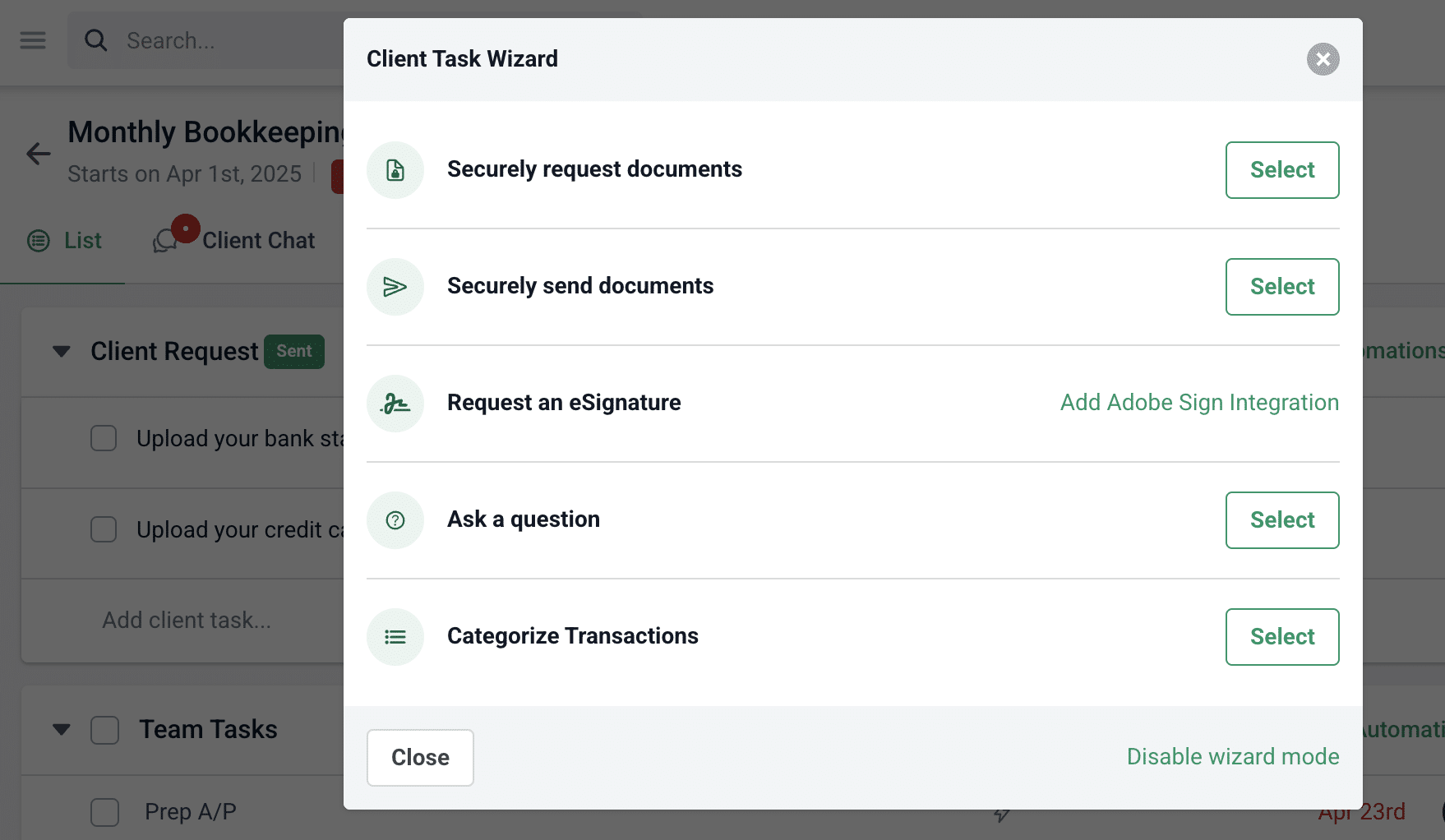
Financial Cents’ client task feature lets you create itemized document requests that specify what’s required and when it’s due.
For a monthly bookkeeping engagement, for example, you can request the August bank statement, credit card statement, payroll summary, and receipts for uncategorized transactions as separate items within one request.
Clients can see what they need to submit in the portal, while your team can track which items have arrived and which are outstanding at a glance.
Automated Reminders Reduce Manual Follow-Up
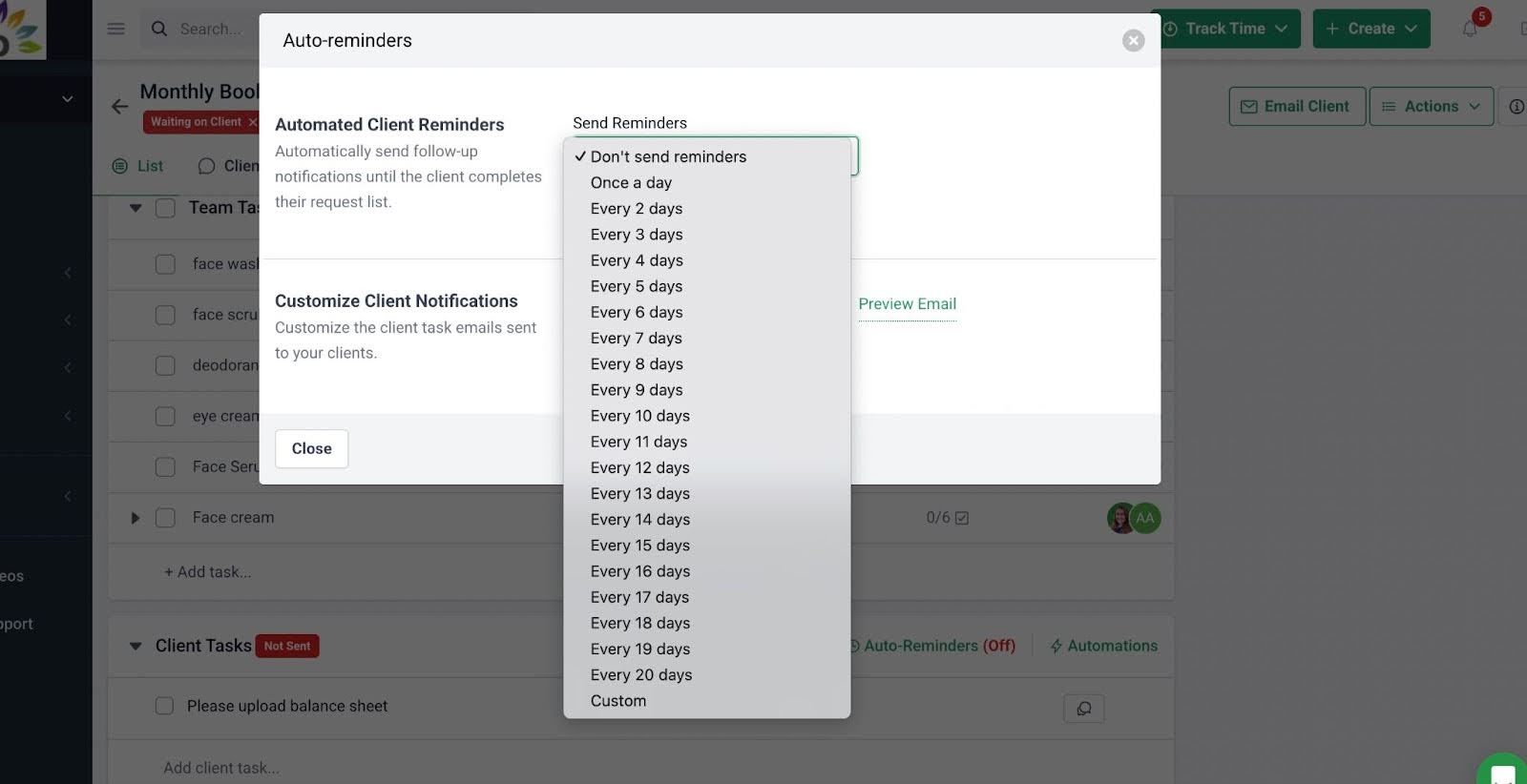
Financial Cents enables firms to schedule reminders for outstanding client requests, so their staff members won’t have to maintain separate follow-up lists or remember when each client needs another reminder.
When a client completes the request, the reminders stop, reducing unnecessary messages and allowing your team to focus on clients whose documents are still outstanding.
You can tailor reminder schedules to the engagement and use them for recurring work to make follow-up more consistent.
A Secure, Passwordless Portal Makes Submission Easier
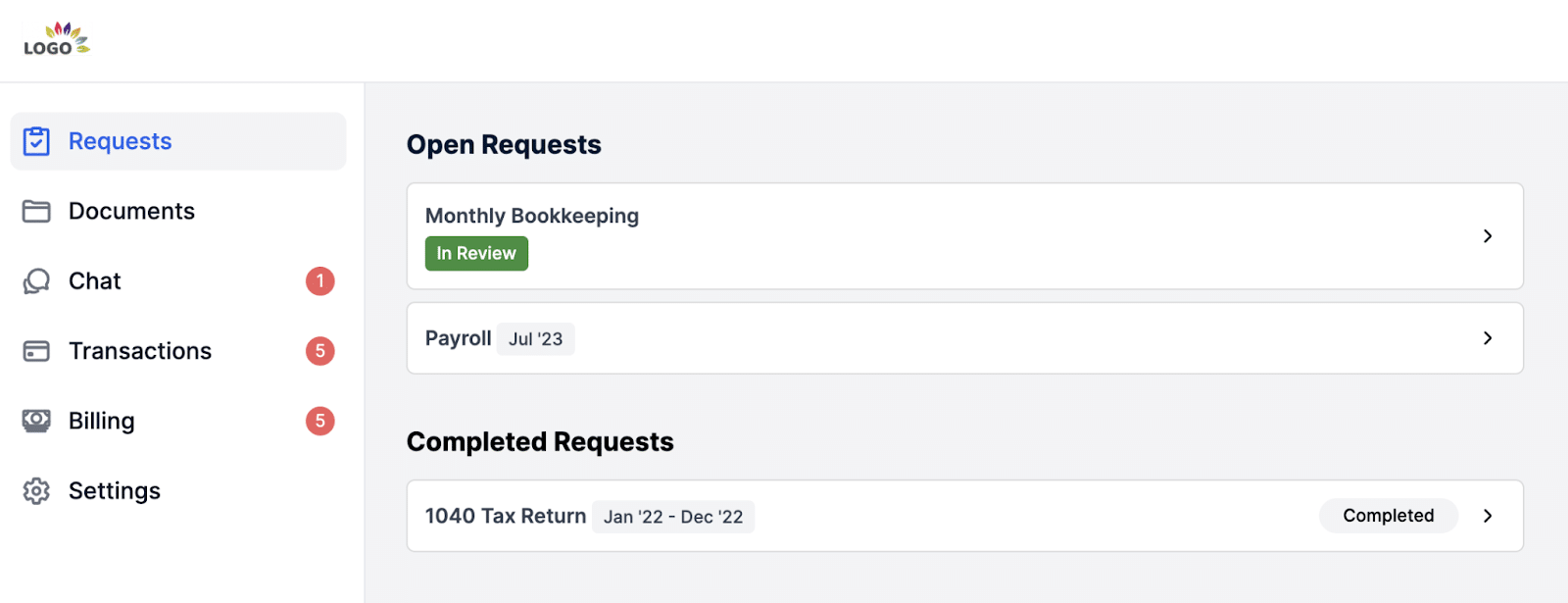
Financial Cents’ passwordless client portal lets clients access pending requests through a magic link. They don’t need to manage another set of login credentials.
That ensures clients have a central and convenient place to access requests and submit files, while your team has a single place to track incoming documents. This makes the submission process easier to follow and does not sacrifice the security of sensitive financial records.
AI File Validation Flags Potential Document Mistakes
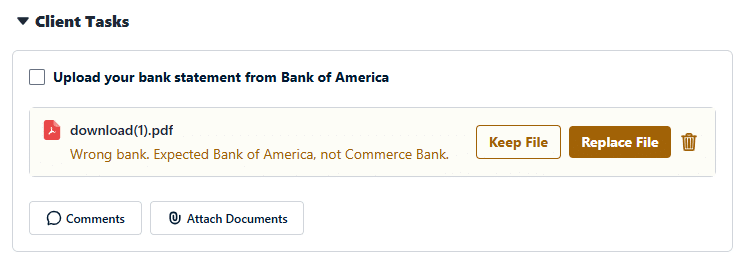
If a client uploads the wrong file or a file for the wrong period, Financial Cents’ AI File Validation agent flags the mismatch. The tool displays a warning beneath the uploaded file, and the client can choose to keep or replace it. The warning doesn’t block the upload.
Flagging potential issues at submission gives clients an opportunity to correct mistakes earlier and prevent the back-and-forth that comes with discovering the error after the fact.
An All-in-One Practice Management Platform
Standalone document collection tools can help firms gather files, but they solve the problem in isolation. Financial Cents is an all-in-one accounting practice management platform, so document requests are connected to the projects, deadlines, and client profiles.
This ensures that:
- Requests can go out with recurring projects: When recurring tax or month-end projects are created, you can configure scheduled client requests to run alongside the work automatically.
- Outstanding documents stay visible alongside deadlines: Your team can monitor client requests alongside project progress, making it easier to spot incomplete submissions that could delay an engagement.
- Collection connects to the wider workflow: Once the required files arrive, your staff can move into preparation, reconciliation, and review within the related project. With time tracking and billing available in the same practice management platform, your firm can manage the work done and its associated billing inside Financial Cents.
These connections are crucial because when document collection is part of the workflow, the handoff between receiving information and doing the actual work becomes easier to manage. Follow-up will no longer depend on someone remembering to send another email.
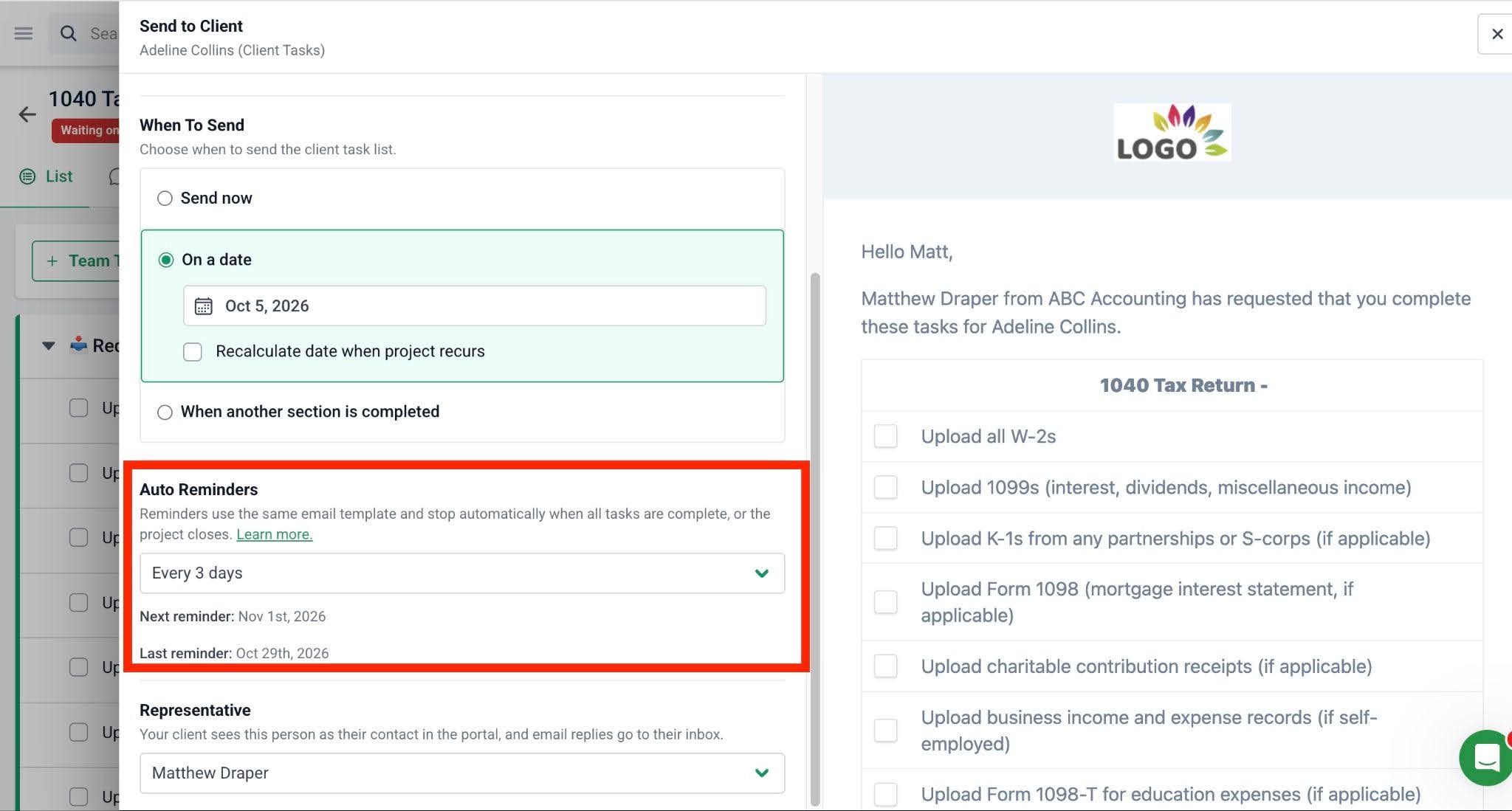
And we don’t have to worry about the client forgetting about it too. Automated emails continue to go out to them (at the frequency we set) until they send in the required information.”
Make Timely Document Collection the Norm with Financial Cents
Reducing (or eliminating) the time your firm spends chasing client documents starts with a repeatable collection process built around four essential components:
- Clear, itemized requests that specify what’s needed, including the reporting period, account, and file format.
- A convenient submission route through a secure client portal that reduces login friction.
- Automated follow-ups that remind clients about outstanding documents.
- Proactive review and validation to flag potential errors before they delay the work.
You don’t need to overhaul your entire operations at once. Start with one service line, such as monthly bookkeeping or individual tax preparation. Measure how much time your team spends on manual follow-ups and what percentage of document requests are completed by your internal deadline.
Then use the results to identify gaps, refine your process, and expand it to other services.
Financial Cents brings client tasks, automated reminders, document validation (and storage), and workflows together in one practice management platform to enable your firm to build a repeatable process that keeps client work moving.
Stop chasing clients; automate document requests and reminders with Financial Cents. Book a free Demo walkthrough or start a 14-day free trial today.
Frequently Asked Questions (FAQs)

Wesley Armstrong is the Customer Onboarding Manager at Financial Cents and a former Technical Support Specialist at SmartVault. He helps accounting and bookkeeping firms set up workflows that fit how they actually work, and writes about choosing, comparing, and switching practice management software.
Share this article