

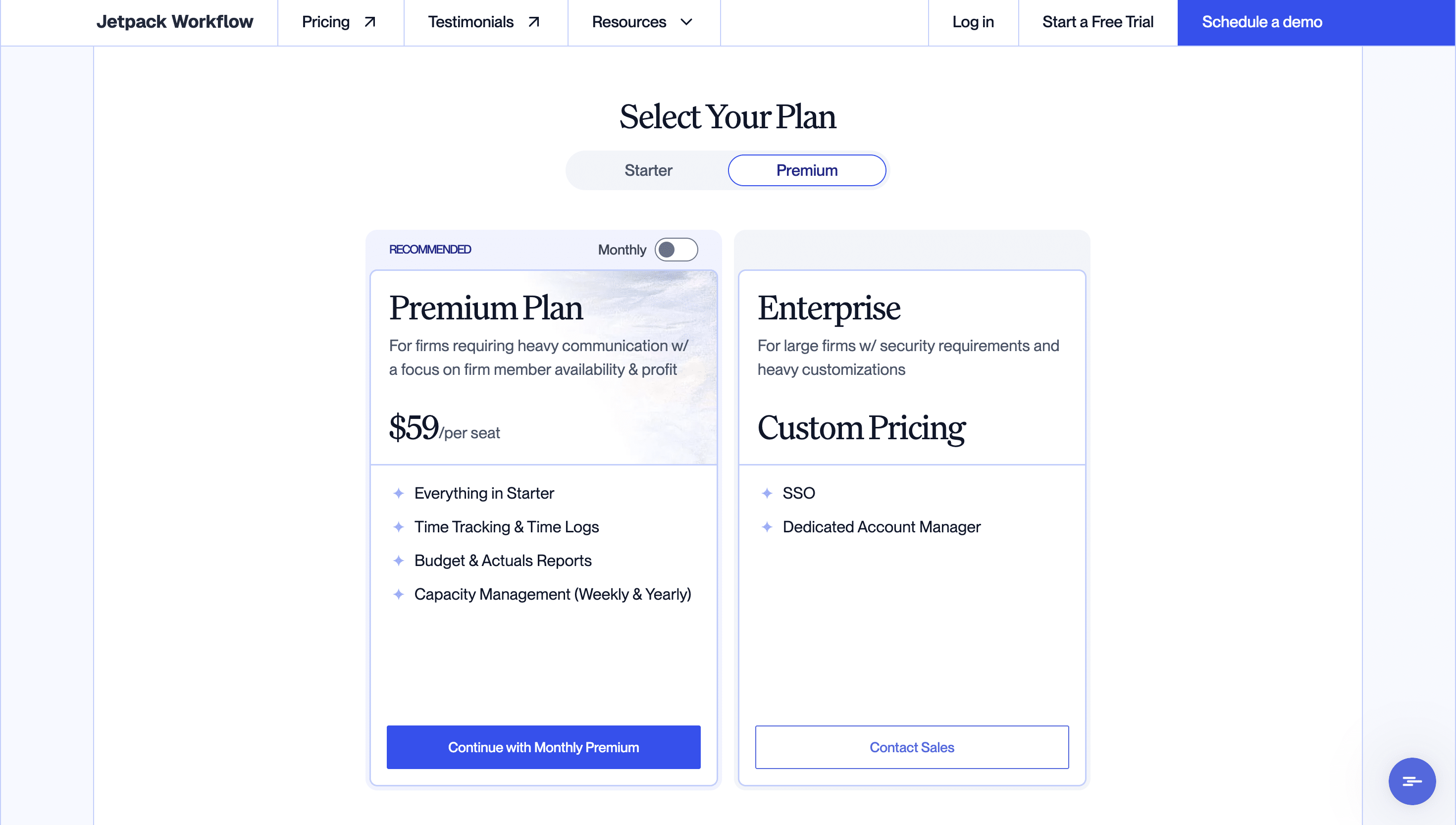
The two publicly listed Jetpack Workflow plans cost $49 and $59/month per seat with monthly billing. Annual billing reduces the costs to $40 and $50/month per seat, and saves firms $108 per seat annually.
One important consideration is that Jetpack Workflow is primarily a workflow management tool, not an all-in-one accounting practice management platform. This means that firms shouldn’t assume the subscription cost includes every tool they need to manage their firms.
Anyone evaluating Jetpack Workflow must factor in the additional cost of tools like client portals, proposals, billing and payment collection, and other functions accounting, bookkeeping, and tax firms need to serve clients from start to finish.
This guide breaks down Jetpack Workflow’s 2026 pricing, what each plan and billing frequency entails, and the additional costs to account for. It also shows how to calculate your firm’s total software spend and weigh your options to get the best value for your needs.
TL;DR
- Jetpack Workflow costs $49 or $59 per seat per month ($40 or $50 with annual billing), with custom pricing for Enterprise.
- Starter: $49 per seat monthly or $40 per seat monthly with annual billing ($480 per seat annually).
- Premium: $59 per seat monthly or $50 per seat monthly with annual billing ($600 per seat annually). Adds time tracking, budget-versus-actuals reporting, and capacity management.
- Enterprise: Custom pricing. Includes single sign-on (SSO) and a dedicated account manager.
- Additional costs: Document storage costs $5 per 100GB per month on monthly billing ($50/year on annual billing), and optional onboarding and training costs $1,500 one-time.
- Total cost: Jetpack Workflow covers workflow management only. In our five-person example, adding storage, a client portal, proposals, and invoicing tools brings the annual total to $5,918.
Quick Jetpack Workflow Pricing Overview
Jetpack Workflow offers three pricing tiers:
| Plan | Monthly billing | Annual billing | Best for |
|---|---|---|---|
| Starter | $49/month per seat | $480/year per seat | Small teams that need standard job tracking and task templates |
| Premium | $59/month per seat | $600/year per seat | Firms that need time tracking and capacity management in addition to workflow management |
| Enterprise | Custom quote | Custom | Larger practices that need Single Sign-On (SSO) and dedicated support |
Pricing verified on Jetpack Workflow’s pricing page on October 13, 2026. Prices may change.
Jetpack Workflow Pricing Plans Explained (2026)
The main difference between Jetpack Workflow’s three plans is the visibility and control they give firms over their work.
Starter Plan
Starter is Jetpack Workflow’s entry-level plan for firms looking for a central place to organize client work, standardize recurring processes, and keep the team on schedule.
What’s included
- Unlimited projects, clients, and workflow templates
- Workflow automation
- Team collaboration tools
- Bulk job creation
- Email-to-job forwarding
- Live chat and email support
What’s missing
Starter doesn’t include time tracking and time logs, budget-versus-actuals reports, or capacity management tools.
Who it’s best for
Starter best suits smaller accounting and bookkeeping firms that want to organize recurring work, track projects, and coordinate their teams in one tool.
Premium Plan
Premium is Jetpack’s highest standard plan. Its features help firms track time spent on client work, see how engagements perform against budgeted hours, and manage team capacity.
What’s included
In addition to everything in Starter, Premium includes:
- Time tracking and time logs
- Budget-versus-actuals reports
- Weekly and yearly capacity management
What’s missing
Enterprise security controls like Single Sign-On (SSO) and a dedicated account manager are not available in Premium.
Who it’s best for
Premium is the better fit for firms that need time tracking, engagement budget monitoring, and capacity planning connected to their client engagements. These firms, usually growing practices, often need to understand team utilization and identify work that consistently exceeds expected budget.
Enterprise
Jetpack Workflow uses custom pricing for the Enterprise plan because it scales the workspace for larger accounting firms with specialized corporate governance needs.
What’s included
In addition to the capabilities in the Premium tier, Enterprise includes:
- Single sign-on (SSO), which supports centralized authentication for organizations with established identity and access management policies
- Dedicated account manager
What’s missing or needs clarification
The Enterprise tier provides all of Jetpack Workflow’s features, but because it uses custom pricing, firms find it hard to estimate their potential costs from the public pricing page.
You’ll have to get a written quote from Jetpack Workflow and confirm which features, service commitments, onboarding services, and support arrangements are included.
Plus, even the Enterprise tier doesn’t provide a complete practice management capability. Firms will need separate software for client portals, document collection, proposals, engagement letters, invoicing, and payment processing.
Who it’s best for
Enterprise is best suited to larger practices with IT-mandated access policies and corporate security compliance requirements.
Across all tiers, Jetpack Workflow offers an intuitive setup that enables firms to set up in a short time. Its pre-built Template Library covers processes for payroll, 1040s, and audits.
How Jetpack Bills: The Rules That Affect Your Cost
Jetpack Workflow’s advertised per-seat price is as straightforward as they come. But its specific billing requirements can significantly change the final dollar amount a firm pays.
Jetpack Workflow’s billing rules include:
Every User Must Be on the Same Plan and Billing Frequency
Jetpack Workflow requires every user on your account to share the same subscription plan and billing schedule. You cannot mix Starter and Premium users or combine monthly and annual billing within the same account.
For example, if your senior managers need Premium for time tracking and capacity planning, you cannot keep junior staff on Starter to save on their seats. Everyone must be on Premium, even if some employees don’t need its advanced features.
The same rule applies to billing frequency. You cannot pay annually for your core team and switch seasonal staff to monthly billing. All users must follow the same billing schedule.
Annual Billing Requires Upfront Payment
You can pay monthly or annually, but annual subscriptions must be paid upfront for the year. In return, you get a lower effective monthly rate: Starter drops from $49 to $40 per seat, while Premium drops from $59 to $50.
That’s a saving of $108/year per seat on the Starter and Premium plans, equivalent to nearly two months’ worth of payments at the annual rate.
The trade-off is that you commit more cash upfront rather than spreading the cost across monthly payments.
Added Seats Are Prorated Immediately
If your team grows mid-cycle, you can add new seats without waiting for your next renewal date. Jetpack Workflow prorates the charge for each additional seat based on the time remaining in your current billing period and charges your payment method immediately.
Prorated Credits Are Non-Refundable
If a seat change results in a prorated credit, Jetpack Workflow applies that credit toward future invoices rather than returning your cash to your account.
If you’re reducing seats or considering a plan change, check how Jetpack calculates the credit and how long you have to use it.
Switching Billing Frequency
Switching from monthly to annual billing takes effect immediately and requires upfront payment for the annual subscription.
However, if you’re on an annual plan and want to switch to monthly billing, you must wait until your current billing cycle ends. The new billing frequency takes effect at renewal.
What Does Jetpack Workflow Cost Beyond the Per-Seat Price?
Since Jetpack Workflow focuses mainly on internal workflows, you need to factor in the expenses of the extra Jetpack tools and other tools your firm needs.
They include:
Document Storage
Jetpack Workflow lets users attach documents to active jobs and tasks, but firms that need additional storage must pay for more capacity.
The document storage add-on costs $5 per 100GB per month ($50 per year on annual billing) and is charged at the account level, not per seat.
If your team handles large volumes of source documents, tax returns, and historical client records, estimate your storage needs to determine how many 100GB increments you’ll require and how much they’ll add to your final bill.
Onboarding and Training
Jetpack Workflow offers an optional Onboarding Setup & Training Package for a one-time fee of $1,500.
The package is most useful for firms that need help configuring workflows, standardizing processes, and getting their staff comfortable with the platform.
Separate Tools for Client-Facing Work
Accounting firms that need additional tools to combine with Jetpack Workflow’s workflow and project management features should also budget for third-party tools, including:
- Client portals and secure file sharing: Liscio, ShareFile, and SmartVault. Around $20–$65/month per user.
- Proposals and engagement letters: Ignition and GoProposal. Around $80–$120 per month.
- Billing and payments: Harvest and Toggl. Around $10–$15/month per user.
- Electronic signatures: DocuSign and Adobe Sign. Around $20–$35 per user.
These tools serve different purposes, and not every firm needs all of them. Maybe you already pay for suitable software or can consolidate several functions into one additional platform.
Either way, check the current pricing for each tool you need, including per-user fees, storage limits, transaction charges, and any tool-specific add-ons. Then add those costs to your Jetpack Workflow subscription to get your firm’s total annual software spend.
For a broader benchmark, see what practice management software typically costs across the major platforms, including what’s bundled and what’s billed separately.
Duplicate Data Entry and Side Spreadsheets
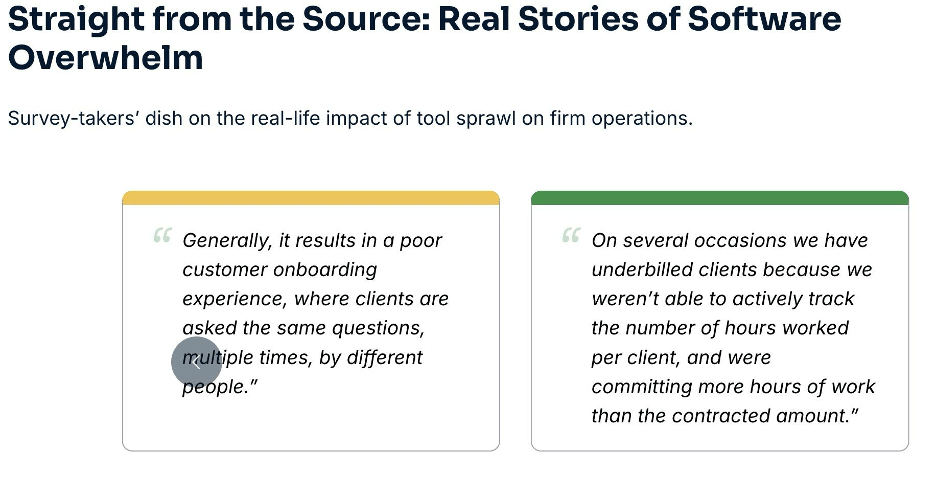
Beyond the money spent, time is also a cost factor. When workflow management, client communication, time tracking, and billing happen in separate systems, your staff may have to enter the same information more than once.
Each task may take only a few minutes, but the time adds up across employees and recurring engagements. Manual updates can also introduce errors, delay reporting, and make it harder for managers to maintain a reliable view of work in progress.
You can estimate the annual cost of this work with a simple calculation:
Annual cost of duplicate work = hours spent on manual updates each week × 52 × the fully loaded hourly staff cost.
If your team spends five hours a week transferring information and maintaining side spreadsheets, and those hours cost the firm $30 each, that’s $7,800 in annual labor costs.
This is an illustrative estimate of the staff time consumed by manual work, not a measured Jetpack Workflow cost. The actual impact will depend on how much duplication your firm’s current software setup creates.
Source: 2026 Bookkeeping Firm Tech Stack Report
To put your own numbers against this, you can calculate your ROI from practice management software based on your team size and the hours you spend on manual work.
What Jetpack Workflow Actually Costs a Firm: Total Stack Examples
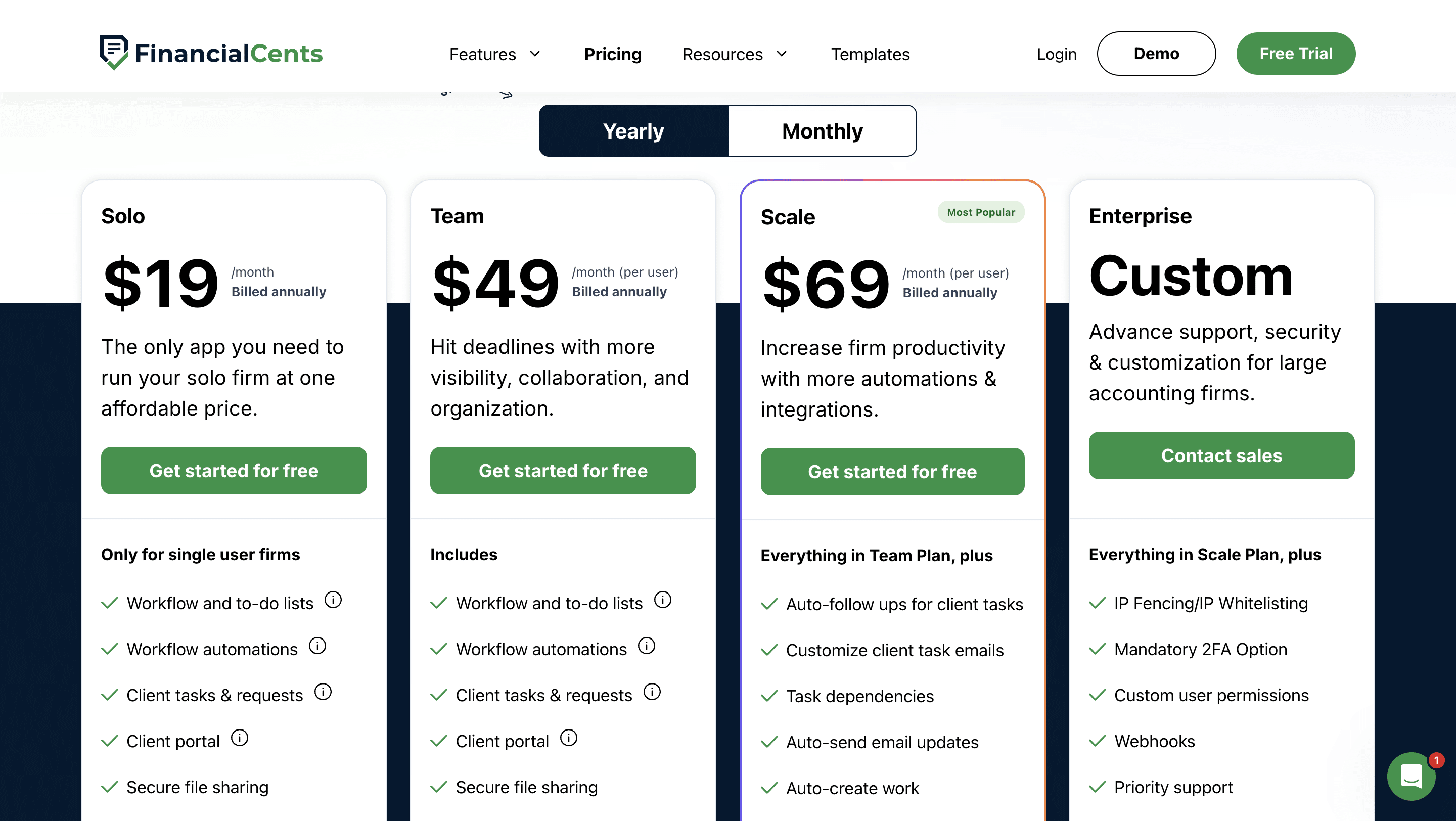
| Features | Jetpack Premium stack (5 seats, annual billing) | Financial Cents Team (5 seats, annual billing) | Financial Cents Scale (5 seats, annual billing) |
|---|---|---|---|
| Workflow and project management | $50 × 12 = $600/year/seat ($3,000/year) | $49 × 12 = $588/year/user ($2,940/year) | $69 × 12 = $828/year/user ($4,140/year) |
| Document storage add-on | Jetpack Storage: 100GB bundle, $50/year (annual billing) | Unlimited storage built in | Unlimited storage built in |
| Client portal and file sharing | Liscio (File Intelligence): $19/month/user ($1,140/year) | Built in | Built in |
| Proposals and engagement letters | Ignition (Core): $99/month ($1,188/year) | Built in | Built in |
| Invoicing and payments | Harvest (Teams): $9/month/user ($540/year) | Built in | Built in |
| Total annual software spend | $5,918/year | $2,940/year | $4,140/year |
| Cost savings vs. Jetpack stack | — | $2,938/year (50% less) | $1,778/year (30% less) |
For a five-person firm on annual billing, Jetpack Premium costs $50/month per user and $600/year per user. That amounts to $3,000 per year, excluding storage or any additional software.
At $49/month per user, the Financial Cents Team plan costs $588/year per user, which is $2,940 per year on annual billing, while Scale costs $69/month per user, $828/year per user, and $4,140 for the firm. See the Financial Cents pricing page for current plans.
That makes the Financial Cents Team plan slightly cheaper at the per-seat subscription level, while the Scale plan costs more than Jetpack’s Premium.
But both the Team and Scale plans include capabilities Jetpack Workflow doesn’t offer. When you factor these extra tools firms need to operate into Jetpack Workflow’s Premium tier, Financial Cents’ all-in-one system becomes much more affordable.
Is Jetpack Workflow Worth the Price? Pros and Limits
Whether Jetpack Workflow is worth the price depends on how well its workflow features meet your firm’s needs and how its benefits compare with the limitations and the cost of additional tools.
Pros
Straightforward, Low-Friction Entry
Jetpack Workflow offers an intuitive user interface that makes it easy for small firms moving away from spreadsheets and other manual systems to adopt.
Affordable Entry Price
Jetpack Workflow’s per-seat pricing offers an affordable starting point for small firms (with limited software budgets) that need a dedicated tool to organize and track client work.
Large Template Library
Jetpack Workflow offers 70+ prebuilt accounting, tax, and bookkeeping checklists that help firms standardize recurring work and set up client projects without building every workflow from scratch.
Time Tracking and Capacity Planning on Premium
The Premium plan lets firms log time spent on client work, compare actual time against budgets, and monitor team capacity. These insights help managers identify work that’s taking longer than expected, balance assignments, and plan workloads more effectively.
Email-to-Job Forwarding
Team members can forward relevant emails to a designated email address associated with the platform to bring the message into their workflow. This helps turn client requests and email-based instructions into trackable jobs.
Bulk Creation & Fast Setup
Jetpack Workflow’s bulk job creation feature lets firms set up jobs for multiple clients at once. It reduces repetitive work when managing recurring services across a large client base.
Common Operational Limits Firms Cite
Limited Reporting and Work Visibility
Some firms need more detailed reporting to understand not just which tasks are overdue, but where work is getting stuck, how workloads are distributed, and which workflows consistently fall behind.
Premium adds budget-versus-actuals reporting and capacity management, but those are not sufficient for firms that need visibility into their realization rate, work-in-progress (WIP), and team utilization reports.
Interface and Team Adoption
Some users find Jetpack Workflow’s interface dated compared with top practice management tools. This can make everyday usage less intuitive and slow team adoption.
Before committing, have the employees who will use the platform daily test common tasks, such as finding client jobs, updating task statuses, and managing recurring workflows. That test will help you assess how easily the team can adopt the software and get value from it.
Rigid Recurring Work Features
Jetpack Workflow lets firms use master templates to deploy recurring tasks across clients, but changing an active schedule can create additional administrative work.
Changing recurrence settings or shifting start dates mid-cycle can generate duplicate job instances on the dashboard instead of updating the existing schedule.
Similarly, extending or adjusting master due dates across recurring jobs requires manually updating deadlines on individual tasks because changes don’t automatically carry over to existing jobs.
Limited Time and WIP Analytics
Jetpack Workflow’s Premium plan tracks time and compares actuals against budgets, but firms needing deeper work-in-progress (WIP) reporting or detailed breakdowns of billable time will find its reporting capabilities limited.
No Built-in Client Portal, Billing, or Proposals
Jetpack Workflow doesn’t include built-in client portals, invoicing, or proposals and engagement letter tools.
Firms that need these capabilities must use separate tools, which increases their software costs and requires staff to manage work across multiple systems.
Which Jetpack Workflow Plan Is Right for Your Firm?
The best Jetpack Workflow plan for your firm depends on how you manage recurring work, whether you need time and capacity reporting, and what additional access and support features your team requires.
Choose Starter if you only need recurring workflow tracking, Premium if you bill hourly or plan capacity, and Enterprise only if IT requires SSO.
Starter Tier ($40–$49/month per seat)
Starter provides the core workflow management tools solo practitioners and small firms need to organize client work, standardize recurring processes, and keep projects on track.
Premium Tier ($50–$59/month per seat)
Premium suits growing firms that need built-in time tracking, budget-versus-actuals reporting, and weekly and yearly capacity management. These tools help managers monitor time spent on engagements, identify work that exceeds budgeted hours, assess team workloads, and allocate assignments more effectively.
Enterprise Tier (Custom Quote)
Firms that need single sign-on (SSO) and a dedicated account manager should contact Jetpack Workflow’s sales team for a written quote and confirm the included features, implementation costs, support commitments, and contract terms.
When Should You Consider an Alternative?
If your firm needs a client portal, automated document reminders, proposals, engagement letters, and billing in one workspace, compare Jetpack Workflow’s costs and benefits with an all-in-one practice management platform like Financial Cents.
Jetpack may suit firms that already have separate tools for these functions. But an integrated platform consolidates your subscriptions, reduces duplicate data entry, and allows you to manage client work in one place.
Make sure that you don’t need too many programs to deliver your services, whether it is client accounting, AP/AR, or workflow.”
Kellie expands on this in her interview on why a streamlined tech stack matters, including how she decides which apps earn a place in her firm.
What You Get When Workflow, Portal, and Billing Live in One Place
All-in-one practice management platforms like Financial Cents bring all your firm’s functions together in one workspace, connecting client work from proposals, project creation, and client relationship management to service delivery, invoicing, and payment processing.
Some of Financial Cents’ Unified Capabilities Include:
- Workflow and Task Management: Standardize recurring client work with prebuilt accounting templates, task dependencies, task automations, and color-coded progress dashboards that keep work organized and visible.
- Email-to-Task Creation: Turn client emails into projects and tasks from your inbox, so requests are not buried in email threads.
- Client Portal and Automated Reminders: Give clients secure access to a collaboration workspace using passwordless magic links and two-factor authentication. Financial Cents also sends automated reminders for missing documents and open requests.
- Built-in Time Tracking, Billing, and Payments: Track billable and non-billable time against client work, convert tracked hours into invoices, and collect payments within Financial Cents.
- Proposals, Engagement Letters, and E-Signatures: Create service proposals and engagement letters, collect electronic signatures, and automate onboarding by connecting signed agreements to project templates.
- Workload Visibility and Capacity Planning: Use workload and utilization reports to monitor team capacity, identify potential bottlenecks, and make informed staffing decisions.
What Firms Experience After Switching to Financial Cents
When firm owners evaluate platforms after testing multiple Jetpack Workflow alternatives, the final choice is about finding a tool that saves them money, time, and fits accounting workflows.
Peter Piluk, Founder of Pathway, chose Financial Cents as the right workspace to organize and track client work after spending 12 months evaluating free trials and paid accounting workflow software solutions.
Read our detailed comparison of Financial Cents vs. Jetpack Workflow.
The True Cost of a Fragmented Software Stack
If the per-seat fees were all you needed to run your firm from proposal and onboarding to delivery and payment processing, Jetpack Workflow would be one of the cheapest options for accounting firms.
However, firms using it often assemble a fragmented stack of third-party apps (client portals, proposals, billing, and e-signatures) to meet core operational needs, which significantly increases their total technology spend.
Such a fragmented software stack may work for firms whose existing tools meet their needs and integrate well. But as your practice grows, managing client work across multiple applications adds administrative overhead and makes it harder to maintain visibility across engagements.
For firms looking to centralize their operations, an all-in-one practice management platform like Financial Cents is a better alternative. It brings workflow management, client portals, time tracking, billing and payments, proposals, e-signatures, and even AI tools into one workspace to reduce the number of subscriptions they need and keep more of their work connected.
In our five-person software cost comparison, Financial Cents Scale Plan costs $4,140 per year, compared with $5,918 for Jetpack Workflow’s Premium plan and its supporting tools. That is a potential saving of $1,778 annually, to say nothing of the other benefits of a unified system.
Ready to see whether a unified workspace is better for your firm? Book a demo with Financial Cents today.
Frequently Asked Questions (FAQs)
Removing users takes effect at the end of the current billing cycle, and subscription charges for unused portions of an active term are applied to future invoices.
Financial Cents is best suited to firms wanting workflow management, passwordless client portals, automated document collection, time tracking, invoicing, proposals, and e-signatures in one workspace.
TaxDome suits tax-focused practices seeking end-to-end practice management and tax preparation workflows.
Karbon is a strong option for firms that prioritize email integration, collaborative workflows, and team communication.
Financial Cents Team costs $588 per user annually, while Scale costs $828 per user annually.
Jetpack Workflow is more affordable for firms that primarily need workflow management. However, once a firm adds separate subscriptions for client portals, document collection, invoicing, proposals, and e-signatures, its total software spend rises significantly.
For a five-person firm, the example Jetpack Premium stack in this guide totals $5,918 per year, compared with $2,940 for Financial Cents Team or $4,140 for Financial Cents Scale, both of which have all the features needed to run a firm in one place.
Share this article:



