

Why does it seem like the lack of clarity around AI use in accounting firms is a bigger problem than the availability of the tools themselves?
Software vendors are marketing their AI accounting features aggressively, and online gurus are predicting the end of accounting jobs as we’ve known them. Yet, most accountants who use this technology day-to-day couldn’t really tell you where, exactly, AI tools fit into their workflows.
In online communities like r/Accounting, seasoned accountants seem to all agree that there is a huge disconnect between the AI hype they see online and the work they do in their firms. Some even noted that the AI tools they implemented actually made things worse, so they had to tear it all down and start again from scratch.
While this uncertainty drags on, client needs continue to evolve, compliance deadlines are not waiting for anyone, and firms are still expected to deliver complete and accurate books with limited resources.
Clearly, accountants cannot afford to chase every flashy AI feature. But they also cannot afford to ignore the technology altogether. Our take: Firms should aim for the middle ground. Educate yourself about AI itself, and learn to use it in ways that deliver quantifiable value. Ultimately, it should buy you and your staff more time to focus on professional judgment, strategic advisory, and a level of client service that software cannot replace.
That gap between experimentation and measurable value is also visible in the data. Our 2026 State of AI in Accounting report found that although 95% of the 486 accounting professionals surveyed said their firms were using or exploring AI, only 20% of AI-active respondents reported a clear, measurable return. The report explores where firms are seeing value, what is holding adoption back, and how training, governance, and human review affect the results.
In this guide, we combine practical insights from Jason Staats, CPA; Blake Oliver, CPA; and Andrew Lassise, with the technical expertise we’ve gained from building accounting-focused AI features to help you separate the genuinely useful applications of AI from the marketing hype.
We also explain where AI still falls short, and take a forward-looking glance at the developments accounting professionals should expect over the next few years.
TL;DR
- The Hype: Marketing claims about fully autonomous accounting platforms or AI replacing accountants are mostly noise. AI completely lacks the capacity for strategic judgment, cannot independently handle complex tax compliance, and can confidently hallucinate incorrect advice.
- The Reality: AI is a powerful productivity tool, not a human replacement. Its value lies in eliminating manual administrative bottlenecks while leaving final decisions, risk management, and client relationships to human professionals.
- What’s Useful Today: Focus on using AI to tackle low-risk, high-volume tasks in your daily workflow: Communication, Workflow Setup, Document Management, and Summarization.
- The Human-in-the-Loop Rule: Treat AI like an intern. It can write the first draft or suggest a transaction category, but a qualified professional must review, edit, and verify anything client-facing or compliance-related.
- Data Security First: Never copy and paste client financials into free, public AI tools. Safe adoption requires enterprise-grade tools that enforce strict data governance, SOC II compliance, and TLS 1.3 encryption.
- How to Start Small: Adopt AI that is already built directly into the practice management software you use daily. Use it to handle basic client email drafts or build new workflow templates; establish clear internal privacy policies; and audit your time savings after 30 days.
What Is AI in Accounting?
AI in accounting is the use of artificial intelligence to automate time-consuming accounting tasks.
This includes everything from drafting client emails and summarizing lengthy meeting notes to building workflow templates and extracting specific data from dense documents.
Our focus here is on how AI tools help accounting firms with practice management, daily workflows, client communication, and operational efficiency. For the purposes of this article, we are less interested in the AI features built into general business accounting software for business owners.
Generally, the AI features used by today’s accounting firms fall into one of three categories:
a. Generative AI
Generative AI creates new content based on information (i.e., a prompt) given to it. Firms use these tools to compose client emails, summarize documents, generate meeting notes, brainstorm ideas, and create standard operating procedures, among other things.
Generative AI takes a first pass at drafting these items, so accounting professionals have something to refine rather than starting from a blank page.
b. Automation AI
Automation AI includes tools that reduce repetitive work by triggering actions inside your firm’s workflows. These tools can automatically assign tasks, populate fields, route work to the right team member, generate recurring projects, update statuses, or initiate follow-up actions based on the conditions you have predefined.
What makes AI-assisted automation different from traditional accounting or bookkeeping automation is that it can make smarter recommendations and adapt workflows based on your firm’s context.
For example, instead of you manually moving a project from “In Progress” to “Review” and emailing the client for missing documents, AI handles the handoffs, status updates, and administrative follow-ups behind the scenes.
c. Review AI
Review and support AI helps accountants work more accurately and efficiently by organizing information and surfacing items that deserve a second look.
These tools are good at identifying patterns, flagging structural inconsistencies, organizing messy client files, or suggesting the next logical step in a process. While this can be a big help when it comes to maintaining accuracy and compliance, your team typically needs to check the AI’s work. So, it’s not a replacement for professional judgment.
What’s Hype: Where Accounting Firms Should Be Careful
Accounting AI has rightfully earned its place in modern firms, but some of the claims surrounding it don’t hold up against the day-to-day realities of client service, regulatory compliance, and overall firm operations.
Those claims include:
1. Fully Autonomous Accounting with No Human Review
As compelling as the claim that AI can run an end-to-end accounting function is, today’s technology just isn’t there yet. AI makes recommendations based on patterns and probabilities, but accounting requires precision, which can’t be guaranteed without professional judgment and accountability.
As observed in this 2025 study at MIT Sloan Management Review, AI confidence scores decrease when it fails to consider the context around financial information. In those instances (which are frequent), the judgment of an experienced accountant is non-negotiable.
We all know client work is rarely as clean or predictable as the sample data shown in product demonstrations. Between missing invoices, inconsistent naming conventions, conflicting documentation, and last-minute client requests, the day-to-day reality of accounting work is messier, which is why human accounting experts are essential.
That’s why the strongest application of AI is when firms use it to augment or accelerate human work (without removing human expertise and professional judgment from the equation).
2. AI Replacing Accountants or Bookkeepers Outright
Few predictions have generated more headlines than claims about AI replacing accountants and bookkeepers altogether. There’s no doubt that AI is changing how firms work, but talk about total replacement is more sensational than realistic.
That is because clients don’t hire accountants just to process transactions. They hire accountants to interpret complex regulations, explain financial information, and provide advice based on their unique financial situation.
The more realistic outcome is transformation, meaning AI will automate some parts of accounting work and enable team members to spend more time on review, advisory services, and client relationship management.
3. Giving Tax, Compliance, or Advisory Recommendations without Professional Verification
Speed is one reason accountants use AI. Within seconds of entering a prompt, AI can generate an impressive explanation of accounting concepts, tax rules, or financial reporting standards. But problems arise when accounting professionals fully trust AI output without reviewing it with a critical eye.
The MIT Sloan study also noted that AI could suggest diverging categories for uncertain transactions, and that accountants tended to follow AI’s suggestions in such cases. This introduces errors attributable to AI, which is a huge problem. And ultimately, the accountant, not the AI tool, is held accountable for any mistakes or errors.
That’s why, while AI can certainly help accelerate the process of gathering information and drafting initial responses, an accountant, bookkeeper, or tax professional must remain responsible for verifying technical accuracy, interpreting the AI’s output in the client’s specific context, and ensuring the work ultimately complies with applicable laws and professional standards.
Dealing with the Accounting AI Hype Hangover
Buying into the AI hype comes with a lot of potential financial, legal, and operational consequences. What’s covered here is just the tip of the iceberg.
1. Standalone AI Tools that Require Copying Client Data into Third-Party Systems with Unclear Controls
With many standalone AI accounting tools requiring users to copy client emails, financial records, or other confidential information into consumer-grade applications, firms must first verify how such data is handled. Failure to do this can expose sensitive client data to cyberattacks.
Important security details to watch out for:
- How client data is stored or retained after processing.
- Whether customer data is used to train the AI model.
- Whether the vendor uses encryption and can provide appropriate security certifications.
- How administrators can control user access to sensitive information.
- How the tool supports your firm’s privacy, security, and regulatory obligations.
Firms should also establish clear internal AI policies that define which tools employees may use, what types of client information may be processed, and when sensitive data should be anonymized or withheld altogether.
2. AI Features that Create More Work Because They Are Not Connected to the Firm’s Actual Workflow
In many cases, AI tools might actually create more work than they eliminate (for example, by generating meeting summaries that need extensive editing or requiring employees to copy information between multiple applications).
This is most common with:
- General-purpose AI tools that are great at generating content, but lack the context of your firm’s clients, deadlines, and internal processes.
- Industry-specific tools that are not fully integrated into the firm’s existing tools and workflows.
Either way, these tools require your team members to manage work and client information on multiple fronts, which consumes both time and mental energy.
Claude is one example of a general-purpose assistant accounting firms are testing for drafting, document analysis, research, and multi-step work. This practical guide to using Claude in accounting firms explains what each Claude interface can do, along with the controls firms should keep in place.
What’s Actually Useful: AI in Accounting Today
The gap between AI hype and day-to-day accounting work has left some firms skeptical, and understandably so.
But that’s not to say that AI has failed to deliver value. Many accounting firms are already using it to manage repetitive administrative tasks, improve consistency, and free up more time for higher-value client work. Let’s run through some of those use cases.
1. Client Communication
That’s where I use it most. I’ll take a first stab at something, and I’ll go ‘nope, this is too mean. Can you (AI) rewrite this for me?’ That’s probably the most universally applicable AI use case right now.”
The need to request client documents, follow up on unanswered emails, and provide project updates means accounting professionals spend a significant portion of their day communicating with clients.
The good news is that many of these accounting communications follow familiar patterns, so you don’t need to reinvent the wheel each time. You just need messaging that’s professional, accurate, and easy for clients to understand. And as Jason noted, AI is good at that.
AI can generate clear and well-structured first drafts in seconds. Accountants and bookkeepers can then review and personalize these communications before sending them to clients. If there’s a particular type of message you find yourself creating again and again, use AI to help you turn it into a template that can be reused.
2. Workflow Creation
The benefits of workflow documentation are enormous, but the process of documenting recurring tasks often requires a significant upfront investment (in hours), which is why many firms put it off.
AI can significantly reduce the time spent on this endeavor, enabling firms to describe the workflow they need in plain language and receive a structured first draft in seconds. In Financial Cents, all you have to do is type out the project title (such as monthly bookkeeping or individual tax return), and the system will produce a structured workflow template.
Essentially, AI cuts down the time needed for this process to a few minutes of refining the checklist, incorporating firm-specific procedures, and adding review and approval steps that meet your quality standards.
3. Document and File Organization
When files are not organized consistently, accounting teams spend unnecessary time searching for documents, verifying correct versions, and cleaning up folders. Those small inefficiencies really add up over hundreds or even thousands of client files, which can become a big problem (especially during busy periods).
AI can help reduce this administrative burden. It can analyze the file, identify details (such as the document date, document type, financial institution, account identifier, and client name), and generate a filename that follows your firm’s preferred naming convention.
In Financial Cents, whenever a client uploads a document, the Automatic File Rename AI feature analyzes its contents and proposes a standardized filename based on your naming rules. You can choose to let the system automatically apply the new name or require it to get your approval before making any changes.
AI can also check whether the uploaded file is the correct one in the first place. Financial Cents’ AI File Validator reviews each document a client uploads against the request, the accounting period, and client details, and gives the client immediate feedback in the portal if the file appears to be the wrong year, the wrong account, or the wrong document altogether. This shifts document checking to the front of the process, so errors are caught at upload instead of surfacing later when your team is already doing the work.
This strikes a good balance between automation and oversight. AI eliminates the repetitive work of organizing documents, while your team members retain their desired level of control over the final outcome.
4. Research and Brainstorming
AI also helps accounting professionals gather, organize, and synthesize information more easily and efficiently.
Whether you’re researching a tax issue, studying an accounting standard, or brainstorming approaches to a complex client situation, AI can quickly surface relevant guidance, summarize multiple sources, identify key considerations, and present it all in a structured format.
This saves you hours or days of searching through articles, publications, and technical documentation to compile and analyze all the data points.
With AI accelerating the research process, your team can focus on evaluating the sources, verifying technical accuracy, and determining how the guidance applies to each client’s specific circumstances.
5. Summarization
Processing long notes takes an enormous amount of time and concentration. Even then, there’s no guarantee that you won’t miss a vital part of the material.
With AI, you can upload large blocks of text or audio/video files to instantly surface bulleted action items. That way, you can quickly pick out the relevant information and understand what to do next.
6. Automation Support
AI can also work with accounting workflow management systems to create workflow content and ensure the right actions take place in the right order.
This could mean leveraging AI to:
- create workflow templates and assign the tasks to the appropriate team members,
- update project statuses, or
- trigger client requests and reminders, all without human intervention.
This creates a repeatable system that prevents tasks from falling through the cracks while keeping client engagements moving smoothly.
7. Categorization Assistance
Transaction categorization is another area where AI can deliver meaningful productivity benefits, but firms must treat its recommendations as suggestions rather than final decisions.
AI can recognize merchant descriptions, suggest likely general ledger (GL) accounts, and even identify unfamiliar vendors that would otherwise require manual research.
It can also analyze historical transaction patterns to recommend the most appropriate account categories for recurring transactions, giving bookkeepers a strong starting point so they don’t have to begin every review from scratch.
Of course, bookkeepers should always review unusual transactions, confirm exceptions, verify suggested GL codes, and apply professional judgment before posting entries.
Where AI Falls Short: It Still Requires Human Input
As useful as AI is at reducing repetitive work, organizing information, and generating first drafts, it still has limitations that accounting firms can’t afford to ignore. They include:
1. Risk of Inaccuracies and Hallucinations in Technical Accounting Guidance
AI does not actually understand tax law, accounting standards, or regulatory requirements. It generates its responses from the most likely sequence of words based on patterns in its training data.
This leaves it vulnerable to hallucination, which can cause it to fabricate tax code references, mix up conflicting regulations, or misinterpret accounting guidance in a way that sounds authoritative.
You might ask AI whether a client qualifies for a particular tax deduction, and it may return a confident answer that cites outdated guidance, overlooks important facts, or applies the wrong accounting standard. Without professional review, relying on that response could result in incorrect advice, compliance issues, or filing errors.
In accounting, where precision is the minimum expectation, “mostly right” is not good enough. Clients depend on your guidance to maintain regulatory compliance and grow their businesses.
2. Data Privacy and Security Concerns When Feeding Client Financial Data into AI Tools
You have to be vigilant and make sure you’re not accidentally sending something that you shouldn’t. But there are ways that you could use AI and still keep the information hidden enough that there’s not going to be any breach of confidentiality because it’s just random numbers.”
Your firm is entrusted with some of your clients’ most sensitive information (financial statements, tax returns, banking information, etc.), and you have to protect it at all costs.
Using these data in unprotected AI tools or those with insecure practices could compromise client confidentiality and create legal, regulatory, and reputational problems for your firm.
That is why cybersecurity experts recommend asking the following questions to understand how your AI software provider stores, processes, and protects customer data:
- Is customer data retained after processing?
- Is submitted data used to train AI models?
- What encryption and security protocols protect data in transit and at rest?
- Does the platform provide recognized security certifications, such as SOC 2?
- Can administrators control who has access to sensitive information?
- Does the platform support the firm’s privacy, security, and regulatory obligations?
Your team can also minimize the amount of sensitive information it shares with AI by anonymizing client data or removing personally identifiable information before submitting prompts. In many situations, AI can still produce useful outputs without knowing a client’s identity.
3. Garbage-In-Garbage-Out
Prompting is one of the most important skills in effective AI use. The quality of an AI’s output is heavily influenced by the quality of information and instructions you feed it.
Asking AI to “create a bookkeeping workflow” can produce a very different outcome than asking it to “create a monthly bookkeeping workflow for a multi-entity real estate client that includes bank reconciliations, fixed asset reviews, sales tax verification, partner reporting, and manager approval.”
The first prompt will likely produce a generic checklist. The second provides enough context for the AI to generate a much more useful starting point.
The same principle applies to the background information you provide. If you upload incomplete, outdated, or inconsistent data, AI will analyze that information as though it were complete and accurate (unless you explicitly tell it otherwise). It may not reliably recognize every missing document, incorrect assumption, or inconsistency in the underlying data.
That’s why accountants shouldn’t view AI as a substitute for clean records or thoughtful instructions. They should treat it as a tool that amplifies the quality of the information it receives.
4. Setup and Customization Overhead that Vendors Rarely Mention in Demos
Most AI product demonstrations make the productivity benefits of AI seem more effortless than they really are. Very few show the actual work required to tailor those capabilities to your firm’s processes.
AI-generated workflow templates must be reviewed and customized. Prompt libraries must be refined over time. And document naming conventions must be configured. Plus, your team needs training on when (and when not) to use AI.
This is not unique to AI tools. You wouldn’t expect your new practice management software to be fully optimized the moment you sign in. AI delivers the greatest value when it has been configured to reflect your firm’s workflows and quality standards. Understanding this upfront will help your team set realistic expectations.
5. Accountability Still Stays with the Human Using the Tool
A good rule of thumb to help your team use AI more responsibly is to ensure that any work sent to a client or submitted to a regulatory authority undergoes human review.
AI can produce polished drafts in seconds, but it cannot take responsibility for the accuracy of financial advice, the interpretation of regulations, or the quality of client communication. That responsibility remains with the accounting professionals who review, approve, and deliver the work.
Whether it is a client email requesting missing documents, a workflow template draft, or the naming of an uploaded document, a qualified team member should confirm the accuracy of any AI-generated information.
When used this way, AI becomes an assistant that reduces repetitive work while leaving professional judgment, client relationships, and accountability to the accounting professionals that clients and regulators trust in the first place.
How to Start Using AI in Your Accounting Firm Without Overwhelming the Team
Two extremes have formed in the current AI conversation:
- firms that are trying to implement AI across every process at the same time, and
- firms that are dismissing AI altogether.
The first group risks overwhelming their team and creating software fatigue, while the second group could miss out on incredible opportunities to save time and improve consistency.
A better approach is to treat AI like any other operational improvement. Start with a few high-impact use cases, measure the results, and expand adoption wherever it shows promise.
1. Start with Low-Risk, High-Volume Admin Tasks
While this quote came from a webinar where Ed was speaking about AI and automation in general, it aligns perfectly with our advice around AI in accounting as well. Starting with low-risk administrative work allows your team to experience the productivity benefits of AI while maintaining confidence in the quality of your work.
Low-risk tasks create administrative friction, but they typically don’t require complex accounting judgment. The consequences of a slightly inaccurate AI-generated meeting summary are nothing compared to AI-automated tax work or financial reporting that isn’t 100% correct, as the latter comes with serious compliance risks.
This approach also gives your firm time to develop AI policies, refine workflows, and build familiarity with the technology before expanding into more advanced use cases.
2. Create Firm-Wide Rules for What Data Can and Cannot Be Entered into AI Tools
Establishing clear guidelines for how AI tools for accountants should be used reduces uncertainty and protects the sensitive client data you’ve been entrusted with.
Your AI policy should define which tools are approved, what types of client information may be entered into them, and when data should be anonymized.
As Jason noted, “regardless of the underlying AI tool that you use, don’t give that system more information than it needs. Think about anonymization and substitution.”
Furthermore, if “you’re going to upload financial statements into a language model (AI), you sure don’t need the business’s name on them,” he said.
3. Decide Which Outputs Require Human Review
A well-defined review expectation creates consistency across the firm, reinforces your assistive approach to AI usage, and ensures that your team remains responsible for approval.
That means everyone in your firm needs to understand who is responsible for verifying the accuracy of the information AI generates, confirming that it reflects current regulations and professional standards, and ensuring that it applies to the client’s specific circumstances.
AI-generated workflow templates or meeting summaries may only need a quick review before use. But client emails, tax guidance, and compliance-related content should always undergo careful human review before they’re sent or relied upon.
4. Build AI into Existing Workflows instead of Adding Another Disconnected App
Security implications aside, almost any AI initiative will struggle if it becomes another application employees have to remember to open and use manually.
The strongest adoption happens when AI is built directly into the software your team already uses every day. That way, employees can generate workflow templates, draft client emails, and organize documents without constantly switching between disconnected tools or copying information back and forth.
This is the approach Financial Cents has taken. Its AI capabilities are embedded directly into your practice management platform, enabling your team members to create workflows, draft client communications, and automatically organize uploaded documents within a single system.
5. Train the Team on Specific Use Cases
Simply telling your team to “use AI more” won’t do much to drive adoption. Your employees need clear guidance on where AI fits into their day-to-day work and where it doesn’t.
Start by identifying a handful of approved use cases and educating your team on exactly how to do each. This could include showing your team how to turn unstructured meeting notes into bulleted action items, draft a professional client email, or use AI to standardize a batch of uploaded client documents.
This targeted approach builds employee confidence and helps them adopt AI more responsibly and consistently.
6. Review Results After 30 Days
AI has to earn its place in your firm’s workflow. That’s why this final step is so important.
By asking questions around how much time AI actually saved, whether it improved consistency across the team, or how much it reduced repetitive administrative work, you will see where to refine your prompts, strengthen your review processes, or expand AI into additional aspects of your workflows.
This approach helps you separate AI features that genuinely improve your workflows from those that add unnecessary complexity.
What Is Next for AI and Accounting?
The next wave of innovation won’t focus on replacing accountants or accounting expertise. Instead, it will be about making the software they already use smarter, faster, and more connected.
1. More Embedded AI Inside Practice Management, Document Management, and Client Management Tools
However, there might be a disconnect between how long that will be a benefit versus when the tools that you’re already paying for offer something that does it for free.”
Today, many firms switch between their practice management platform, accounting document management system, email, and standalone AI applications. That constant context switching creates unnecessary friction and requires staff to copy information between disconnected tools.
One of the biggest shifts we’ll see over the next few years is AI tools becoming less standalone and more integrated into the software accounting firms already use.
When the AI tool has access to the context of the client, the project, and the firm’s established processes, its suggestions become more accurate, relevant, and actionable than those produced by general-purpose or AI tools operating in isolation.
2. AI-Assisted Review Steps Where the System Flags Missing Information or Inconsistent Workflow Status
AI will become much better at helping human reviewers identify issues that otherwise go unnoticed, helping work move through the firm more smoothly and consistently.
This includes monitoring projects, documents, and workflows to flag missing information, inconsistent statuses, overdue tasks, or potential bottlenecks before they snowball.
For example, an AI agent could alert a manager when a project is marked “Ready for Review,” but required client documents are still missing. Or, it could use historical workload data to highlight team members who are likely to exceed their capacity limit in the coming week.
Financial Cents already applies this idea to client documents today: its AI File Validator flags an uploaded file when it doesn’t match the request, the accounting period, or the client it should belong to, catching the wrong document before it moves further into the firm’s workflow
3. More AI Agents that Handle Well-Defined Tasks (but Still Require Human Oversight)
The next generation of AI in accounting will likely include specialized AI agents that automate well-defined operational tasks, but still require human oversight.
These agents will execute multi-step processes such as cross-referencing newly uploaded client documents against an intake checklist, preparing first drafts of recurring client communications, or gathering the information needed to move a project to the next stage.
4. Faster Document Intake, Document Naming, and File Organization
The sheer volume of files accountants handle makes document management a great area for continued AI innovation.
Future AI systems will become better at identifying document types, applying standardized naming conventions, and filing documents in the correct client folders.
This could include leveraging AI to automatically split a document bundle into individual files, identify the appropriate tax year, apply your firm’s file naming convention, and move each document to the correct client folder.
Financial Cents’ AI-assisted Automatic File Rename already points in this direction, analyzing uploaded file content and suggesting a properly formatted file name automatically (while also flagging complex files where the AI was unable to confidently suggest a name).
5. Smarter Client Communication and Follow-Up
AI can already help draft emails, but the next wave of AI will generate even more personalized communications by drawing on the context of a client’s engagement, project status, and previous interactions.
For example, if a client asks about the status of a tax return, an embedded AI assistant could use the project’s workflow status, internal notes, and prior communications to prepare a personalized draft response for your team’s review.
This will further reduce the administrative effort required to deliver timely, accurate, and consistent client communication.
6. Greater Focus on AI Policies, Audit Trails, and Security Controls
As more firms rely on AI, their ability to govern its use will be just as important as what the technology can do.
This is especially important considering the sensitive financial information accounting firms are entrusted with.
Firms should expect more emphasis on AI usage policies, data privacy controls, audit trails that record when AI assisted with work, documented human approval checkpoints, and stronger security and compliance standards.
Firms that establish clear AI governance early through platform approval processes, client data protection, and human oversight will be better positioned to adopt AI without compromising client trust.
Software vendors, too, will be evaluated on the strength of their security architecture, data handling practices, and compliance controls (including comprehensive audit logs that show when AI was used, what actions it performed, and where a human reviewed and approved the final output).
7. Growing Emphasis on Advisory Support
As AI becomes more effective at organizing information, identifying trends, summarizing financial data, and surfacing potential issues, it will help accountants prepare for client meetings more efficiently and uncover insights that previously would have taken them much longer to find.
As AI’s ability to highlight unusual financial patterns, summarize changes in key performance indicators (KPIs), and identify potential discussion points grows, accountants and bookkeepers will spend less time gathering information and more time interpreting the results, applying professional judgment, and helping clients make informed decisions.
This will open the door for firms to focus more on their advisory service offerings, which is a big win for clients. Many clients look to their accountant for guidance on what their financial information means and recommendations on the best course of action.
Useful, Not Flashy: Financial Cents’ Approach to AI for Accounting Firms
The Financial Cents team does NOT believe that AI will or should develop to the point of replacing accountants. What we do believe is that AI should be integrated into everyday workflows, so accounting professionals can access the benefits of AI in the same place they are managing work, nurturing client relationships, and documenting processes.
This enables firms to get value out of AI without making any major adjustments to their existing tech stack or processes.
Current Financial Cents AI features include:
1. Automatic File Renaming for Client-Uploaded Documents
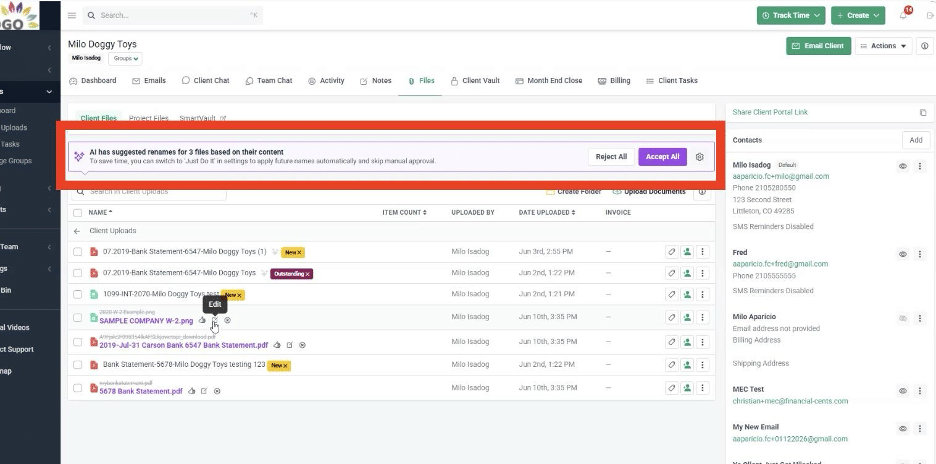
Financial Cents’ Automatic File Rename agent identifies key details in each file a client uploads and suggests a name that aligns with your firm’s designated naming convention.
The File Rename feature works in one of two ways:
- Just Do It: AI-generated names will automatically be applied to newly uploaded documents.
- Always Ask: Financial Cents will suggest a new name, but your team must approve it before it is applied to the newly uploaded document.
Financial Cents keeps a record of renaming actions, so you always have a complete audit trail of where and how the AI was involved. You will also be able to see the previous file name by hovering over the new one.

When the system’s confidence level for a naming recommendation is low, it will flag that recommendation to you so you can review the name more carefully.
Learn more
2. AI File Validator for Client-Uploaded Documents
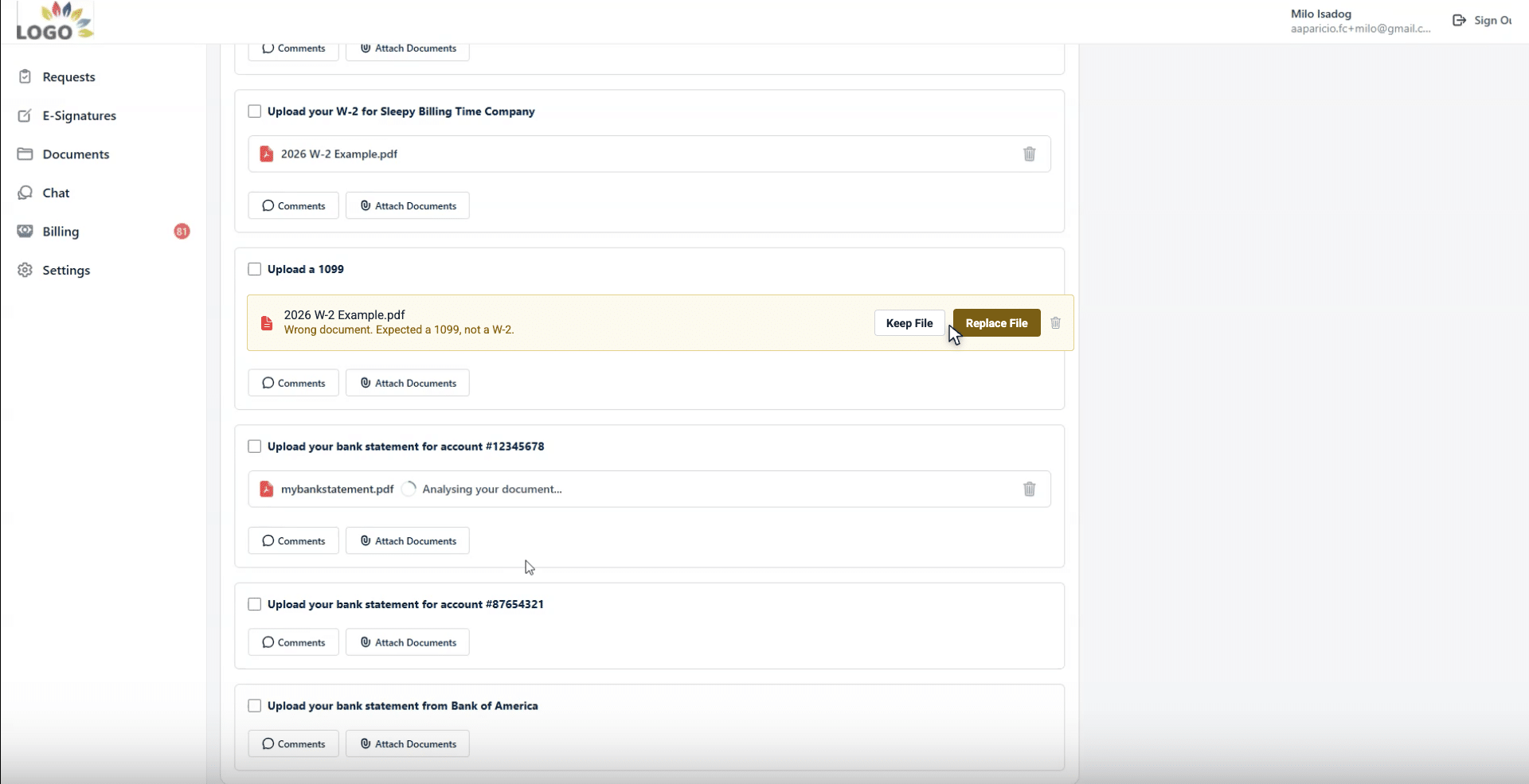
Getting documents from clients is easy. Getting the right documents is the hard part. Financial Cents’ AI File Validator checks every file a client uploads to a client task and compares it against the request, the project’s accounting period, and client details, to determine whether it’s the correct document.
If something looks wrong, such as last year’s W-2, a statement from the wrong bank, or the wrong document type, the client sees clear feedback right in the portal explaining what’s off, and can replace the file before it ever reaches your team.
The validator is deliberately conservative: it only flags a file when it is highly confident something is wrong, so your clients are never second-guessed by mistake. And if a client decides to keep a flagged file anyway, your team sees an advisory on the firm side, preserving the same human-in-the-loop visibility as the rest of Financial Cents’ AI features. There’s nothing to configure; you simply turn it on under Settings → AI Agents.
3. AI-Generated Workflow Checklist Templates
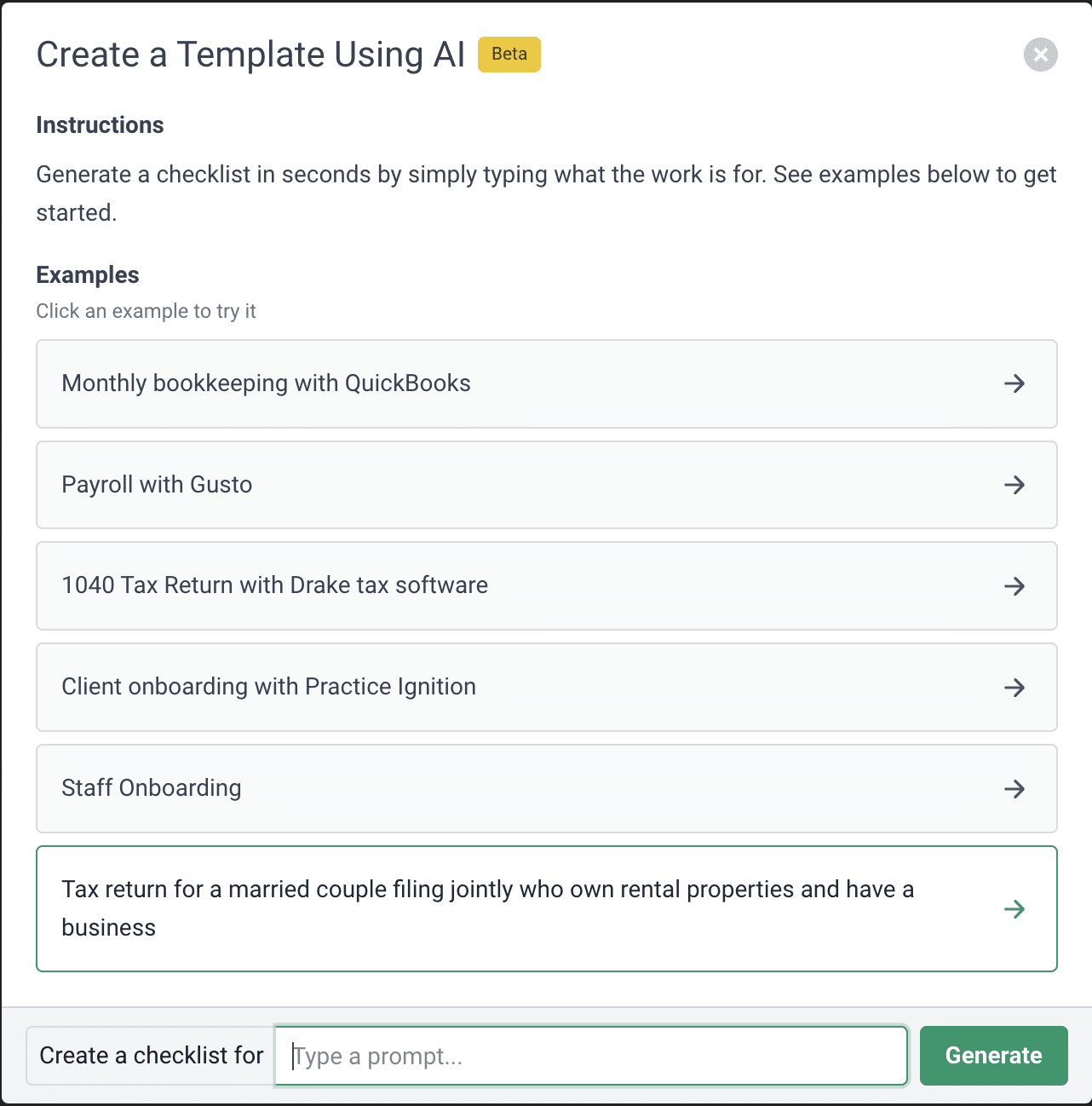
This ChatGPT-powered accounting AI feature can generate a first draft of any workflow checklist in seconds.
Whether it’s a monthly bookkeeping process, tax preparation workflow, or client onboarding checklist, you can type the workflow you need into the chat box, and you’ll receive a structured template.
Once generated, your team members can review and customize the tasks to fit your firm’s specific operating procedures before using them to create real projects.
4. AI-Generated Client Emails and Responses
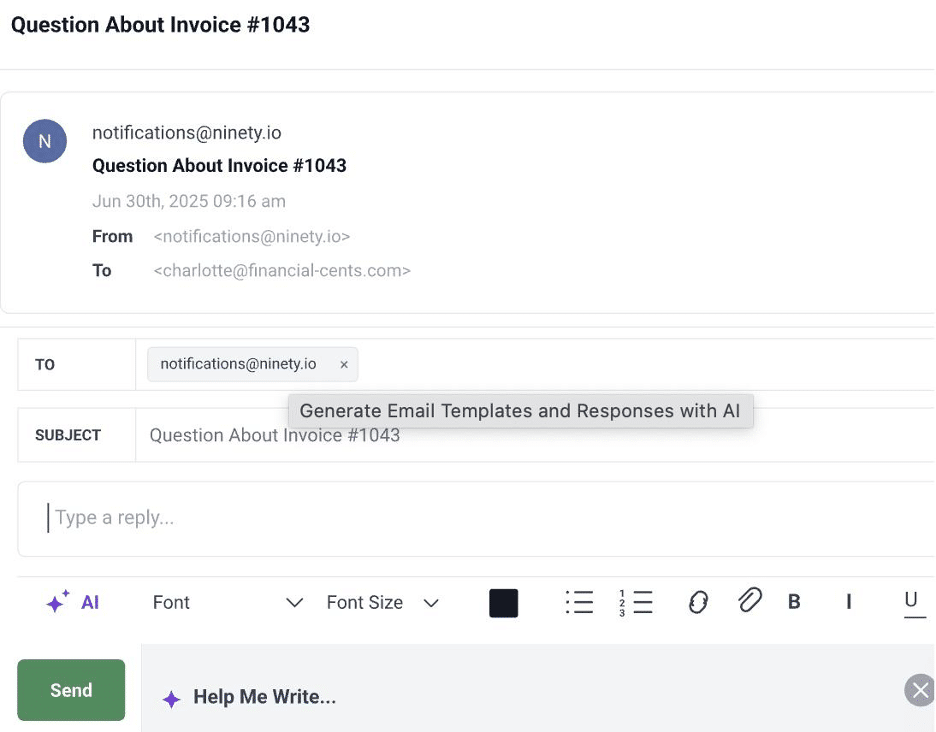
Financial Cents’ built-in AI can draft client emails and responses to help firms request documents, follow up on pending requests, provide status updates, and handle other common communications, all directly within the platform.
These drafts can then be edited, personalized, and saved as reusable templates to reduce time spent on repetitive writing tasks in recurring workflows.
5. AI-Supported Workflow Automation and Client Reminders
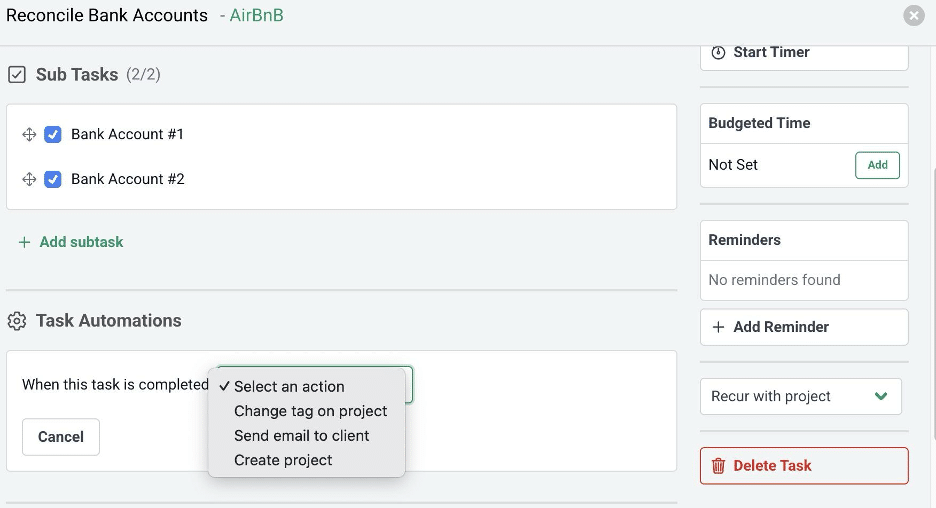
As an all-in-one practice management software, Financial Cents allows you to combine AI capabilities with existing workflow automation to help move your firm’s work forward.
Financial Cents’ AI and Task Automation features can combine to simplify client communication. For example, the AI drafts the project update email. When you have refined the content, the Task Automation tool automatically sends the email when a task is completed. The same applies to client requests and reminders.
This combination of AI and automation helps eliminate repetitive administrative work while preserving the structured processes that accounting firms depend on.
6. Financial Cents Security and Review Controls
We completely understand and respect the sensitive nature of the information accounting firms manage, which is why our team builds AI features to be assistive.
In other words, the AI features in Financial Cents are not meant to replace accounting expertise or professional judgment. Every AI suggestion, draft, and file rename is clearly indicated in your dashboard, thus preserving the human-in-the-loop system for verification and approval.
This means:
- The prompts entered into the AI assistant are not stored, logged, or used to train AI models. Financial Cents’ ChatGPT-powered features are different from the publicly available version of ChatGPT.
- Data transfer between Financial Cents and secure AI processing systems is fully protected with TLS 1.3 protocols.
More Soon-to-be-Added AI Features in Financial Cents
AI in accounting is evolving pretty quickly, and Financial Cents is committed to staying at the forefront of that innovation.
Over the next few months, we will be rolling out more task-specific AI capabilities to help accounting, bookkeeping, and tax firms streamline routine setup, accelerate communication, and improve operational visibility.
To stay up-to-date with our latest feature releases and see how we are continuing to build practical AI technology for modern firms, check our AI Features for Accounting firms page.
Use AI to Amplify Your Technical Expertise and Professional Judgment
Claims about artificial intelligence revolutionizing accounting have created more confusion than clarity. While AI is undoubtedly changing the profession, the reality is far more practical than most headlines suggest.
In this article, we have shown that:
- AI is not taking over the jobs of accountants, bookkeepers, or tax professionals.
- AI will reduce the repetitive admin work that hinders efficiency and consistency in every firm.
- The right application of AI gives accounting firms more time and space to leverage their technical expertise, professional judgment, and client knowledge where it is most needed.
To realize these benefits, accounting firms should selectively adopt AI where it delivers value, always keeping experienced professionals in charge of final review and approval of AI output.
Based on our experience building AI features for accounting and working closely with the firms using the technology, we believe the greatest ROI from AI in accounting currently lies in helping teams:
- draft client communications,
- create workflow templates,
- organize documents,
- summarize information, and
- support their daily workflows.
These are the capabilities we are focused on embedding in our platform to help accounting, bookkeeping, and tax firms save time without disrupting their existing workflows or replacing the professional judgments clients rely on.
If you’re ready to see how Financial Cents AI features can help your team work more efficiently, click here to book a personalized demo.
Frequently Asked Questions (FAQs)
Secure integrations, like the one built into Financial Cents, protect client confidentiality by enforcing SOC II compliance, securing transfers via TLS 1.3 encryption, and ensuring prompts are never used to train public models.
Watch the Grow & Scale: Data Security in an AI World with Andrew Lassise interview to learn how to establish firm-wide governance policies for AI.
- Automation follows rigid, pre-defined, rule-based logic (such as automatically moving a project to the next stage when the previous stage is finished, or and emailing a client the moment a task is checked off).
- AI operates on statistical probabilities to interpret unstructured data and generate unique content, responses, or recommendations (such as reading a PDF receipt to draft a summary or predicting a transaction category based on context).
This functionality enables you to generate comprehensive workflow checklists, draft polished client emails, and automatically rename client-uploaded documents within the dashboard you already use to manage your work.
The risk is easily mitigated by enforcing strict internal review policies and data governance guidelines.
Introduce your team to these simple use cases, establish clear firm-wide data privacy rules, and audit your results after 30 days to measure your actual time savings.



