It’s the fifth business day of the month, and you’re staring at a $4,200 payment to a vendor nobody at the firm recognizes. So you do what you did last month: export the transactions, start a new tab in the spreadsheet, and fire off another email asking the client what the charge was. Then you wait.
It’s not hard, per se. But that’s the problem.
Month-end close is death by a thousand small tasks. Each one is manageable on its own, which is why nobody questions it. But together, these tedious to-do’s stretch a “quick” close across multiple days. We call it spreadsheet ping-pong: export, flag, email, wait, re-import, reconcile, repeat.
When you put a number on it, the impact of the problem is hard to ignore. Without an automated system, firms spend roughly two hours per client every month on month-end close tasks, which, for a 100-client firm billing $70 an hour, adds up to a pretty significant chunk of change (we’re talking six figures!). Run your own numbers through our ROI calculator to see what it’s costing your firm, and if you want the full breakdown, check out our article on the hidden cost of a manual close. Keep these numbers in mind as you read, because the reclaimed time is what everything below is really about.
This guide walks through where the close process breaks down and how Month-End Close in Financial Cents fixes each break point.
P.S. If you tried this feature early on and it didn’t yet cover a key part of your process, it’s worth another look. A lot has shipped in a few short months. And if you’ve never used a tool built for this particular process, the sections below explain each piece in simple terms, framed around the recurring work that is all too familiar for most accounting firms.
Where the Close Process Actually Breaks Down: The 5 Pain Points
Let’s walk through the most common month-end close pain points and how Month-End Close in Financial Cents solves them. If you’re building your process from scratch, pair this section with a month-end close checklist so nothing slips, or check out this detailed step-by-step process with a free template to get you started.
Uncategorized transactions and missing receipts
Month-end close often starts here. You pull a list of transactions the system couldn’t categorize, and now you’re playing detective: cross-referencing bank feeds, guessing at vendors, and emailing the client one line at a time to clarify each line item.
Done manually, this is the biggest time sink of the month and the hardest to get ahead of, as anyone fighting a growing backlog of uncategorized transactions knows.
How Month-End Close Solves It
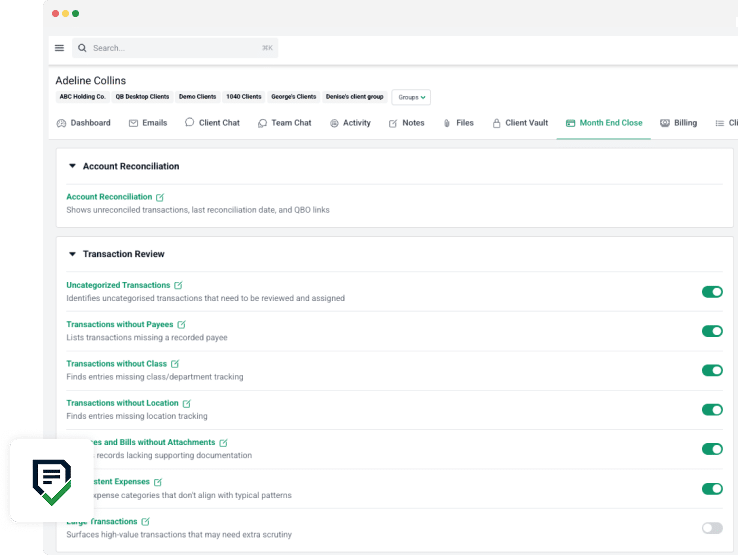
The Uncategorized Transactions report in Transaction Review (released in November 2025) puts everything in a single working view, lets you code transactions inline, and syncs your fixes straight back to QuickBooks Online. When you genuinely need the client’s input, you can route the question to them directly through the system instead of toggling back to your email inbox.
Missing payees, class, and attachments (and odd-looking entries)
Once categorization is under control, the next layer is everything else that makes a set of books audit-ready. That means addressing:
- transactions without payees,
- missing class, department, or location,
- expenses and bills without attachments,
- inconsistent expenses, and
- unusually large transactions.
Doing this manually means eyeballing a register and hoping you catch everything.
How Month-End Close Solves It
Transaction Review breaks each of these items into its own named report, so the review becomes a checklist you can actually finish and verify.
The annual 1099 and W-9 scramble
The rest of the year, W-9s are a someday problem. Then the calendar turns to January, and someday is now. Done by hand, this is a multi-week fire drill: digging through vendor records, cross-checking payment totals, and chasing signatures from contractors who’ve long since moved on.
How Month-End Close Solves It
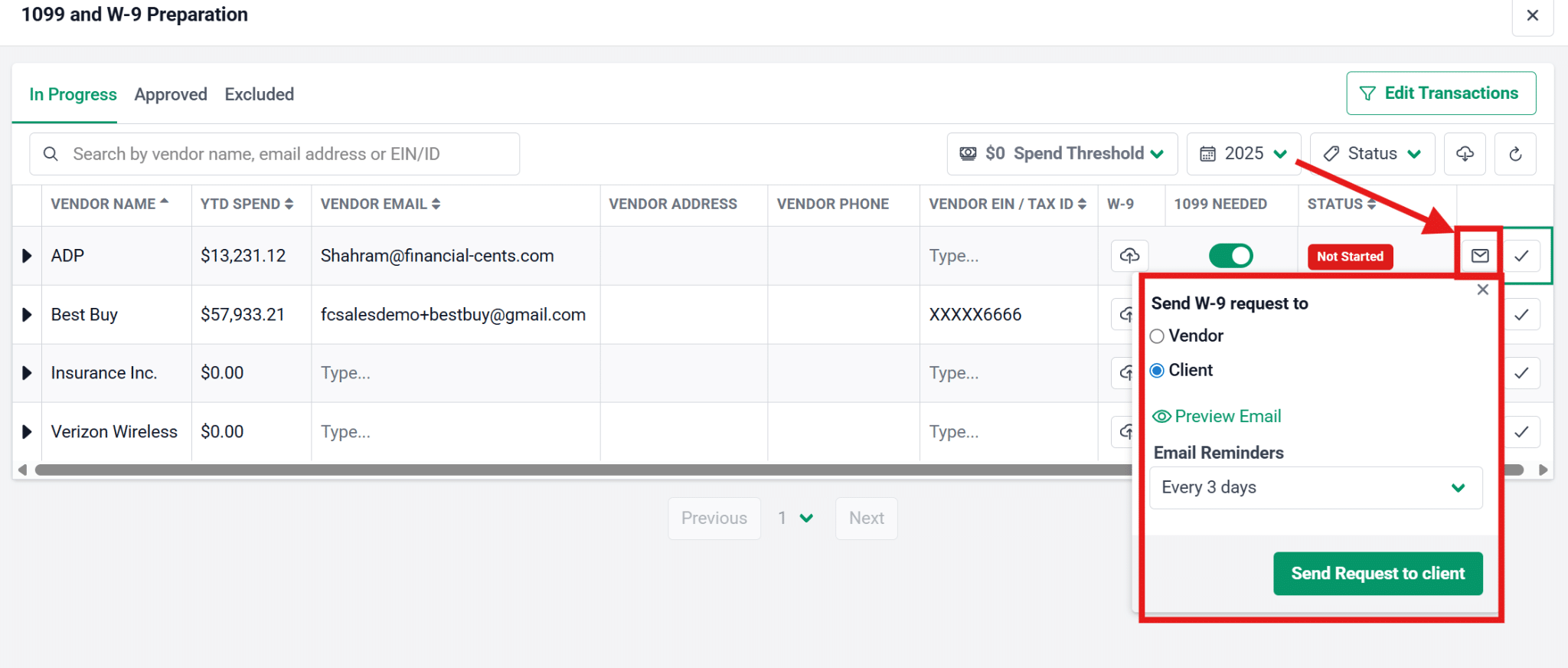
The 1099 and W-9 Preparation Report released in December 2025 pulls 1099-eligible vendors straight from QBO and tracks each W-9 through a clear status path, from Not started to Waiting on vendor, Response received, Ready for review, and Ready to file. You can also request the W-9 from the vendor or the client directly, so the chase happens inside the workflow instead of across your inbox.
When firms stay on top of this process all year, they barely feel it in January.
Steve Libhart, Founder of Numbers Matter LLC, saw the same impact: “I was done in a week. It used to take me almost a whole month.”
Reconciliation with no audit trail
Reconciling an account is simple enough. Knowing at a glance which of your 80 accounts are done, who did them, and when, is not. That’s where many firms lose the thread, and it usually surfaces at the worst possible moment: right before a review, when someone asks if everything’s reconciled and nobody can say for sure.
How Month-End Close Solves It
A more recent addition to the close workflow, the Account Reconciliation Report (launched March 2026), gives you a consolidated view of every account waiting to be reconciled and shows the Last Reconciled Transaction Date at a glance. Add it to a project, and it stamps each account with Reconciled Date and Reconciled By, so you have a real audit trail instead of a jumbled mess of mental notes.
Chasing answers across reports and getting surprised mid-period
Maybe a question you asked the client three weeks ago is buried somewhere in an email thread, still unanswered, and you can’t remember if you ever got the information you needed. Or perhaps a vendor the client set up on their own is silently miscategorizing half their expenses, and you won’t catch it until the numbers come out wrong. Sound familiar?
How Month-End Close Solves It
Financial Cents added two reports in 2026 to close these gaps. Shared Transactions compiles every transaction you’ve flagged for a client into Needs Review and Approved tabs, with your questions and their answers displayed side by side, so the conversation lives on the transaction itself instead of in your inbox. And Newly Added Vendors & Accounts catches the vendors and chart-of-accounts entries a client created mid-period, letting you bulk approve them, sync them back to QBO, or hide what isn’t relevant—before they turn into next month’s mystery.
What is your manual month-end close costing you?
Most firms treat the close as overhead. It is really billable capacity you are giving away every month. Enter your numbers and see the trade-off.
Billable capacity you reclaim every month
$14,000
That is $168,000 a year, or 2,400 hours.
Month-End Close costs $500/mo for this firm. Every $1 spent returns $28 in capacity.
Month-End Close in Financial Cents is $5 per client, per month. ROI = reclaimed billable capacity divided by annual cost.
What Turns Month-End Close From a Set of Reports Into a Workflow
What actually makes the close faster is the automation layer running underneath it: the mechanics that let you fix something once and never touch it again. It’s the same logic behind any good bookkeeping workflow.
Two-Way QBO Sync
Minimizing your team’s manual effort starts with a two-way QuickBooks Online sync. With Month-End Close in Financial Cents, every correction you make pushes back to QBO on its own, so you never type the same fix twice. Add bulk actions to that, and a cleanup that used to mean clicking through two hundred rows, one at a time, becomes a job you finish in about a minute: bulk categorize, bulk share, bulk approve, or hide closed-period transactions by a cutoff date.
Filters and Approvals
Include and exclude filters mean each report shows only what your firm cares about, so you’re not scrolling past noise to find the five things you actually need to see. You can spin up new vendors and customers inline, and those records sync straight out to QBO. Approvals close the loop: approve a transaction to push it back and move it to the Approved tab, or unapprove it when you need another look.
Templates
And finally, templates are the piece that turns all of this from one good month into a repeatable system for all months. Any report can drop into a project or a template, and paired with Quick Add, that’s your rollout mechanism.
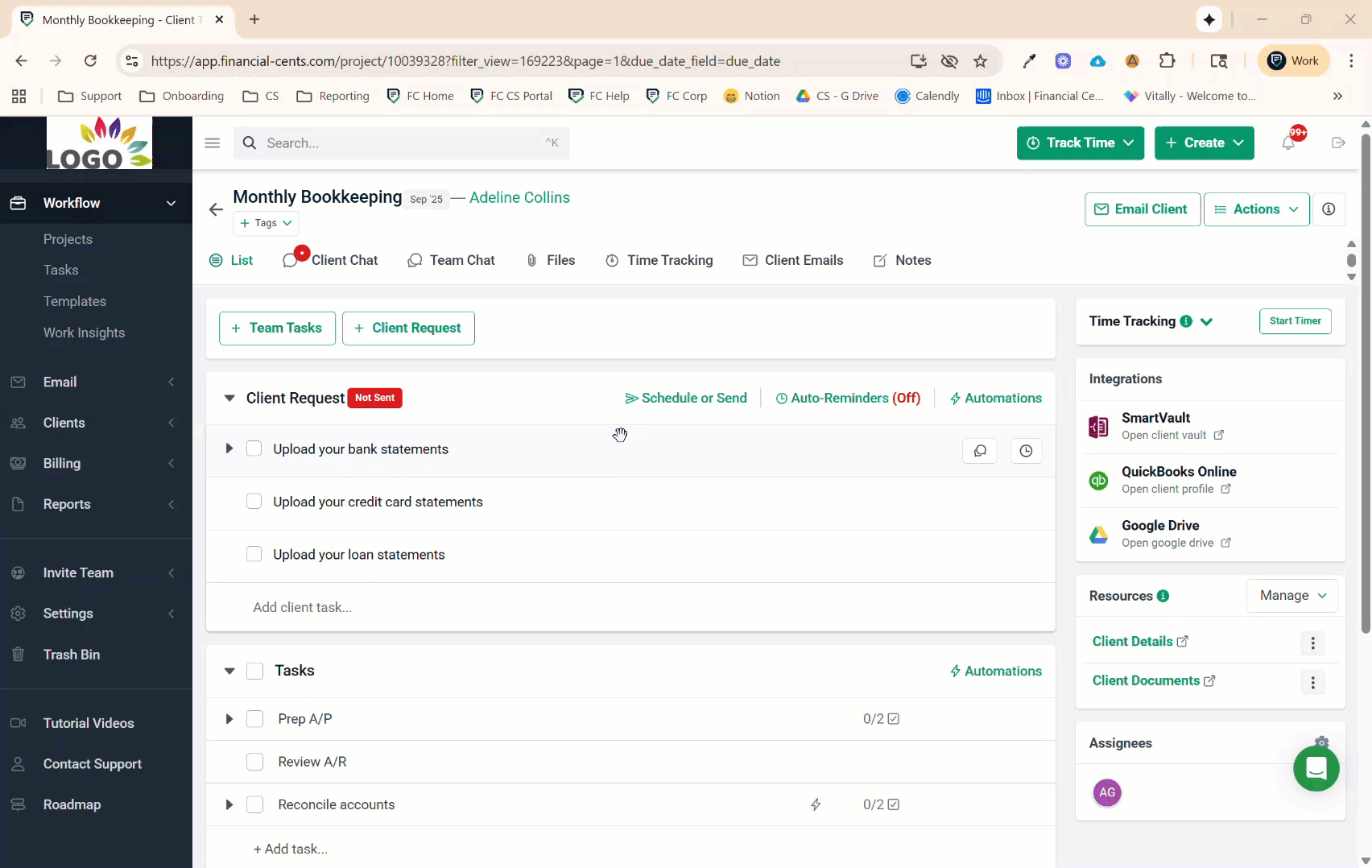
You build the close once—with the exact reports and exact steps you want—and every client inherits it automatically. Sure, adding clients one at a time works, and there’s nothing wrong with a cautious rollout. But firms that are getting the most out of this functionality bake the close into their project templates, so the whole process automatically gets applied when onboarding a new client (and you don’t have to rebuild anything from scratch).
A Constantly Evolving Solution
One more important thing, particularly for all of the “I already tried it” folks out there: our product moves fast.
Financial Cents has shipped fourteen Month-End Close releases in seven months, with a dense cluster between March and May 2026: project templates, Quick Add, Account Reconciliation, and Shared Transactions all landed in that stretch. Whatever this feature looked like the last time you evaluated it, there’s a good chance it does a lot more now.
The Impact of a Streamlined Close on the Client Experience
The close isn’t only an internal process. Every snag your team feels, the client feels too, usually as another email asking for something they were sure they’d already sent. So, when you fix your own workflow, things get lighter and easier on their side almost as a byproduct. Here are three improvements clients will notice right away:
- Reminders arrive on a schedule, not at random. Instead of a trickle of one-off questions all month, clients get batched, scheduled requests they can knock out in one sitting.
- Answered items disappear. Once a client responds, the request drops off their list instead of lingering for another round of “did you get this?” confirmation.
- Everything lives in one portal. All of the client’s questions and documents are stored behind one login, even for clients running multiple entities. No more scavenger hunts across tools.
After adopting Month-End Close at Envision Business Services, firm owner Kristin Thompson immediately noticed the positive impact on the client experience: “It really is nice to have that set schedule of reminders going out to clients. It’s not as cumbersome on their side of things, so that was really important for me.”
The comprehensive client portal was the main reason Greg Scholten adopted Month-End Close at On Track Accounting in the first place:
Kristin also highlighted that benefit, especially for multi-entity clients:
Even the clients who tend to resist new processes typically come around once they realize how much easier it is.
Detail-oriented clients will be particularly impressed with the coverage offered by the Month-End Close functionality. After one close in Financial Cents, Mary Ferry had a new client at Advantage Insights offer unprompted praise:
The Real Payoff: Increased Team Capacity
While tidier reports and records are certainly nice, the real value of a more streamlined month-end close process lies in the hours you get back. (And as noted at the beginning of this piece, that value can easily surpass the six-figure dollar mark.)
That said, what you do with your team’s reclaimed capacity is up to you. Some firms leverage it for growth, taking on more clients without adding headcount because the close no longer scales linearly with the book of business. Others use it to create more breathing room, so staff can end the month without working any late nights.
For Mary Ferry, this extra capacity is what lets her build the kind of firm she envisioned from the beginning: “I have moms who are doing work sitting at basketball practice, waiting in the car, doing those sorts of things. The tools have helped us create the right culture for my team members, because they have the flexibility and they’re able to put their families first.”
Bringing It All Together
Month-end close will always be a recurring event, but it doesn’t have to be a recurring game of spreadsheet ping-pong. Uncategorized transactions, missing details, the 1099 scramble, reconciliation you can’t verify, questions scattered across your inbox, surprises added mid-period: Month-End Close is built specifically to alleviate all of these costly pain points (and to help standardize it all through templates, so you feel the relief across every single client).
At $5 per client per month with no minimums, the cost of implementing it in your firm is small next to the increased capacity and peace of mind it promises. Want to give it a whirl? If you’re new to Financial Cents, start a free 14-day trial or book a demo now. And if you’re already a customer, it’s time to make Month-End Close your default for every client so you can get every reclaimed hour (or dollar) of value out of it.