
How many times have you agreed to take on a new client or project, only to realize your team is already at capacity? Or assigned a task to a teammate you thought was available, only to discover they’re fully booked while other team members have room for more work?
If this sounds familiar, the problem may not be how many people you have. It may be that you don’t have a clear picture of your team’s actual capacity. Without that visibility, you risk overloading your team, missing deadlines, or turning down work you could have handled with better planning.
It’s one reason many accounting professionals are overworked, especially during busy season. In a survey by staffing agency Distinct, nearly 80% of audit and tax professionals worked more than 51 hours a week during busy season, and 74% rated their work-life balance as “fair” or “poor.” Over time, that pace can cause employees to make more mistakes, experience burnout, or leave the firm.
We explain everything you need to know about capacity management for accounting firms in this guide. We show you the warning signs to watch for, how to calculate your team’s capacity, how capacity affects profitability, and how to decide when to hire, outsource, improve your processes, or say no.
TL;DR
- Capacity management matches your firm’s workload with your team’s available hours and skills.
- To calculate billable capacity, multiply available hours by target utilization.
- Forecast capacity and demand monthly as well as annually to spot short-term workload changes, anticipate busy seasons, and plan staffing before deadlines become difficult to meet.
- Review workloads weekly and redistribute assignments before employees become overloaded or miss deadlines.
- When demand consistently exceeds capacity, improve processes, raise pricing, use outsourced or seasonal support, hire full-time for sustained demand, or decline work that doesn’t fit your firm’s capacity.
What Is Capacity Management in an Accounting Firm?
Capacity management refers to matching your firm’s available staff time and skills with current and future client workload, so you can take on work without overloading your team or missing deadlines. In practice, that means planning and allocating available resources, such as staff time and expertise, to meet current and future client workloads.
Instead of relying on headcount or how busy people appear, you assess available hours, utilization and workload by person, role and time period. This helps you see how much capacity your team has and determines whether you can take on more work without overloading employees or compromising deadlines.
Capacity management is different from capacity planning. Accounting firm capacity planning looks ahead to estimate future demand and decide whether your team can handle it, especially in busy periods like tax season and year-end. While capacity management is the ongoing process of monitoring workloads and adjusting assignments as priorities, deadlines, and staff availability change.
Signs Your Firm Has a Capacity Problem
How do you know if you have capacity problems? Watch out for these warning signs:
- Regular overtime outside busy season: If your team regularly works late or on weekends even during quieter periods, your workload may exceed your team’s available capacity.
- Missed or repeatedly pushed deadlines: If your team is constantly missing due dates, you may be assigning more work than people can realistically complete on time.
- Uneven workloads across the team: If the same one or two people are always overbooked while other people on the team have spare capacity, you may need to reevaluate how you distribute assignments.
- Work piling up in the review stage: If work is always stuck in a particular stage, say ‘waiting for review’, the people responsible for that stage may be consistently overloaded with work.
- Rising staff turnover: If employees leave frequently, check whether they regularly work overtime or struggle to meet deadlines. This may indicate that your firm’s workload exceeds its team’s capacity.
How to Calculate Your Team’s Capacity
Before you accept another client or assign work to your team, you need to know how much work your team can realistically handle. Having enough employees on paper doesn’t mean they have time available for more work. Some may already be fully booked, others may have leave or internal commitments, and some may not have the skills needed for a particular engagement.
To calculate operating capacity, look at three numbers: total working hours, billable capacity, and workload.
Step 1: Calculate Working Hours
Start by calculating each employee’s working hours for the year. For a full-time staff employee working 40 hours a week, that’s:
40 x 52 = 2,080 gross working hours annually
Then subtract hours the employee won’t be working, like sick days, paid time off (PTO), and other expected absences. So if the accountant has 200 hours of planned absence, working hours will be:
2,080 – 200 = 1,880 working hours.
Note: Calculate working hours separately for each team member based on their work conditions. A part-time bookkeeper, for example, will have fewer hours than a full-time bookkeeper.
Step 2: Calculate Billable Capacity
Your team won’t spend every working hour on billable client work. Employees also need time for meetings, administration, training, and other non-billable activities. Apply a target utilization rate to estimate how many hours each person can devote to billable work.
Use this formula to calculate billable capacity:
Billable capacity = Available hours × Target utilization rate
For the accountant with 1,880 available hours and an assumed 75% utilization target:
Billable capacity = 1,880 x 75% = 1,410 billable hours
This means you plan for the employee to spend 1,410 hours on billable client work during the year. The remaining 470 hours allow for nonbillable activities.
Note: Set different utilization targets by role. The more senior the role, the lower the target. For instance, accountants often have higher targets than managers, while firm owners may have the lowest because they also handle hiring, leadership, client relationships, and the day-to-day work of managing an accounting firm.
Step 3: Compare Capacity With Expected Workload
Repeat the billable capacity calculation for each team member, then add up everything to estimate how many hours your firm can devote to billable client work over the year.
Here’s what this can look like for a five-person team:
| Team member capacity | Available hours | Target utilization | Billable capacity |
|---|---|---|---|
| Owner | 1,880 | 45% | 846 |
| Manager | 1,880 | 60% | 1,128 |
| Staff accountant 1 | 1,880 | 75% | 1,410 |
| Staff accountant 2 | 1,880 | 75% | 1,410 |
| Part-time bookkeeper | 940 | 80% | 752 |
| Total | 8,460 | 5,546 |
This firm has 5,546 hours of annual billable capacity. Next, estimate how many hours the firm’s existing and expected client work will require. Use time-tracking data and historical averages to get this figure. Then multiply the estimated hours per engagement by the number of engagements to calculate total expected demand.
If the firm’s expected client work requires 6,000 hours, compare it with the annual billable capacity. That’s:
6,000 – 5,546= 454 hours
This means demand exceeds capacity by 454 hours, and so you need to either redistribute assignments, improve processes, outsource some tasks, or hire full-time.
In short, a five-person firm with 5,546 billable hours and 6,000 hours of expected work is 454 hours short.
If you need further help calculating capacity for your firm, use Financial Cents’ free capacity planner.
Forecast Capacity by Month, Not Just by Year
Demand for accounting services changes throughout the year, with some months, such as tax season, far busier than others. If you plan capacity based on annual totals alone, you may have enough hours across the year but still struggle to meet deadlines during busy periods.
Build a monthly forecast that compares expected client work with available team capacity. Start with recurring projects like monthly bookkeeping, payroll processing, reconciliations, and financial reporting. Then add seasonal engagements and expected work from new clients, including clients you plan to onboard soon. Estimate the hours each engagement will require and assign those hours to the months when you’ll do the work.
For instance, plan for individual and business tax preparation between January and April. Then from December through January for 1099 collection and filing, and allow for year-end adjustments into the first quarter.
Don’t plan to use every available hour, though. Always leave a buffer for scope creep, unexpected client requests, and client delays like documents arriving later than expected.
Review this forecast monthly, and update it as clients sign, leave, or change scope.
How to Balance Workloads Across Your Team
Here are some capacity management strategies to prevent burnoutand ensure no team member is consistently over or under capacity.
Assign Work Based on Skills, Experience, and Availability
Before assigning a task, check who has time available and who has the skills and experience to complete it. This helps you avoid overloading experienced employees or assigning complex work to someone who needs more support than the deadline allows.
Prioritize Approaching Deadlines and Aging Work
Sort and assign work by due date and by how long it’s been waiting in the queue. Start work well before the deadline rather than waiting until it’s close. Good accounting project management makes this easier, because every engagement has a due date, owner, and status in one place.
Stagger Internal and Client Due Dates
If several clients need the same service, avoid scheduling all the work for completion on the same day. Spread internal deadlines across the month so your team has enough time to complete each engagement without rushing.
Jackie Mayer CPA, Founder, TaxPlan IQ, recommends categorizing clients into tiers and setting deadlines based on their value, complexity, or service requirements. For example, a firm might complete bookkeeping for A clients by the 10th of the month, B clients by the 15th, and C clients by the 20th. This way your team is not rushing, and clients always know when they’ll get their work.
Standardize Workflows For Your Firm
If only one employee knows how to complete a process, their availability limits the team’s capacity. Document recurring workflows, create checklists, and use consistent naming conventions so any team member can also do the work, and in a consistent format too.
Set Individual Weekly Hour Limits
Set expectations for how much work each employee can reasonably handle in a week. Account for scheduled client work, meetings, training, leave, and internal responsibilities rather than filling every available hour with assignments.
You can also check in with employees regularly to understand how manageable their workloads feel. Alexis Sadler, CEO of Accounting Therapy, says her firm uses a stress rating from one to five.
“Each week we have a stress level measurement. One is easy peasy, five is get me the hell out of here. Usually I like to see my team around a two. Obviously there are times of the year where I will accept a three, but once they get to a four, we need to have a conversation.” she explains.
Use Automated Reminders to Follow up on Document Collection
Getting documents from clients is the top workflow issue accounting firms face, according to Financial Cents’ 2025 State of Accounting Workflow and Automation Report. Manually following up on missing documents takes time and can delay work, even when your team has the capacity to complete it.
That’s why you should automate follow-up reminders so you can collect what you need sooner and reduce delays that can cause workload imbalance.
How Capacity Affects Your Firm’s Profitability
Capacity and profitability are closely linked. If employees have more available time than your firm can use, you’re not getting the most value out of them and are likely losing money. But if they’re constantly overloaded, they might rush through tasks, spend extra time correcting errors, or work overtime to meet deadlines. These problems increase delivery costs and reduce profit margins.
To understand how well your firm uses its capacity and earns from client work, track three metrics: utilization rate, realization rate and effective hourly rate.
Utilization Rate
Utilization measures how much of an employee’s available working time they spend on billable client work.
Use this formula:
Utilization Rate = Billable Hours ÷ Available Working Hours × 100
So, if an accountant has 30 billable hours in a 40-hour working week, their utilization rate is 75%.
Track utilization by employee and role, then compare results with your targets. Low utilization may indicate that an employee has spare capacity, spends too much time on internal work, or doesn’t have enough assigned client work. But high utilization leaves little room for unexpected requests or complex engagements.
Aim for a utilization rate that supports profitability without overloading your team. Tonya Schulte, founder of The Profit Constructors, recommends an 80% capacity with a 20% contingency plan in case she needs to add a new emergency client or other unplanned tasks.
Realization Rate
If utilization rate tells you how much time your team spends on billable work, then accounting realization ratetells you how much of the value of that work your firm actually bills.
Use this formula:
Realization Rate = Actual Amount Billed ÷ Standard Value of Work × 100
Suppose your team completes work worth $5,000 at standard rates, but you invoice the client only $4,000, your realization rate is 80%.
A low realization rate can indicate that your team regularly works beyond the agreed scope, you offer too many discounts, or you underprice your services. These issues reduce the revenue your firm earns from the time employees spend on client work.
Effective Hourly Rate
Even if you use a fixed-fee pricing, track the time each engagement takes so you can calculate its effective hourly rate (EHR): the fee divided by the hours spent. To calculate it, use this formula:
Effective Hourly Rate = Project Fee ÷ Total Hours Spent
So if a client pays $900 per month for bookkeeping and your team spends 15 hours on the work, your effective hourly rate is $60. If another client pays the same fee but requires 20 hours of work, your effective hourly rate drops to $45.
Without tracking this data, you might assume both clients are as profitable, but they’re not. Use this information to decide whether to reprice the service, adjust its scope, or move the client to a different package.
As Angela Main Roberts, CEO, Main Accounting Services says: “Being able to capture everything that we need (like actual work hours and the amount the client is paying each month) enables us to track profit by client.”
You can use Financial Cents’ time-tracking toolto record the time spent on each project and see reports on where your team spends its time.
Read: How to measure and improve efficiency in accounting
When to Hire, Outsource, Improve Processes or Say No
If you find that demand exceeds your team’s capacity, don’t just rush to hire. Work through these options, in order:
Fix Your Process and Automate Repetitive Work
First, identify all the time-consuming tasks you can standardize or automate, like client follow-ups, scheduling, and assigning work. These can free up time and capacity without increasing headcount. Financial Cents’ 2025 Workflow and Automation Report found that before automation, 53.8% of firms spent more than five hours a week scheduling and assigning work, and after automation, 75.8% spent five hours or less.
You can also use AI to complete certain tasks faster. Financial Cents’ 2026 State of AI in Bookkeeping & Accounting report found that the most common time saving among AI users was 1–3 hours a week, reported by 37% of respondents. This frees up time for other client or emergency work.
For bookkeeping firms, standardizing the monthly close and automating client follow-ups is usually the fastest way to increase bookkeeping capacity before adding headcount.
Raise Prices or Repackage Low-Margin Clients
If the capacity issues persist, find the clients who regularly require more hours than you budgeted and either increase your rates, reduce the scope of work, or move them to a more suitable service package. Don’t absorb the extra work.
Use Part-Time, Seasonal or Outsourced Support
If you do need to bring in extra hands, try part-time employees or outsourced support first. This works well for temporary seasonal spikes or when you’re not sure how long demand will last. As Jackie Mayer, CPA, Founder, TaxPlan IQ, says, “I encourage any accounting firm that I work with to have an outsourced company or subcontractor that can jump in in an emergency situation during busy seasons.”
Hire When Demand Remains High
If demand stays above capacity outside your peak season, or after you’ve tried the first three options, then hire a full-time staff. But you need to start recruiting weeks before you need the help. In a CFO Pulse surveyof more than 250 finance and accounting leaders, 49% said it takes their organizations 60 days or more to fill open roles. Add time for onboarding and training, and a hire you want ready for tax season needs to start well before it.
Say No to Clients Who Don’t Fit
If all these don’t work and your team still can’t keep up with the work, then it might be time to say no to new clients or end the working relationship with the client that always pushes your team past capacity.
As Logan Graf, CPA, advises, “Know what you’re not going to work on and keep that boundary.”
Common Capacity Management Mistakes
Here are six mistakes to avoid when planning and managing your accounting firm’s capacity.
- Planning by headcount instead of hours: Don’t plan capacity by the number of employees you have. Plan with each person’s available hours, and check who has the skills the work requires.
- Assuming 100% utilization: Your team needs time for other non-billable work, so if you schedule every available hour for client work, even a small delay can push deadlines back. That’s why you shouldn’t set a 100% utilization target. Try 75-85% for staff roles, and lower targets for managers and owners.
- Ignoring the owner’s capacity: Owners don’t have endless capacity either. Account for the time you spend on client work, reviews, and running the firm, plan around it, and leave room for a life outside work.
- Forecasting annually instead of monthly: In addition to yearly forecasts, do monthly too. An annual total shows whether you have enough hours across the year and helps you plan for busy seasons, while a monthly forecast accounts for new clients and changing deadlines that affect capacity in the short term.
- Estimating work without real-time data: Base your decisions on data instead of guesses. Track time on every engagement, so you know how long work takes and which clients earn your highest margins.
- Treating burnout as a personal problem: When employees regularly work long hours or struggle with deadlines, don’t assume they simply need better time management. Repeated overwork can signal unrealistic workloads, poor scheduling, or insufficient capacity. Check that this isn’t the case first before telling them to make personal changes.
Read: How to avoid overtime during tax season
Tools for Managing Capacity in Your Accounting Firm
Certain tools make managing capacity easier. A small firm can start with a spreadsheet to record each team member’s available hours, compare them with estimated client work, and track upcoming deadlines in a calendar. But as it grows, keeping spreadsheets and calendars updated becomes harder and more time-consuming.
That’s where capacity management software for accounting firmscomes in. They bring assignments, estimated hours, deadlines, and team availability into one place. So you can identify workload imbalances, redistribute work and adjust schedules before employees start missing deadlines or working overtime.
Before investing in a tool, however, start with Financial Cents’ free Capacity Planner. You’ll answer questions about your team, workload, and client mix, then receive a personalized capacity snapshot and recommendations to help you decide whether to hire, delegate, or reorganize work.
For firms unsure where to begin, the free Capacity Planner is a great starting point for assessing workload and identifying what needs attention.
How Financial Cents Helps You Manage Team Workload
Financial Cents is an all-in-one accounting firm practice management software that helps firms manage deadlines and client work through workflow automation, client management, time tracking, reporting, team collaboration, and capacity management.
With its capacity management features, you can see how much work each team member has on their plate, identify overloaded employees, and redistribute assignments before they miss deadlines.
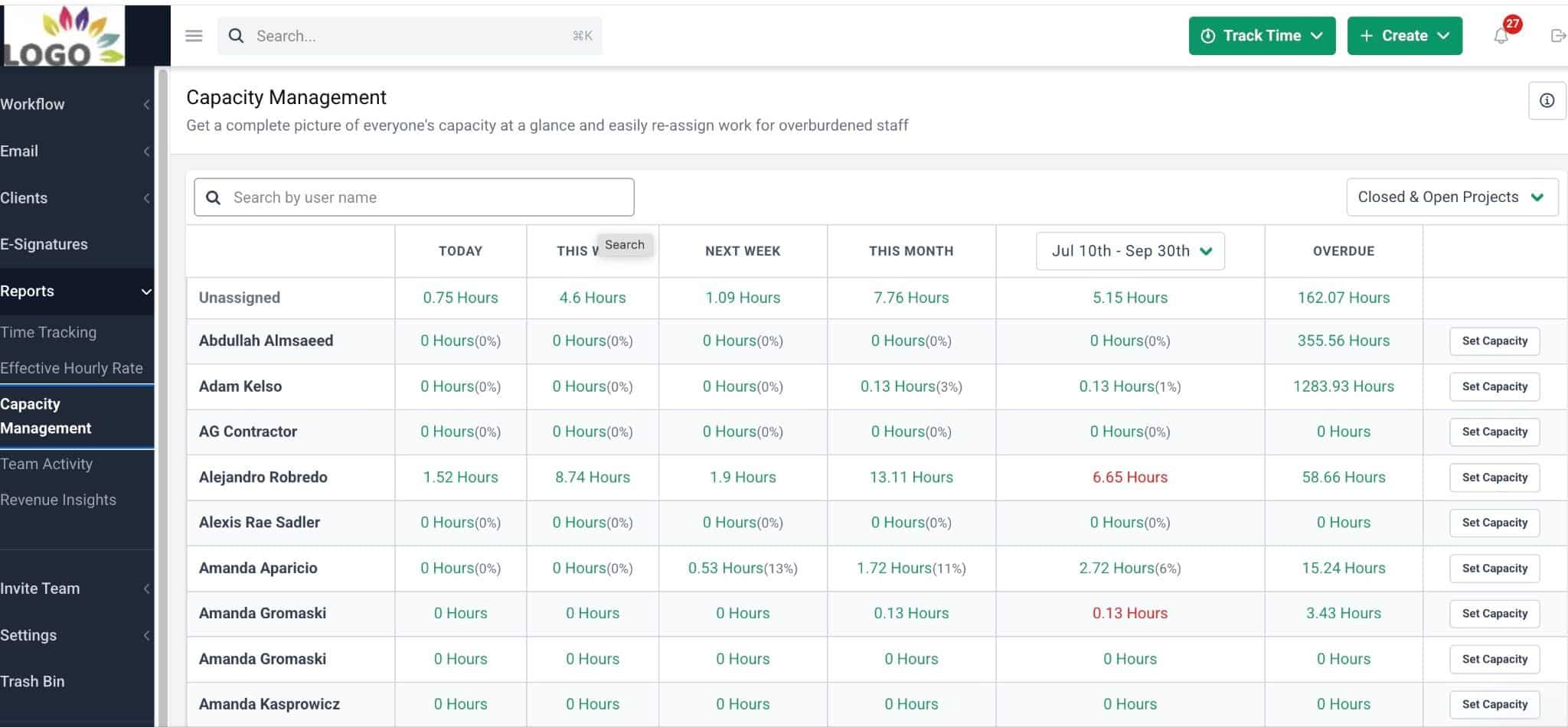
The Capacity Management feature also provides a report that helps you make more informed decisions before accepting another client. It shows the estimated hours of work for each team member for a selected period, which you can then use to find who has room for more work and who is approaching or exceeding their capacity.
For accurate results, the report needs a project budget in hours, a due date, and an assignee. And if you run weekly or biweekly projects, create recurring projects with enough look ahead to ensure the report captures a full month of upcoming work.
When you open the Capacity Management Report, look for team members with red hour totals. These indicate that they’re over capacity for the selected period.
Click a team member’s hour total to see the projects and tasks assigned to them during that period:
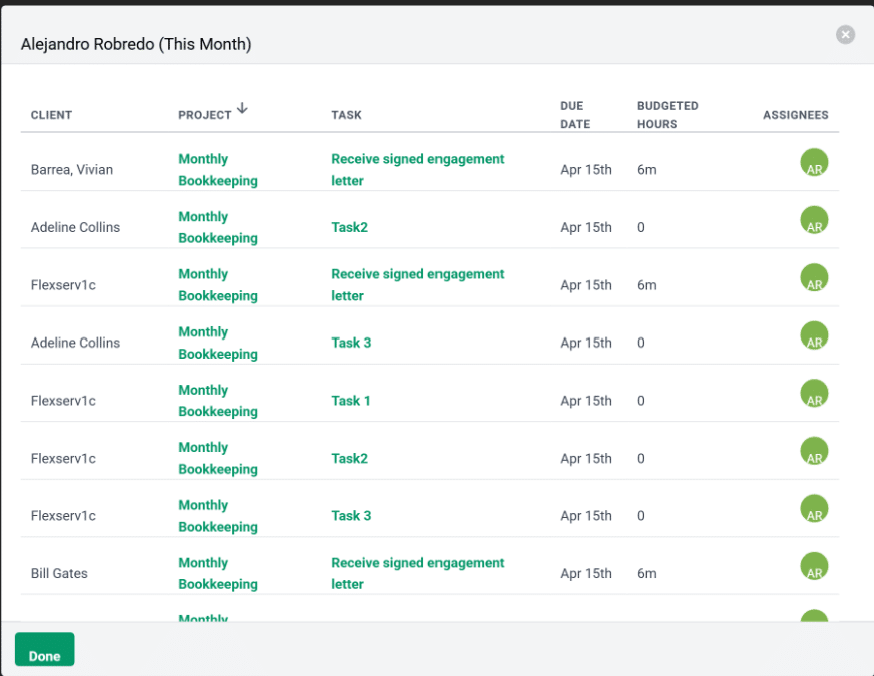
From there, you can take two actions:
- Reassign tasks: Click the Assignee icon on a task to move it to another team member with available capacity.
- Reschedule tasks: Click the task name to open it, then change its due date to a date when the assigned employee has more capacity.
After making changes, return to Reports > Capacity to check whether the workload is more balanced.
Want to see this in action? Book a demo today to see how Financial Cents can help you plan capacity and manage your firm’s workload.
Frequently Asked Questions (FAQs)

The Financial Cents Editorial Team creates practical guides, templates, and resources for accounting, bookkeeping, and tax firms, drawing on our in-house experts and the firm owners we work with.
Share this article