

For most bookkeeping firms, scaling is the goal. You want more clients, higher fees, more revenue, and a bigger team to handle the growing workload.
But growth can create a new set of problems. Without the right foundation and systems, adding clients and staff can leave you spending more time on small, recurring tasks like chasing documents, answering every question, checking every file, and keeping track of each client’s requirements and quirks.
And you’re not alone. Financial Cents’ 2026 Bookkeeping Firm Tech Stack Report found that only one in three firms have a clear, unified view of all client work, while half aren’t confident that their current systems are preventing work from falling through the cracks.
Bookkeeping practice management software can help close these operational gaps. It gives your firm a central system for managing workflows, workloads, deadlines, and collaboration with your team and clients. In this guide, we’ll show you how to use it to scale without your processes breaking down or adding more work for yourself.
TL;DR
- Scaling means growing your clients and revenue without your workload and operational problems growing at the same rate. Practice management software helps by reducing dependence on the owner and making work easier to delegate.
- Practice management software manages the business side of a bookkeeping firm. It brings recurring work, deadlines, client requests, team assignments, documents, communication, time, and billing into one system.
- A scalable firm makes recurring work visible, repeatable, assignable, reviewable, and measurable. Everyone should know what needs to happen, who owns it, and whether it’s done.
- Software won’t fix an undefined workflow. First, decide how each service should run, who owns each step, what the service standards are, which exceptions need special handling, and how work gets reviewed.
- Introduce software before the owner becomes the bottleneck, then roll it out in phases. Start with one recurring workflow and a small group of clients, test it with the team, fix gaps, and expand once the process works consistently.
What Is Bookkeeping Practice Management Software?
Bookkeeping practice management software helps you run the business side of your firm. It brings client information, recurring work, deadlines, documents, team assignments, time tracking, billing, and other day-to-day operations into one system for everyone to work from instead of using scattered tools.
It’s different from your accounting software like QuickBooks Online or Xero, which manage the client’s books. It’s also different from generic project management tools like Monday.com, Asana, or ClickUp, which often lack specific features and internal workflows firms need to scale, like recurring monthly work templates, client document requests, and deadline tracking across every client.
So instead of handling every task, the software lets you delegate smoothly and even automate some tasks. That’s what lets your firm scale.
What Does “Scale” Mean for a Bookkeeping Firm?
Scaling doesn’t simply mean adding more clients or employees. It means increasing clients and revenue without your workload, headcount, errors, or service delays increasing at the same rate. And you can only do that with solid systems in place.
As Dawn Brolin, CPA, CFE, says, “How can you grow if you don’t have systems in place? You can’t. If you want to grow, you have to solidify what you’re doing.”
You can add 30 new clients and several employees and still end up with a larger but less profitable and more stressful firm. For a bookkeeping firm, scaling means removing the operational constraints that make firm growth harder to manage like overdependence on the owner, manual document chasing, uneven workloads, and slow onboarding. This frees up capacity and makes it possible to take on more work without operational problems growing at the same rate.
The Scaling Stages: How Your Systems Need to Change as Your Firm Grows
As your bookkeeping firm grows, the way you manage work needs to change with it. What works when you’re managing everything yourself won’t necessarily work once you start adding team members, clients, and services.
The goal at each stage is to move more of the firm’s work out of your head and into repeatable processes that your team can follow.
| Stage | Typical operating pattern | Main bottleneck | Systems to introduce | Owner’s changing role | Metric to watch |
|---|---|---|---|---|---|
| Stage 1: Solo/founder-led | You handle most of the work yourself, with emails and spreadsheets | Work heavily depends on your personal involvement and memory | Document your core workflow, centralize client information and track time | Create a consistent process so you can delegate | Time per client, so you can see where your hours go |
| Stage 2: First hires/small team | You’ve started hiring and delegating, but are still involved in most work | Unclear ownership and handoff can cause work to be stuck | Recurring workflow, templates, task owners, dependencies, and shared client notes | Move from managing every task to managing the process. Only step in when something needs your attention | On-time completion and work visibility |
| Stage 3: Growing firm | You have a larger team, client base, and services offered | Capacity and profitability across the firm become hard to determine without a system | Capacity management, structured onboarding, role-based permissions, and service-level reporting | Improve the systems that keep the firm running and use numbers to make decisions | Capacity, utilization, and profit per service and client |
Read: Accounting firm organizational chart & structure for all sizes
Eight Ways Bookkeeping Firms Use Practice Management Software to Scale
A bookkeeping firm platform can help turn the work that once depended on the owner into repeatable processes the team can follow. Here’s how to scale your bookkeeping firm in eight ways.
1. Standardize Recurring Monthly Bookkeeping Workflows
As a solo founder, you probably had a process for recurring bookkeeping tasks, even if you never documented it because you were the only person doing the work.
But with more team members, systemize your solo firm by turning that process into a workflow that defines the steps, order, owner, and due date for each task. Save it as a template in your practice management software so the team can follow the same process for every client and your firm can self-operate.
2. Automate Client Document Collection and Follow-up
Client delays can hold up your entire bookkeeping firm workflow. As your client base grows, manually checking who has sent what and following up with each client also takes more of your team’s time.
Practice management software can automate document requests and reminders, while giving your team a central view of what’s been received and what’s still missing. That means fewer manual follow-ups and less time spent searching through email threads.
3. Delegate Without Losing Quality
Hiring more people only helps you scale if you can actually hand work over to them. If everyone still needs to ask you what to do, wait for your approval, or have you check every step, scaling will be limited to your capacity and availability.
Use your software to assign task owners and reviewers, set dependencies, store workflow templates and SOPs, add review/editing steps, and include client-specific instructions. This gives employees a clear process to follow, so you can delegate with confidence and maintain the same quality no matter how many projects your firm is handling. “When we put our processes in place and document these processes, we set ourselves up to more easily delegate, and delegation is the key to you working less in your firm,” says Ryan Lazanis.
4. Create a Repeatable Client Onboarding System
Onboarding is another process that can become messy as the firm grows.
If you handle every onboarding manually, it’s easy to miss a step or forget to collect some documents and discover the problem only after work has started.
Instead, create an onboarding workflow that covers everything needed for a new client from signing the engagement to completing their first project. With this, no matter how many new clients you sign at the same time, every client goes through the same essential steps and gets the same experience.
If you’re building this for the first time, start from a new client onboarding checklist for bookkeepers and adapt it to your services.
5. Manage Month-End Close Across Every Client
Doing month-end close for several clients at the same time can be hard to manage, but a bookkeeping firm platform makes it easier. You can build a month-end close checklist that outlines what needs to happen, from the tasks leading up to the close to the actual close and final review, then save this checklist as a template everyone should use.
Set the project to automatically recur every month so you don’t have to create it from scratch. Then use the software to monitor close progress across clients from one place.
6. Balance Workloads and Hire Before the Team Breaks
As your team grows, it becomes harder to keep track of everyone’s workload and available capacity. Asking each employee how much work they have can work with a small team, but it becomes increasingly difficult to manage manually as the firm grows.
Practice management software can give you visibility into assigned work and capacity management across the team. You can use that information to redistribute work, decide whether you have capacity for another client, and identify when you may need additional staff.
7. Protect Margins With Time, Billing, and Scope Visibility
More clients and revenue don’t necessarily mean more profit. A client or service can become less profitable when it consistently takes more time and effort than expected.
Bookkeeping firm software can help you track time, utilization, billing, budgets, and profitability by client or service. This gives you data to identify work that is taking too long, clients that consistently exceed scope, or services that may need a pricing or process change.
When a client or service keeps running over, the fix is often a price change. The bookkeeping pricing calculator helps you work out what that work should cost.
8. Monitor Exceptions Instead of Every Task
At a certain point, you can’t personally check every client, task, and deadline. You still need to know when something is off track, though.
Use dashboards and reports to surface overdue work, blocked tasks, upcoming deadlines, capacity issues, and other exceptions. Instead of asking your team for an update on every client, you can focus on exceptions.
That shift allows you to stay informed without becoming the bottleneck.
Read: 13 best accounting practice management software
The Bookkeeping Firm Scaling System: From New Client to Profitable Recurring Work
To scale, a firm needs a repeatable process that takes a client from the first conversation through delivery and payment. Here’s what that workflow can look like:
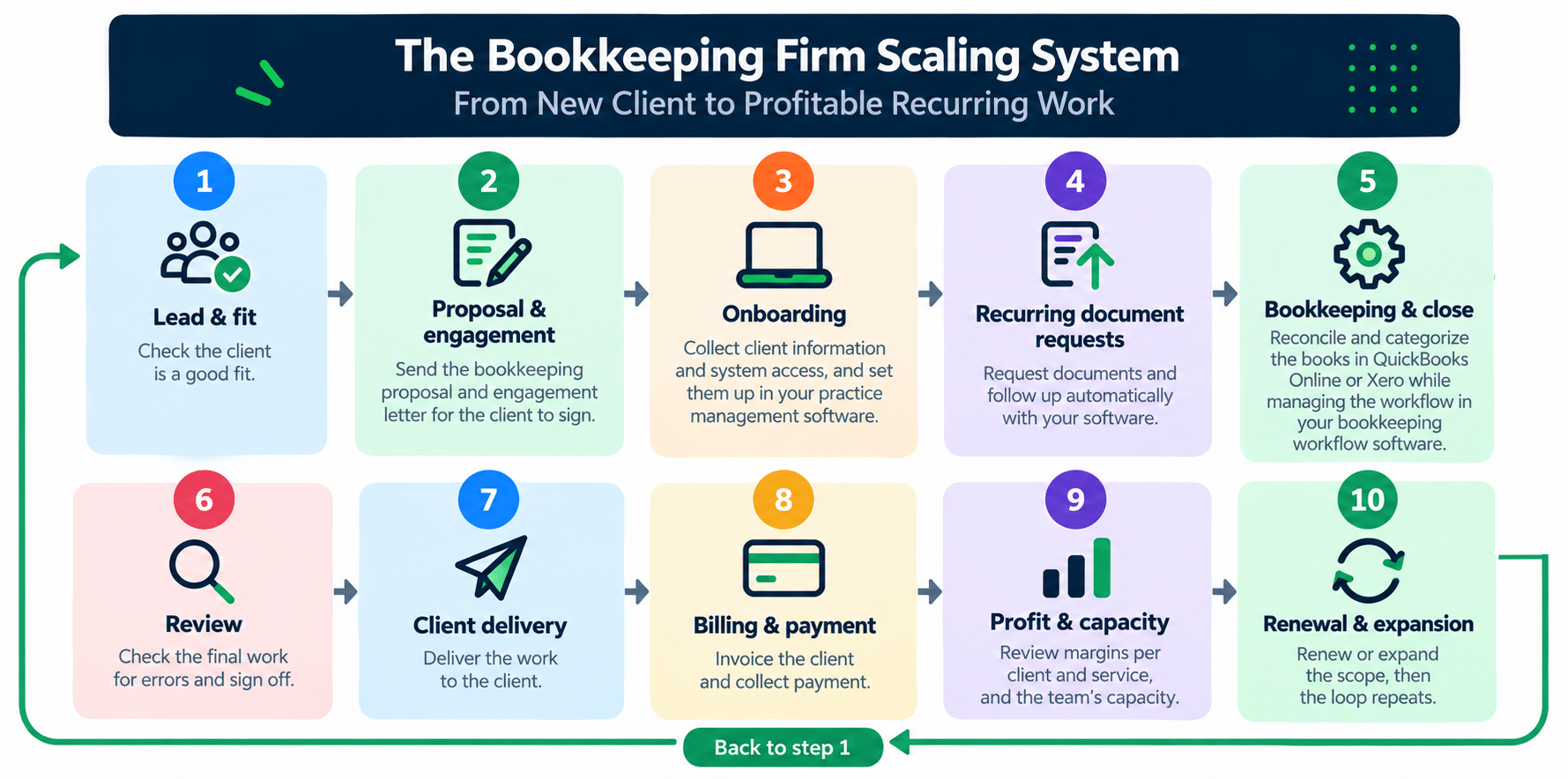
- Lead & fit: Check the client is a good fit.
- Proposal & engagement: Send the bookkeeping proposal and engagement letter for the client to sign.
- Onboarding: Collect client information and system access, and set them up in your practice management software.
- Recurring document requests: Request documents and follow up automatically with your software.
- Bookkeeping & close: Reconcile and categorize the books in QuickBooks Online or Xero while managing the workflow in your bookkeeping workflow software.
- Review: Check the final work for errors and sign off.
- Client delivery: Deliver the work to the client.
- Billing & payment: Invoice the client and collect payment.
- Profit & capacity: Review margins per client and service, and the team’s capacity.
- Renewal & expansion: Renew or expand the scope, then the loop repeats from step 1.
Each stage should have a clear owner, trigger, and definition of done. The stages may overlap depending on how your firm operates, but clearly defined handoffs prevent work from getting stuck between people.
What to Standardize and What Should Stay Client-Specific
Scaling requires standardization. You can’t double or triple your team and client base without a set process. Otherwise everyone will do work their own way, causing disorganization and inconsistency.
“We’ve got to have consistent workflow… and in order to do that we have to have systems, and we have to have systems that are documented,” Dawn says.
Standardizing the work lets you handle more clients while keeping the same standard. But that doesn’t mean treating every client the same. Some parts of your workflow should be consistent across every client, while others need to account for each client’s specific requirements.
Here’s What to Standardize
- Workflow stages: The same steps for each service you offer
- Review rules: Who reviews what, and what they check before sign-off
- Naming conventions: A consistent format for files and documents
- Request schedule: When you ask clients for documents
- Communication cadence: How often and through what channel you update clients
- Completion criteria: What “done” means for each stage
- Reporting format: The same report layout for every client
What to Keep Client-Specific
Record these in the client project folder anyone can access:
- Chart-of-accounts rules: How this client’s transactions get categorized
- Recurring journal entries: Standing entries specific to their books
- Integrations: The apps and bank feeds connected to their account
- Approval thresholds: When something needs client or partner sign-off
- Reporting needs: The specific reports and metrics this client wants
- Deadlines and jurisdictions: Their filing dates and any state or country rules that apply
- Contact preferences: Who to reach, how, and when
- Known exceptions: The quirks and one-off arrangements unique to them
Keep this record current. When something changes with the client like a new integration or reporting requirement, update the record immediately.
KPIs to Track as Your Firm Scales
| KPI | What it tells you | What to do about it |
|---|---|---|
| On-time completion rate | Whether you’re delivering work as planned even as you add more clients | If you’re not meeting deadlines, either hire more people, rebalance workloads, or fix bottlenecks causing delays |
| Monthly close cycle time | How quickly the firm can complete and deliver monthly books | If it increases, check all stages to find where the delay is (usually from document collection) |
| Client document-response time | How long client delays are holding up work | Improve document collection process for clients |
| First-close cycle time | How efficiently you move a new client from onboarding to their first close | Identify onboarding bottlenecks and standardize the process |
| Rework rate | How often work needs corrections after review | If rework rate is high, identify training gaps or unclear process |
| Realization rate | How much of the firm’s work turns into revenue | If it falls below your baseline, tighten scope, reprice, or fix workflow inefficiency |
| Effective hourly rate | Reveals revenue generated for each hour spent, including non-billable time | Reprice or renegotiate scope on low-rate clients |
| Capacity and utilization | Shows whether the team has enough capacity for current and expected work | Redistribute work, or hire if utilization remains high |
| Unbilled work and billing lag | How much completed work hasn’t been invoiced and how long it takes to bill after delivery | Shorten the billing cycle or automate invoicing |
| Client retention | The percentage of clients who continue working with the firm over a given period | If retention is low, investigate service issues, client fit, pricing, or communication problems |
A Practical Bookkeeping Firm Software Implementation Plan
Ready to implement practice management software for bookkeepers? Great! But don’t roll it out all at once, especially if your team is used to another way of working. Roll it out over 4–6 weeks instead. Here’s what that looks like.
- Week 1: Document your current workflows and bottlenecks. Then define what success should look like after the rollout.
- Week 2: Clean up client and staff records and import them. Then build one real monthly bookkeeping workflow in the new system with all the steps and owners.
- Week 3: Test the workflow with a small group of clients and at least two roles, such as bookkeeper and reviewer. Record every missing step, exception, and piece of feedback.
- Week 4: Fix the workflow based on the pilot. Document the rules, train the team, and prepare for a wider rollout.
- Weeks 5–6: Move the remaining clients in batches and add time, capacity, and billing reports. Confirm that everything is working well in the new system, then shut down duplicate spreadsheets and trackers.
Note: Always name one person to own the rollout. This person should be the go-to for questions, decisions, and follow-through.
Also, don’t recreate every old workaround in the new system. Some of them exist only because the old system couldn’t handle the process well.
Finally, check whether staff are using the system and whether missed deadlines, close times, rework, and billing delays are improving.
Common Mistakes Firms Make When Scaling with Software
- Buying software without documenting workflows: Always record your core workflows, then set up the software to match.
- Choosing a generic project management tool that can’t model recurring engagements: Instead, choose software that supports recurring client engagements, task dependencies, recurring deadlines, and other bookkeeping workflows.
- Picking a platform without a client portal: Choose one with a secure client portal for document uploads and automatic reminders.
- Buying enterprise software as a small firm: Choose a system your current team can implement and maintain rather than paying for features you won’t use.
- Rolling it out without team buy-in: Involve the people who will use the system, test the workflow with them, and address their feedback before rolling it out firm-wide.
Scale the Firm Without Making the Owner the System
Remember this: A bookkeeping firm can only scale so far when everything depends on the owner to function.
Sustainable scale comes from moving those recurring decisions and follow-ups into a system the whole team can see and use. You still make judgment calls and review important work, but routine processes can run without requiring you to coordinate every step.
One such system is Financial Cents. It’s a practice management software that brings many features a bookkeeping firm needs into one system so your team can manage work without relying on the owner’s memory or a collection of disconnected tools. Some of its features are:
- Recurring workflow templates to standardize monthly bookkeeping, onboarding, and other repeatable processes.
- Task dependencies to automatically notify the right team member when work is ready for the next step.
- Client requests and automatic reminders to collect documents, answers, and signatures without manually following up each time.
- A passwordless client portal where clients can securely submit documents, respond to requests, view shared information, and communicate with the firm.
- CRM accounting to keep client information organized and easily accessible.
- Capacity management to see team workloads, identify overloaded team members, and rebalance work before deadlines slip.
- Time tracking and billing to see where the firm’s time is going, identify underpriced work, and reduce the manual work involved in invoicing.
- Reporting to monitor metrics such as effective hourly rate, utilization, and realization.
Many firms have used Financial Cents to scale, including Safe Harbor Bookkeeping. They were able to onboard more clients than the previous year even though it was the busiest season of the year.
Frequently Asked Questions (FAQs)
Share this article:



