

The automatic triggers for dependent tasks have been a life-changing opportunity for our staff. We don’t have to worry about communicating back and forth via email, Slack, or several other channels to make sure people know their next responsibility. It automatically happens in our accounting project management software, which has been a huge game-changer for us.”
There is a reason you hardly hear of an accounting firm that moved from an accounting project management software to a generic system like Asana. It’s the same reason an oral health patient won’t go from a dentist to a General Practitioner.
Asana is like that General Practitioner. It is popular across industries, easy to use, and offers a free plan. In just a few hours, a team can create projects, assign tasks, set deadlines, and start monitoring progress in one central place.
As useful as its features are for internal task management, they are insufficient for accounting projects, and firms end up overcompensating for the missing features.
That explains why over 69% and 60% of the 816 accounting firms we surveyed in 2024 identified client reminders and client portals as the software features that they can’t do without. Asana doesn’t offer these critical features.
In this guide, we show what Asana does well for accounting firms, where it is limited, and how firms can decide whether it’s the right tool for their practice.
TL;DR
- Asana is an intuitive platform for internal project management.
- Many accounting and bookkeeping firms successfully use Asana for task management, workflow tracking, recurring templates, team collaboration, and deadline management through client-per-project setups and Kanban boards.
- However, Asana lacks several features accounting firms commonly need, such as automatic client reminders, a secure client portal, CRM functionality, a billing tool, accounting-specific workflow templates, and native accounting integrations.
- The free plan is a great starting point for solo accountants and small firms, but as your client base grows, the manual effort required to manage recurring work, client requests, and multiple software tools becomes a major operational challenge.
- By the time firms add separate solutions for client portals, CRM, and billing, the total cost can approach, if not exceed, the cost of an integrated accounting practice management platform.
- For growing bookkeeping, accounting, and tax firms, an accounting-specific project management platform like Financial Cents provides better efficiency, visibility, and long-term scalability.
What is Asana?
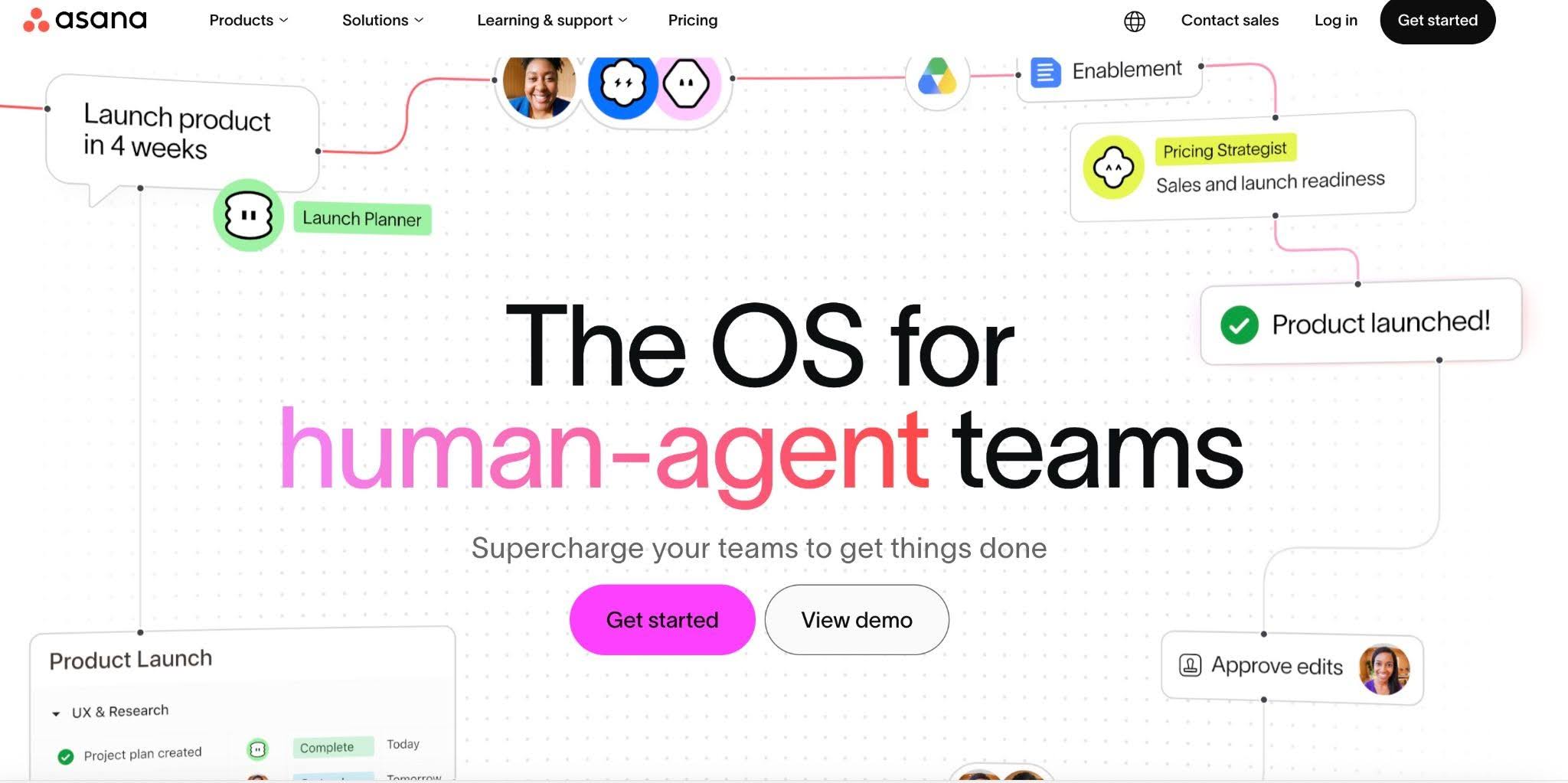
Asana is a project management software that allows teams to create projects, assign tasks, set deadlines, and monitor progress using lists, Kanban boards, or timeline views.
Its clean interface, visual dashboards, and cross-functional flexibility make it useful for small and large teams in virtually any industry (marketing, HR, Manufacturing, software development, etc.)
Asana’s key features include task management, project tracking, custom fields, status updates, project views, my tasks, and inbox, all tailored to internal project management.
While these features are powerful, they are insufficient for the operational needs of accounting firms that manage large volumes of recurring work, depend on client input, and rely on billing and reports to understand the profitability of their engagements.
For example, the templates in Financial Cents serve as our springboard. You may need to adjust it a little bit, but I don’t need to reinvent the wheel. I just have to tweak it a little bit, not set the whole system up.”
How Accounting Firms Use Asana
Where there is a will, there is a way. Asana is flexible enough for any determined accounting firm to customize it for their project management needs. The time and effort they’ll need to pull that off is a whole different conversation.
Common accounting project management setups in Asana include:
1. Client-per-project structure

Since Asana does not provide the CRM feature, many accounting firms organize work by creating a separate project for each client.
Within each project, they use sections to organize work by service category or workflow stage, while custom fields track information such as status, priority, due dates, and assigned staff members.
This approach gives teams some sense of a dedicated workspace for each client and makes it easier to see the status of a particular engagement without searching across multiple projects.
If the firm later performs a financial audit or a major bookkeeping cleanup for ABC Manufacturing, it may create a separate project just for that engagement rather than adding it to the client’s existing project.
2. Recurring task templates

Accounting firms rely on Asana’s templates and recurring task features to manage repetitive work (monthly bookkeeping, payroll processing, quarterly filings, etc.).
A common approach is to create a master workflow template containing the tasks, subtasks, responsibilities, and workflow stages required to complete a service. They can then generate new work from that template whenever the next engagement cycle comes due. This helps to ensure the same process is followed consistently.
As effective as this approach can be, it still requires ongoing oversight to update changing client requirements, templates, due dates, automations, and workflow rules.
3. Kanban views
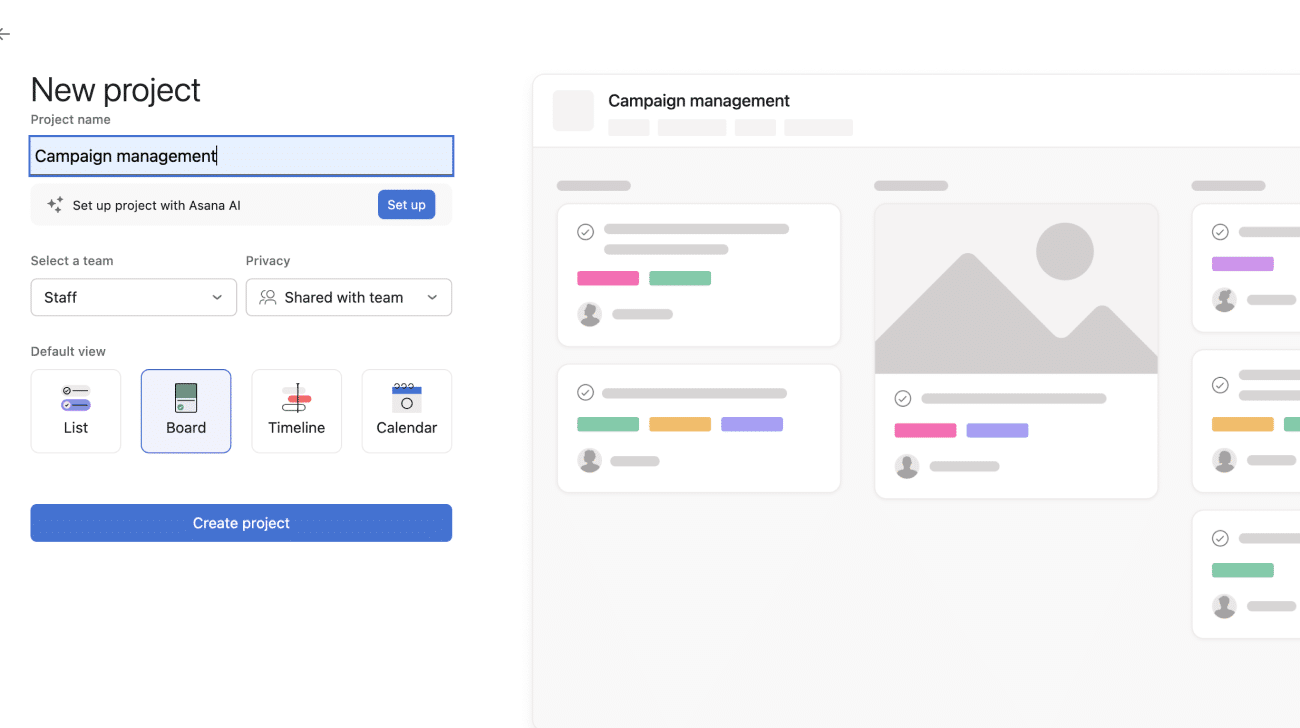
Asana’s board view allows accounting firms to recreate many of the workflow structures in accounting practice management software.
Using a Kanban-style layout, firms can build workflows that mirror the stages an engagement passes through from start to finish. For example, they can create columns for Waiting for Documents, In Preparation, Ready for Review, Awaiting Client Approval, Filed, etc., to manage a tax preparation workflow.
As work progresses, tasks move from one stage to the next, which gives staff and managers a visual representation of each engagement’s status.
This approach makes it easier to identify bottlenecks, such as when tax returns accumulate in the “Awaiting Client Approval” stage, so that the firm can do something about clients’ unresponsiveness.
4. Team task assignments and due dates for smaller teams
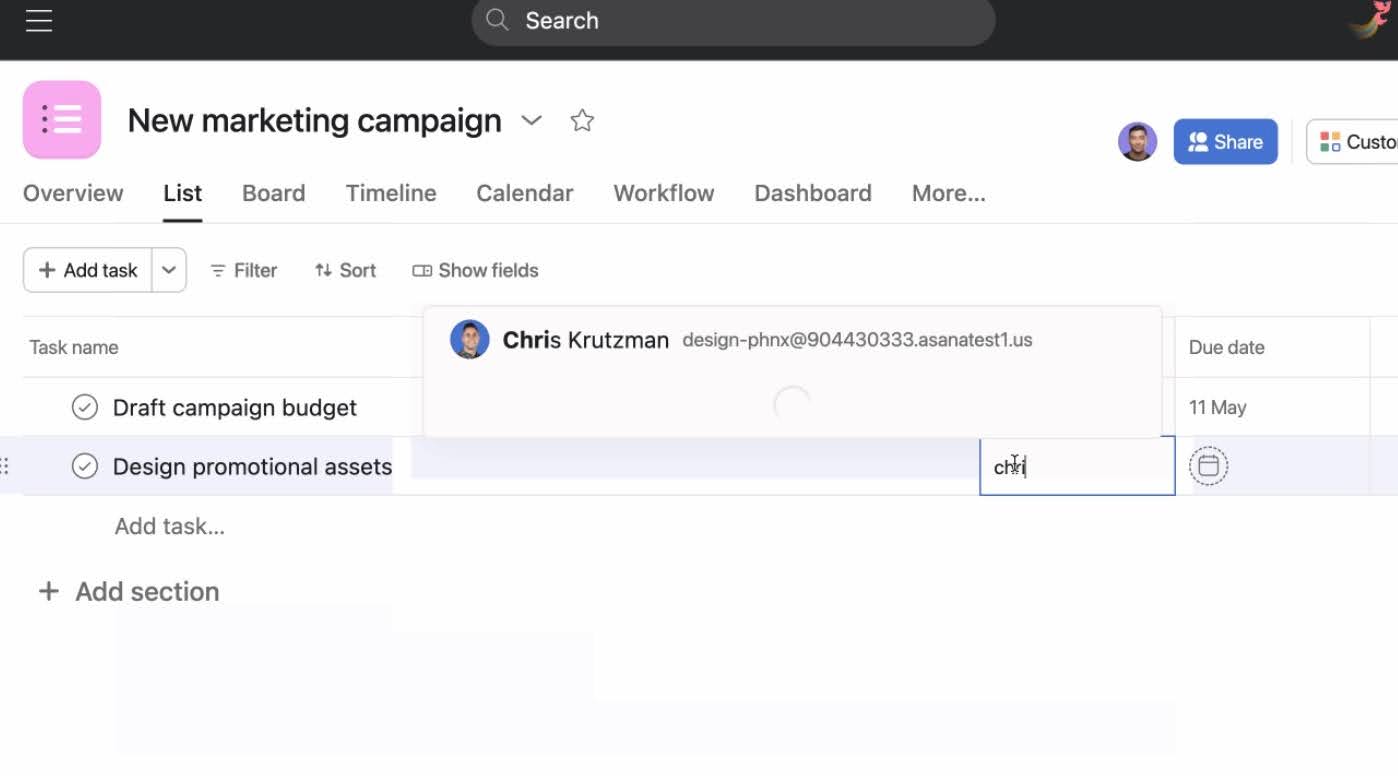
Asana enables small firms with relatively simple workflows to assign work to team members, set due dates for key milestones, monitor overdue tasks, and track project progress across the team.
Everyone can see exactly what they’re responsible for, when it’s due, and how their work fits into the broader engagement. Managers also gain visibility into who owns each task and whether work is progressing as expected.
Asana’s Calendar and Timeline views further improve visibility by helping firms plan work around important deadlines, such as tax filing dates, payroll runs, month-end closes, and other recurring engagements.
Note:
If you read between the lines, you’ll notice that these setups require firms to build and maintain their own accounting workflow framework inside a platform that wasn’t designed specifically for accounting practices.
While this can work well for solo accountants and small firms, the administrative effort required to keep it going often grows alongside the client base and team size.
More importantly, these workarounds only address internal workflow management. They do little to solve client-facing challenges such as document collection, automated reminders, approvals, and client collaboration, which are core components of accounting workflows.
Asana Pros for Accounting Firms
Asana’s biggest draws for accounting firms include:
i. A Generous Free plan
For firms transitioning from spreadsheets, email, or paper-based systems, Asana offers a low-risk way to introduce structure into their workflows without immediately committing to another software subscription.
The free plan provides enough functionality for solo accountants and small teams to test, adopt, and validate their workflow processes before investing in a paid solution.
For many firms, that low barrier to entry outweighs the tool’s limitations around reporting, billing, advanced workflow automation, and workload management.
ii. Visual Workflow Views
Asana offers multiple ways for accounting firms to visualize their work. With a single click, teams can switch between Kanban boards, calendar views, and timeline views depending on the information they need.
A tax firm might use a Kanban board to track returns as they move through preparation, review, and filing stages. Then managers use calendar views to monitor upcoming deadlines and timeline views to plan work across multiple engagements.
For firms juggling numerous clients, deadlines, and recurring engagements, this visibility makes it easier to identify bottlenecks, prioritize work, and keep projects on schedule.
iii. Task Templates
Asana’s templates help firms standardize recurring accounting work such as monthly bookkeeping, payroll processing, and annual tax preparation.
These templates include subtasks, assignees, due dates, dependencies, and custom fields, which saves firms the stress of rebuilding the same projects from scratch whenever a new engagement cycle begins.
By ensuring the same workflow is followed every time, Asana’s templates not only ensure that firms are less likely to overlook important steps and rely on memory, but also promote consistency in service delivery and work quality.
iv. Strong Team Collaboration
Asana keeps conversations tied to the work itself. Team members can comment on tasks, tag colleagues, share files, and discuss issues within a project instead of relying on scattered email threads and chat messages.
This is particularly useful for accounting firms, where preparers, reviewers, managers, and administrative staff may all need to contribute to the same engagement.
Keeping accounting communication inside the workflow also creates a clear record of decisions, questions, and status updates that anyone involved can reference later.
V. Intuitive User Interface
Asana’s modern interface makes it relatively easy for team members to learn, even if they have limited experience with project management software features.
With minimal training, most users can understand the basics of creating tasks, assigning work, updating statuses, and tracking deadlines.
This short learning curve helps firms implement the platform more quickly and reduces the resistance that accompanies software adoption.
vi. Automation Rules
Asana’s automation features can automatically assign tasks when projects are created, move work between workflow stages, trigger notifications, and create follow-up actions based on predefined rules.
While these automations do not extend to the client-facing processes accounting firms need, they are effective for coordinating internal team activities. They reduce repetitive administrative work and ensure workflows are followed consistently.
Asana Cons and Limitations for Accounting Firms
The reason Asana is appreciated across industries is the source of its biggest limitations for accounting firms, its design priorities:
i. No automatic Client Reminders
While Asana allows users to create internal task reminders and automation rules for team members, those capabilities do not extend to client-facing follow-up workflows.
When a client fails to send documents, answer questions, or approve a return, your staff will have to send reminder emails and track outstanding requests themselves.
For firms managing dozens or hundreds of recurring engagements, this easily becomes a huge administrative burden. That is why 69.3% of accounting firms in this report declared they won’t buy a software solution that doesn’t have client requests and automatic reminders.
ii. No Accounting Client Portal
The client-dependent nature of accounting work and the sensitivity of accounting data make having a secure accounting client portal for client collaboration non-negotiable.
Asana does not have a client portal. Firms can invite clients as Guests, but doing so means using an internal project management system as a client collaboration tool.
Accounting clients want a simple way to collaborate with their accountant. They do not want to learn a project management platform simply to exchange information. Plus, every firm prefers to keep client interactions separate from its internal workflows and processes.
iii. No CRM or Client Database
Accounting engagements rely on up-to-date client information. From contact details and engagement history to client notes and communication records, having a central source of client data helps teams deliver faster and consistent service.
Unfortunately, Asana is not a CRM. While firms can use custom fields, project descriptions, and tasks to store some client information, the platform does not provide the dedicated relationship management capabilities that are common with accounting CRM software.
In an accounting CRM software, the client profile serves as a single source of truth. Beyond basic contact information, firms can track engagement history, communication records, service offerings, client requests, prospect activity, and other relationship data in one place.
When client information is spread across Asana, email inboxes, spreadsheets, and accounting software, it becomes harder to maintain a complete view of each client relationship.
iv. No Direct Integration with Accounting Software
When your accounting workflow software integrates with the accounting tools (QuickBooks, Xero, Drake Tax, etc.), information can move between systems without constant manual intervention. Asana does not offer these accounting integrations.
To access them, firms have to rely on third-party integration tools, but these require additional setup, maintenance, and customization.
Your staff may need to switch between applications, manually update records, and piece together information from different apps to understand the status of accounting engagements.
v. No Billing and Payments Feature
While Asana offers basic time-tracking capabilities on some paid plans, it does not provide native billing functionality that can convert the time into invoices. As a result, firms often need separate applications to manage invoices and track payments.
For firms that rely on these features to manage cash flow and profits, this means additional software subscriptions, more systems to maintain, and less visibility into the payment process.
vi. Generic Workflow Templates
Asana’s templates are designed for a wide range of industries and project types, not the unique requirements of accounting work. Teams must build their own bookkeeping, tax, audit, payroll, and advisory workflows, and continually update them.
For smaller firms, this may be manageable. For growing firms, however, the time spent creating and maintaining accounting workflow templates can become a recurring administrative burden that accounting-specific project management tools are designed to eliminate.
vii. Support Isn’t Accounting-specific
Asana’s support team can help users understand the platform’s features, troubleshoot issues, and configure workflows within the software. However, Asana’s support resources are not tailored to the operational realities of accounting firms, since it serves organizations across countless industries.
For example, if you’re trying to improve client request management during tax season, Asana’s support team can explain how the platform works. But they can’t provide accounting-specific guidance based on industry best practices.
When Asana Works vs. When You’ve Outgrown It
While some accounting firms can use Asana successfully for years, others outgrow it surprisingly as client volume, recurring work, and team collaboration requirements increase.
Here is a framework to help you determine whether Asana still fits your firm’s needs or whether it’s time to consider an accounting-specific alternative.
Asana may work if:
- You’re a solo accountant or a 1–2-person team doing mostly internal task tracking
Asana’s task management, due dates, templates, and automation features provide enough structure for many small firms without requiring a significant financial investment.
Firms this size usually don’t need advanced practice management features because their communication and workflow coordination needs are relatively simple. Their primary challenge is usually organizing work rather than managing the operational complexity.
The consequences of a fragmented workflow (thanks to Asana’s limitations) are also lower. If something falls behind, it’s easier to identify the issue quickly because the same people are involved in every engagement.
- You have a small, stable client roster (under 15 clients) with simple recurring work
With fewer than 15 clients and straightforward recurring services, your workflow challenges are still mostly internal. Recurring work is more predictable. The customization required to make Asana work for an accounting firm with such client volume is also more manageable.
You can use Asana’s templates, due dates, and manual follow-up features to handle those without feeling overwhelmed. That said, how responsive your clients are could determine how well you can continue in this system.
- You don’t yet need client-facing workflows
Again, Asana is much easier to use as an administrative accounting workflow tool when your work requires minimal client collaboration.
This applies mostly to firms that use email for client communication and don’t need clients to upload documents or approve tax returns so frequently.
But then, the risks of exchanging sensitive financial documents and information through email outweigh the simplicity and affordability of Asana.
- You’re testing a practice management approach before committing to paid software
When you’re trying out top accounting practice management tools to see what works best for you, the cheapest and easiest-to-use tools are the best places to start.
Asana’s free plan and minimal learning curve make it a low-risk tool to implement for the time being.
It can help you to establish an operational structure and determine what your firm should look for in long-term practice management software.
You’ve Outgrown Asana If:
- You’re spending time manually following up with clients for documents or signatures
The first sign you’ve outgrown Asana (or any tool for that matter) is when your team spends a significant amount of time chasing clients for information.
It starts with a few follow-up emails here and there. But as your client volume grows, the number of outstanding document requests, unanswered questions, unsigned forms, and pending approvals will increase.
Before you know it, team members are spending hours each week checking whether clients have responded, sending reminder emails, and tracking who still owes information.
This happens because Asana does not have a native client request and reminder feature for you to collect and follow up with your clients.
- Your client list has grown past 20 clients, and you’re losing track of work status
While there is no generally applicable number for every firm, many accounting firms start feeling operational strain once they move beyond the 20-client mark.
If 10 projects are small enough for your firm, tracking work across 20, 30, or 50 recurring clients in Asana’s project-per-client setup will be too complex and time-consuming to rely on.
In that system, your team can spend more time searching for information, monitoring statuses, and updating workflows instead of moving work forward and growing the firm.
- You need staff to collaborate on client work, and it’s getting messy
The more people you have working across the same client engagements in Asana, the higher the chances of confusion and the need for manual coordination.
Asana supports team collaboration, but not in the way accounting team collaboration works. Its project structure does not accommodate multi-person workflows.
When you have bookkeepers, preparers, reviewers, managers, and administrative personnel all needing visibility into who is responsible for what, where work is stuck, and what should happen next, you need a system designed for accounting-specific roles and workflow structure.
- You’re paying for 3+ separate tools to cover what one accounting-specific platform would handle
We’ve found that 9 in 10 accounting firm owners want to reduce their tech stack to four (max). Tools like Asana make it that much more difficult to achieve.
The lack of a client portal, CRM, billing feature, and month-end close capability leaves firms combining multiple tools that require separate payments, onboarding, and a set of information to maintain.
By contrast, an accounting-specific platform offers these (and more) at a much lower cost than the Asana-plus-third-party tools setup.
- Tax season or busy season feels chaotic because your workflow visibility breaks down under pressure
Many workflow systems perform adequately when the workload is moderate, but become harder to navigate when dozens of projects are moving simultaneously, and staff need instant visibility into priorities and project status.
This is most common with tools that were not built with the operational realities of tax season, year-end close, and financial audits in mind.
So, how was your last busy season with Asana? The extent to which Asana buckled under the pressure of the schedule is the extent of your need for a more suitable system.
What Asana’s Pricing Actually Means for Accounting Firms
Asana uses a tiered per-user pricing:
- Personal: Free (for up to 2 users).
- Starter: $10.99/month per user (billed annually) or $13.49/month per user (billed monthly)
- Advanced: $24.99 per user per month (billed annually) or $30.49/month per user (billed monthly)
- Enterprise: Custom pricing
An accounting firm owner could see Asana’s low per-user prices and conclude that it’s more affordable than their other alternatives, but that would be inaccurate.
In our guide on the cost of using an accounting practice management software, we explained that starting prices tell half the cost story. We showed how hidden costs and add-on features can significantly increase costs.
For Asana (with several missing accounting-specific features), this is even easier to calculate. On its highest plan (Advanced), accounting firms still have to account for the cost of using a separate client portal, CRM, and accounting billing solutions.
The math looks like this:
- Asana Advanced Plan: 5 users × $24.99 = $124.99/month
- CRM: 5 users x $59 = 295/month (PipeDrive’s most popular plan)
- Client portal: 5 users x $59 = 295/month (Liscio’s most popular plan)
- Billing and invoicing: $57.50/month (QBO’s customer favorite plan)
That’s $124.99 + $295 + $295 + 57.50 = $772.49 per month.
Meanwhile, a five-person team can access all these features with the Financial Cents Scale plan for $345 per month.
Not to mention that using an accounting project management software saves you the complex setup and manual maintenance needed to manage the patchwork of Asana + PipeDrive + Liscio + QBO.
For more information about the total cost of using practice management software, read this article.
The Switch Most Accounting Firms Make After Asana
The more accounting firm owners realize that running an accounting firm is a difficult enough job, the more unjustifiable the additional time, money, and effort of stitching multiple tools together to make Asana work becomes.
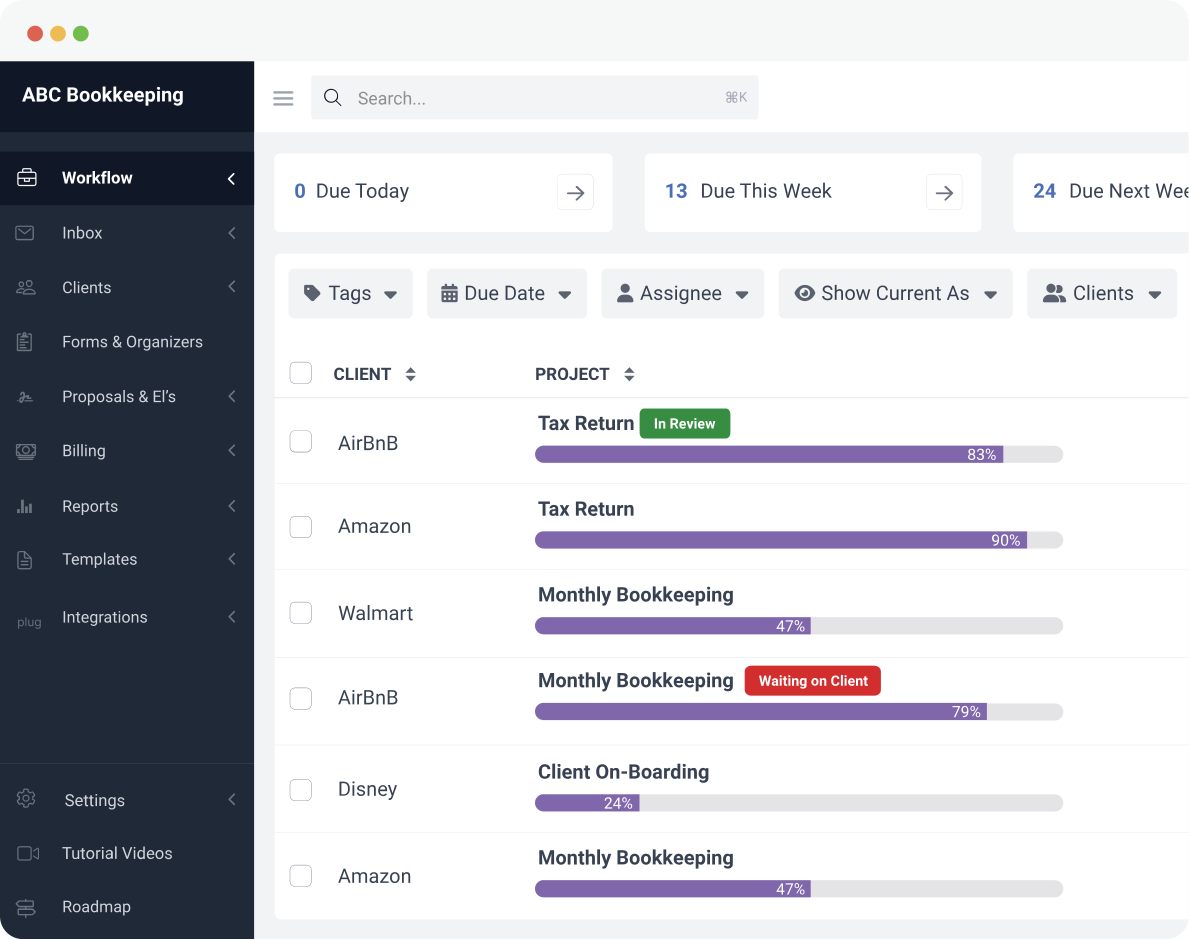
Accounting project management solutions like Financial Cents are hardwired for the operational needs of the accounting industry.
While Asana will take years (if at all) to come to terms with certain needs in the accounting community, Financial Cents has made these features and functionalities available from the get-go:
a. Automatic Client Reminders
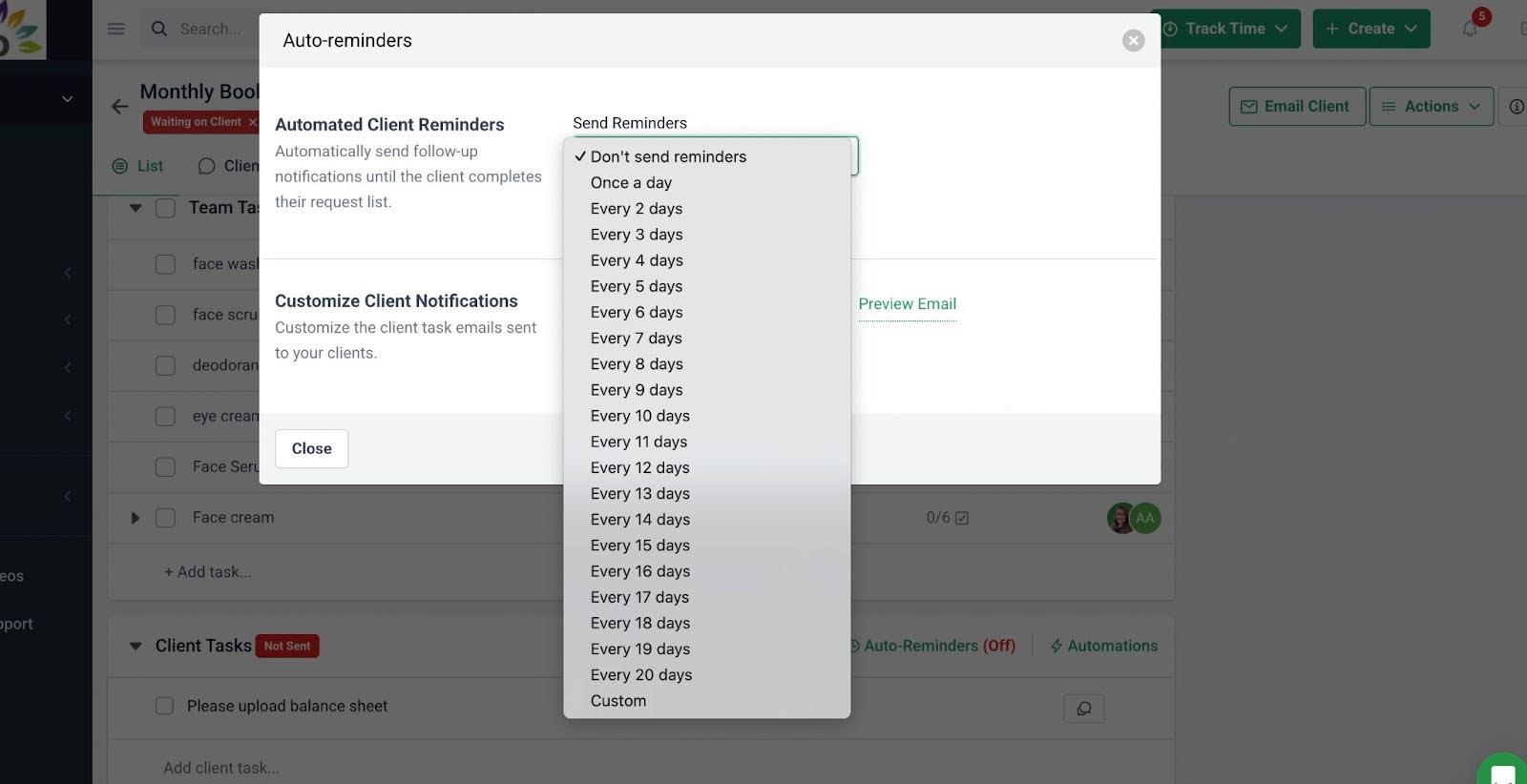
Financial Cents’ Client Task and Auto-Reminder feature allows you to create and send a checklist of the files and information you need from a client.
The system will automatically follow up with the client on your preferred schedule until it is provided.
b. Accounting Client Portal
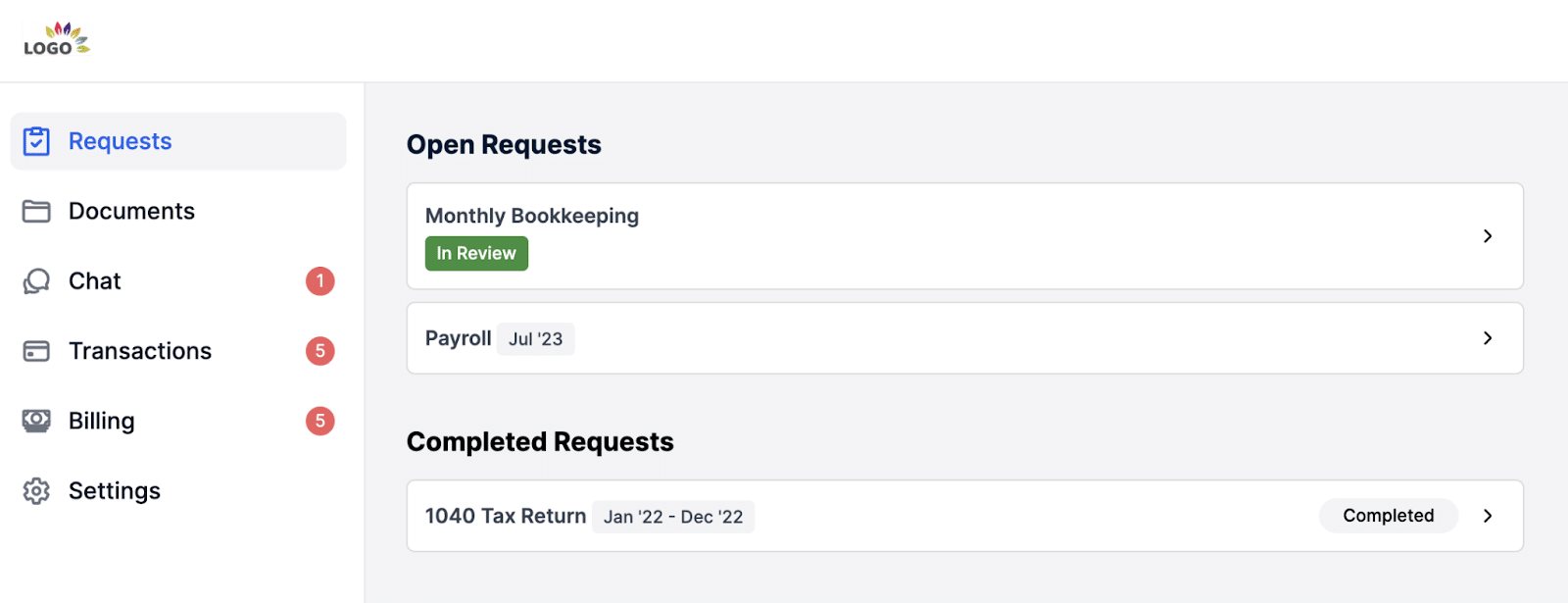
Financial Cent includes a branded and passwordless client portal that clients can access to share files, provide information, e-sign documents, and manage payments securely.
c. CRM (Customer Relationship Management)
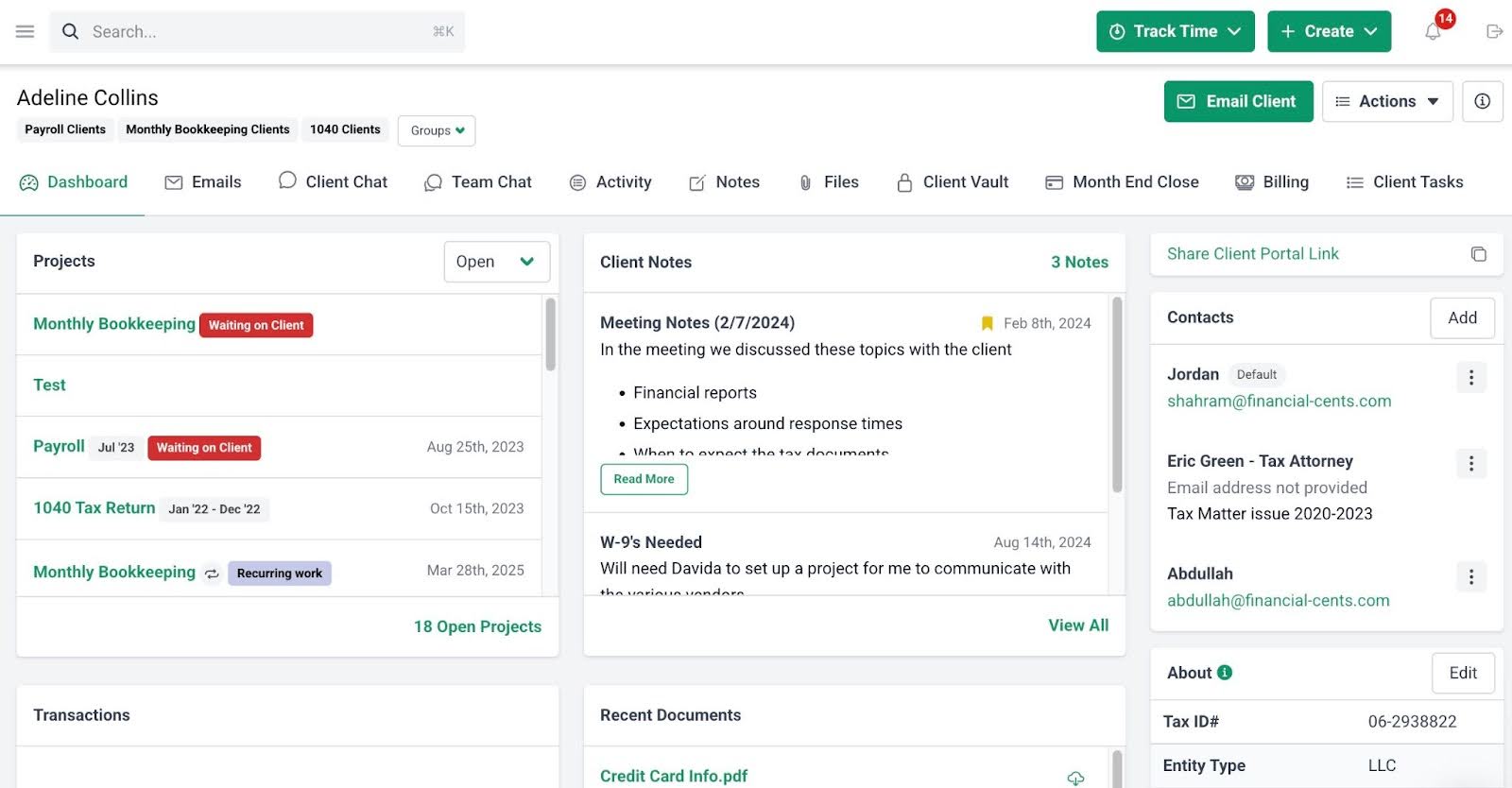
Every client profile in Financial Cents acts as a single source of truth for everything about each client.
From past and present projects to stored passwords (and software logins), email threads, and custom information (like Entity Type, EINs, and fiscal year-end dates).
d. Accounting Integrations
Financial Cents has a two-way sync with QuickBooks Online, where each new client information you add or update in QuickBooks Online is automatically reflected in Financial Cents (and vice versa). Financial Cents also has accounting practice management integrations such as Gmail and Outlook, Google Drive, SmartVault, Ignition and more.
e. Time Tracking & Billing
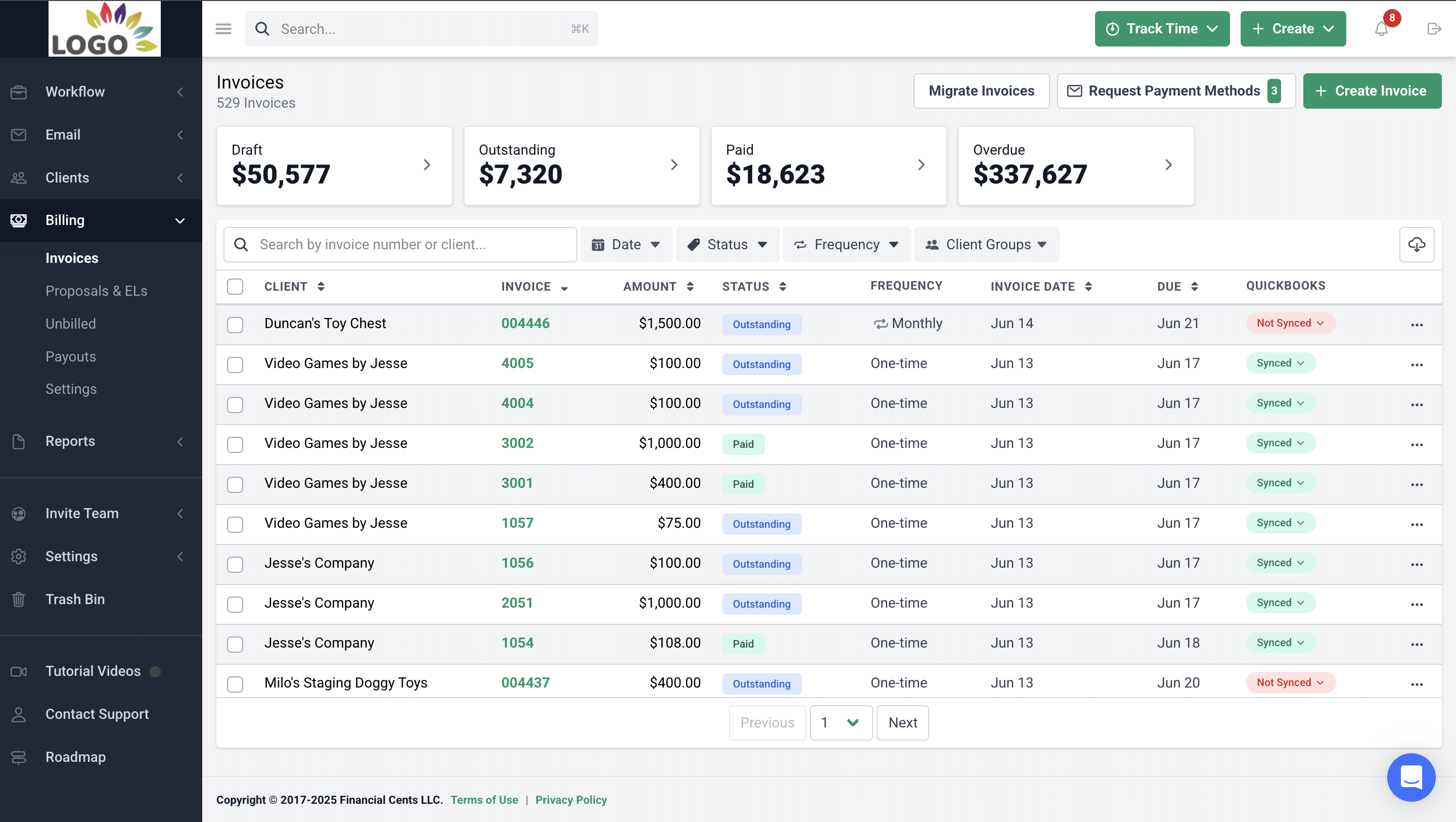
Financial Cents’ built-in timer enables your staff to track time against the task they are working on. You can also send invoices and receive payments inside the platform.
f. 400+ Accounting Workflow Templates
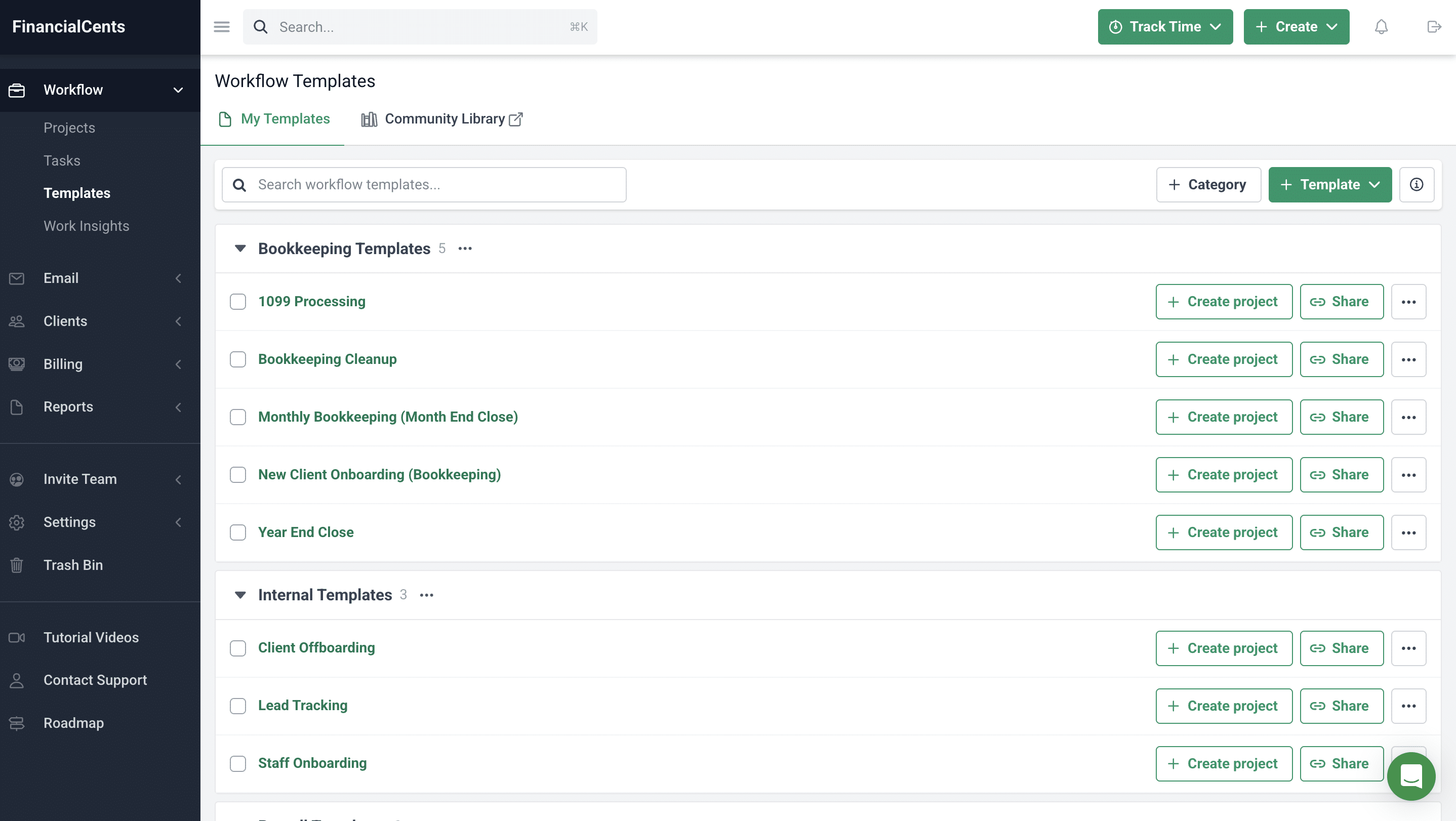
Financial Cent provides over 400+ industry-specific workflow templates for projects like Corporate Tax Returns, Payroll, Month-End Closes, and Client Onboarding. You can use them right away or customize them as you see fit.
g. Industry-Specific Support
Financial Cents is built exclusively for the accounting industry, so its entire support ecosystem, help documentation, and product roadmap are tailored to the accounting community.
Whether you have a single person or multiple people on your team, Financial Cents is one of the best ways to collate and manage all the information (about the work that needs to be done) in one central place”
If you want to see how Financial Cents compares to Asana, here’s a side-by-side guide.
Check out how Financial Cents handles accounting project management. Click here to book a free demo.
Final Verdict: Is Asana Right for Your Accounting Firm?
Asana’s modern and cross-functional design makes it a useful tool across multiple industries. But it wasn’t built for the recurring, client-facing, and deadline-driven nature of accounting work.
Many solo accountants and early-stage firms have found Asana’s free plan to be an effective way to introduce structure and accountability to their work without a major financial commitment.
However, growth in client volume, recurring engagements, and team size increases the manual effort required to manage client requests, maintain workflows, and coordinate multiple tools.
At some point, these firms find that the limitations of a general-purpose project management tool are too costly to ignore. The lack of automated client reminders, client collaboration, CRM functionality, billing, and accounting-specific workflows reduces efficiency levels and obstructs visibility in a way that can hurt client satisfaction.
For many growing accounting firms, the time, money, and mental energy saved through automation, effective client communication, and an integrated tech stack is more than enough to justify the switch from Asana to an accounting project management software solution.
That’s why Asana, like spreadsheets, is best seen as a good starting point rather than a lasting destination for growing firms.
Come test the accuracy of these claims with Financial Cents.
Frequently Asked Questions (FAQs)
However, Asana wasn’t designed specifically for accounting firms, so it requires additional tools and manual processes to manage accounting engagements.
However, as client volume grows, many bookkeepers need multiple standalone tools for automated client reminders, client portals, and accounting-specific reporting that Asana does not provide natively.
The right choice depends on your firm’s size, service mix, and operational complexity.
Asana connects to QuickBooks Online and Xero through third-party tools such as Zapier and Unito. These integrations require additional setup and maintenance.
Paid plans start at $10.99/month per user.
Many firms also use custom fields and automation rules to improve visibility and standardize processes.
Share this article:



