

Monday.com is helpful for professionals across industries, but it can become a problem when firms start to mistake it for specialized accounting practice management software.
As we have seen from firm owners like Terri Evans of Safe Harbor Bookkeeping, using a tool like Monday.com is not so much about what you can do with it as it is about what you are giving up.
Such general-purpose software can be an effective stopgap solution, but it’s crucial to know when it’s time to switch to an industry-specific system. Otherwise, you will stretch these generic tools beyond their original design, a mistake that creates a system of disconnected apps and increases administrative work.
Unfortunately, the industry is already struggling with these challenges. About 80% of firms in the 2026 Bookkeeping Firm Tech Stack Report still manually copy and paste data between different software tools, 50% aren’t fully confident that nothing is slipping through the cracks, and only 1 in 3 has a unified view of all their client work.
Whether you believe these challenges are the result of using the wrong tool stack or not, it’s tough to deny that trying to mold a tool like Monday.com into a full-scale practice management system plays a part.
In this review, we evaluate Monday.com from an accounting firm’s perspective, examining its core features, where it performs well, where it limits accounting workflows, and the types of firms that benefit from it.
We also compare it with dedicated accounting-specific practice management software like Financial Cents, Karbon, and TaxDome to help you make a more informed decision.
TL;DR
- Monday.com is a visually appealing and flexible platform that helps teams across multiple industries manage internal projects.
- However, you will invest several hours of non-billable work to configure it from scratch and maintain it as your firm grows.
- Monday.com doesn’t have a native client portal, cannot send automated client reminders, struggles with complex recurring tasks, and offers no visibility into accounting-specific operational metrics like staff utilization or client realization rates.
- Accounting practice management software like Financial Cents addresses this friction by consolidating everything accounting and bookkeeping teams need to get work done in one place.
What Is Monday.com?
Monday.com is a work management software that helps teams plan, organize, and track work. Its flexible workspace allows teams across industries and functions (IT, procurement, governments, media, etc.) to manage their projects, coordinate resources, and achieve their goals.
Monday.com’s key features include:
- Boards & Items: Boards are high-level dashboards that house projects. Items are individual rows that represent specific client accounts or projects.
- Columns: Customizable data fields that track specific project information, such as project status, priority levels, assignees, budgets, and due dates.
- Multiple Views: Enables teams to visualize the same dataset in different ways (e.g., standard tables, Kanban boards, interactive calendars, timelines, and Gantt charts) depending on your immediate need.
- Dashboards & Automations: Allow teams to pull data from multiple boards into a master report that, used in conjunction with custom triggers, helps automate repetitive administrative tasks.
- Forms: Intake forms make it easy to collect data.
Monday’s adaptability allows firms to configure the platform around their own processes, but this flexibility can also increase the administrative burden of managing accounting teams, which typically benefit more from predefined workflows.
Can Monday.com Work for Accounting Firms?
Accounting firms can run many internal task management processes in Monday.com with relative ease. These include:
a. Tracking internal tasks and deadlines
You can create and track tasks for service lines, departments, or clients within Monday.com’s customizable boards. Each task can be assigned to a team member, given a due date and priority level, linked to supporting documents, and tracked through customizable status columns.
You can also create task dependencies so that work progresses in the correct order. On the highest plans, managers can use workload views and dashboards to identify overdue tasks, balance assignments across the team, and spot potential capacity issues before deadlines are missed.
b. Building custom boards for monthly bookkeeping, payroll, tax prep, onboarding, or admin work
Monday.com allows accounting firms to structure boards in any way they see fit. If you’d like, you can create a separate board for each service line (monthly bookkeeping, payroll processing, tax preparation, client onboarding, etc.).
Within these boards, you can create workflow stages that reflect your internal processes (e.g., waiting on Client, in progress, under review, or completed). Each client engagement can then include custom columns for project information (e.g., client name, assigned staff member, due date, priority, engagement status, filing deadline, and internal notes).
c. Creating simple automations for status changes, due dates, reminders to staff, and task movement
Accounting firms use Monday.com’s trigger-and-action automation rules to reduce routine administrative work, improve consistency, and decrease the risk of steps being overlooked.
For example, Monday.com can automatically assign new engagements to staff members, update task status when dependent work is completed, move tasks to the next workflow stage, or notify reviewers when bookkeeping or tax work is ready for review.
d. Giving a small team visibility into what is in progress, blocked, or completed
Monday.com’s shared workspace gives your entire team visibility into what work is currently in progress, what has been completed, and what is blocked or waiting for action. Each board uses customizable status columns that allow you to define the workflow stages that reflect your own accounting processes.
This shared visibility helps managers identify bottlenecks, balance workloads, and understand the status of client engagements without having to ask team members for updates.
e. Using dashboards and views to monitor tasks at a high level
Monday.com offers multiple board views that enable teams to visualize the work in whatever format best suits their needs.
A Kanban view provides a visual overview of work as it moves through the stages, while a Table view displays detailed information such as due dates, assignees, priorities, and statuses.
Monday.com also provides customizable dashboards that combine data from one or more boards in a single view. This allows you to monitor metrics like overdue engagements, work due this week, and tasks waiting on client information without opening each board individually.
NB: Monday.com’s Administrative Overhead Factor
Monday.com is flexible enough to support a wide range of accounting workflows, from monthly bookkeeping and payroll to tax preparation and client onboarding.
The challenge, however, is the time and effort required to customize it. Since it doesn’t have accounting-specific workflows built in, you must be willing to commit as much time as necessary to tailor it to your unique operating procedures.
For a solo practitioner or a small firm with relatively simple processes, implementing and maintaining a custom workspace may be quick and straightforward.
But as the number of clients, recurring engagements, service lines, and team members grows, you’ll have to decide how to structure boards, manage recurring work, build automations, and keep those processes up to date as the business evolves.
How Accounting Firms Might Set Up Monday.com
Many accounting firms build their processes using the boards, groups, columns, automations, and dashboards available in Monday.com.
Let’s take a look at an example of a monthly bookkeeping project.
1. One board per workflow or service line
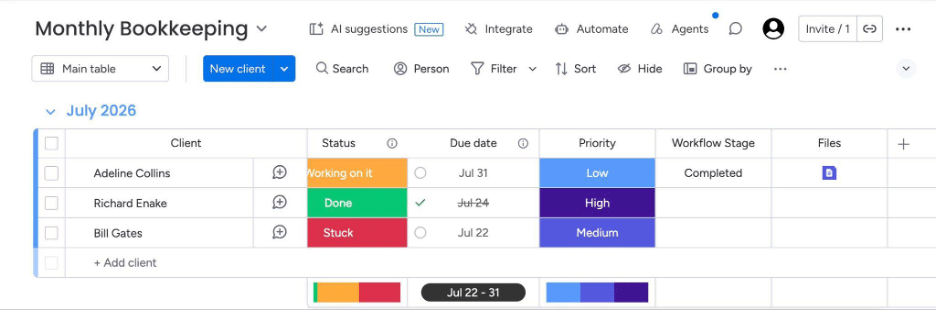
In Monday.com, a board is a primary workspace where teams organize and track a specific process, service, or group of projects.
Many accounting firms create separate boards for each major service line or operational workflow to keep related work organized in each specific board.
Each board is independent of the others, so firms can tailor specific columns, automations, permissions, dashboards, and views to the unique needs of that particular service line.
2. Groups to categorize engagements
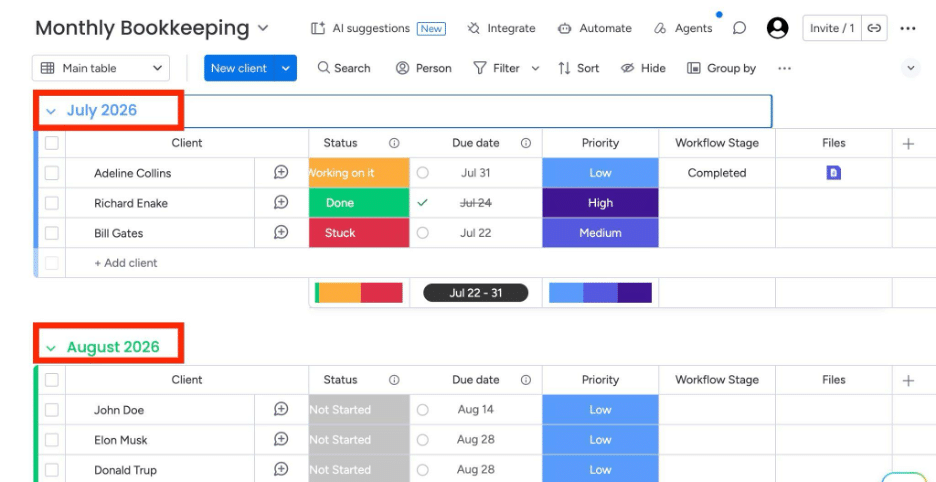
Inside each board, groups can be used to organize related items into logical categories. Accounting firms can use groups to separate work by month, quarter, client type, team, or any other category.
For example, a Monthly Bookkeeping board might use groups like August 2026 or November 2026 to categorize accounting periods for its clients. Or, groups like Active Clients and Paused Clients could categorize items based on engagement status.
3. Columns for client name, assignee, due date, status, priority, waiting-on-client, and notes
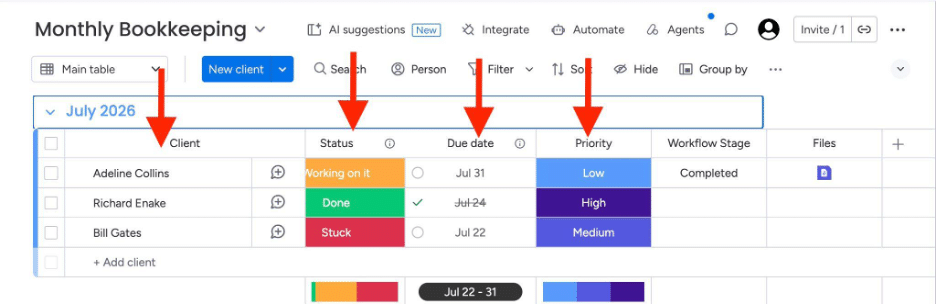
Columns are customizable fields for storing and displaying the data that accounting teams need to manage client work.
As shown above, while the rows in the board may be organized by accounting period, the columns can provide the operational details needed to track the engagement from start to finish.
Common columns for a Monthly Bookkeeping board include:
- Client name
- Assigned bookkeeper
- Reviewer
- Due date
- Status
- Priority
- Notes or special instructions
Firms can add as many columns as they need to manage their client projects.
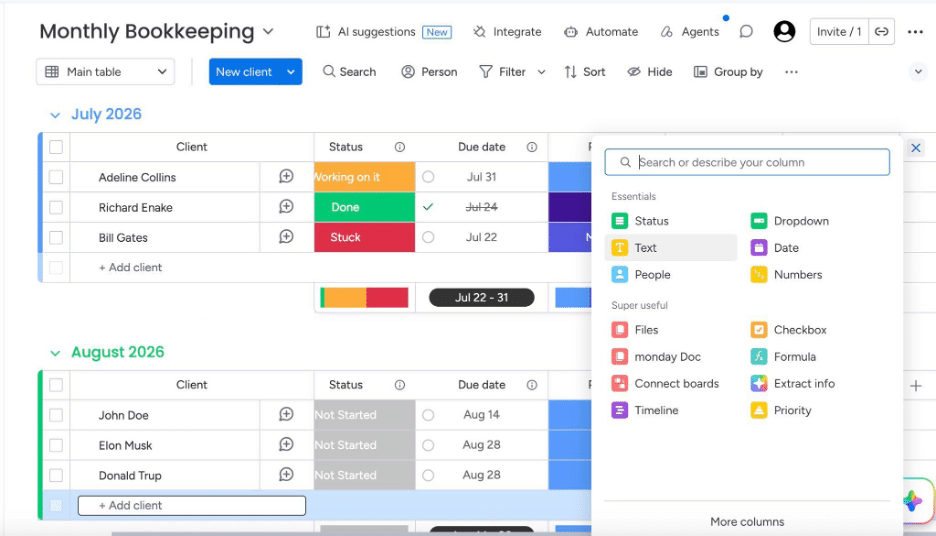
4. Automations for assigning staff or changing statuses
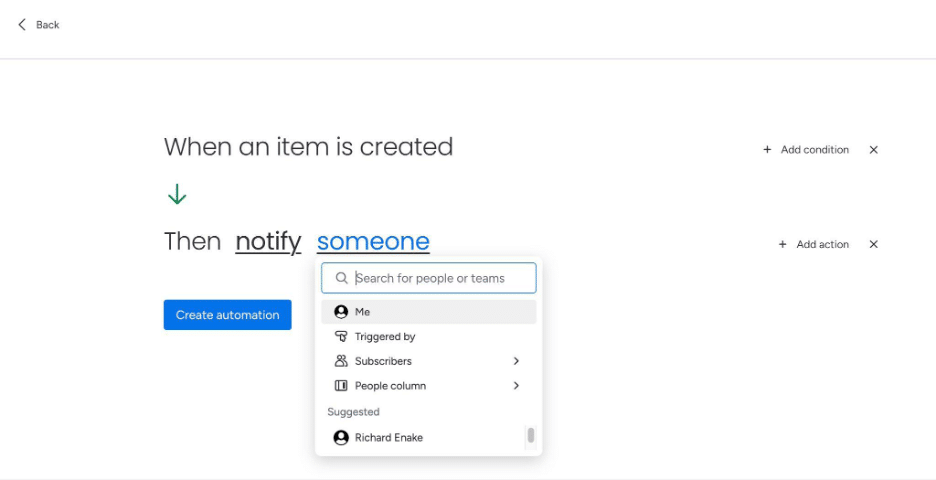
Once your board is set up, you can create rules that use the information stored in the columns to trigger internal actions like work handoffs.
Common automation rules include:
- Notify a reviewer when an engagement’s status changes to Ready for Review.
- Alert the assigned bookkeeper when a due date is approaching.
- Automatically move an engagement to the next stage when a task is completed.
For firms with more sophisticated workflows, Monday.com also supports advanced automation scenarios, such as assigning work based on service lines or integrating with other business applications.
5. Dashboards for overdue work and workload
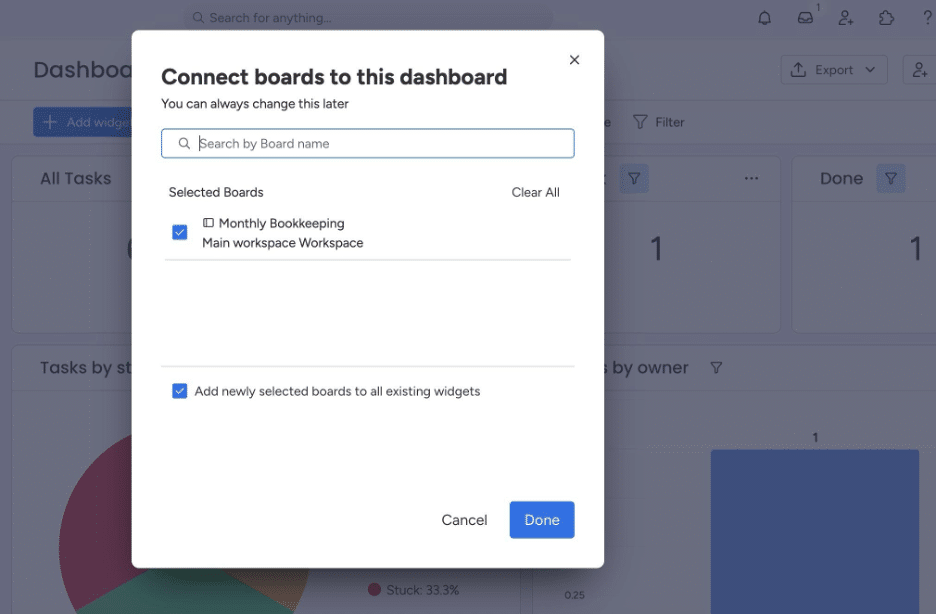
Accounting firms also use Monday.com’s dashboards to pool information from one or multiple boards, creating a higher-level view of operations that enables teams to identify bottlenecks more quickly.
Using the customizable dashboard widgets, firm owners and managers can monitor the metrics that matter to them, from Overdue Bookkeeping Engagements and Work Due this Week to Tasks Waiting on Client Information and Engagements by Workflow Status.
These dashboards update in real time as teams complete tasks and change statuses, giving firm owners an always-current picture of the firm’s operations without the need to manually compile reports.
6. Workarounds for client requests, document collection, and recurring workflows
While Monday.com supports many accounting workflows, it doesn’t provide client-facing capabilities, so firms have to rely on manual workarounds.
- For client requests and document collection, the absence of client task, client portal, and automated reminder features (for requesting documents, tracking outstanding client requests, and automatically reminding clients to respond) means that accounting firms must pair Monday.com with a document management or secure file sharing tools such as ShareFile, SmartVault, or Google Drive.
These third-party tools enable accounting teams to add file-sharing links to their boards or connect them through integrations.
- For recurring accounting work management (like monthly bookkeeping, payroll, and periodic compliance work), firms will have to create automation rules to generate a new monthly engagement for each client or duplicate a predefined workflow for each reporting cycle.
As you can imagine, these approaches require firms to design, test, and maintain the automation rules themselves.
For a deeper comparison of the tools firms pair with their PM software, here’s our guide to the best accounting document management software.
Limitations of Monday.com for Accounting and Bookkeeping Firms
Monday.com’s multi-industry features are so customizable that many of its limitations aren’t obvious until accounting firms begin to scale beyond a handful of clients or take on a higher volume of recurring work.
a) Generic workflow templates
Monday.com has a large library of templates covering project management, operations, sales, marketing, HR, software development, and other business functions. It even offers some templates for finance-related work.
However, these templates are designed for general business processes rather than recurring accounting workflows.
This forces accounting firms to create their own custom boards, workflow stages, columns, automations, and recurring processes to capture their unique workflows, which requires additional planning, testing, and refinement.
b) Setup and maintenance burden
Unlike accounting practice management software, which comes with pre-built workflows tailored to accounting engagements, Monday.com requires firms to decide how to structure their boards, define workflow stages, configure columns, build dashboards, create automations, and manage recurring work.
The initial setup requires substantial planning, testing, and refinement before the platform is ready for firmwide use (a major drawback for firms looking for a quick implementation). Plus, as the firm introduces new services, adjusts review processes, reorganizes teams, or refines workflows, the relevant boards and automations will need to be updated.
c) No accounting-specific client portal
While accounting practice management platforms allow firms to request documents, collect files, obtain approvals, exchange messages, and track outstanding client requests, Monday.com requires firms to stitch multiple tools together to achieve the same functional value.
Monday.com supports external collaboration through guest access, forms, and file attachments, but it doesn’t include a dedicated accounting client portal designed for managing ongoing client interactions.
If a dedicated client portal is a priority, here’s how the best client portals for accountants compare on security, document collection, and automated reminders.
d) No automated client reminders for missing documents or approvals
Monday.com doesn’t allow firms to create client requests with automated reminder emails (which enable them to follow up at designated intervals until the client uploads the requested documents).
While firms can build custom automations in Monday.com (or connect it with third-party applications to send emails or notifications), doing so requires additional configuration. Even then, it doesn’t provide the same streamlined experience for the firm or their clients.
c) CRM limitations
Monday.com can be customized to track prospects, existing clients, engagement stages, and contact information, but it doesn’t include the kind of full-on accounting CRM that accounting, bookkeeping, and tax professionals really need.
Accounting firms typically need a CRM system that provides fields for engagement history, internal notes, communications, documents, and other unique client information in one place.
Monday.com can store a lot of this information in custom boards, connected boards, and additional fields, but firms must bear the admin cost of designing and maintaining the system themselves.
e) Limited accounting ecosystem fit
Of the hundreds of business applications that Monday.com integrates with, few are relevant to the specialized needs of the accounting industry, especially compared with dedicated accounting practice management tools.
The platform integrates with QuickBooks Online, but beyond that, it lacks the practice-wide connectivity that often saves accounting firms the stress of duplicate data entry and human error.
Firms that want to connect Monday.com with other accounting-specific solutions, such as document management, E-signature, or tax software, will need to rely on third-party tools. And that fattens their technology stack.
g) Capacity and profitability gaps
Monday.com’s Workload View and dashboards give managers visibility into how work is distributed across the team.
However, accounting firm owners and managers need more than that. They also want visibility into the clients that consistently exceed their budgeted hours, the engagements that generate the lowest realization, the profitability of each service line, and other related questions. Unless they build custom boards and use third-party tools, accounting teams cannot sufficiently track their profitability in Monday.
h) Accounting-specific support
Monday.com’s extensive user documentation, webinars, community forums, and implementation partners—and their responsive customer support—demonstrate how well the team can help users configure boards, build automations, and troubleshoot technical issues. But none of these resources include information specific to accounting firm management.
If you need guidance on structuring recurring bookkeeping projects or organizing tax workflows, you won’t find it in Monday.com’s resources; their team simply doesn’t have the same depth of expertise as an accounting practice management team.
Signs Your Firm Has Outgrown Monday.com
If you notice any of the following signs as your firm grows, you are likely already stretching Monday.com beyond its limit.
- Your team keeps rebuilding the same recurring workflows manually
Monday.com can support ongoing work through recurring items, templates, and automations. But because these were not designed primarily for accounting workflows, they require ongoing adjustments as your services evolve, new clients are added, or internal processes change.
Switching to an accounting-specific practice management software will equip your firm with relevant recurring work features as a core capability rather than a custom configuration. That way, your team can spend less time recreating workflows and more time completing billable tasks.
- Clients still email documents, approvals, and questions outside of your core system
Monday.com doesn’t offer a dedicated accounting client portal, so many firms that use it continue to rely on email or third-party platforms for document sharing, e-signature, and client communication.
As a result, client documents, approvals, and conversations are often scattered across multiple systems rather than managed alongside the work itself.
This fragmented workflow forces staff to switch between applications to locate documents, check the status of client requests, or review previous conversations. They may also spend time manually updating Monday.com to reflect information that arrived through email or another platform. All of this makes it harder to maintain a complete view of each engagement.
- You struggle to see which staff members are overloaded
Monday.com’s Workload View feature gives a visual overview of how work is distributed across the team. However, it doesn’t provide the metrics that many accounting firms need to manage their operations end-to-end.
Many teams supplement Monday.com’s workload information with spreadsheets, custom reports, or manual team check-ins to understand who is overloaded, where work should be reassigned, and when to hire more hands.
Accounting practice management software combines workload visibility with accounting-specific insights (e.g., realization, utilization, and client upload reports) to help firms make staffing decisions in real time.
- You use Zapier or multiple add-ons just to connect basic firm workflows
Every accounting firm uses more than one application, and tools like Zapier are an effective way to connect them.
But integrations can get overwhelming. When your firm depends on numerous integrations to support the operational needs that an accounting project management software provides out of the box, you end up increasing your setup time, subscription costs, and exposure to workflow disruptions more than necessary.
Having too many integrations can also make it harder for your team members to find the latest client information, documents, or workflow updates.
- You have no single client record that connects work, emails, documents, notes, and deadlines
Your staff shouldn’t have to search multiple boards, email threads, document folders, or applications to answer routine questions about an engagement.
Monday.com can store several types of client information through custom boards, connected boards, and integrations, but you will need to piece it all together to get a full picture.
Accounting practice management software, on the other hand, centralizes work and client information like active and past engagements, communication history, internal notes, outstanding client requests, and other key client details directly inside the client profile.
- You still rely on separate tools for client requests, billing, time tracking, and document storage
At some point, most accounting firms realize that Monday.com manages only a part of their workflow processes. While it provides a flexible platform for organizing and tracking work, accounting practices have to combine it with additional software for:
- Client requests and secure document collection
- Time tracking and billing
- Document management and file storage
- E-signatures
- Client relationship management (CRM)
- Tax preparation and compliance
Using this many standalone applications requires constant movement between systems to manage each engagement. That is why 9 out of 10 firm owners want to run their firms on 4 or fewer tools.
As the number of applications grows, the software costs and admin overhead also increase. An accounting practice management solution that brings these capabilities together will simplify your operations and minimize the unbillable effort of keeping everything connected.
- Work is technically in Monday.com, but partners and managers still chase staff for status updates
The role of an accounting practice management software goes beyond recording work; it also makes the status of every client task visible to those who need it.
Perhaps your firm has added more clients, boards, and custom workflows than Monday.com should manage (from an accounting perspective). When managers need to navigate multiple views or dashboards to get a pulse on where things stand, they may give up and ask team members directly instead. And that’s a strong signal that Monday.com is no longer able to supply information quickly or clearly enough for your team to act on it.
Monday.com vs. Accounting Practice Management Software
The major difference between a general-purpose project management tool (like Monday.com) and accounting-specific practice management software is their target audience, which ultimately determines the features, workflows, and functionalities they provide.
This is how Monday.com compares with top accounting practice management software.
| Tool | Best for | Built for accounting firms? | Client portal | Accounting Workflow templates | Automated client reminders | Accounting CRM | Time tracking & billing | Accounting integrations | Best-fit firm size |
|---|---|---|---|---|---|---|---|---|---|
| Monday.com | Firms that want a work management platform that can be adapted to a variety of business processes and industries | No | Limited (sharing boards, forms, and integrations rather than a dedicated accounting portal) | No | No | Basic contact management | Time tracking available; Billing is not. | Integrates with general ledger and Gmail, but not much else. | Solo and small firms willing to build and maintain custom workflows |
| Financial Cents | Accounting firms looking for an all-in-one accounting practice management software | Yes | Yes | Yes | Yes | Has a CRM tool that stores every bit of client information in one place, including past and present engagements, communication history, and uncategorized transactions. | Built-in time tracking and billing features | Integrates with accounting firm management tools, from general ledger and email to document management and e-signature. | Growing small and mid-sized firms |
| Karbon | Larger firms that need collaborative workflow management, email integration, and advanced practice management capabilities | Yes | Yes | Yes | Yes | Has CRM tools, such as contact management, activity timelines, and custom fields. | Yes | Integrates with general ledger software, Microsoft 365, and Dext. | Enterprise accounting firms, partly due to its native triage and deep workflow customizability |
| TaxDome | Firms that prioritize integrated client communication, document management, and tax workflows | Yes | Yes | Yes | Yes | CRM tools include projects, documents, and communication. | Yes | Integrates with accounting general ledger, email, and tax tools. | Growing tax and bookkeeping practices |
Related:
Best Monday.com Alternative to Consider: Financial Cents
If you like Monday.com’s visual interface but are spending too much time building workflows, connecting multiple tools, or tracking client information across different systems, then we’re betting you’ll find Financial Cents is a much better value for your time and money.
With Financial Cents, there’s no need to customize a blank, generic workspace from scratch, because the platform was built for accounting, bookkeeping, and tax operations, combining the project, workflow, client, and team management tools accounting firms use every day.
This includes:
Accounting-specific workflow templates for bookkeeping, tax, payroll, and client onboarding
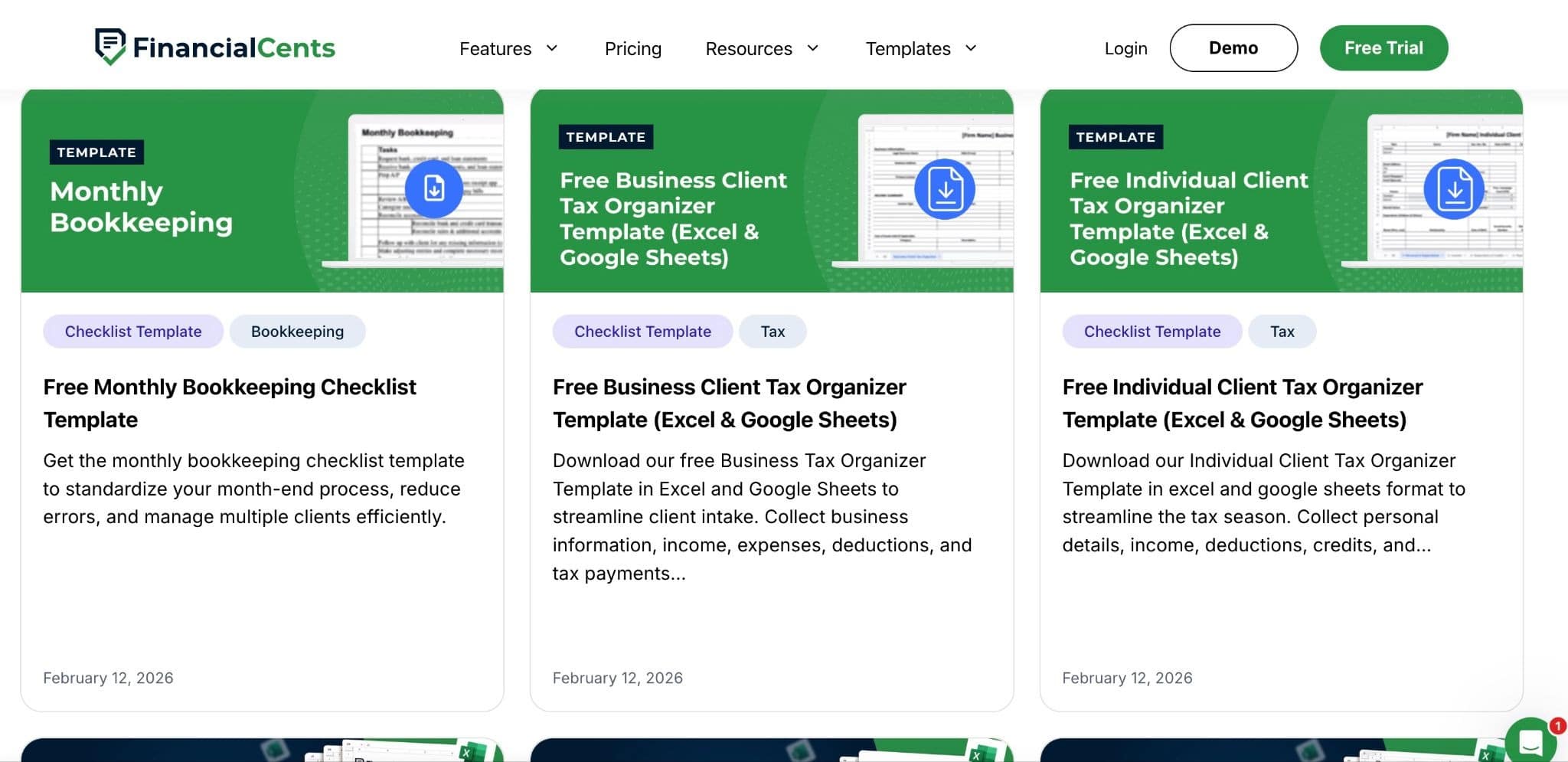
Since Financial Cents does not concern itself with the needs of any other industry, its templates are designed exclusively for accounting and bookkeeping services, from monthly bookkeeping and tax preparation to payroll, client onboarding, and client accounting services (CAS).
All you have to do is add or remove the steps that do not align with your firm’s operating procedure. Its community-driven template library offers access to the workflow templates other firms like yours are using to deliver top-notch services.
Central workflow dashboard for client work, tasks, statuses, assignees, and deadlines
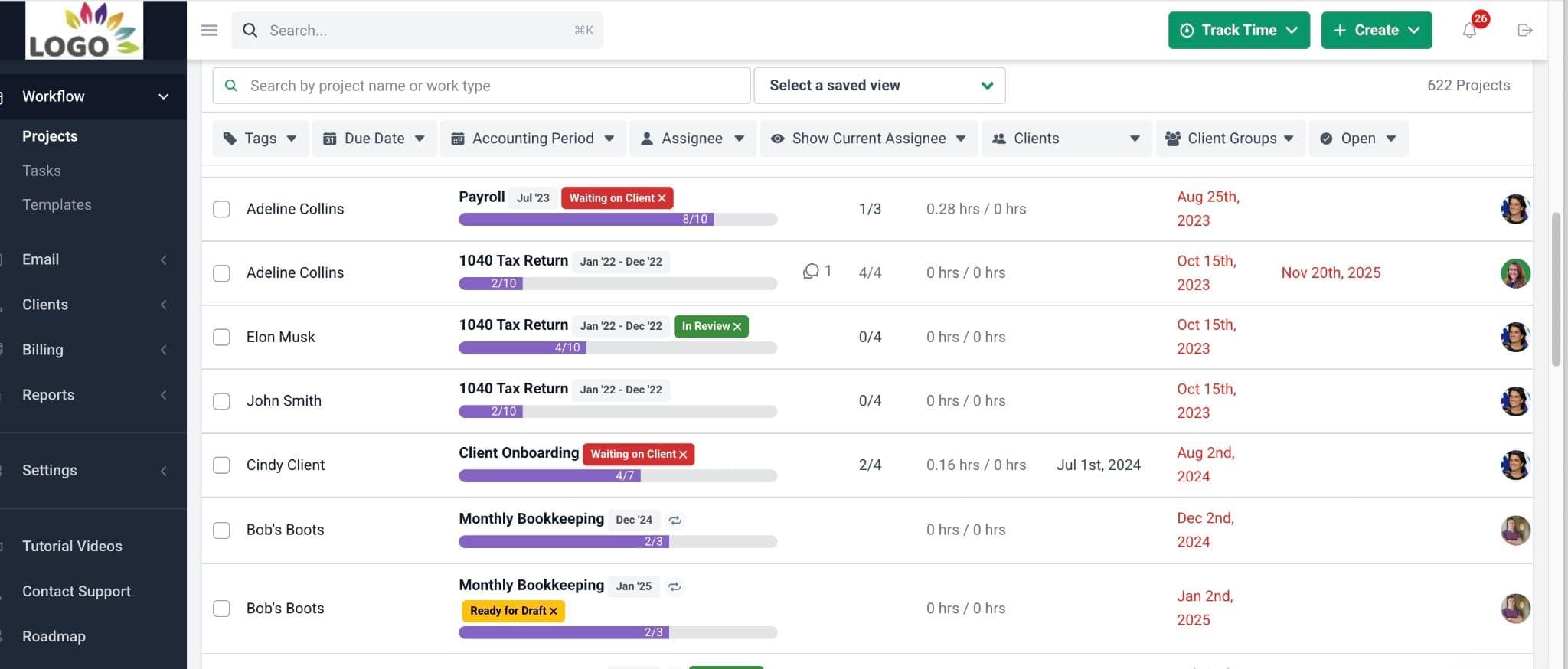
Financial Cents’ workflow dashboard displays all the information accounting teams need to manage their projects across the firm.
The dashboard shows all active engagements, progress levels, due dates, assigned staff, status reports, and Team Chat. This makes it easier for you to assess your firm’s workload and performance without jumping between multiple boards or manually combining information from different workspaces.
You can even select the specific information you want your dashboard to display. That way, your team members will see only the information that’s relevant to your projects.
Client requests and automated reminders so firms don’t waste time manually chasing documents and approvals
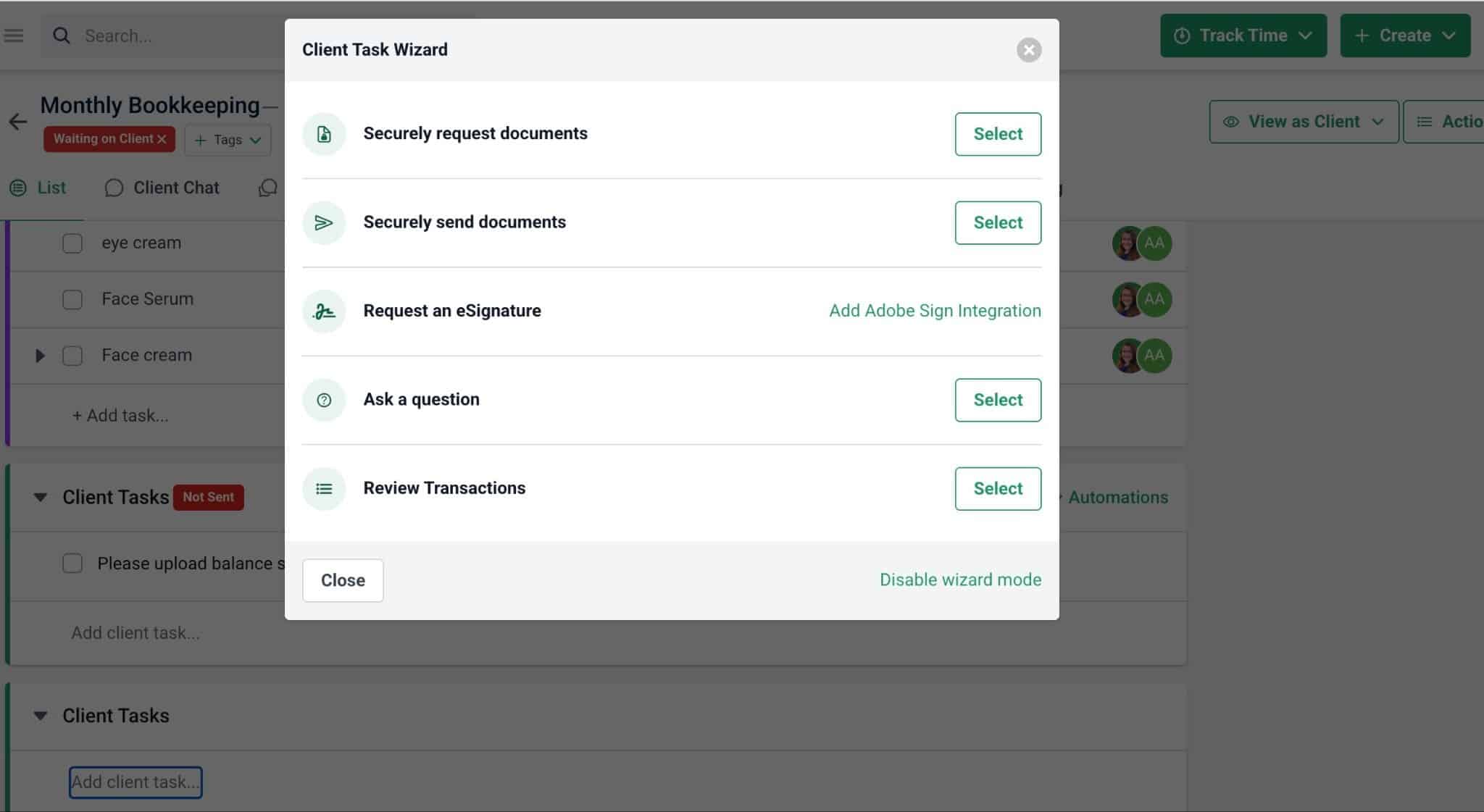
Where Monday.com requires firms to stitch multiple tools together and manually chase clients for files and information, Financial Cents enables you to automate the request and follow-up process (through client tasks and automated reminders).
And that’s not all. Financial Cents also gives you visibility into what documents and information have been provided and what is still outstanding. This capability reduces administrative work and enables accounting teams to focus on the work that grows the firm.
Accounting CRM that keeps client information, communication history, notes, passwords, and documents connected to the work
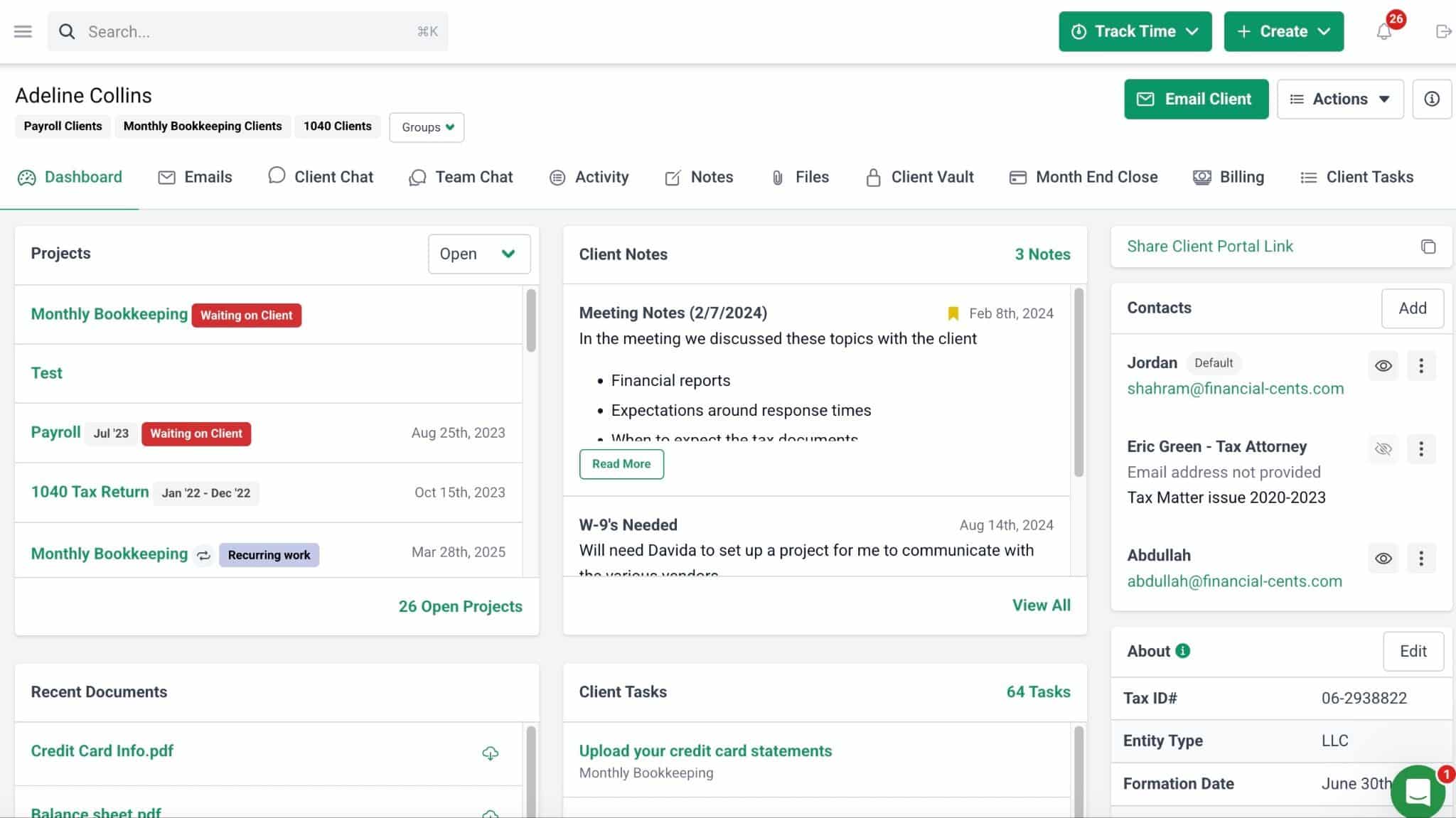
Financial Cents’ CRM tool keeps projects and operational information connected to each client record.
Rather than storing information across separate boards and applications, firms can access client details such as:
- Contact information
- Emails
- Chats
- Internal notes
- Client interactions
- Documents
- Passwords and secure credentials
- Active and historical engagements
- Other client-specific information
This creates a single source of truth for all staff and improves your firm’s ability to manage client relationships.
Secure client portal for document collection and collaboration
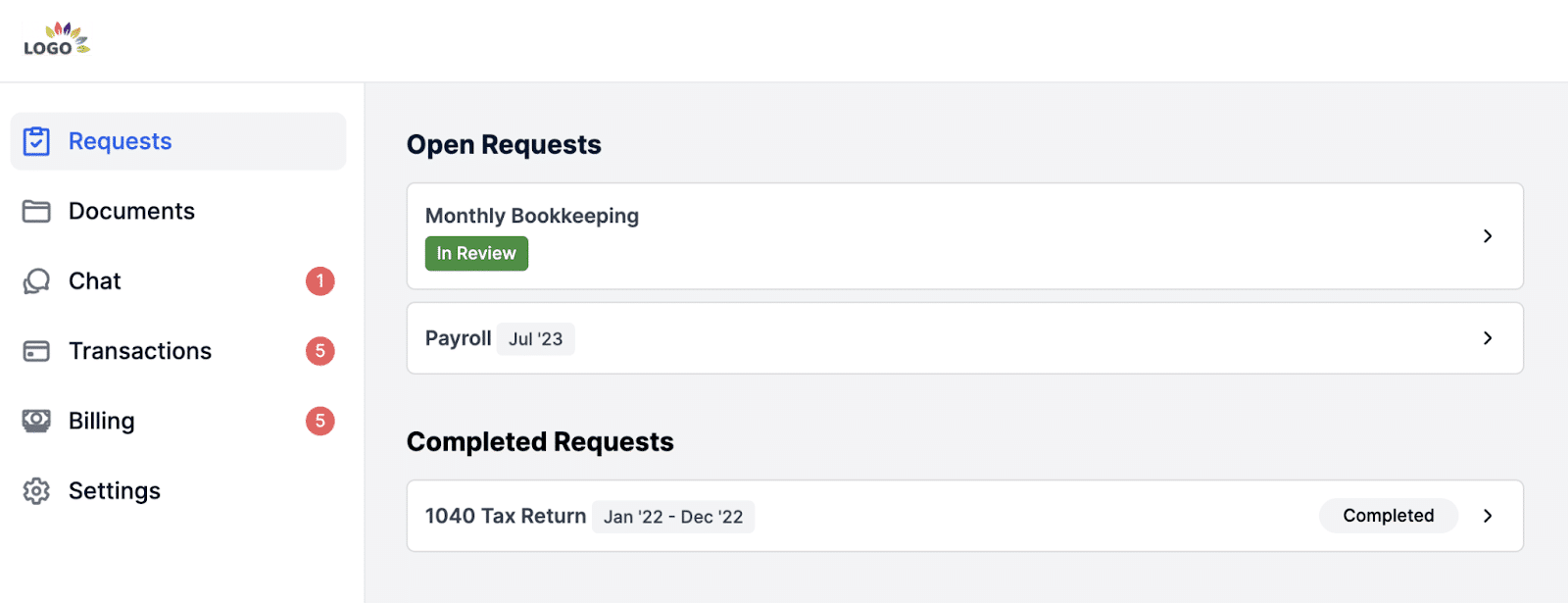
Financial Cents’ client portal integrates with your firm’s workflows, so client interactions remain connected to the work itself rather than existing as separate email conversations or file-sharing links.
This makes document collection and client collaboration easier and more secure. Many bookkeeping teams rely on this portal to review transactions with clients and push corrections to QuickBooks Online.
Capacity management to understand who is overloaded before work falls behind
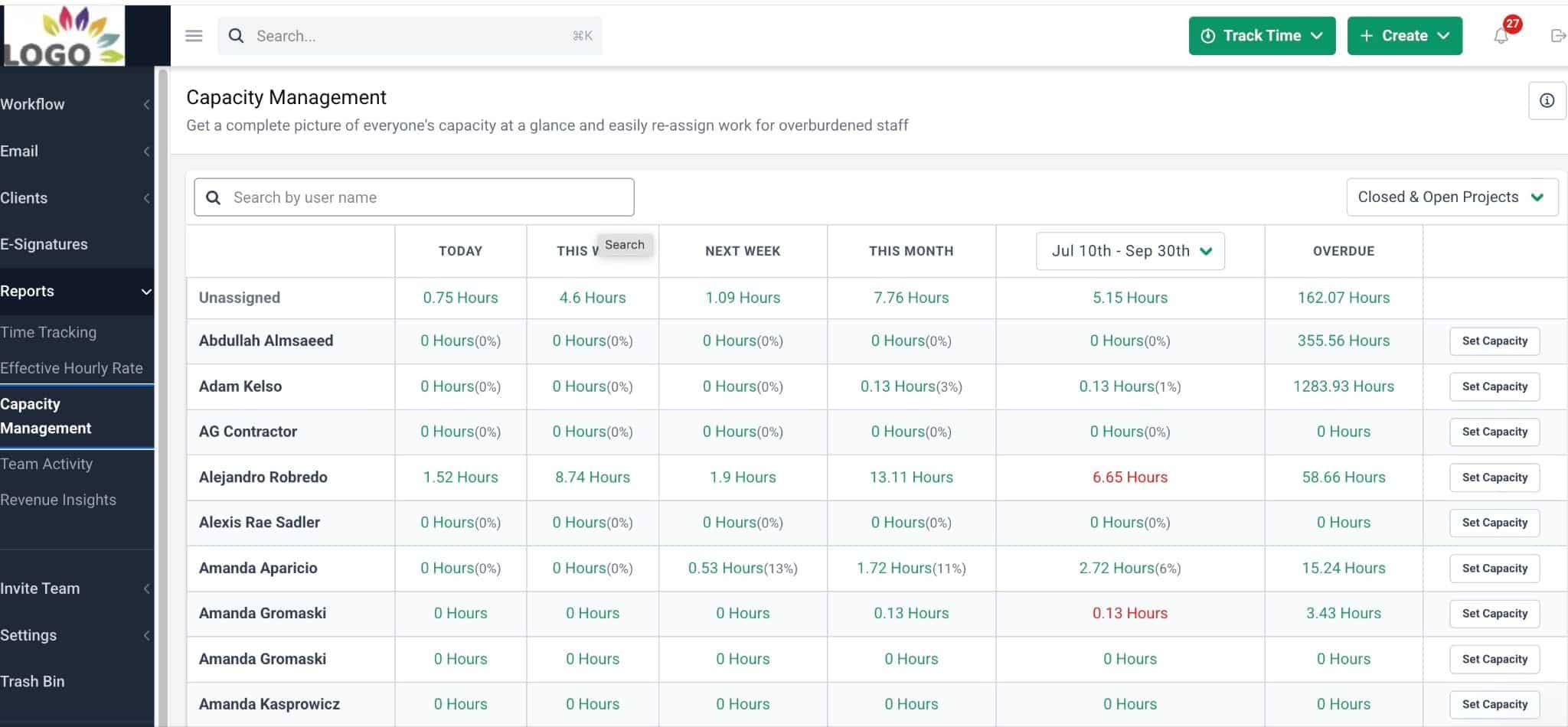
Financial Cents’ capacity management tools don’t just track task assignments; they also help managers identify who is approaching their capacity limit, who has room for more work, and where bottlenecks might develop.
This helps firms assign and reassign work more effectively, especially as their team and workload grow, instead of relying on manual check-ins or workload estimates.
Time tracking and billing so firms can connect work to revenue and profitability
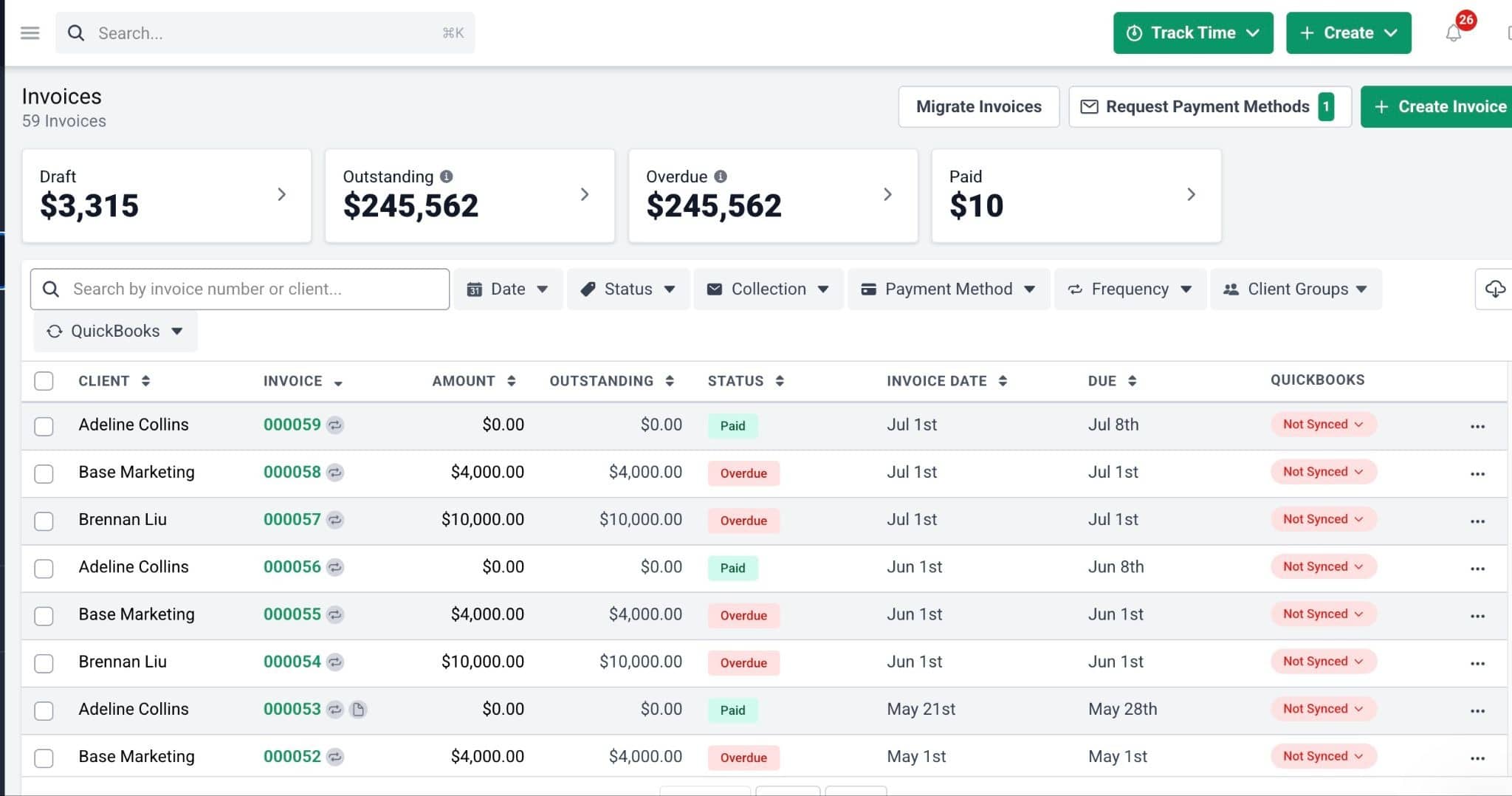
Whether you bill by the hour or simply want better visibility into profitability, Financial Cents’ time tracking and billing features can help you draw a line between work completed and revenue generated.
Your staff can log billable hours directly inside their tasks, and the system can generate timely invoices and ensure prompt payment.
Having these tools in the same platform makes it easy to understand where time is being spent, monitor team efficiency and productivity, and evaluate engagement profitability.
Firm-wide visibility without unnecessary enterprise complexity
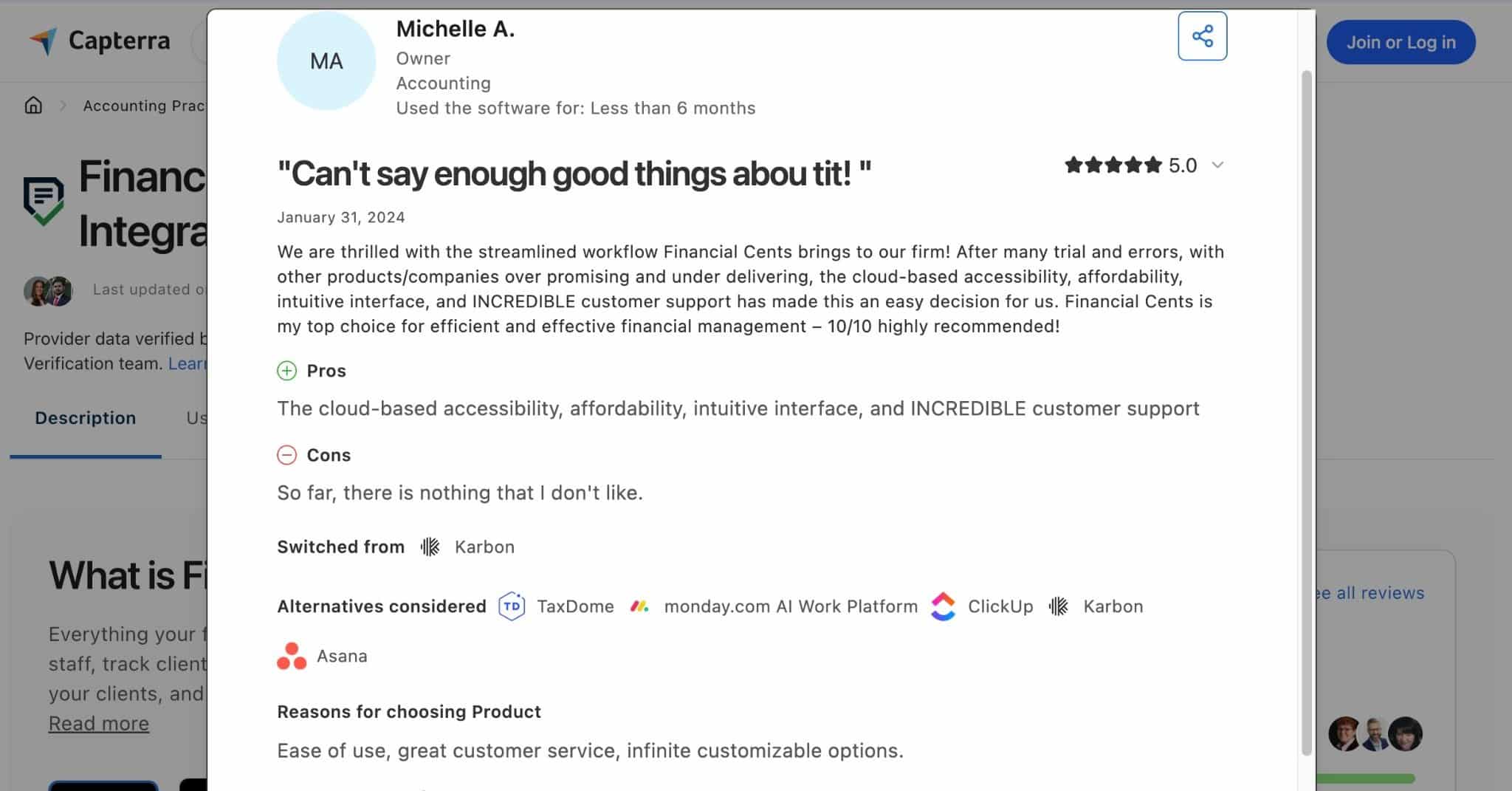
Although some larger accounting firms use it, Financial Cents designs its features primarily for small-to-mid-sized accounting, bookkeeping, CPA, and tax firms.
The platform focuses on providing greater visibility across the practice without the implementation effort or enterprise-level complexity associated with highly configurable work management platforms.
This simplicity saves firm owners and managers the stress of acting as the system administrator, so they can focus on service delivery.
If your team is spending too much time maintaining custom workflows in Monday.com, Financial Cents offers a more tailored, integrated experience. Click here to start your free trial.
Final Verdict: Is Monday.com the Right Fit for Accounting Firms?
The cost of researching, choosing, and training your team and clients on the right practice management software is too high to settle for a tool that will only be useful for a short while.
Growing accounting firms should choose a practice management software that offers the features and functionalities they need most to operate as efficiently as possible (today and for the foreseeable future).
That’s why we believe Monday.com’s multi-industry work management approach makes it, at best, a good place for solo and small accounting firms to start.
For growing teams with a large volume of recurring work, evolving client collaboration requirements, and the need for capacity management reporting, Monday.com might not be the best choice. It requires firms to manage multiple boards, integrations, and ongoing maintenance that their peers with purpose-built accounting practice management software don’t have to worry about.
That is because accounting practice management software like Financial Cents combines workflow management, recurring task automation, client requests, a secure client portal, an accounting CRM, team workload visibility, time tracking, and billing into a single platform designed for the way accounting firms operate.
Instead of creating a patchwork of apps, Financial Cents uses an all-in-one approach that requires minimal customizations and third-party integrations to get work done, collaborate with clients, and manage your team.
 If Financial Cents were to ever go away, I don’t know what I would do. It would be very, very hard to replicate—even amongst a varied array of software that’s out there.”
Frequently Asked Questions
- Basic: $9/month per user
- Standard: $12/month per user
- Pro: $19/month per user
- Custom pricing
- Solo: $19/month
- Team: $49/month per user
- Scale: $69/month per user
- Enterprise: custom pricing
Share this article:



