

Every business has to categorize its transactions. It’s how owners understand where their money comes from and where it goes. Most of them don’t do it themselves, which is where your firm comes in. You sort their bank and credit card activity into the right accounts so their books hold up.
For one client, it’s straightforward enough, since you’re only dealing with one chart of accounts and one owner to ask when something’s unclear. But with more clients on your roster, the work multiplies, and the process gets much harder. So do the chances of a mistake that leaves a client’s books inaccurate or leads them to a wrong decision.
In this piece, we share what transaction categorization is, why it gets harder across a full client roster, and what an efficient workflow for it looks like.
TL;DR
- Transaction categorization is the process of assigning every transaction to the right account in a client’s chart of accounts, such as revenue, cost of goods sold, operating expenses, equity, or fixed assets.
- Bank rules and AI categorize most transactions automatically, but they get some wrong. That’s why a person should still review the output and, in some cases, ask the client for clarification
- Transaction categorization for bookkeepers gets harder across a client roster because every client’s chart of accounts is different and every unclear transaction means waiting on a different person for an answer.
- The fix is to make categorization a step of your month-end close in your workflow software rather than a separate task in a spreadsheet.
- Financial Cents’ Month End Close tool pulls uncategorized transactions from QuickBooks Online, allows clients to upload documents in the client portal, and pushes approved corrections back to QuickBooks.
What Is Transaction Categorization?
Transaction categorization is the process of assigning every transaction to the right account in a client’s chart of accounts. The exact chart of accounts varies by client and industry, but common ones are revenue, cost of goods sold (COGS), operating expenses like rent, payroll, software, and utilities, equity for owner’s draws and contributions, and fixed assets for large purchases like equipment.
Much of this process is automated now. When transactions sync from a bank feed into accounting software like QuickBooks or Xero, bank rules you set can categorize matching transactions on their own, and the software suggests categories for the rest based on the vendor and how you coded similar transactions before. But the software doesn’t always get everything right. That’s why you review what it suggests and recategorize the ones it got wrong or couldn’t place.
Why Transaction Categorization Matters for Bookkeeping Firms
It’s important to get transaction categorization right because so much of what your clients rely on you for, depends on it, from their financial statements to how quickly you can close.
Financial Statement Accuracy
When every transaction sits in the correct account, the financial statements you produce reflect what actually happened in the business. Nothing overstated or understated. That accuracy is what lets a client make sound decisions about their business.
Client Advisory Insights
The advice you give a client is only as good as the numbers behind it. When the categories are accurate, you can see spending patterns and trends, and tell the client where their money is going and what to do about it. When they’re off, so is your advice.
Tax Deductions
How you categorize an expense decides whether the client can deduct it. Miscategorize a deductible expense as non-deductible and the client overpays. Clean categorization captures every deduction the business is entitled to, which keeps more money in the client’s pocket.
Lender-Ready Reports
Lenders review a business’s financial statements before they approve a loan or line of credit. If your client’s transactions aren’t categorized consistently, you can’t produce lender-ready reports, and the client may lose access to the funding they need to operate.
Month-End Close Speed
Transaction categorization is a core part of the month-end close process, and how fast you close depends on how much has piled up. Stay on top of it through the month, and there’s little left to clear. Otherwise you’ll spend hours clearing the backlog before you can close the books.
Why Transaction Categorization Is Harder for Bookkeeping and Accounting Firms
Categorizing transactions for one business is manageable. You have one chart of accounts, the same predefined rules, a familiar set of vendors, and only one owner to contact when you need clarification. So you review the transactions, categorize the clear ones, ask the client about the unclear ones, approve the categorization, sync it back to the accounting software, and close the books.
But when you have multiple clients, which is usually the case, it gets significantly harder. You repeat that whole workflow for each client, and they’re all set up slightly differently. For instance, auto-categorization rules that work for one client’s transactions don’t usually transfer to another. And ambiguous transactions mean following up with different clients across email, texts, or phone calls. You have to do this for every client, every month, on a deadline.
For a growing firm, that isn’t sustainable. It takes time your team could spend on other strategic tasks that could grow the firm.
Common Transaction Categorization Mistakes
Here are some of the most common mistakes firms make when categorizing transactions.
Letting Uncategorized Transactions Pile Up Until Close Week
Leaving transactions uncategorized until it’s time to close is common. You end up sorting a month’s worth of transactions under deadline, and the more there are, the more likely you are to miss the close date.
Guessing Instead of Asking the Client
When you can’t tell what a transaction was, you might be tempted to guess instead of following up with the client, especially if the deadline is close. But a wrong guess means a mistake in the financial statements, and this is harder to catch and costlier to fix in the long run.
Using Categories Inconsistently Month to Month
Coding the same expense to one account this month and a different one next month makes a client’s reports impossible to compare over time and hides the trends you’d otherwise catch. It usually happens when there’s no documented standard for how that client’s transactions get categorized.
Failing to Document Recurring Category Rules or Judgment Calls
When the person who knows the reasoning behind a client’s recurring categorizations doesn’t document it, everyone else applies their own rules if the person is out or leaves. An SOP of all category rules and calls ensures the work is consistent no matter who is handling it.
Relying Too Heavily on Automation Without Review
AI and bookkeeping automation often make mistakes and miscode transactions, especially if it’s an unusual or edge case. Without a person reviewing the output, those errors go into the financial statements the client uses to make decisions.
Not Separating Personal and Business Expenses
Solo and small-business owners often run personal charges through the business account, so those transactions show up mixed into the feed. Your job is to catch them. Miss one and you code a personal expense as a business one, which overstates the client’s expenses and creates a problem at tax time.
Having No Set Process for Client Questions
When there’s no defined way to ask clients about unclear transactions and get answers, there’ll be constant back and forth over emails and texts. This will cause delays, and you might even miss the replies sometimes.
Treating Categorization as Separate From Your Workflow Software
Many firms track uncategorized transactions in accounting spreadsheets, which is manual and time-consuming. Instead, include it in your workflow, preferably your month-end close software, and run it in your practice management software. That way you can automate the manual parts like client follow-ups, track who owns each task, and meet deadlines.
Why Transaction Categorization Belongs Inside Your Month-End Close Process
When you manage uncategorized transactions as a separate task in spreadsheets and emails, there are likely to be a lot of errors and delays.
The fix is to build this task into your month-end close workflow as a step you perform in your accounting firm practice management software. During the close, you gather the month’s transactions, categorize them, reconcile each account against the bank and credit card statements, post any adjusting journal entries, and review the statements before closing the books.
At the categorization step of the month-end close process, the software flags the uncategorized or questionable transactions, routes them to the client for an answer, and once the answer comes back, lets you approve the category.
Work this way and you close faster, find mistakes before they reach the financial statements, and avoid the rush in close week.
Firms like Safe Harbor Bookkeeping that use this workflow in Financial Cents say that:
The Transaction Categorization Workflow Bookkeeping Firms Should Follow
Use the bookkeeping firm workflow below for every client you have to close the books for:
- Pull bank and credit card transactions into the accounting system
First connect the bank feed so transactions sync into accounting tools like QuickBooks or Xero where you can then categorize them. For a new client, the feed typically only reaches back 90 days, so anything older has to be uploaded manually.
- Apply rules or suggested categories where appropriate
Your bank rules code matching transactions on their own, and the software suggests categories for the rest based on the vendor and how you coded similar transactions before.
- Review new, unusual, or low-confidence transactions
Then double-check what the system did and confirm it got it right, especially for new or unusual transactions. For ones you can’t verify yourself, set them aside.
- Ask the client for clarification or documents when needed
For transactions you can’t resolve on your own, ask the client what they were for and request the receipt or invoice you need as support.
- Approve the category once the answer is confirmed
Once you get your answer, assign the correct account and mark it approved.
- Document recurring decisions for future months
If a transaction keeps showing up, build a rule for it, or note the reasoning somewhere your team can find it so the categorization stays consistent no matter who’s working on it
- Confirm all transaction review tasks are complete before closing the books
Check that everything is categorized and you’re not waiting on a client for anything, then close.
Use Financial Cents to Review and Categorize Transactions During Month-End Close
Financial Cents is a bookkeeping practice management software that helps firms manage client work, collaborate with their team, and hit their deadlines. One of its features is the Month End Close (MEC) tool, which pulls uncategorized transactions out of your client’s books and gives you one place to review and resolve them.
In the words of Greg Scholten, President & Owner, On Track Accounting Solutions,
Here’s how MEC works:
- Surfaces uncategorized transactions automatically: MEC retrieves uncategorized transactions from your client’s QuickBooks Online account, so you’re not building a spreadsheet or searching through their file to find out what’s not categorized.
- Lets you ask clients questions and request documents on specific transactions: It allows you to ask questions or send document requests about certain uncategorized transactions in the same platform.
- Gives clients one place to respond: Then the software has a bookkeeping client portal where clients can respond to those requests and upload the necessary documents or files you asked for. This helps you properly categorize the transaction without leaving the tool.
As Steve Libhart, Founder, Numbers Matter LLC says,
- Sends client reminders on its own: You can set automated reminders at intervals you choose to follow up with clients if they don’t respond on time, so you stop manually chasing them.
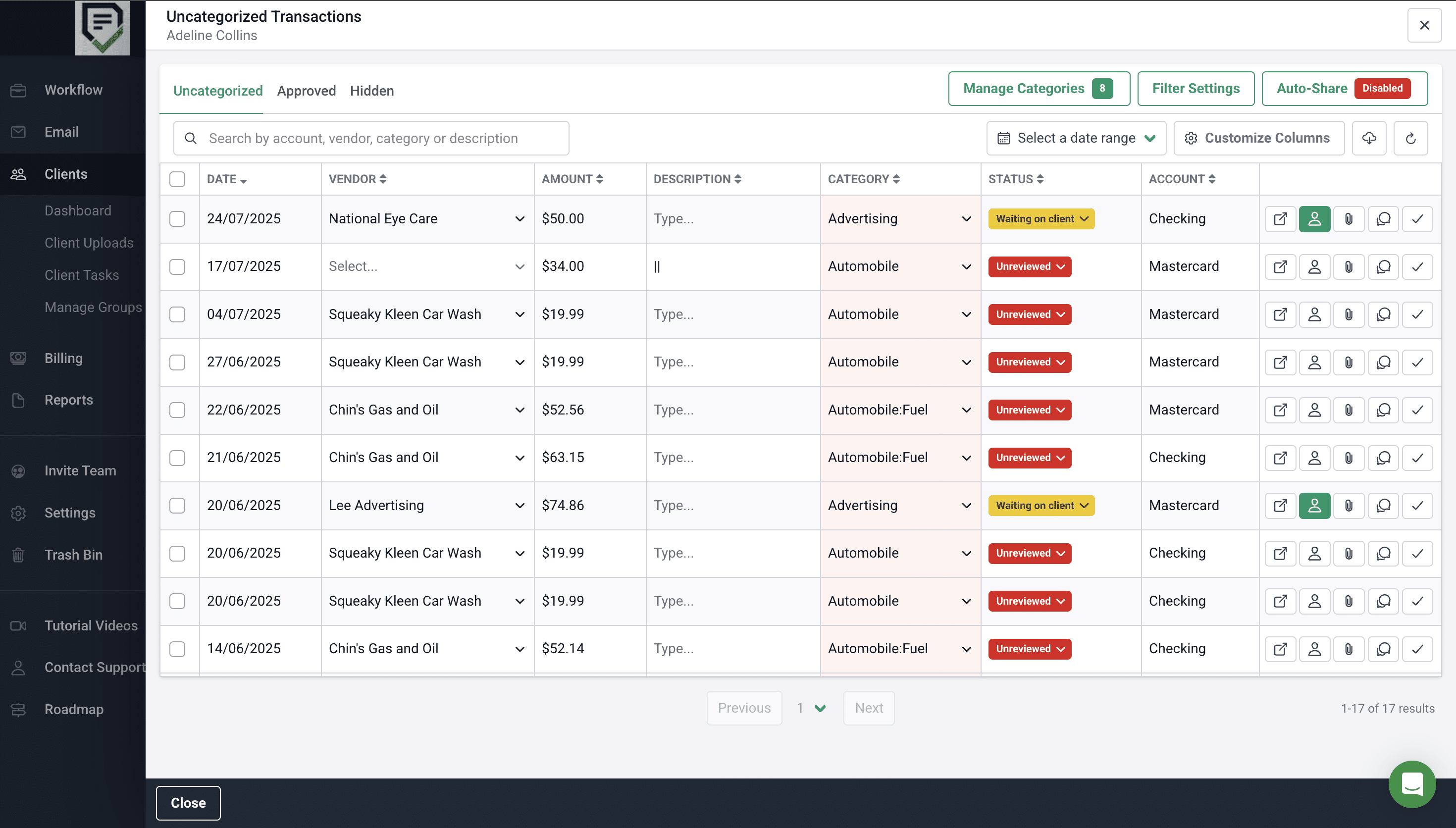
- Batch-Categorize Transactions: MEC allows you to apply the same change to several transactions at once, or send a client everything you need to ask them about in one batch instead of individually throughout the month. This can save time and improve efficiency in accounting.
- Pushes approved changes back to QuickBooks Online: There’s a two-way QuickBooks Online sync in Financial Cents, which pushes approved changes back to QuickBooks and vice versa.
- Tracks categorization: You can review categorization inside your Projects and track its status, and once it’s resolved, close the books.
Scale Transaction Categorization Across Your Firm
Transaction categorization is easy enough when you have a few clients. Once you have many, it gets harder to manage accurately and consistently. You’re working across books that all look a little different and waiting on answers from clients.
The firms that don’t struggle build categorization into their month-end close workflow. They don’t leave it as bookkeeping cleanup work at the end of the month. Their rules categorize the routine transactions as the bank feed syncs, their software pulls the ones left over, they ask clients about anything unclear, and they approve every category before it’s time to close the books. That’s what prevents the last-minute scrambling and errors in reports.
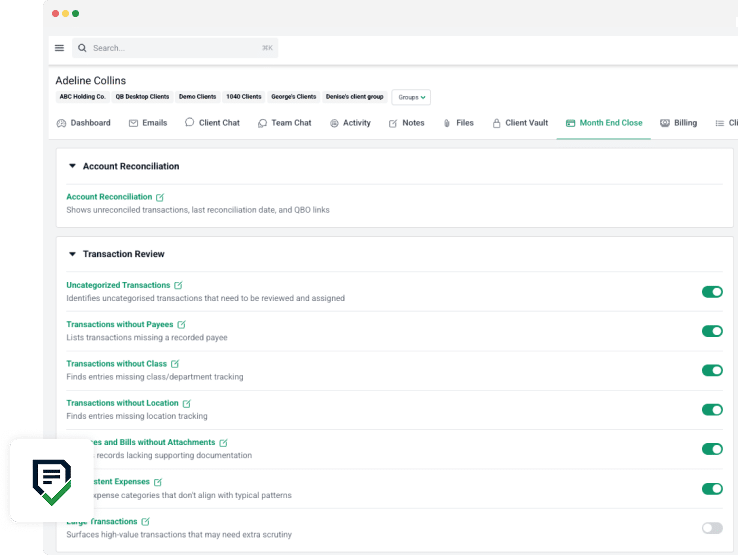
Financial Cents’ Month End Close feature pulls uncategorized transactions from QuickBooks Online, lets you ask clients questions and have them upload documents onto the client portal, pushes your approved corrections back to QuickBooks, and shows you which clients are ready to close and which you’re still waiting on. That way you can perform this task across dozens of clients without losing track or missing deadlines.
Hear from Terri Evans, Owner, Safe Harbor Bookkeeping:
Frequently Asked Questions
You’ll produce inaccurate financial statements, which will affect the quality of advice you give clients and their decision-making. It can also cost the client tax deductions they were entitled to.
Share this article:



